


 MONA OS 2.0
 Partner with MONA










































 Free AI courses
 AI tools at work

 Tự động hoá doanh nghiệp
 Cẩm nang SEO
 Digital Marketing
 Kinh nghiệm thiết kế website
 Hạ Tầng Server
 Giáo dục


 VI
 EN


How to manage tickets on MONA eLearning
To keep learning and purchasing smooth for customers, managing and tracking support requests (tickets) is essential. When customers have a problem with a course or need help buying one, they send requests through the ticket system. Handling tickets well not only solves problems quickly but also improves the customer experience. In this article, MONA Media shows you in detail how to manage tickets in MONA Elearning.
Step 1: Open ticket management in MONA Elearning
In the admin interface, go to Learners -> Tickets
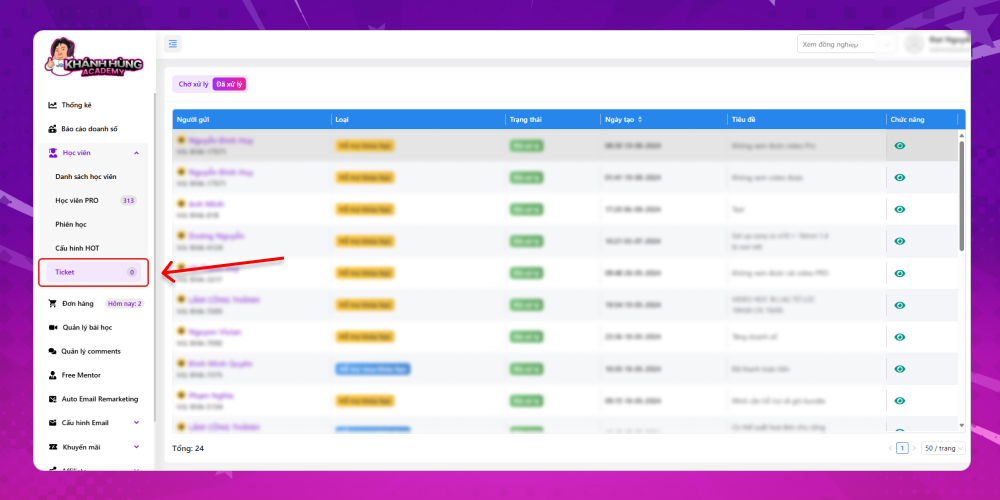
There are two sections:
- Pending: Tickets where learners asked for support that hasn't been handled yet
- Resolved: Tickets that Khánh Hùng has successfully handled for learners
Step 2: How to view ticket information
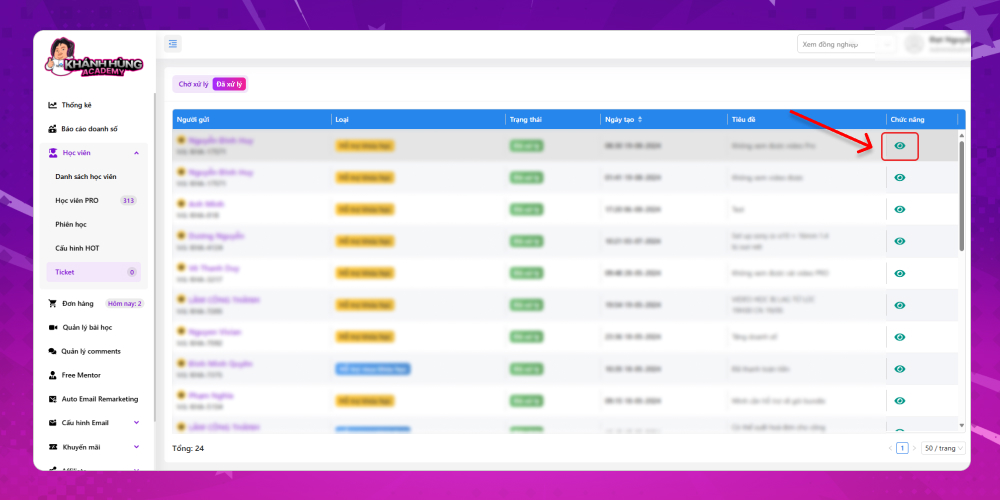
Key ticket information in MONA Elearning includes:
- Ticket sender: Includes full name and Affiliate code
- Ticket category
- Status: Resolved or unresolved
- Ticket creation date
- Ticket title
- Features: Click eye icon in the system to see what support that learner needs. You can reply to the ticket right in the system to answer the learner quickly.
Managing tickets well not only helps you meet customers' support needs quickly but also builds your reputation and service quality. We hope this article helps you master the ticket process. Contact MONA Media if you want an effective e-learning solution for your course.
- Hotline: 1900 636 648
- Email: info@themona.global
- Address: 1073/23 Cach Mang Thang 8, Ward 7, Tan Binh District, Ho Chi Minh City








