


 MONA OS 2.0
 Partner with MONA










































 Free AI courses
 AI tools at work

 Tự động hoá doanh nghiệp
 Cẩm nang SEO
 Digital Marketing
 Kinh nghiệm thiết kế website
 Hạ Tầng Server
 Giáo dục


 VI
 EN


How to create a Flash Sale promotion on MONA eLearning

Flash Sale promotions have become one of the most attractive strategies, with a short run time and very appealing discounts. For anyone always hunting for quality products at a bargain, this is the golden moment to get dream items, and hunting for elearning course deals is no exception. So how do you set up a Flash Sale campaign fastest and automatically when selling online courses? MONA Media will walk you through creating Flash Sale promotions on MONA Elearning in detail. Let's get started!
Step 1: Create a new Flash Sale promotion
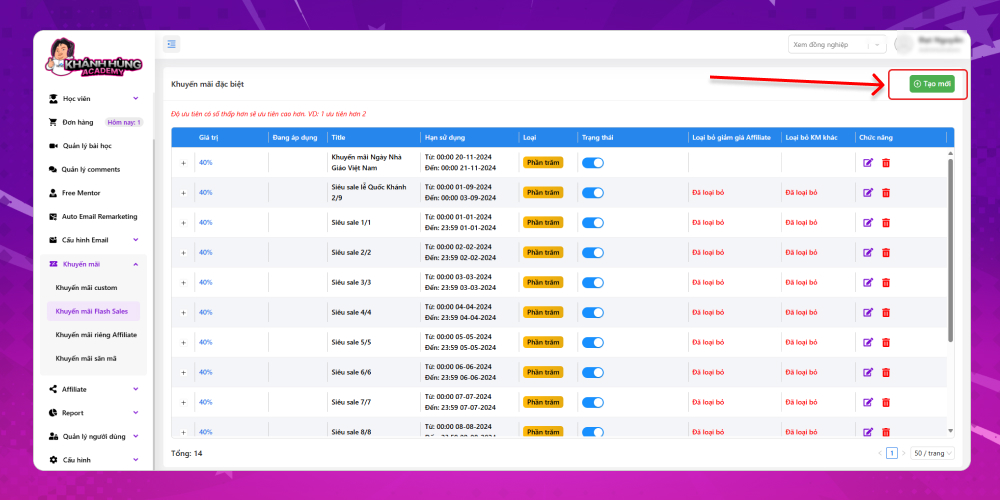
If you are new to MONA Elearning, we will set up monthly Flash Sale campaigns for you in advance, such as the 8/8, 9/9 and 10/10 sales and other special days. You can see an overview of the Flash Sale promo codes on the main screen of this feature.
In the admin interface, choose Promotion –> Flash Sale promotions
To create a new Flash Sale promo code, click the button Create new at the top right of the screen
Step 2: Fill in the Flash Sale promo code details
MONA will use the example of a Flash Sale for Vietnamese Teachers' Day, November 20. The fields on the new promo code screen include:
- Thumbnail: You can insert an image here, and it will appear as a popup on the course page. If you don't set an image, the popup will use the information you fill in below.
- Applicable users: With custom promotions, you choose users freely or by certain conditions. With Flash Sale promotions, however, MONA applies the promotion to all students.
- Exclude Affiliate discounts: Do not combine the Flash Sale promo code with Affiliate discounts
- Exclude other promotions: Do not combine the Flash Sale promo code with other promo codes
- Titte: Name of the Flash Sale promo code
- Choose type: Percentage discount or fixed amount discount
- Value: Choose the discount amount or percentage for the Flash Sale campaign. MONA recommends a 30 to 40% discount, because Flash Sales run only a few days a year but bring in strong sales, so go big on the discount to draw students to your course.
- Start date: The date the Flash Sale starts. For example, starting at 0:00 on November 20
- End date: The date the Flash Sale ends. For example, ending at 0:00 on November 21
- Description: Enter the Flash Sale description
- Conditions to receive the Flash Sale code: For other types of promotion, MONA sets up detailed filters to pick the users who can use that promo code. For a Flash Sale, however, you don't need to enter any conditions; apply it to all students.
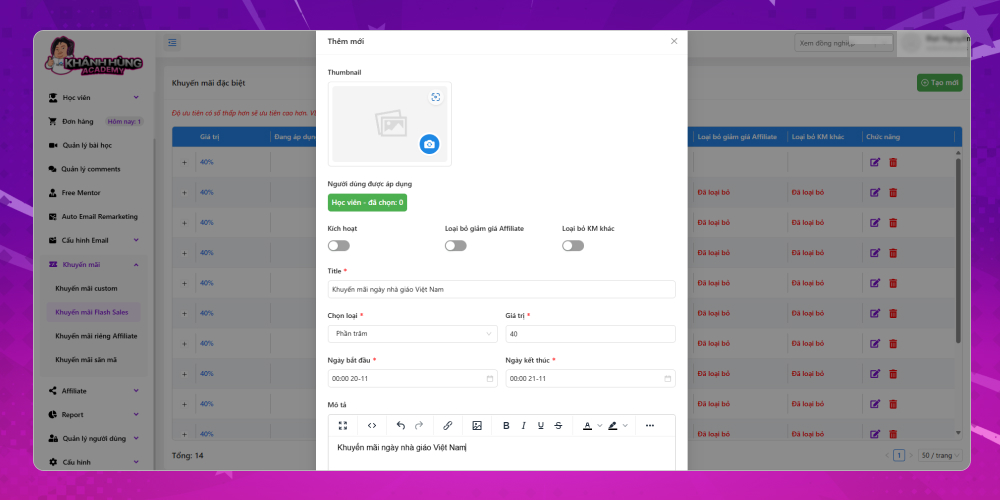
After entering all the Flash Sale promo code details, click Save to finish the promo code
This article has shown you how to create a Flash Sale promo code in detail on MONA Elearning. If you have more questions about using MONA Elearning or want advice on other features of the system, contact MONA Media through the details below:
- Hotline: 1900 636 648
- Email: info@themona.global
- Address: 1073/23 Cach Mang Thang 8, Ward 7, Tan Binh District, Ho Chi Minh City








