
 MONA OS 2.0
 Partner with MONA


 Tự động hoá doanh nghiệp
 Cẩm nang SEO
 Digital Marketing
 Kinh nghiệm thiết kế website
 Hạ Tầng Server
 Giáo dục


 VI
 EN














Message us on
Zalo Official


 ProductsNew

 ProductsProducts
 Mới ra mắtKHA AI 2027App tự edit video, tự đăng mọi mạng xã hội, 2 phút mỗi ngày










 Website designLooks good and wins customers over.
SEO servicesBrings in customers searching for exactly what you sell.
 Tư vấn digital marketingKéo khách từ nhiều kênh, đo bằng số thật.
Corporate video productionVideos introducing your company, factory and team.
 NewAI video productionCompany story films made with AI.
 Custom software developmentCRM, ERP and HRM built for your business.
 Viết AI Agent theo yêu cầuĐặt riêng một trợ lý AI cho đúng việc của mình.
 Tư vấn chuyển đổi AIĐưa AI vào vận hành của cả công ty.
NewMONA LMSManagement for centers and schools.
MONA SkillHubInternal training for company staff.
 NHTQ systemEnd-to-end China–Vietnam shipping operations.
MONA JMSManagement for gold, diamond and pawn shops.
 MONA E-LearningA website with every feature you need to sell courses.
 How to sell online courses (course)More than 30 free lessons on selling courses on autopilot.
 MONA Cloudmonacloud.vnServers to get your apps and websites running.
 MONA Basemonabase.vnPostgres database, sign-in and file storage.
 MONA Mailmonamail.vnSend OTP, order and invoice emails from your software.
 MONA Paymonapay.vnAccept bank transfers via VietQR and notify your software when the money arrives.
 MONA eInvoiceComing soonIssue e-invoices that meet tax standards.
Gấu CườiTrả lời khách 24/7 trên web, Fanpage, Zalo và thu lead cho sale.
 Gấu TeleSalesGọi điện tư vấn, chăm khách như tổng đài viên thật.
Dê CườiTư vấn và chốt đơn cho shop ngay trong khung chat.
Gấu WebmasterNhắn nhóm Zalo là website được sửa xong.
 Gấu Pháp ChếSoạn hợp đồng, rà điều khoản trong vài phút.
 Gấu Báo GiáLên báo giá đúng mẫu và gửi khách ngay.
 AI chăm sóc khách hàngTheo dõi và giữ chân khách hàng cũ.
 Gấu Tuyển DụngLọc hồ sơ, hẹn lịch, phỏng vấn ứng viên.
 Mới ra mắt
KHA AI 2027
Xây kênh chuyên gia 2 phút mỗi ngày
Quay bằng điện thoại, AI tự edit video, tự đăng lên 16 nền tảng và tự trả lời bình luận, tin nhắn.
883.362lượt xem trên kênh CEO MONA sau 36 ngày
 Anh Khánh HùngCEO MONA đang dùng mỗi ngày
Xem app làm được gì
 AI
Gấu Cười MONA ĐANG TỰ XÀITrả lời khách 24/7 trên website, Zalo OA, Messenger và thu lead về cho sale.
Dê CườiChốt đơn bán lẻ và sàn: Shopee, TikTok Shop, web. Chăm cả khách sỉ, đại lý.
Gấu WebmasterCập nhật nội dung, tối ưu SEO website mỗi ngày.
Gấu TeleSalesGọi điện tư vấn, chăm khách như tổng đài viên thật.
Gấu Tuyển DụngLọc hồ sơ, hẹn lịch, phỏng vấn ứng viên tự động.
AI chăm sóc khách hàngGiữ khách cũ, cứu lead đã rớt cho phòng kinh doanh.
Gấu Pháp ChếSoạn hợp đồng, rà điều khoản trong vài phút.
Gấu Báo GiáLên báo giá đúng mẫu, gửi khách ngay khi có yêu cầu.
 Chuyển đổi AI toàn phầnGiải pháp tổng cho doanh nghiệp, 3 lớp triển khai.
 Viết AI Agent theo yêu cầuĐặt riêng một con AI gánh đúng nghiệp vụ của bạn.
 Custom softwareCRM, ERP and HRM with built-in AI automation.
 SEO & AEO thời đại AIĐược Google lẫn AI trích dẫn, không chỉ xếp hạng.
 Kiến thức AI cho doanh nghiệpBài phân tích, hướng dẫn ứng dụng AI vào vận hành.
 Free AI courses
 AI tools at work
App mới · KHA AI 2027
Xây kênh 2 phút mỗi ngày
AI tự edit video, tự đăng mọi mạng xã hội
Free consultation, 8am–10pm every day

26 July, 2026

The fifth course in MONA's free AI course series, and the first written specifically for people who don't plan to learn programming: business owners, directors and department heads who are buried every day in contracts, reports, emails and decisions that can't wait. Learning Claude here means learning to turn the AI that office workers worldwide rate highest for getting things done into a real business assistant: it reads a 40-page contract for you, picks apart a revenue spreadsheet, drafts the hardest email of your week, and keeps your company's context so it understands your work better the more you use it. The whole course works on the free version, with no card and nothing to install beyond your browser. And to keep you from getting lost, to be clear: this course does not teach coding. If you want to learn to build software with AI, we have a separate Claude Code course , while this one covers Claude the chat version: a tool for people who run things.
Course contents
Claude is a conversational AI from Anthropic, a US AI company founded in 2021 by a group of former senior OpenAI staff. Among the three AI names Vietnamese business owners hear most (ChatGPT, Gemini, Claude), Claude is the one famous among professionals for two things: it is very solid at writing and reading long documents, and it follows complex instructions with little “drift”. Our team uses all three every day at MONA, and how we split the work internally says what each one is: quick lookups go to Google, work that needs images and the Google ecosystem goes to Gemini, and work that needs careful reading, deep thinking and serious written documents goes to Claude. Contracts, business plans, data analysis, negotiation emails: this is its home turf.
Before going further, we need to clear up a mix-up our own clients often run into: Claude now has three products with similar names, and each one suits a different kind of user.
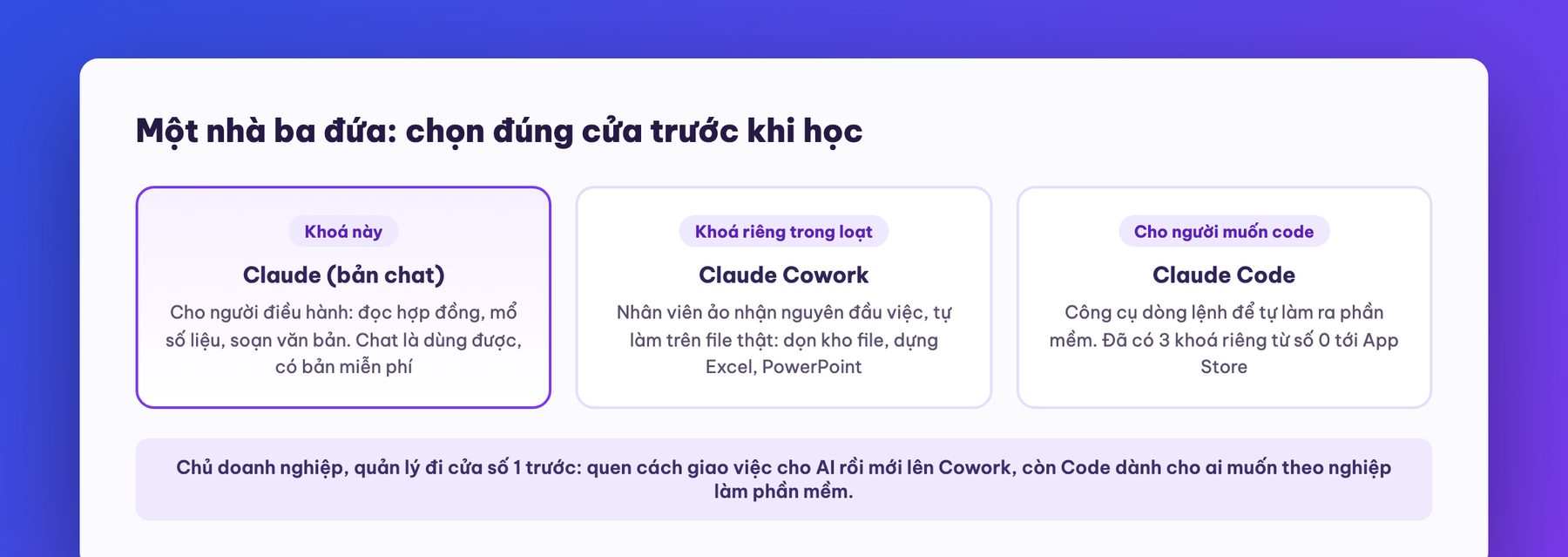
Why do we recommend that executives start with the chat version rather than the other two? Because an executive's biggest problem is the speed of processing information and making decisions; building software is already handled by the technical team. Your day is a chain of reading, understanding, deciding, delegating and writing. The Claude chat version plugs straight into that chain without asking you to change any work habit. When your needs grow into “I want the machine to run the whole process itself”, you will see it for yourself, and that is when Cowork or custom-built software comes in (the last part of the course covers this boundary in detail).
Go to claude.ai and sign up with a Google account or email, and you're done. No card needed. The phone app is available on both iOS and Android, and the desktop app on Mac and Windows. Our experience is to install the phone version from day one, because the habit of “asking wherever you get stuck” while on the move is what gets AI into your work, not a few weekend research sessions.
The current pricing (July 2026) has four tiers, and we've translated each into how a business person thinks:
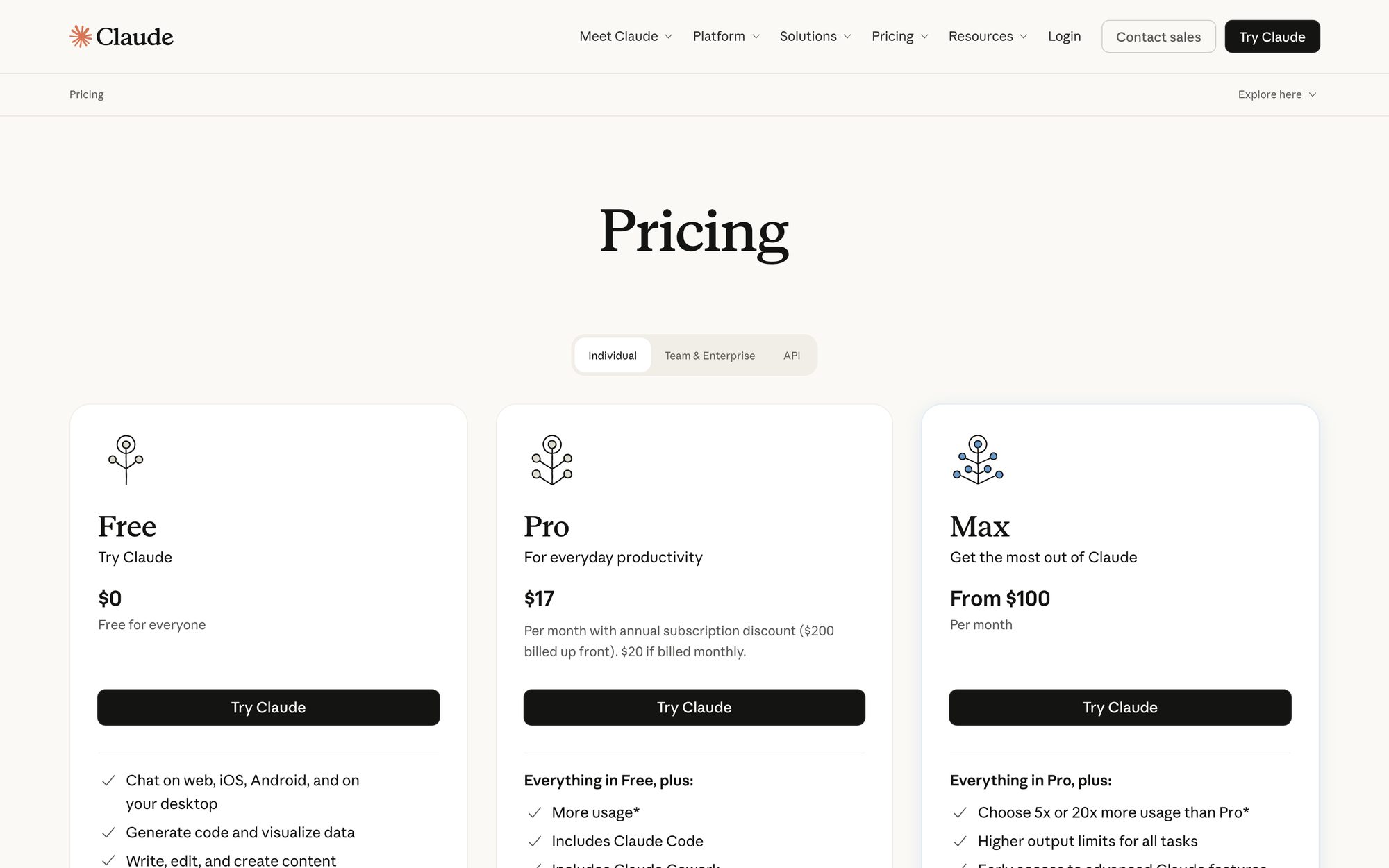
Our plan advice in one sentence: learn on the free version, move up to Pro once you hit the usage cap two days in a row, and don't go to Max just because you're afraid of running short. AI spend is operating spend too: pay for what you actually use, like hiring staff for the actual workload rather than overstaffing for show. One more thing to know: the default model (the “brain”) on Pro is currently Sonnet 5, part of the latest Claude 5 generation, with an allowance of higher-end brains for hard tasks. You don't need to remember what each brain does, just one principle: leave everyday work on the default, and for important work pick the strongest brain in the menu, and when the allowance runs out it falls back to the default on its own.
This is the most important part of the course. Nine out of ten people who complain that “AI gives generic answers” make the same mistake: asking AI like asking Google, typing a vague line and waiting for a miracle. The right way is something every business owner is already good at: delegating. Delegate to Claude exactly as you would to a very smart new hire who knows nothing about your company. Specifically, four pieces:
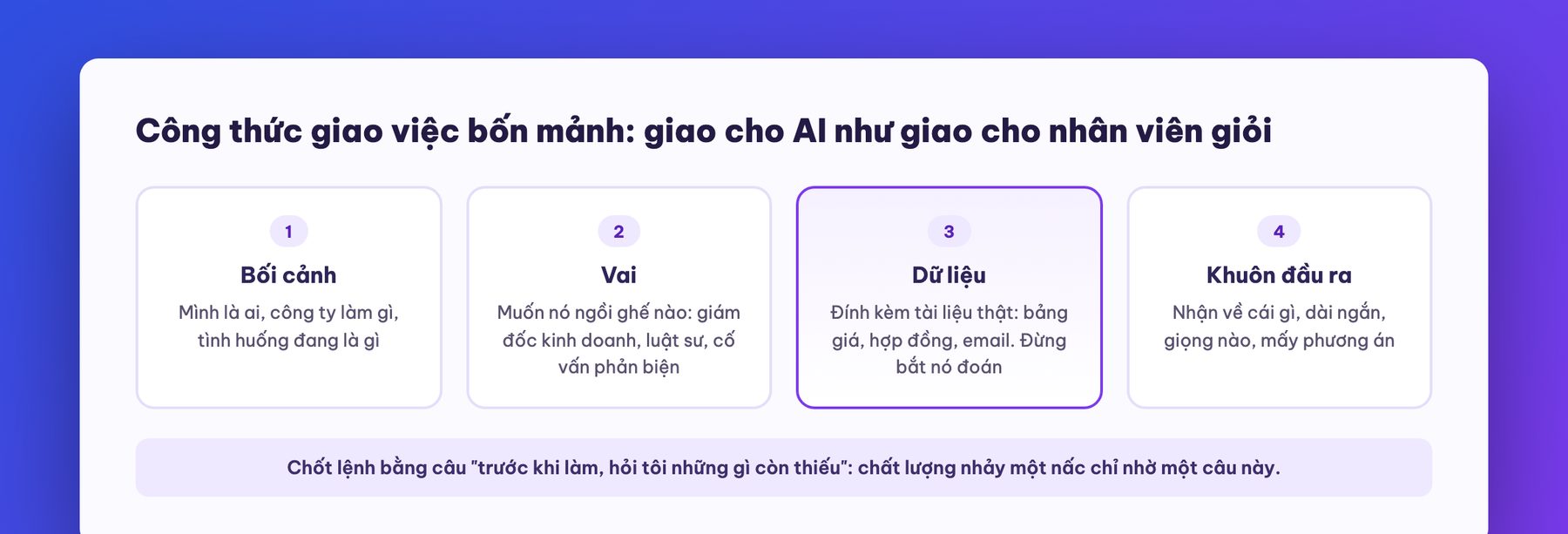
The same need, asked two ways, shows the gap. The Google-style question: “how to negotiate with big customers”. The result: a lecture that is correct but useless, because it could be read by anyone, which means it is for no one. The four-piece delegation above gives three options that fit the kitchen equipment industry, match the strengths and weaknesses in the file you provided, and include a ready-to-send email. The difference lies entirely in the person delegating; the AI is the same one. And the good news: learn this skill once and use it on every AI, and it works exactly the same on ChatGPT or Gemini.
Three more small habits to make your delegation pay off:
On Vietnamese specifically: Claude writes some of the smoothest Vietnamese among today's AIs, but by default it still tends to slip into a translated tone. We already have a full article on the formula for instructing Claude to write natural Vietnamese; read it after this part and you'll have the full set.
If Part 3 is the most worthwhile skill, this part is where you make money fastest, because it hits the kind of work that eats an executive's time the most: reading long documents and messy data. Claude takes attached files right in the chat box: PDF, Word, Excel, photos, just drag and drop. Its reading capacity is among the biggest on the market: it swallows a hundred-page contract in one go, with no need to chop it up and feed it in pieces.
Four kinds of document work we and our clients do every day:
A golden warning before you get excited and pour all your company documents in: AI reads well but can still misread numbers, miss points or be confidently wrong. The principle we apply inside MONA: what AI produces from reading a document is a draft for review, not a verdict. Any figure about to be signed, paid or taken to court must be checked back at the source by a person. Treat it as an excellent assistant who is new to the job: delegate reading, filtering and summarizing, while the final call is yours. For how far confidential data should go into the cloud, Part 8 has its own rules.
Here you will hit the first wall of casual chatting: having to explain everything from scratch every time what the company does, who the customers are, what voice to write in. Every chat is a brand-new temp worker, bright but with no memory. Projects are the cure for exactly this, and in our view the most worthwhile feature when learning Claude for business work.
A project is a fixed “workroom” with two things attached to it: a base document library (you upload once: company profile, price list, processes, product descriptions, a few sample documents in your company's voice) and a standing instruction sheet (you set once: its role in this room, the rules for answering, the output format). From then on, every chat opened in the room carries all that context automatically. A three-line question gets back an answer like one from someone who has worked at your company for three years.
Five sample rooms we think fit Vietnamese businesses best, which you can set up this afternoon:
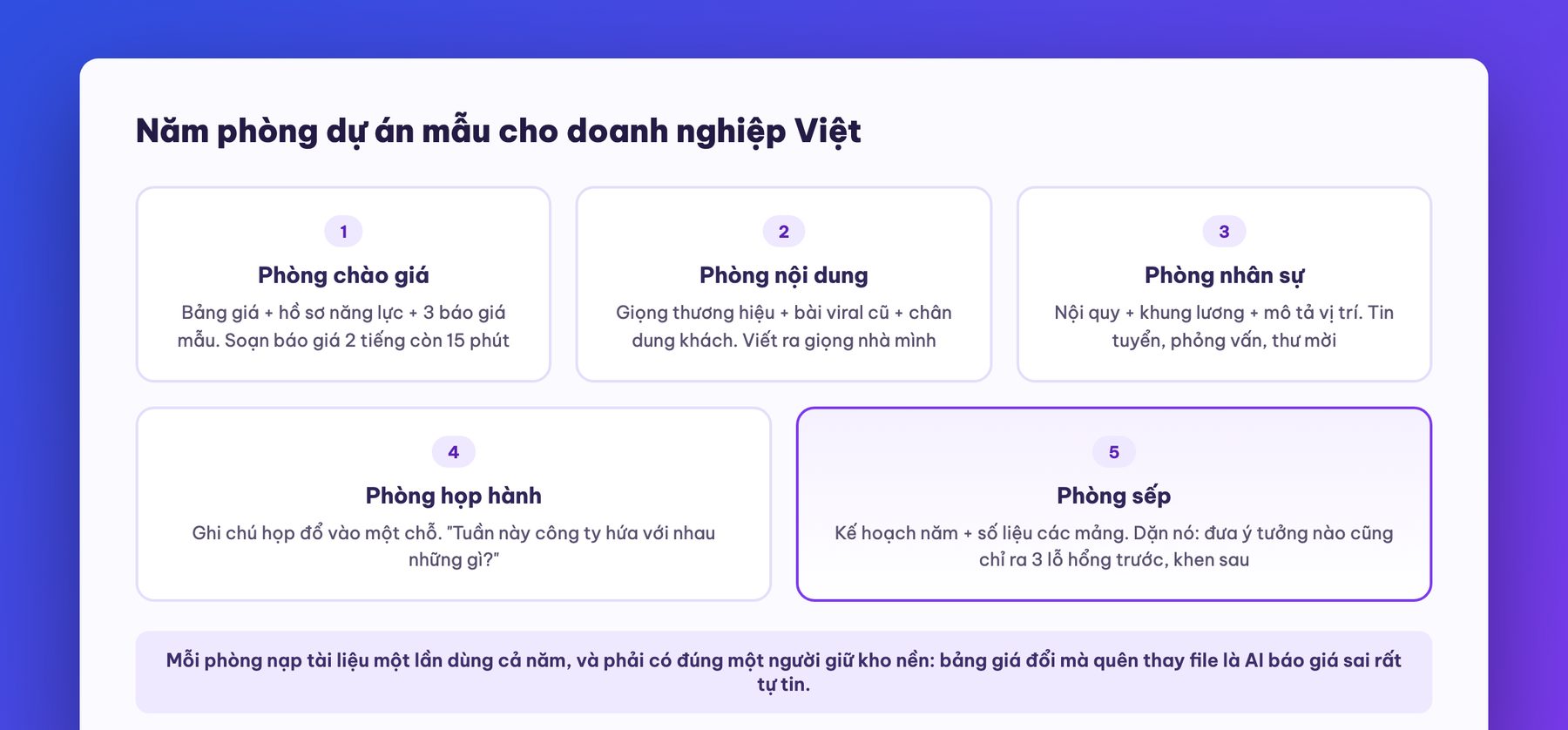
A tip for keeping rooms healthy: the base documents need an owner. If the price list changes and no one replaces the file in the quote room, the AI will quote the wrong price with great confidence. At MONA every project has exactly one person responsible for updating the base library, the same rule as ISO document control: it sounds bureaucratic, but that very habit decides whether AI is an asset or a fast-copying source of wrong information.
That is the halfway point of the course. Take a moment to run a calculation we often ask our clients to do: each week, how many hours do you and your team burn on reading documents, drafting quotes, writing emails and summarizing meetings? The average we measure at companies of 20 to 50 people is around 60 hours a week across the whole organization, nearly two full-time staff just to “process text”. Learning Claude to the level of Parts 3, 4 and 5 usually cuts a third to a half of that, without buying any extra software. And if you'd like someone to look in person at where your operation leaks hours, our team offers a free operations check for businesses: call 1900 636 648, describe your operation for 15 minutes, and we will point out 3 places where AI can cut hours within the month.
However good the chat is, the output is still text in a chat box. Artifacts take it up a level: when you delegate a task that has a “product” (a document, a table, a slide deck, even a small calculator), Claude opens a separate panel on the right and builds that product into a finished piece that you can edit directly, download and send to others to use.
Things executives most often ask Artifacts to make:
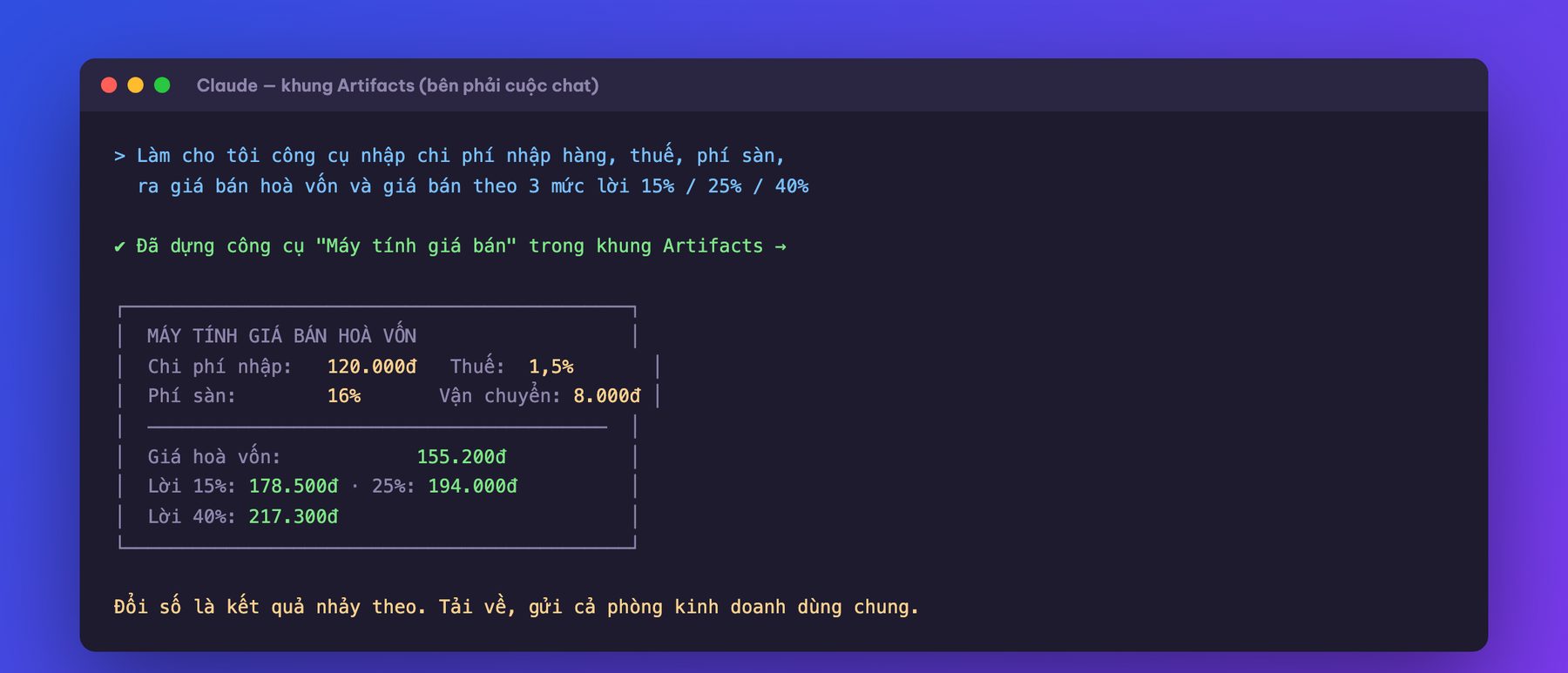
A limit to know so you don't get carried away: Artifacts suit small tools and documents, not building management software for a whole company. A cost calculator for the sales team: great. A multi-user order management system with permissions: wrong arena, that's a job for real software. We'll draw this line firmly in Part 8, because getting this boundary wrong is where businesses lose the most money with AI.
The three features in this part split Claude users into two classes: people who “have an AI account” and people who have a working system with AI built in.
One, connect directly to Gmail, Calendar and Drive. Claude can work with the Google toolset that most Vietnamese companies run: grant access once, and from then on ask directly “what have I promised customers by email this week”, “which slots next week are free for the dealer meeting”, “pull the numbers from the report file on Drive and compare them with last month”. It cuts out the loop of opening each app, searching, copying and pasting. Access can be revoked at any time in settings, and our advice: for any account holding company data, the person granting access must be someone who understands that company's data rules, don't let staff connect things on a whim.
Two, long-term memory. Claude can now remember across chats: tell it once “my company has 25 people, in kitchen equipment, address customers this way, hates empty fluff”, and later chats carry it along. This memory can be viewed, edited and deleted line by line in settings, so it is a notebook it keeps about you for you to review not a black box. Every few weeks, open it and tidy up, like cleaning out a desk drawer.
Three, Skills. Think of it simply as packaged standard procedures: you write up “the way my company does task X” (how to write a quote, how to answer a complaint, how to review a contract), save it as a skill, and from then on calling it makes Claude follow that exact method every time, in every chat. This is also the bridge to the Cowork world: there you even have a feature to record your screen as you do something once so the machine learns it as a skill, which we save entirely for Claude Cowork course.
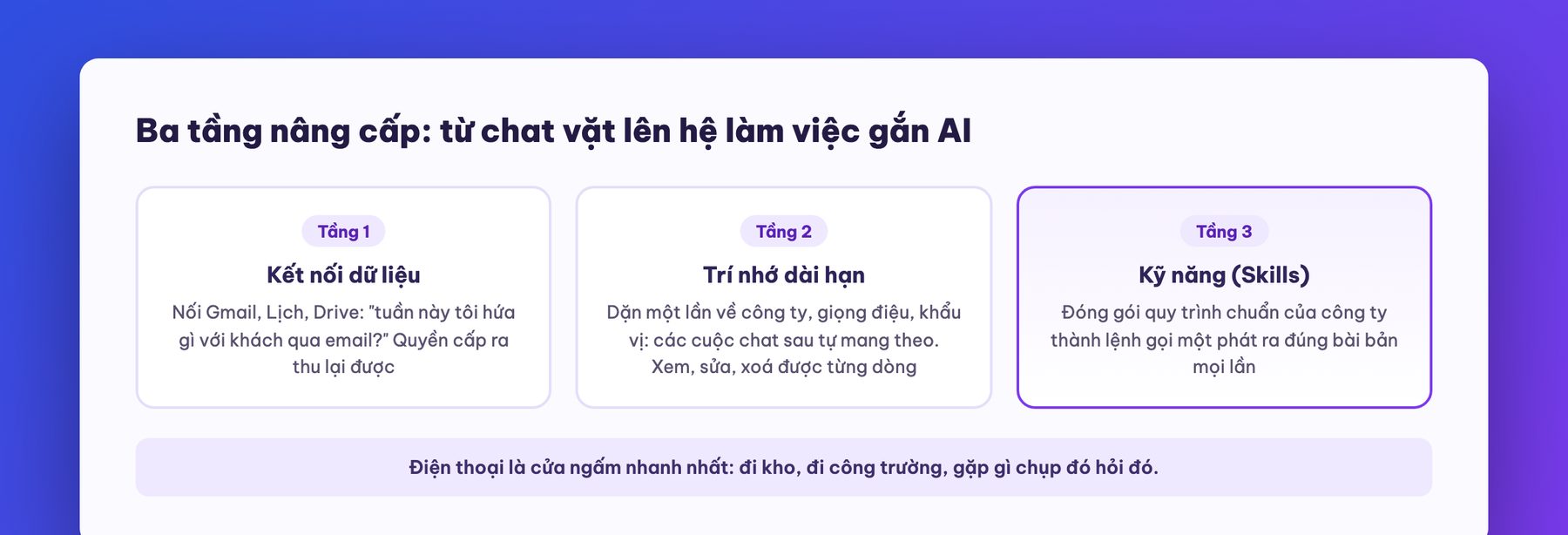
Don't forget your phone: the Claude app on iOS and Android has voice chat and lets you snap a photo and ask right away. The habit of many business owners after this course is walking the warehouse or the job site, photographing whatever they meet and asking about it: photograph a machine's spec plate and ask about maintenance, photograph an invoice and ask where to book it, dictate an email by voice while driving and have it drafted. That is how AI sinks into a company, not by issuing a memo saying “all staff must seriously use AI”.
However good you get at Claude alone, the company only gets faster by one person. To make the whole organization faster you need three things: a plan for the team, ground rules and a roadmap.
Plan for the team: the Team plan at 25 USD per person per month (billed yearly) gives every member Pro-level power plus a shared admin console: consolidated billing, managing who joins and leaves, and permission control. A company of more than 10 people really using it should move to Team rather than everyone buying individually, because the most valuable thing about Team is control, more than the price: when an employee leaves, you can take back the account together with all the projects and data in it, instead of it walking out with a personal account holding a full memory of your company. Large enterprises that need single sign-on, compliance standards and role-based permissions should work with the Enterprise version.
Data ground rules, we recommend issuing exactly one page, with three core lines:
On Anthropic's side: business plans come with a commitment not to use the organization's data to train models by default, and personal accounts have a switch in settings to opt in or out. Go into your account and set it to your company's risk appetite: it takes 30 seconds, and they are 30 seconds worth spending today.
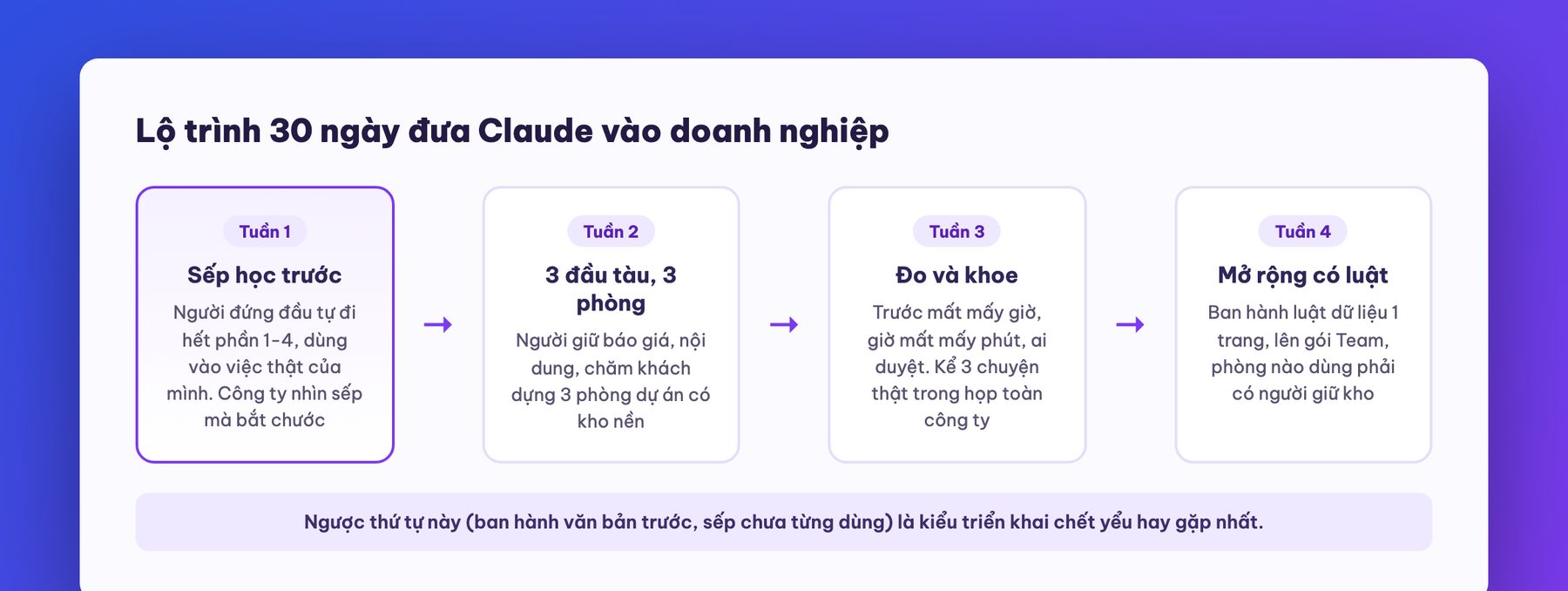
30-day roadmap we have run for MONA itself and for clients, condensed into four weeks:
And the last boundary, so important that we repeat it in every course in this series: the Claude chat version is an assistant for each individual, not the operating system of a business. When you start dreaming of things like “a new order comes in and the system checks stock, issues the invoice, notifies the carrier and messages the customer by itself”, that is no longer a job for a chat box: it is custom-built automation software, with permissions, logs, a person accountable for every step, and able to run even when no one is typing commands. MONA has walked that road for over 10 years across 14,000+ projects. You have just learned to use AI for yourself; for the next step, if you want the whole operation to run itself, book a session with us: call 1900 636 648 or send us a brief at info@themona.global, tell us which process in your company eats the most people, and we will sketch the road from today's AI assistant to a self-running system, with transparent quoting done at the right price, not one dong over.
Do I need to know technology to learn Claude? No. This course is designed for people who have never used AI: if you can chat and attach a file, you can learn it. All the harder parts (projects, connectors, skills) are point-and-click, with no code.
Is Claude free? The free version is enough to finish the course and for light daily use. For heavier use, Pro at 17 to 20 USD a month includes Claude Code and Claude Cowork in the same seat.
How is Claude different from ChatGPT? Each has its strengths. Claude stands out at reading long documents, serious writing and following complex instructions, so it suits executive work. The way of delegating taught in this course works on both, so learning once means you can't pick the wrong side.
Does Claude write good Vietnamese? It is among the smoothest today, good enough for emails, quotes and sales content. To get a natural Vietnamese voice instead of a translated one, see our Vietnamese prompting formula article (linked in Part 3).
Is it safe to put company data into Claude? Business plans by default don't use the organization's data for training; personal accounts can opt in or out in settings. The unbreakable principle: highly confidential data needs a responsible person's approval before going onto any AI service, and important decisions are always double-checked by a human.
What should I learn after this course? Two directions. To hand a whole task to AI to do on your computer: Claude Cowork course. To build software yourself with AI: Claude Code course from zero. Both are free in MONA's AI course series.

CEO & Founder · The MONA
The founder of The MONA built a service company of 60+ staff with 14,000+ projects delivered. Khánh Hùng shares his thinking on building self-running systems, automating a business, and the real lessons behind MONA's projects.
 484




Professional website
design services
Own a website with a beautiful, 100% exclusive design and a lifetime warranty, with the ability
to expand features flexibly as your business grows, starting today!






 MONA will never sell your information or send you spam


 MONA will never sell your information or send you spam
