Managing orders for e-learning courses becomes important when you sell courses. To support e-learning course sellers, MONA Elearning has an order management feature for e-learning courses. This article shows you how to use the system to manage orders in detail.
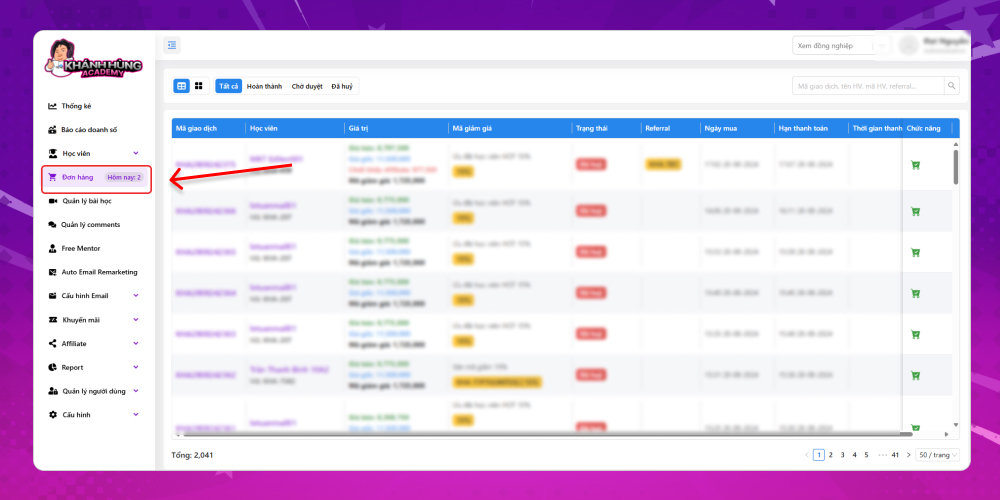
Step 1: Open order management
On the overview screen of MONA Elearning, go to Orders
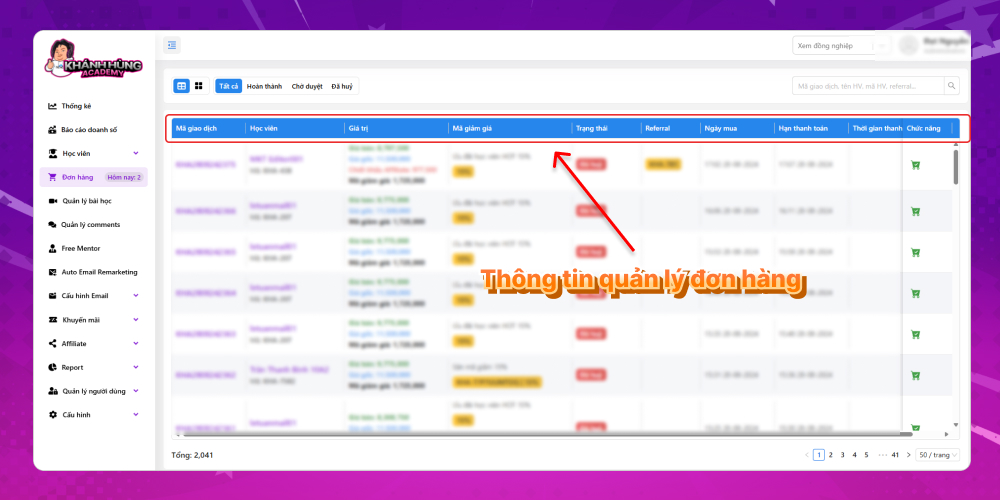
Step 2: How to view order management in MONA Elearning
Here is the order information you need to know in MONA Elearning:
Transaction ID:
Learner: includes name and Affiliate code
Course value: includes selling price, original price, discount code and Affiliate discount
The discount code the learner applied
Order status
Referral: the Affiliate code the learner came through
Purchase date
Payment deadline
Payment time
Khánh Hùng Academy uses 3 order statuses in MONA Elearning:
Completed
Pending approval
Canceled
This article showed you how to manage e-learning course orders effectively in MONA Elearning. By following these steps, from tracking order status to handling learner requests, you can streamline your process, save time and improve service quality. For any questions about MONA Elearning, contact MONA Media via the following for detailed answers:
Hotline: 1900 636 648
Email: info@themona.global
Address: 1073/23 Cach Mang Thang 8, Ward 7, Tan Binh District, Ho Chi Minh City
MONA has a podcast: listen instead of readingEpisodes on AI, automation & SEO for Vietnamese businesses



 MONA OS 2.0
 Partner with MONA










































 Free AI courses
 AI tools at work

 Tự động hoá doanh nghiệp
 Cẩm nang SEO
 Digital Marketing
 Kinh nghiệm thiết kế website
 Hạ Tầng Server
 Giáo dục


 VI
 EN