


 MONA OS 2.0
 Partner with MONA










































 Free AI courses
 AI tools at work

 Tự động hoá doanh nghiệp
 Cẩm nang SEO
 Digital Marketing
 Kinh nghiệm thiết kế website
 Hạ Tầng Server
 Giáo dục


 VI
 EN


How to create a coupon hunt promotion on MONA eLearning

Hunting for promo codes doesn't only save money. Using a promo code also brings the satisfaction of owning your favorite items at a discount. The Khánh Hùng Academy course also runs discount codes by time window: users who visit the website during these windows get an extra discount on the course. In this article, MONA Media will help you create code-hunting promotions on MONA Elearning, just like the khanhhung.academy website.
Step 1: Create the code-hunting promotion
In the admin interface, choose Promotions → Code-hunting promotions → Add a row
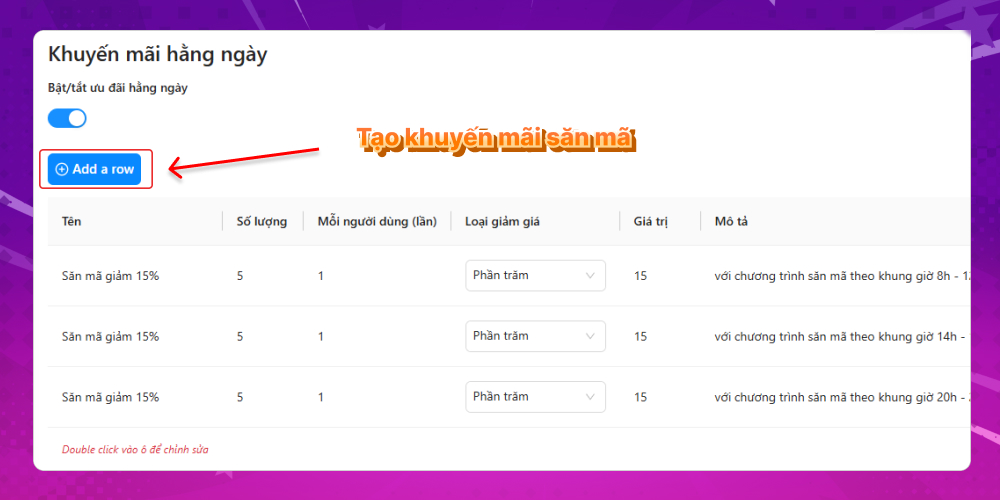
Fill in the following to create a code-hunting promo code:
- Promo code name
- Number of promo codes
- Number of users per promo code
- Discount type
- Discount value
- Promo code description
Khánh Hùng Academy currently runs 3 time windows with discount codes:
- 8am to 12pm window
- 2pm to 5pm window
- 8pm to 11pm window
You can use these as a reference or add new ones to suit your needs.
Step 2: Configure the maximum discount percentage
For an elearning course, multiple marketing campaigns with multiple promo codes are unavoidable. To stop users from stacking too many discount codes, MONA Elearning has a feature to configure the maximum discount percentage. When you create a code-hunting promo code, just enter the maximum discount percentage.
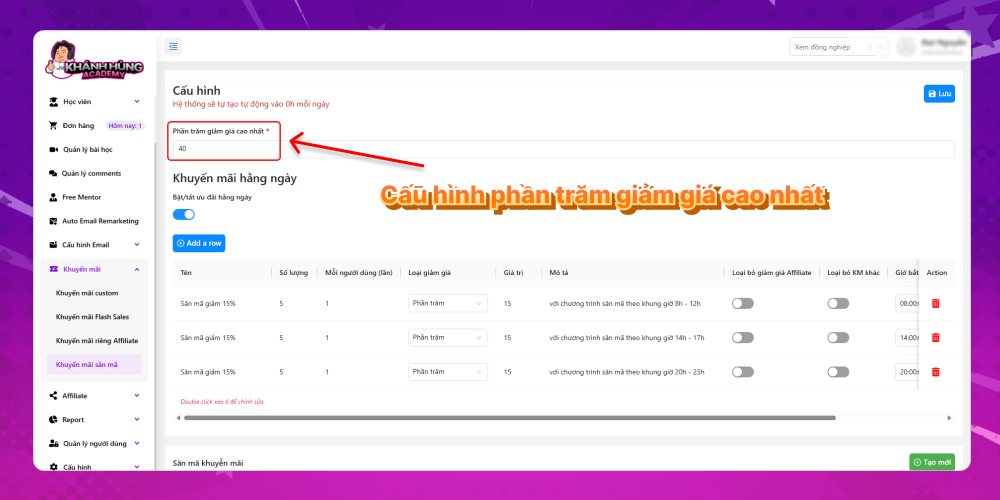
This promo code isn't common, but it is very useful for a course-selling website, because it makes visitors more excited and speeds up the push to upgrade to PRO. Those are the detailed steps to create a code-hunting promo code. For any questions about the MONA Elearning system, you can contact MONA Media through the details below:
- Hotline: 1900 636 648
- Email: info@themona.global
- Address: 1073/23 Cach Mang Thang 8, Ward 7, Tan Binh District, Ho Chi Minh City








