


 MONA OS 2.0
 Partner with MONA










































 Free AI courses
 AI tools at work

 Tự động hoá doanh nghiệp
 Cẩm nang SEO
 Digital Marketing
 Kinh nghiệm thiết kế website
 Hạ Tầng Server
 Giáo dục


 VI
 EN


How to manage learning sessions on MONA eLearning
On an online learning website, each student can join many different sessions, and knowing the details of those sessions helps administrators understand how students learn. MONA Elearning provides detailed statistics so administrators can easily manage and track each student's sessions. This guide shows you how to use MONA Elearning to manage and view student session information effectively.
Step 1: Open session management
In the system's admin screen, select Students –> Sessions
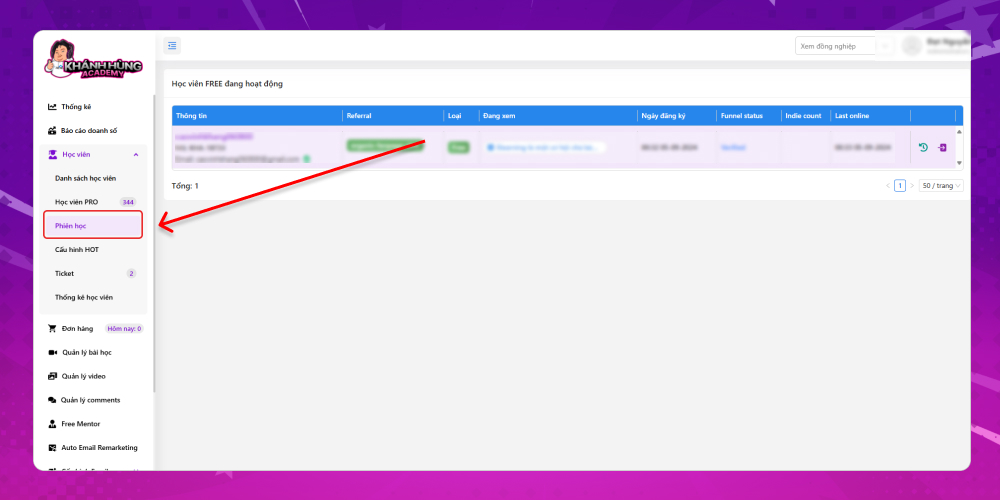
Here you can see the students who are active on the website in real time. The information shown for administrators includes:
- Student information: Including full name, affiliate code and email
- Referral: Records the source each student came from to reach the course. The sources are set up by the admin at the start, for example:
- ads_fanpage_click
- ads_youtube_click
- organic_email_click
- organic_fanpage_click
- …
- Student type: Based on the history of video watch time on the website, a student who reaches a certain number of watched hours is classified into groups such as potential students. The student type is marked in this column so administrators can see it at a glance.
- Now watching: The lesson on the website that the student is currently watching
- Course registration date
- Funnel status: The funnel stage this student is at on the website
- Indie count: The number of times this student has fallen into the Indie state
- Last Online: Last online time
Step 2: View a student's session details
To view a student's session details, click the activity log button. This shows the student's detailed actions on the website. A few specific actions MONA would like to point out include:
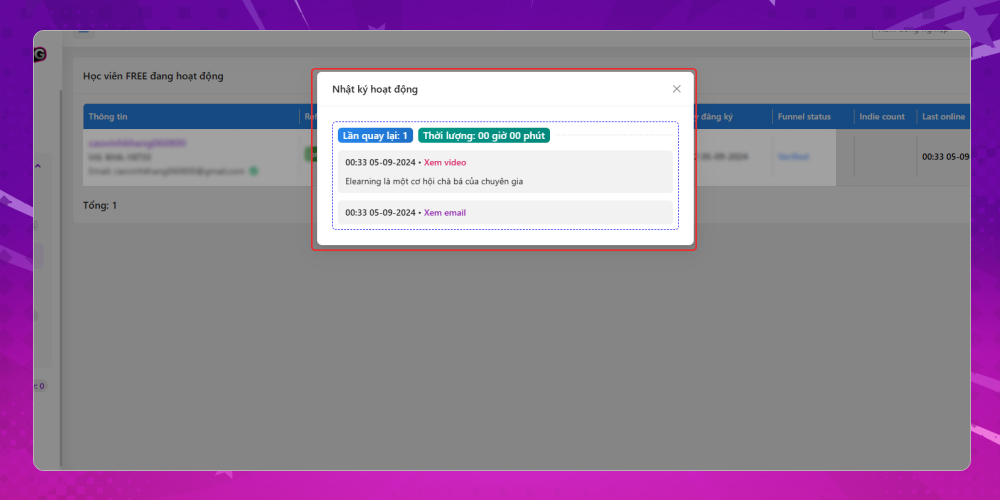
- Which return visit it was and what the student did
- When each action happened. Common actions include returning, watching a video, visiting the upgrade page, falling into the cold state, falling into the indie state, logging in, and so on.
This level of detail helps you keep better control of learning progress and make the right adjustments to improve your course. Apply the steps above to manage your students better in MONA Elearning. For any questions about MONA Elearning, contact MONA Media for detailed advice:
- Hotline: 1900 636 648
- Email: info@themona.global
- Address: 1073/23 Cach Mang Thang 8, Ward 7, Tan Binh District, Ho Chi Minh City








