In MONA Elearning, managing and evaluating students is key to improving teaching quality and the learning experience. In particular, identifying and configuring HOT students, the active, high-performing students who meet criteria set by the admin, makes them easy to spot. For new users, though, configuring HOT students can be tricky. This guide covers every step so you can set up and manage HOT students in MONA Elearning with ease.
Step 1: Review the conditions for becoming a HOT user
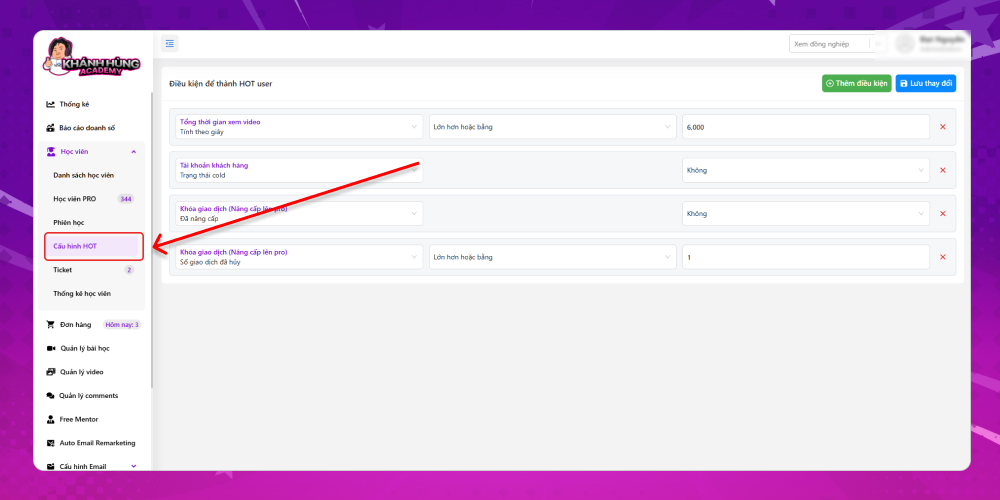
To see the conditions for becoming a HOT user, on the system's overview screen, select Students –> HOT Settings
Here you can see the conditions for becoming a HOT user that were set up earlier.
Step 2: Add conditions for becoming a HOT user
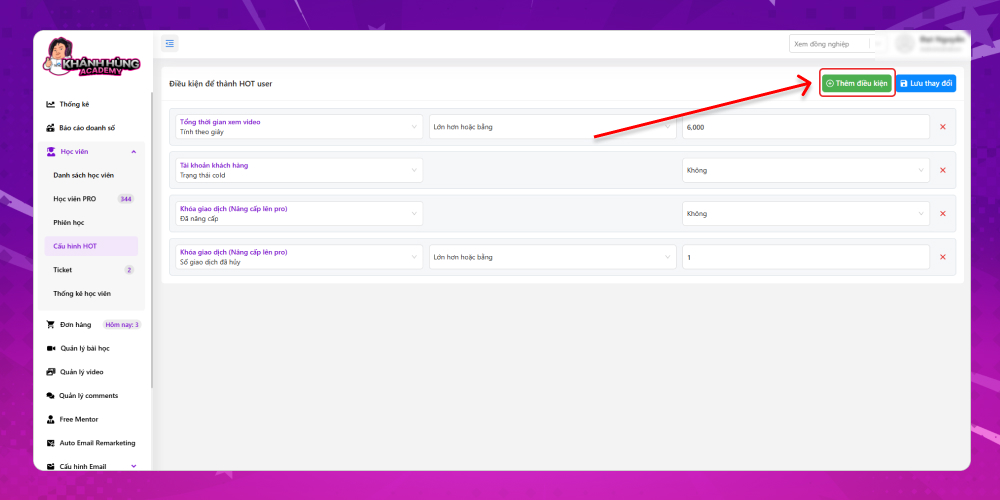
Besides the conditions already set up, you can make the HOT student filter more precise by clicking Add condition
The available conditions include:
Number of videos watched
Last viewed (in days)
Last viewed (in hours)
Number of canceled transactions when upgrading to PRO
Upgraded to PRO
We hope this guide gives you a clear and complete picture of how to set up and manage HOT students. If you have any questions or need more help, contact the MONA Media support team for prompt advice.
Hotline: 1900 636 648
Email: info@themona.global
Address: 1073/23 Cach Mang Thang 8, Ward 7, Tan Binh District, Ho Chi Minh City
MONA has a podcast: listen instead of readingEpisodes on AI, automation & SEO for Vietnamese businesses



 MONA OS 2.0
 Partner with MONA










































 Free AI courses
 AI tools at work

 Tự động hoá doanh nghiệp
 Cẩm nang SEO
 Digital Marketing
 Kinh nghiệm thiết kế website
 Hạ Tầng Server
 Giáo dục


 VI
 EN