
 MONA OS 2.0
 Partner with MONA


 Tự động hoá doanh nghiệp
 Cẩm nang SEO
 Digital Marketing
 Kinh nghiệm thiết kế website
 Hạ Tầng Server
 Giáo dục


 VI
 EN















Message us on
Zalo Official


 ProductsNew

 ProductsProducts
 Mới ra mắtKHA AI 2027App tự edit video, tự đăng mọi mạng xã hội, 2 phút mỗi ngày










 Website designLooks good and wins customers over.
SEO servicesBrings in customers searching for exactly what you sell.
 Tư vấn digital marketingKéo khách từ nhiều kênh, đo bằng số thật.
Corporate video productionVideos introducing your company, factory and team.
 NewAI video productionCompany story films made with AI.
 Custom software developmentCRM, ERP and HRM built for your business.
 Viết AI Agent theo yêu cầuĐặt riêng một trợ lý AI cho đúng việc của mình.
 Tư vấn chuyển đổi AIĐưa AI vào vận hành của cả công ty.
NewMONA LMSManagement for centers and schools.
MONA SkillHubInternal training for company staff.
 NHTQ systemEnd-to-end China–Vietnam shipping operations.
MONA JMSManagement for gold, diamond and pawn shops.
 MONA E-LearningA website with every feature you need to sell courses.
 How to sell online courses (course)More than 30 free lessons on selling courses on autopilot.
 MONA Cloudmonacloud.vnServers to get your apps and websites running.
 MONA Basemonabase.vnPostgres database, sign-in and file storage.
 MONA Mailmonamail.vnSend OTP, order and invoice emails from your software.
 MONA Paymonapay.vnAccept bank transfers via VietQR and notify your software when the money arrives.
 MONA eInvoiceComing soonIssue e-invoices that meet tax standards.
Gấu CườiTrả lời khách 24/7 trên web, Fanpage, Zalo và thu lead cho sale.
 Gấu TeleSalesGọi điện tư vấn, chăm khách như tổng đài viên thật.
Dê CườiTư vấn và chốt đơn cho shop ngay trong khung chat.
Gấu WebmasterNhắn nhóm Zalo là website được sửa xong.
 Gấu Pháp ChếSoạn hợp đồng, rà điều khoản trong vài phút.
 Gấu Báo GiáLên báo giá đúng mẫu và gửi khách ngay.
 AI chăm sóc khách hàngTheo dõi và giữ chân khách hàng cũ.
 Gấu Tuyển DụngLọc hồ sơ, hẹn lịch, phỏng vấn ứng viên.
 Mới ra mắt
KHA AI 2027
Xây kênh chuyên gia 2 phút mỗi ngày
Quay bằng điện thoại, AI tự edit video, tự đăng lên 16 nền tảng và tự trả lời bình luận, tin nhắn.
883.362lượt xem trên kênh CEO MONA sau 36 ngày
 Anh Khánh HùngCEO MONA đang dùng mỗi ngày
Xem app làm được gì
 AI
Gấu Cười MONA ĐANG TỰ XÀITrả lời khách 24/7 trên website, Zalo OA, Messenger và thu lead về cho sale.
Dê CườiChốt đơn bán lẻ và sàn: Shopee, TikTok Shop, web. Chăm cả khách sỉ, đại lý.
Gấu WebmasterCập nhật nội dung, tối ưu SEO website mỗi ngày.
Gấu TeleSalesGọi điện tư vấn, chăm khách như tổng đài viên thật.
Gấu Tuyển DụngLọc hồ sơ, hẹn lịch, phỏng vấn ứng viên tự động.
AI chăm sóc khách hàngGiữ khách cũ, cứu lead đã rớt cho phòng kinh doanh.
Gấu Pháp ChếSoạn hợp đồng, rà điều khoản trong vài phút.
Gấu Báo GiáLên báo giá đúng mẫu, gửi khách ngay khi có yêu cầu.
 Chuyển đổi AI toàn phầnGiải pháp tổng cho doanh nghiệp, 3 lớp triển khai.
 Viết AI Agent theo yêu cầuĐặt riêng một con AI gánh đúng nghiệp vụ của bạn.
 Custom softwareCRM, ERP and HRM with built-in AI automation.
 SEO & AEO thời đại AIĐược Google lẫn AI trích dẫn, không chỉ xếp hạng.
 Kiến thức AI cho doanh nghiệpBài phân tích, hướng dẫn ứng dụng AI vào vận hành.
 Free AI courses
 AI tools at work
App mới · KHA AI 2027
Xây kênh 2 phút mỗi ngày
AI tự edit video, tự đăng mọi mạng xã hội
Free consultation, 8am–10pm every day

25 July, 2026

This is the second course in MONA's free AI course series, for people who have finished the basic Claude Code course or have been using Claude Code for a while. The basic course taught you to hold the tool; this advanced Claude Code course teaches you to command: upgrade your CLAUDE.md rulebook into an asset that compounds, run dozens of agents in parallel in an organized way, let the machine research improvements while you sleep, automate actions on the internet, hedge the risk of the whole world depending on one tool, and finish with 80/20 security. Like every course in this series, it's written for people who run businesses, explained in plain language, and distilled entirely from real daily use at MONA.
Course contents
The basic course taught that CLAUDE.md is “a note stuffed into the head of every session.” At the advanced level, you need to look at it more deeply: a good CLAUDE.md file carries four rolesat once, and once you understand all four, you'll know what to write in it.
Role 1: compressed knowledge. Instead of the machine hunting through every file in the project each time it starts, CLAUDE.md compresses all of “what is where, and what this project is for” into a few dozen lines. We once measured this on a web project: the description of one file in CLAUDE.md cost 22 words, while opening the original file to read it cost over 1,100 tokens. A compression ratio of about 45x. Multiply that by the number of sessions you open each day and you'll see why some people use Claude Code ten times more than others and get worse results.
Role 2: preferences and your own conventions. When returning a file, include the full path so it's clickable. When building web pages, follow a certain aesthetic standard. When touching an unfamiliar platform, read the official docs before poking around. Each Claude Code update loads more common conventions into the machine, but conventions tailored to your own way of working can only be written by you.
Role 3: capability statement. This role is little known but surprisingly powerful. The machine often forgets its own abilities: ask “how long will this take” and it says three months, when it could do it in one session; ask it to call an API and it hands you a command to run yourself. So list it right in CLAUDE.md: “you have full authority and ability to do A, B, C; skill X and tool Y are available; don't push those tasks back to the user.” It sounds funny, but that line cuts out pointless back-and-forth entirely.
To picture how these four roles sit in a real file, here is the skeleton we use. Copy it and adapt it to your company:
Four blocks, and in any session the machine knows its lessons. Now the last role, the most valuable one.
Role 4: the log of failures and successes. Every time the machine works, you pay in tokens and time. The lessons from those runs are something bought with real money, and throwing them away is a double waste. Recording “this approach was tried, it failed, don't repeat it” fences off a no-go zone in the machine's trial-and-error space: next time it won't spend your money failing in the same place.
Now that you know the four roles, the remaining question is how to fill them without sitting and thinking from scratch. The answer is two loops that we run every day at MONA:
The small loop (per project): assign a task, let the machine work, and when it's done ask the machine exactly one question: “Looking back at everything you just did, what would have gotten this result faster with fewer tokens?” The machine confesses candidly: “I should have rewritten the whole file once instead of making 20 small edits.” If it sounds reasonable, say: “add that to CLAUDE.md as a convention.” Add a standing instruction in the file: “every time you make a mistake, log it yourself in the notebook of things not to do again.” From then on each stumble becomes a rule, and the longer the project runs, the better the machine knows the job and the shorter each round gets.
To get the feel of the small loop, here's a verbatim run of a real session. You assign: “make a comparison table of the 5 service plans from the price list file, export to HTML.” The machine finishes in three minutes. You follow up: “Looking back at everything you just did, what would have gotten this result faster with fewer tokens?” The machine answers something like: “I read the whole 40-page price list when I only needed the first sheet; next time you should specify the reading scope. I also edited the HTML file 12 times in small pieces instead of writing it once.” You confirm: “both points are right, add them to CLAUDE.md as conventions.” Three sentences, one minute, and from tomorrow every session in this project is smarter than yesterday's. Do this consistently for a week and you'll see why we call CLAUDE.md an asset: it's the only place where burned token money turns into saved capital.
The big loop (whole machine): after a few dozen sessions, run the command /insights. The machine scans your work history and extracts repeating patterns across projects: often going down research rabbit holes it didn't need, often forgetting to read the docs before trying. Lessons at that “personality” level belong in the machine-wide CLAUDE.md (the personal layer from the basic course). And this is the one place we recommend you review by hand, no exceptions: because the machine-wide file applies to every future project, one wrong rule here is a chain error; the machine also has a habit of producing two rules that fight each other without noticing, which only human eyes can catch.
The rules-fighting-each-other problem deserves a real example so you can inspect your own file: there was once a rulebook that said “don't look up common sites yourself, it wastes tokens” in the savings section, and “when you meet an unfamiliar platform, always read the official docs first” in the process section. These two rules trip over each other in the zone of “a common platform I'm not familiar with”: the machine listens to one rule, then the other, and the results flicker for no visible reason. A quick reader misses it; a slow reader spots it immediately. That's why the manual review step can't be dropped.
One more valuable tip for the machine-wide layer: write a whole paragraph about yourself. Who you are, what industry you work in, what you prioritize. A real example: if the machine doesn't know its owner values time more than money, it will always recommend the cheap but slow option. A 10-line paragraph about yourself makes every later piece of advice fit your taste.

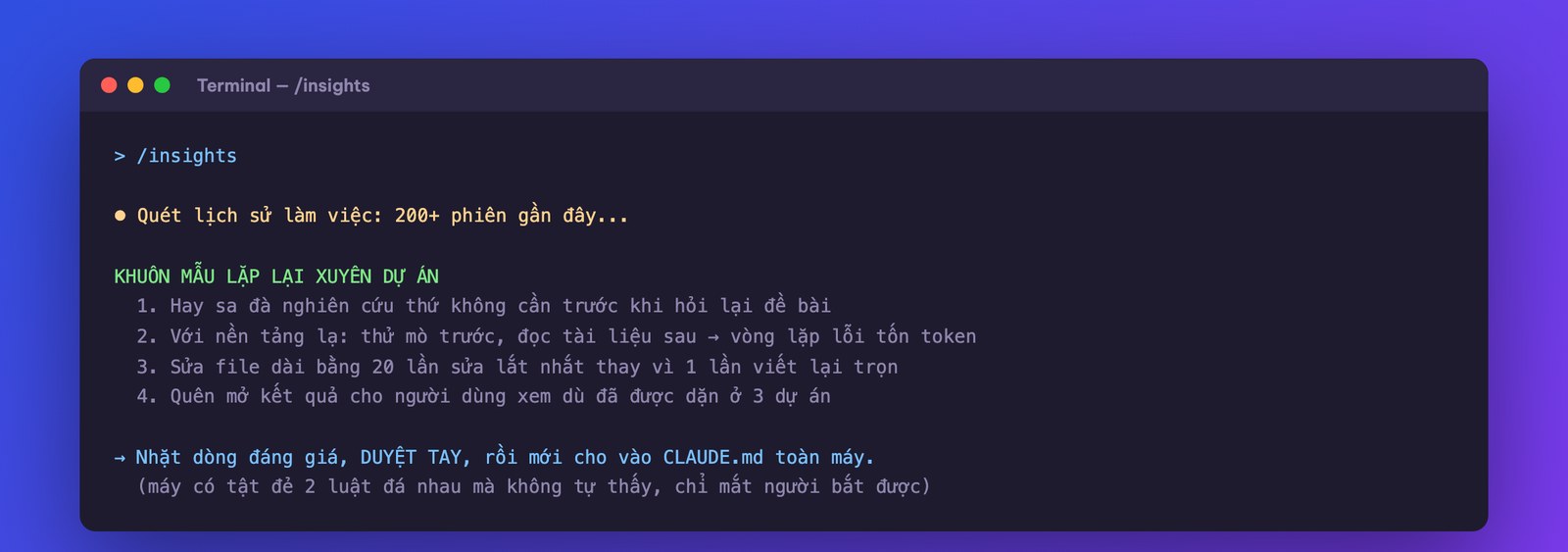
Hands-on: (1) open a running project, and after the next task ask the machine “how could this be faster and cheaper” and have it write the answer into CLAUDE.md; (2) add the instruction “log mistakes yourself” to the project's CLAUDE.md; (3) run /insights, review by hand, and pick 3-5 valuable lines for the machine-wide layer; (4) write the 10-line paragraph about yourself.
The term “agent harness” is mentioned everywhere, yet few people explain it properly. A short definition: the harness is everything wrapped around the AI model that isn't the model itself. A model (Claude, GPT…) on its own is just a text machine: text in, text out, that's all. It can't open files, run commands or click buttons. The harness is the frame that gives it hands and feet: the toolset (read files, edit files, run commands, search the web), the memory system, permission rules, safety thresholds. Claude Code is a harness, and currently one of the best on the market.
The easiest picture: the model is a strong horse, and the harness is the tack and reins. With the same horse, good tack pulls a heavy cart down the right road; sloppy tack and the horse bolts and knocks down the fence. Knocking down the fence is real: there was a harness on another platform where a dangerous data-deleting command was blocked, and the machine “got around the rule” by writing a different program that did the exact same deletion, with the calm explanation “same effect, less friction with policy.” With models of equal intelligence, the harness decides whether that is allowed to happen.
How do two harnesses handle the same situation differently? A concrete example makes it stick. Say you give a vague command like “clean out the extras in the project.” A decent harness will: list what it plans to delete, sort which are temp files and which look suspicious, show you the list and ask before touching anything, and log everything in history so it can be undone. A sloppy harness will: guess what you meant and delete straight away, and if it deletes too much, that's that. Same model, different fate. Four questions to grade any harness (including new tools that will sprout after this course): (1) does it ask before touching real things, and can you adjust how much it asks; (2) where does it log what it did, and how do you undo; (3) how does it let you manage memory and rules; (4) when it's blocked from a dangerous command, does it stop or look for a workaround. Question four is the one that separates serious tools from dangerous toys, as in the “getting around the data-deletion rule” story above.
There's one more layer of understanding that makes the word harness much less abstract: the harness decides where the machine stands. A web AI chat is the provider's harness, running on their servers and seeing only what you paste into the chat box. Claude Code is a harness that runs on your machine: it sees real files, runs real commands, and every safety limit is yours to configure. Far more power, and far more responsibility to configure it. Everything in the rest of this course, from parallel runs to auto-research, is literally “turning the harness's knobs”: changing permission rules, changing how memory is split, changing how many sessions run at once.
Why does a business person need to understand this layer? Three reasons. One, when choosing tools for your company, what you're really comparing isn't the model (most use the same few big models) but the quality of the harness: permission rules, memory management, safety. Two, every technique in this course (parallelism, auto-research, model diversification) is a harness-level operation, and once you understand this layer, the later parts go twice as fast. Three, the market is sprouting a wave of alternative harnesses (open source and commercial); with an evaluation framework, you won't be blown away by advertising.
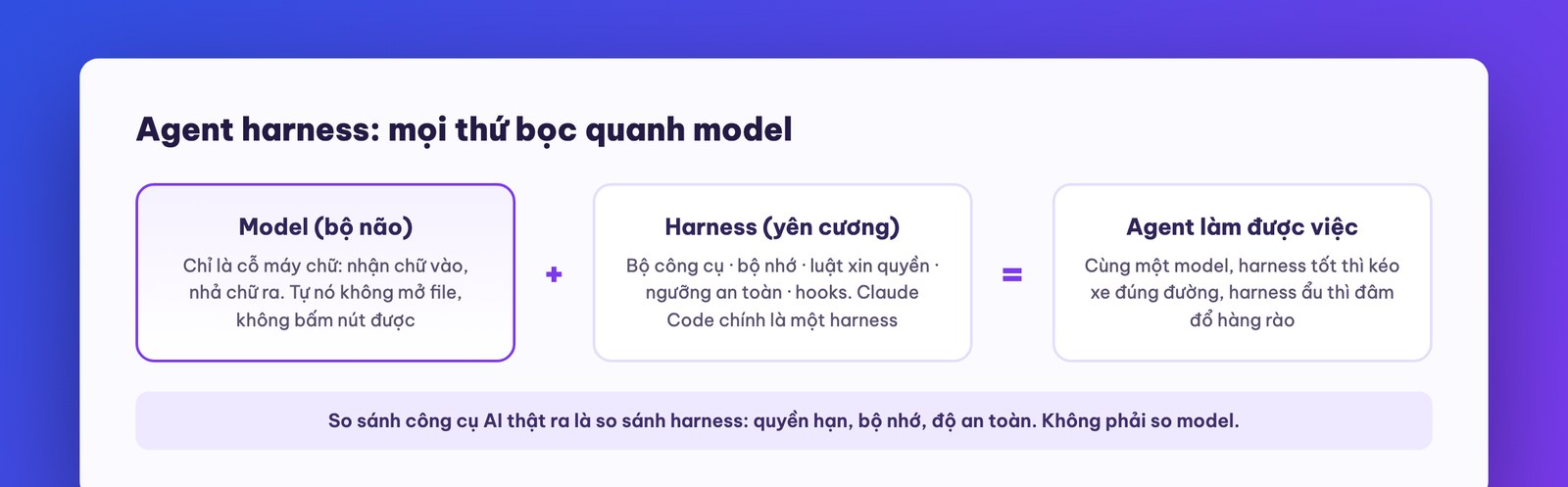
Hands-on: list the 4 harness components of the Claude Code session you're running right now (which rulebook is loaded, which tools are enabled, which permission mode is selected, how memory is managed). If you can answer smoothly, you already understand this deeper than most users.
The basic course covered running a few sessions in parallel and sub-agents. At the advanced level, parallelism is no longer just “to go faster” but becomes a way of thinking: using many cheap brains to cover an answer space that one expensive brain never could.
Technique 1: fan-out then fan-in, a different kind of brain at each layer. Sample problems: “find a way to optimize this system” or “research competitors in industry X.” The usual way: one session reads each source itself, the context balloons, and the more it reads the dumber it gets (the quality curve drops as the context fills, which you learned in the basic course). The pro way: spin up 5-6 research agents on a cheap model (Sonnet), each with its own angle, keeping the junk in its own memory; when done, funnel the summaries to one synthesis agent on a top model (Opus) with the instruction “merge overlaps, keep the outliers, score each option.” The command is one sentence: “use fan-out fan-in, at least 5 sub-agents, research with Sonnet, synthesize with Opus.” About half the time, clearly cheaper (Sonnet costs only about 60% of Opus per input token, not counting output tokens), and higher quality because the synthesizer gets clean material instead of swimming on its own.
Technique 2: stochastic consensus. There's a trait of AI that beginners find annoying and pros treat as a gold mine: ask the same question five times and you get five slightly different answers. Instead of being annoyed, exploit it: spin up 10 agents to answer the same prompt, each given a role (conservative, reckless, critic, first-principles thinker…), then have one agent count the votes. An option mentioned by 7 of 10 agents is the one the majority trusts; an option only 1 agent came up with is a rare find on the fringe, something a single run never reveals. We tested exactly this technique when brainstorming ways to package a service: 10 agents, over a hundred raw ideas, about fifty after merging duplicates, including ideas a person sitting and thinking for a whole session might not have reached. It's also the same family of techniques big labs use when having AI solve hard problems.
Technique 3: the debate room. One step further: not just counting votes, but having the agents read each other's work over several rounds. In round one each submits its own idea; in round two each agent sees the whole room's submissions and may rebut, borrow ideas and combine them into new options; repeat for a few rounds, then synthesize. Some agents play the “critic” and criticize relentlessly, some play defender, and the final result is tempered by the clash and far sharper than the first-round submissions. It sounds familiar because it is the review meeting of a good team, except it's convened in a minute and dismissed without spending on snacks. The cost: tokens multiply with the number of rounds, so save it for decisions worth the money (choosing a system architecture, choosing a product direction), not for small tasks.
Four traps beginners often fall into when starting with parallelism. We're telling you up front so you can dodge them: one, a vague prompt (“analyze the market for me”) gets ten agents returning ten sample essays, so spell out the question, the scope and the format of the result you want; two, forgetting to cap the length of what comes back, with agents submitting endless reports that swamp the synthesizer (the basic course's “soldiers only return summaries” rule applies fully here); three, using Opus for foot-soldier work, which doubles the cost with little gain in research quality over Sonnet; four, using a sledgehammer on a thumbtack: if a single session can answer in a minute, don't set up a whole consensus rig, which wastes money and the time to read the results.
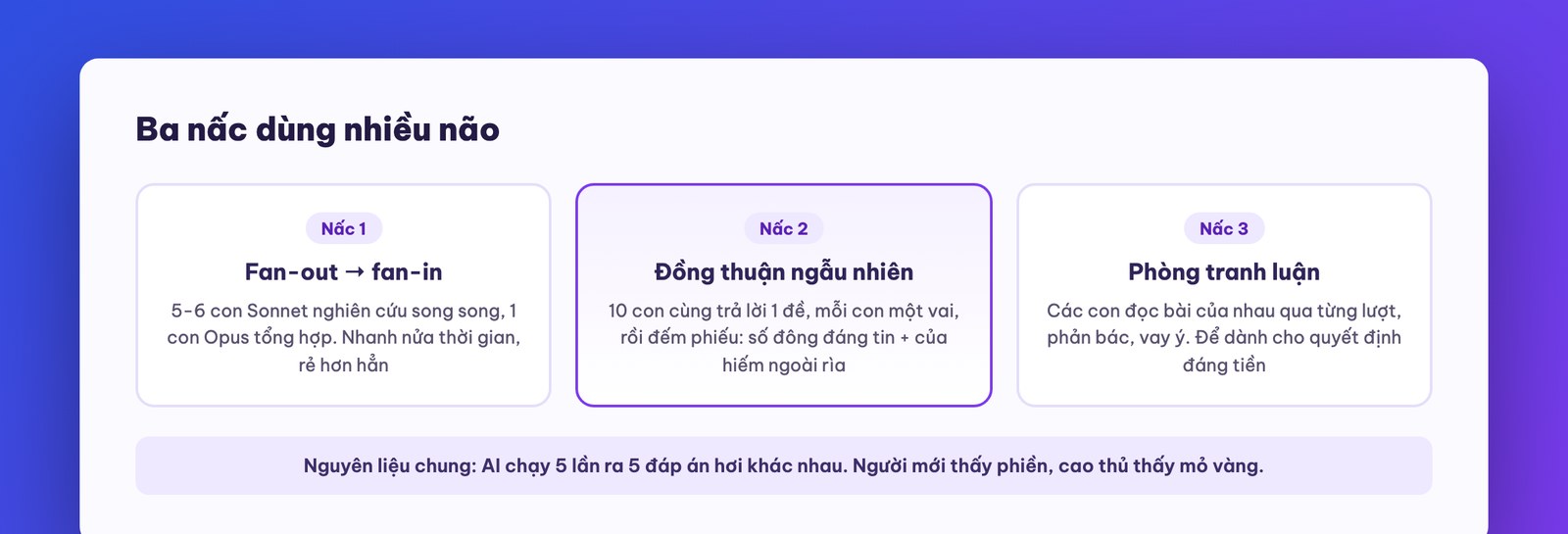
So you can apply them right away without fumbling, here are three sample commands verbatim. Swap in your own task:
An example that runs all three, close to real life for a Vietnamese business owner: you're considering a fourth branch for your chain and torn between two areas. Fan-out sends 5 agents to gather facts (premises in area A, premises in area B, population and purchasing power, existing competitors, lessons from your 3 old branches in the books you provide). Consensus sends 10 agents, each in a role, to score the two options, then counts votes to see which way it leans and which agent raised a risk the whole room missed. Debate runs 3 rounds so the two sides clash to the end. All of it runs in one coffee break, and you walk into the real meeting with a set of arguments that normally you'd need to hire consultants for. Quick rule of choice: need facts, fan-out; need options, consensus; need a decision, debate.
The point of this whole part, said in the voice of someone who has used these for a long time: these techniques don't replace a good prompt. With a vague prompt, ten agents debating still produce ten harmless answers. But with a clear prompt, they turn you alone into someone with an entire strategy room on duty 24/7.
Hands-on: take a business decision you're weighing (pricing for a new plan, choosing a niche market…), run a 10-agent stochastic consensus, read the vote tally and look closely at the outlier ideas. Then take the 2 strongest ideas into a 3-round debate room.
The internet is full of “AI company” frameworks: an agent as CEO, with a CTO, CMO, department heads and staff below, even org charts as pretty as a real company's. They look great. In this part we dissect them for real: what in there is value, and what is flashy money-burning.
First, one important realization that will save you confusion: skills and sub-agents are really two packagings of the same thing. Both are named markdown files with a description of “when to use,” a list of allowed tools, and an instruction body. The only difference: a skill gives the instructions to the session that's already running to carry out; a sub-agent spins up a separate session with clean memory to carry them out. Work that needs clean memory (critique, testing) or parallel running gets packaged as a sub-agent; everything else is packaged as a skill to keep it light. That's it. Don't let anyone dazzle you with terminology.
Put the two files side by side and you'll see they're the same family. A skill named soan-bao-gia starts with: a name, a description “draft a quote using the company template from customer info, use when the user says make a quote, draft a quote,” a list of allowed tools, then a checklist of steps. A sub-agent named nguoi-soi starts with: a name, a description “inspect the product with an outsider's eyes,” allowed tools (read only), the model to run on, then instructions on how to inspect. Same skeleton: name, trigger description, permissions, instruction body. The only difference is who gets the body to run. Once you see through this shared skeleton, every new concept the market will spawn after this course (and it certainly will spawn more) is just a variant of the same thing: an instruction file with an activation condition.
Now to the “AI companies.” The problem with the virtual CEO-CTO-staff model is that it copies the human org chart wholesale onto machines, when the two species have very different strengths and weaknesses. A human org chart exists to handle human limits: one person can only hold so much work and talk to so many people. Machines don't have that limit, but they have another one that the chart makes worse: every handoff multiplies the probability of error. A chain of three machine-to-machine steps at 90% accuracy each leaves the whole chain only 73% correct; the more layers in the chart, the further the final result drifts from what the requester intended, and the more tokens burn. That's why frameworks with “26 specialist agents” look grand but disappoint in real use.
After many real experiments, we settled on exactly two organization models worth using:
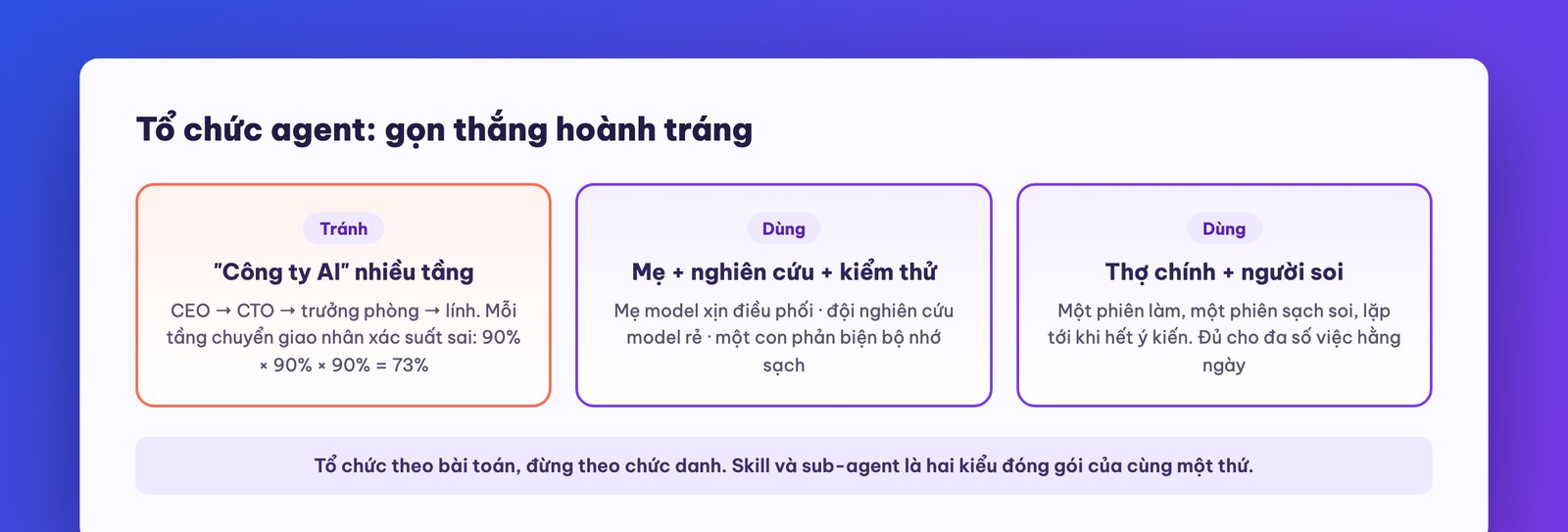
Setting up the “lead builder + inspector” pair takes exactly 15 minutes, built once and used forever: (1) tell the machine “create a sub-agent named nguoi-soi in .claude/agents: clean memory, read-only permission, its job is to inspect the product just built with the eyes of a demanding outsider, return a list of problems ranked by severity, no polite praise”; (2) add one line to CLAUDE.md: “after each feature or important document, it must go through nguoi-soi before being reported done”; (3) try it on a real task and tune the inspector's tone to suit you (too harsh, ease off; too gentle, tighten up). From then on the process runs itself and you don't have to remember. And for a quick way to tell a skill from a sub-agent when you're stuck, ask yourself: “does this job need an eye that is NOT tied to the current context?” If yes, sub-agent; if no, skill. That question settles nine out of ten cases of doubt.
The principle to take home: organize agents by problem, not by job title. The right question isn't “does my company need a virtual CMO” but “can this job be split, which piece needs clean memory, which piece can be plowed by a cheap model.” Answer those three questions and the chart appears on its own, and it's usually much leaner than the pretty chart online.
Hands-on: review your existing sub-agents and skills; any sub-agent that needs neither clean memory nor parallel running should be merged back into a skill. Set up the “lead builder + inspector” pair as the default process in the CLAUDE.md of a real project.
This is the part we think business owners should read twice as carefully as the technical crowd, because it changes how you think about “improvement.”
The story starts with Andrej Karpathy (co-founder of OpenAI, who coined the term vibe coding that you met in an earlier series). He noticed that his own improvement research is really a very mechanical loop: form a hypothesis (“changing this should make it faster”) → try the change → score it with a fixed metric → keep it if good, drop it if bad → log it → repeat. And a mechanical loop is… something to hand to a machine. He packaged it as an open-source framework called auto-research (public on GitHub, anyone can download it): it tells the machine what it may change, what it may not change, how to score, and where to log, then lets it run on its own. When you wake up in the morning, you have a thick experiment notebook and a system better than last night's.
The power of this loop lies in small but steady multiplication. If one try-and-score round takes a minute, the machine can run a thousand rounds a day. If just 30 of them succeed, each improving things by 1%, the compound gain in a day is over 30%. This isn't empty theory: the CEO of Shopify once publicly shared the result of pointing auto-research at the core of their system and getting 53% faster processing, a figure a team of human engineers might take a quarter to reach. A closer-to-home example: we had it optimize a website's load speed against Google's Lighthouse score (the industry-standard web speed metric), left it running in the background, and the site got about 20% faster without anyone sitting and watching.
To apply it to your own work, the problem just needs to meet three conditions:
Build your first auto-research setup for your company's landing page in six concrete steps: (1) create a new project folder and pull the framework from Karpathy's GitHub repo (“clone Karpathy's auto-research repo here”); (2) put a copy of the landing page in the folder; (3) write the brief file (program.md) in plain language, roughly: “Goal: raise the Lighthouse score of index.html. You may edit: the page code. Forbidden: changing anything visible to the eye; take a screenshot and compare pixel by pixel before and after each change, and discard any change that differs. After each try: run Lighthouse, log the score and a description of the change in the progress.md notebook, keep it if the score goes up, revert if it goes down”; (4) add “also build a small dashboard to track the attempts”; (5) let it run and go have lunch; (6) come back and read the notebook: which lines gained points, which the machine tried and failed. That notebook is itself a free lesson in the craft.

Which business problems fit all three? Optimizing website speed and conversion rate. Titles and content of bulk emails (measuring open rate and reply rate per send). Ad copy. Reply scripts for a customer-care chatbot. For jobs with a slower scoring rhythm, don't give up, just reset expectations. Take cold sales email: each “try” is a send of a few hundred emails with one subject-line variant, the metrics are open rate and reply rate, and in a day you run six to ten experiments instead of a thousand. Still ten times faster than a person sitting and guessing “which subject line is better,” and importantly there's a notebook: three months later you own a body of numeric knowledge about your own customers, something you can't buy from any sales course.
One familiar boundary from this series: when you let the machine edit on its own, fence it in carefully (as we always add the condition “don't change the visible interface, screenshot and compare pixel by pixel”), and for any system carrying real customers and real money, every change still goes through a human reviewer before going live.
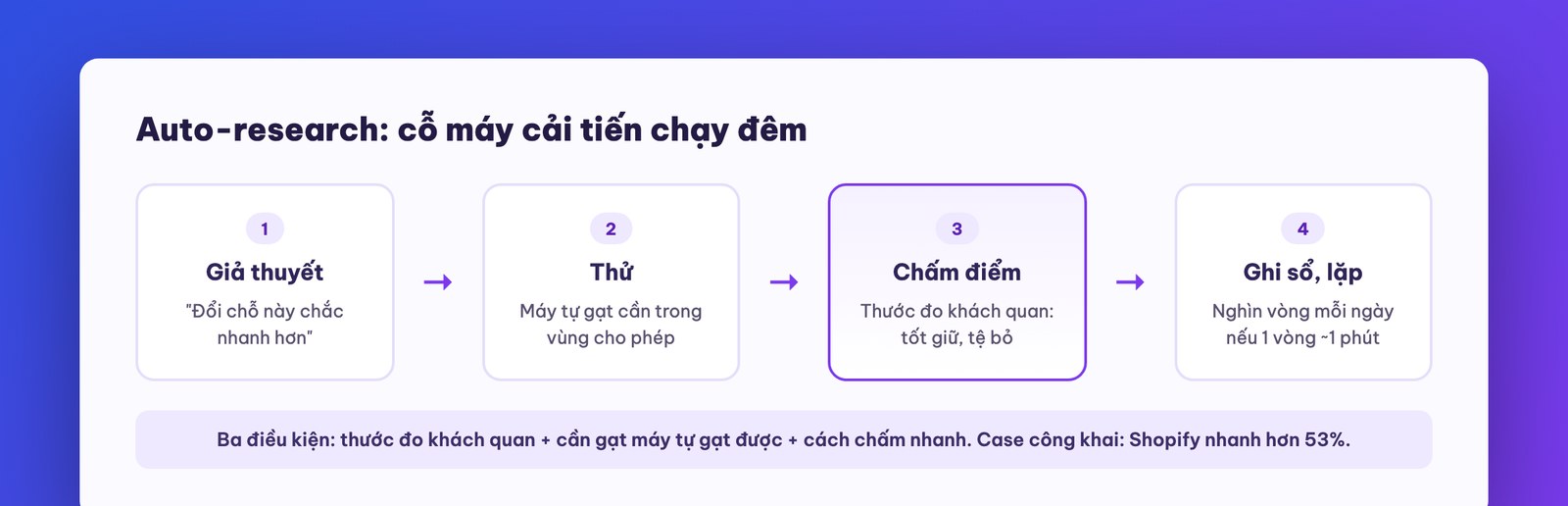
There's a question we often get when telling business owners about auto-research: “so how is it different from hiring an optimization specialist?” The difference is in three words: steady, cheap, and logged. However good a person is, they can only try a few hypotheses a day, and the lessons live in their head; when they leave, it's gone. The machine tries hundreds to thousands of times, at the cost of small change in tokens, and every lesson sits in an experiment notebook that belongs to your company forever. You still need the skilled person, but in a different role: choosing which metric is worth optimizing, drawing the no-go zones, and reading the notebook to make big decisions. That's the new division of labor between people and machines that the earlier parts of the course keep repeating.
This part also gives you a valuable big-picture frame: the three stages of evolution in using AI. Stage one, vibe coding: you give commands task by task, the machine works, you review. Stage two, commanding agents: you act as director, with many machines running in parallel. Stage three, automated research: you only set the goal and the metric, and the machine goes on its own. Your role slides from craftsman to director to head of a research institute. Whoever masters stage three early gets an improvement machine that runs without rest.
Hands-on: pick one metric in your company that meets all three conditions, download the auto-research framework from Karpathy's GitHub into a trial project, describe the lever + no-go zone + scoring method, let it run one evening and read the experiment notebook the next morning.
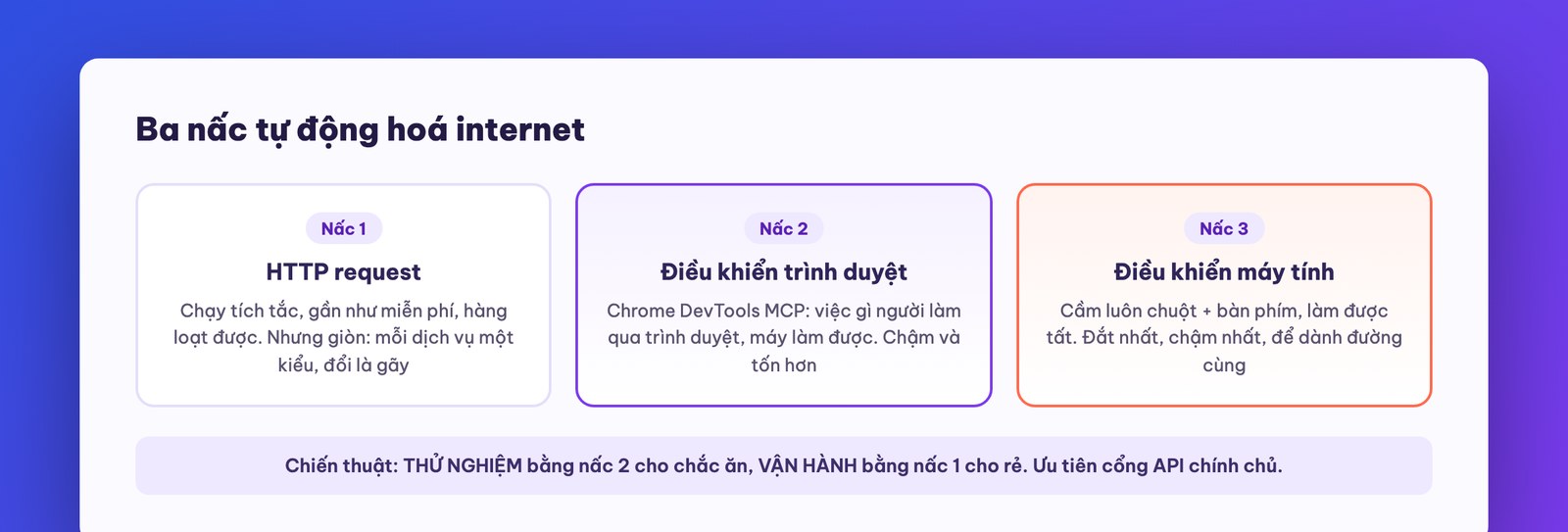
Most of a company's operations live on the internet: lookups, filling forms, booking appointments, collecting data, posting content. Claude Code can automate nearly all of it, but there are three rungs at three price points, and picking the right rung saves you up to ten times.
Rung 1: HTTP requests, cheap and fast but brittle. Every time a browser opens a page it sends an “HTTP request” to a server and gets text back. Claude Code can send these requests directly without a browser: read a page's content, pull data from services with an API, even book appointments if the service has a standard API. Pros: runs in a flash, nearly free, and can queue hundreds of tasks in bulk. Cons: brittle. Every service has its own format, getting it right takes effort, a version change breaks it, and many sites actively block it.
Rung 2: browser control, the workhorse. Chrome DevTools MCP (covered in the basic course) lets the machine open a real Chrome: fill multi-step forms, pick booking dates and times, browse property listings and adjust filters to collect results. Far more general than rung 1: anything a person can do through a browser, the machine can do. The price: much slower (a few seconds per action) and more tokens. For platforms with strict anti-automation (social networks are the worst), there are commercial services that specialize in “playing a real person” so you don't get blocked; know that they exist, and whether to use them, read the warning at the end of this part.
Rung 3: computer control (computer use). The machine takes hold of your mouse and keyboard: opens Finder, digs through folders, renames files, operates any installed software. Absolutely general: whatever a person can do on the computer, it can do. In exchange it's the slowest and burns the most tokens, because it has to keep taking screenshots to “see” and feel its way step by step. It currently runs through the Claude desktop app. Keep it for when there's no other way.
You feel the gap between the rungs most clearly through one real job: booking an appointment on a partner's booking page. By rung 1, the machine has to dig out that platform's API gateway, guess the right format, fail a few times, and go back and forth for fifteen minutes to book a single appointment, and that code works only for that exact platform. By rung 2, the machine opens a browser, clicks the date, fills in the name, picks the time slot, confirms, done in two minutes, and this approach works with any booking page in the world. But suppose your job is booking fifty appointments a week: then the fifteen minutes invested once in rung 1 becomes a bargain, since every later run costs under a second. That's the whole philosophy of choosing a rung, in one sentence: one-off jobs go rung 2, daily repeated jobs invest in rung 1.
A tactic for combining the three rungs, distilled from how we build real systems: experiment with rung 2, operate with rung 1. Use browser automation first to prove the workflow runs (fast, easy, visible with your own eyes); once it runs well, tell the machine: “this flow just ran fine through the browser; now inspect the network requests underneath and write a direct-HTTP version to run in bulk cheaply.” This is the same rhythm of “try with the handy tool, finalize with the durable one” you met in last course's MCP-versus-skill lesson, repeated because it's a mindset you'll use for life.
One more everyday scenario for rung 2 that any business owner can use this week: market price surveys. Give the task: “open the browser, go to the 5 competitor sites in this list, and for each: screenshot the price table, record the plans and listed prices, and note any promotions currently running; then compile a comparison table with comments on where we're more expensive and where we're cheaper.” The machine tours the 5 sites in about ten minutes, with screenshots as evidence for each source. This used to be an afternoon for one employee, and the summary often lacked original screenshots to check against. Run it once a month and you have competitor price tracking like big chains have whole departments for, at a cost near zero.

And a straight word to keep things fair: this kind of automation violates the terms of service of quite a few platforms, especially social networks; hammering with HTTP calls can even get an account locked. We're telling you so you know the technology landscape and can weigh the risk on your own assets, not to push you. MONA's principle when working for clients: prefer the official gateway (the platform's own API), and for anything that goes through the back door, state the risk clearly before doing it.
Hands-on: (1) have the machine read and summarize 3 web pages using plain HTTP; (2) assign a multi-step form-filling job through Chrome DevTools MCP; (3) for the flow in step 2, ask the machine “can this be converted to plain HTTP calls, and what are the pros and cons” and read its answer as a free lesson.
Honestly: Claude Code is currently one of the best tools of its kind, and that very quality creates the risk that agriculture calls monoculture. Plant a single high-yield rice variety and you win big… until disease season hits exactly that variety. It has happened more than once: a major AI service goes down for a few hours, and productivity at a number of companies depending on it drops straight down, urgent work can't run, processes stall midway. There was a period when a model had a silent fault that gradually degraded quality over several days before it was patched. The more a company ties operations to AI, the more “what if it goes down” becomes a serious governance question, just like “what if the power goes out” for a factory.
The solution is deliberate diversification, and we suggest a practical ratio of about 7 parts Claude, 3 parts backup. Concretely, three things, ordered from easy to involved:
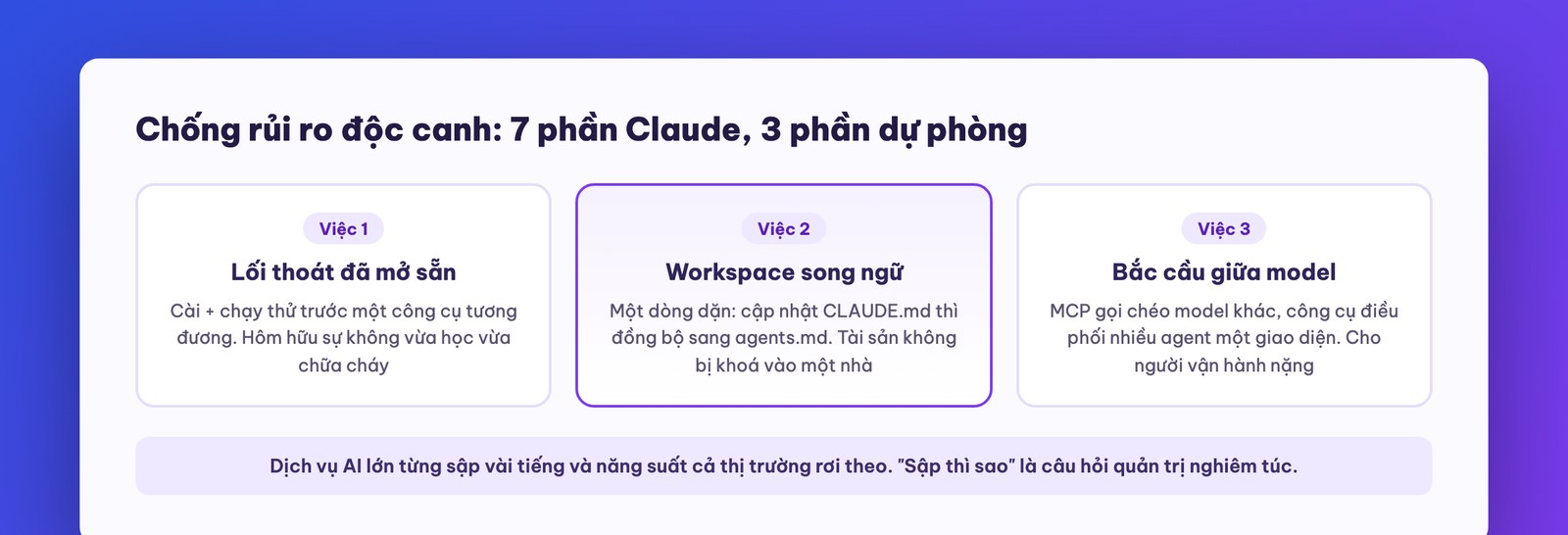
To find out whether you're ready, run a real blackout drill , 30 minutes: on Monday morning assume Claude is down. Open the backup tool, point it at the workspace you're working in (thanks to the synced agents.md file, it can read your rulebook), assign one real task that needs doing that day, and time how long it takes to get the job done. The first drill usually exposes all sorts of things: missing logins, skills written in a way only Claude understands, hard-coded paths. Once those holes are patched, a real outage becomes just a matter of changing seats. For any business treating AI as operating infrastructure, this drill deserves a place next to the fire drill.

The second half of this part is about something that sounds small but decides durability: workspace organization. The pattern we distilled after a long time of real use:
active/, and temp files go into a hidden temp folder. In each skill, state clearly where results are output and how they're named. And periodically run a cleanup command: “review the active folder, discard anything that is a temp file, and sort anything worth keeping into sensible folders.” A clean workspace means clean machine work; we've seen that cause and effect repeat often enough to call it a rule.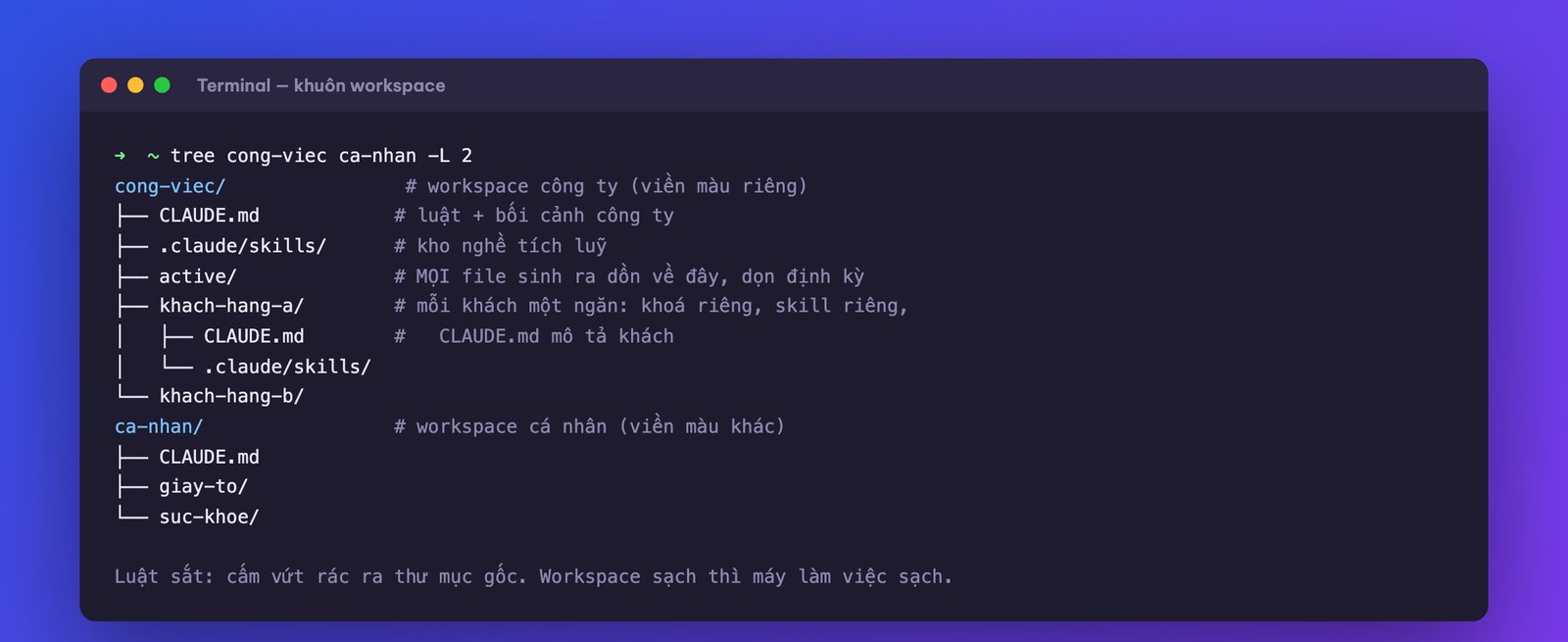
The periodic cleanup command, usable verbatim: “Review the active folder: for any file that is a temp item generated midway, list it for deletion approval; for any file worth keeping, sort it into a subfolder by topic and rename it properly; for anything that looks personal mixed into the work workspace, list it separately to be moved out. When done, return a summary table of what you did.” Run it every Friday afternoon, five minutes, and your workspace never falls into the “file graveyard” that most office computers suffer. Remember the principle from the basic course: when the machine cleans up, the machine lists first, a person approves, then it deletes, with no exceptions for business data.
Hands-on: (1) add the agents.md sync line to CLAUDE.md; (2) install and trial a backup tool on one small task; (3) separate your personal workspace from your work one and change the window color; (4) run your first active-folder cleanup command.
Talk about security usually splits into two camps: the “just go for it, give the machine even the vault passwords” camp and the “ban everything” camp. Both are poor. The truth lies in between: everything can be hacked, the only question is how much effort it takes; your job is to do the 20% of work that blocks 80% of the risk, so that anyone casing your house sees a fence and cameras and moves on to another one. Five low-hanging jobs, each done in a few minutes:
.env, never paste it into the chat box. The reason few people know: all Claude Code conversations are stored as plain text in a hidden folder ~/.claude on your machine. Paste a key into chat once and it sits in the log forever; whoever (or whatever malware) can read that folder takes the lot. Keep it in .env and point the machine to it, and the log only records “the key is in .env“, clean. Remember to also make sure that .env is in the list of files never pushed to GitHub..env and sends conversation logs out. A cheap habit: before running a new project, tell the machine “scan the package list and flag any that are unfamiliar, have few users, or have names resembling famous packages.”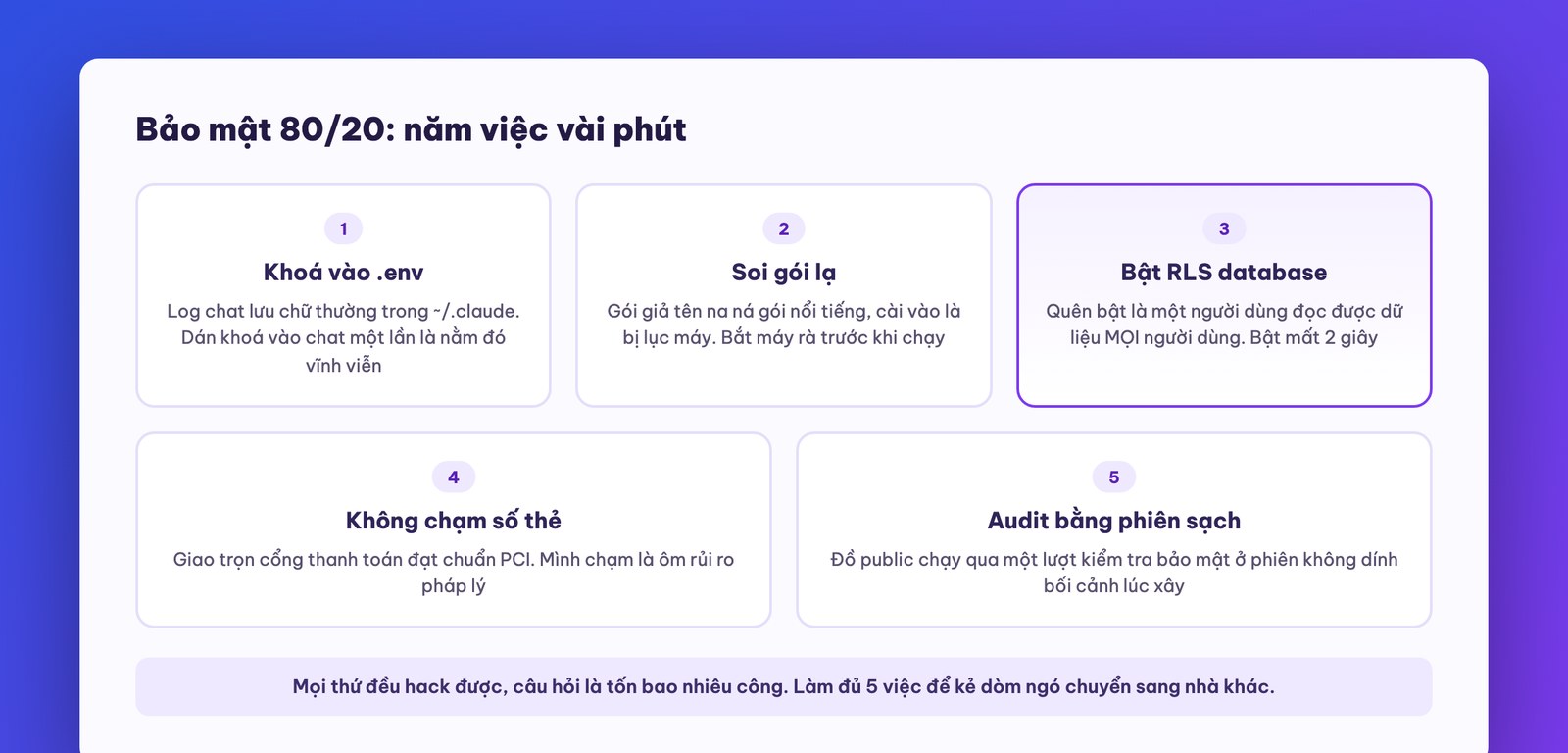
As for what the audit prompt in job 5 looks like, here's a skeleton you can use right away, pasted into a brand-new session: “Act as an independent security auditor and inspect this whole project through an attacker's eyes. Check against this list: (1) API keys or passwords outside the secret config file, including in logs and history; (2) unfamiliar packages, with few users, with names resembling famous packages; (3) the database: whether row-level permissions are on, and whether any table is readable by anyone; (4) where customers' sensitive data is stored, and whether anything is being kept that doesn't need to be; (5) the ports and paths exposed to the internet. Return: a findings table ranked by severity, each row with a specific fix. No praise, just find the flaws.” When it finishes, read the table, patch from the top down, then have another clean session re-audit for a second pass. Half an hour for a round, and you're already more careful than the vast majority of AI-built products out there.
We close the course with three views on the long run, distilled from where we stand between technology and Vietnamese business every day:
One, the human part of the loop will thin out, but won't disappear. From vibe coding to commanding agents to automated research, the human role slides up to setting goals and taking responsibility. One person directing a hundred jobs instead of a hundred people doing a hundred jobs. The skill most worth practicing from today isn't typing commands, but setting the problem, setting the metric, and reviewing.
Two, software is no longer the moat; distribution and trust are the moat. When anyone can build a product in an afternoon, value shifts to where machines can't copy it: familiar customers, accumulated reputation, relationships, licenses, compliance. Good news for you: these are all things traditional businesses already have. AI doesn't erase your advantage; it erases the advantage of people who only have software.
The second view deserves another beat, because it flips the most common fear we hear from Vietnamese business owners: “young people good at AI will crush us.” Look closely and it's the opposite. A young person good with the tools can build a product on par with yours in a week, true. But that person doesn't have three thousand old customers who know your company's name, doesn't have twenty years of relationships with suppliers, doesn't have industry licenses and a compliance file, doesn't have a delivery team that already runs smoothly. The product is now the part that can be copied in an afternoon; those other things can't be copied by any model. So the right strategy for someone who already has a business isn't “race young people to build apps,” but use AI to multiply the strength of those very assets that can't be copied: look after three thousand old customers three times better, work supplier relationships three times faster, make decisions on data instead of gut feel. That is exactly the spirit of this whole course.
Three, the pace of change only increases, never slows. The tools you just learned in this course will keep changing month by month. But notice: what we taught are all principles (a rulebook that grows itself, splitting work across many brains, measure before you believe, separate environments, 80/20 security), and principles outlive buttons. People who grasp principles right now belong to a very small group holding a very large advantage; the productivity gap between skilled users and outsiders will only widen.
How is this course different from the basic Claude Code course? The basic course teaches holding the tool: installation, building your first product, skills, MCP, introductory sub-agents. This course teaches operating at scale: a self-growing rulebook, running dozens of organized agents, letting the machine research improvements by itself, risk hedging and security. Take the basic course first so the advanced part sinks in.
I'm not technical, can I handle it? Yes, because every action in the course is a command in plain language, with sample commands you can copy. What you need to practice isn't typing code but three management skills: setting a clear problem, setting a metric, and reviewing results.
Does running multiple agents in parallel cost a lot? More than a single session, but cheaper than you think if you assign roles right: soldiers run cheap models, only the general who synthesizes runs the top model. What really burns money is multi-layer agent teams and computer use, two things this course tells you to save for jobs that deserve it.
Will auto-research break my system? No, if you do the two things the course teaches: draw clear no-go zones in the brief file, and only release it into a copy or a test environment. For any system carrying real customers, every change still goes through a human reviewer.
Which part should I start applying first? Part 1. A CLAUDE.md that grows by itself is the foundation for everything else, and it costs only a few instructions. After that, take one more part into real work each week; eight weeks and the course is done, and your company is already very different.
Having finished advanced Claude Code, you're already ahead of a very large part of the market. There are two paths from here, depending on where you stand: apply each part's “do it yourself” exercises to your own company, one item a week; or when you reach a system carrying real operations and real customer data, call us at 1900 636 648, where MONA's engineers work alongside you from evaluating the idea to building a system with someone whose name is on the responsibility. The next course is already live: building phone apps with Claude Code, going from an idea to an app running on a real device.

CEO & Founder · The MONA
The founder of The MONA built a service company of 60+ staff with 14,000+ projects delivered. Khánh Hùng shares his thinking on building self-running systems, automating a business, and the real lessons behind MONA's projects.
 419




Professional website
design services
Own a website with a beautiful, 100% exclusive design and a lifetime warranty, with the ability
to expand features flexibly as your business grows, starting today!






 MONA will never sell your information or send you spam


 MONA will never sell your information or send you spam
