


 MONA OS 2.0
 Partner with MONA










































 Free AI courses
 AI tools at work

 Tự động hoá doanh nghiệp
 Cẩm nang SEO
 Digital Marketing
 Kinh nghiệm thiết kế website
 Hạ Tầng Server
 Giáo dục


 VI
 EN


How to view the lesson quality report on MONA eLearning
In e-learning courses, evaluating and tracking lesson quality is key to improving learning results. To help with this, MONA Elearning includes a detailed report on the quality of each lesson. In this article, MONA Media walks you through opening and using it step by step.
Step 1: Open the lesson quality report in MONA Elearning
In the admin interface, go to Reports -> Lesson Quality
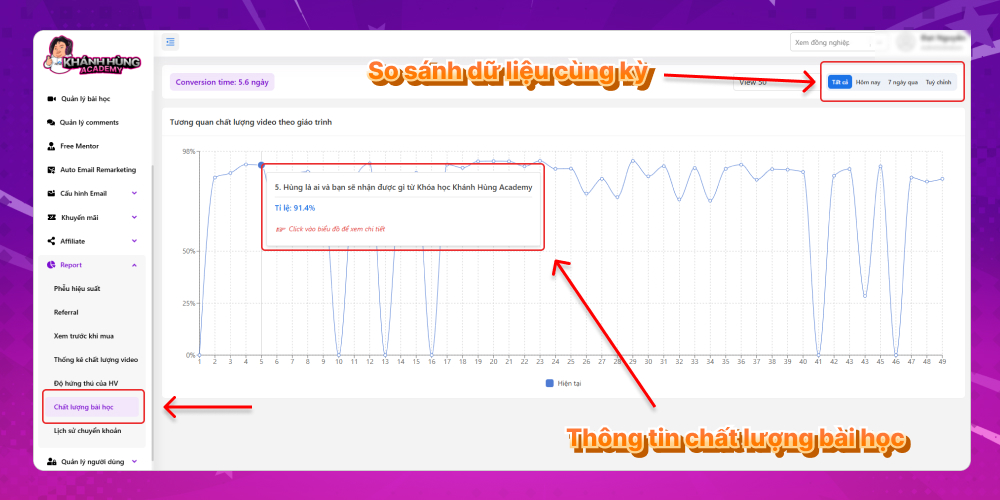
The vertical axis of the chart shows the percentage of the lesson watched to the end, and the horizontal axis shows the order of lessons in the course.
To see a lesson's quality, hover over a dot on the chart. The information shown includes:
- Lesson name
- Completion rate
You can click to see this lesson's details, and another chart appears. The vertical axis shows the number of users watching the lesson, and the horizontal axis shows each point in the video's timeline. In short, the chart shows how many users are watching at each point in the video.
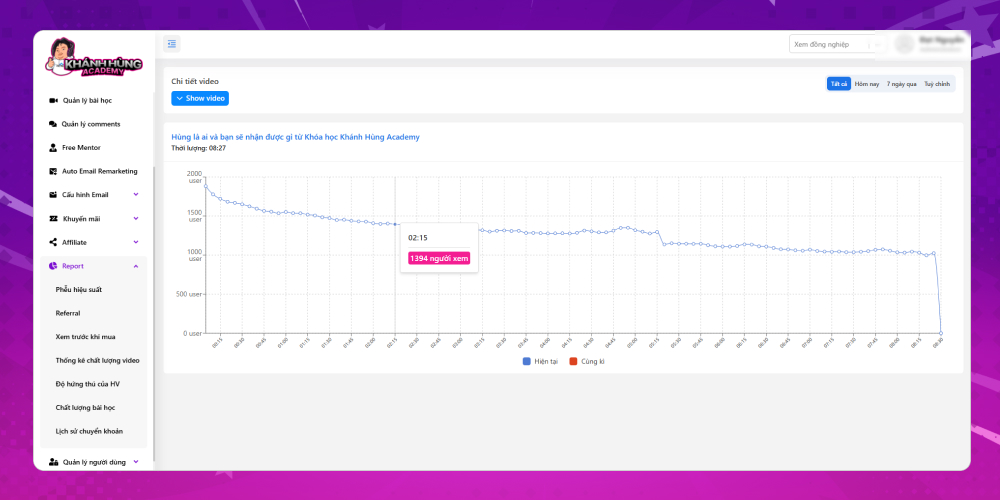
For each report chart, you can also compare against other periods:
- Compare today with yesterday
- Compare the last 7 days
- Compare by custom dates
Step 2: Open the video quality statistics report in MONA Elearning
Besides the lesson quality report, you can see how effective each lesson in the course is.
In the admin interface, go to Reports -> Video Quality Statistics
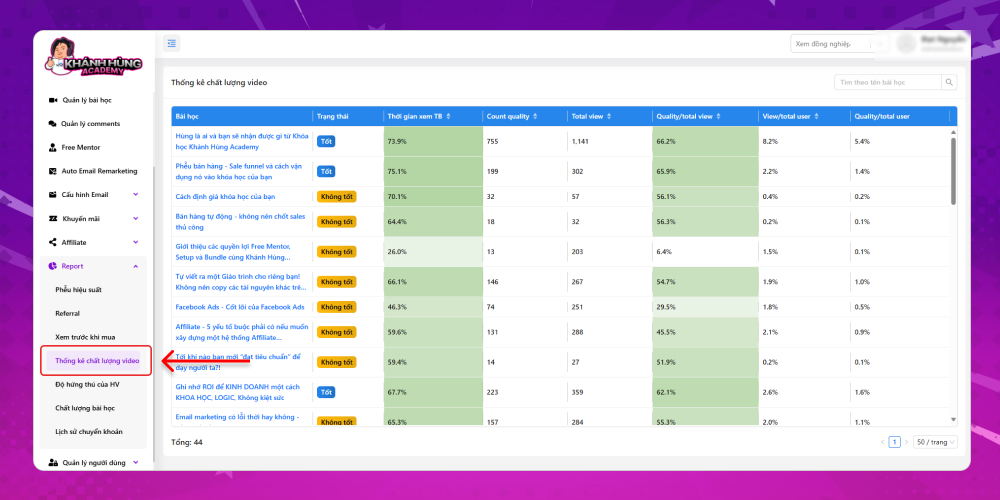
The system shows a statistics table for lessons, including:
- Lesson name
- Status: Good or not good (you can set a condition, for example average watch time above 65% is Good and below 65% is Not good)
- Average watch time
- Count quality
- Total view
- Quality/total view
- View/total user
- Quality/total user
From these numbers you can decide whether to revise a lesson video and switch to more engaging content, improving video quality and the learner experience.
This article walked you through viewing the lesson quality report in MONA Elearning. Get an effective e-learning solution for your course today. Contact MONA via:
- Hotline: 1900 636 648
- Email: info@themona.global
- Address: 1073/23 Cach Mang Thang 8, Ward 7, Tan Binh District, Ho Chi Minh City








