
 MONA OS 2.0


 Tự động hoá doanh nghiệp
 Cẩm nang SEO
 Digital Marketing
 Kinh nghiệm thiết kế website
 Hạ Tầng Server
 Giáo dục


 VI
VI
 EN
EN































Message us on
Zalo Official


 ProductsNew

 ProductsProducts
 Mới ra mắtKHA AI 2027App tự edit video, tự đăng mọi mạng xã hội, 2 phút mỗi ngày










 Website designLooks good and wins customers over.
SEO servicesBrings in customers searching for exactly what you sell.
Website designLooks good and wins customers over.
SEO servicesBrings in customers searching for exactly what you sell.
 Tư vấn digital marketingKéo khách từ nhiều kênh, đo bằng số thật.
Corporate video productionVideos introducing your company, factory and team.
Tư vấn digital marketingKéo khách từ nhiều kênh, đo bằng số thật.
Corporate video productionVideos introducing your company, factory and team.
 NewAI video productionCompany story films made with AI.
 Custom software developmentCRM, ERP and HRM built for your business.
 Viết AI Agent theo yêu cầuĐặt riêng một trợ lý AI cho đúng việc của mình.
 Tư vấn chuyển đổi AIĐưa AI vào vận hành của cả công ty.
NewMONA LMSManagement for centers and schools.
MONA SkillHubInternal training for company staff.
Tư vấn chuyển đổi AIĐưa AI vào vận hành của cả công ty.
NewMONA LMSManagement for centers and schools.
MONA SkillHubInternal training for company staff.
 NHTQ systemEnd-to-end China–Vietnam shipping operations.
MONA JMSManagement for gold, diamond and pawn shops.
NHTQ systemEnd-to-end China–Vietnam shipping operations.
MONA JMSManagement for gold, diamond and pawn shops.
 MONA E-LearningA website with every feature you need to sell courses.
 How to sell online courses (course)More than 30 free lessons on selling courses on autopilot.
 MONA Cloudmonacloud.vnServers to get your apps and websites running.
 MONA Basemonabase.vnPostgres database, sign-in and file storage.
 MONA Mailmonamail.vnSend OTP, order and invoice emails from your software.
 MONA Paymonapay.vnAccept bank transfers via VietQR and notify your software when the money arrives.
 MONA eInvoiceComing soonIssue e-invoices that meet tax standards.
Gấu CườiTrả lời khách 24/7 trên web, Fanpage, Zalo và thu lead cho sale.
MONA eInvoiceComing soonIssue e-invoices that meet tax standards.
Gấu CườiTrả lời khách 24/7 trên web, Fanpage, Zalo và thu lead cho sale.
 Gấu TeleSalesGọi điện tư vấn, chăm khách như tổng đài viên thật.
Dê CườiTư vấn và chốt đơn cho shop ngay trong khung chat.
Gấu WebmasterNhắn nhóm Zalo là website được sửa xong.
Gấu TeleSalesGọi điện tư vấn, chăm khách như tổng đài viên thật.
Dê CườiTư vấn và chốt đơn cho shop ngay trong khung chat.
Gấu WebmasterNhắn nhóm Zalo là website được sửa xong.
 Gấu Pháp ChếSoạn hợp đồng, rà điều khoản trong vài phút.
 Gấu Báo GiáLên báo giá đúng mẫu và gửi khách ngay.
 AI chăm sóc khách hàngTheo dõi và giữ chân khách hàng cũ.
 Gấu Tuyển DụngLọc hồ sơ, hẹn lịch, phỏng vấn ứng viên.
 Mới ra mắt
KHA AI 2027
Xây kênh chuyên gia 2 phút mỗi ngày
Quay bằng điện thoại, AI tự edit video, tự đăng lên 16 nền tảng và tự trả lời bình luận, tin nhắn.
310.136lượt xem trên kênh CEO MONA sau 17 ngày
Mới ra mắt
KHA AI 2027
Xây kênh chuyên gia 2 phút mỗi ngày
Quay bằng điện thoại, AI tự edit video, tự đăng lên 16 nền tảng và tự trả lời bình luận, tin nhắn.
310.136lượt xem trên kênh CEO MONA sau 17 ngày
 Anh Khánh HùngCEO MONA đang dùng mỗi ngày
Xem app làm được gì
Anh Khánh HùngCEO MONA đang dùng mỗi ngày
Xem app làm được gì
 AI
Gấu Cười MONA ĐANG TỰ XÀITrả lời khách 24/7 trên website, Zalo OA, Messenger và thu lead về cho sale.
Dê CườiChốt đơn bán lẻ và sàn: Shopee, TikTok Shop, web. Chăm cả khách sỉ, đại lý.
Gấu WebmasterCập nhật nội dung, tối ưu SEO website mỗi ngày.
Gấu TeleSalesGọi điện tư vấn, chăm khách như tổng đài viên thật.
Gấu Tuyển DụngLọc hồ sơ, hẹn lịch, phỏng vấn ứng viên tự động.
AI chăm sóc khách hàngGiữ khách cũ, cứu lead đã rớt cho phòng kinh doanh.
Gấu Pháp ChếSoạn hợp đồng, rà điều khoản trong vài phút.
Gấu Báo GiáLên báo giá đúng mẫu, gửi khách ngay khi có yêu cầu.
AI
Gấu Cười MONA ĐANG TỰ XÀITrả lời khách 24/7 trên website, Zalo OA, Messenger và thu lead về cho sale.
Dê CườiChốt đơn bán lẻ và sàn: Shopee, TikTok Shop, web. Chăm cả khách sỉ, đại lý.
Gấu WebmasterCập nhật nội dung, tối ưu SEO website mỗi ngày.
Gấu TeleSalesGọi điện tư vấn, chăm khách như tổng đài viên thật.
Gấu Tuyển DụngLọc hồ sơ, hẹn lịch, phỏng vấn ứng viên tự động.
AI chăm sóc khách hàngGiữ khách cũ, cứu lead đã rớt cho phòng kinh doanh.
Gấu Pháp ChếSoạn hợp đồng, rà điều khoản trong vài phút.
Gấu Báo GiáLên báo giá đúng mẫu, gửi khách ngay khi có yêu cầu.
 Chuyển đổi AI toàn phầnGiải pháp tổng cho doanh nghiệp, 3 lớp triển khai.
 Viết AI Agent theo yêu cầuĐặt riêng một con AI gánh đúng nghiệp vụ của bạn.
 Custom softwareCRM, ERP and HRM with built-in AI automation.
 SEO & AEO thời đại AIĐược Google lẫn AI trích dẫn, không chỉ xếp hạng.
 Kiến thức AI cho doanh nghiệpBài phân tích, hướng dẫn ứng dụng AI vào vận hành.
 Free AI courses
 AI tools at work
App mới · KHA AI 2027
Xây kênh 2 phút mỗi ngày
AI tự edit video, tự đăng mọi mạng xã hội
Free consultation, 8am–10pm every day
AI tools at work
App mới · KHA AI 2027
Xây kênh 2 phút mỗi ngày
AI tự edit video, tự đăng mọi mạng xã hội
Free consultation, 8am–10pm every day

18 March, 2023

In SEO, and in website design in general, having a site with quality content that Google has not indexed, meaning it doesn’t appear in search results, makes all your effort on content, technical optimization and marketing pointless. You can spend dozens of hours writing posts, speeding up pages and building links, but if Google hasn’t “added the post to its index,” customers will never find you through Google.
So what is Google indexing, how does the process work, and how can you get Google to index your content faster? Read on to MONA Media find out in this article, based on both Google’s official guidance and the hands-on SEO experience MONA’s team has built up working with hundreds of businesses.
Google Index Google indexing of a website is a specialist term in SEO search engine, referring to how Google finds and analyzes information. In practice, Google indexing is the process in which Google’s Googlebot bots, also called spiders, crawl and evaluate web pages against what users search for.

Google’s process of crawling, indexing and ranking a website runs as follows:
After each stage, Google automatically stores, compares and evaluates the trustworthiness of the data it has collected. The more a page’s data is crawled and evaluated by the bots, the more likely it is to rank highly on search engine. You can read Google’s latest ranking methods to understand this process better.
Of course, your post won’t climb the rankings or reach the top 100 on Google in a short time. You have to wait for indexing to finish. How fast or slow indexing is depends on many factors, such as: csite structure, visitor traffic, link quality, and so on.
Depending on the quality of a site’s content, each website ends up with a different ranking. Some pages are indexed quickly and move up after only 1 to 2 months, while others take 5 to 6 months before they even start to enter the rankings. So how do you shorten this wait? Is there a way to get a website indexed on Google fast?
Many factors affect how long Google indexing takes. To shorten it and speed up indexing for your site, pay attention to the following:

Page load speed Load speed is one of the factors that can affect the indexing speed of Google’s “bot” crawler. To work out whether your site qualifies for indexing, the “bot” must first look through your content.
Googlebot has a huge number of pages to evaluate, so its time is extremely valuable. If your page loads too slowly, it won’t wait. These bots usually stay on each website for only a short, fixed time and leave when it is up, whether or not they have indexed the content.
So the way to get posts indexed fast is to improve your site’s load speed. Load speed depends on your hosting and on the theme you choose, so pick quality hosting and a premium theme. If your website runs on WordPress, take a look at 10 ways to speed up a WordPress website this URL.
Code that hasn’t been optimized, or a code structure that isn’t clean, is a major reason Google “delays” indexing your website. So you need to optimize the site to an SEO-standard structure. If you have tried several methods and they still don’t work, you can turn to website design service professional services such as MONA Media to adjust your site’s code so it follows SEO standards and fits search engine algorithms better, Google’s in particular.
If the code structure is standard but the code itself has problems, a website that contains malware or suspicious components, you should fix that early too, to improve slow Google indexing.

Old, duplicated content is something Google dislikes, and it is also a reason why your pages don’t get indexed on Google. Google may even penalize you if a page has too much duplicate content.
That is why you should improve your content, avoid copying, and write new content that is 100% unique with no duplication at all. Updating regularly is also the best way to get Google’s bot into the habit of visiting your site, and it matters even more for new sites. Every day, you should add to your site at least 3 to 4 posts.
If you use the platform WordPress you can schedule your posts. In WordPress you can set publishing times for a specific number of posts. This saves a good deal of time and effort, keeps you from forgetting to publish, and gets your posts indexed by Google faster, more often.
≫ Read more: What is a Topic Cluster? How to build an effective Topic Cluster for your website
Submitting your sitemap to Google also speeds up indexing by Google’s bot. The sitemap lets Googlebot reach and review your site’s content more easily and quickly. Ideally, you submit the XML sitemap to Google as soon as you build the site.
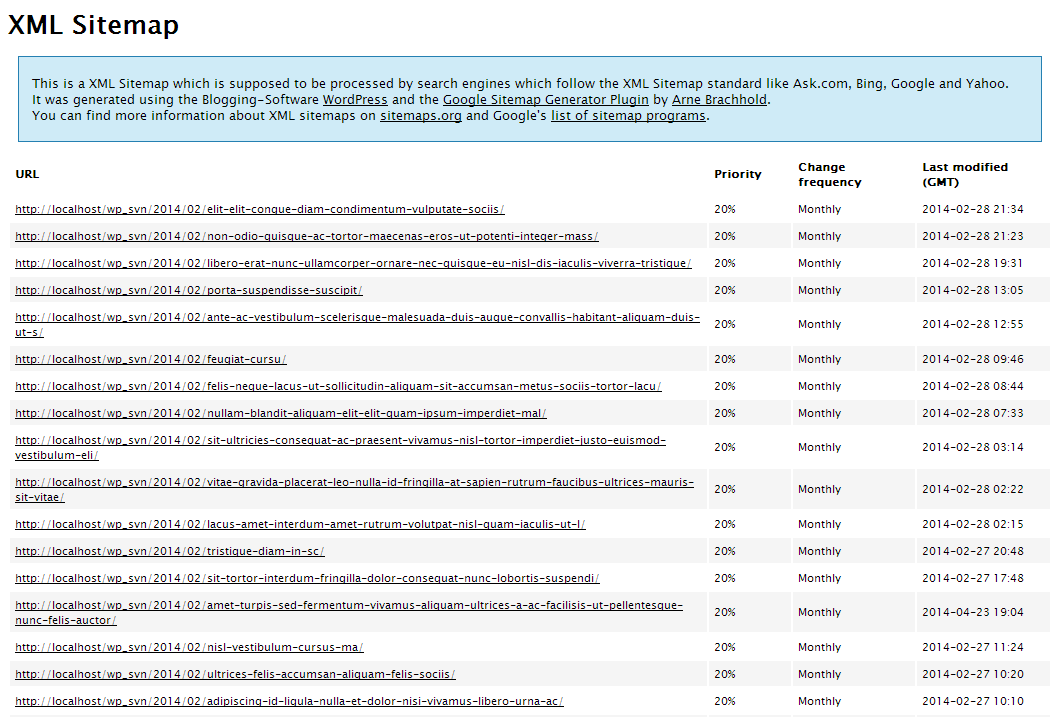
Before you create a sitemap, read Google’s sitemap guidelines to make sure you follow the rules. To create one, you can use Yoast SEO to generate it automatically. After installing it, go to SEO and choose XML Sitemap to get the link. Finally, go to Google Webmaster Tool to submit the sitemap to Google.
One tip when creating a sitemap: put the sitemap link in the footer of your site so Google’s bot can index your site better.
-> Read more: Detailed guide to submitting URLs to Google as fast as possible
Another way to get your pages indexed faster, and one you can’t skip, is building a system of internal links, also called Internal link – links between the posts on your site. This is done when optimizing SEO Onpage, to lift rankings considerably.
When building internal links, remember to keep them natural and useful to the reader. In other words, internal links should help readers understand more deeply the subject they are looking into.
Keep in mind, too, that internal linking not only helps Googlebot index your site faster and better, it also reduces bounce rate as well.
A lot of people think that once a post is written, Google will index it on its own. Honestly, it is not that simple. Some URLs sit forgotten for a month, and without being indexed, where would traffic come from? In the new video, Huy shows how to check and request indexing for your posts yourself, so you can handle it right after watching.
Build A backlink system is another way to get posts indexed faster that you shouldn’t overlook. Many people think backlinks can make your ranking drop. But you should know that the link dofollow of good quality can help you improve your ranking faster and more easily than ever.

When building dofollow backlinks, keep the following in mind:
Another way to get posts indexed on Google is to build fanpages on social networks. This not only speeds up indexing, it also brings you a large amount of traffic at low cost, while also lifting your business performance.
When Google doesn’t index the right important posts, a website easily loses focus. The pages that should bring in traffic and conversions don’t show up, while low-value URLs appear in search results. Over time, Google misreads the content structure, SEO strength across the whole site weakens, and the work you put into content stops paying off. That is why the MONA Media team keeps tight control of indexing, so Google doesn’t miss important URLs.
This has been proven in the SEO case study for Kim Khí Tiến Thành. In a highly competitive market with hundreds of product keywords, MONA ran full-scope SEO combined with SEO AI, built the site structure properly from the start, and monitored indexing daily so every post was recorded by Google correctly. After 10 months, the website reached nearly 7,000 organic visits a month with steady growth, giving the business momentum for sustainable market expansion.
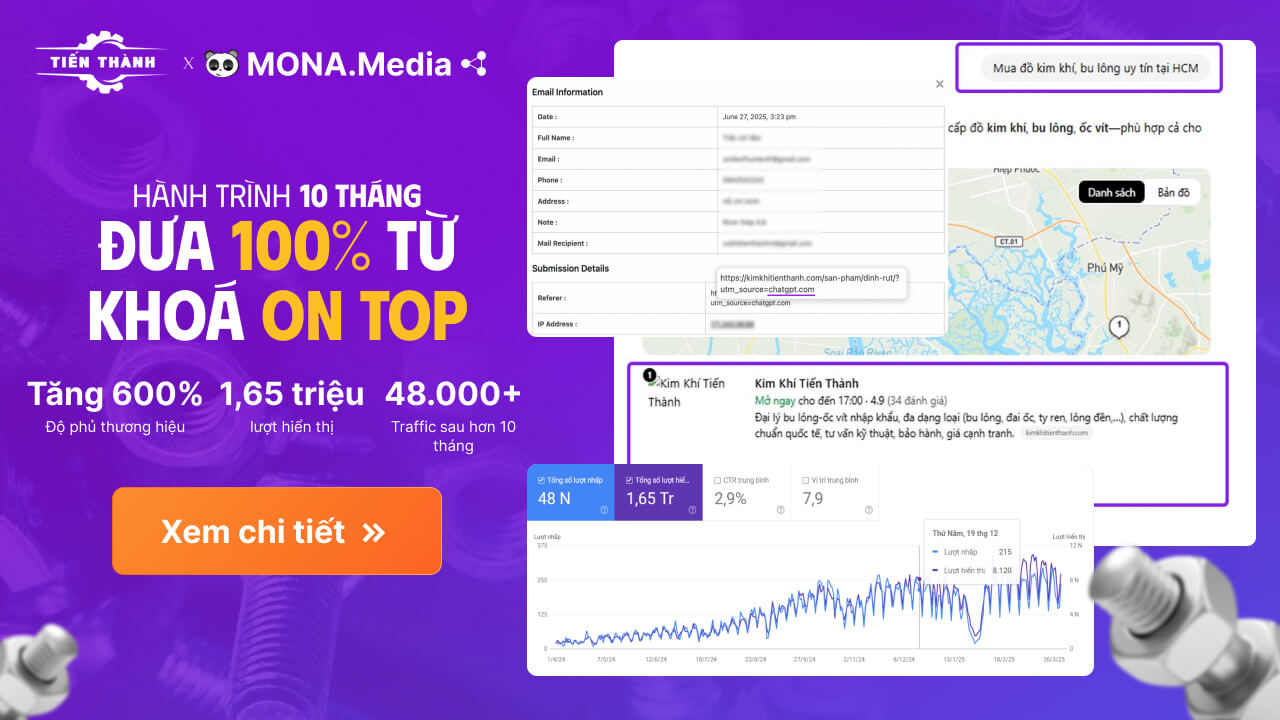
See the Kim Khí Tiến Thành SEO case study to understand how MONA controls indexing and helps a website grow traffic sustainably.
Plenty of websites publish content and optimize the technical side regularly, yet traffic quietly slips over time for no clear reason. The cause may not be the content or on-page SEO at all, but important URLs that Google has not indexed, or that carry a noindex tag by accident. If you don’t catch and fix this in time, the site gradually loses its chances to show up, wastes crawl budget and sees overall SEO performance decline. Understanding how to handle URLs that are not indexed, are noindex, or are indexed wrongly is the foundation for protecting and optimizing your organic traffic over the long term.
A URL tagged noindex is usually the result of a misconfiguration, not a deliberate decision to block SEO. Common causes are a noindex meta tag in the source code, a block in robots.txt, or an X-Robots-Tag HTTP header.
On WordPress sites, this error usually comes from SEO plugin settings such as Yoast or RankMath, or from the Search Engine Visibility option being switched on by mistake. In that case Google still crawls the page but won’t add the URL to search results, even if the content is fully up to standard.
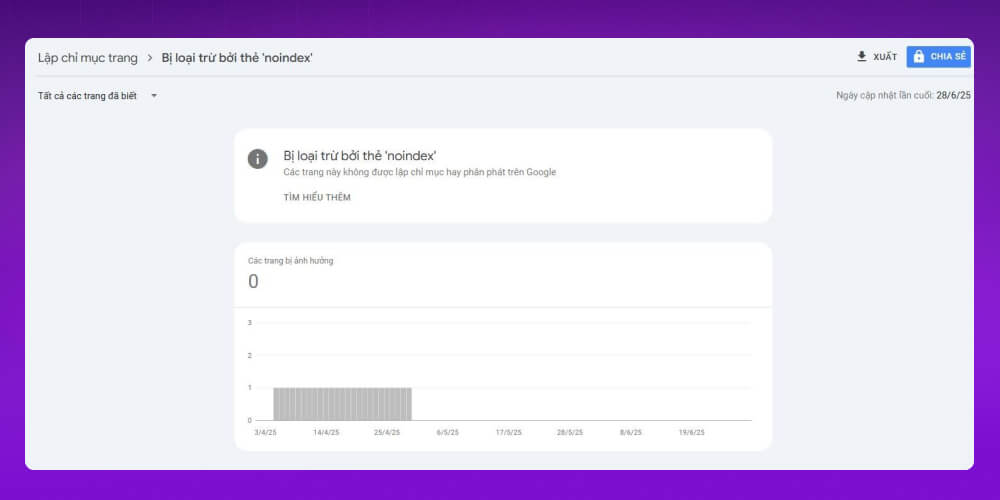
Steps to handle URLs tagged noindex:
URLs that Google doesn’t index usually come from a combination of factors. The most common are thin, low-value or duplicate content, so Google doesn’t prioritize adding them to the index.
Technical problems also make it harder for Google to discover and assess a page: being blocked by robots.txt, returning 404 errors, slow crawling, or no internal link signals. A missing sitemap, or one that isn’t fully updated, can also cause URLs to be skipped during crawling.
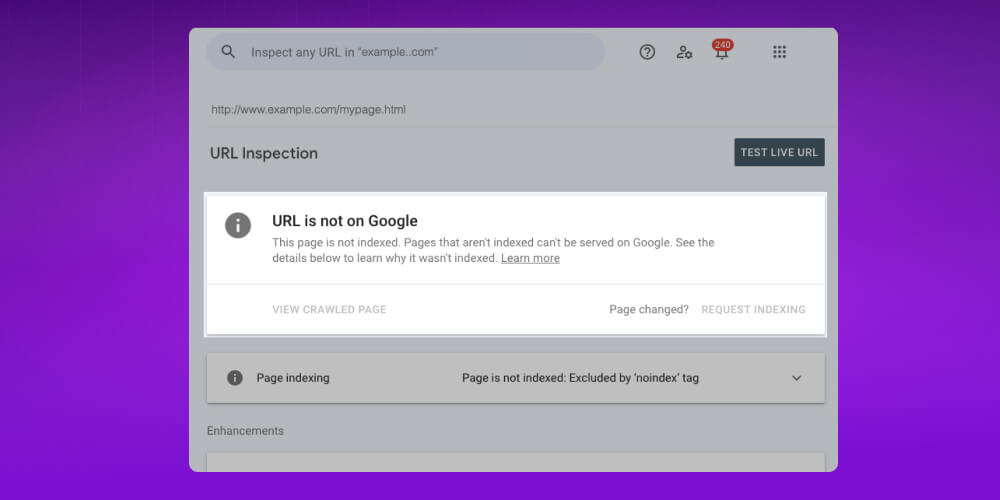
How to handle URLs that are not indexed even without a noindex tag:
URLs get indexed by mistake when Google crawls and indexes URL versions you don’t need, such as URLs with filter, session or tracking parameters.
Duplicate content is also very common: several different URLs show the same content without a clear signal about which is the main page, so Google indexes the wrong one and splits your SEO strength.
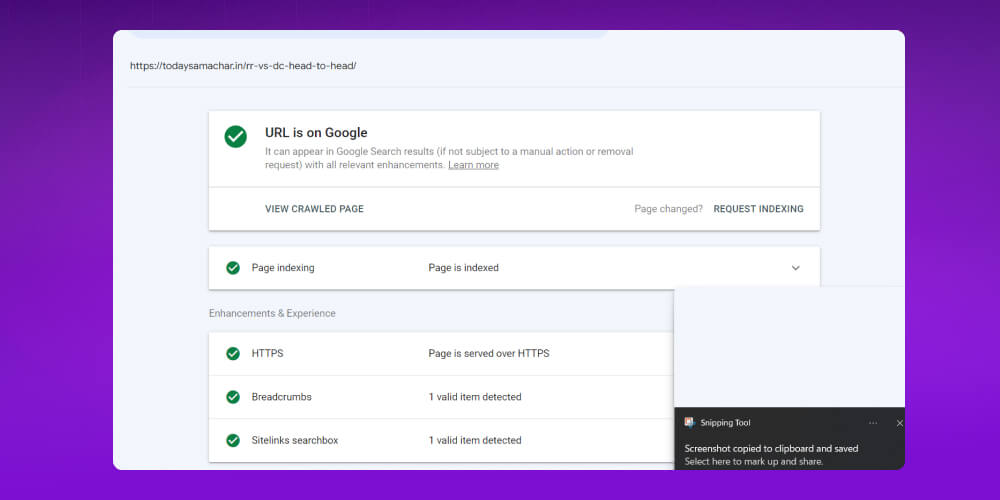
How to handle Google indexing the wrong URLs:
If these optimization steps are too complicated or take too much of your time, you can hand them over to SEO services of MONA Media to handle.

From ensuring fast Google indexing to optimizing the technical side of your website, or any of the SEO techniques, our SEO services cover it all. With more than 10 years in SEO and website design, we know how to optimize websites and meet Google’s complex algorithms.
As a result, MONA has helped more than 12,000 partners in Vietnam and abroad succeed with SEO alone, and grow revenue by up to 300 times. You can get results like these too. Just CONTACT US with MONA via hotline 1900 636 648 and our SEO specialists will give you advice and support, detailed SEO quote quickly.
Not every URL shows up on Google right after you publish it. Plenty of pages that have been live for a long time are still not indexed, or have been dropped from search results without the site owner ever noticing.
That is why knowing how to check indexing for each URL is an important step. It tells you exactly where your SEO stands and lets you fix, in time, the problems affecting how visible your website is in search engines.
B1. Go to Google Search Console and open the URL Inspection tool
B2. Paste the URL of the post you want to check into the search box and press Enter
B3. Look at the indexing status Google returns for the URL
B4. When a URL isn’t indexed, use the “Request indexing” feature so Google prioritizes crawling and indexing it sooner
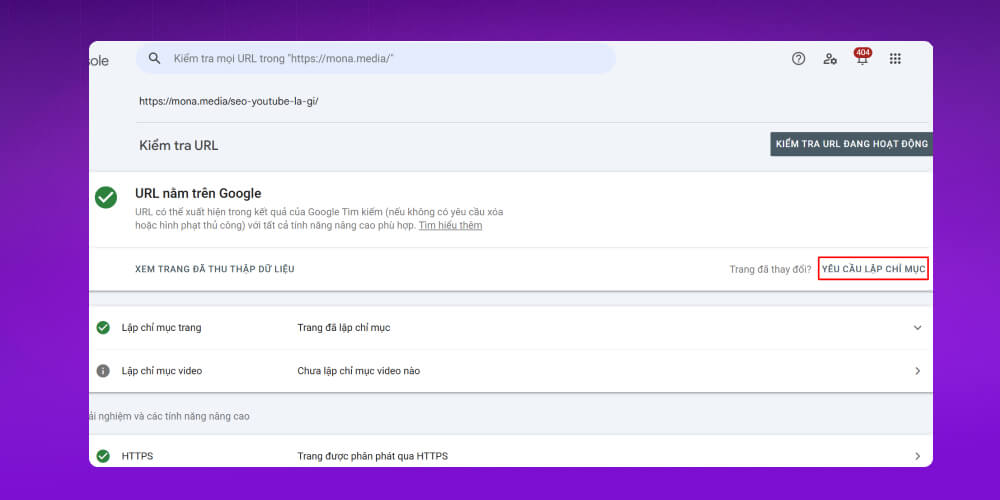
This is the most accurate way to check indexing and follow the status of each post on Google.
B1. Go to Google.com and open the search bar
B2. Enter site:yourdomain.com to see all the pages of your website that Google has indexed
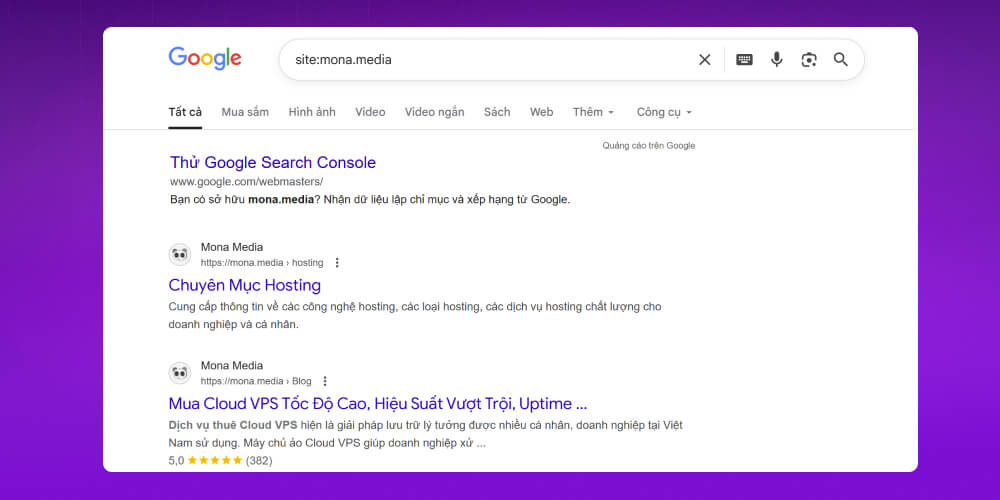
B3. Look at the results. If there are very few pages or none, the website or many of its URLs may not be fully indexed
B4. To check a specific post, enter site:yourdomain.com/post-path and compare the results
This is a quick, easy way to check Google indexing, and it gives you the basic indexing status of your site before you dig deeper with Google Search Console.
As you can see, indexing in SEO, also known as Google Index is essential if you want to rank high in search engines, Google above all. We hope the ways to speed up indexing that MONA shared above help you improve your website’s SEO. Good luck.
-> Related articles:

CEO & Founder · The MONA
Founder of The MONA, who built a services company of 200+ staff with 14,000+ projects delivered. Khánh Hùng shares how he thinks about building systems that run themselves, automating a business, and the real lessons from delivering projects at MONA.
 1,6K
1,6K



Professional website
design services
Own a website with a beautiful, 100% exclusive design and a lifetime warranty, with the ability
to expand features flexibly as your business grows, starting today!








 MONA will never sell your information or send you spam
MONA will never sell your information or send you spam
MONA will never sell your information or send you spam


 MONA will never sell your information or send you spam