
 MONA OS 2.0


 Tự động hoá doanh nghiệp
 Cẩm nang SEO
 Digital Marketing
 Kinh nghiệm thiết kế website
 Hạ Tầng Server
 Giáo dục


 VI
VI
 EN
EN

























Message us on
Zalo Official


 Products

 ProductsProducts









 Website designLooks good and convinces your customers.
SEO servicesBrings in customers searching for exactly what you sell.
Website designLooks good and convinces your customers.
SEO servicesBrings in customers searching for exactly what you sell.
 Tư vấn digital marketingKéo khách từ nhiều kênh, đo bằng số thật.
Corporate video productionVideos introducing your company, factory and team.
Tư vấn digital marketingKéo khách từ nhiều kênh, đo bằng số thật.
Corporate video productionVideos introducing your company, factory and team.
 NewAI video productionCompany story films made with AI.
 Custom software developmentCRM, ERP and HRM built for your business.
 Viết AI Agent theo yêu cầuĐặt riêng một trợ lý AI cho đúng việc của mình.
 Tư vấn chuyển đổi AIĐưa AI vào vận hành của cả công ty.
NewMONA LMSManagement for centers and schools.
MONA SkillHubInternal training for company staff.
Tư vấn chuyển đổi AIĐưa AI vào vận hành của cả công ty.
NewMONA LMSManagement for centers and schools.
MONA SkillHubInternal training for company staff.
 NHTQ systemEnd-to-end China–Vietnam shipping operations.
MONA JMSManagement for gold, diamond and pawn shops.
NHTQ systemEnd-to-end China–Vietnam shipping operations.
MONA JMSManagement for gold, diamond and pawn shops.
 MONA E-LearningA website with every feature you need to sell courses.
 Course on selling online coursesMore than 30 free lessons on selling courses automatically.
 MONA Cloudmonacloud.vnServers to get your apps and websites running.
 MONA Basemonabase.vnPostgres database, sign-in and file storage.
 MONA Mailmonamail.vnSend OTP, order and invoice emails from your software.
 MONA Paymonapay.vnReceive bank transfers via VietQR, with payment alerts sent to your software.
 MONA eInvoiceComing soonIssue e-invoices that meet tax standards.
Gấu CườiTrả lời khách 24/7 trên web, Fanpage, Zalo và thu lead cho sale.
MONA eInvoiceComing soonIssue e-invoices that meet tax standards.
Gấu CườiTrả lời khách 24/7 trên web, Fanpage, Zalo và thu lead cho sale.
 Gấu TeleSalesGọi điện tư vấn, chăm khách như tổng đài viên thật.
Dê CườiTư vấn và chốt đơn cho shop ngay trong khung chat.
Gấu WebmasterNhắn nhóm Zalo là website được sửa xong.
Gấu TeleSalesGọi điện tư vấn, chăm khách như tổng đài viên thật.
Dê CườiTư vấn và chốt đơn cho shop ngay trong khung chat.
Gấu WebmasterNhắn nhóm Zalo là website được sửa xong.
 Gấu Pháp ChếSoạn hợp đồng, rà điều khoản trong vài phút.
 Gấu Báo GiáLên báo giá đúng mẫu và gửi khách ngay.
 AI chăm sóc khách hàngTheo dõi và giữ chân khách hàng cũ.
 Gấu Tuyển DụngLọc hồ sơ, hẹn lịch, phỏng vấn ứng viên.
 AI
Gấu Cười MONA ĐANG TỰ XÀITrả lời khách 24/7 trên website, Zalo OA, Messenger và thu lead về cho sale.
Dê CườiChốt đơn bán lẻ và sàn: Shopee, TikTok Shop, web. Chăm cả khách sỉ, đại lý.
Gấu WebmasterCập nhật nội dung, tối ưu SEO website mỗi ngày.
Gấu TeleSalesGọi điện tư vấn, chăm khách như tổng đài viên thật.
Gấu Tuyển DụngLọc hồ sơ, hẹn lịch, phỏng vấn ứng viên tự động.
AI chăm sóc khách hàngGiữ khách cũ, cứu lead đã rớt cho phòng kinh doanh.
Gấu Pháp ChếSoạn hợp đồng, rà điều khoản trong vài phút.
Gấu Báo GiáLên báo giá đúng mẫu, gửi khách ngay khi có yêu cầu.
AI
Gấu Cười MONA ĐANG TỰ XÀITrả lời khách 24/7 trên website, Zalo OA, Messenger và thu lead về cho sale.
Dê CườiChốt đơn bán lẻ và sàn: Shopee, TikTok Shop, web. Chăm cả khách sỉ, đại lý.
Gấu WebmasterCập nhật nội dung, tối ưu SEO website mỗi ngày.
Gấu TeleSalesGọi điện tư vấn, chăm khách như tổng đài viên thật.
Gấu Tuyển DụngLọc hồ sơ, hẹn lịch, phỏng vấn ứng viên tự động.
AI chăm sóc khách hàngGiữ khách cũ, cứu lead đã rớt cho phòng kinh doanh.
Gấu Pháp ChếSoạn hợp đồng, rà điều khoản trong vài phút.
Gấu Báo GiáLên báo giá đúng mẫu, gửi khách ngay khi có yêu cầu.
 Chuyển đổi AI toàn phầnGiải pháp tổng cho doanh nghiệp, 3 lớp triển khai.
 Viết AI Agent theo yêu cầuĐặt riêng một con AI gánh đúng nghiệp vụ của bạn.
 Custom softwareCRM, ERP and HRM with built-in AI automation.
 SEO & AEO thời đại AIĐược Google lẫn AI trích dẫn, không chỉ xếp hạng.
 Kiến thức AI cho doanh nghiệpBài phân tích, hướng dẫn ứng dụng AI vào vận hành.
 Free AI courses
 AI tools at work
18 March, 2023
What is a sitemap? How do you create a sitemap and submit it to Google? This is a question newcomers to SEO cho website tricks often ask. A sitemap is a very important step that guides Google's bot to all the content on a website more quickly. In this article, MONA Media answers “everything” about Sitemap as well as simple ways to create and submit one.
A sitemap is a file that lists the pages and files on a website. The list is arranged as a hierarchy (in decreasing order of importance) that helps search engines:

There are 2 main, common types of sitemap, and both benefit SEO:
HTML Sitemap is a site map built in HTML that helps users reach the section they are looking for more easily
An HTML sitemap should be placed in the footer so users can find it most easily
An XML sitemap is created to help search engine bots navigate and collect information on a website more easily and quickly.
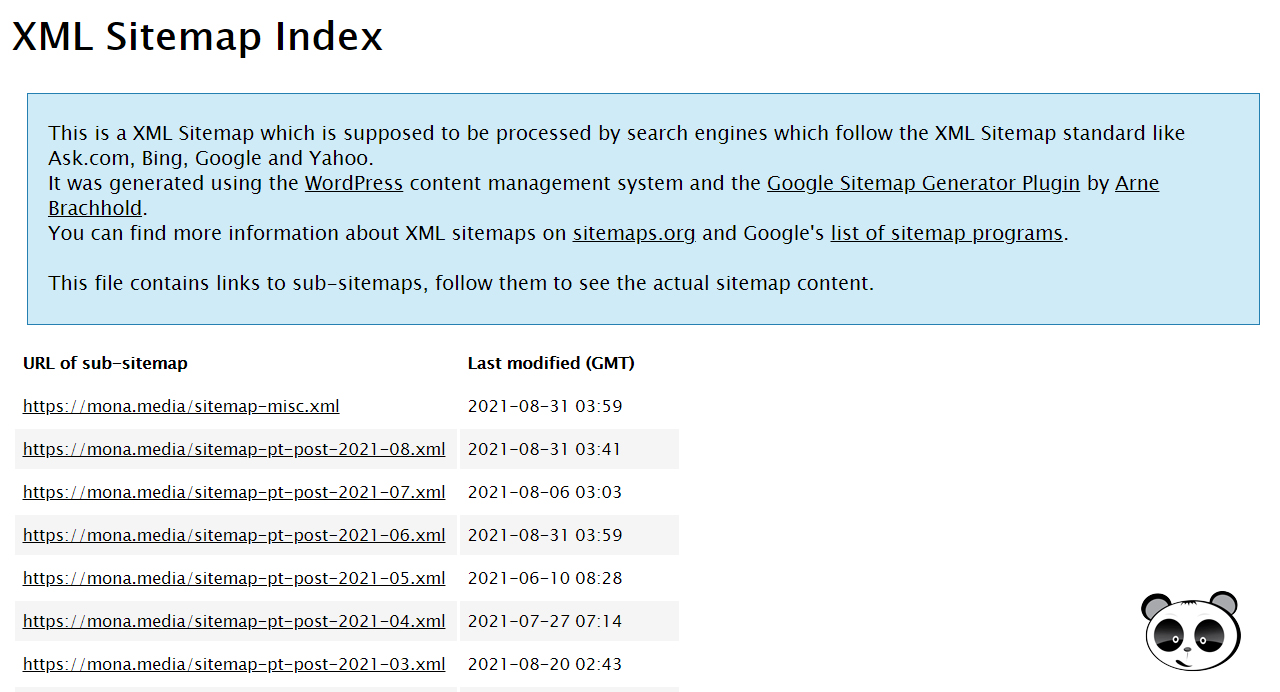 Other types of sitemaps
Through these secondary sitemaps, Google can collect data in ways better suited to special types of websites, such as news sites and sites where media is the main content (wedding photography service sites, sites selling images, videos…), …
To help you save time building websites with a special structure, Mona Media offers a company website design template plan, 100% optimised for SEO, at a full-scope SEO quote reasonable price.

For a website to be rated highly by Google and other search engines, it has to be understandable to the crawling bot. This is where a sitemap does its job as a road map that helps search engines discover and index the pages on the site efficiently.
In any SEO guide worth its salt, creating and submitting a sitemap is always stressed as a foundational step in technical optimisation. If you are wondering why your website needs a sitemap and how to use it properly, read the details in the content below.
 It affects the SEO process
A sitemap affects your website's SEO process. It helps tell Google whether your website meets SEO standards.
Example: You have some articles on your website that are not (or not yet) indexed. In that case, the sitemap is the tool that tells Google about those articles, so Google will index them faster.
Before rolling out a website optimisation strategy, Agency SEO MONA always runs a website audit to check whether the website already has a sitemap. If it does not, the Mona SEO team creates and submits one.
Along with that, MONA also audits and sets up other items such as Robots.txt, creating Schema, Google Business, registering and indexing the business on Google,… so Google recognises the business faster, instead of taking months or years as it did before SEO.
Learn how Sitemap, Audit and Onpage affect a website in the video below!
SEO case study: MONA x Kim Thành
From the start of the partnership, MONA set about optimising the entire Kim Thành website platform, from submitting the sitemap and standardising the technical structure to speeding up page load, laying a solid foundation for SEO. In the highly competitive motorbike parts market in Ho Chi Minh City, MONA did not take a short-term SEO approach. Instead, we analysed the website's current state carefully and built a full-scope SEO strategy combined with SEO AI that fits the business's goals.
Alongside optimising onpage, alt tags and SEO-standard content, the MONA team kept up with Google's new algorithms and applied AI SEO to help the brand stand out on both Google AI Overview and AI search engines.

After a period of implementation, visibility in AI Search rose sharply, organic traffic held steady and website revenue grew by more than 400%. The results show that with the right strategy, AI SEO can help a business pull well ahead. Explore this SEO case study to see how the business broke through in the era of AI search!
A sitemap is very useful for newly launched websites.
These new websites always struggle with indexing because they have too few backlink pointing back to them. A sitemap is very useful for search engine bots crawling your site for indexing, because it tells Google to index your website on your behalf, which benefits your SEO strategy.
From the user's side, a sitemap helps visitors picture and understand the website's structure more clearly, and access and find the information they need more accurately.
The more detailed the sitemap and the clearer its hierarchy, the better it improves experience and engages users.
According to Google, if your website is an ordinary site without too many pages or too much media, and its pages are linked to each other properly, bots can still easily reach every page on it without a sitemap.
However, a sitemap is still one of the criteria that help optimise Technical SEO and in some special cases a sitemap plays a very important role, such as:
Sometimes the technical errors you cannot see are exactly why your website cannot reach the top of Google. Don't worry, in this video Huy shares common technical errors and how to fix them quickly. Watch the video to optimise your website!
You can view a website's sitemap by adding sitemap.xml to the end of the website address.
Example: https://www.example.com/sitemap.xml
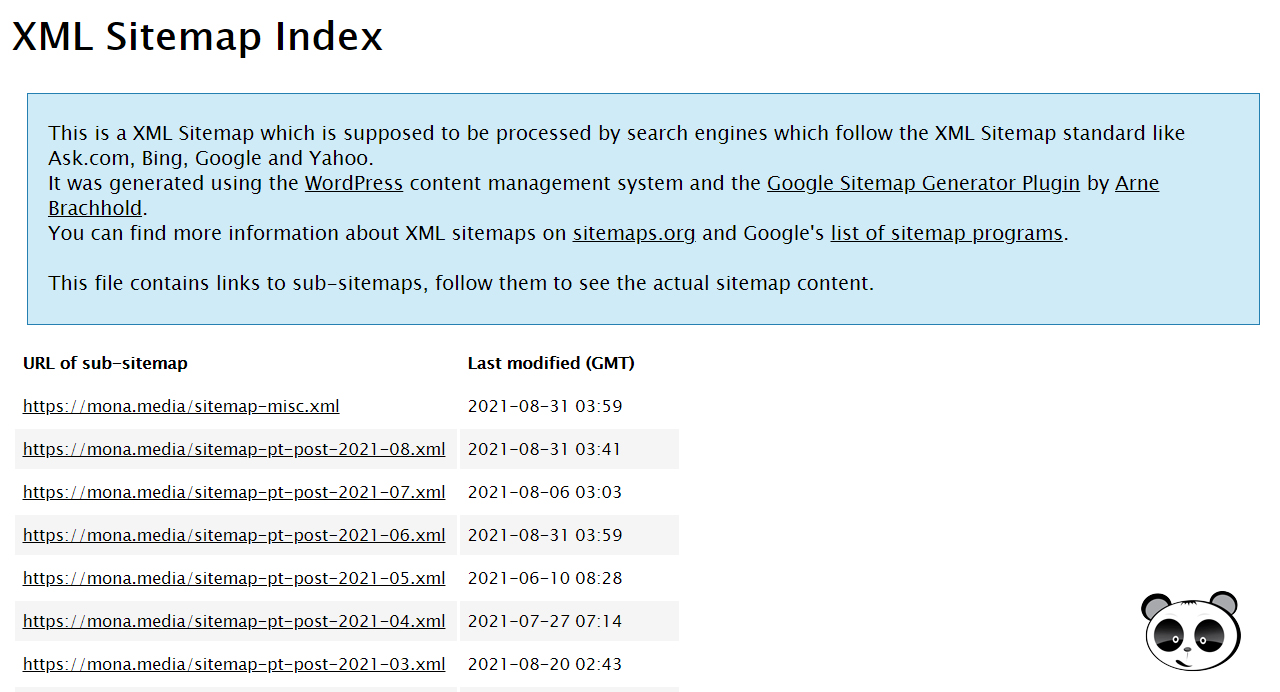
If the website returns nothing (the screen differs from site to site), it means you have not created a sitemap file yet.
Submitting sitemaps to Google can be done at any time, but building sitemaps is something you have to plan before you website design, the sitemap structure depends on the type of website, website structure will differ (a basic service website is different from an e-commerce site with many product categories and product types).
It also has a big impact on your SEO tactics later on – so you should get it right from the start to shorten the SEO road (because if you later find the limits of your current sitemaps and want to change them, Google will take time to re-index the new URLs, or if you use Redirect 301 , it will not take effect immediately).
≫ See our: SEO Services in Ho Chi Minh City that you can trust
For WordPress websites, the plugin Simple Sitemap is the best solution. Simple Sitemap adds the ability to build and design an HTML sitemap directly with the default editor, easily, quickly and conveniently
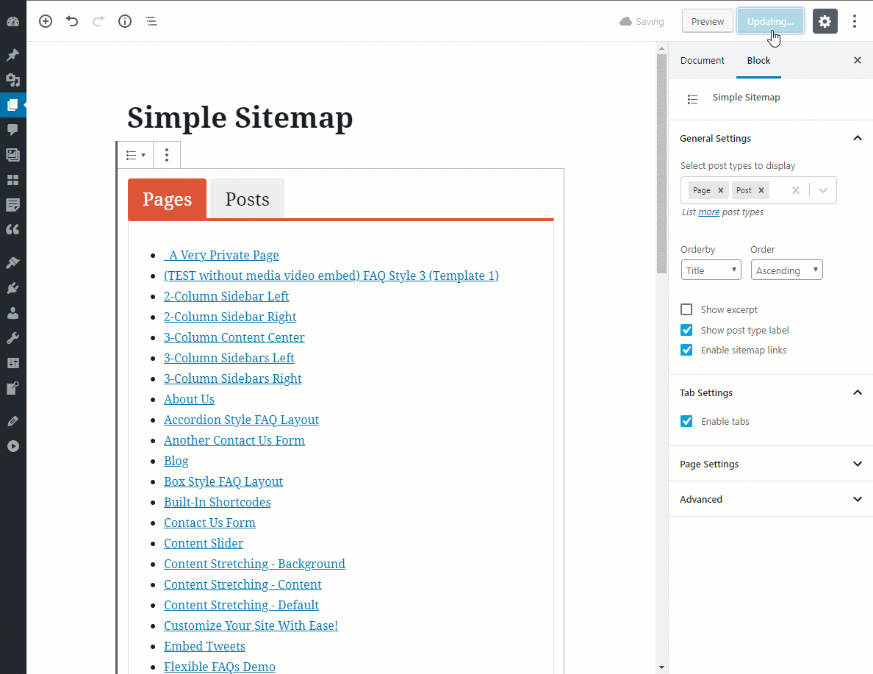
If you create an HTML sitemap by coding it manually, you can use <ol> or <ul> tags combined with CSS to get exactly the HTML sitemap you want
How to create an XML sitemap with Yoast SEO
Yoast SEO is a very popular plugin for optimising SEO on WordPress websites. Yoast SEO offers many tools to make sure a website is fully SEO-optimised, including XML sitemap creation.
Step 1: Install and activate Yoast SEO
You can install Yoast SEO directly from the WordPress plugin directory or download it from https://wordpress.org/plugins/wordpress-seo/. Then activate Yoast SEO once installation is complete
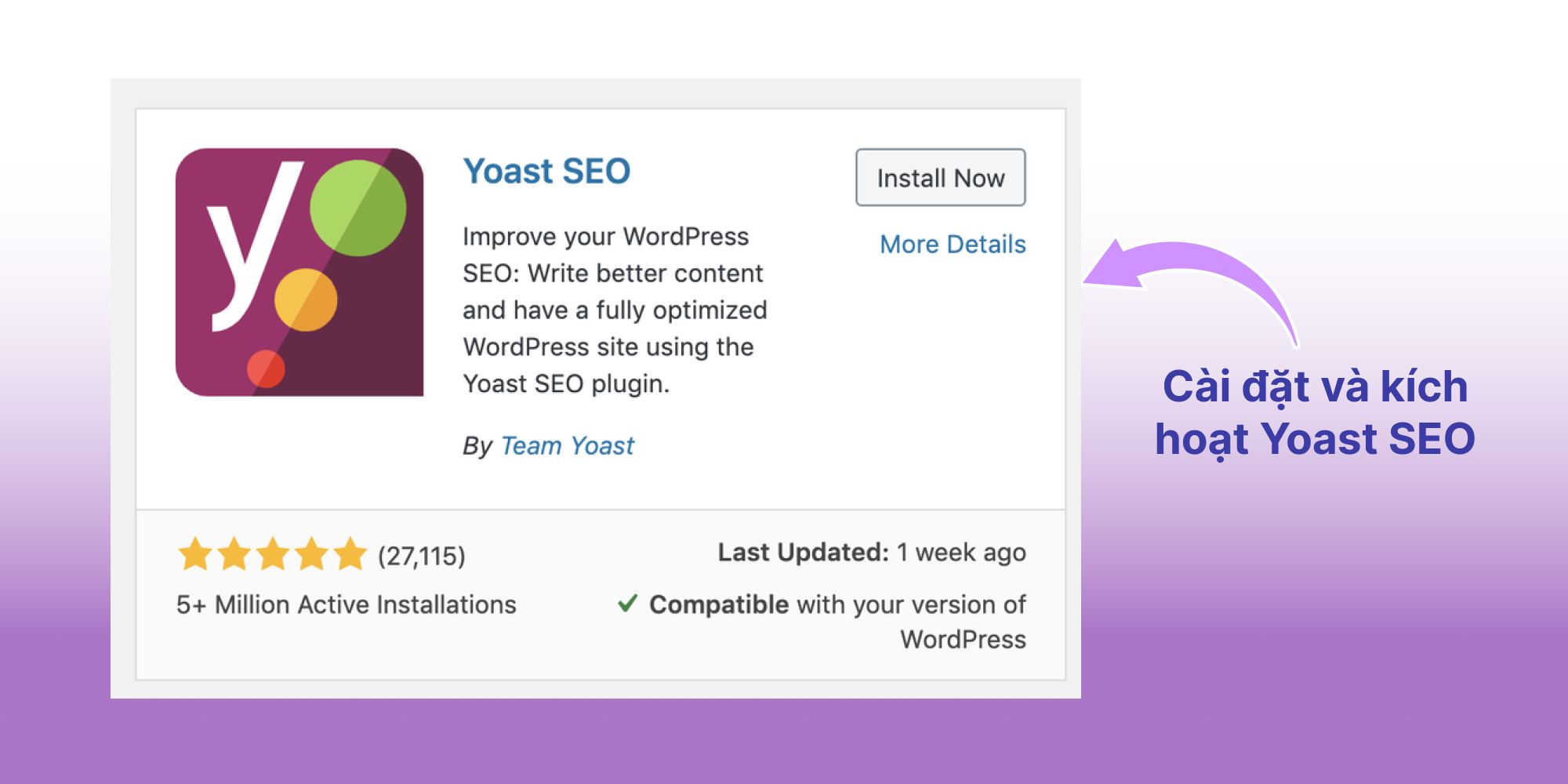
See also: Detailed guide to installing, configuring and using Yoast SEO
Step 2: Open advanced settings for pages
After activating,
Step 3: Enable XML Sitemap
After enabling advanced editing:
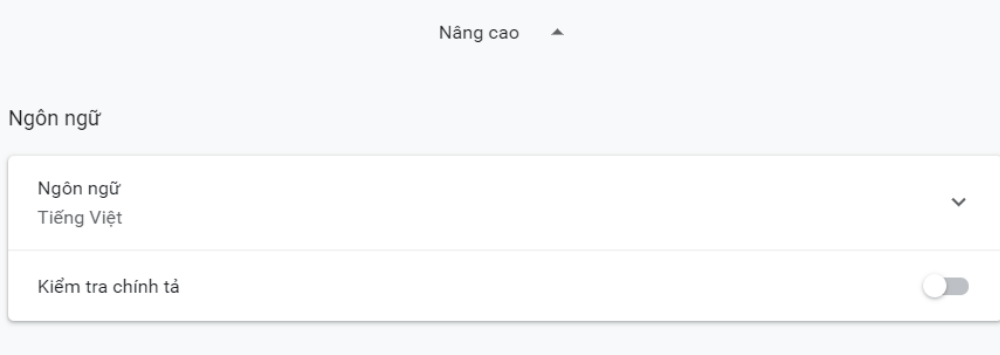
Step 4: Check
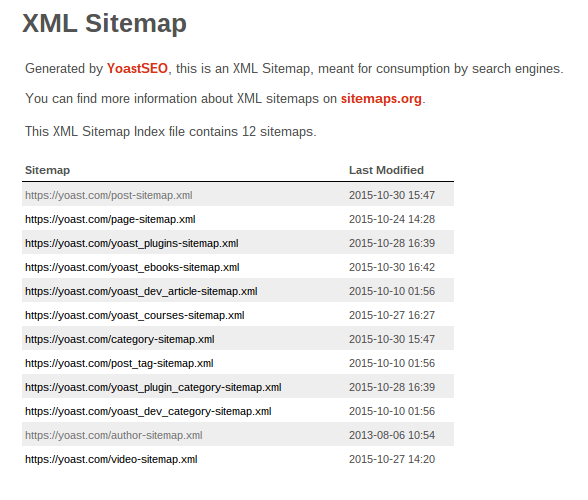
Check the XML sitemap by adding sitemap.xml to the end of your domain. Websites that have created a sitemap successfully with Yoast SEO will show a screen similar to this:
Creating an XML sitemap with the Google XML Sitemaps plugin
Google XML Sitemaps is a well-known plugin dedicated to creating XML sitemaps, used by many people who run an SEO plugin other than Yoast SEO.
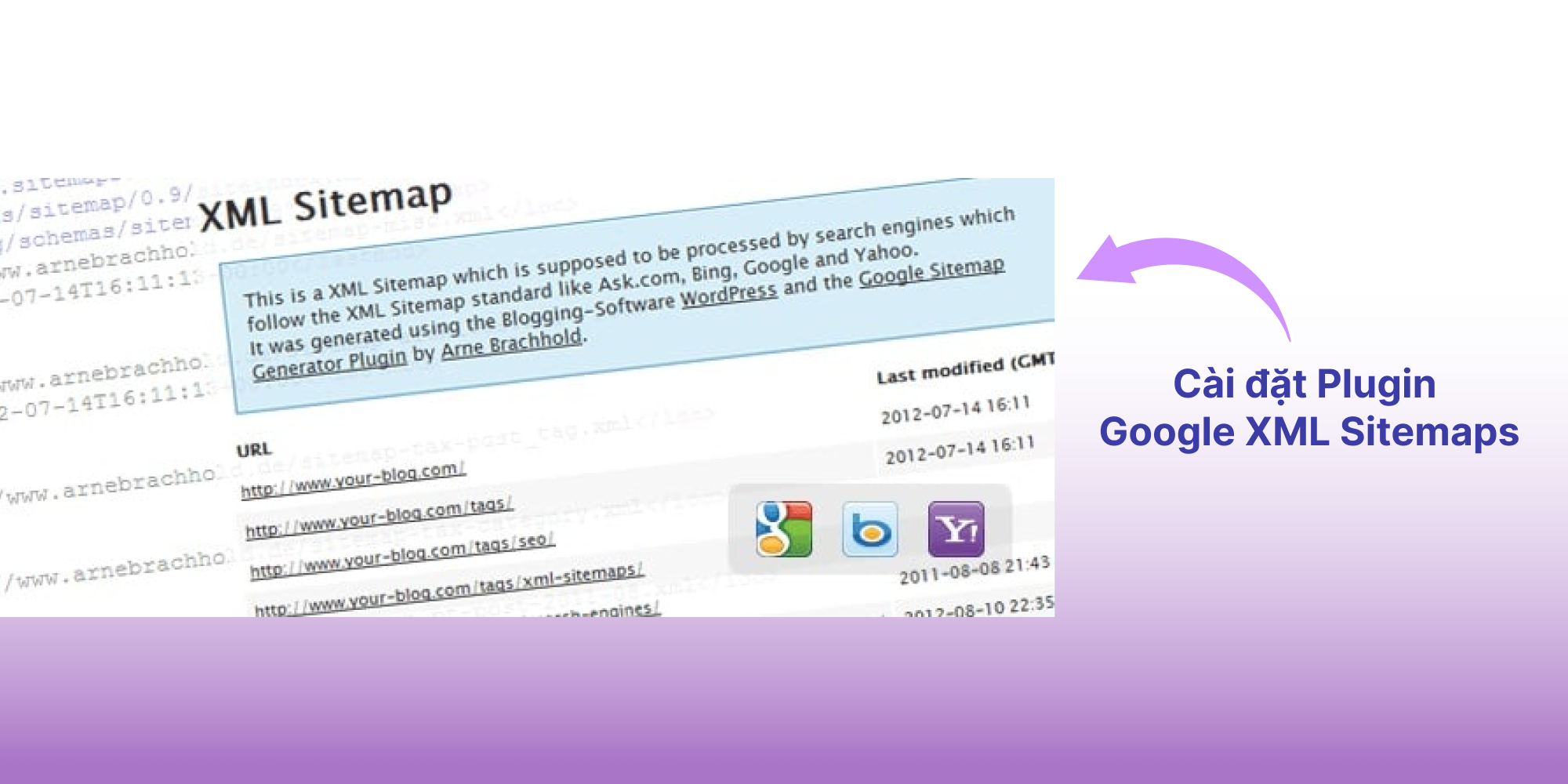
Step 1: Install and activate the Google XML Sitemaps plugin
You can install Google XML Sitemaps directly from the WordPress plugin directory or download it from https://wordpress.org/plugins/google-sitemap-generator/. Then activate it once installation is complete.
Step 2: Configure XML Sitemaps
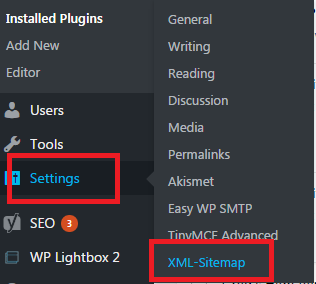
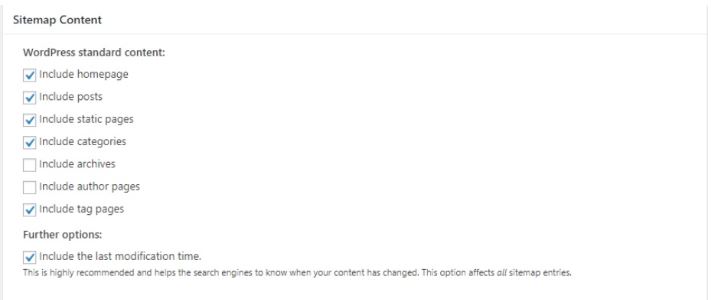
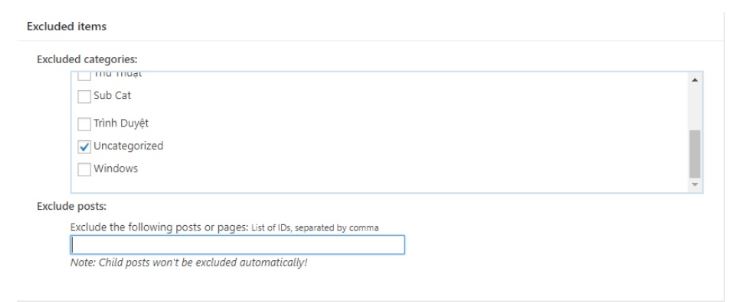
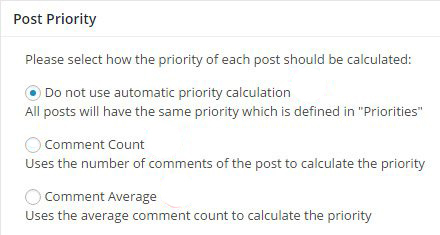
After activating, go to Settings -> select XML Sitemaps and start configuring:
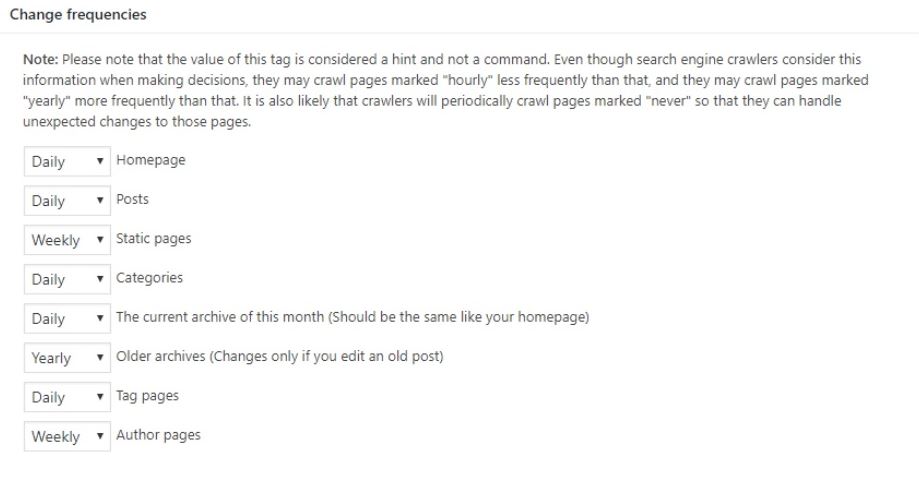
Step 3: Finish and check
Once configured, check the XML sitemap the plugin has created for your website. The XML sitemap page created by the Google XML Sitemaps plugin looks like this:
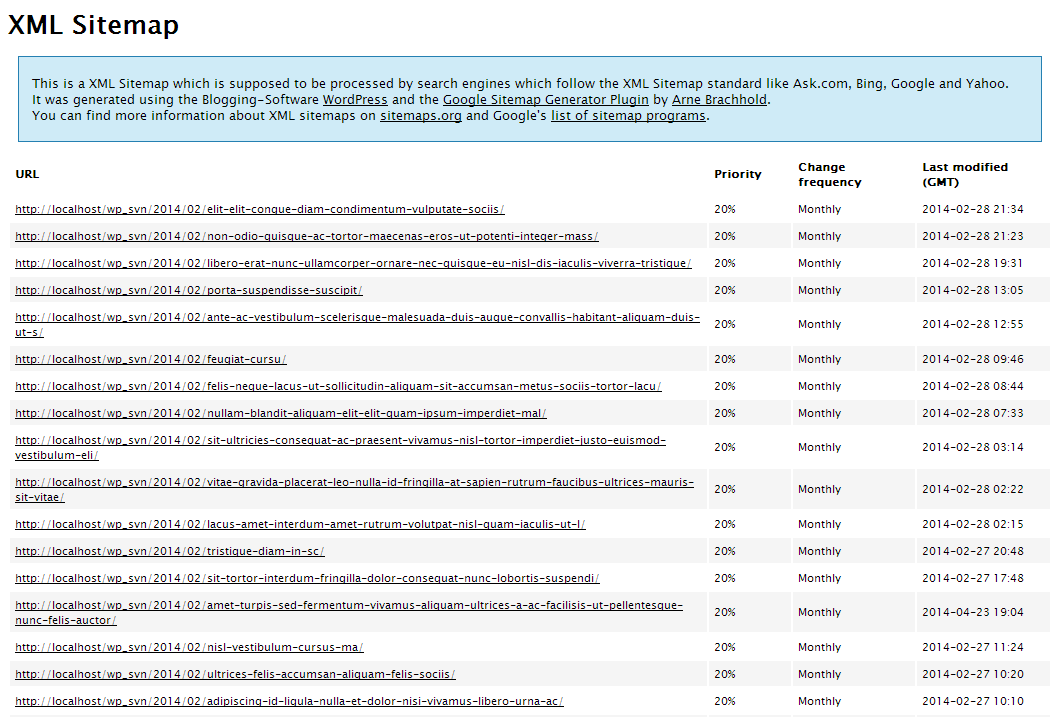
The online sitemap generator XML-Sitemaps.com provides an XML file the way you want it, to apply to your website's sitemap
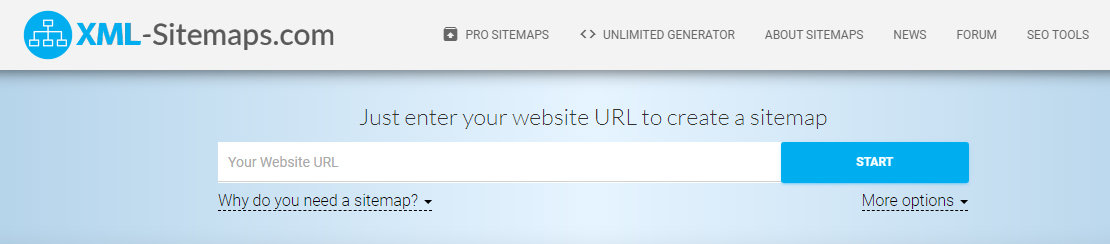
Step 1: Go to the website http://www.xml-sitemaps.com/
Step 2: Enter the URL and select Start
You can turn some options on or off before starting:
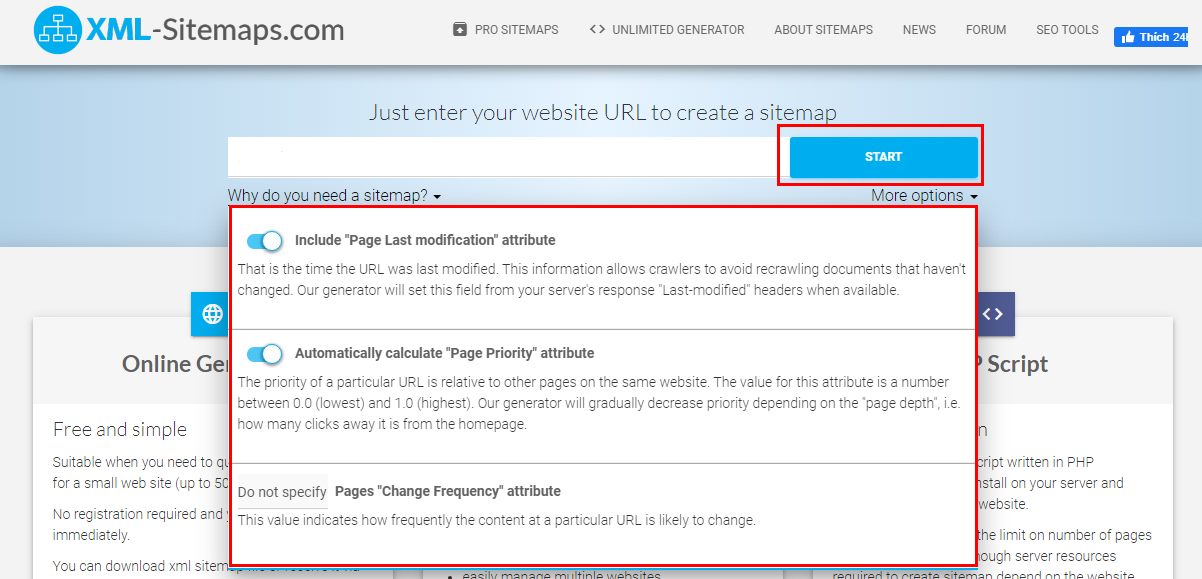
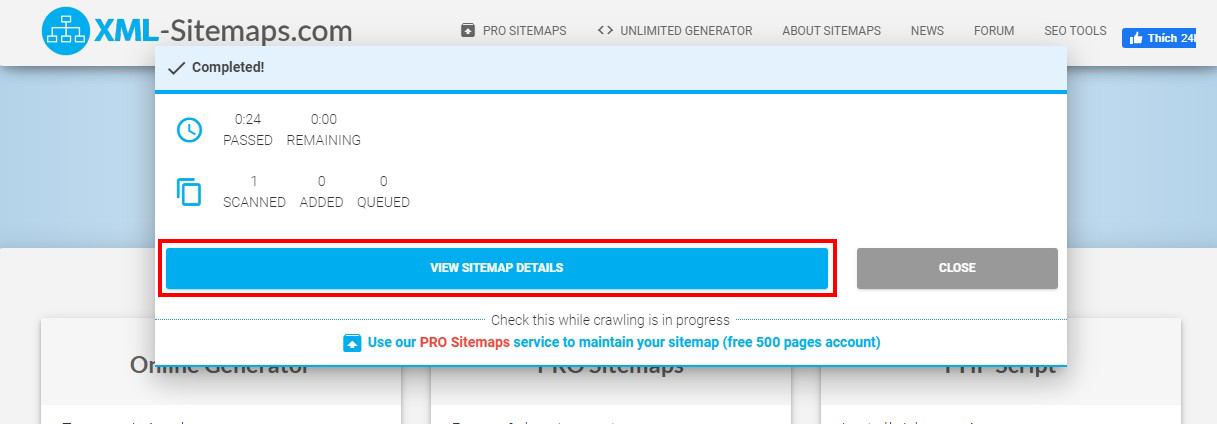
Step 3: Once processing is finished -> select View Sitemap Details
Step 4: Download the sitemap
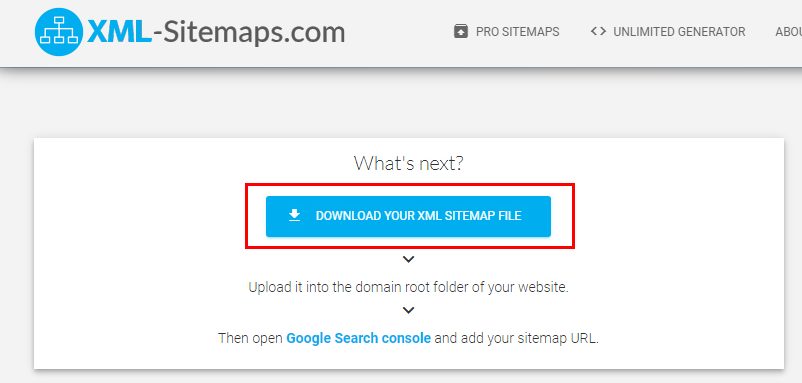
Step 5: Upload the XML file Hosting to the website's directory and check it at the URL www.example.com/sitemap.xml
To submit a sitemap to Google, you need to use Google Search Console.
Step 1: Log in to the Google Search Console account that has verified ownership of your website's domain

Step 2: Select Sitemaps -> enter the URL pointing to the sitemap (usually sitemap.xml) -> Submit
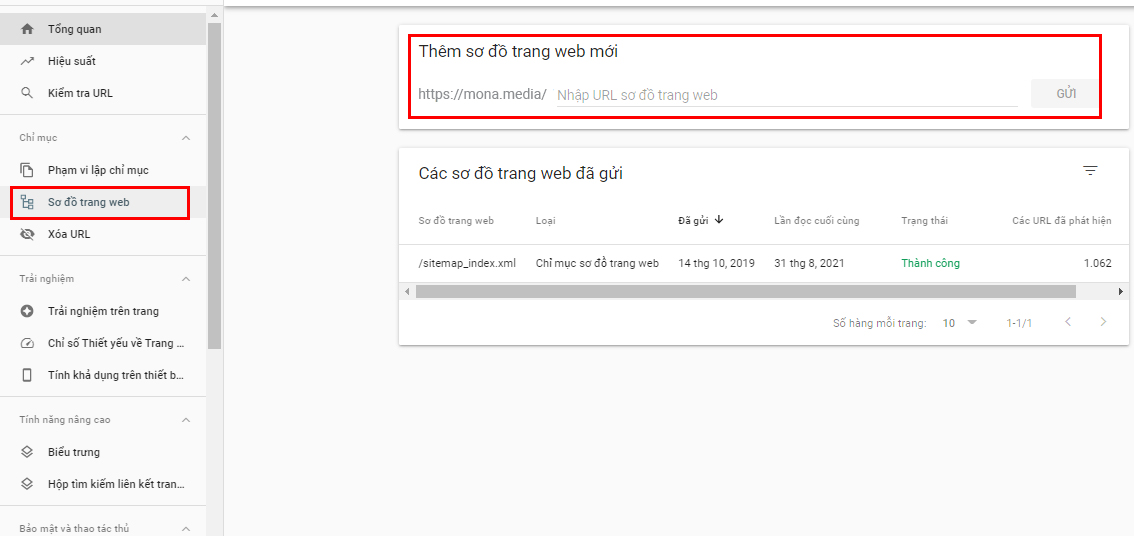
Step 3: After you submit, Google will crawl the whole website according to the sitemap
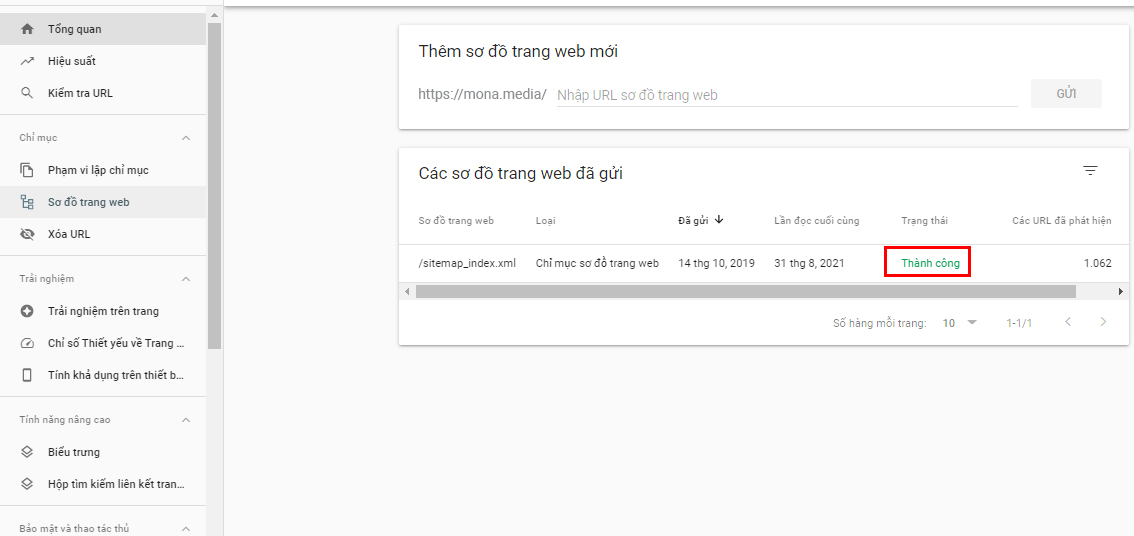
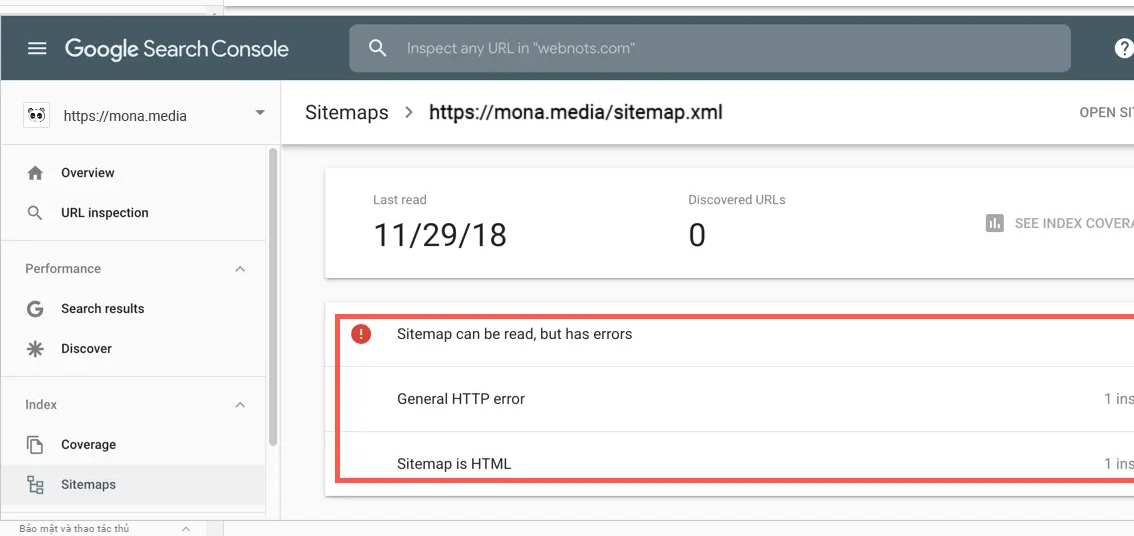
After a successful submission, the sitemap file helps the website change how bots crawl it to suit it better.
The sitemap file can also automatically update and store information on:
However, for very important pages or articles that you want Google to index as quickly as possible, submit the URL directly to Google to get into the priority queue.

Google Search Console also offers many other very useful features, such as:
Many businesses invest heavily in content and design but forget a “backbone” part of the website: the sitemap. It is the “road map” that helps Google understand the site structure, know which content matters and prioritise indexing more accurately. A well-optimised sitemap is the foundation for SEO to work effectively and sustainably.

If you are not sure where to start, MONA Media will work with you with full-scope SEO services, combining content, technical work and branding. We do not just get keywords to the top; we also help your website run reliably and create real value for your business.
Why choose MONA Media's SEO services?
Turn your website into a channel that brings sustainable revenue, not just a place to display information. Contact MONA for advice on SEO strategy full-scope SEO that fits you, and start winning the top of Google today.
Each time there is a new article, we usually add it to the sitemap with the newest at the top, in descending order. When Google reads the sitemap file, it indexes the newest article.
The problem is that if the sitemap has as many as 50,000 links, Google will spend a lot of effort downloading and parsing it. Not to mention that if you submit articles constantly, there is a big risk that Google has to download the sitemap file over and over.
In practice, Google rechecks the sitemap file about once a day or once a week to make sure no link has been missed. Sitemap plugins often bundle thousands of links into a single sitemap.
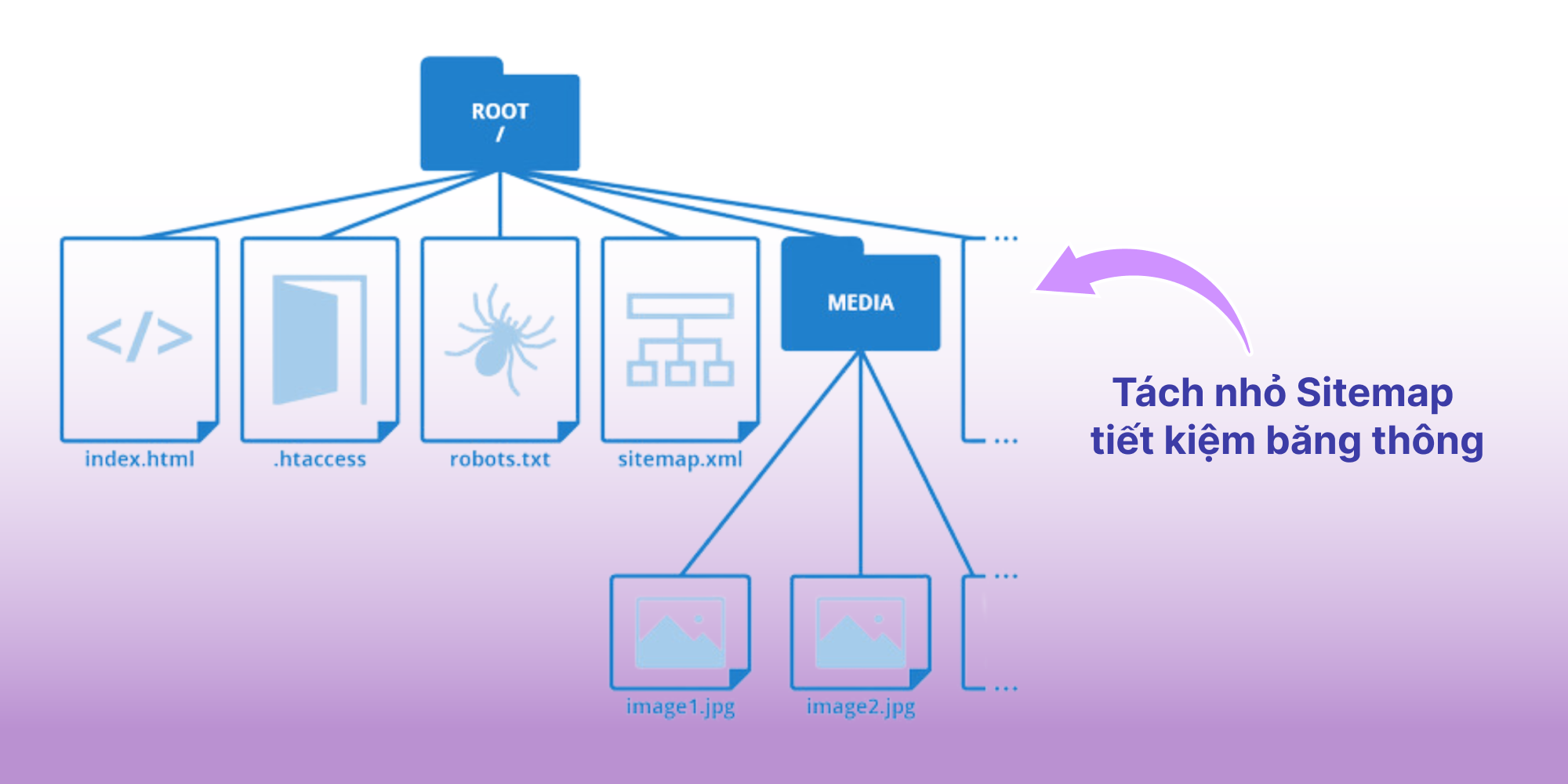
So splitting your sitemap to speed things up for Google is something you can consider. In practice, splitting sitemaps can save bandwidth and let Google scan them as fast as possible.
Aim for about 500 links per sitemap if you use sitemap plugins or if they have a sitemap-splitting setting.
You can also split sitemaps by content type: post sitemap, video sitemap, category sitemap, image sitemap,…
Sitemap is always one of the most effective tools supporting your SEO, because it lets Google's bot reach the articles on your website very quickly, even when your internal linking is poorly optimised. Mona Media hopes the article above has given you plenty of useful information on concepts such as what a sitemap is, and guidance on how to create and submit a sitemap simply so you can fill gaps, fix problems and make your website friendlier to both users and search engines. Good luck! If you have any questions about website management, digital marketing, corporate photographyfilming, product PR or services, feel free to contact MONA via HOTLINE 1900 636 648 for a free, detailed consultation!

CEO & Founder · The MONA
Founder of The MONA, who built a services company of 200+ staff with 14,000+ projects delivered. Khánh Hùng shares how he thinks about building systems that run themselves, automating a business, and the real lessons from delivering projects at MONA.
 1,8K
1,8K





Professional website
design services
Own a website with a beautiful, 100% exclusive design and a lifetime warranty, with the ability
to expand features flexibly as your business grows, starting today!










 MONA promises never to use your information for sale or SPAM
MONA promises never to use your information for sale or SPAM
MONA promises never to use your information for sale or SPAM


 MONA promises never to use your information for sale or SPAM