
 MONA OS 2.0
 Hợp tác với MONA


 Tự động hoá doanh nghiệp
 Cẩm nang SEO
 Digital Marketing
 Kinh nghiệm thiết kế website
 Hạ Tầng Server
 Giáo dục


 VI
 EN














Message us on
Zalo Official


 ProductsNew

 ProductsProducts
 Mới ra mắtKHA AI 2027App tự edit video, tự đăng mọi mạng xã hội, 2 phút mỗi ngày










 Thiết kế websiteVừa đẹp vừa thuyết phục được khách.
Dịch vụ SEOKéo về khách đang tìm đúng thứ anh chị bán.
 Tư vấn digital marketingKéo khách từ nhiều kênh, đo bằng số thật.
Quay video doanh nghiệpVideo giới thiệu công ty, nhà xưởng, đội ngũ.
 MớiDựng video AIDựng phim câu chuyện công ty bằng AI.
 Custom software developmentCRM, ERP and HRM built for your business.
 Viết AI Agent theo yêu cầuĐặt riêng một trợ lý AI cho đúng việc của mình.
 Tư vấn chuyển đổi AIĐưa AI vào vận hành của cả công ty.
NewMONA LMSManagement for centers and schools.
MONA SkillHubInternal training for company staff.
 NHTQ systemEnd-to-end China–Vietnam shipping operations.
MONA JMSManagement for gold, diamond and pawn shops.
 MONA E-LearningA website with every feature you need to sell courses.
 How to sell online courses (course)More than 30 free lessons on selling courses on autopilot.
 MONA Cloudmonacloud.vnServers to get your apps and websites running.
 MONA Basemonabase.vnPostgres database, sign-in and file storage.
 MONA Mailmonamail.vnSend OTP, order and invoice emails from your software.
 MONA Paymonapay.vnAccept bank transfers via VietQR and notify your software when the money arrives.
 MONA eInvoiceComing soonIssue e-invoices that meet tax standards.
Gấu CườiTrả lời khách 24/7 trên web, Fanpage, Zalo và thu lead cho sale.
 Gấu TeleSalesGọi điện tư vấn, chăm khách như tổng đài viên thật.
Dê CườiTư vấn và chốt đơn cho shop ngay trong khung chat.
Gấu WebmasterNhắn nhóm Zalo là website được sửa xong.
 Gấu Pháp ChếSoạn hợp đồng, rà điều khoản trong vài phút.
 Gấu Báo GiáLên báo giá đúng mẫu và gửi khách ngay.
 AI chăm sóc khách hàngTheo dõi và giữ chân khách hàng cũ.
 Gấu Tuyển DụngLọc hồ sơ, hẹn lịch, phỏng vấn ứng viên.
 Mới ra mắt
KHA AI 2027
Xây kênh chuyên gia 2 phút mỗi ngày
Quay bằng điện thoại, AI tự edit video, tự đăng lên 16 nền tảng và tự trả lời bình luận, tin nhắn.
876.475lượt xem trên kênh CEO MONA sau 35 ngày
 Anh Khánh HùngCEO MONA đang dùng mỗi ngày
Xem app làm được gì
 AI
Gấu Cười MONA ĐANG TỰ XÀITrả lời khách 24/7 trên website, Zalo OA, Messenger và thu lead về cho sale.
Dê CườiChốt đơn bán lẻ và sàn: Shopee, TikTok Shop, web. Chăm cả khách sỉ, đại lý.
Gấu WebmasterCập nhật nội dung, tối ưu SEO website mỗi ngày.
Gấu TeleSalesGọi điện tư vấn, chăm khách như tổng đài viên thật.
Gấu Tuyển DụngLọc hồ sơ, hẹn lịch, phỏng vấn ứng viên tự động.
AI chăm sóc khách hàngGiữ khách cũ, cứu lead đã rớt cho phòng kinh doanh.
Gấu Pháp ChếSoạn hợp đồng, rà điều khoản trong vài phút.
Gấu Báo GiáLên báo giá đúng mẫu, gửi khách ngay khi có yêu cầu.
 Chuyển đổi AI toàn phầnGiải pháp tổng cho doanh nghiệp, 3 lớp triển khai.
 Viết AI Agent theo yêu cầuĐặt riêng một con AI gánh đúng nghiệp vụ của bạn.
 Custom softwareCRM, ERP and HRM with built-in AI automation.
 SEO & AEO thời đại AIĐược Google lẫn AI trích dẫn, không chỉ xếp hạng.
 Kiến thức AI cho doanh nghiệpBài phân tích, hướng dẫn ứng dụng AI vào vận hành.
 Free AI courses
 AI tools at work
App mới · KHA AI 2027
Xây kênh 2 phút mỗi ngày
AI tự edit video, tự đăng mọi mạng xã hội
Free consultation, 8am–10pm every day

23 October, 2026

Two vulnerabilities in the PHP core let an attacker run code on a server with a single request to the website, no login needed. Patches have been available since October 21, 2026, and security vendors have recorded exploitation attempts, so any website running unpatched PHP faces a real risk.
This post answers four questions in turn: is your website affected, has your server been patched, what to do while you wait if it hasn't, and which signs in the logs are worth checking.
Yes, if the server runs unpatched PHP, whether the website is built on WordPress, Laravel or Magento. The bug is in the PHP engine, so no matter how clean your website code is, it can't block it, because PHP handles the malicious request before the website code starts running. The severity varies with how PHP is invoked. Apache mod_php is the most exposed setup, because the advisory records successful remote code execution on mod_php with default limits. PHP-FPM, FrankenPHP and LiteSpeed LSAPI are also in the affected set, with a lower level of proven exploitation.
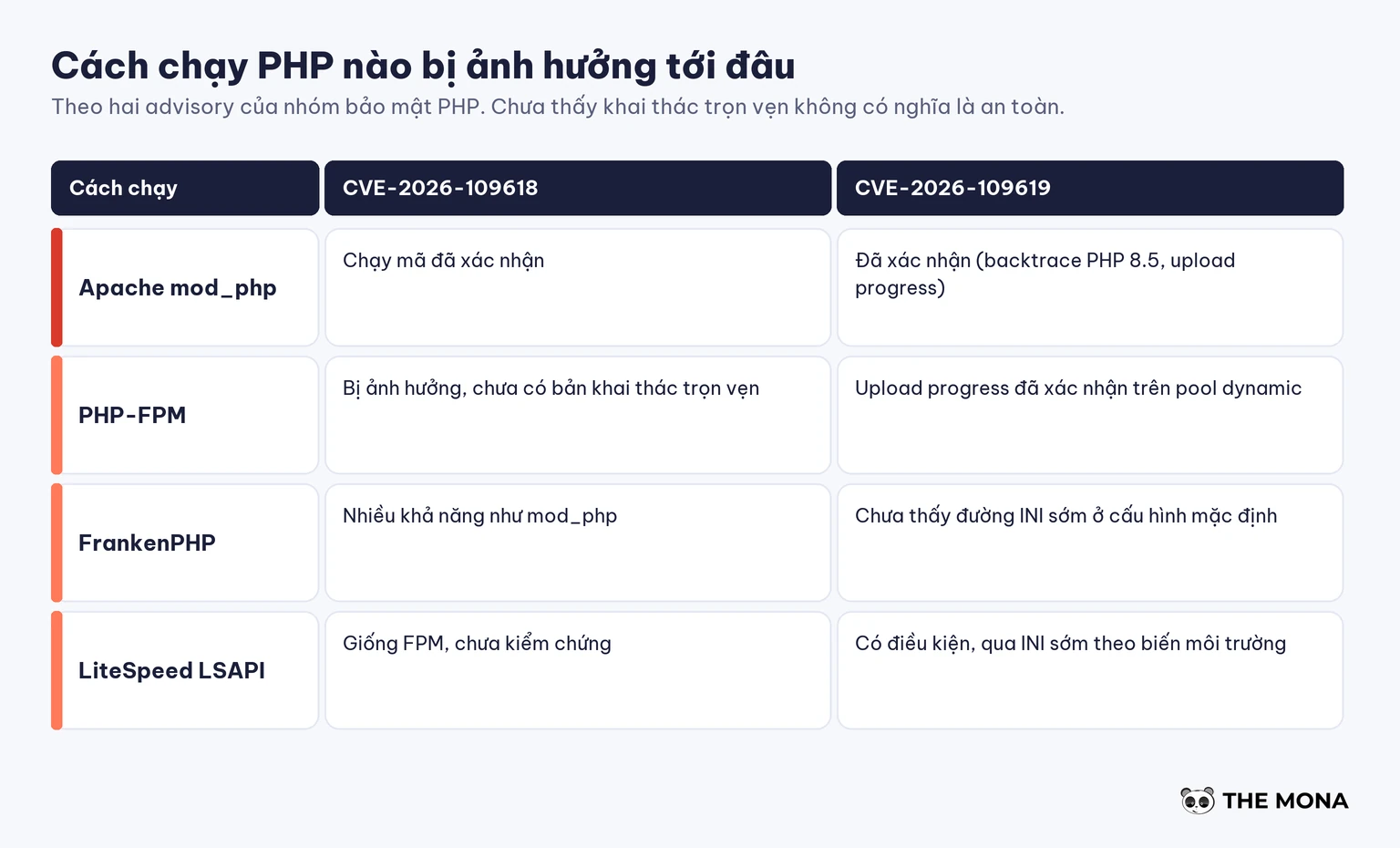
| How PHP runs | For CVE-2026-109618 | For CVE-2026-109619 |
|---|---|---|
| Apache mod_php | Confirmed code execution, right at the request startup step | Confirmed through a fatal backtrace (PHP 8.5) and session upload progress |
| PHP-FPM | Affected, no complete exploit yet | Session upload progress confirmed on a normal dynamic pool |
| FrankenPHP | Likely affected, like mod_php | No early INI path established in the default configuration; that doesn't mean it's safe |
| LiteSpeed LSAPI | Same as FPM, not verified | Conditional, through early INI via environment variables |
Attempts have been made. According to Tenable's FAQ, Amazon Threat Intelligence recorded an exploitation attempt on October 17, four days before disclosure, while Cloudflare and watchTowr saw attack waves from October 21. As of October 22, CISA had not added the two bugs to its KEV catalog, and PHP said its security team had found no working exploit at release. The October 22 update from Sansec adds that public PoCs don't run on default PHP installs, and most need the target website to already have another bug such as local file inclusion. These two facts don't contradict each other: people are trying, but no single request exploits every server.
It's patched when PHP runs a version equal to or higher than the patch version for the branch you use.
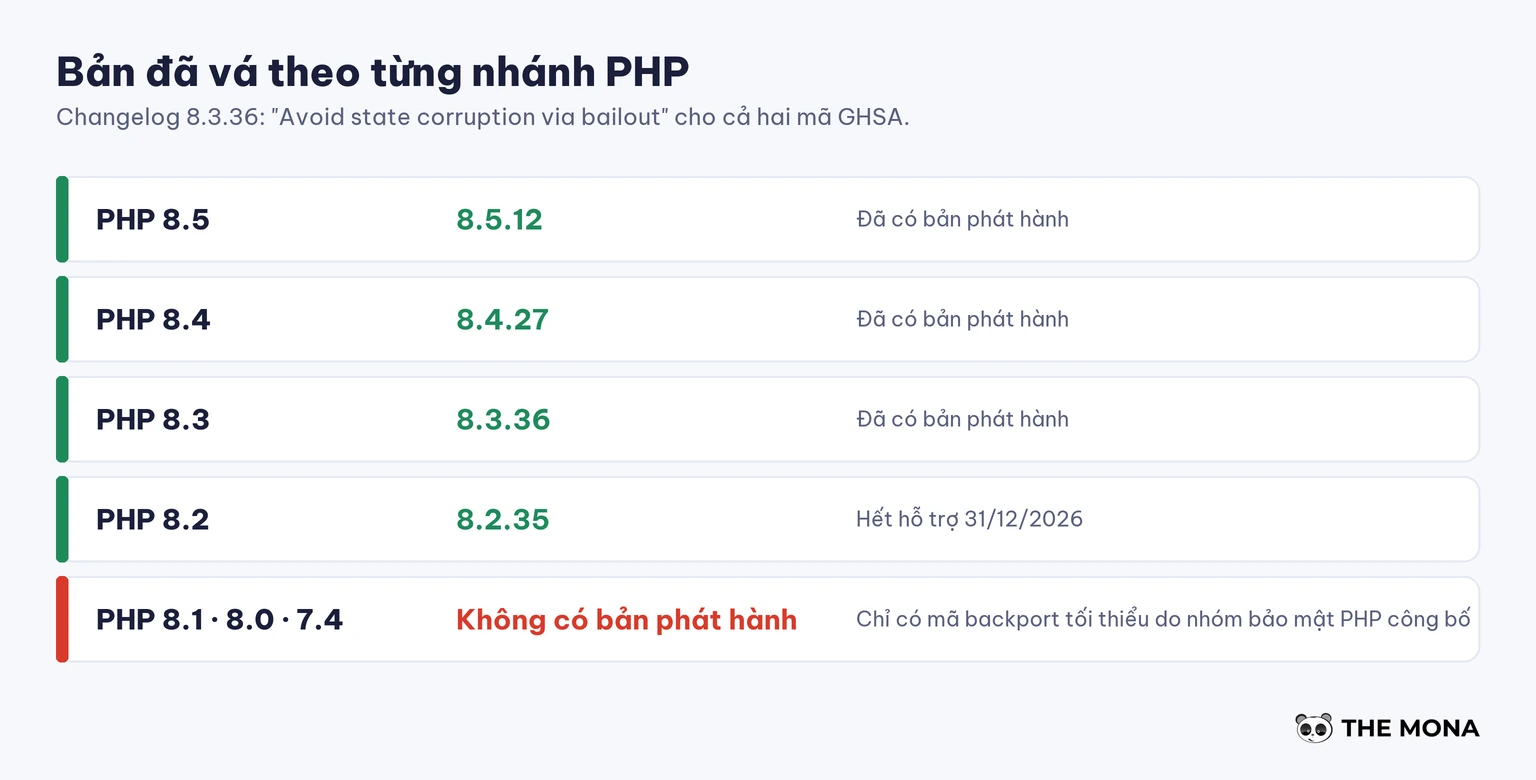
| PHP branch | Patched version | Notes |
|---|---|---|
| 8.5 | 8.5.12 | Additional path fatal_error_backtraces |
| 8.4 | 8.4.27 | |
| 8.3 | 8.3.36 | Also bundles the 8.3.35 patch from September 24, 2026 |
| 8.2 | 8.2.35 | End of support on December 31, 2026 |
| 8.1, 8.0, 7.4 | No official release | Minimal backport source published by the PHP security team |
OS and hosting PHP packages are usually patched by backport, meaning the version number stays low even after the fix is in. So don't conclude anything by comparing version numbers. The right way is to look for the CVE code in the package changelog:
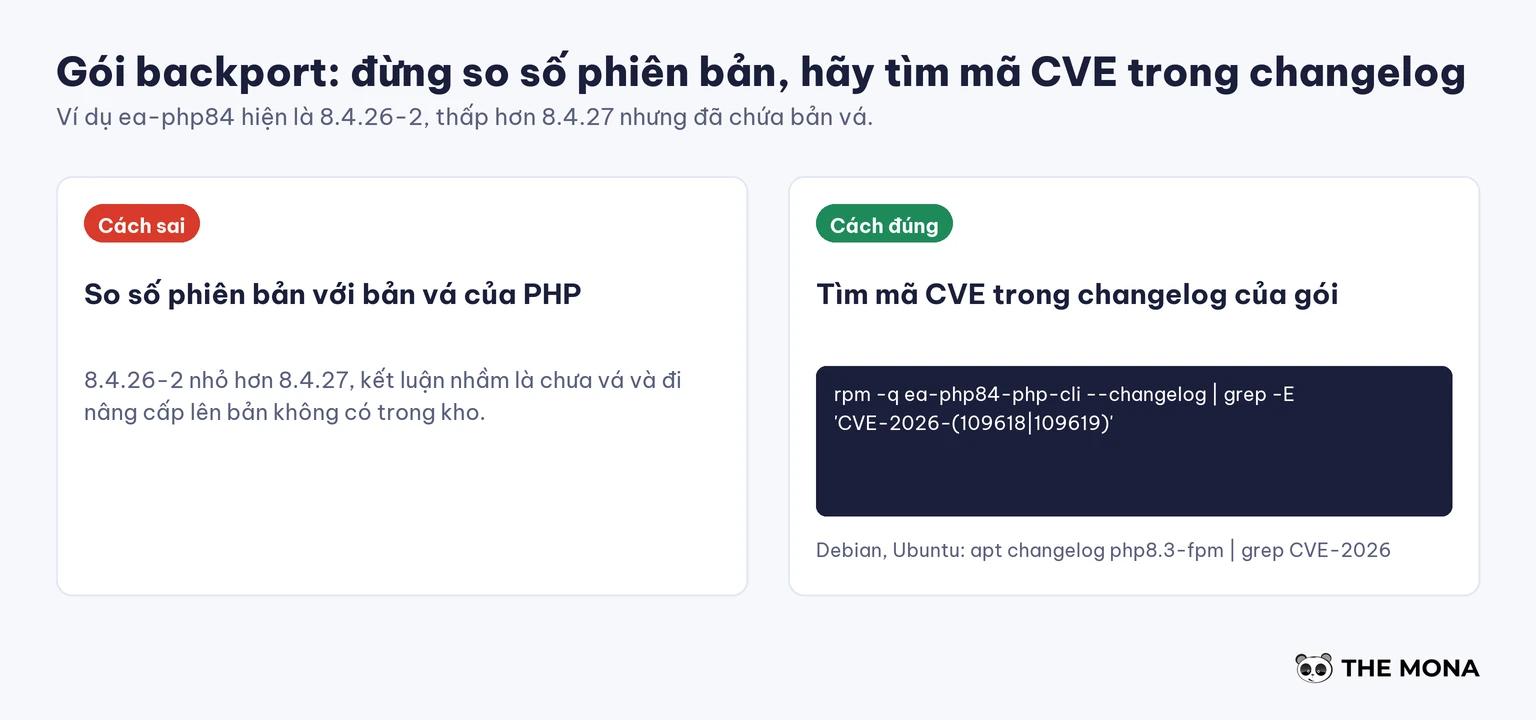
# RHEL, AlmaLinux, Rocky, CloudLinux
rpm -q --changelog ea-php84-php-cli | grep -E 'CVE-2026-(109618|109619)'
# Debian, Ubuntu
apt changelog php8.3-fpm | grep -E 'CVE-2026-(109618|109619)'
If you see a line containing the CVE code, the package is patched. If not, ask your hosting provider with this template: “Has my server been updated with the CVE-2026-109618 and CVE-2026-109619 patches, and which PHP version is it running?”
A machine can run several PHP branches side by side, each with its own PHP-FPM master. List them with the command below, then restart each master after updating.
ps aux | grep -E "php-fpm: master|apache2|httpd|litespeed|frankenphp" | grep -v grepTheo the CloudLinux status page at 01:19 UTC on October 22, the ea-php patch (cPanel EasyApache 4) had reached the stable repository since 20:55 UTC on October 21 for ea-php52 through ea-php85. The alt-php build reached stable for CloudLinux 7, 8 and 9 and finished at 00:07 UTC on October 22. CloudLinux's own PHP has stable builds only for 8.2 and 8.3 on CloudLinux 9 and 8.2 on CloudLinux 8, with the rest in testing.
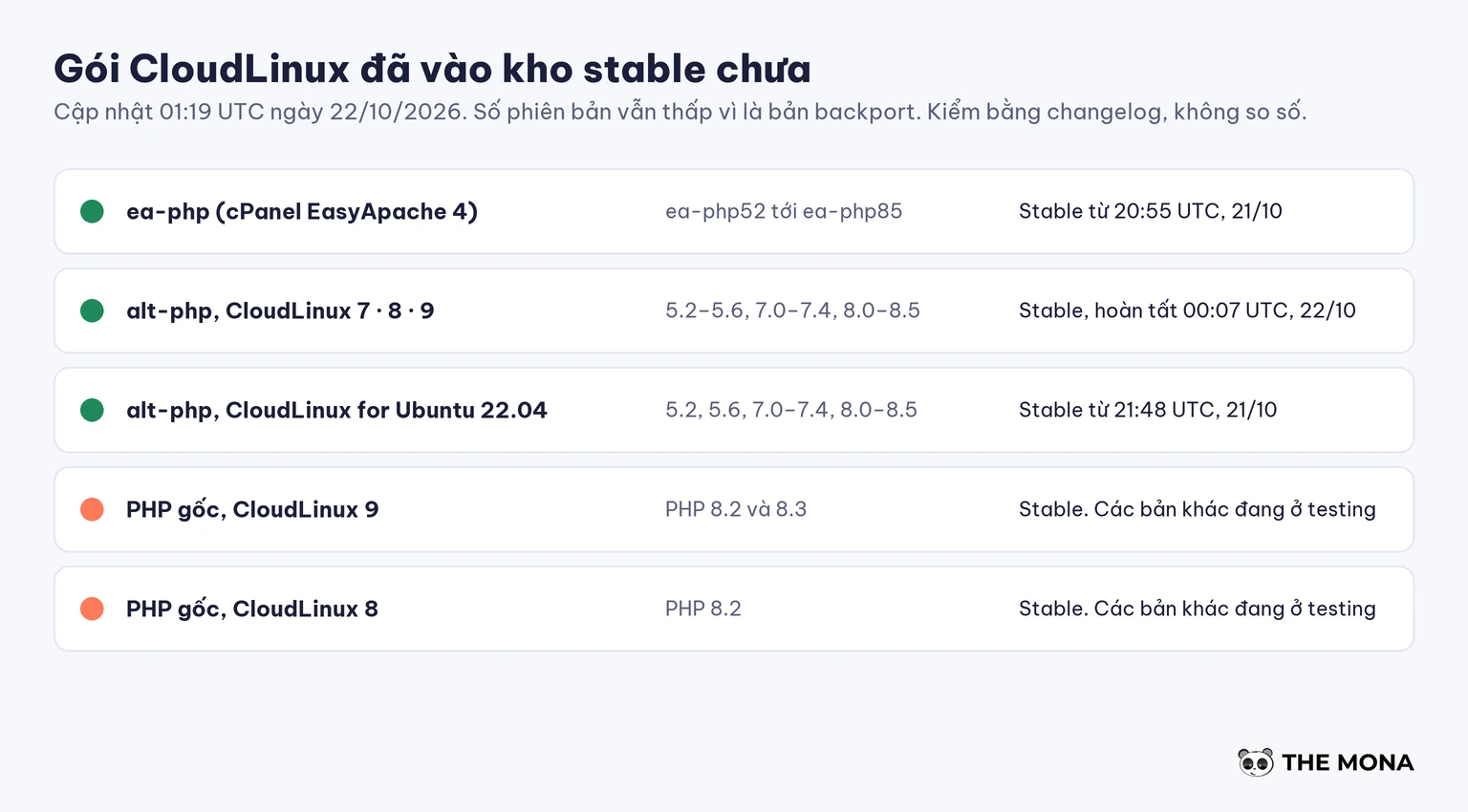
ea-php packages keep a low version number because they are backports: ea-php84 is currently 8.4.26-2, not 8.4.27, and ea-php83 is 8.3.35-2. The security metadata hasn't been published, so yum --security these packages aren't listed yet. Update with the usual command:
# CloudLinux 7
yum clean all && yum update "ea-php*"
# CloudLinux 8, 9, 10
dnf clean all && dnf upgrade "ea-php*"
/scripts/restartsrv_httpd
/scripts/restartsrv_apache_php_fpm
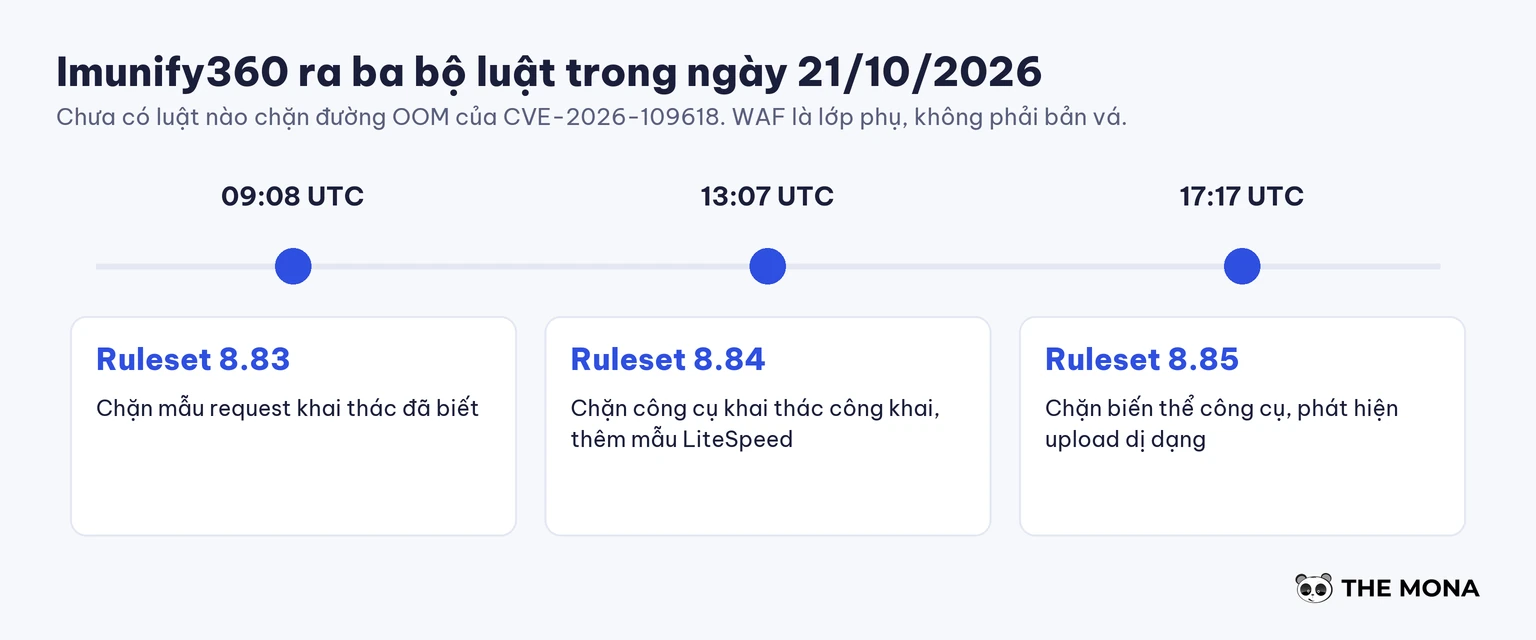
Imunify360 released three firewall rule sets on October 21 (8.83 at 09:08 UTC, 8.84 at 13:07 UTC, 8.85 at 17:17 UTC) that block known exploit patterns, but the CloudLinux page says no rule yet blocks the out-of-memory path of CVE-2026-109618. Treat the firewall as a supplementary layer; it doesn't replace the patch.
Branches 8.1, 8.0 and 7.4 have no official release. You have two routes: get backport packages from your hosting provider or OS vendor (CloudLinux, TuxCare, or the distro you use), or move the website to a branch that is still patched. You can compile the backport code yourself, but it takes far more effort than switching branches. PHP 7.3 and below are end of life and have no patch from PHP. Tenable cites a CISA recommendation that systems that can't be patched right away, or that run PHP 8.1 or below, should be taken offline until they are patched or upgraded.
Every measure below only reduces risk. The PHP advisory states clearly that updating is the only complete fix.
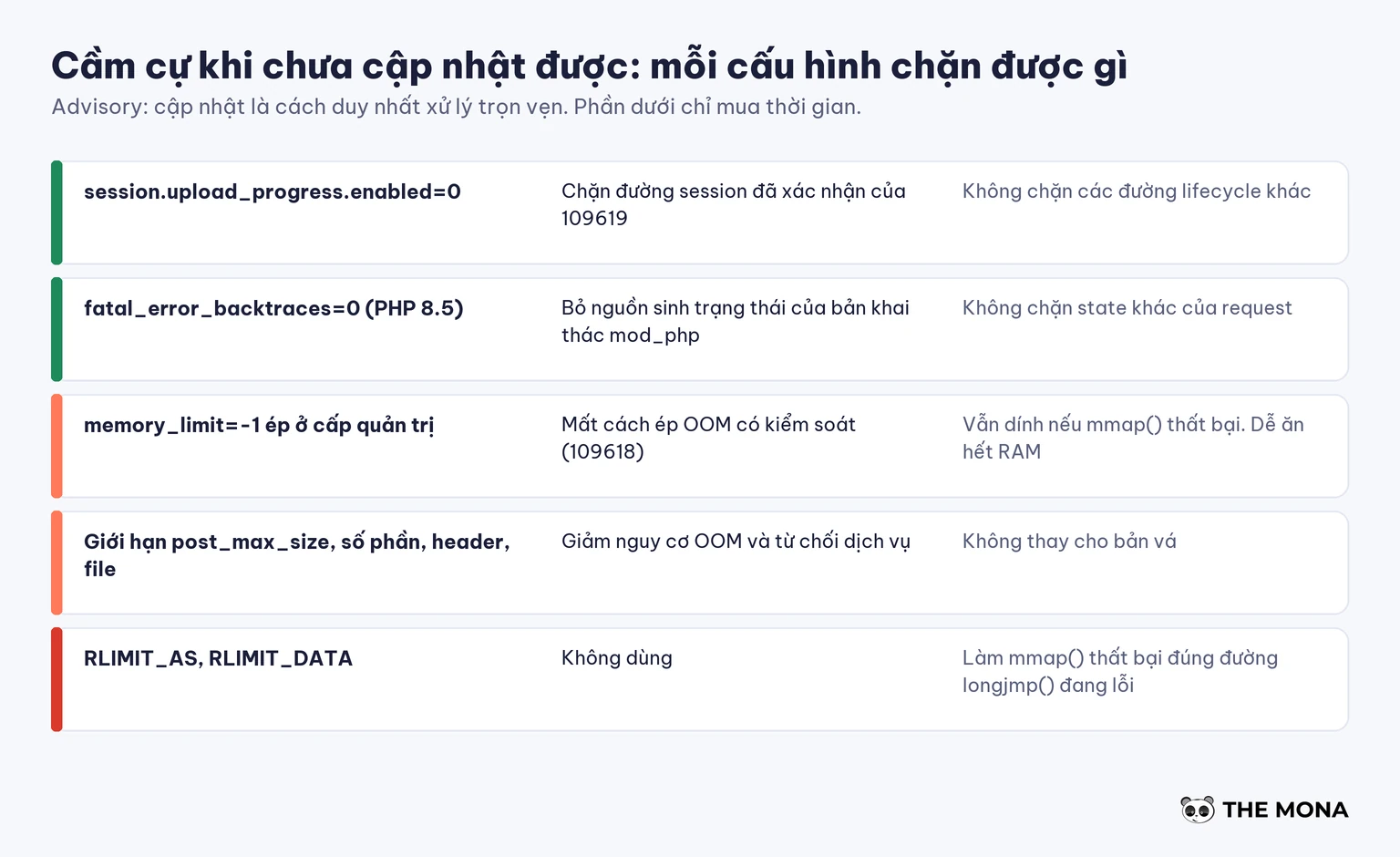
session.upload_progress.enabled=0 in php.ini, the FPM pool configuration or the server configuration, then restart all workers. This blocks the confirmed session path of CVE-2026-109619, not the other paths.fatal_error_backtraces=0, removing the state source of the confirmed mod_php exploit.multipart/form-data in nginx or Apache if the website doesn't use uploads. Sansec notes this breaks image upload, so place a test order or publish a post after applying it.post_max_size moderate, limit the number of multipart parts, headers per part and upload files, and cap the decoded request size at the frontend.For CVE-2026-109618, the advisory also mentions memory_limit=-1 at the admin level. We don't apply this on a shared server without a replacement limit, because a script with a loop bug would eat the whole machine's RAM. If you must use it, add a cgroup limit memory.max for each worker, and never use RLIMIT_AS hay RLIMIT_DATA, because those two limits make mmap() fail right on the faulty path.
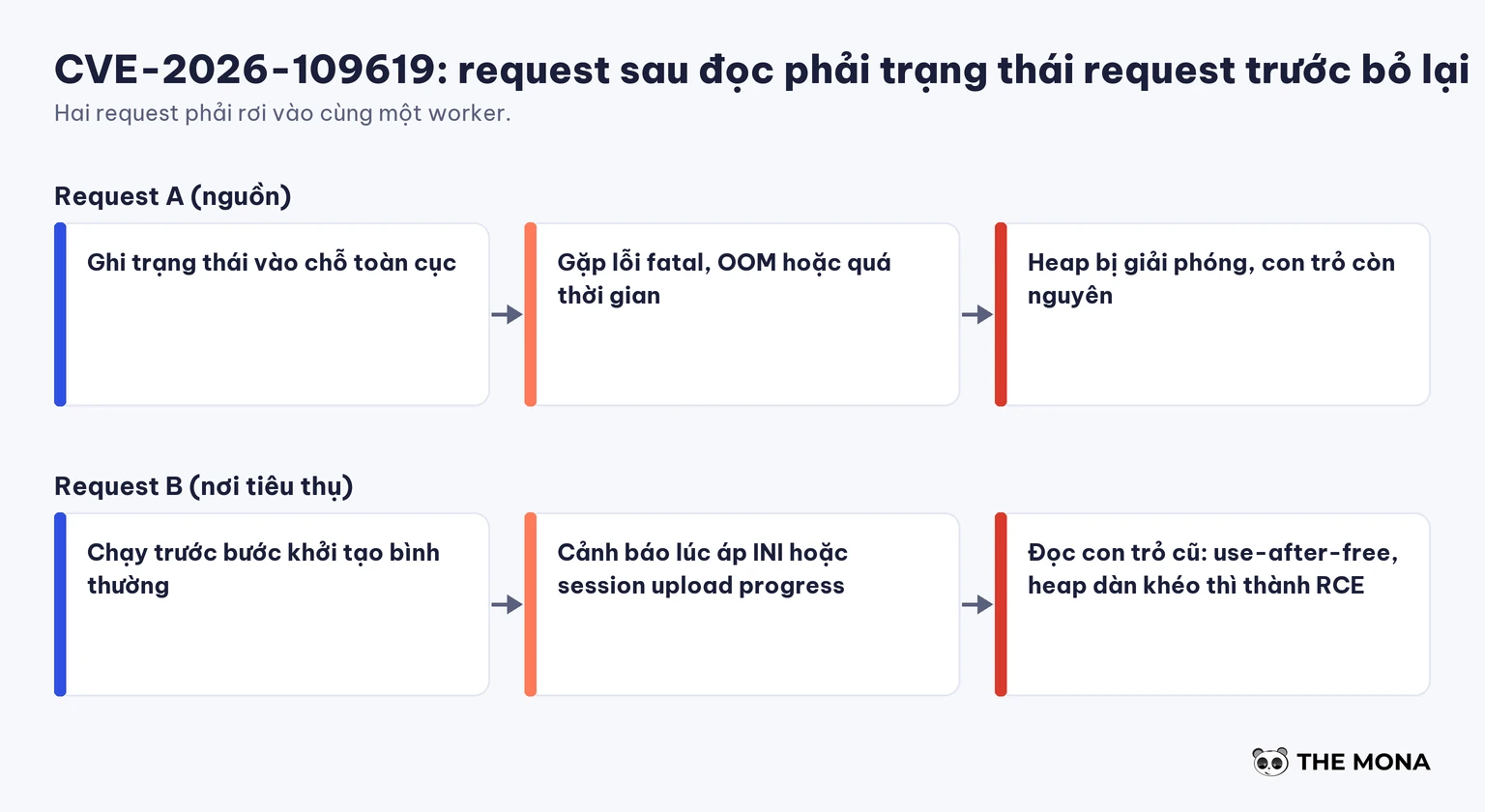
Both bugs share one pattern: PHP is interrupted partway through an operation but still treats the half-finished state as valid, and then a later piece of code reads that very memory region. The attacker rearranges memory to turn the bad read into code execution, with the web account's privileges: the whole source directory, config files holding the database password, and everything that account can write.
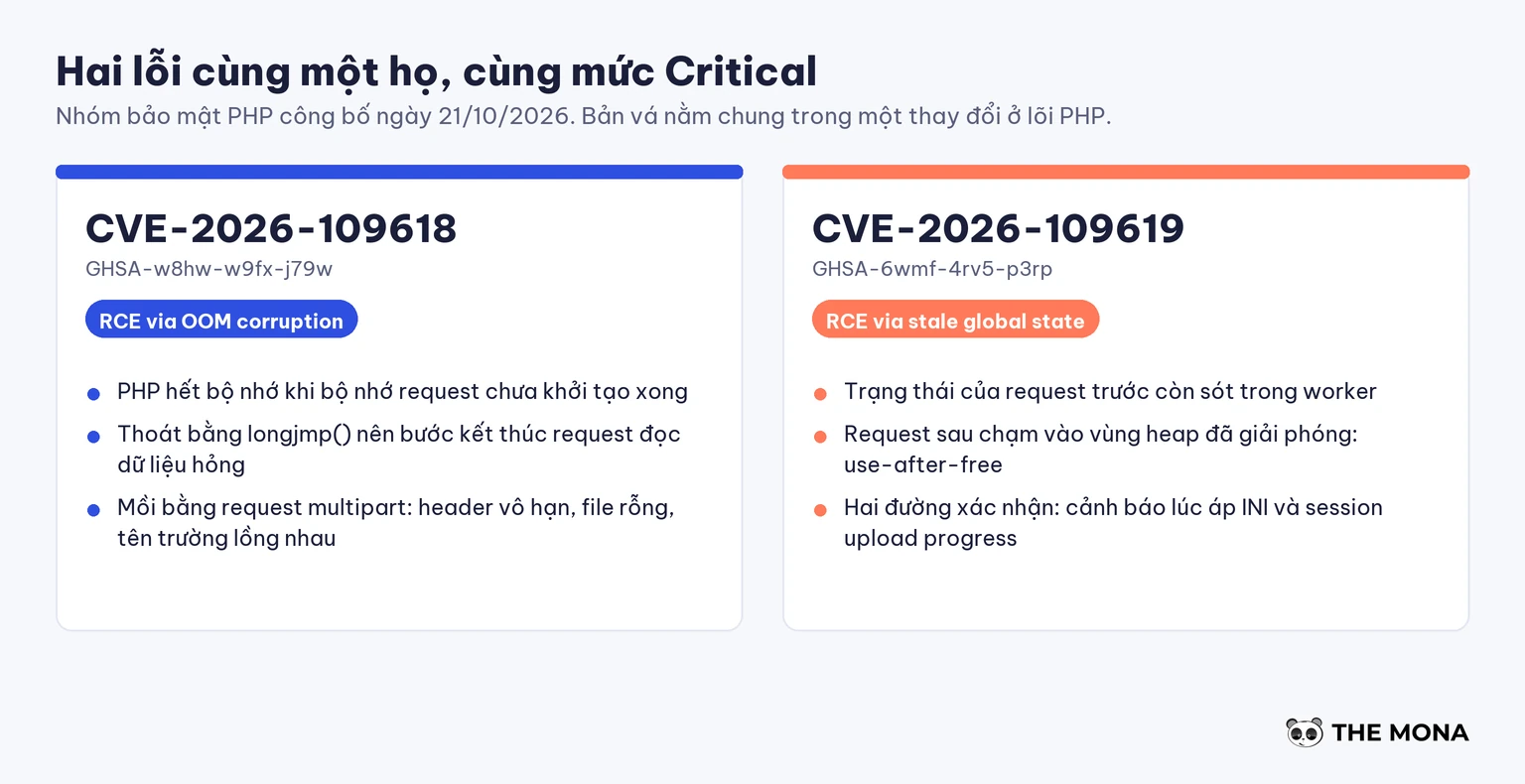
| Item | CVE-2026-109618 | CVE-2026-109619 |
|---|---|---|
| Advisory ID | GHSA-w8hw-w9fx-j79w | GHSA-6wmf-4rv5-p3rp |
| Name | RCE via OOM corruption | RCE via stale global state |
| Root cause | Out of memory while request memory is not yet fully initialized | Leftover state from an old request, reused by the next request |
| Conditions | Able to send a multipart request | Two requests land on the same worker |
| Requires an account | No | No |
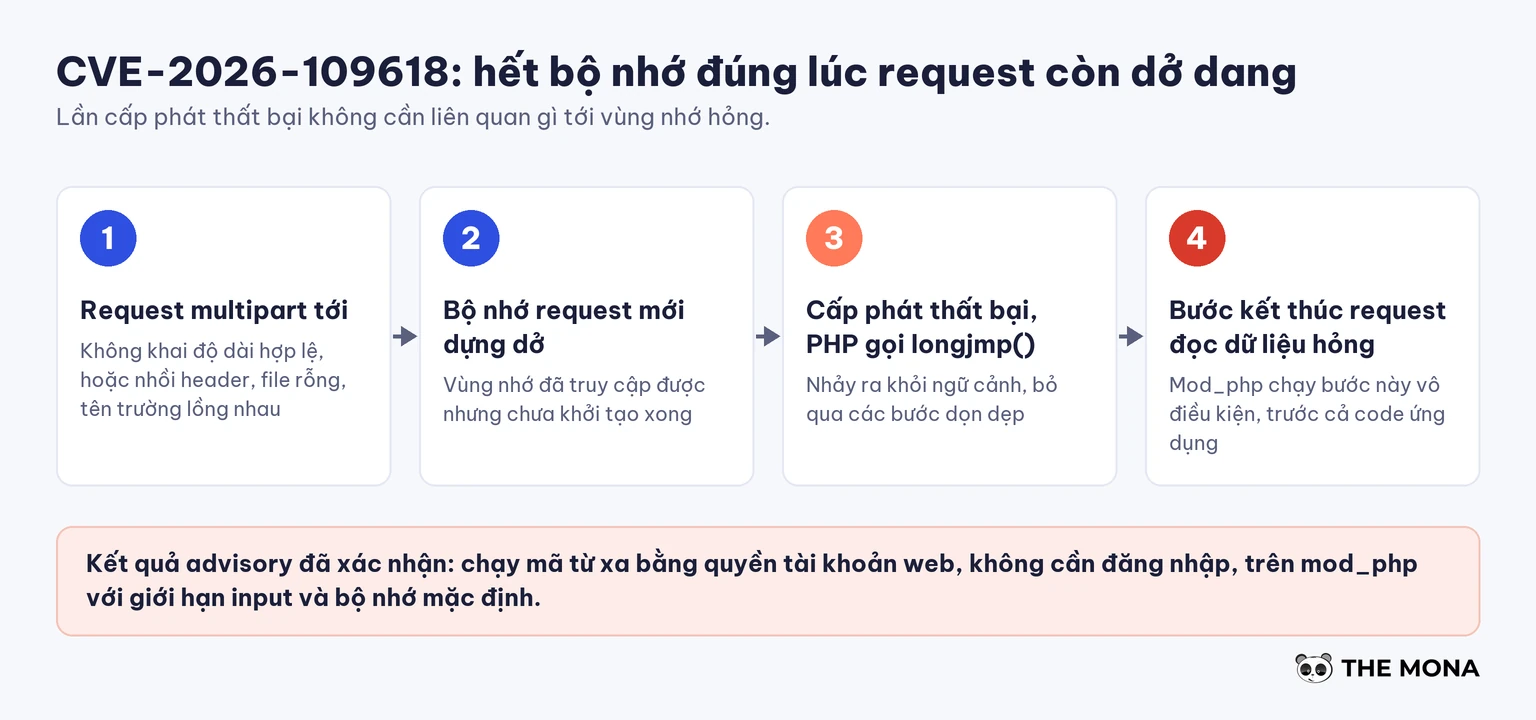
CVE-2026-109618. PHP exits an out-of-memory error with the command longjmp(), jumping straight out of the context without passing through the cleanup steps. If that happens while the request's memory is accessible but not yet fully initialized, the request-shutdown step reads corrupted data. The attacker forces memory exhaustion with a multipart request: unlimited headers in one part, empty files not counted toward max_file_uploads, or a request without a valid length declaration to get past post_max_size.
CVE-2026-109619. PHP keeps many global variables pointing at each request's memory. If a request ends abnormally before clearing them, the next request on the same worker can read the stale pointers, a use-after-free. The two confirmed paths are the warning raised while applying INI configuration and session upload progress, which is on by default and doesn't need the website to call session_start().
The advisory doesn't promise that logs will show traces, and having no error lines doesn't necessarily mean you're safe. What you can do is temporarily turn on log_errors=On, a error_log that can run and error_reporting=E_ALL in the startup configuration, then search the Apache, PHP-FPM and proxy logs:
Maximum execution time exceeded.If you've already seen odd signs, don't just patch and walk away: after updating, you still need to scan for malware, change the database password and the secret keys in the config file. The step-by-step path is in the post on detecting and cleaning a website infected with malware and the list of 14 signs your website has been hacked.
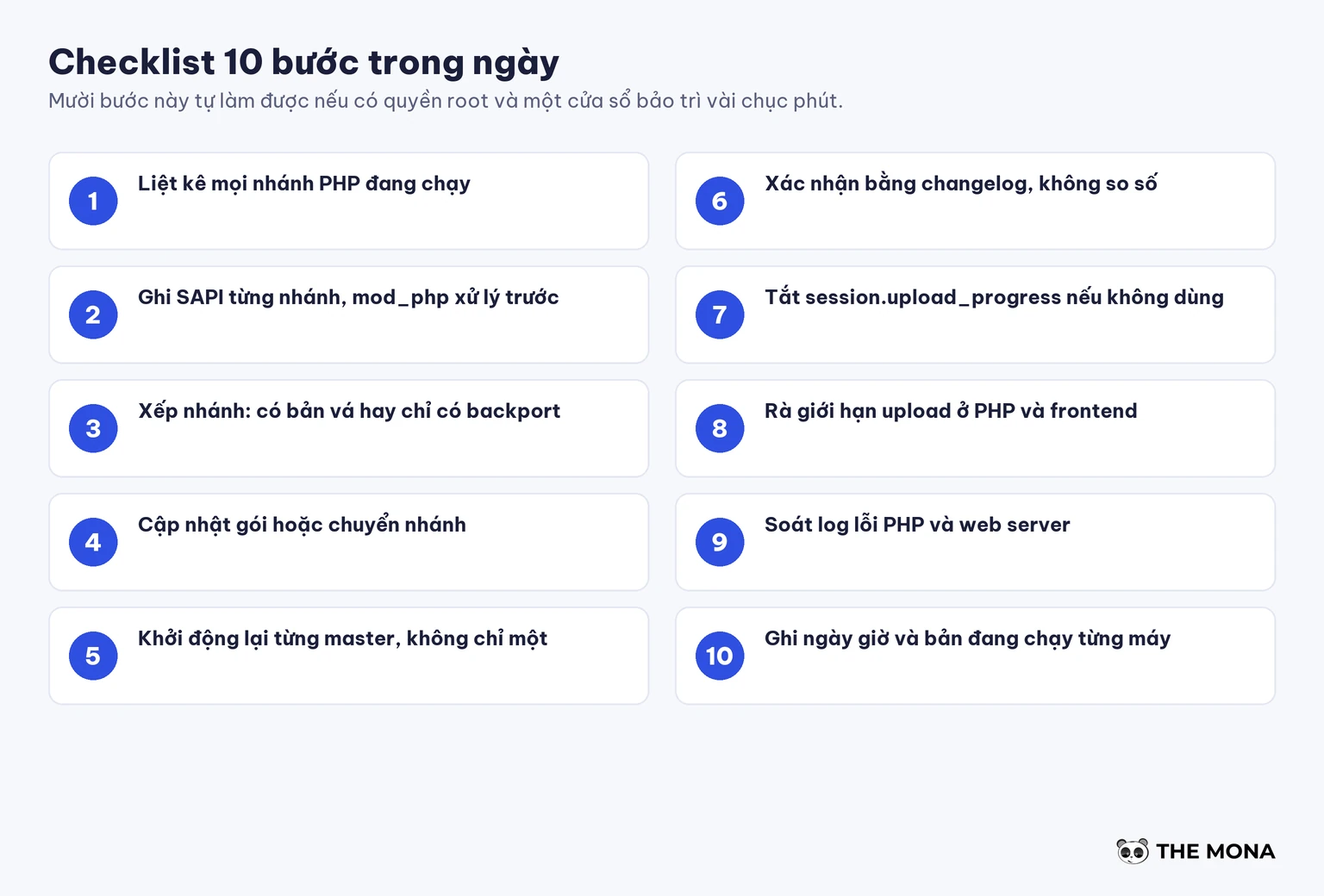
session.upload_progress.enabled if the code doesn't use it. Check with grep -rn "upload_progress" in the source directory.post_max_size, max_file_uploads, max_input_nesting_level and the request size limit at the frontend.You can do all ten steps yourself with root access and a maintenance window of a few dozen minutes, no need to hire anyone.
The first thing we did was count. The infrastructure we manage has three PHP branches running side by side, each with its own PHP-FPM master, including an old branch outside the set with official releases. Only after counting did we know which branch needed just a package update and which had to be moved. After updating the packages, we restarted each master one at a time, because restarting one service doesn't touch the other two masters.
Switching the PHP branch of a website carries real risk: themes and plugins written for PHP 7.4 may break on 8.x, so we test on a copy first and only then change the pool. If you have many websites on a branch with no patch, or don't have time to check each machine, we can handle it under our website care service, or move you to cloud VPS managed by us. Call the 1900 636 648 hotline and tell us which PHP branch the machine runs and which control panel you use, and we can tell you right away whether that branch has a patch.
Patching PHP closes only one door. The rest of keeping a server safe is in these posts: what a server is and what a VPS is for people new to managing servers, what SSH is for running commands safely, LiteSpeed Web Server if you use LSAPI, what is a firewall and What is DDoS for the blocking layer in front, website data backup before every upgrade, website security and WordPress security plugins, malware scanning tools, how to choose hosting and list of Vietnamese hosting providers.
Figures cross-checked through October 23, 2026. Exploitation status and each vendor's package status change by the hour, so open the sources to see the latest before you update.

Project Manager · MONA Media
Website and technical specialist at MONA Media. Directly coordinates and delivers website design, programming, security and operations optimization projects for businesses, turning complex requirements into solutions that run reliably, can be measured and are easy to scale.
 376




Professional website
design services
Own a website with a beautiful, 100% exclusive design and a lifetime warranty, with the ability
to expand features flexibly as your business grows, starting today!






 MONA will never sell your information or send you spam


 MONA will never sell your information or send you spam
