
 MONA OS 2.0
 Hợp tác với MONA


 Tự động hoá doanh nghiệp
 Cẩm nang SEO
 Digital Marketing
 Kinh nghiệm thiết kế website
 Hạ Tầng Server
 Giáo dục


 VI
 EN











Message us on
Zalo Official


 ProductsNew

 ProductsProducts
 Mới ra mắtKHA AI 2027App tự edit video, tự đăng mọi mạng xã hội, 2 phút mỗi ngày










 Thiết kế websiteVừa đẹp vừa thuyết phục được khách.
Dịch vụ SEOKéo về khách đang tìm đúng thứ anh chị bán.
 Tư vấn digital marketingKéo khách từ nhiều kênh, đo bằng số thật.
Quay video doanh nghiệpVideo giới thiệu công ty, nhà xưởng, đội ngũ.
 MớiDựng video AIDựng phim câu chuyện công ty bằng AI.
 Custom software developmentCRM, ERP and HRM built for your business.
 Viết AI Agent theo yêu cầuĐặt riêng một trợ lý AI cho đúng việc của mình.
 Tư vấn chuyển đổi AIĐưa AI vào vận hành của cả công ty.
NewMONA LMSManagement for centers and schools.
MONA SkillHubInternal training for company staff.
 NHTQ systemEnd-to-end China–Vietnam shipping operations.
MONA JMSManagement for gold, diamond and pawn shops.
 MONA E-LearningA website with every feature you need to sell courses.
 How to sell online courses (course)More than 30 free lessons on selling courses on autopilot.
 MONA Cloudmonacloud.vnServers to get your apps and websites running.
 MONA Basemonabase.vnPostgres database, sign-in and file storage.
 MONA Mailmonamail.vnSend OTP, order and invoice emails from your software.
 MONA Paymonapay.vnAccept bank transfers via VietQR and notify your software when the money arrives.
 MONA eInvoiceComing soonIssue e-invoices that meet tax standards.
Gấu CườiTrả lời khách 24/7 trên web, Fanpage, Zalo và thu lead cho sale.
 Gấu TeleSalesGọi điện tư vấn, chăm khách như tổng đài viên thật.
Dê CườiTư vấn và chốt đơn cho shop ngay trong khung chat.
Gấu WebmasterNhắn nhóm Zalo là website được sửa xong.
 Gấu Pháp ChếSoạn hợp đồng, rà điều khoản trong vài phút.
 Gấu Báo GiáLên báo giá đúng mẫu và gửi khách ngay.
 AI chăm sóc khách hàngTheo dõi và giữ chân khách hàng cũ.
 Gấu Tuyển DụngLọc hồ sơ, hẹn lịch, phỏng vấn ứng viên.
 Mới ra mắt
KHA AI 2027
Xây kênh chuyên gia 2 phút mỗi ngày
Quay bằng điện thoại, AI tự edit video, tự đăng lên 16 nền tảng và tự trả lời bình luận, tin nhắn.
874.631lượt xem trên kênh CEO MONA sau 35 ngày
 Anh Khánh HùngCEO MONA đang dùng mỗi ngày
Xem app làm được gì
 AI
Gấu Cười MONA ĐANG TỰ XÀITrả lời khách 24/7 trên website, Zalo OA, Messenger và thu lead về cho sale.
Dê CườiChốt đơn bán lẻ và sàn: Shopee, TikTok Shop, web. Chăm cả khách sỉ, đại lý.
Gấu WebmasterCập nhật nội dung, tối ưu SEO website mỗi ngày.
Gấu TeleSalesGọi điện tư vấn, chăm khách như tổng đài viên thật.
Gấu Tuyển DụngLọc hồ sơ, hẹn lịch, phỏng vấn ứng viên tự động.
AI chăm sóc khách hàngGiữ khách cũ, cứu lead đã rớt cho phòng kinh doanh.
Gấu Pháp ChếSoạn hợp đồng, rà điều khoản trong vài phút.
Gấu Báo GiáLên báo giá đúng mẫu, gửi khách ngay khi có yêu cầu.
 Chuyển đổi AI toàn phầnGiải pháp tổng cho doanh nghiệp, 3 lớp triển khai.
 Viết AI Agent theo yêu cầuĐặt riêng một con AI gánh đúng nghiệp vụ của bạn.
 Custom softwareCRM, ERP and HRM with built-in AI automation.
 SEO & AEO thời đại AIĐược Google lẫn AI trích dẫn, không chỉ xếp hạng.
 Kiến thức AI cho doanh nghiệpBài phân tích, hướng dẫn ứng dụng AI vào vận hành.
 Free AI courses
 AI tools at work
App mới · KHA AI 2027
Xây kênh 2 phút mỗi ngày
AI tự edit video, tự đăng mọi mạng xã hội
Free consultation, 8am–10pm every day

26 October, 2026

AI video editing means shooting a real-face clip on your phone and sending it to software with an editing brief, a short description of what you want. The AI makes the rough cut, adds subtitles, inserts B-roll and illustrative graphics, then exports the edit. The person on camera only reviews the edit and gives feedback by timecode. We measured this on the channel of Mr. Khánh Hùng, CEO of MONA, as of the morning of October 26, 2026: 12 videos with recorded times show he shoots an average of 124 seconds per video, and 11 videos with recorded times show AI processing takes an average of 61 minutes per video.
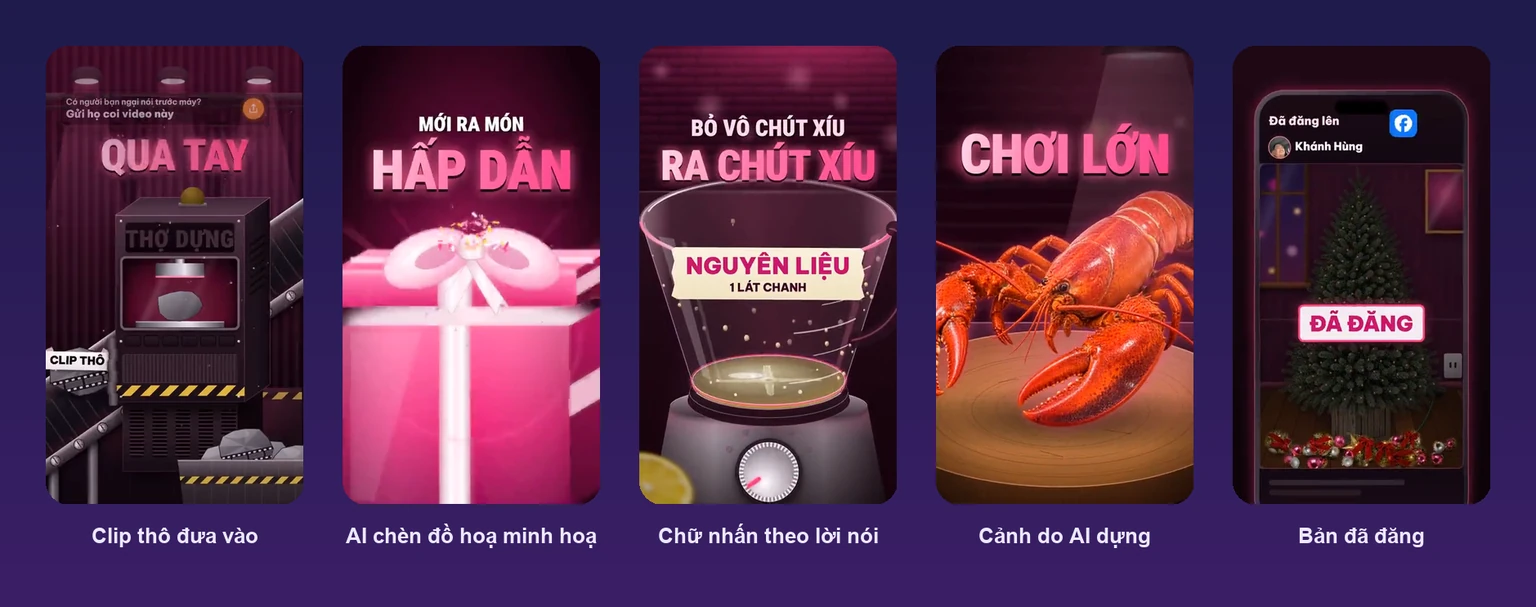
Short talking-head video, meaning a person speaking straight to the camera, is the type best suited to AI, because most of the editing time goes into the rough cut rather than effects. Mr. Hùng said exactly this in his video on October 7, 2026, the first day of building his channel: the hardest part is sitting through the clip again, removing the ums and the lines said wrong and then redone. A 2-minute clip can have dozens of cut points, and the editor has to listen to all of it to know where to cut.
People in video have been moving this way since last year, and the survey State of Video Marketing 2026 by Wyzowl reports that 63% of marketers using video have used AI to create or edit video, up from 51% the year before. In the same survey, 71% said videos of 30 seconds to 2 minutes perform best, which is exactly the length of a CEO explaining one idea.
Today's AI editing tools edit by transcript instead of dragging on a timeline. Descript, a company that makes editing software, describes its assistant as “edits video by working on the transcript” in its Underlord guide: the software turns speech into text, and whatever words you delete, the matching footage is cut too. This is easy for people who don't know editing, because editing a video feels like editing a paragraph.
What AI can't replace yet is the speaker. The videos on Mr. Hùng's channel show a real face and real voice, with no virtual avatar, because people follow a CEO's channel to hear that person speak. If you want to explore making video with virtual characters, there's an article on What is HeyGen, while this one only covers editing clips you shoot yourself.
Edit quality depends on the input footage more than on the brief: the clip must show a clear face, clear audio, and each segment should cover just one idea.
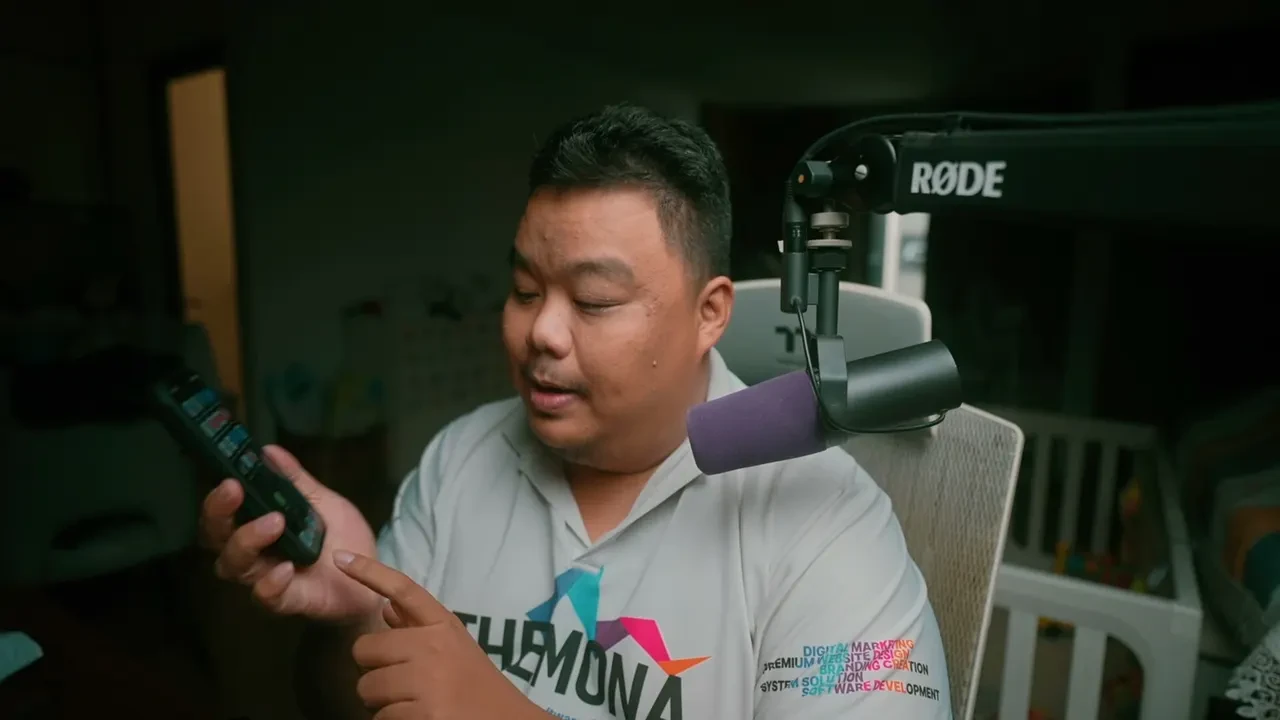
Mr. Hùng shoots with his phone's front camera, using a teleprompter running right next to the lens so his eyes look almost straight into the camera. He fits his shoots into gaps already in his day: “In the morning, from the parking lot up to the office, that's one video done. In the evening, from the parking garage up to the house, I shoot one more” (caption, October 25, 2026). From October 11 to October 25 he shot every day without a miss.
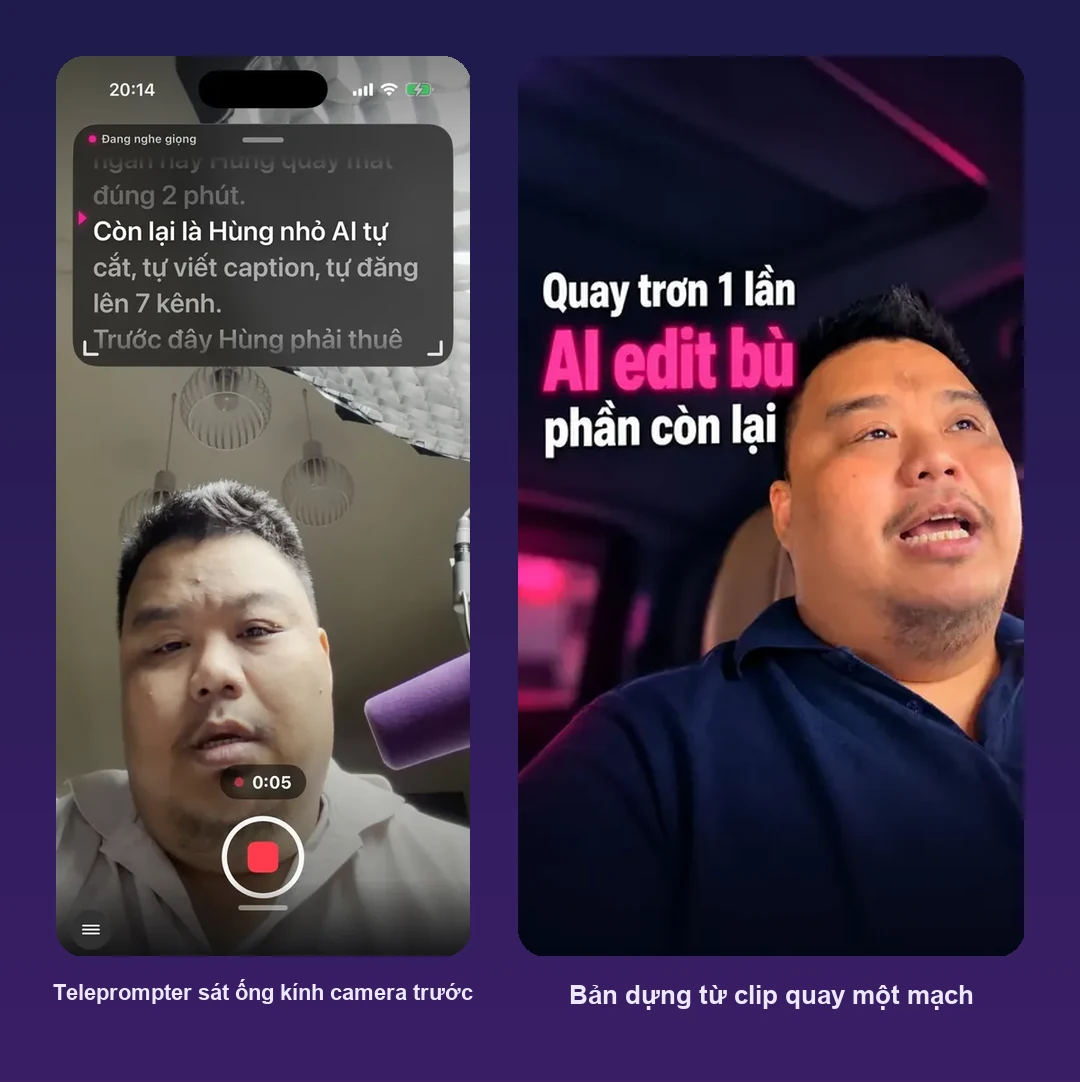
A few things we saw on this channel that newcomers tend to worry about needlessly:
The opening line (hook) you have to prepare yourself before you press record. Mr. Hùng noted in his caption on October 21, 2026: “don't open by calling out a name like ‘CEO friends, pay attention.’ People scrolling to your video give you only 2 or 3 seconds.” The first line should be the conclusion of the whole video, the way the channels in the article on how to make TikTok videos open. If you don't know how to write one, see short video script templates or build a shot list first for longer videos.
A good editing brief describes the result you want to see in the video, in one or two short sentences. Two sample briefs on the intro page of the app Mr. Hùng uses are “emphasize the dosage section, add a warning caption” and “what is this clip about.” The second looks simple, but it tells the AI the topic so it can choose the right B-roll and graphics.
Descript reached the same lessons in its guide. First, state what you want instead of what to avoid. Second, a vague brief gives a vague edit. Third, if the AI misunderstands, rephrase instead of resending the same sentence.
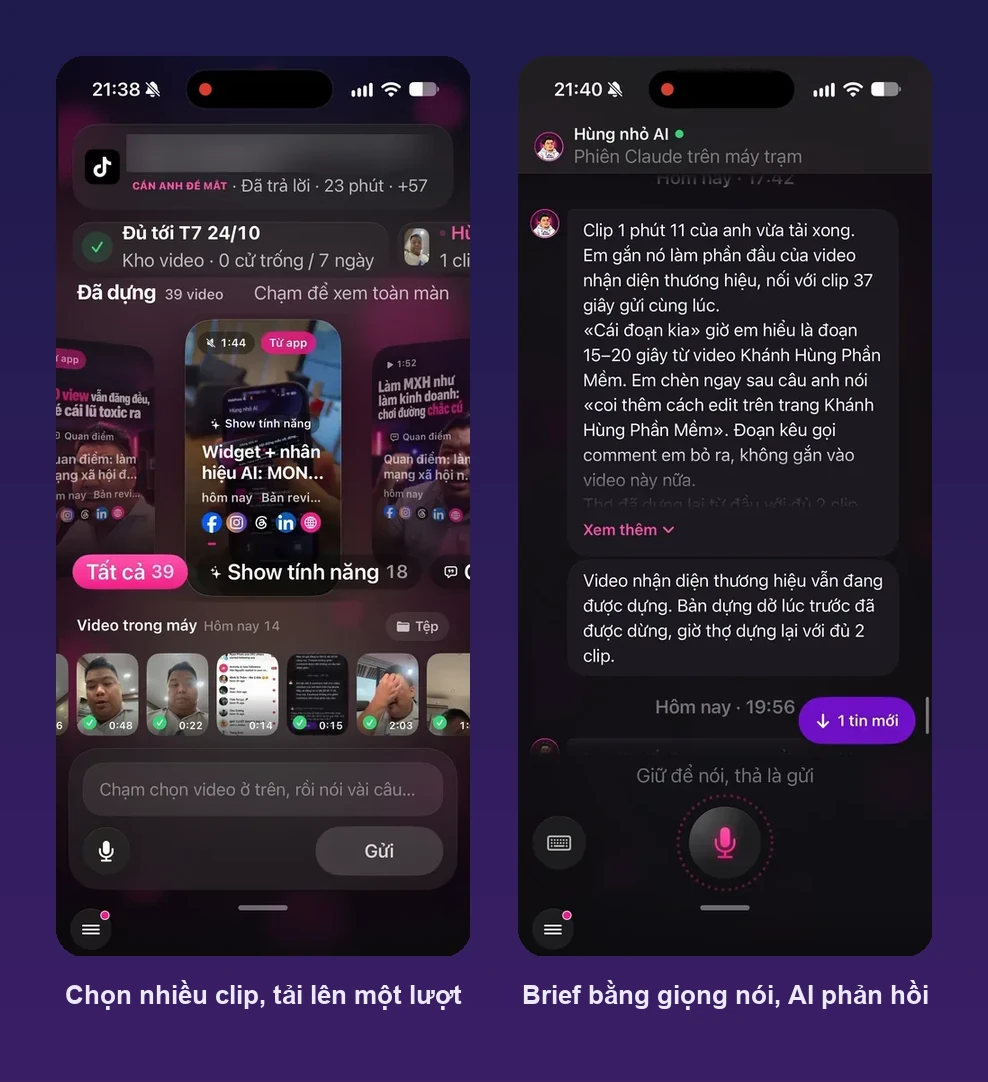
Here are some briefs we wrote following those three principles. Swap the bracketed parts to fit your industry and use them:
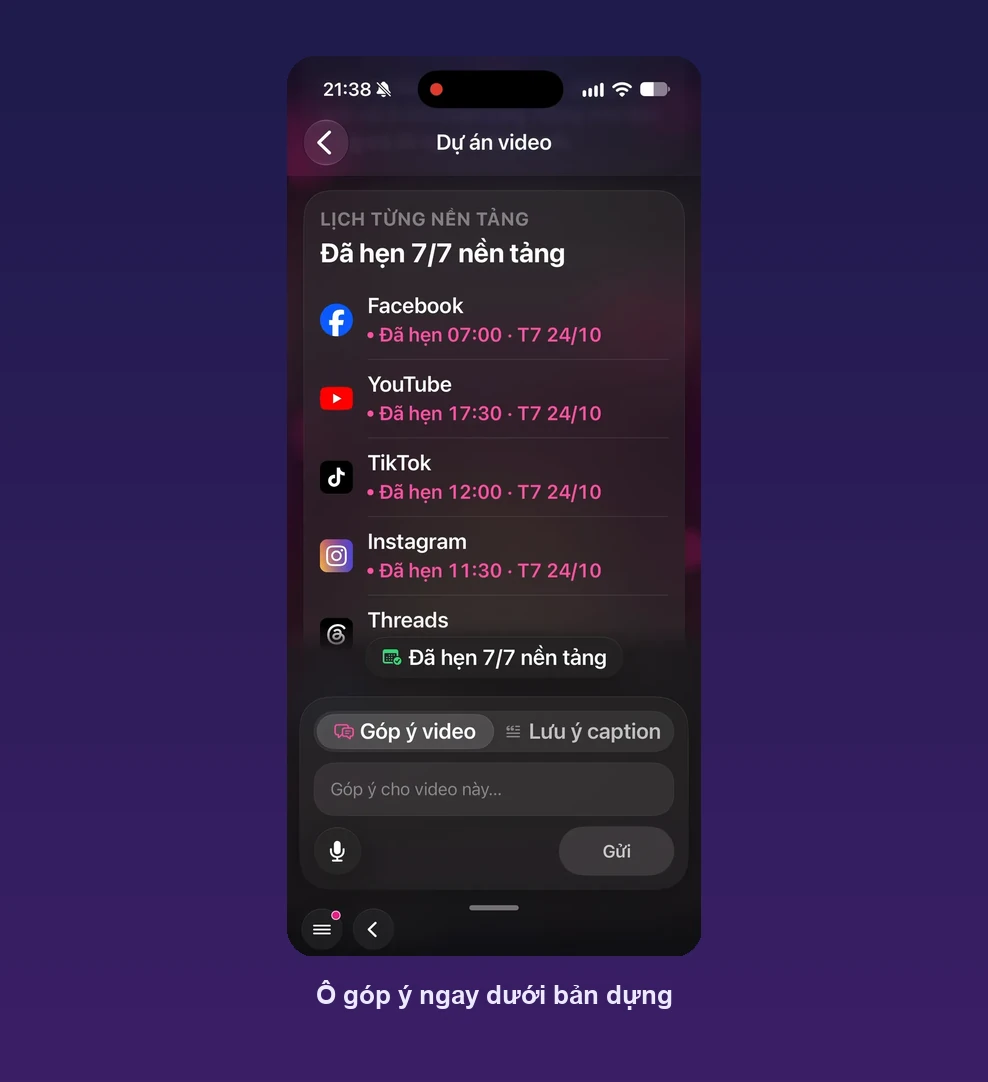
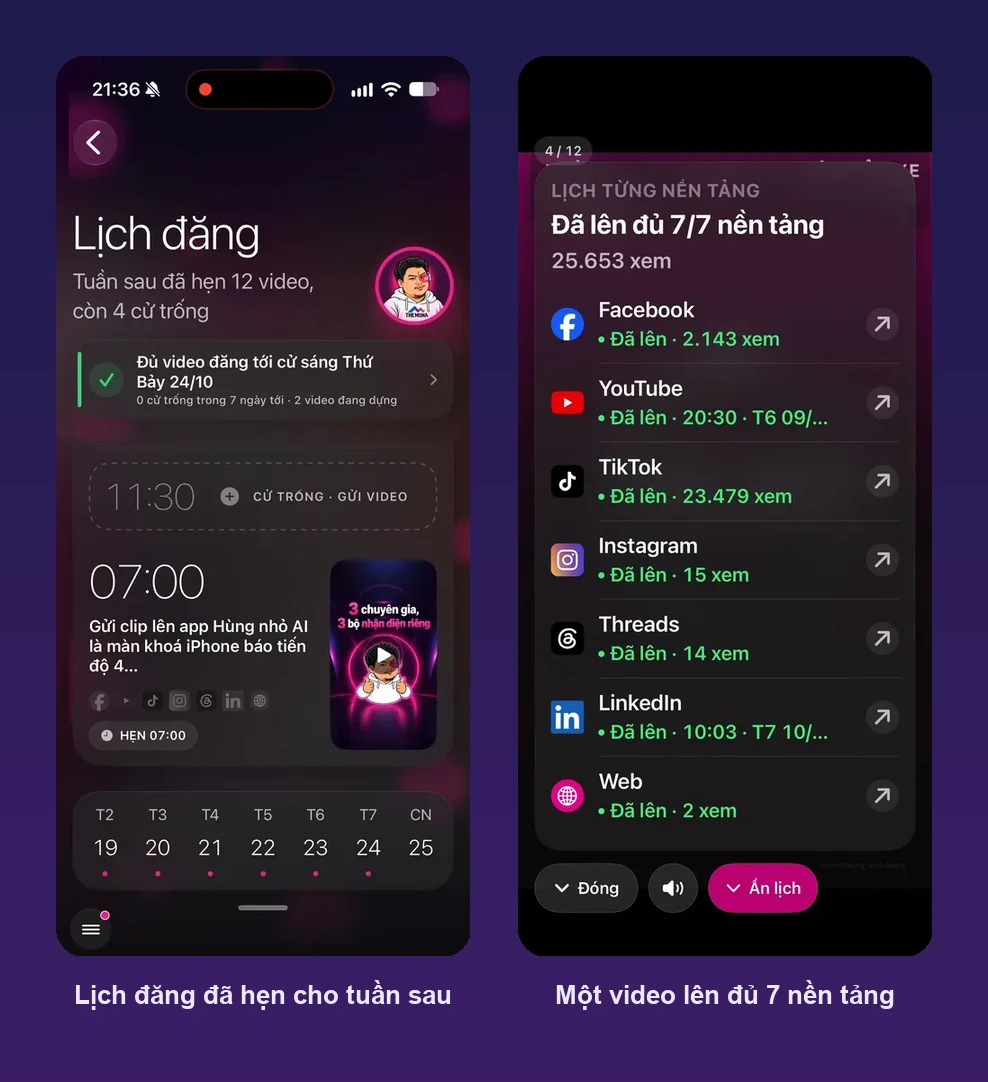
Uploading many clips at once doesn't confuse the system. “I shot 3 videos in just over 7 minutes and sent them straight to the app to edit at the same time,” Mr. Hùng said on October 18, 2026. Five days later he uploaded 4 pieces of footage shot out of order, and the AI rearranged them and edited right away. While waiting, his phone's lock screen showed the processing progress of each video, so he didn't have to open the app to check.
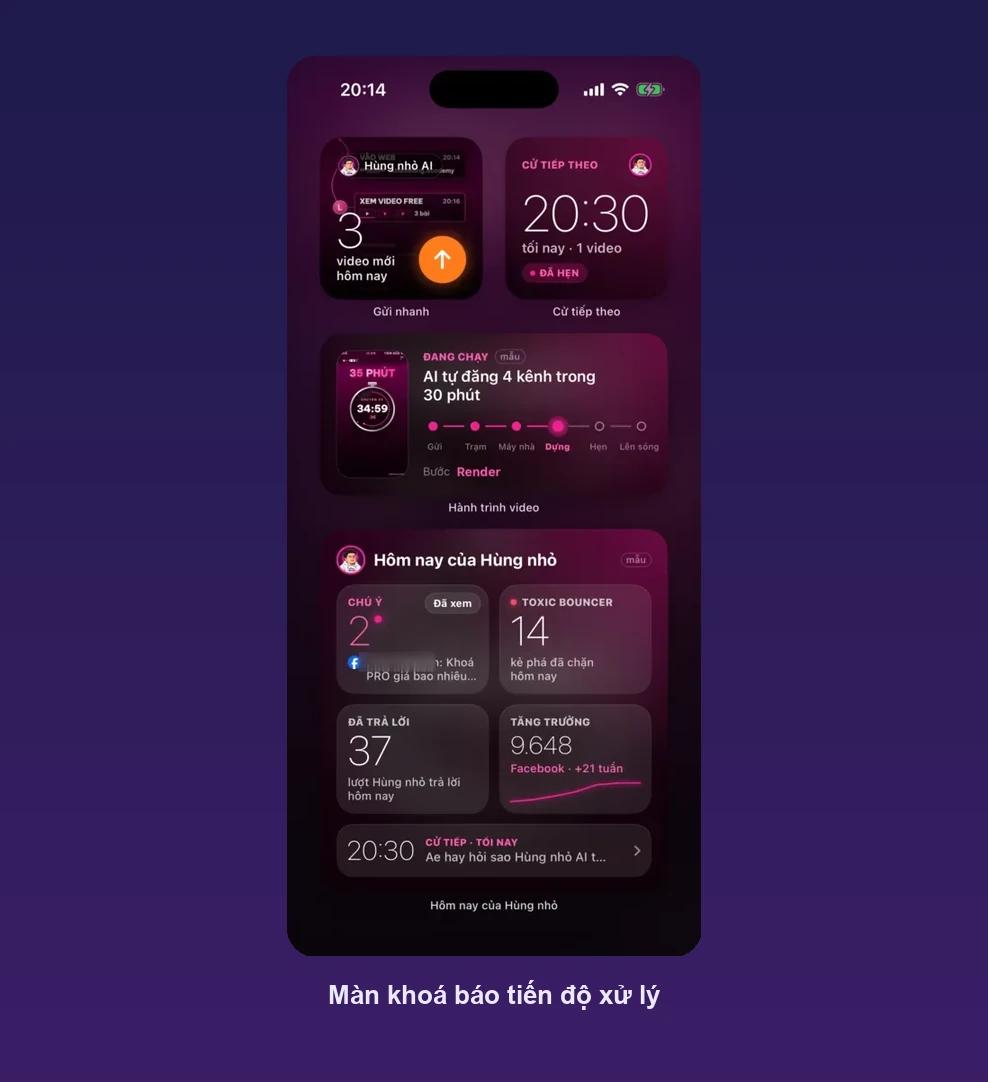
Giving feedback by timecode is faster than redoing the edit, because the AI keeps what already works and fixes only the part you point to. Mr. Hùng fixes things this way: “Wherever I see it doing something silly, I tap that exact second to make it redo that part” (caption, October 18, 2026).
Feedback in the text box under the edit follows the same principle as the brief: one position, one request. For example, “0:42 the text covers the face, move it down” can be fixed by the AI right away. But “the middle part doesn't look right” makes the AI guess, and it often guesses wrong.
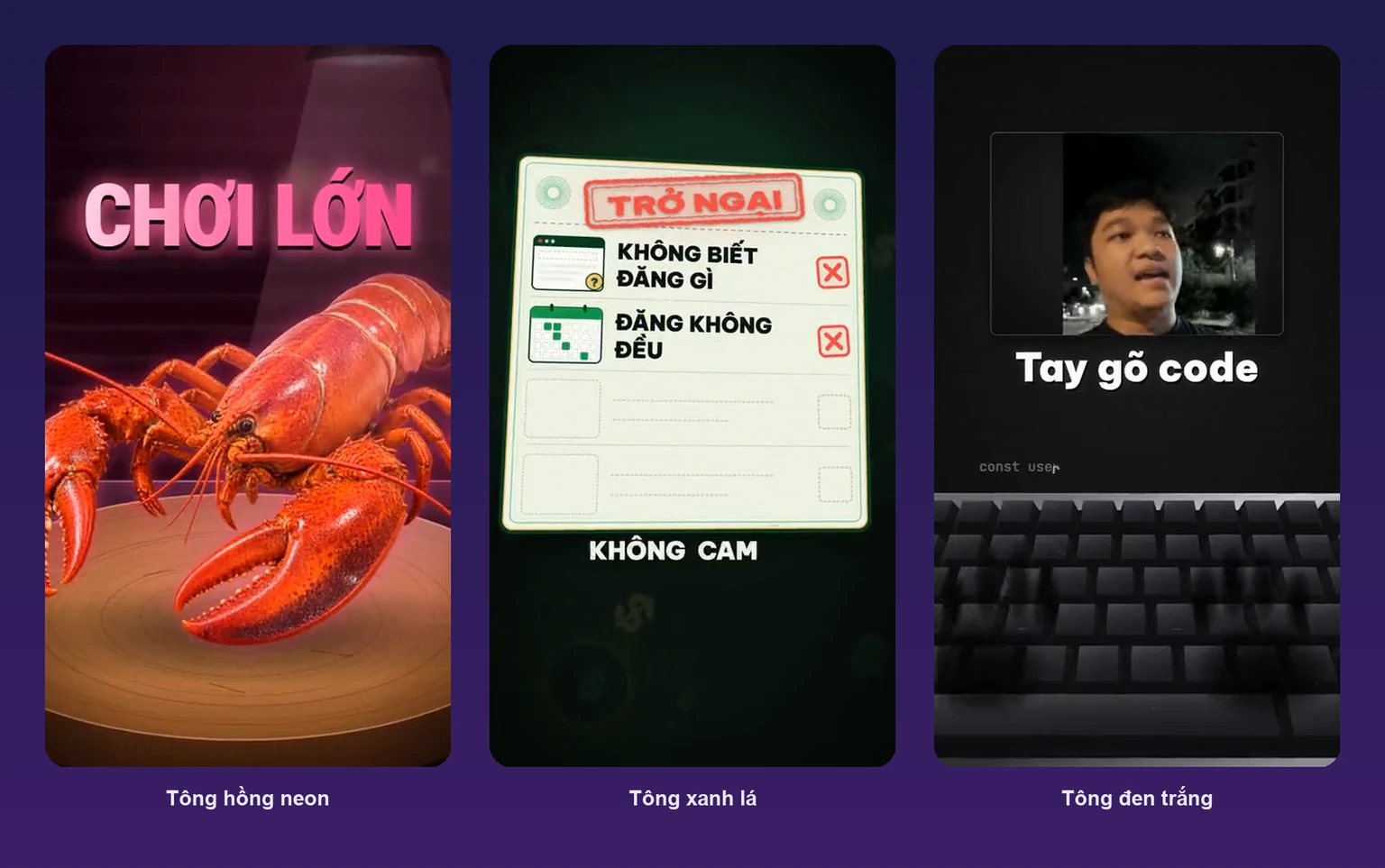
The part we find most worth the money is the illustrative graphics the AI creates itself. In the video from October 15, 2026 by Mr. Nguyễn Thanh Bình, translator of the book Tung Sản Phẩm, only the first 10 seconds are original footage, and the rest is nine graphic segments the AI built to illustrate each idea he spoke: “It drew a 72-hour clock, gears and a Start button by itself” (Mr. Bình agreed to let us use this video). A video about mindset is the hardest to edit, because there's no product or figure to shoot as B-roll.

For short talking-head video, AI video editing is cheaper than hiring an editor and faster than editing yourself, provided you spend time reviewing the edit. The table below compares four approaches we see among MONA customers, with prices checked October 26, 2026.
| Approach | Cost | Who spends the time |
|---|---|---|
| Edit it yourself with CapCut | Free version, or Pro at 290,000 VND/month, 1,890,000 VND/year according to CapCut's pricing page | You edit each video yourself |
| Hire an editor | Average salary of 12.1 million VND/month according to JobsGO 2026 (875 samples) | The editor, plus your hours briefing them on ideas |
| Renting MONA production crew for TikTok videos | 2,500,000 VND/video, minimum 20 videos, crew of 3 | The crew handles both shooting and post-production |
| Upload clips to an AI editing app | MONA quotes per person and per number of channels | You shoot, the AI edits, you approve |
The last column is where the real difference lies. In the first three approaches, someone has to sit and edit every clip, while in the fourth the AI handles that part. Mr. Hùng compared the two on October 23, 2026: upload the clips and let the AI edit and it's done, “the other ways mean sitting with a bot for 57 turns, uploading and waiting hours to get it back.”
Don't read 61 minutes as a promise. It's the average of 11 videos on one channel, and some videos take longer because the AI has to generate many illustrative graphics. The right number to compare is your own hours: on this channel, the CEO's share is about 2 minutes of shooting and a few minutes reviewing the edit.
A more detailed reading of the numbers, including 342,858 views after 20 days and which platforms drive messages, is in the article on building a CEO's personal brand with self-shot video.
If you only post two or three videos a week to a single channel, you can do this yourself, with no need to hire anyone or build a dedicated app yet. CapCut has a free version, and according to CapCut's support page a watermark is added only when you use premium templates, effects or stock materials, not to the whole video.
Two things to test in the app before paying. First, on phones, items marked Pro or videos longer than the free version's limit will make the app prompt you to upgrade, and this limit varies by region. Second, CapCut's own pages say different things about automatic subtitles and export resolution on the free version, so we don't state them as fact here. Open the free version, edit a 2-minute clip and export it, and you'll know right away.
If you've chosen CapCut, mona.media already has a few useful articles: how to use CapCut AI free version, auto subtitles and voiceover with CapCut AI, CapCut AI plan pricing and how to make videos with CapCut AI for beginners. To compare with desktop software, see a list of free video editing software, and for tools that create video from text there's an article on AI video tools for beginners.
Editing yourself starts to overload you as the number of channels grows. Each platform needs an export at the right aspect ratio for that platform and its own caption, for example TikTok needs a shorter hook than Facebook. With 7 platforms like Mr. Hùng's channel, one video becomes 7 posts, and that takes more hours than the editing itself.
A video produced once to be used for years should still go to a production crew. Company introduction films, TVCs and product launch videos need a script, lighting, actors and a director responsible for every frame. AI editing suits short daily videos, where speed matters more than polish. For that kind of film, see corporate introduction video production or AI film production services with a director package from MONA?
The channel's brand identity, including colors, fonts and graphic frames, also shouldn't be left to AI to create. Mr. Hùng said it bluntly on October 22, 2026: “The valuable part is the beginning: settle the style and then have the AI follow it. Leave the brand identity to a skilled designer, because what AI creates won't satisfy you.” His channel uses a neon pink tone the designer set from the start, and every later video follows that tone.
In industries with strict professional standards like medicine and law, you must read every line of text the AI inserts before posting. Subtitles transcribe exactly what you say, but emphasis text and headlines the AI writes can make a statement sound stronger than is allowed.
Can you edit video with AI for free? Yes, for simple videos. CapCut has a free version, a watermark is added only when you use premium templates, effects or materials, and the Pro version costs 290,000 VND/month according to CapCut's pricing page on October 26, 2026.
How long does it take to edit one video? On Mr. Khánh Hùng's channel, AI processing averages 61 minutes per video, across 11 videos with recorded times. The person on camera spends about 2 minutes shooting and a few minutes reviewing the edit.
If I'm not good at speaking on camera, can AI help? Yes. Shoot straight through from start to finish, redo any line you stumble on, and the AI cuts the stumbles and keeps the clean take.
If I shoot the clips out of order, will the AI put them together correctly? On Mr. Hùng's channel, yes: on October 23, 2026 he uploaded 4 pieces of footage shot out of order, and the AI rearranged them and edited.
Can viewers tell the video was edited by AI? Viewers see your real face and voice, since the video uses no virtual avatar. What the AI does is cut, add text, B-roll and graphics, the same work an editor does.
Do I need a powerful computer to edit? Not with the app Mr. Hùng uses, because MONA's workstation does the processing while the phone only shoots and uploads. But editing yourself with desktop software does need a machine powerful enough to render video.
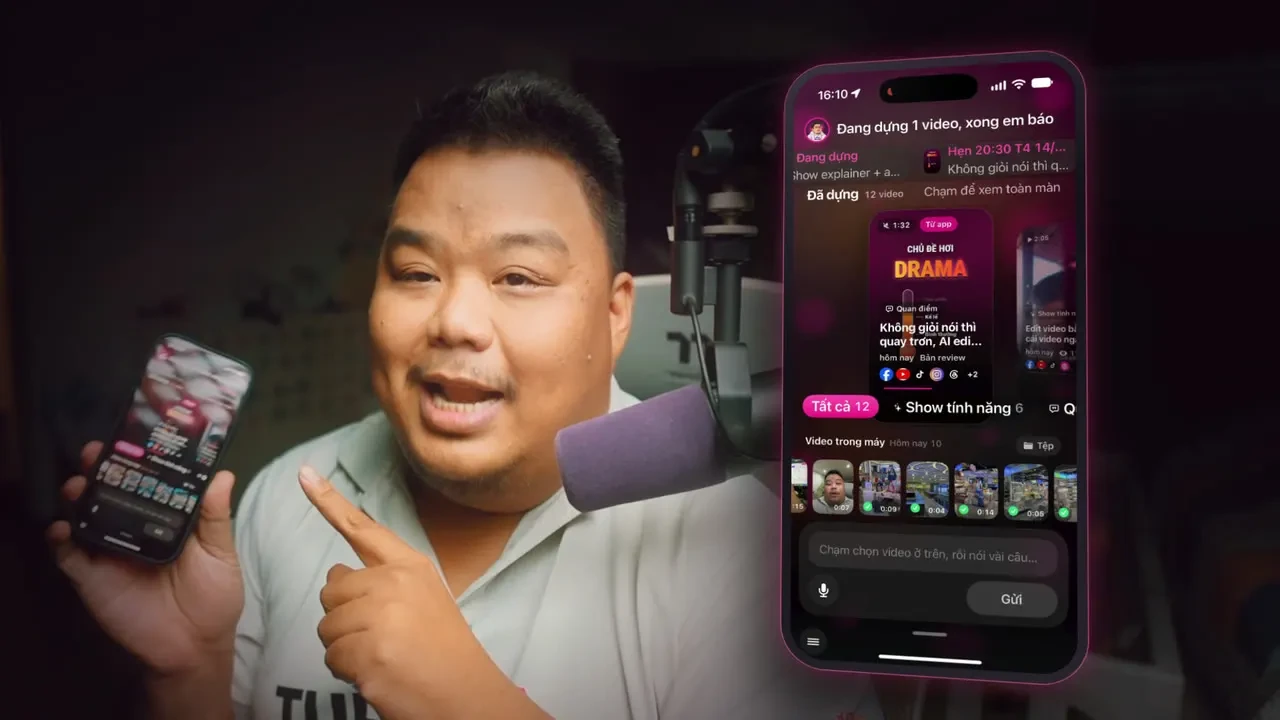
If you've tried editing yourself and find each video eats a whole evening, that's the time to take post-production out of your hands. The app Mr. Hùng uses every day is KHA AI 2027 from Khánh Hùng Academy, developed by the MONA team: shoot with a teleprompter, upload clips with a voice brief, MONA's workstation edits, and then the video is scheduled and posted to each platform. Each person has an assistant bearing their own name and their own brand identity, so MONA asks about your industry, number of channels and video formats before quoting a price.
See each screen of the app that edits video from self-shot clips for CEOs and experts, watch the video of Mr. Hùng opening the app on the Khánh Hùng Academy YouTube channel, or call 1900 636 648 so the MONA team can hear where your current channel gets stuck.
Updated: October 26, 2026. Shooting time and processing time were read from Mr. Khánh Hùng's channel data on the morning of October 26, 2026. CapCut prices come from CapCut's own page the same day, and the page says prices are for reference only. Khánh Hùng Academy (khanhhung.academy) and MONA Software both belong to The MONA Group.
AI video editing means shooting a real-face clip on your phone and uploading it to software with an editing brief, so the AI makes the rough cut, adds subtitles, inserts B-roll and illustrative graphics. By MONA's measurements on the channel of Mr. Khánh Hùng, CEO of MONA, as of October 26, 2026, each video averages 124 seconds of shooting (12 videos with recorded times) and 61 minutes of AI processing (11 videos with recorded times). A good brief states the result you want and is specific; fix the edit by giving feedback at the exact timecode. Subtitles and silence trimming can be done yourself with CapCut's free version, with Pro at 290,000 VND/month. Company introduction films and TVCs should still go to a production crew.

Project Manager · MONA Media
Website and technical specialist at MONA Media. Directly coordinates and delivers website design, programming, security and operations optimization projects for businesses, turning complex requirements into solutions that run reliably, can be measured and are easy to scale.
 360




Professional website
design services
Own a website with a beautiful, 100% exclusive design and a lifetime warranty, with the ability
to expand features flexibly as your business grows, starting today!






 MONA will never sell your information or send you spam


 MONA will never sell your information or send you spam
