
 MONA OS 2.0


 Tự động hoá doanh nghiệp
 Cẩm nang SEO
 Digital Marketing
 Kinh nghiệm thiết kế website
 Hạ Tầng Server
 Giáo dục


 VI
VI
 EN
EN


Below are the most common onpage SEO errors and quick, effective ways to fix them.








![10 Google algorithms every SEO must know [Google Algorithm update 2026]](https://mona.media/wp-content/uploads/2023/03/cac-thuat-toan-cua-google.jpg)














Message us on
Zalo Official


 ProductsNew

 ProductsProducts
 Mới ra mắtKHA AI 2027App tự edit video, tự đăng mọi mạng xã hội, 2 phút mỗi ngày










 Website designLooks good and wins customers over.
SEO servicesBrings in customers searching for exactly what you sell.
Website designLooks good and wins customers over.
SEO servicesBrings in customers searching for exactly what you sell.
 Tư vấn digital marketingKéo khách từ nhiều kênh, đo bằng số thật.
Corporate video productionVideos introducing your company, factory and team.
Tư vấn digital marketingKéo khách từ nhiều kênh, đo bằng số thật.
Corporate video productionVideos introducing your company, factory and team.
 NewAI video productionCompany story films made with AI.
 Custom software developmentCRM, ERP and HRM built for your business.
 Viết AI Agent theo yêu cầuĐặt riêng một trợ lý AI cho đúng việc của mình.
 Tư vấn chuyển đổi AIĐưa AI vào vận hành của cả công ty.
NewMONA LMSManagement for centers and schools.
MONA SkillHubInternal training for company staff.
Tư vấn chuyển đổi AIĐưa AI vào vận hành của cả công ty.
NewMONA LMSManagement for centers and schools.
MONA SkillHubInternal training for company staff.
 NHTQ systemEnd-to-end China–Vietnam shipping operations.
MONA JMSManagement for gold, diamond and pawn shops.
NHTQ systemEnd-to-end China–Vietnam shipping operations.
MONA JMSManagement for gold, diamond and pawn shops.
 MONA E-LearningA website with every feature you need to sell courses.
 How to sell online courses (course)More than 30 free lessons on selling courses on autopilot.
 MONA Cloudmonacloud.vnServers to get your apps and websites running.
 MONA Basemonabase.vnPostgres database, sign-in and file storage.
 MONA Mailmonamail.vnSend OTP, order and invoice emails from your software.
 MONA Paymonapay.vnAccept bank transfers via VietQR and notify your software when the money arrives.
 MONA eInvoiceComing soonIssue e-invoices that meet tax standards.
Gấu CườiTrả lời khách 24/7 trên web, Fanpage, Zalo và thu lead cho sale.
MONA eInvoiceComing soonIssue e-invoices that meet tax standards.
Gấu CườiTrả lời khách 24/7 trên web, Fanpage, Zalo và thu lead cho sale.
 Gấu TeleSalesGọi điện tư vấn, chăm khách như tổng đài viên thật.
Dê CườiTư vấn và chốt đơn cho shop ngay trong khung chat.
Gấu WebmasterNhắn nhóm Zalo là website được sửa xong.
Gấu TeleSalesGọi điện tư vấn, chăm khách như tổng đài viên thật.
Dê CườiTư vấn và chốt đơn cho shop ngay trong khung chat.
Gấu WebmasterNhắn nhóm Zalo là website được sửa xong.
 Gấu Pháp ChếSoạn hợp đồng, rà điều khoản trong vài phút.
 Gấu Báo GiáLên báo giá đúng mẫu và gửi khách ngay.
 AI chăm sóc khách hàngTheo dõi và giữ chân khách hàng cũ.
 Gấu Tuyển DụngLọc hồ sơ, hẹn lịch, phỏng vấn ứng viên.
 Mới ra mắt
KHA AI 2027
Xây kênh chuyên gia 2 phút mỗi ngày
Quay bằng điện thoại, AI tự edit video, tự đăng lên 16 nền tảng và tự trả lời bình luận, tin nhắn.
310.136lượt xem trên kênh CEO MONA sau 17 ngày
Mới ra mắt
KHA AI 2027
Xây kênh chuyên gia 2 phút mỗi ngày
Quay bằng điện thoại, AI tự edit video, tự đăng lên 16 nền tảng và tự trả lời bình luận, tin nhắn.
310.136lượt xem trên kênh CEO MONA sau 17 ngày
 Anh Khánh HùngCEO MONA đang dùng mỗi ngày
Xem app làm được gì
Anh Khánh HùngCEO MONA đang dùng mỗi ngày
Xem app làm được gì
 AI
Gấu Cười MONA ĐANG TỰ XÀITrả lời khách 24/7 trên website, Zalo OA, Messenger và thu lead về cho sale.
Dê CườiChốt đơn bán lẻ và sàn: Shopee, TikTok Shop, web. Chăm cả khách sỉ, đại lý.
Gấu WebmasterCập nhật nội dung, tối ưu SEO website mỗi ngày.
Gấu TeleSalesGọi điện tư vấn, chăm khách như tổng đài viên thật.
Gấu Tuyển DụngLọc hồ sơ, hẹn lịch, phỏng vấn ứng viên tự động.
AI chăm sóc khách hàngGiữ khách cũ, cứu lead đã rớt cho phòng kinh doanh.
Gấu Pháp ChếSoạn hợp đồng, rà điều khoản trong vài phút.
Gấu Báo GiáLên báo giá đúng mẫu, gửi khách ngay khi có yêu cầu.
AI
Gấu Cười MONA ĐANG TỰ XÀITrả lời khách 24/7 trên website, Zalo OA, Messenger và thu lead về cho sale.
Dê CườiChốt đơn bán lẻ và sàn: Shopee, TikTok Shop, web. Chăm cả khách sỉ, đại lý.
Gấu WebmasterCập nhật nội dung, tối ưu SEO website mỗi ngày.
Gấu TeleSalesGọi điện tư vấn, chăm khách như tổng đài viên thật.
Gấu Tuyển DụngLọc hồ sơ, hẹn lịch, phỏng vấn ứng viên tự động.
AI chăm sóc khách hàngGiữ khách cũ, cứu lead đã rớt cho phòng kinh doanh.
Gấu Pháp ChếSoạn hợp đồng, rà điều khoản trong vài phút.
Gấu Báo GiáLên báo giá đúng mẫu, gửi khách ngay khi có yêu cầu.
 Chuyển đổi AI toàn phầnGiải pháp tổng cho doanh nghiệp, 3 lớp triển khai.
 Viết AI Agent theo yêu cầuĐặt riêng một con AI gánh đúng nghiệp vụ của bạn.
 Custom softwareCRM, ERP and HRM with built-in AI automation.
 SEO & AEO thời đại AIĐược Google lẫn AI trích dẫn, không chỉ xếp hạng.
 Kiến thức AI cho doanh nghiệpBài phân tích, hướng dẫn ứng dụng AI vào vận hành.
 Free AI courses
 AI tools at work
App mới · KHA AI 2027
Xây kênh 2 phút mỗi ngày
AI tự edit video, tự đăng mọi mạng xã hội
Free consultation, 8am–10pm every day
AI tools at work
App mới · KHA AI 2027
Xây kênh 2 phút mỗi ngày
AI tự edit video, tự đăng mọi mạng xã hội
Free consultation, 8am–10pm every day

18 March, 2023

Have you ever wondered why your website gets little traffic even though you invested a lot in content, or why visitors come but do not convert? The cause may well be technical SEO errors you have not noticed. SEO is not only about writing SEO-ready articles. It also means optimizing the whole structure and technical side of the website so Google can crawl it easily and users have a smooth experience. A few small technical errors can noticeably affect your search ranking and traffic.
In this article, let's MONA Media go through common technical SEO errors on websites and how to fix them, so your website runs more smoothly and brings in more customers.
When you first start learning SEO, it is hard to avoid some onpage SEO mistakes. Wrong title tags, a missing meta description or badly done content optimization can all make it hard for your site to reach the top. Knowing these errors and how to fix them helps you build a solid foundation and optimize your website effectively and for the long term.
Page load speed is an important SEO factor that Google uses to assess and rank websites. If a site takes more than 3 seconds to load, users lose patience and leave, and they are less likely to buy or use the service. This is one of the most common onpage SEO errors, yet many people overlook it.

Common causes of slow page loading on your website:
Images not optimized for file size
Website code that does not meet standards
Too many unnecessary plugins
CSS and JavaScript files that are too heavy
How to fix onpage technical SEO errors and optimize the website:
Check website speed with PageSpeed Insights, GTMetrix or Pingdom
Optimize images, minify CSS/JS and remove extra plugins
Upgrade PHP to a newer version (for example PHP 7 for WordPress)
If needed, hire an expert to optimize speed and set up a staging domain so editing does not affect performance
Today, more than 50% of web traffic comes from mobile devices. Google also ranks websites based on the mobile version first. So failing to optimize SEO for mobile devices is a serious onpage SEO error that directly affects ranking and conversion rate.

Causes of mobile SEO errors:
The website is not responsive design, so it does not fit many screen sizes.
Some content or features do not display on mobile.
The interface is hard to use on a touch screen.
Only the desktop version is optimized, and the mobile experience is ignored.
How to check whether your website is mobile-friendly:
Use Google's Mobile-Friendly Test to assess how mobile-friendly the site is.
Check whether Googlebot Mobile crawls your website.
Try the website on several devices (iOS, Android) to find display or function errors.
How to fix a website that is not mobile-friendly:
Design mobile-first and use a responsive layout.
Optimize breakpoints (for example max-width 320px for iPhone).
Replace incompatible content (Flash) with HTML5.
Make sure every page and feature runs smoothly on mobile.
Check and update regularly to avoid new mobile SEO errors.
One of the most common technical SEO errors is a bad URL structure. When URLs are unclear, disorganized or have too many folder levels, both users and search bots struggle to navigate. This also leads to problems such as 404 errors and broken links, which hurt user experience and your Google ranking.
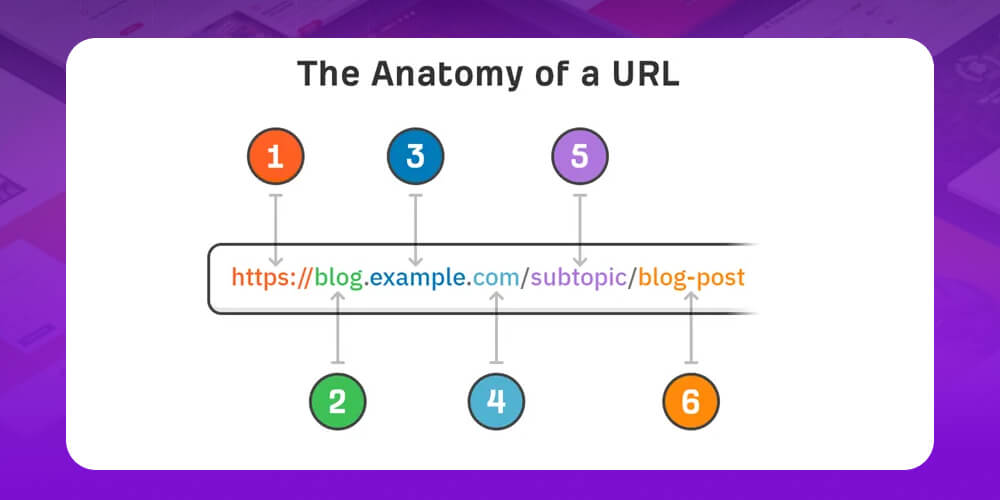
How to check basic technical SEO errors in your website's URL structure:
Use SEO tools such as SiteBulb, DeepCrawl or Screaming Frog to crawl the whole website.
Check the Google Search Console reports (Crawl > Errors).
Test the user experience by searching for a product or service, or by placing a test order, to find navigation errors.
How to quickly fix basic technical SEO errors that affect SEO:
Plan a clear parent-child URL hierarchy with at most 3 folder levels.
Keep URLs short, readable and containing related keywords.
Delete or merge duplicate content, and avoid several pages ranking for the same keyword.
Check and fix all broken links to keep the experience smooth.
If you are building a website for a business and want to do SEO for the long run, understanding Google's algorithms is a must. In this video Huy goes through the most important algorithms so you start with the right foundation and avoid doing it wrong and having to fix it later.
The H1 and Title tags are the two most important “storefront” elements of every post. They improve how your site shows up in search engines and draw in readers more effectively. A fairly common on-page SEO error, though, is an H1 or Title that is not set up properly, for example:
An H1 that is too long (over 70 characters) or a Title over 65 characters.
No main keyword, or no LSI keywords.
The H1 and Title are identical.
A missing H1, or an H1 that is not at the top of the post.
Many posts on the site share the same Title.
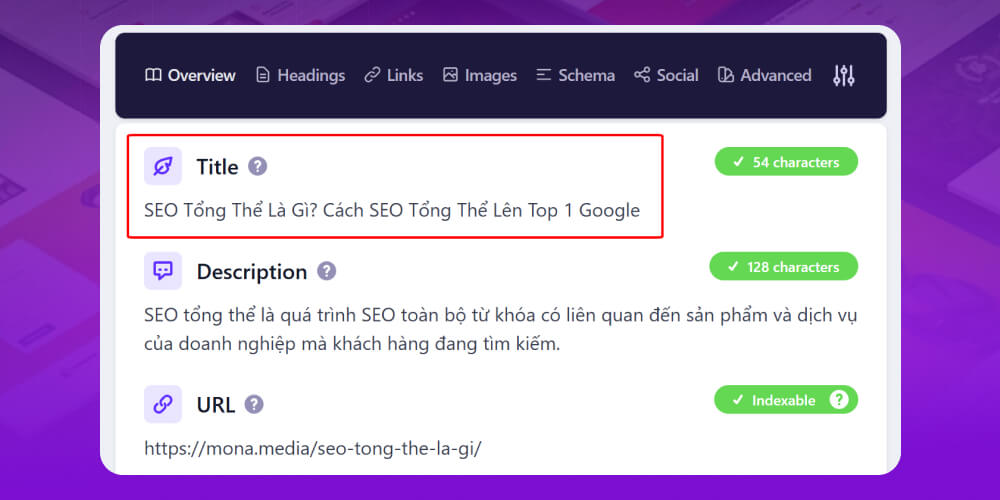
How to spot an unoptimized H1 or Title:
Use Screaming Frog to check technical SEO errors related to H1 and Title tags.
Use the search operator allintitle: on Google to see whether your Title duplicates other pages.
How to fix unoptimized H1 and Title tags:
Place the main keyword and LSI keywords naturally in the H1 and Title.
Keep the H1 under 70 characters and the Title under 65.
Make sure the H1 sits at the top of the post and does not repeat the Title.
Rewrite or replace duplicate Titles so each one is unique and can compete on its own.
Internal linking is one of the most common technical errors that hurt SEO. Internal links pass link strength between pages, help Google understand your site structure, and improve the chance of reaching the top for your keywords. If you don’t use them well, you miss the chance to lift the rankings of several pages at once.
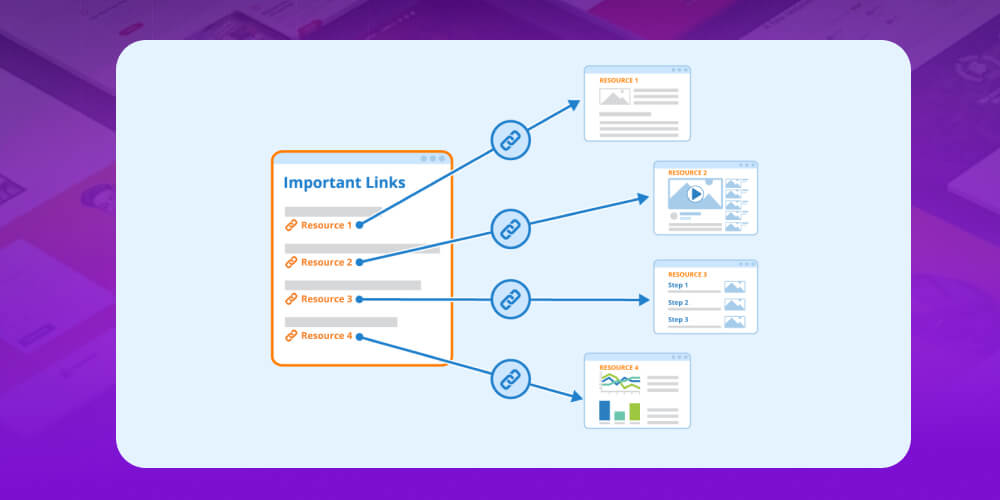
How to spot poorly optimized internal links:
Check the number and quality of internal links pointing to your important pages.
Use Google Analytics or Screaming Frog to review inlinks and find pages with too few links.
Check whether nofollow has been applied to internal links without a good reason.
See whether anchor text is repeated too often or distributed unnaturally.
How to fix common internal link problems:
Add related content on other pages and insert internal links pointing to the page you want to rank.
Use Screaming Frog data to find better opportunities for cross-linking.
Spread anchor text naturally and avoid keyword stuffing.
Check and adjust your nofollow rules so they don’t block internal link strength.
Put simply, Google only wants to rank websites with in-depth content that gives users real value. So don’t put too much weight on writing content by SEO strategy but let Google’s own assessment guide you.
A page full of low-quality content hurts SEO. That content does not meet user needs, so conversion rates drop, Google's algorithms and search engines don’t rate the page’s reliability or link structure highly either, which also lowers how often the page gets crawled.

How to spot thin content on your site:
Crawl the site to find pages with fewer than 500 words.
Check Google Search Console for notices about content quality.
Track keyword rankings. If many keywords drop or never reach the top, the content may be too thin.
Look at bounce rate and time on site: low-quality content usually makes visitors leave quickly.
How to fix this technical SEO error quickly:
Combine several keywords on the same topic into one in-depth post instead of splitting them across many small ones.
Add useful content, and bring in video, images, infographics or audio to add value and keep people on the page longer.
Research what users need before writing, so the content is relevant and engaging.
Review, update and expand older content regularly so it doesn’t become thin or outdated.
|
Fixing technical SEO errors is one of the key tasks when running an SEO project, as it full-scope website SEO services keeps the site running smoothly and performing at its best in search. Without regular audits, errors pile up, harm the user experience, pull rankings down and reduce conversion rates. At MONA Media, our SEO team builds a detailed SEO audit checklist and optimizes every small item, from page load speed and URL structure to meta tags and the internal link system, so your website runs more smoothly and performs better full-scope SEO over the long term.
Contact MONA qua hotline 1900 636 648 for a consultation and to receive SEO services quote that suit your business. We will help you roll out solutions that raise brand awareness and widen your pool of potential customers online. |
Beyond fixing thin content, the content on your site also needs to be coherent, with pages that connect closely to one another. A site with a lot of unrelated content drags down the other sections that are working well. In practice, that shows up as low engagement, or search engines crawling pages that are not SEO,…

To fix a site with too much irrelevant content, keep the following in mind:
One of the reasons a website doesn’t reach the top is technical errors that Googlebot notices but we don’t see. Don’t let your site keep making those mistakes. Watch the video to learn how to spot optimization errors on your own site.
Besides the on-page technical errors MONA has covered above, avoiding and fixing off-page SEO errors matters just as much.
Here is a summary of the off-page technical SEO errors you should watch closely:
A 404 error is a fairly common technical SEO error. It happens when the browser cannot find the page a user is trying to reach. This error is one that Technical SEO hurts both the user experience and the site’s ranking.

How to spot a 404 error:
A page was changed or deleted without setting up a redirect.
A URL was typed wrongly, or a link is broken.
Use Google Search Console or SEO tools such as Screaming Frog to find URLs returning 404.
How to fix 404 errors:
Use 301 redirects to send users from the old URL to the new URL or a related page.
Build a friendly custom 404 page with suggested links to keep visitors on your site.
Check for broken links regularly and fix them so the site keeps running smoothly.
Redirect errors are among the most common technical SEO errors, and they directly affect user experience and search rankings. When redirects are set up incorrectly, a site easily loses the SEO value it has built up, and Google has a harder time crawling it.

What causes redirect errors:
Using the wrong type of redirect, for example a temporary 302 instead of a permanent 301, so SEO value is not fully passed on.
A faulty HTTPS setup, with no redirect from HTTP to HTTPS, or one that creates duplicate content.
Incomplete redirects during a site migration, with pages missed or internal links not updated.
Errors in the .htaccess file that break redirects.
Redirect chains that slow down page load.
A canonical tag that is not updated, leading to duplicate content.
How to fix this SEO error:
Use the right type of redirect: 301 for permanent, 302 for temporary.
Check and tidy up the .htaccess file so redirects work correctly.
Update internal links, replacing old URLs with the new ones.
Set canonical tags correctly to identify the main version of each page.
Make sure robots.txt does not block redirected pages.
Avoid redirect chains and optimize so redirects go straight to the destination and load faster.
Sitemap XML plays an important role in technical SEO, helping search engines find their way around and crawl quickly. Many websites, especially large ones with complex structures, make sitemap-related mistakes such as:
Many pages are not linked to each other, which makes it hard for Google to collect complete information.
Newly updated content is missed by bots.
The sitemap includes advanced content that search engines cannot process.
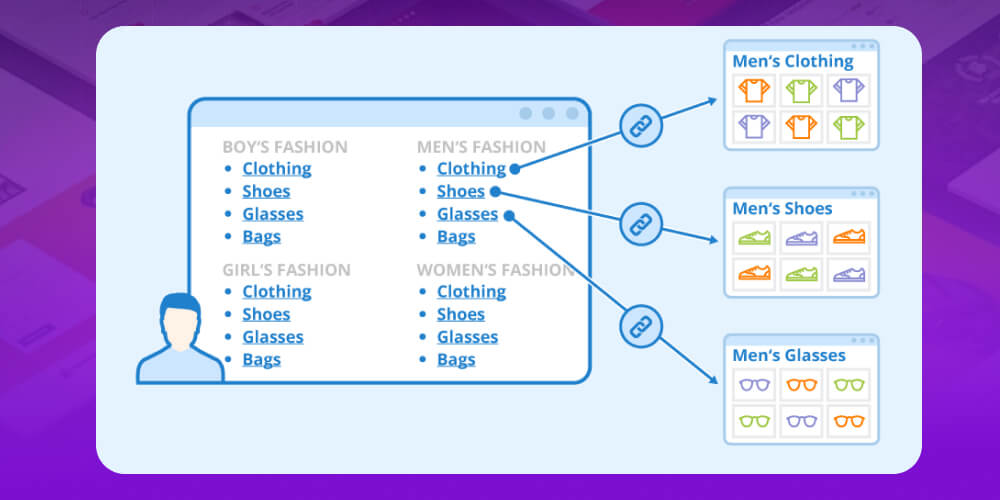
How to fix SEO errors related to the XML sitemap:
Connect the XML sitemap to Google Search Console so you can monitor it and catch errors early.
Analyze and check the sitemap regularly to make sure every important URL is indexed.
If you use a plugin to generate the sitemap, keep it updated and working reliably.
The canonical tag is an HTML element that helps search engines deal with duplicate content. If two pages are nearly identical, you can use a canonical tag to tell search engines which one you want shown. But overusing the canonical tag does more harm than good.
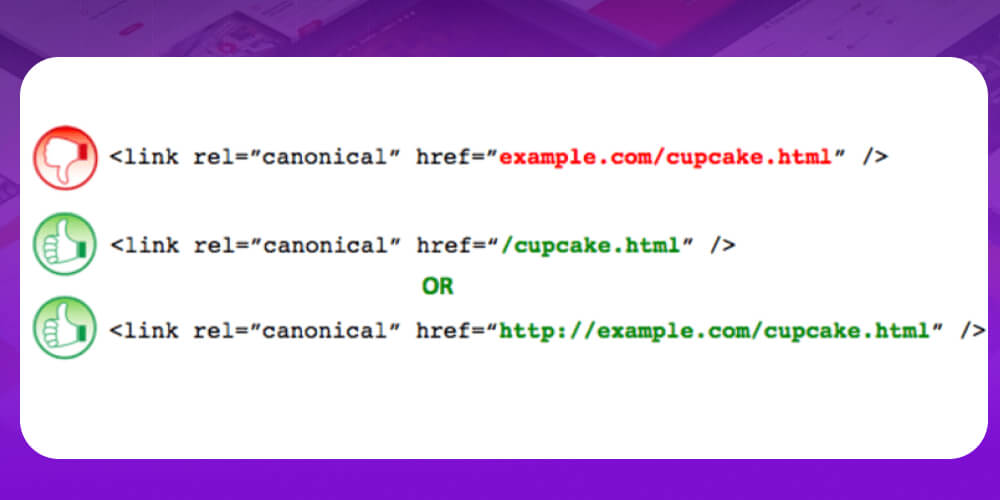
To avoid this mistake, you can try the following:
Robots tags go in the page header, so they can cause a number of problems, especially when they are applied at file level and on individual pages. Several robots tags showing up on the same page is entirely possible. This technical error becomes a barrier that makes the site hard to optimize.

To fix this error, use the following methods:
Mistake robots.txt file is a common technical SEO error that directly affects how a website is crawled and indexed. This file tells search engines how to reach your content. If it is misconfigured, important pages can be skipped, which lowers rankings and traffic.
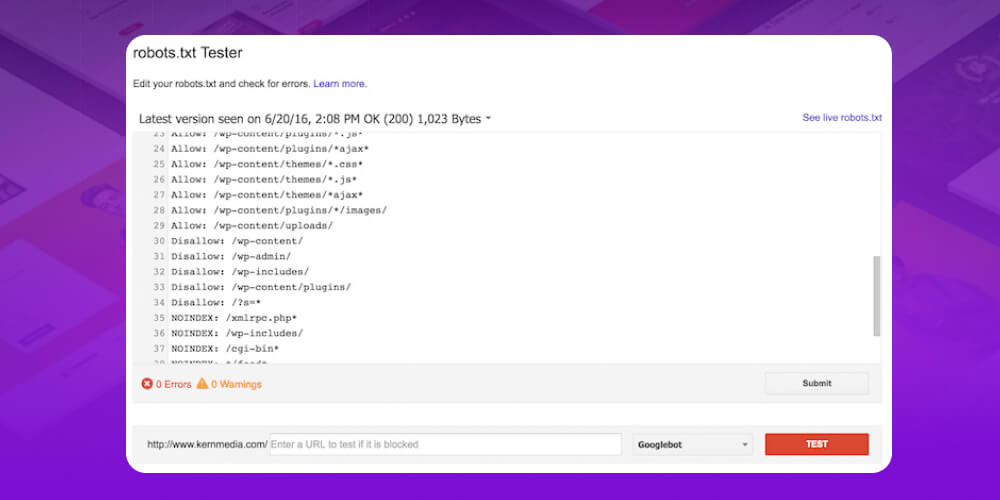
Some common problems:
Wrong path: The robots.txt file is not in the root directory, or the paths inside the file are incorrect.
Syntax errors: Syntax mistakes make bots misread or ignore the instructions.
Blocking important content by mistake: Accidentally blocking folders that hold CSS, JavaScript or key pages.
File not updated: After the site structure changes or the site is moved, robots.txt is not adjusted in time, which causes crawling and indexing errors.
How to fix robots.txt errors:
Use Google Search Console to check for robots.txt errors and see which pages are blocked.
Make sure the file is in the root directory, the syntax is correct, and it does not block important folders or URLs.
Use Google’s robots.txt tester or a third-party tool to find and fix errors quickly.
Update the file as soon as the site structure changes so crawling stays smooth.
Google encourages users to move to HTTPS for better security. But quite a few websites overlook this, which hurts their SEO. In particular, the site is less secure and search engines rate it lower.
To optimize HTTPS, you need to get a certificate SSL certificate from a certificate authority if you want to move your site to HTTPS. Once the certificate is installed, your website is better protected.
Unoptimized ALT tags (alt text) are a fairly common off-page SEO error. ALT tags help search engines understand what an image shows and act as replacement text when the image does not load. Without proper ALT text, your images struggle to rank on Google Images and are less accessible to users.

How to optimize ALT tags:
Describe accurately: Write a description that matches the image so both users and search engines understand it.
Short and to the point: Use brief wording that covers the idea without long explanations.
Relevant to the page: ALT text should relate to the topic of the post or page that holds the image.
Avoid keyword stuffing: Use keywords naturally and don’t overdo it.
Use Vietnamese with diacritics: Keep spelling complete so the text looks professional and reads well for users.
Check regularly: Review all ALT tags to find and optimize them in time.
Using too little structured data (schema markup), or none at all, is a common off-page SEO error. Schema gives search engines detailed information so they understand your content better and can display it prominently in search results (rich snippets). When schema is missing or incomplete, your website loses its edge in search appearance and SEO performs worse.
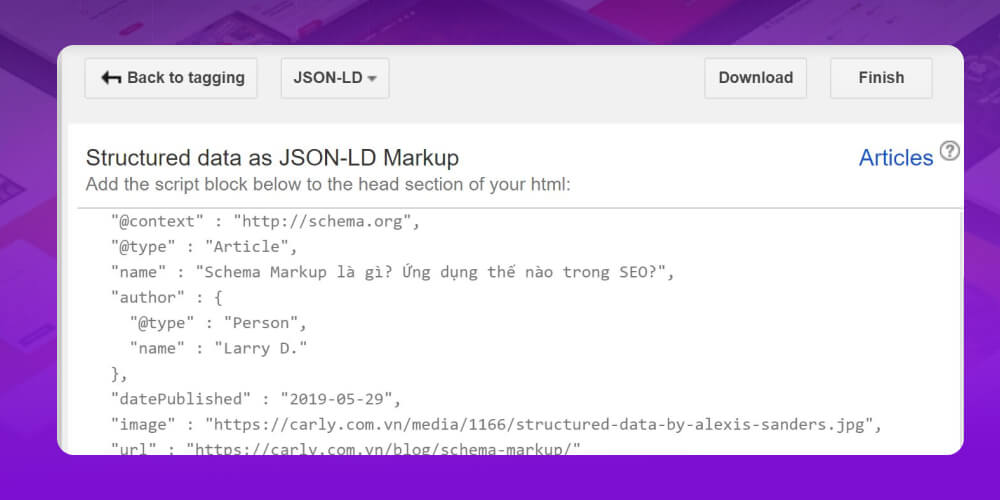
How to optimize structured data on your site:
Check your schema status: Use Google’s structured data testing tool to see whether schema is already in place and whether any data is missing.
Choose the right schema type: Apply the type that fits your content, such as Article, Product, Event, LocalBusiness, FAQ schemaand so on, to increase relevance.
Optimize the schema content: Make sure the data is accurate, complete and follows Google’s guidelines so search engines read it correctly.
Check regularly: Review and update schema whenever your content or site structure changes, to prevent new technical SEO errors.
A homepage that exists under several URL versions, such as example.com and www.example.com, looks harmless but splits your content, weakens indexing and hurts the homepage’s ranking. It also divides the value of your backlinks, lowers search performance and directly affects overall SEO.
How to fix a homepage with multiple URL versions:
Check all URL versions of your homepage to see whether they resolve to one standard version.
Set up 301 redirects from every other version to one canonical URL.
Set the canonical domain in Google Search Console so search engines recognize the official version.
Explore the case study: LALUZ PARFUMS x MONA
LALUZ PARFUMS is a premium perfume brand in a luxury category with high competition and experienced rivals. When we started their SEO, MONA took a clear full-scope SEO strategy and worked through LALUZ’s initial problems one step at a time.
MONA’s SEO team did not chase short-term SEO tricks. We focused on optimizing the website foundation, building quality content and a sustainable link strategy, combined with a plan AI-powered SEO optimization. After just 8 months, traffic grew 9 times, helping LALUZ build a much stronger presence in customers’ minds.

For MONA, an SEO project is not only about getting a website to the top. It is about creating real value and measurable results, so clients can clearly see the change month after month.
Technical SEO errors that affect how your site shows up and ranks in search engines include:
When Google changes its ranking algorithm, it can create SEO problems and lower your keyword rankings, for example:
Causes of technical SEO errors:
Google updates its algorithm often to deliver more accurate and relevant results. With each update, a website’s keyword rankings can jump or drop sharply. It is also how Google patches flaws in older algorithms and adds new criteria.
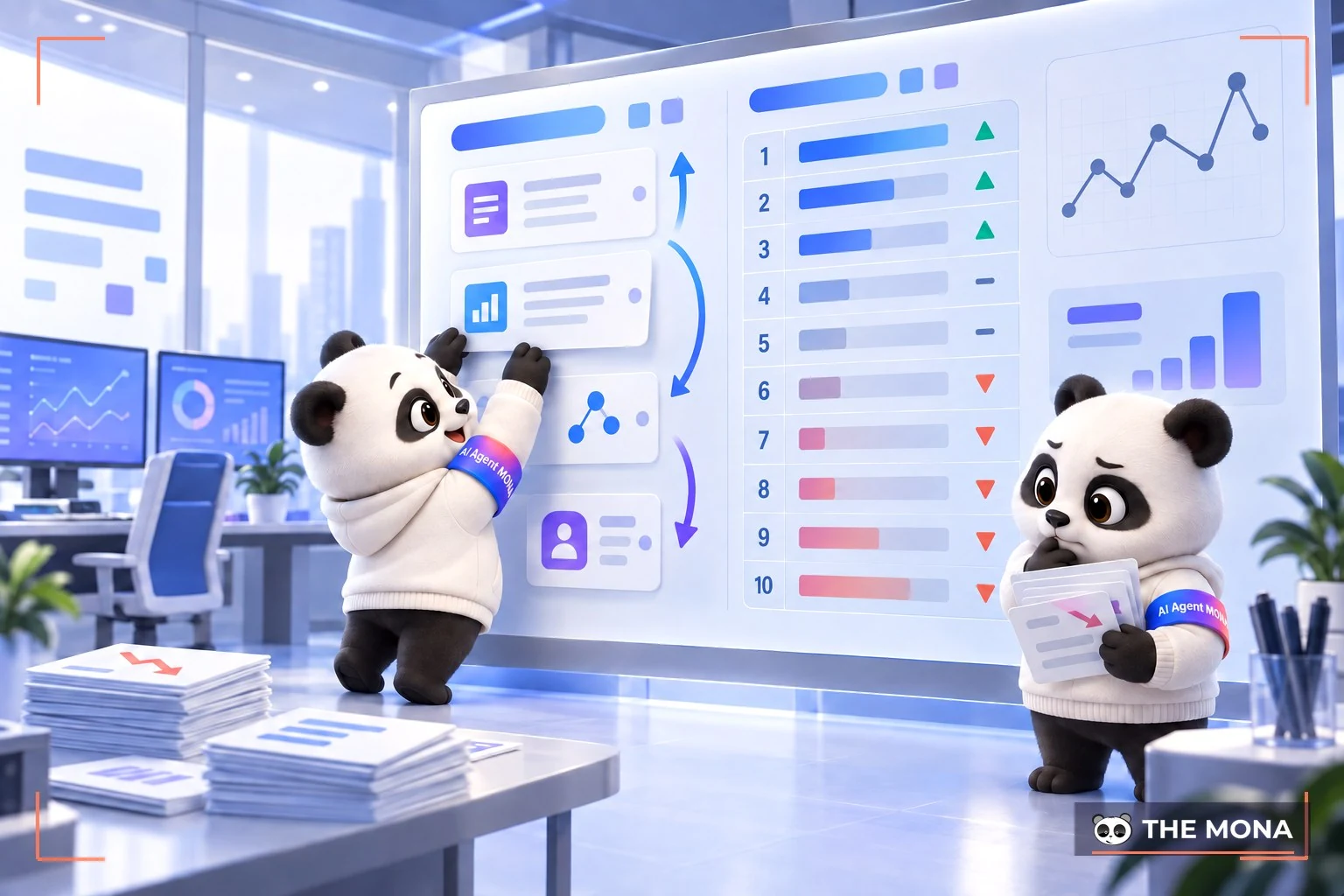
How to fix the SEO error:
To recover keywords that dropped because of an algorithm change, you can try the following:
Follow official sources: Keep up with news from Google or reputable SEO sites to understand the goal, scope and recommendations of each update.
Check your numbers: Use Google Analytics, Google Search Console or other SEO tools to compare traffic and keyword rankings before and after the algorithm change.
Get expert help: If you lack experience or time, work with a reputable SEO agency to analyze and optimize your site to Google’s new standards.
SEO errors tied to PageRank and backlinks usually come from low-quality inbound links from untrustworthy or off-topic websites, for example:

Causes of technical SEO errors:
Some technical issues can make a site’s rankings fall sharply, and the most common are low PageRank or a poor-quality backlink profile.
Low PageRank: This is the Google algorithm that rates a page’s “credibility” based on the number and quality of links pointing to it. Sites with high PageRank are generally favored by Google. Low PageRank, on the other hand, shows that the site is not yet trusted enough to reach a high position in search results.
Poor-quality backlinks: These are links from unrelated or low-reputation websites, spam, copied content, or sites that break Google’s webmaster guidelines. Backlinks like this don’t improve your ranking, and they can get your site penalized by Google, causing it to drop or be removed from search results.
How to fix this technical SEO error:
To fix low PageRank or poor-quality backlinks, work through these steps with MONA:
Check your PageRank and backlinks: Use Google Search Console, Google Analytics or SEO tools to analyze the number, quality and source of your backlinks.
Remove bad backlinks: Contact the site owners to remove the links, or use the Disavow Links tool in Google Search Console to tell Google to ignore them.
Build quality backlinks: Earn links from relevant, reputable websites with valuable content to improve PageRank and strengthen your rankings.
SEO errors that lead to a Google penalty come from several causes, mostly violations of Google’s content and technical SEO policies.
Causes of technical errors that affect SEO:
Many things can get your website penalized by Google. The most common ones, as MONA has summarized below:
How to fix technical website errors that affect SEO:
A Google penalty is something you want to avoid, because it can cut your rankings, traffic and revenue. There are a few ways to check whether your site has been penalized and how to recover:
SEO errors from duplicate and outdated content are a serious problem that can hurt your rankings in search engines.
Causes of content SEO errors:
From years of fixing SEO problems for clients, MONA has found that duplicate content and content that isn’t updated regularly are the main reasons keywords slip. Usually the cause is SEOers not keeping close enough watch on the content plan and its execution, so Google rates the site’s quality low.

How to fix content SEO errors:
The best way to fix poor content is to raise its quality. Look at your competitors’ content, pick out what works and apply it to your own site. Older posts on your site also need to be updated on a regular schedule, so Google rates the site higher.
A website with a poor user experience will struggle to rank high on Google, because slow loading, hard-to-use layouts and irrelevant content are all negative signals for SEO.
Causes of the SEO error:
A poor user experience is a technical problem that keeps your website from ranking high on Google. Google tends to favor sites that are easy to use on every device, with content that is easy to read and understand and keeps visitors on the page longer.

How to fix the SEO error:
The best fix is to improve the user experience of your website. Here are some things you can try:
The rise of competitors is a common reason your SEO keywords drop. When rivals improve their content quality, optimize site performance and build a strong backlink profile, they can overtake you in search rankings and reduce your visibility.
How to fix it and improve your SEO ranking:
To recover, you can take the following steps:
SEO errors caused by Google algorithms can cover many different problems, from low-quality content and poor technical SEO to link and user experience issues, for example:
A Google Penalty is a punishment Google applies when it finds a website breaking its guidelines, usually tied to black-hat SEO or attempts to manipulate search results. Once penalized, a site can lose keyword rankings sharply, see organic traffic drop, or even disappear from search results.
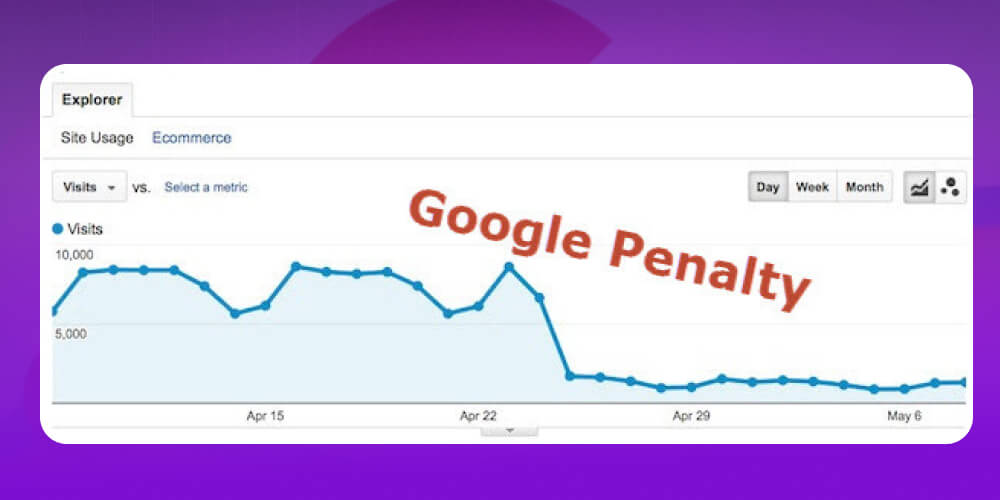
Causes of SEO errors from a Google Penalty:
Low-quality content: Duplicate or copy-pasted content, keyword stuffing, or auto-generated text.
Low-quality links: Backlinks from spam or unrelated sites, or bought and sold links used to manipulate PageRank.
Spam and deceptive practices: Comment spam, forum spam, deceptive redirects and keyword spam.
Structured data violations: Not following schema markup guidelines, or using wrong or incomplete data.
Poor hosting or security: A server that hosts many violating sites, malware or spyware, or a full hosting account that slows the site down.
How to fix the SEO error:
Check whether you have been penalized: Use Google Search Console and Google Analytics to track changes in traffic and keyword rankings.
Clean up bad backlinks: Remove or disavow low-quality links.
Upgrade your content: Rewrite posts to SEO standards, update the information, make sure they are more than 95% unique, and give users real value.
Optimize the website technically: Improve page speed, security and structured data.
Follow Google’s guidelines: Keep up with algorithm updates, avoid short-term SEO tricks, and build a sustainable strategy instead.
Google Panda is an algorithm update first released in February 2011, aimed at lowering the rankings of websites with low-quality content and favoring pages with high-quality content. Between 2011 and 2015, Google rolled out about 28 Panda updates to improve search results, remove junk content and push websites to invest in real value for users.
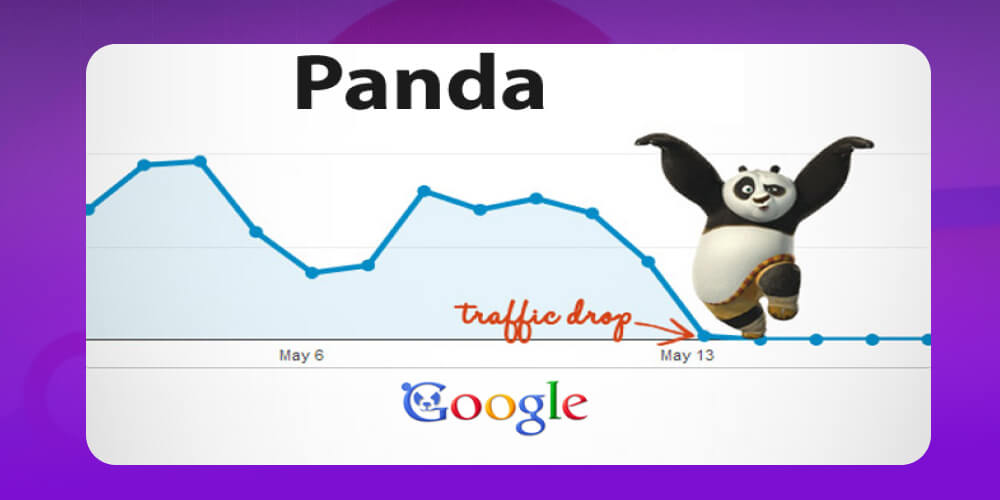
Why a website is hit by Google Panda:
Thin or low-quality content: Posts that are too short, lack information and give readers no value.
Duplicate content: Copied from other sites, or repeated across many sub-pages of the same website.
Lack of trust and authority: Content that doesn’t define its target audience, or has no evidence or reputable sources.
Content spam: Keyword stuffing, or content stitched together from many sources without editing, which gives a poor user experience.
Too many ads: Content buried under banners and pop-ups, which hurts the experience and the real value of the page.
How to fix and avoid Google Panda issues:
Check for and remove duplicate content: Use SEO tools to find, edit or delete repeated content.
Raise content quality: Write in-depth, complete posts of a sensible length (600 to 2,000 words) in clear, easy language.
Improve short content: Add useful information, images and video to keep visitors on the page longer.
Optimizing the user experience: Make navigation logical, limit ads that cover content, and keep pages fast with a layout that is easy to read.
Build high-quality content: Provide practical information that meets search needs and keeps readers on the page longer.
The Google Sandbox is a “control” mechanism Google applies to new websites or new keywords, limiting how well they can rank in search results. Many SEOers compare it to Google’s “probation period.” It usually lasts about 4 weeks, but can run longer if a site is over-optimized or its SEO looks unnatural.
The purpose of the Google Sandbox is to stop new sites, especially those with spam or low-quality content, from “climbing to the top” too fast and hurting the quality of search results.
Why a website ends up in the Google Sandbox:
A brand-new website with no reputation or track record yet.
Low-quality or duplicate content, or excessive keyword stuffing.
A sudden spike in backlinks in a short time, especially low-quality ones.
Over-doing on-page SEO on a new site (too many anchor texts, multiple H1s, unusually high keyword density).
Duplicate URLs caused by using the same titles and keywords across many posts.
Sabotage by competitors, such as hidden links or toxic backlink spam.
How to fix it and shorten the Google Sandbox period:
Find the cause: Check carefully to identify what triggered the Sandbox, from content and backlinks to site structure.
Build quality backlinks: Prioritize links from reputable sites in the same field with high traffic. Don’t grow the number of backlinks too quickly.
Optimize keywords sensibly: Keep keyword density at a safe level (around 1 to 2%), spread it evenly through the post, and mix in secondary keywords and synonyms so the text reads naturally.
Invest in unique, in-depth content: Write 100% new content that is rich in information and depth, and avoid spun content.
Control outbound links: Avoid linking out too much, or to low-reputation sites.
Put White Hat SEO first: Do SEO transparently and focus on value for users rather than quick tricks to “push to the top.”
Don’t over-optimize a new domain: Go step by step, building content and backlinks slowly to earn Google’s trust.
And don’t miss the latest SEO trend of 2026, where everything gets easier than ever. Watch the video “SEO in 2026 Made Easy in Just 5 Minutes” to pick up the most effective method and climb the rankings fast.
As you can see, there are many mistakes and technical SEO errors that can appear while you carry out an SEO strategy. Even experienced SEOers can’t always avoid them. That is why it is important to stay up to date and fix problems promptly when SEO website they happen. Doing so helps you improve your website and your ranking on Google more effectively. We hope the information on 25+ common technical SEO errors and how to fix them in detail MONA Media shared above is useful to you. Good luck with your fixes.

CEO & Founder · The MONA
Founder of The MONA, who built a services company of 200+ staff with 14,000+ projects delivered. Khánh Hùng shares how he thinks about building systems that run themselves, automating a business, and the real lessons from delivering projects at MONA.
 1,6K
1,6K




Professional website
design services
Own a website with a beautiful, 100% exclusive design and a lifetime warranty, with the ability
to expand features flexibly as your business grows, starting today!



NHẬN TƯ VẤN SEO MIỄN PHÍ !








 MONA will never sell your information or send you spam
MONA will never sell your information or send you spam
MONA will never sell your information or send you spam


 MONA will never sell your information or send you spam