
 MONA OS 2.0


 Tự động hoá doanh nghiệp
 Cẩm nang SEO
 Digital Marketing
 Kinh nghiệm thiết kế website
 Hạ Tầng Server
 Giáo dục


 VI
VI
 EN
EN














Message us on
Zalo Official


 ProductsNew

 ProductsProducts
 Mới ra mắtKHA AI 2027App tự edit video, tự đăng mọi mạng xã hội, 2 phút mỗi ngày










 Website designLooks good and wins customers over.
SEO servicesBrings in customers searching for exactly what you sell.
Website designLooks good and wins customers over.
SEO servicesBrings in customers searching for exactly what you sell.
 Tư vấn digital marketingKéo khách từ nhiều kênh, đo bằng số thật.
Corporate video productionVideos introducing your company, factory and team.
Tư vấn digital marketingKéo khách từ nhiều kênh, đo bằng số thật.
Corporate video productionVideos introducing your company, factory and team.
 NewAI video productionCompany story films made with AI.
 Custom software developmentCRM, ERP and HRM built for your business.
 Viết AI Agent theo yêu cầuĐặt riêng một trợ lý AI cho đúng việc của mình.
 Tư vấn chuyển đổi AIĐưa AI vào vận hành của cả công ty.
NewMONA LMSManagement for centers and schools.
MONA SkillHubInternal training for company staff.
Tư vấn chuyển đổi AIĐưa AI vào vận hành của cả công ty.
NewMONA LMSManagement for centers and schools.
MONA SkillHubInternal training for company staff.
 NHTQ systemEnd-to-end China–Vietnam shipping operations.
MONA JMSManagement for gold, diamond and pawn shops.
NHTQ systemEnd-to-end China–Vietnam shipping operations.
MONA JMSManagement for gold, diamond and pawn shops.
 MONA E-LearningA website with every feature you need to sell courses.
 How to sell online courses (course)More than 30 free lessons on selling courses on autopilot.
 MONA Cloudmonacloud.vnServers to get your apps and websites running.
 MONA Basemonabase.vnPostgres database, sign-in and file storage.
 MONA Mailmonamail.vnSend OTP, order and invoice emails from your software.
 MONA Paymonapay.vnAccept bank transfers via VietQR and notify your software when the money arrives.
 MONA eInvoiceComing soonIssue e-invoices that meet tax standards.
Gấu CườiTrả lời khách 24/7 trên web, Fanpage, Zalo và thu lead cho sale.
MONA eInvoiceComing soonIssue e-invoices that meet tax standards.
Gấu CườiTrả lời khách 24/7 trên web, Fanpage, Zalo và thu lead cho sale.
 Gấu TeleSalesGọi điện tư vấn, chăm khách như tổng đài viên thật.
Dê CườiTư vấn và chốt đơn cho shop ngay trong khung chat.
Gấu WebmasterNhắn nhóm Zalo là website được sửa xong.
Gấu TeleSalesGọi điện tư vấn, chăm khách như tổng đài viên thật.
Dê CườiTư vấn và chốt đơn cho shop ngay trong khung chat.
Gấu WebmasterNhắn nhóm Zalo là website được sửa xong.
 Gấu Pháp ChếSoạn hợp đồng, rà điều khoản trong vài phút.
 Gấu Báo GiáLên báo giá đúng mẫu và gửi khách ngay.
 AI chăm sóc khách hàngTheo dõi và giữ chân khách hàng cũ.
 Gấu Tuyển DụngLọc hồ sơ, hẹn lịch, phỏng vấn ứng viên.
 Mới ra mắt
KHA AI 2027
Xây kênh chuyên gia 2 phút mỗi ngày
Quay bằng điện thoại, AI tự edit video, tự đăng lên 16 nền tảng và tự trả lời bình luận, tin nhắn.
356.271lượt xem trên kênh CEO MONA sau 21 ngày
Mới ra mắt
KHA AI 2027
Xây kênh chuyên gia 2 phút mỗi ngày
Quay bằng điện thoại, AI tự edit video, tự đăng lên 16 nền tảng và tự trả lời bình luận, tin nhắn.
356.271lượt xem trên kênh CEO MONA sau 21 ngày
 Anh Khánh HùngCEO MONA đang dùng mỗi ngày
Xem app làm được gì
Anh Khánh HùngCEO MONA đang dùng mỗi ngày
Xem app làm được gì
 AI
Gấu Cười MONA ĐANG TỰ XÀITrả lời khách 24/7 trên website, Zalo OA, Messenger và thu lead về cho sale.
Dê CườiChốt đơn bán lẻ và sàn: Shopee, TikTok Shop, web. Chăm cả khách sỉ, đại lý.
Gấu WebmasterCập nhật nội dung, tối ưu SEO website mỗi ngày.
Gấu TeleSalesGọi điện tư vấn, chăm khách như tổng đài viên thật.
Gấu Tuyển DụngLọc hồ sơ, hẹn lịch, phỏng vấn ứng viên tự động.
AI chăm sóc khách hàngGiữ khách cũ, cứu lead đã rớt cho phòng kinh doanh.
Gấu Pháp ChếSoạn hợp đồng, rà điều khoản trong vài phút.
Gấu Báo GiáLên báo giá đúng mẫu, gửi khách ngay khi có yêu cầu.
AI
Gấu Cười MONA ĐANG TỰ XÀITrả lời khách 24/7 trên website, Zalo OA, Messenger và thu lead về cho sale.
Dê CườiChốt đơn bán lẻ và sàn: Shopee, TikTok Shop, web. Chăm cả khách sỉ, đại lý.
Gấu WebmasterCập nhật nội dung, tối ưu SEO website mỗi ngày.
Gấu TeleSalesGọi điện tư vấn, chăm khách như tổng đài viên thật.
Gấu Tuyển DụngLọc hồ sơ, hẹn lịch, phỏng vấn ứng viên tự động.
AI chăm sóc khách hàngGiữ khách cũ, cứu lead đã rớt cho phòng kinh doanh.
Gấu Pháp ChếSoạn hợp đồng, rà điều khoản trong vài phút.
Gấu Báo GiáLên báo giá đúng mẫu, gửi khách ngay khi có yêu cầu.
 Chuyển đổi AI toàn phầnGiải pháp tổng cho doanh nghiệp, 3 lớp triển khai.
 Viết AI Agent theo yêu cầuĐặt riêng một con AI gánh đúng nghiệp vụ của bạn.
 Custom softwareCRM, ERP and HRM with built-in AI automation.
 SEO & AEO thời đại AIĐược Google lẫn AI trích dẫn, không chỉ xếp hạng.
 Kiến thức AI cho doanh nghiệpBài phân tích, hướng dẫn ứng dụng AI vào vận hành.
 Free AI courses
 AI tools at work
App mới · KHA AI 2027
Xây kênh 2 phút mỗi ngày
AI tự edit video, tự đăng mọi mạng xã hội
Free consultation, 8am–10pm every day
AI tools at work
App mới · KHA AI 2027
Xây kênh 2 phút mỗi ngày
AI tự edit video, tự đăng mọi mạng xã hội
Free consultation, 8am–10pm every day

18 March, 2023
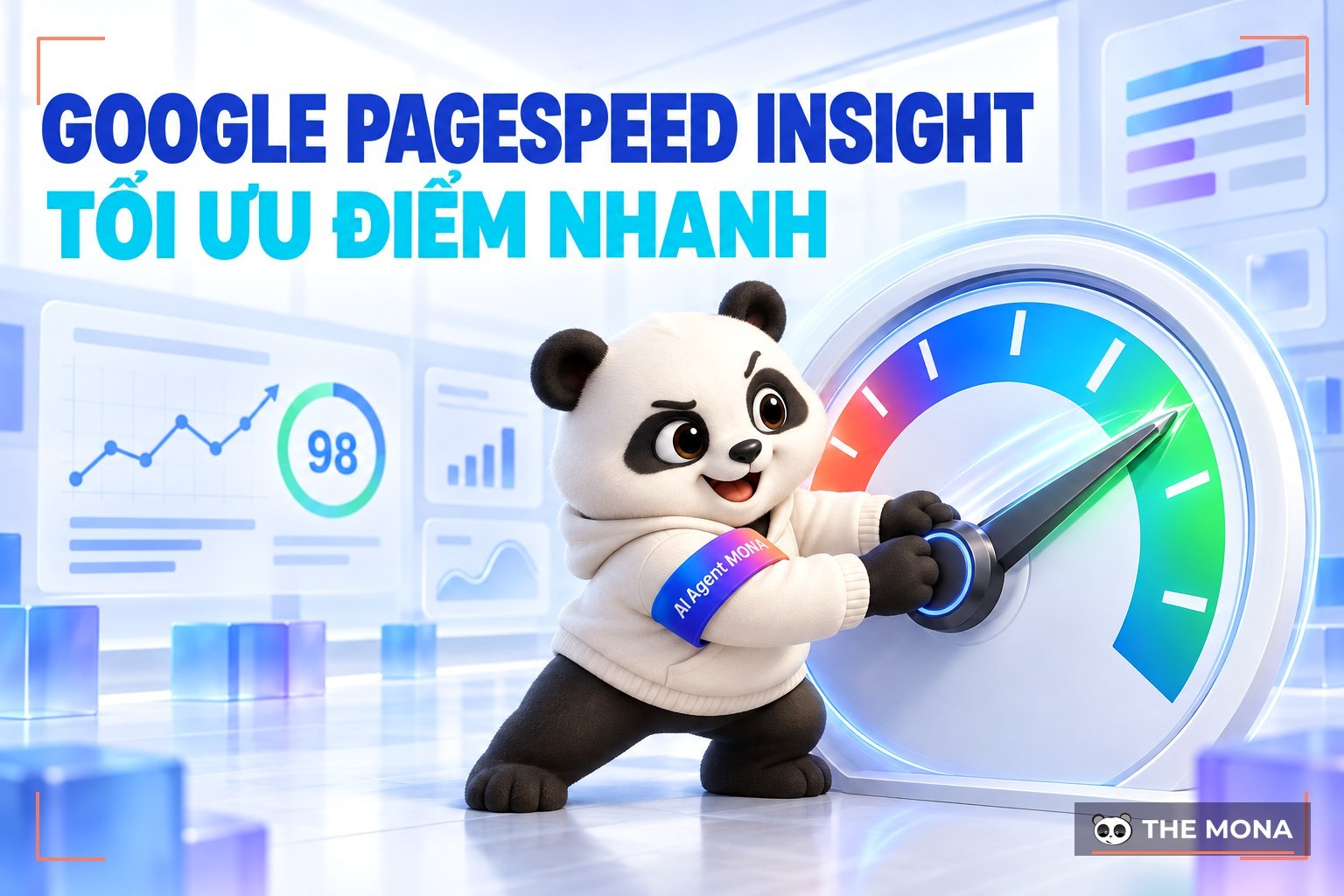
How do you measure and improve website speed accurately, to keep users and raise SEO rankings?
Google has many tools for optimizing websites, but PageSpeed Insights is one of the most widely used. Still, not everyone understands what Google PageSpeed Insights is and how it works. In this article, let's MONA Media look at this tool in detail and how to use it to optimize website performance.
Google PageSpeed Insights (PSI) is a free SEO tools from Google that helps you measure the performance and load speed of a website on both computers and phones. It scores on a scale of 0 to 100 and comes with specific suggestions for improving page speed, which improves user experience and supports full-scope SEO.
PSI works from two data sources:
Lab Data: simulates device and network conditions to test performance in a controlled environment.
Field Data: collected from real users over 30 days, accurately reflecting their experience when they visit the page.
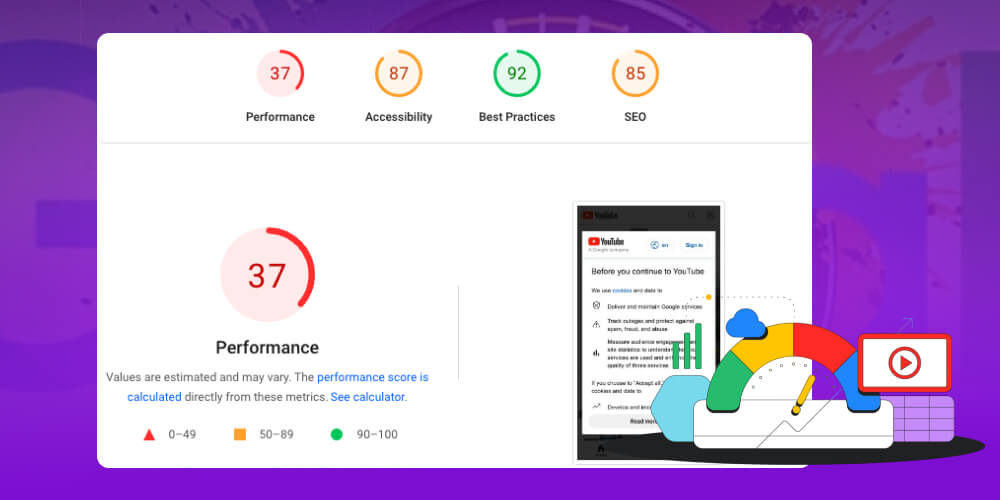
The analysis shows useful information such as:
Speed Score: a speed score based on the Lighthouse tool.
Field Data: key metrics such as First Contentful Paint (FCP) and First Input Delay (FID).
Opportunities: optimization suggestions to shorten page load time.
Diagnostics: detailed technical recommendations.
Passed Audits: a list of what you have already done well.
With these reports, PageSpeed Insights helps administrators and developers easily spot problems, optimize page load speed, lower bounce rate, improve user experience and help improve SEO rankings.
Google PageSpeed Insights does not only evaluate page load speed, it also measures the overall user experience. The tool provides several key metrics that show how your site is performing and where it needs to improve. The important Google PageSpeed Insights metrics include:
This is a combined score from 0 to 100, reflecting how well optimized the website is. The higher the score, the faster and smoother the site loads and the better the experience for users.
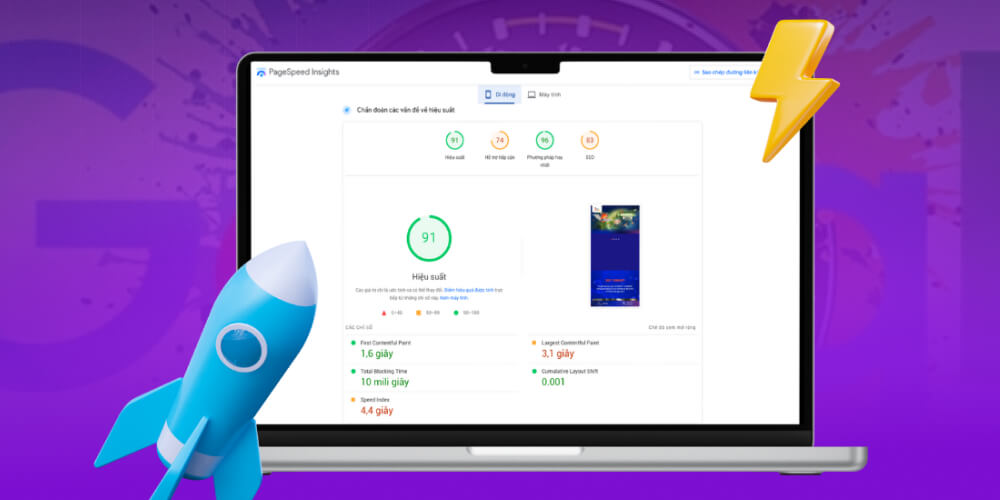
This score is calculated from several factors, including:
The performance score is also based on Core Web Vitals, the three metrics Google defines as web SEO ranking factors. So improving the score not only makes users happier but also raises search rankings.
Google uses three main metrics to evaluate the quality of user experience, specifically:
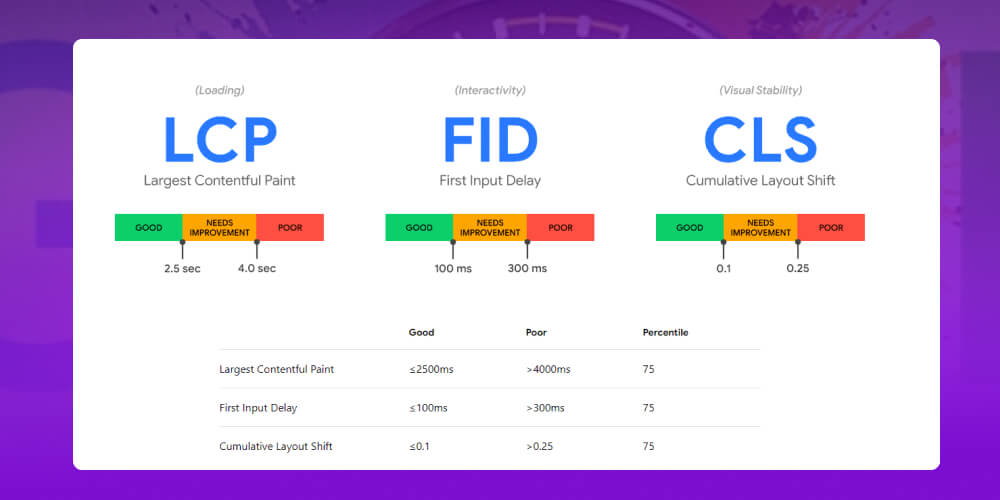
When a website scores well on all three, users feel the page loads fast and responds smoothly and steadily, which lowers bounce rate, increases time on site and improves SEO strategy.

Besides Core Web Vitals, PSI offers many other detailed metrics that give you a deeper view of page performance, such as:
First Contentful Paint (FCP): The time for the first content (text, small images) to appear on screen.
Time to Interactive (TTI): The time until the page is fully ready and users can interact without interruption.
Speed Index: Measures how quickly content is displayed visually on the page (compared with full load time).
Field Data (real-world data): Figures collected from real users over the past 30 days, giving an honest view of page load experience in the real world.
Opportunities: A list of improvement opportunities, such as compressing images and deferring scripts, that reduce load time.
Diagnostics: Deeper technical recommendations on structure, performance and code optimization.
Don't jump into SEO before you know who you are up against. This video shows you how to see the full picture with real data. WATCH NOW!
Your score on Google PageSpeed Insights does not directly affect SEO rankings. But the tool measures factors that matter a great deal to web SEO strategy, such as page load speed and user experience, two core criteria in Google's ranking algorithm.
PageSpeed Insights does not "directly" decide where you appear in search results. But the metrics it provides are the ranking signals Google uses to judge website quality.
A low PageSpeed Insights score shows that your site loads slowly and gives users a poor experience. This can hurt your site's ranking and reduce visibility and organic traffic.
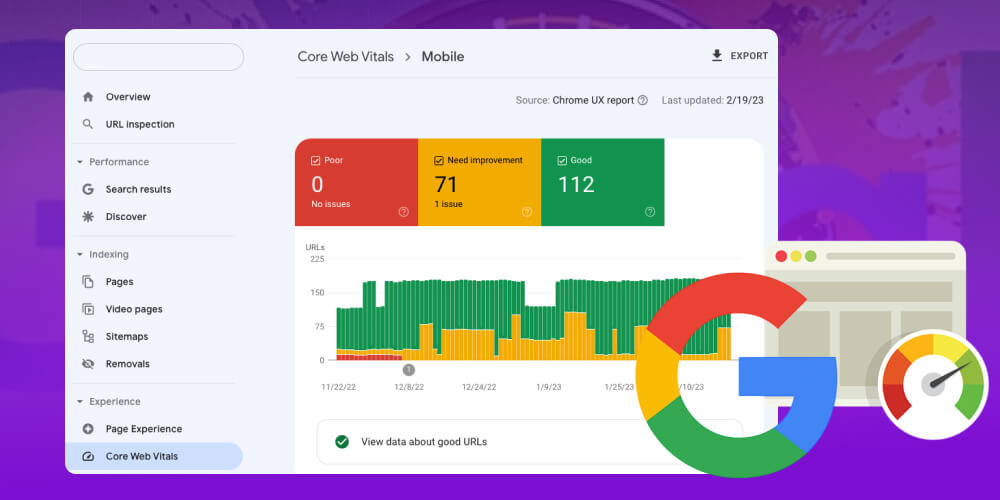
Conversely, when you optimize performance and improve your PageSpeed Insights score, you not only make the site load faster, you also:
Google always favors sites that are fast, smooth and user-friendly. So improving your PageSpeed Insights score is an important item when carrying out a structured full-scope.
If you focus only on on-page content and ignore technical factors, user experience suffers and so does SEO performance: rankings drop out of the top of the SERP, organic traffic fall, and in the end the business's sales are seriously affected.

With more than 10 years experience, having carried out more than 2,000+ SEO projects across many fields, the MONA team is ready to work with you on SEO AI Onpage and Offpage optimization through to technical SEO to win the top of Google.
Technical SEO optimization: keeps the website running smoothly and steadily, improves user experience and opens access to millions of potential customers, which raises conversion value.
Onpage optimization: Improve content quality and optimize titles, meta tags, URL structure, internal links, images and schema to be friendlier to Google and keep users longer.
Offpage optimization: Build a quality backlink system, run press and guest posts, and use social media and referral channels to raise the website's credibility and ranking.
Analyze and build an SEO strategy tailored to the project's situation and closely tied to business goals to set up KPI SEO for each stage.
Transparent reporting at regular intervals, so the business can closely follow progress and the return on its investment.
Close coordination with the business throughout the process so the SEO strategy stays flexible and delivers the best results.
Contact with MONA Media for strategy advice and to receive SEO services quote detailed for you.
In the final part, this article guides you through some adjustments to make after receiving a PageSpeed Insights report. There are 6 ways to optimize your PageSpeed Insights score:
Reducing server response time (TTFB) is one of the most effective ways to improve website performance when using Google PageSpeed Insights. Time To First Byte is the time from when the browser sends a request to the server until it receives the first byte of the response. The lower the TTFB, the faster the page loads and the better the user experience.
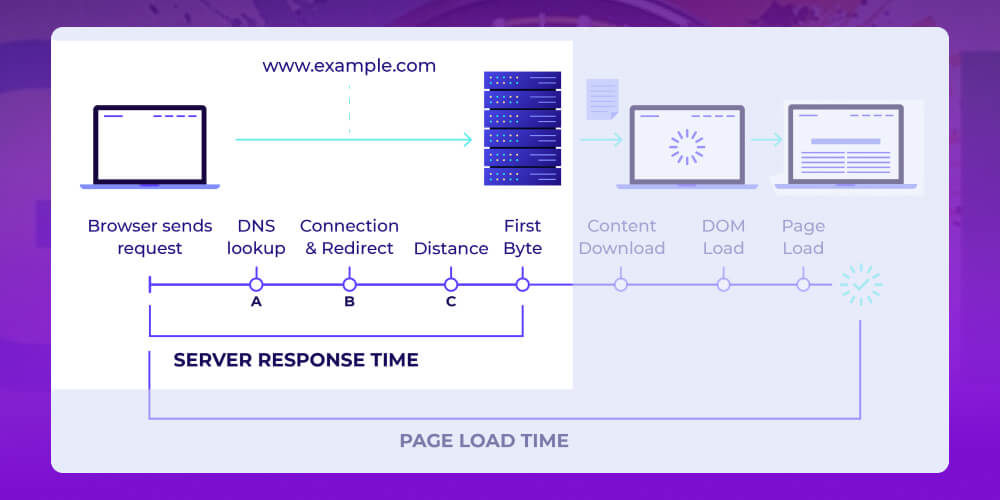
The main ways to reduce server response time are:
Choose a high-quality hosting providerwith fast, reliable servers to ensure quick responses.
Use caching such as browser cache and server cache to reduce the load of reprocessing pages and resources.
Optimize the web server configuration such as Apache, Nginx, or use a high-performance web server like LiteSpeed to speed up responses.
Optimize source code and database such as reducing the number of queries, merging CSS/JS files, avoiding redundant code, and keeping code clear and concise.
Use a content delivery network (CDN) to deliver content from the server closest to the user and reduce network latency.
Optimize CSS and JS files and split stylesheets by area so they load faster and cut response time.
Optimizing above-the-fold content is one way to improve website performance. "Above-the-fold" is the content shown as soon as the page loads, before the user scrolls down. Optimizing this part makes the page load faster and improves user experience.
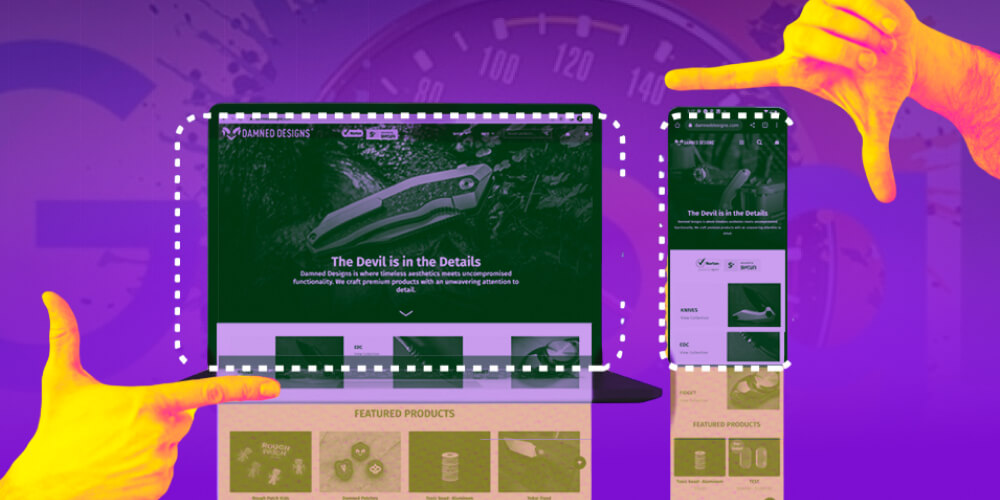
Ways to optimize above-the-fold to improve Google PageSpeed Insights:
Load the main content first: Arrange the HTML so the most important content loads and displays first, even if it sits on the right or in the middle of the layout. Put user experience ahead of source-code layout.
Reduce initial resources: Limit unnecessary HTML, CSS, images and JavaScript in the first visible section so the page responds faster.
Inline CSS for above-the-fold: Embed the critical CSS directly in the <style> tag in the HTML so the browser does not wait for an external CSS file, shortening the time to display content.
Defer or lazy load the rest: Elements lower on the page (such as images, scripts and widgets) should load later or when the user scrolls down, so they do not slow down the top of the page.
JavaScript plays an important role in interactive features on a website, but if it is not optimized it can slow page load significantly. Google PageSpeed Insights often points to JavaScript issues as a main cause of low performance scores.

Here are effective ways to optimize JavaScript, so the site loads faster, user experience improves and your PageSpeed Insights score goes up:
Enabling caching is one way to improve your Google PageSpeed Insights score. With caching, the browser stores static resources such as images, CSS and JavaScript on the user's device. On the next visit the page loads faster because it does not need to download all the data from the server again.
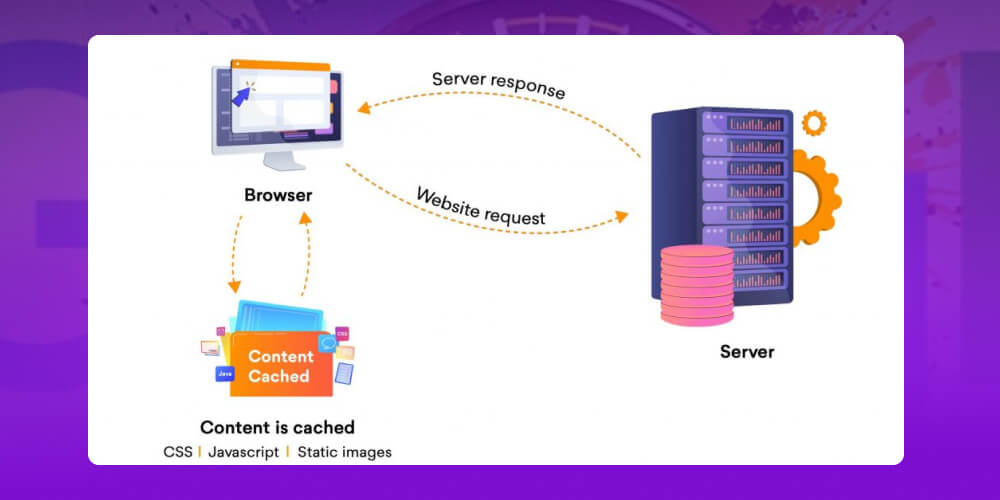
How to enable caching on your website:
Use a plugin (for WordPress sites): Plugins such as WP Rocket and LiteSpeed Cache make it easy to turn on caching. You can set up caching for the homepage, subpages, comments, 404 errors… and adjust the cache lifetime (TTL) as needed.
Configure on the server: Set HTTP headers such as Cache-Control and ETag in the configuration file (for example .htaccess or the nginx server config) to tell the browser how long to cache and when to refresh.
Optimize for every device: Make sure caching works well on both desktop and mobile. Avoid running several caching plugins at once, since they can conflict and hurt performance.
Cutting third-party requests such as tracking codes, ads and web fonts is one way to improve website performance in Google PageSpeed Insights. These requests often slow down page loading and hurt your performance score.
How to reduce and optimize third-party requests:
Remove unnecessary code: Remove external scripts, pixels or plugins that are unimportant or no longer used.
Check regularly: Use the PageSpeed Insights report to find and remove third-party requests that slow your pages down.
Defer or load asynchronously (defer/async): Apply defer or async to third-party scripts so they don't delay the main content from rendering.
Use preconnect or preload for key resources: This lets the browser connect to third-party domains early, shortening load time when they're needed.
Limit external widgets and plugins: Every plugin you add means one or more requests. Keep only the tools you truly need.
Reducing image size is one of the most effective ways to improve website performance in Google PageSpeed Insights. It cuts file size without hurting image quality, which shortens load time and improves your PageSpeed Insights score.

Here are simple but effective ways to optimize image size, raise your PageSpeed Insights score and improve the user experience:
Google PageSpeed Insights is a useful tool for evaluating website performance, but you need to use it the right way to get the most from it.
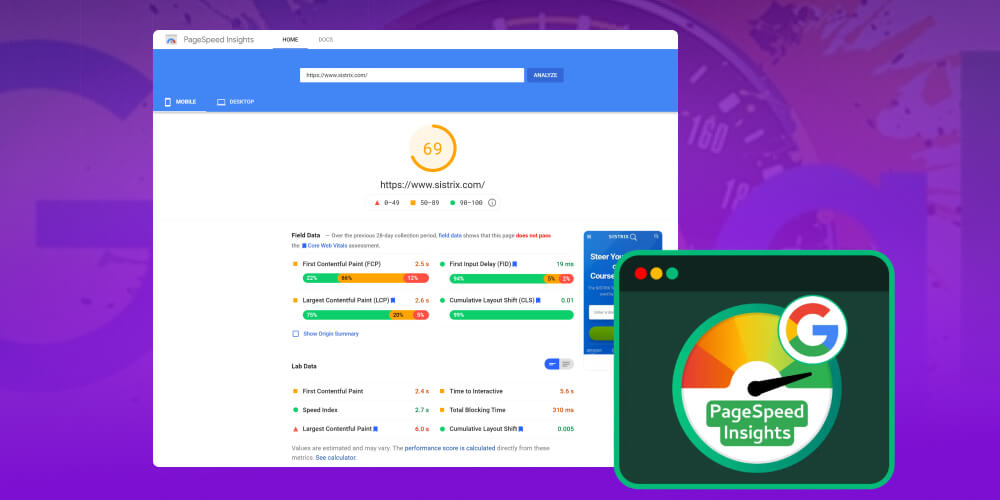
Here are the things to keep in mind:
Treat the score as a guide, not an absolute standard: The scores and suggestions from PageSpeed Insights are for reference only. Don't fixate on reaching “100”; focus on improving real speed and the user experience.
Combine with other tools: Also use tools like GTmetrix and Pingdom for a fuller picture of performance, since each tool measures and weights things differently.
Read carefully and apply sensible recommendations: Suggestions such as minifying CSS, deferring JavaScript or optimizing images are very useful, but they don't always fit. Understand each recommendation before applying it so you don't break any site functionality.
Focus on user experience: The end goal is a page that loads fast, responds smoothly and stays stable, not just a high score. Improving metrics such as LCP, FID and CLS is what Google really cares about.
Test regularly and track progress: Website performance can change over time. Check periodically to track improvements and adjust in time.
1. Why does the PageSpeed Insights performance score change from one run to the next?
The performance score on Google PageSpeed Insights can change between runs even if you haven't touched the page, because of variation in the network, the server, the test location and other technical factors that PageSpeed Insights uses for its assessment.
So treat the score as a general indicator and focus on acting on the tool's optimization suggestions rather than worrying about fluctuations between tests.
2. What is a good Google PageSpeed Insights score?
The Google PageSpeed Insights score runs on a scale of 0 to 100, where:
90-100: A very good score. The site loads exceptionally fast and delivers a great user experience.
50-89: This range means the page loads reasonably well but still has room to improve.
Below 50: This range means the site loads slowly. Prioritize performance fixes right away to improve the user experience and your SEO score.
That covers everything you need to know about Google's PageSpeed tool. It is a valuable tool for website administrators, but you need to know a few standards to run your site more effectively. The article from MONA Media also covers the essentials along with a usage guide. We hope it helped you understand the tool better. If you want to optimize your website and improve traffic, contact us for advice on solutions and to receive SEO price list with full details.

CEO & Founder · The MONA
Founder of The MONA, who built a services company of 200+ staff with 14,000+ projects delivered. Khánh Hùng shares how he thinks about building systems that run themselves, automating a business, and the real lessons from delivering projects at MONA.
 1,5K
1,5K




Professional website
design services
Own a website with a beautiful, 100% exclusive design and a lifetime warranty, with the ability
to expand features flexibly as your business grows, starting today!








 MONA will never sell your information or send you spam
MONA will never sell your information or send you spam
MONA will never sell your information or send you spam


 MONA will never sell your information or send you spam