
 MONA OS 2.0


 Tự động hoá doanh nghiệp
 Cẩm nang SEO
 Digital Marketing
 Kinh nghiệm thiết kế website
 Hạ Tầng Server
 Giáo dục


 VI
VI
 EN
EN



















Message us on
Zalo Official


 ProductsNew

 ProductsProducts
 Mới ra mắtKHA AI 2027App tự edit video, tự đăng mọi mạng xã hội, 2 phút mỗi ngày










 Website designLooks good and wins customers over.
SEO servicesBrings in customers searching for exactly what you sell.
Website designLooks good and wins customers over.
SEO servicesBrings in customers searching for exactly what you sell.
 Tư vấn digital marketingKéo khách từ nhiều kênh, đo bằng số thật.
Corporate video productionVideos introducing your company, factory and team.
Tư vấn digital marketingKéo khách từ nhiều kênh, đo bằng số thật.
Corporate video productionVideos introducing your company, factory and team.
 NewAI video productionCompany story films made with AI.
 Custom software developmentCRM, ERP and HRM built for your business.
 Viết AI Agent theo yêu cầuĐặt riêng một trợ lý AI cho đúng việc của mình.
 Tư vấn chuyển đổi AIĐưa AI vào vận hành của cả công ty.
NewMONA LMSManagement for centers and schools.
MONA SkillHubInternal training for company staff.
Tư vấn chuyển đổi AIĐưa AI vào vận hành của cả công ty.
NewMONA LMSManagement for centers and schools.
MONA SkillHubInternal training for company staff.
 NHTQ systemEnd-to-end China–Vietnam shipping operations.
MONA JMSManagement for gold, diamond and pawn shops.
NHTQ systemEnd-to-end China–Vietnam shipping operations.
MONA JMSManagement for gold, diamond and pawn shops.
 MONA E-LearningA website with every feature you need to sell courses.
 How to sell online courses (course)More than 30 free lessons on selling courses on autopilot.
 MONA Cloudmonacloud.vnServers to get your apps and websites running.
 MONA Basemonabase.vnPostgres database, sign-in and file storage.
 MONA Mailmonamail.vnSend OTP, order and invoice emails from your software.
 MONA Paymonapay.vnAccept bank transfers via VietQR and notify your software when the money arrives.
 MONA eInvoiceComing soonIssue e-invoices that meet tax standards.
Gấu CườiTrả lời khách 24/7 trên web, Fanpage, Zalo và thu lead cho sale.
MONA eInvoiceComing soonIssue e-invoices that meet tax standards.
Gấu CườiTrả lời khách 24/7 trên web, Fanpage, Zalo và thu lead cho sale.
 Gấu TeleSalesGọi điện tư vấn, chăm khách như tổng đài viên thật.
Dê CườiTư vấn và chốt đơn cho shop ngay trong khung chat.
Gấu WebmasterNhắn nhóm Zalo là website được sửa xong.
Gấu TeleSalesGọi điện tư vấn, chăm khách như tổng đài viên thật.
Dê CườiTư vấn và chốt đơn cho shop ngay trong khung chat.
Gấu WebmasterNhắn nhóm Zalo là website được sửa xong.
 Gấu Pháp ChếSoạn hợp đồng, rà điều khoản trong vài phút.
 Gấu Báo GiáLên báo giá đúng mẫu và gửi khách ngay.
 AI chăm sóc khách hàngTheo dõi và giữ chân khách hàng cũ.
 Gấu Tuyển DụngLọc hồ sơ, hẹn lịch, phỏng vấn ứng viên.
 Mới ra mắt
KHA AI 2027
Xây kênh chuyên gia 2 phút mỗi ngày
Quay bằng điện thoại, AI tự edit video, tự đăng lên 16 nền tảng và tự trả lời bình luận, tin nhắn.
351.491lượt xem trên kênh CEO MONA sau 20 ngày
Mới ra mắt
KHA AI 2027
Xây kênh chuyên gia 2 phút mỗi ngày
Quay bằng điện thoại, AI tự edit video, tự đăng lên 16 nền tảng và tự trả lời bình luận, tin nhắn.
351.491lượt xem trên kênh CEO MONA sau 20 ngày
 Anh Khánh HùngCEO MONA đang dùng mỗi ngày
Xem app làm được gì
Anh Khánh HùngCEO MONA đang dùng mỗi ngày
Xem app làm được gì
 AI
Gấu Cười MONA ĐANG TỰ XÀITrả lời khách 24/7 trên website, Zalo OA, Messenger và thu lead về cho sale.
Dê CườiChốt đơn bán lẻ và sàn: Shopee, TikTok Shop, web. Chăm cả khách sỉ, đại lý.
Gấu WebmasterCập nhật nội dung, tối ưu SEO website mỗi ngày.
Gấu TeleSalesGọi điện tư vấn, chăm khách như tổng đài viên thật.
Gấu Tuyển DụngLọc hồ sơ, hẹn lịch, phỏng vấn ứng viên tự động.
AI chăm sóc khách hàngGiữ khách cũ, cứu lead đã rớt cho phòng kinh doanh.
Gấu Pháp ChếSoạn hợp đồng, rà điều khoản trong vài phút.
Gấu Báo GiáLên báo giá đúng mẫu, gửi khách ngay khi có yêu cầu.
AI
Gấu Cười MONA ĐANG TỰ XÀITrả lời khách 24/7 trên website, Zalo OA, Messenger và thu lead về cho sale.
Dê CườiChốt đơn bán lẻ và sàn: Shopee, TikTok Shop, web. Chăm cả khách sỉ, đại lý.
Gấu WebmasterCập nhật nội dung, tối ưu SEO website mỗi ngày.
Gấu TeleSalesGọi điện tư vấn, chăm khách như tổng đài viên thật.
Gấu Tuyển DụngLọc hồ sơ, hẹn lịch, phỏng vấn ứng viên tự động.
AI chăm sóc khách hàngGiữ khách cũ, cứu lead đã rớt cho phòng kinh doanh.
Gấu Pháp ChếSoạn hợp đồng, rà điều khoản trong vài phút.
Gấu Báo GiáLên báo giá đúng mẫu, gửi khách ngay khi có yêu cầu.
 Chuyển đổi AI toàn phầnGiải pháp tổng cho doanh nghiệp, 3 lớp triển khai.
 Viết AI Agent theo yêu cầuĐặt riêng một con AI gánh đúng nghiệp vụ của bạn.
 Custom softwareCRM, ERP and HRM with built-in AI automation.
 SEO & AEO thời đại AIĐược Google lẫn AI trích dẫn, không chỉ xếp hạng.
 Kiến thức AI cho doanh nghiệpBài phân tích, hướng dẫn ứng dụng AI vào vận hành.
 Free AI courses
 AI tools at work
App mới · KHA AI 2027
Xây kênh 2 phút mỗi ngày
AI tự edit video, tự đăng mọi mạng xã hội
Free consultation, 8am–10pm every day
AI tools at work
App mới · KHA AI 2027
Xây kênh 2 phút mỗi ngày
AI tự edit video, tự đăng mọi mạng xã hội
Free consultation, 8am–10pm every day

03 April, 2023
Robots.txt is a text file in the root directory of a website. It gives search engines instructions on which parts of the site they may crawl and index. Robots.txt is one of the first things anyone should check and optimize in technical SEO. Any mistake or misconfiguration in your robots.txt file can cause SEO problems and hurt your site's search rankings. So what is File Robots.txt ? Let's find out with MONA Media explore it in this article.

File robots.txt is a simple .txt file used in website management. It is part of the REP (Robots Exclusion Protocol) – a group of web standards. Its job is to give webmasters more flexibility and control over whether Google's crawler (Googlebot) should index each part of a site.
The robots.txt file uses its own simple language made of directive lines. Each line starts with a keyword followed by one or more parameters.

The keywords you will most often see in robots.txt syntax:
Google and Bing use two main expressions to mark the pages or subfolders an SEO wants to exclude. The two characters are “*” and “$”. In detail:
The most basic robots.txt syntax:
User-agent: [user-agent name]
Disallow: [URL string that must not be crawled]
This is one complete robots.txt rule. In practice, one rule can contain several user agents and directives such as disallows – disallow, allows – allow, crawl-delays – delayed crawling, and so on). Directives are written one after another with no blank lines.
However, if a robots.txt file has several commands for one bot, the bot follows the clearest and most complete one by default. In a robots.txt file, each set of user agents appears under its own rule block, separated by a line break.
A few more examples of robots.txt syntax:
User-agent: *
Disallow: /
Using this syntax in your robots.txt file tells all web crawlers not to crawl any page on the website, including the home page.
User-agent: *
Disallow:
Using this syntax, your robots.txt file tells web crawlers to crawl all pages on the website, including the home page.
User-agent: Googlebot
Disallow: /specific-folder/
This syntax tells Google's crawler user agent, Googlebot (or another user agent), not to crawl any page whose URL contains that folder string.
User-agent: Bingbot
Disallow: /trang web.html.
This syntax tells Bing's crawler, Bingbot, not to crawl the specific page named.
Example of a standard robots.txt file
Here is an example of a robots.txt file working for the website https://mona.media/:
User-agent: *
Disallow: /wp-admin/
Allow: /
Sitemap: https://mona.media/sitemap_index.xml
The robots.txt structure above lets all Google tools follow the link https://mona.media/sitemap_index.xml to find and read the robots.txt file. Google's tools will also index all the data on the pages of the website https://mona.media/ except https://mona.media/wp-admin/.

Creating a robots.txt file for your website lets you control search bots as they crawl certain areas of your site. Be careful when setting it up, though: one small mistake in the directives can stop search engines like Google from indexing your content properly. It is an important step in a guide to doing SEO for your website, helping your visibility and search performance hold up over the long term.
Risky as that sounds, creating a robots.txt file for WordPress is still necessary for several reasons:
Technical errors can hurt your website's SEO strategy, especially in robots.txt or sitemap files, where Googlebot gets “blocked” if they are not set up properly. In this video, Huy shows you how to check for and fix these errors. Watch it and tune up your website.
While a website is being built and nothing is the way you want it yet, the builder needs to keep Google's bot out so it does not index unfinished content.
Only use File robots.txt while you are setting up the system. If your website is running stably, do not put these lines in your robots.txt file. Doing so keeps your site from appearing in search results.

Sitemap works like a map that helps Google discover your web pages. If a site has a very large number of articles to index but no sitemap, Google won't have the resources to index them all, so some important content will not show up.
There are currently three tools that scan backlink (the popular ones are Moz, Majestic and Ahrefs). These tools can scan the backlinks of any website. This is where the use of robots.txt comes in: it stops competitors from analyzing your backlinks.
A website's source code usually has folders that need to be kept secure. For example wp-includes, phpinfo.php, wp-admin, memcached, cgi-bin,…
These must never be indexed. Once the content is public on the internet, hackers can steal important information or even attack your system. This is where robots.txt helps, by stopping Google from indexing this content.

Besides the tools that check backlinks, there is other harmful software your competitors may use. Some bots are built just to copy other people's content. Others send too many requests, too fast, to your server, which wastes your bandwidth and resources.
-> See also:
E-commerce sites have features users expect: registration, login, product reviews, shopping carts and so on. They often create duplicate content, which does not help keyword SEO. You can use a robots.txt file to block indexing of these paths.
The robots.txt file is an important file for controlling how search robots access a website. It also has some limitations you should understand to avoid hurting your site.

Here are the limitations of the robots.txt file you need to know:
In practice, not every search engine supports directives like allow, disallow and crawl delay in a robots.txt file. To keep business data secure, site administrators should also password-protect private content on the server.
Reputable web crawlers normally follow the directives in a robots.txt file. But each crawler parses and interprets the data in its own way.
Sometimes a web crawler simply cannot understand the syntax in a robots.txt file. Web developers therefore need to know the right syntax for each different crawler.
If you block a URL in robots.txt but it still shows up, Google may still crawl and index that URL. In that case, if the page content isn't important, remove the URL from your site, so it is as secure as possible and nobody can find it when they search on Google.

As MONA mentioned earlier, in the part after User-agent: the character * means the rule applies to all bots across the website. The file then tells bots they may not enter areas like wp-includes and wp-admin, since those two folders hold a lot of sensitive information.
Keep in mind this is a virtual file that WordPress sets up on installation and cannot be edited. The robots.txt file for WordPress normally sits in the root directory, usually called www and public_html. To create your own robots.txt file, you need to create a new file to replace the old one in the root directory.

Every search engine today does two main jobs:
To crawl information, website structure, search engines follow links to move from page to page. They crawl billions of websites and links. This crawling behavior is also called “spidering”.
When it arrives at a website, before crawling the pages, the crawler looks for a robots.txt file. If it finds one, the bot reads that file before continuing with the pages.
The robots.txt file also holds information on how bots should crawl, with instructions for the process. If the file has no directives for bots, or the website has no such file, bots will go through every page on the site and do their job.

How do you check whether your website has a robots.txt file? Just enter your root domain and add /robots.txt at the end of the URL.
Example: To check the robots.txt of MONA Media online, search using this syntax: mona.media/robots.txt. If you paste it into the browser and no .txt page appears, the website has no robots.txt file.
Creating and managing a robots.txt file is an important part of SEO for your WordPress site. Here are 3 simple ways to create a robots.txt file on WordPress:
You can edit or create a robots.txt for WordPress directly in the WordPress Dashboard. Follow these steps:
Step 1: Log in to your WordPress site. On the Dashboard, look at the left side of the screen and click SEO → Tools → File editor.
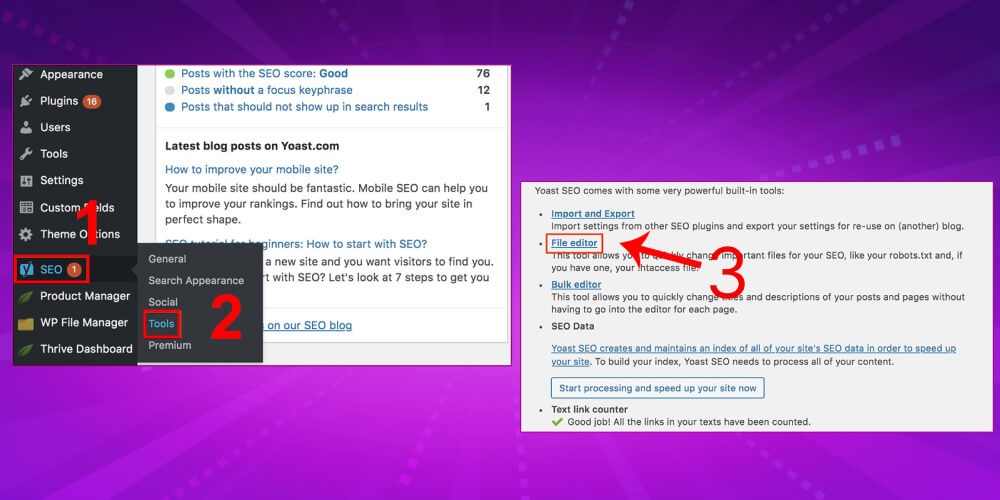
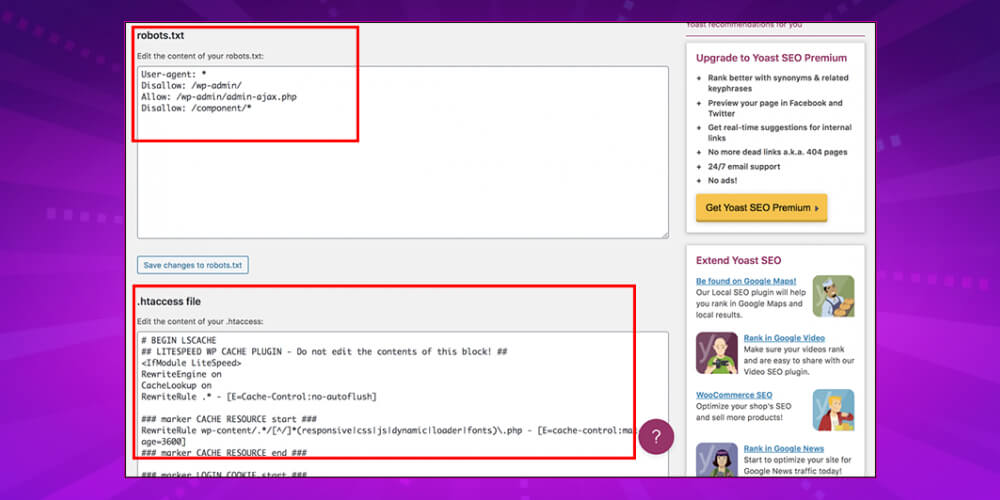
Step 2: You will see the robots.txt and .htaccess file sections. You can create or edit the robots.txt file there.
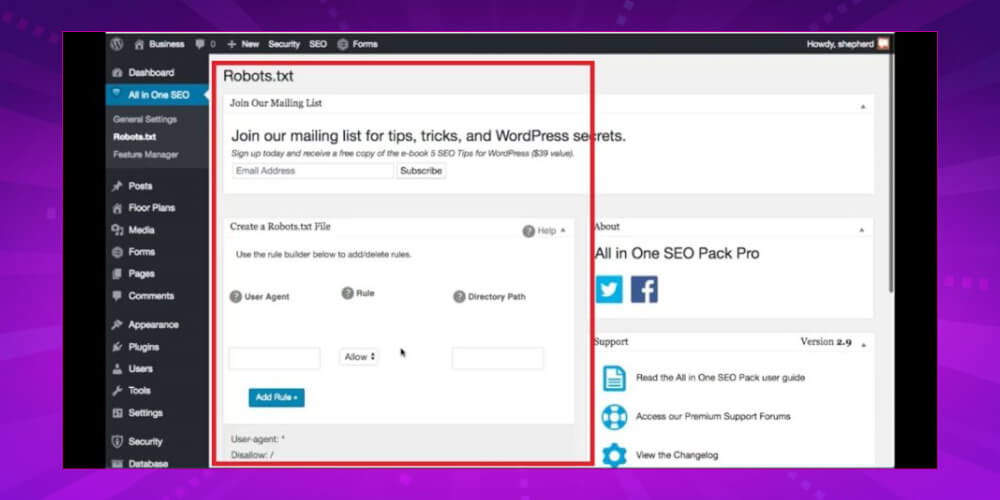
You can also use the All in One SEO plugin to create a robots.txt file for your website. Follow these steps:
Step 1: Open the main screen of All in One SEO Pack.
Step 2: Select All in One SEO → Features Manager → click Active for the Robots.txt section.
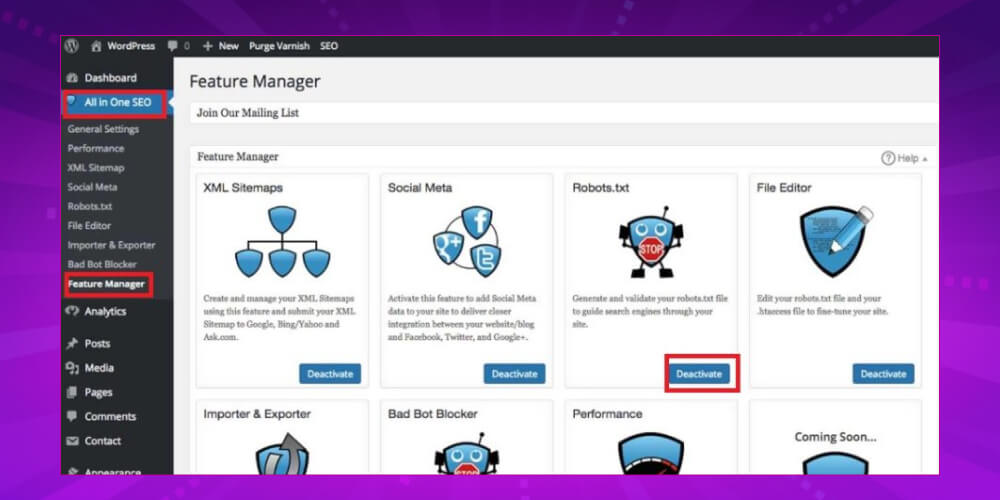
Step 3: You can create and edit the robots.txt file in the screen that appears.
If you'd rather not use plugins, you can still create the txt file in a text editor. The most common are Notepad and TextEdit. Once the file is done, upload it to your website via FTP. The steps:
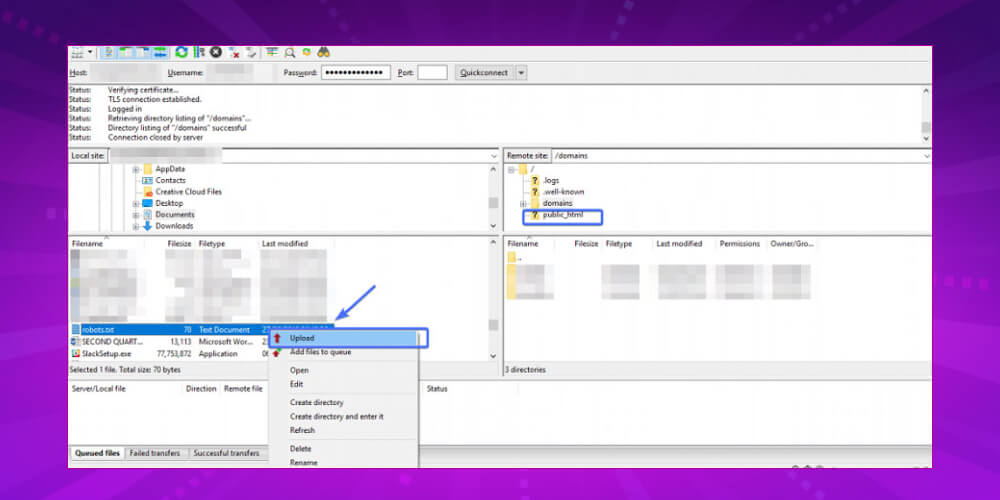
Step 1: Open a text editor such as Notepad or TextEdit.
Step 2: Write the content of the robots.txt file
Step 3: Open FTP → Choose public_html → Choose file robots.txt → Upload to finish the upload.
Some rules about format and location when creating a txt file:

When using a robots.txt file, keep these points in mind:
Used properly, robots.txt can help manage crawling on your website and create a better experience for users. Here are some situations where you need a robots.txt file:
Building and finishing a website can take many days, and more for complex sites. During this time, while the trial content is still unedited, you should not let search engines index it. Pages that are not yet well finished will not deliver the website SEO results you want.

MONA Media is a provider of SEO services that clients trust, with thousands of projects projects completed successfully for companies in many fields over more than 10 years. Using only professional, safe SEO techniques, MONA has helped more than 12,000 clients in Vietnam and abroad achieve solid numbers 300 times revenue growth!
So what are you waiting for? Why not CONTACT US via hotline 1900 636 648 to get advice and access to website SEO price list and start optimizing an SEO-ready website for your brand today!
When you embed a search tool in your website, the results page gets its own URL, and Google can still index those pages. The danger is that competitors can use this to search for keywords with offensive content, damaging your website's reputation. So block all result pages from being evaluated and indexed.
-> Read more: How to find bad backlinks and remove them from your website
Tools like Ahrefs have their own bots that collect website information, including backlinks, organic keywords, referring domains, top pages and more. Competitors can use these tools to analyze your website. You can use robots.txt to stop this.

Here are some common questions, and maybe some of yours, about robots.txt:
1- What is the maximum size of a robots.txt file?
The maximum size of a robots.txt file is 500 kilobytes.
2- How do I edit robots.txt in WordPress?
You can edit it manually, or use a WordPress SEO plugin such as Yoast, which lets you edit the robots.txt file from the WordPress backend.
3- Where is the WordPress robots.txt file on the website?
The WordPress robots.txt file is at: domain.com/robots.txt
4- What happens when you Disallow noindex content in robots.txt?
Commands in a robots.txt file apply only to relative paths.
5- How do I block web crawlers?
All you need to do is go to Settings >> Reading and tick the box next to the Search Engine Visibility option. Once it is ticked, add “meta name=’robots’ content=’noindex,follow’” to your website. WordPress will also change the robots.txt file on your website to add these lines “User-agent: * Disallow: /”.
Above is the detailed information on File Robots.txt as well as detailed instructions for creating and editing a robots.txt file in WordPress the way you want. We hope this helps search engine bots crawl and index your website faster and more accurately. Good luck!

CEO & Founder · The MONA
Founder of The MONA, who built a services company of 200+ staff with 14,000+ projects delivered. Khánh Hùng shares how he thinks about building systems that run themselves, automating a business, and the real lessons from delivering projects at MONA.
 1,5K
1,5K




Professional website
design services
Own a website with a beautiful, 100% exclusive design and a lifetime warranty, with the ability
to expand features flexibly as your business grows, starting today!



NHẬN TƯ VẤN SEO MIỄN PHÍ !








 MONA will never sell your information or send you spam
MONA will never sell your information or send you spam
MONA will never sell your information or send you spam


 MONA will never sell your information or send you spam