
 MONA OS 2.0


 Tự động hoá doanh nghiệp
 Cẩm nang SEO
 Digital Marketing
 Kinh nghiệm thiết kế website
 Hạ Tầng Server
 Giáo dục


 VI
VI
 EN
EN















Message us on
Zalo Official


 ProductsNew

 ProductsProducts
 Mới ra mắtKHA AI 2027App tự edit video, tự đăng mọi mạng xã hội, 2 phút mỗi ngày










 Website designLooks good and wins customers over.
SEO servicesBrings in customers searching for exactly what you sell.
Website designLooks good and wins customers over.
SEO servicesBrings in customers searching for exactly what you sell.
 Tư vấn digital marketingKéo khách từ nhiều kênh, đo bằng số thật.
Corporate video productionVideos introducing your company, factory and team.
Tư vấn digital marketingKéo khách từ nhiều kênh, đo bằng số thật.
Corporate video productionVideos introducing your company, factory and team.
 NewAI video productionCompany story films made with AI.
 Custom software developmentCRM, ERP and HRM built for your business.
 Viết AI Agent theo yêu cầuĐặt riêng một trợ lý AI cho đúng việc của mình.
 Tư vấn chuyển đổi AIĐưa AI vào vận hành của cả công ty.
NewMONA LMSManagement for centers and schools.
MONA SkillHubInternal training for company staff.
Tư vấn chuyển đổi AIĐưa AI vào vận hành của cả công ty.
NewMONA LMSManagement for centers and schools.
MONA SkillHubInternal training for company staff.
 NHTQ systemEnd-to-end China–Vietnam shipping operations.
MONA JMSManagement for gold, diamond and pawn shops.
NHTQ systemEnd-to-end China–Vietnam shipping operations.
MONA JMSManagement for gold, diamond and pawn shops.
 MONA E-LearningA website with every feature you need to sell courses.
 How to sell online courses (course)More than 30 free lessons on selling courses on autopilot.
 MONA Cloudmonacloud.vnServers to get your apps and websites running.
 MONA Basemonabase.vnPostgres database, sign-in and file storage.
 MONA Mailmonamail.vnSend OTP, order and invoice emails from your software.
 MONA Paymonapay.vnAccept bank transfers via VietQR and notify your software when the money arrives.
 MONA eInvoiceComing soonIssue e-invoices that meet tax standards.
Gấu CườiTrả lời khách 24/7 trên web, Fanpage, Zalo và thu lead cho sale.
MONA eInvoiceComing soonIssue e-invoices that meet tax standards.
Gấu CườiTrả lời khách 24/7 trên web, Fanpage, Zalo và thu lead cho sale.
 Gấu TeleSalesGọi điện tư vấn, chăm khách như tổng đài viên thật.
Dê CườiTư vấn và chốt đơn cho shop ngay trong khung chat.
Gấu WebmasterNhắn nhóm Zalo là website được sửa xong.
Gấu TeleSalesGọi điện tư vấn, chăm khách như tổng đài viên thật.
Dê CườiTư vấn và chốt đơn cho shop ngay trong khung chat.
Gấu WebmasterNhắn nhóm Zalo là website được sửa xong.
 Gấu Pháp ChếSoạn hợp đồng, rà điều khoản trong vài phút.
 Gấu Báo GiáLên báo giá đúng mẫu và gửi khách ngay.
 AI chăm sóc khách hàngTheo dõi và giữ chân khách hàng cũ.
 Gấu Tuyển DụngLọc hồ sơ, hẹn lịch, phỏng vấn ứng viên.
 Mới ra mắt
KHA AI 2027
Xây kênh chuyên gia 2 phút mỗi ngày
Quay bằng điện thoại, AI tự edit video, tự đăng lên 16 nền tảng và tự trả lời bình luận, tin nhắn.
360.759lượt xem trên kênh CEO MONA sau 22 ngày
Mới ra mắt
KHA AI 2027
Xây kênh chuyên gia 2 phút mỗi ngày
Quay bằng điện thoại, AI tự edit video, tự đăng lên 16 nền tảng và tự trả lời bình luận, tin nhắn.
360.759lượt xem trên kênh CEO MONA sau 22 ngày
 Anh Khánh HùngCEO MONA đang dùng mỗi ngày
Xem app làm được gì
Anh Khánh HùngCEO MONA đang dùng mỗi ngày
Xem app làm được gì
 AI
Gấu Cười MONA ĐANG TỰ XÀITrả lời khách 24/7 trên website, Zalo OA, Messenger và thu lead về cho sale.
Dê CườiChốt đơn bán lẻ và sàn: Shopee, TikTok Shop, web. Chăm cả khách sỉ, đại lý.
Gấu WebmasterCập nhật nội dung, tối ưu SEO website mỗi ngày.
Gấu TeleSalesGọi điện tư vấn, chăm khách như tổng đài viên thật.
Gấu Tuyển DụngLọc hồ sơ, hẹn lịch, phỏng vấn ứng viên tự động.
AI chăm sóc khách hàngGiữ khách cũ, cứu lead đã rớt cho phòng kinh doanh.
Gấu Pháp ChếSoạn hợp đồng, rà điều khoản trong vài phút.
Gấu Báo GiáLên báo giá đúng mẫu, gửi khách ngay khi có yêu cầu.
AI
Gấu Cười MONA ĐANG TỰ XÀITrả lời khách 24/7 trên website, Zalo OA, Messenger và thu lead về cho sale.
Dê CườiChốt đơn bán lẻ và sàn: Shopee, TikTok Shop, web. Chăm cả khách sỉ, đại lý.
Gấu WebmasterCập nhật nội dung, tối ưu SEO website mỗi ngày.
Gấu TeleSalesGọi điện tư vấn, chăm khách như tổng đài viên thật.
Gấu Tuyển DụngLọc hồ sơ, hẹn lịch, phỏng vấn ứng viên tự động.
AI chăm sóc khách hàngGiữ khách cũ, cứu lead đã rớt cho phòng kinh doanh.
Gấu Pháp ChếSoạn hợp đồng, rà điều khoản trong vài phút.
Gấu Báo GiáLên báo giá đúng mẫu, gửi khách ngay khi có yêu cầu.
 Chuyển đổi AI toàn phầnGiải pháp tổng cho doanh nghiệp, 3 lớp triển khai.
 Viết AI Agent theo yêu cầuĐặt riêng một con AI gánh đúng nghiệp vụ của bạn.
 Custom softwareCRM, ERP and HRM with built-in AI automation.
 SEO & AEO thời đại AIĐược Google lẫn AI trích dẫn, không chỉ xếp hạng.
 Kiến thức AI cho doanh nghiệpBài phân tích, hướng dẫn ứng dụng AI vào vận hành.
 Free AI courses
 AI tools at work
App mới · KHA AI 2027
Xây kênh 2 phút mỗi ngày
AI tự edit video, tự đăng mọi mạng xã hội
Free consultation, 8am–10pm every day
AI tools at work
App mới · KHA AI 2027
Xây kênh 2 phút mỗi ngày
AI tự edit video, tự đăng mọi mạng xã hội
Free consultation, 8am–10pm every day

18 March, 2023

You have probably seen Google search results that show a Frequently Asked Questions (FAQ) section right under the description. That is FAQ schema. It is a form of structured data that helps Google understand your Q&A content and display it more prominently, which raises click-through rate, improves SEO rankings and gives users a better experience.
So what is FAQ schema, and how do you add it to your website in the simplest, most effective way without complicated code? In this article, MONA Media will walk you through creating FAQ schema the right way, step by step. Read on.
FAQ schema (also called schema FAQ) is a type of structured data that marks up frequently asked questions and their answers on a web page, to answer queries about a subject related to the page.
When it is set up correctly, search engines like Google can recognize and understand your FAQ content and show it directly on the search results page (SERP) as an expanded result (rich snippet), so users get the information they are looking for faster.
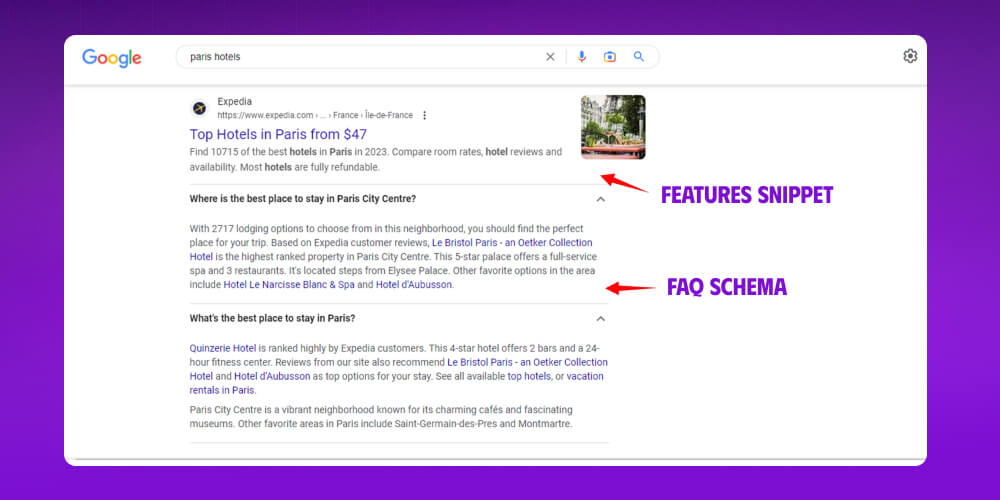
Adding FAQPage Schema not only helps Google read your website better, it also brings practical benefits such as:
Up click-through rate (CTR) thanks to a more prominent listing on Google
More visits, which leads to more conversions and revenue
Content that meets what users need, which helps improve your ranking
To show your information as a set of questions and answers in Google Search, you need to follow these guidelines:
For the structured data and website management guidelines, see the Google links above. For the content guidelines, we summarize the key points for implementing FAQ schema below.
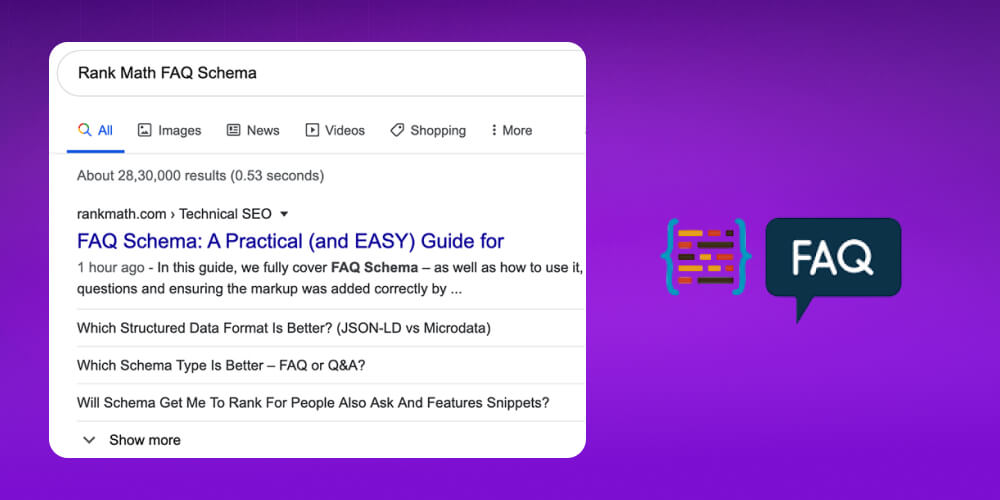
Content guidelines
Valid uses of FAQ schema:
Your page has a set of clear questions and answers, written by you as the site owner.
Each question has only one answer, and users can't add or edit answers.
The questions and answers are fully visible on the page. They can be in an expandable accordion, as long as readers can see them when they click.
The FAQ content must match the page content. Don't stuff in questions just to take up space on Google.
If a question appears on several pages, mark up only one page with schema to avoid duplicate structured data.
Valid example: questions and answers shown in full on the page, as a list:
Q: How do I change my account password?
A: Go to "Account settings", choose "Change password" and follow the instructions
Invalid uses of FAQ schema:
Google will not show a rich snippet if you apply schema incorrectly, specifically in these cases:
The questions and/or answers are not visible to users on the page and exist only in the schema code.
The page is a forum or Q&A site where users can submit multiple different answers.
The answer is unclear or not accessible, for example completely hidden or outside the main content.
The page uses FAQ schema for advertising or keyword stuffing.
Invalid example: The page has FAQ schema in its source code, but users can't see any part of the FAQ on the website.
If you want your website to show prices, star ratings and images prominently like the top-ranking sites, don't miss this video. Huy shares a detailed, easy-to-follow guide to creating schema markup. Take a look!
Can you do SEO yourself?? Yes, especially if you start with simple but effective tools like adding schema to your website. It helps improve your Google ranking and your site's visibility, even if you aren't a specialist.
On a WordPress website, you can use existing plugins such as Yoast SEO or Rank Math to add FAQs without any code.
Here are the steps using plugin Yoast SEO
Step 1: Install the Yoast SEO plugin on your site
Step 2: Open the post or page where you want to add FAQ schema.
Step 3: In the Gutenberg editor, click the "+" icon to add a new block. Search for "FAQ" in the block list.
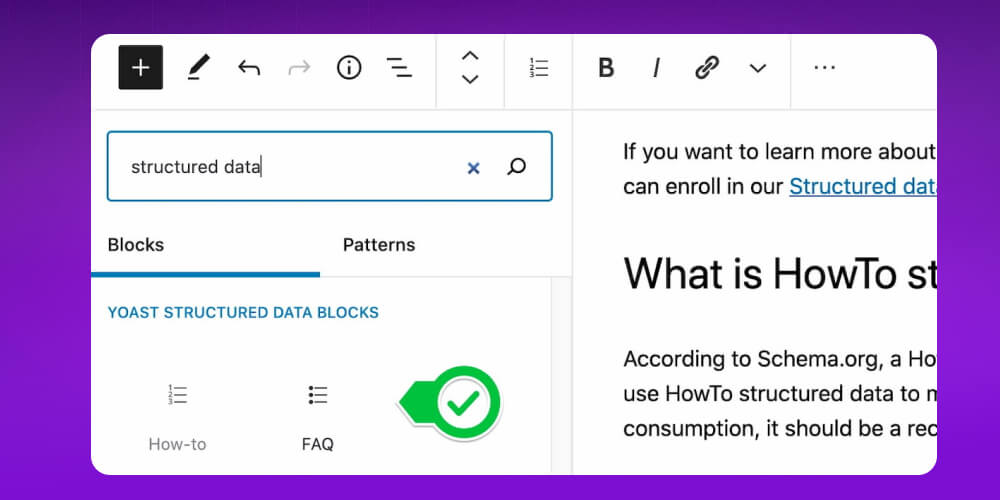
Then write the set of questions and answers for the post's FAQ schema. Review it and publish.
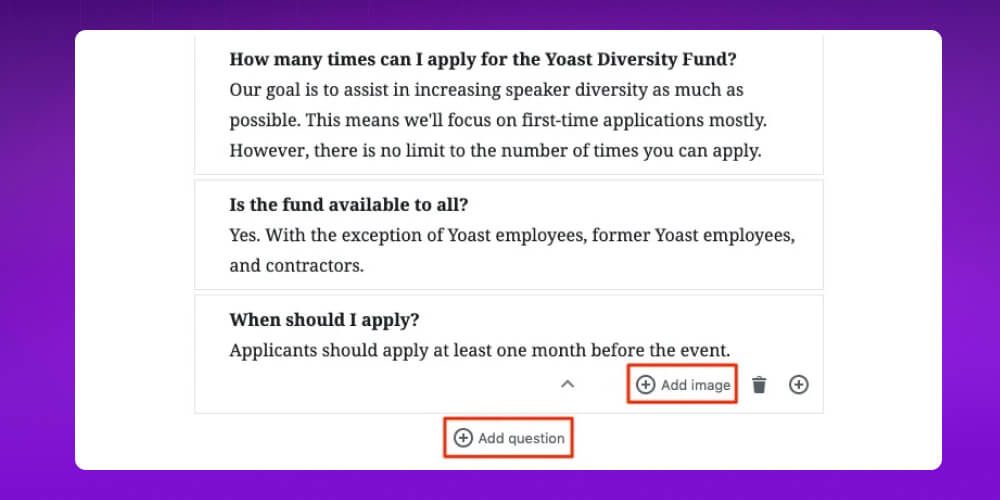
When you finish writing, publish the post. Then check that the FAQ schema for the post is installed correctly.
On other websites, you can also add an FAQ to a post or page the following way:
Create FAQ schema manually with JSON-LD code
You can create FAQ schema with ready-made JSON-LD code. Here is a code snippet you can use to set up FAQ schema
<script type=”application/ld+json”>
{
“@context”: “https://schema.org”,
“@type”: “FAQPage”,
“mainEntity”: [{
“@type”: “Question”,
“name”: “Question 1?”,
“acceptedAnswer”: {
“@type”: “Answer”,
“text”: “Answer 1.”
}
}, {
“@type”: “Question”,
“name”: “Question 2?”,
“acceptedAnswer”: {
“@type”: “Answer”,
“text”: “Answer 2.”
}
}]
}
</script>
Where:
Copy the code above and replace the name and text fields in the INSERT QUESTION/ ANSWER HERE section with your own questions and answers.
To be sure your website has FAQ schema structured data installed correctly, you need to test it. Here are 2 ways to check the structured data:
Rich Results Test is Google's free tool for checking whether your page can appear as a rich result in search, including FAQ schema. Enter a URL or paste your HTML code, and the tool checks it automatically and tells you whether the FAQ schema is correct or has errors to fix
Open the rich results testing tool, paste the URL of your FAQ page or URL post, and click Test URL
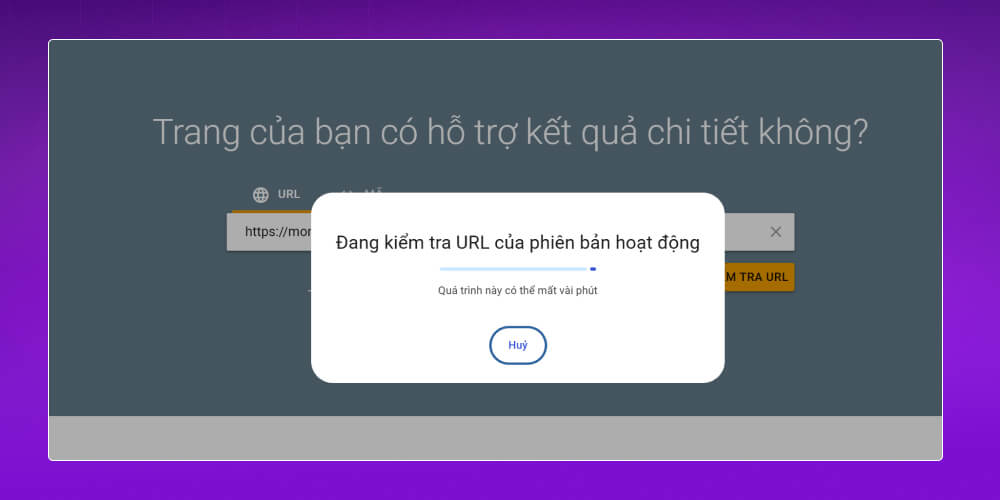
If the result looks like the image below, the FAQ has been installed successfully for your post.
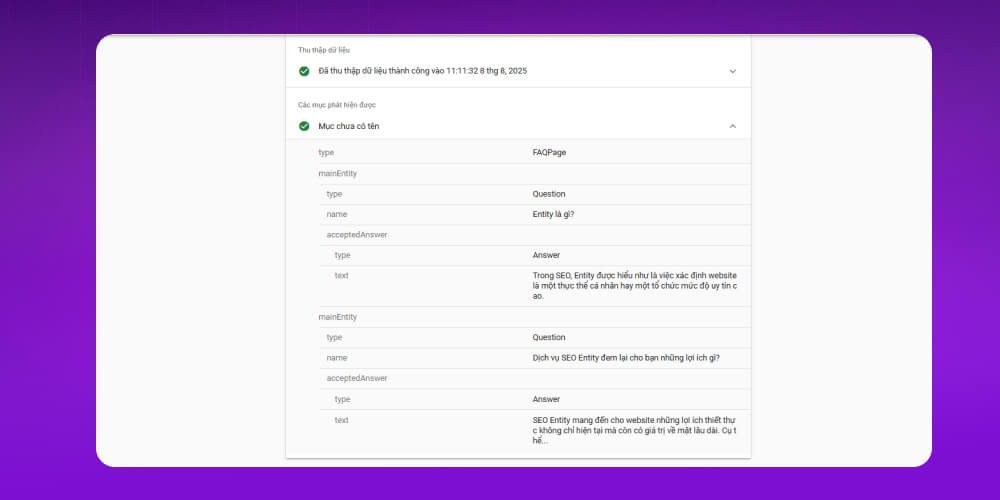
Preview how FAQ schema appears on Google
After testing with Rich Results Test, you can click the "Preview search result" option to see more clearly how Google will show your questions and answers as an expanded result (rich snippet) on the search page.
You can also check it in practice by:
Besides Rich Results Test, you can use the Schema Markup Validator to check that your schema code is correct.
It is simple to use:
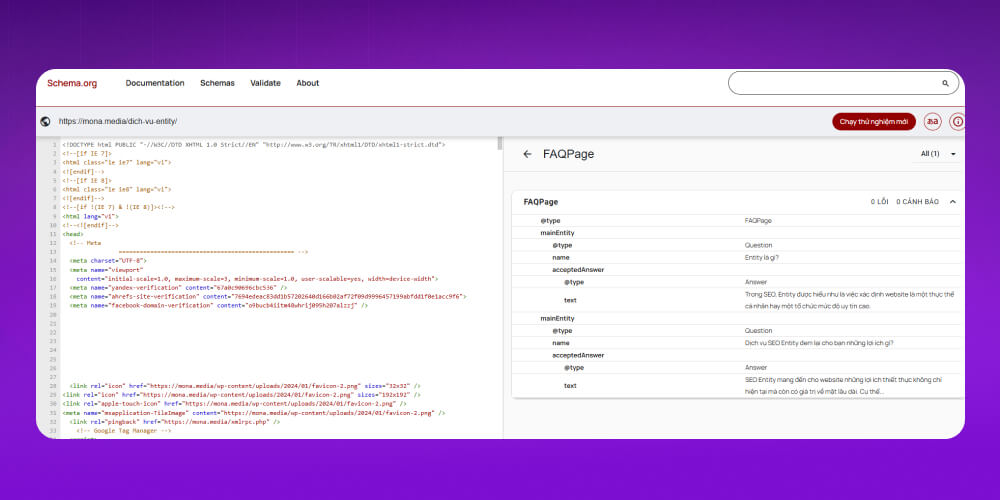
You will then get detailed results, including:
Checking with this tool makes sure your FAQ schema is written correctly, which raises the chance that Google shows it as a rich result.
Besides the tools above, you can check whether FAQ schema has been installed successfully in a web browser such as Chrome, Firefox or Edge.
It is simple to do:
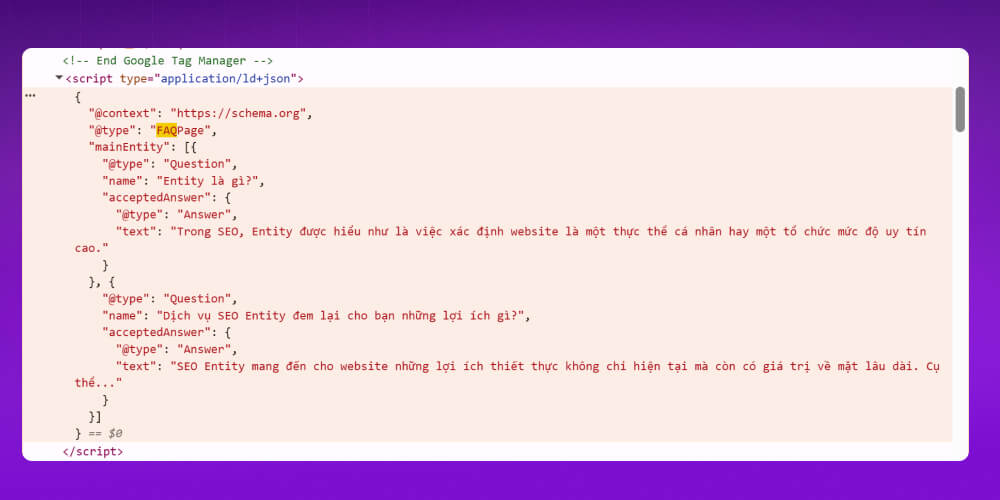
If the structured code appears and is formatted correctly, the FAQ schema has been inserted into the page successfully. This is a quick way to confirm the setup without relying on outside tools.
Not technical? Not sure where to put schema, whether to use code or a plugin? Or which type of schema fits each type of page?
No problem. The MONA Media team can work with you on a full SEO strategy, from on-page and off-page SEO to Google-standard schema optimization, especially FAQ schema, so your content is not only strong but also stands out in search results.

MONA does more than SEO. Our team also builds a solid foundation for your website to reach the top of Google, when we deliver SEO services.
company website design that is friendly in UX/UI and SEO-optimized from the start.
SEO with a clear strategy, organized by topic cluster, with duplicate content kept to a minimum.
Clear, transparent KPIs, so you can easily track the return on your investment.
Support throughout, from technical audits and content to schema display optimization.
Do you want a website that is SEO-readyand also looks great on Google with rich results like FAQs? Contact with MONA Media to get detailed advice from our experts and a strategy that fits your project!
FAQ schema helps Google evaluate your website better. It also gives searchers more information, meets what users want, increases clicks and raises the order rate.
FAQ schema appears as a list of questions and answers in Google's search results.
When the page is optimized for its keyword set and UX/ UI to give users a good experience, and the right structured data markup is added, FAQ schema adds value to your SEO plan.
That covers everything about FAQ Schema. FAQ is a conditional type of structured data that many SEO specialists use. If you combine schema correctly in your SEO work, it can bring your website a lot of traffic, potential customers, and even higher revenue and profit. You can get there faster with MONA's SEO service. Contact us for advice and a detailed SEO quote right away.

CEO & Founder · The MONA
Founder of The MONA, who built a services company of 200+ staff with 14,000+ projects delivered. Khánh Hùng shares how he thinks about building systems that run themselves, automating a business, and the real lessons from delivering projects at MONA.
 1,7K
1,7K




Professional website
design services
Own a website with a beautiful, 100% exclusive design and a lifetime warranty, with the ability
to expand features flexibly as your business grows, starting today!








 MONA will never sell your information or send you spam
MONA will never sell your information or send you spam
MONA will never sell your information or send you spam


 MONA will never sell your information or send you spam