
 MONA OS 2.0


 Tự động hoá doanh nghiệp
 Cẩm nang SEO
 Digital Marketing
 Kinh nghiệm thiết kế website
 Hạ Tầng Server
 Giáo dục


 VI
VI
 EN
EN
























Message us on
Zalo Official


 ProductsNew

 ProductsProducts
 Mới ra mắtKHA AI 2027App tự edit video, tự đăng mọi mạng xã hội, 2 phút mỗi ngày










 Website designLooks good and wins customers over.
SEO servicesBrings in customers searching for exactly what you sell.
Website designLooks good and wins customers over.
SEO servicesBrings in customers searching for exactly what you sell.
 Tư vấn digital marketingKéo khách từ nhiều kênh, đo bằng số thật.
Corporate video productionVideos introducing your company, factory and team.
Tư vấn digital marketingKéo khách từ nhiều kênh, đo bằng số thật.
Corporate video productionVideos introducing your company, factory and team.
 NewAI video productionCompany story films made with AI.
 Custom software developmentCRM, ERP and HRM built for your business.
 Viết AI Agent theo yêu cầuĐặt riêng một trợ lý AI cho đúng việc của mình.
 Tư vấn chuyển đổi AIĐưa AI vào vận hành của cả công ty.
NewMONA LMSManagement for centers and schools.
MONA SkillHubInternal training for company staff.
Tư vấn chuyển đổi AIĐưa AI vào vận hành của cả công ty.
NewMONA LMSManagement for centers and schools.
MONA SkillHubInternal training for company staff.
 NHTQ systemEnd-to-end China–Vietnam shipping operations.
MONA JMSManagement for gold, diamond and pawn shops.
NHTQ systemEnd-to-end China–Vietnam shipping operations.
MONA JMSManagement for gold, diamond and pawn shops.
 MONA E-LearningA website with every feature you need to sell courses.
 How to sell online courses (course)More than 30 free lessons on selling courses on autopilot.
 MONA Cloudmonacloud.vnServers to get your apps and websites running.
 MONA Basemonabase.vnPostgres database, sign-in and file storage.
 MONA Mailmonamail.vnSend OTP, order and invoice emails from your software.
 MONA Paymonapay.vnAccept bank transfers via VietQR and notify your software when the money arrives.
 MONA eInvoiceComing soonIssue e-invoices that meet tax standards.
Gấu CườiTrả lời khách 24/7 trên web, Fanpage, Zalo và thu lead cho sale.
MONA eInvoiceComing soonIssue e-invoices that meet tax standards.
Gấu CườiTrả lời khách 24/7 trên web, Fanpage, Zalo và thu lead cho sale.
 Gấu TeleSalesGọi điện tư vấn, chăm khách như tổng đài viên thật.
Dê CườiTư vấn và chốt đơn cho shop ngay trong khung chat.
Gấu WebmasterNhắn nhóm Zalo là website được sửa xong.
Gấu TeleSalesGọi điện tư vấn, chăm khách như tổng đài viên thật.
Dê CườiTư vấn và chốt đơn cho shop ngay trong khung chat.
Gấu WebmasterNhắn nhóm Zalo là website được sửa xong.
 Gấu Pháp ChếSoạn hợp đồng, rà điều khoản trong vài phút.
 Gấu Báo GiáLên báo giá đúng mẫu và gửi khách ngay.
 AI chăm sóc khách hàngTheo dõi và giữ chân khách hàng cũ.
 Gấu Tuyển DụngLọc hồ sơ, hẹn lịch, phỏng vấn ứng viên.
 Mới ra mắt
KHA AI 2027
Xây kênh chuyên gia 2 phút mỗi ngày
Quay bằng điện thoại, AI tự edit video, tự đăng lên 16 nền tảng và tự trả lời bình luận, tin nhắn.
361.109lượt xem trên kênh CEO MONA sau 23 ngày
Mới ra mắt
KHA AI 2027
Xây kênh chuyên gia 2 phút mỗi ngày
Quay bằng điện thoại, AI tự edit video, tự đăng lên 16 nền tảng và tự trả lời bình luận, tin nhắn.
361.109lượt xem trên kênh CEO MONA sau 23 ngày
 Anh Khánh HùngCEO MONA đang dùng mỗi ngày
Xem app làm được gì
Anh Khánh HùngCEO MONA đang dùng mỗi ngày
Xem app làm được gì
 AI
Gấu Cười MONA ĐANG TỰ XÀITrả lời khách 24/7 trên website, Zalo OA, Messenger và thu lead về cho sale.
Dê CườiChốt đơn bán lẻ và sàn: Shopee, TikTok Shop, web. Chăm cả khách sỉ, đại lý.
Gấu WebmasterCập nhật nội dung, tối ưu SEO website mỗi ngày.
Gấu TeleSalesGọi điện tư vấn, chăm khách như tổng đài viên thật.
Gấu Tuyển DụngLọc hồ sơ, hẹn lịch, phỏng vấn ứng viên tự động.
AI chăm sóc khách hàngGiữ khách cũ, cứu lead đã rớt cho phòng kinh doanh.
Gấu Pháp ChếSoạn hợp đồng, rà điều khoản trong vài phút.
Gấu Báo GiáLên báo giá đúng mẫu, gửi khách ngay khi có yêu cầu.
AI
Gấu Cười MONA ĐANG TỰ XÀITrả lời khách 24/7 trên website, Zalo OA, Messenger và thu lead về cho sale.
Dê CườiChốt đơn bán lẻ và sàn: Shopee, TikTok Shop, web. Chăm cả khách sỉ, đại lý.
Gấu WebmasterCập nhật nội dung, tối ưu SEO website mỗi ngày.
Gấu TeleSalesGọi điện tư vấn, chăm khách như tổng đài viên thật.
Gấu Tuyển DụngLọc hồ sơ, hẹn lịch, phỏng vấn ứng viên tự động.
AI chăm sóc khách hàngGiữ khách cũ, cứu lead đã rớt cho phòng kinh doanh.
Gấu Pháp ChếSoạn hợp đồng, rà điều khoản trong vài phút.
Gấu Báo GiáLên báo giá đúng mẫu, gửi khách ngay khi có yêu cầu.
 Chuyển đổi AI toàn phầnGiải pháp tổng cho doanh nghiệp, 3 lớp triển khai.
 Viết AI Agent theo yêu cầuĐặt riêng một con AI gánh đúng nghiệp vụ của bạn.
 Custom softwareCRM, ERP and HRM with built-in AI automation.
 SEO & AEO thời đại AIĐược Google lẫn AI trích dẫn, không chỉ xếp hạng.
 Kiến thức AI cho doanh nghiệpBài phân tích, hướng dẫn ứng dụng AI vào vận hành.
 Free AI courses
 AI tools at work
App mới · KHA AI 2027
Xây kênh 2 phút mỗi ngày
AI tự edit video, tự đăng mọi mạng xã hội
Free consultation, 8am–10pm every day
AI tools at work
App mới · KHA AI 2027
Xây kênh 2 phút mỗi ngày
AI tự edit video, tự đăng mọi mạng xã hội
Free consultation, 8am–10pm every day

18 March, 2023

Want to optimize SEO for your WordPress website but don't know where to start? Writing SEO-friendly posts, adding meta tags, creating sitemaps, configuring schema... it all sounds confusing. But with the Rank Math SEO tool, everything gets easier. It is one of the most powerful SEO plugins for WordPress today, easy to use and packed with the features needed to improve search rankings.
Specifically, What is Rank Math SEO? How do you install the Rank Math SEO plugin on a WordPress site? Find out with MONA Media explains it in this article.
Rank Math SEO is a comprehensive, powerful “all in one” SEO plugin built for WordPress that helps users optimize both content and site structure to improve rankings on search engines such as Google.
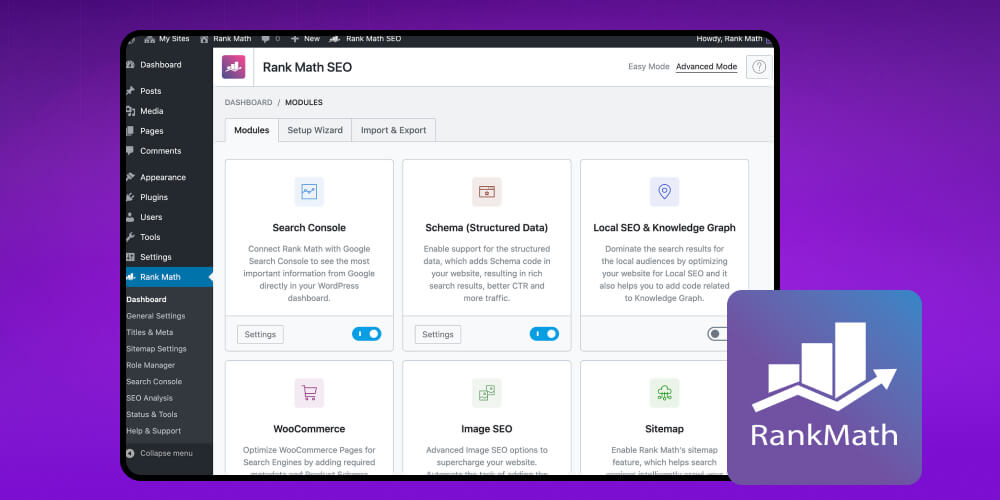
With standout features such as real-time SEO analysis, keyword optimization suggestions, automatic Schema Markup generation and smooth integration with Google Search Console and Google Analytics, Rank Math is a capable assistant for both beginners and SEO specialists.
As of 2025, the plugin has passed 1 million installs worldwide. Beyond its intuitive, easy-to-use interface, Rank Math helps make your website friendlier to Google and gives it a chance to stand out on search engine results pages (SERPs).
If you're looking for a plugin SEO WordPress that works best for your website, Rank Math is an ideal tool for SEO.
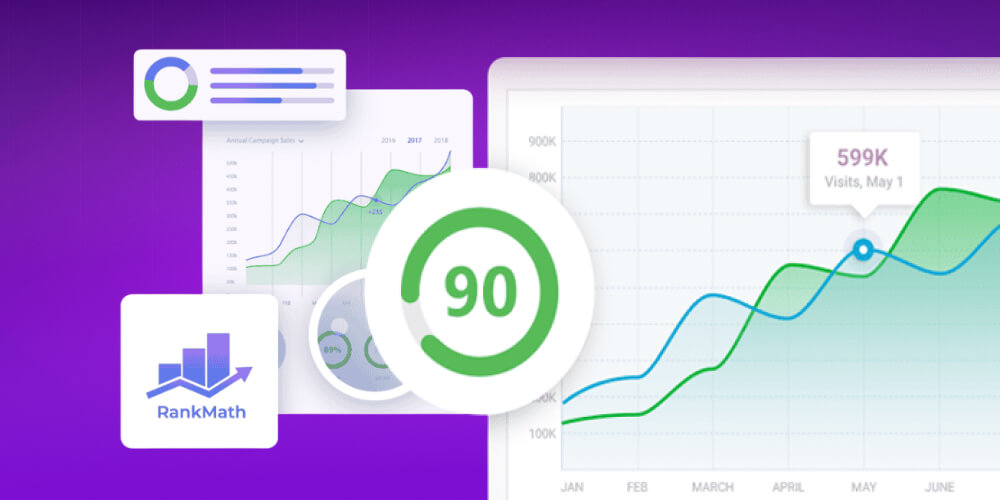
Here are the reasons to use the Rank Math SEO tool:
Easy to use, suitable for beginners: Rank Math has an intuitive interface and simple operation. Even if you aren't familiar with SEO techniques, you can get used to it and use it easily.
Light, fast, doesn't slow your site: This plugin is lighter than its competitors, processes quickly and doesn't affect page load speed.
Reports Google crawl errors: Rank Math monitors and reports 404 errors on your site so you can fix error pages quickly and protect the user experience.
Optimize Image SEO done automatically: Image SEO is a powerful feature that often gets overlooked. Rank Math automatically adds ALT tags and titles to images in your posts, which helps increase organic traffic.
Wide range of Google Schema integrations: Rank Math supports creating structured data such as FAQ schema, Article, Product and more with just a few clicks, making your posts stand out on Google.
Direct connection to Webmaster Tools: Rank Math lets you connect directly to Google Search Console and Analytics to track site performance and get SEO improvement suggestions
Backed by a development team and community: If you run into a problem, you can easily find answers or timely help from the forum, documentation or the technical team.
Many advanced features built in: Custom breadcrumbs, Redirect Manager, Local SEO, WooCommerce SEO and more, with no extra plugins needed.
SEO isn't just “writing content + building links,” folks. What matters is knowing where your competitors stand so you can plan your route. SEMrush is a tool that helps with exactly that, and Huy walks through it step by step in the video. Watch the video.
To optimize your SEO strategy on a WordPress site with the Rank Math SEO plugin, follow these basic setup steps:
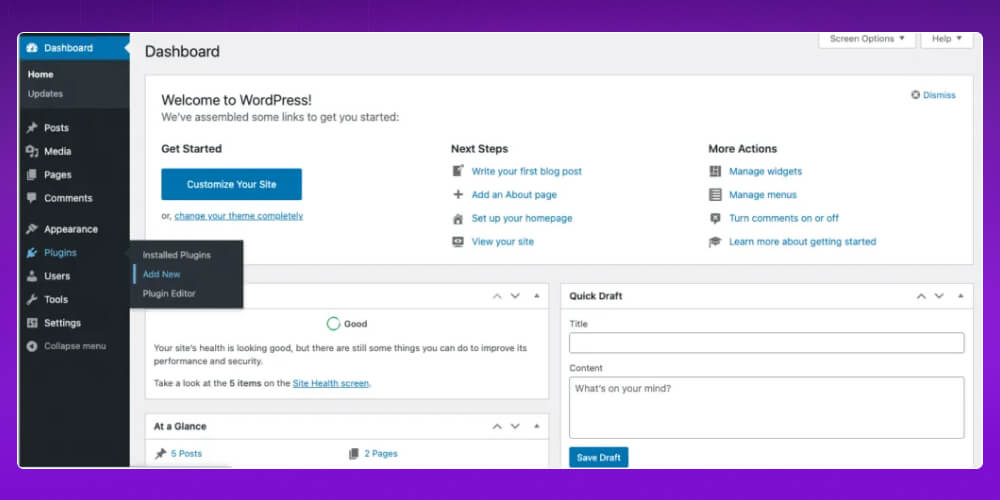
Log in to your WordPress admin.
Go to Plugins → Add New.
Search for the keyword “Rank Math SEO”.
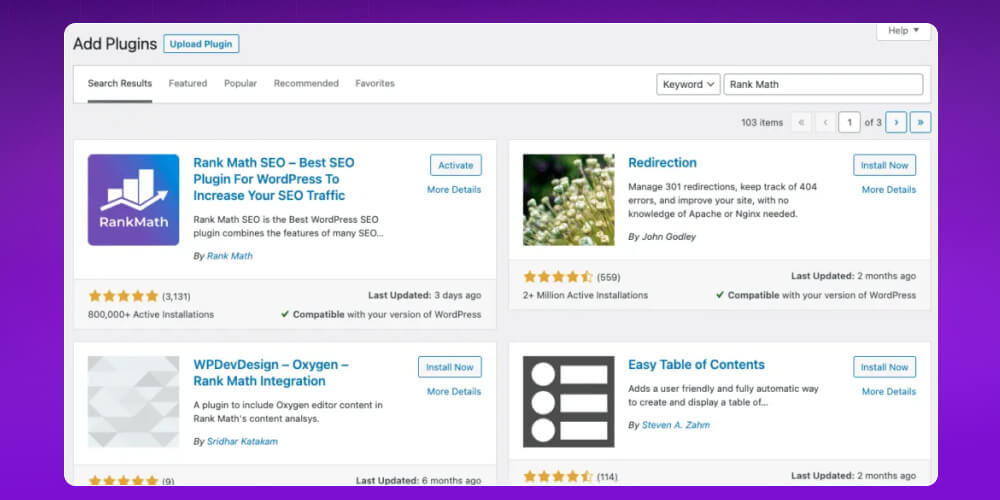
Click Install Now, then choose Activate to finish.
Right after activation, you'll be taken to the Setup Wizard, which helps you configure the plugin easily.
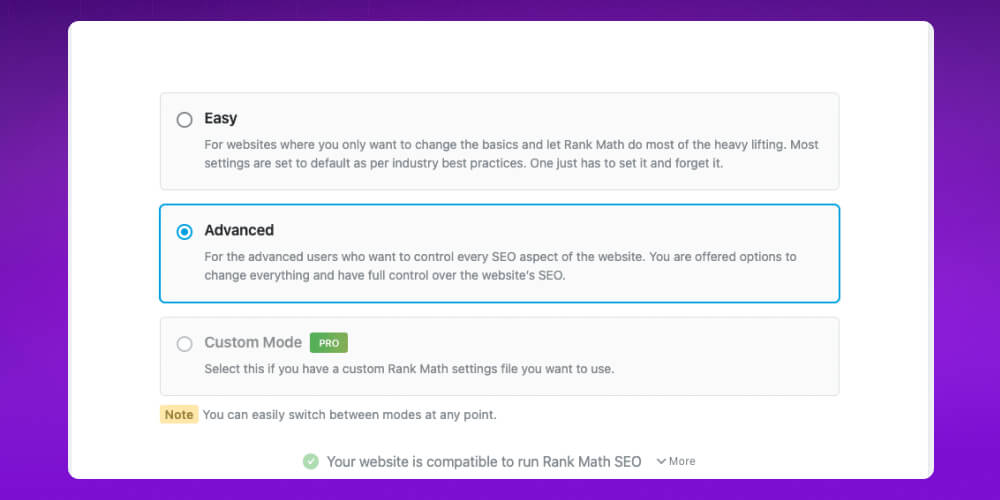
Rank Math offers 3 setup modes: Easy, Advanced or Custom Mode (Pro version only).
If you're just starting out SEO, choose Easy Mode to follow the simple steps, then click Start Wizard to continue.
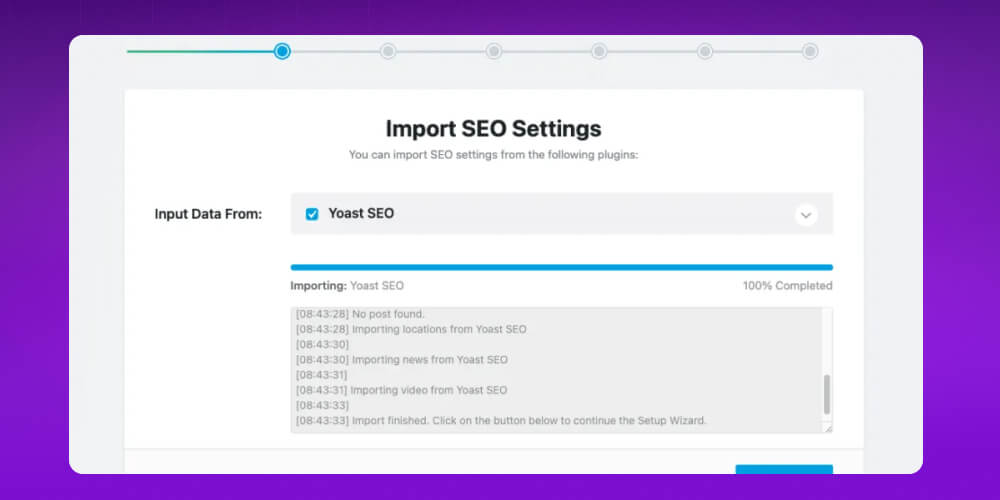
If you've used Yoast SEO, Rank Math can automatically import all your SEO data (such as titles, descriptions and keywords), which is convenient and avoids data loss. If you don't use Yoast, skip this step.
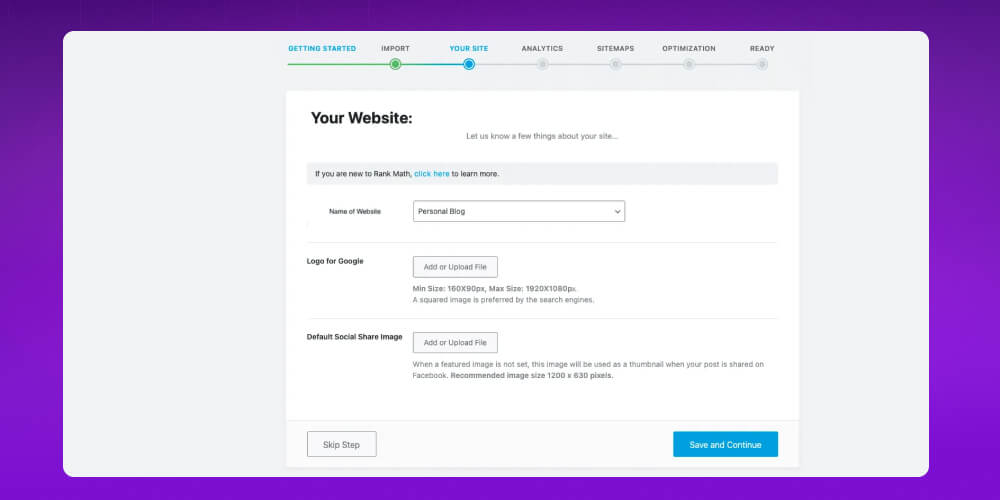
This step is important for helping Google understand your website better. You'll fill in details such as:
Rank Math can integrate directly with Google Search Console and Google Analytics, two important tools for tracking website performance. Connecting them makes it easy to track keywords, traffic and SEO errors. Just follow the prompts to authorize and connect your account, then click Save and Continue.

A sitemap helps Google index your posts more easily. Rank Math generates a sitemap automatically, so you only need to turn the feature on and customize it if needed.
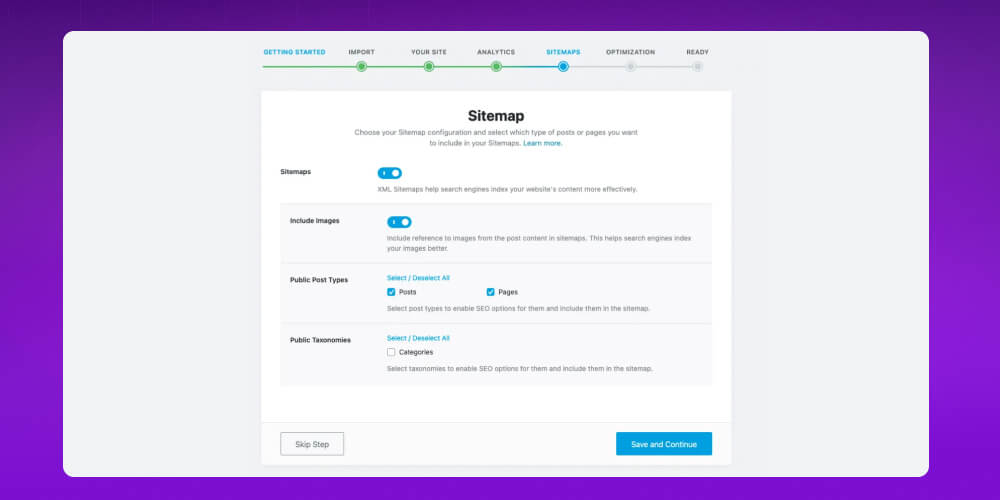
In the last step, you can turn on some useful features to optimize your site more thoroughly, such as:

To use Rank Math SEO effectively and reach the top quality score of 100, you need to know a few basic principles.
Optimizing the Rank Math SEO plugin not only improves post rankings but is also an important part of how to improve SEO for your website contributing to the overall quality of your website and the user experience.
When you write posts in WordPress, Rank Math gives you a series of suggestions to optimize SEO-standard content right inside the post.

Specifically:
Compelling title and meta description: You can easily customize the title and description shown on Google right in the admin. Add your main keyword to both, and write them so they entice readers to click your post in search results.
Optimize post content: The plugin suggests what to improve so your post performs better, such as adding the main keyword to subheadings, adjusting content to a sensible length and checking keyword density.
Friendly URL structure: Rank Math helps you shape URLs that are short, readable and reflect the post's content. A clear URL is good for SEO and makes readers more willing to click.
When doing SEO, researching and choosing the right main and related keywords is an important step in your Keyword SEO.
Besides using SEO keyword research tools, you can use Rank Math, which suggests the most-searched keywords and gives you more ideas when writing. But don't rely on those suggestions alone. For a truly high-quality keyword set, you need to understand customer insight and plan content that fits your brand.
Each post in Rank Math lets you optimize up to 5 keywords (1 main keyword and 4 secondary keywords). The system evaluates and warns you if you try to stuff in too many keywords, keeping the post natural and helping you avoid a Google penalty for over-optimization.
In some cases you can raise this limit in the plugin settings, but consider it carefully so content quality isn't affected.
When using Rank Math SEO, you'll see a color scheme beside each optimization criterion. It's a simple way to tell whether your post is fine or needs changes. Specifically:
Green: Everything is in good shape. Rank Math shows you've optimized that criterion well.
Yellow: A mild warning. It's acceptable, but you should check and improve it for better results.
Red: Needs attention. This signals you're missing something important and should fix it right away.
Besides colors, Rank Math also scores posts on a scale of 0 to 100:
81 and above: Good.
51 to 80: Acceptable, with room to improve.
Below 50: Needs reoptimizing.
However, don't stuff keywords or over-edit just to turn everything green. Color codes and scores are only a reference tool.
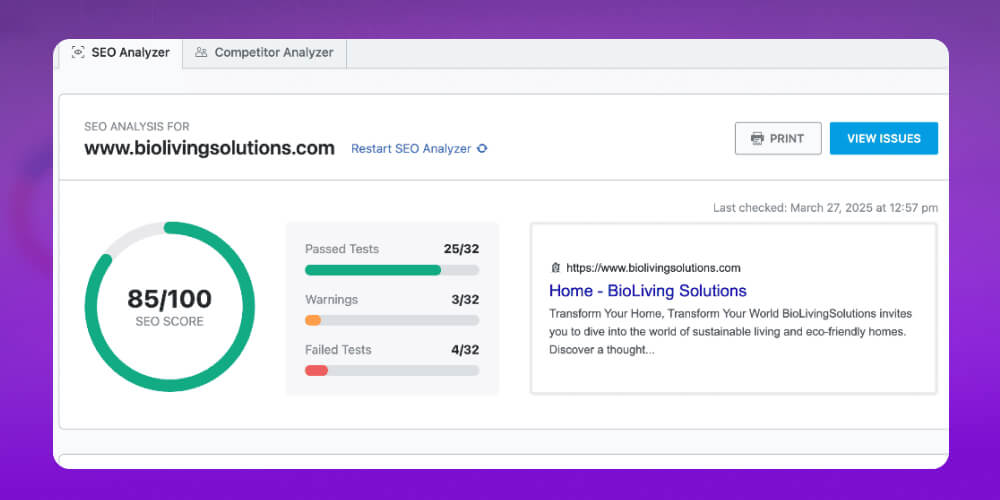
Google rankings also depend on many other factors, such as keyword competition, publish time and website authority. What matters is putting the user experience first, so write quality, SEO-friendly content that drives conversions.
To complete SEO-standard content with Rank Math, you need all 4 basic but very important and necessary parts:
When you start optimizing a post's SEO, Rank Math guides you through the most basic yet extremely important steps to make the post friendly to Google.
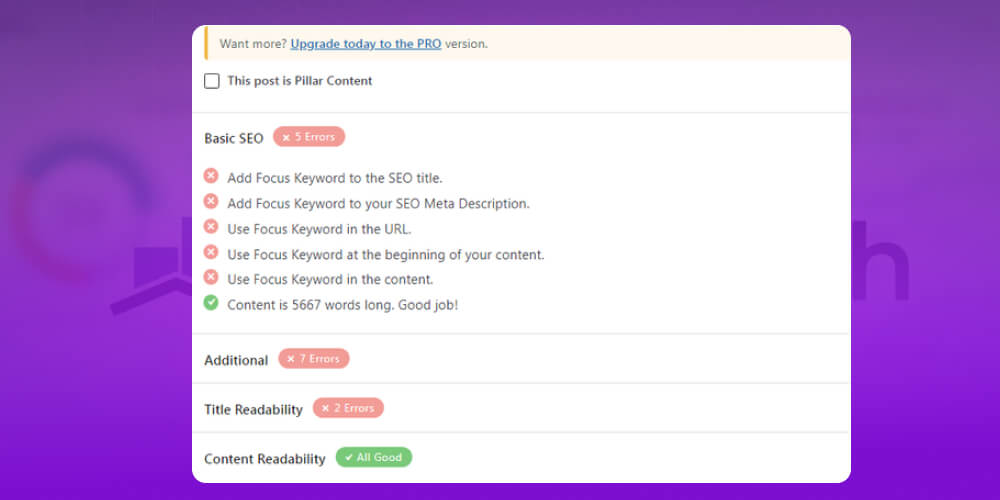
Here are the points to pay attention to:
Main keyword in the title (SEO Title): Make sure the main keyword appears in the title and keep the title within 50 characters so it displays in full on both desktop and mobile.
Main keyword in the description (Meta Description): Add the keyword to a short description (under 160 characters) to help users and search engines understand what the post is about.
Keyword in the URL: The URL should contain the main keyword, with no special characters or unnecessary numbers. A clear URL builds trust and is easier to remember.
Keyword appears early in the content: Ideally the keyword appears in the first 10% of the post so readers know they're in the right place.
Keyword appears throughout the content: Beyond the main keyword, include related keywords to broaden coverage and keep the post natural.
Post length: An SEO-friendly post should be at least 600 words. To give it more depth and a better chance to rank, aim for 1,000-2,000 words.
In SEO optimization, beyond basics like the title, meta description and URL structure, Additional SEO acts as an important “core” that makes a post fuller, deeper and more engaging.
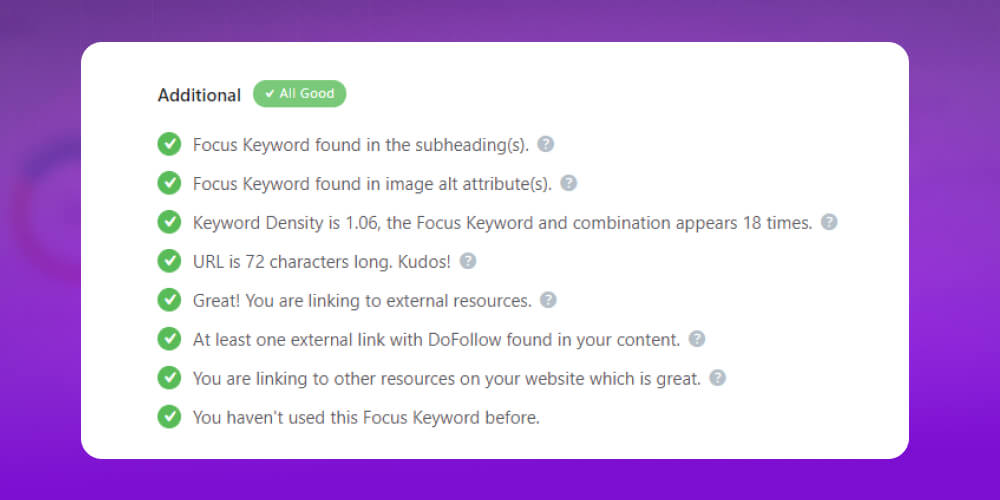
Here are some important supporting factors to keep in mind when optimizing posts with Rank Math:
The headline is the first touchpoint with users, and within about 3 seconds they usually decide whether to click your post.
So crafting a striking headline takes plenty of effort, thought and time. With Rank Math SEO, the title matters even more because it is a key factor in optimizing ranking and attracting organic clicks.
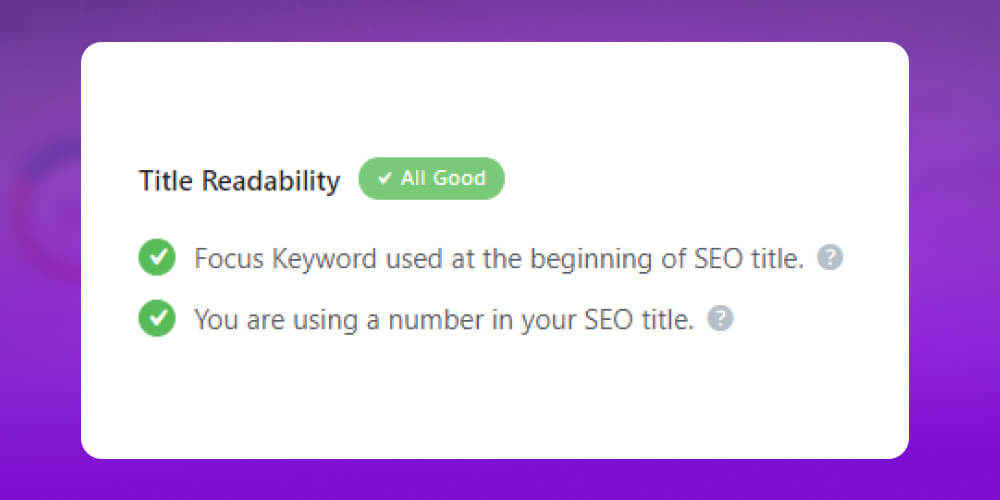
A well-rated title needs to meet these main requirements:
Content readability is an important factor in Rank Math SEO. Even if the content on your site isn't outstanding, presenting it clearly, coherently and in an easy-to-follow way can still make a good impression and keep readers engaged.
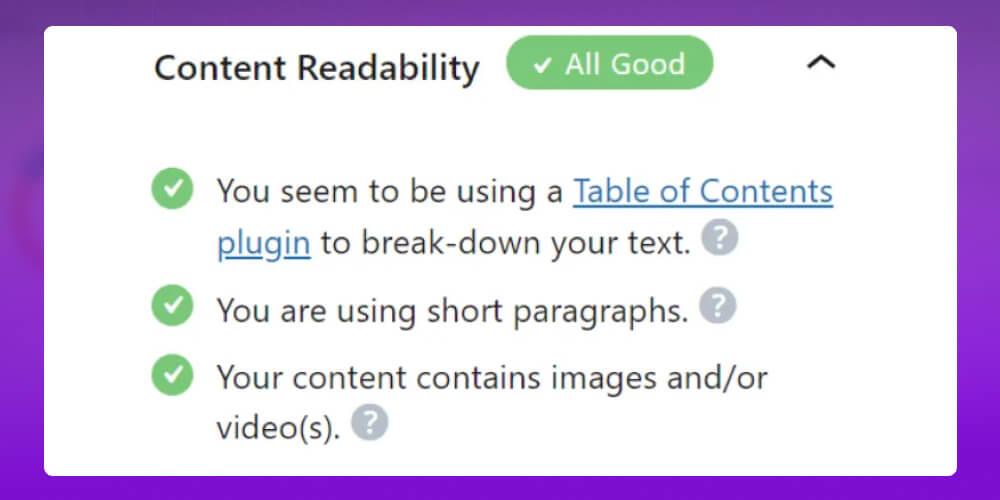
Understanding this, Rank Math SEO offers useful suggestions to improve how readable your posts are. Here are the key factors to keep in mind to make your content more engaging and communicate more effectively.
Many businesses invest in professional website design “good-looking,” but skip technical optimization such as speed and link structure. The result is that Google doesn't understand the content, doesn't index it properly, and the SEO never gets anywhere. Carrying out SEO services is a long-term strategy that needs to be done properly and in the right direction from the start.
Even with tools like Rank Math SEO to help, they should only be a reference. What matters most is still strategic thinking, a sound optimization process and genuinely valuable content.

With more than 10 years of experience and more than 3,000+ projects full-scope SEO projects, MONA is confident it is a partner to hundreds of businesses working toward lasting Top Google rankings.
Why choose full-scope SEO services at MONA?
Contact MONA today so our team can advise on a suitable SEO strategy and start optimizing your website properly and sustainably.
Yoast SEO and Rank Math are both powerful SEO plugins for WordPress, but each has its own strengths suited to different kinds of users.
Below is an overview comparison of Yoast SEO and Rank Math for your reference:
| Criterion | Rank Math SEO | Yoast SEO |
|---|---|---|
| Keyword count | Supports up to 5 focus keywords at once in the free version. | The free version supports only 1 focus keyword per post. |
| Keyword analysis | Provides detailed data on search volume, difficulty and competition for each keyword, plus LSI keyword suggestions. | Simpler analysis, with SEO improvement suggestions based on a single main keyword. |
| SEO optimization features | Automatically generates titles and meta descriptions, supports a wide range of schema markup, creates tables of contents and manages redirects. | Focuses on detailed content analysis, checking title and meta description optimization, alt text and social media integration. |
| User interface | A modern, friendly interface with logically grouped features and pleasant colors. | A simple interface, familiar to long-time users. |
| SEO reporting and tracking | Integrates Google Analytics and Google Search Console with detailed reports right inside WordPress. | Also integrates Search Console, with basic reports and analysis. |
| Paid version | Lower price, usable on unlimited websites, with more advanced features. | The paid plan is fairly expensive (about $99/year) and covers 1 website per subscription; adds features such as Redirect Manager and Internal Link Blocks. |
| Other standout features | Supports WooCommerce SEO, Local SEO, 404 checks and detailed keyword ranking tables. | Stands out for in-depth SEO standards, Cornerstone Content and breadcrumb management. |
Understanding what Rank Math SEO is, and knowing how to install and use it, is essential. With it, raising the ranking of your posts and your site can be done as well as you want. That in turn keeps the website running well, supports your business goals and supports growth in whatever field your business pursues. If you need a complete, fast-to-deploy website SEO solution, contact MONA for advice and to receive full-scope SEO quote .
For a personal blog or a small showcase website, the free version of Rank Math is almost enough. You can set up titles, descriptions, sitemaps and basic schema in one plugin.
A business website is a different story. We have taken over many systems with thousands of product pages, multiple branches and several people publishing content. At that scale, what's usually missing is process: who approves meta, which schema applies to each page type, what extra data to declare for machines to read. A pre-installed plugin can't answer those questions by itself.
| Criterion | Rank Math free | Rank Math PRO | MONA SEO |
|---|---|---|---|
| Cost | Free | Paid yearly | License per domain; one license covers the whole set of 7 MONA plugins |
| Admin interface | center | center | Fully in Vietnamese |
| Declarations for AI search (ChatGPT, Gemini, AI Overview) | No dedicated section yet | No dedicated section yet | Built in, set up alongside Google SEO |
| Support when you're stuck | International forum | English-language tickets | MONA team, hotline 1900 636 648 |
| Switching | None | None | Detects whether Rank Math or Yoast is installed, hands over control, and lets you switch gradually without losing data |
If Rank Math is working steadily for you, there's no need to remove it right away. Consider it when the website has several people operating it, or you want the content read correctly by both Google and AI tools. At that point, review the whole setup following our WordPress SEO guide , and also compare the options in the plugin WordPresscategory. If your website needs proper SEO done end to end, take a look at SEO services package from MONA?
A suggestion from MONA
If you are considering an SEO plugin for your WordPress website, we have MONA SEO, a licensed plugin developed by the MONA team. Besides SEO for Google, the plugin also declares data for ChatGPT, Gemini and AI Overview, and its admin interface is fully in Vietnamese. It detects an existing Yoast or Rank Math install and steps aside, so you can switch over gradually without conflicts.
See the details at plugin.mona.software, or see more reviews in the plugin WordPress section of our blog. For advice based on your website's current state, call 1900 636 648.

CEO & Founder · The MONA
Founder of The MONA, who built a services company of 200+ staff with 14,000+ projects delivered. Khánh Hùng shares how he thinks about building systems that run themselves, automating a business, and the real lessons from delivering projects at MONA.
 1,5K
1,5K




Professional website
design services
Own a website with a beautiful, 100% exclusive design and a lifetime warranty, with the ability
to expand features flexibly as your business grows, starting today!








 MONA will never sell your information or send you spam
MONA will never sell your information or send you spam
MONA will never sell your information or send you spam


 MONA will never sell your information or send you spam