
 MONA OS 2.0


 Tự động hoá doanh nghiệp
 Cẩm nang SEO
 Digital Marketing
 Kinh nghiệm thiết kế website
 Hạ Tầng Server
 Giáo dục


 VI
VI
 EN
EN

























Message us on
Zalo Official


 ProductsNew

 ProductsProducts
 Mới ra mắtKHA AI 2027App tự edit video, tự đăng mọi mạng xã hội, 2 phút mỗi ngày










 Website designLooks good and wins customers over.
SEO servicesBrings in customers searching for exactly what you sell.
Website designLooks good and wins customers over.
SEO servicesBrings in customers searching for exactly what you sell.
 Tư vấn digital marketingKéo khách từ nhiều kênh, đo bằng số thật.
Corporate video productionVideos introducing your company, factory and team.
Tư vấn digital marketingKéo khách từ nhiều kênh, đo bằng số thật.
Corporate video productionVideos introducing your company, factory and team.
 NewAI video productionCompany story films made with AI.
 Custom software developmentCRM, ERP and HRM built for your business.
 Viết AI Agent theo yêu cầuĐặt riêng một trợ lý AI cho đúng việc của mình.
 Tư vấn chuyển đổi AIĐưa AI vào vận hành của cả công ty.
NewMONA LMSManagement for centers and schools.
MONA SkillHubInternal training for company staff.
Tư vấn chuyển đổi AIĐưa AI vào vận hành của cả công ty.
NewMONA LMSManagement for centers and schools.
MONA SkillHubInternal training for company staff.
 NHTQ systemEnd-to-end China–Vietnam shipping operations.
MONA JMSManagement for gold, diamond and pawn shops.
NHTQ systemEnd-to-end China–Vietnam shipping operations.
MONA JMSManagement for gold, diamond and pawn shops.
 MONA E-LearningA website with every feature you need to sell courses.
 How to sell online courses (course)More than 30 free lessons on selling courses on autopilot.
 MONA Cloudmonacloud.vnServers to get your apps and websites running.
 MONA Basemonabase.vnPostgres database, sign-in and file storage.
 MONA Mailmonamail.vnSend OTP, order and invoice emails from your software.
 MONA Paymonapay.vnAccept bank transfers via VietQR and notify your software when the money arrives.
 MONA eInvoiceComing soonIssue e-invoices that meet tax standards.
Gấu CườiTrả lời khách 24/7 trên web, Fanpage, Zalo và thu lead cho sale.
MONA eInvoiceComing soonIssue e-invoices that meet tax standards.
Gấu CườiTrả lời khách 24/7 trên web, Fanpage, Zalo và thu lead cho sale.
 Gấu TeleSalesGọi điện tư vấn, chăm khách như tổng đài viên thật.
Dê CườiTư vấn và chốt đơn cho shop ngay trong khung chat.
Gấu WebmasterNhắn nhóm Zalo là website được sửa xong.
Gấu TeleSalesGọi điện tư vấn, chăm khách như tổng đài viên thật.
Dê CườiTư vấn và chốt đơn cho shop ngay trong khung chat.
Gấu WebmasterNhắn nhóm Zalo là website được sửa xong.
 Gấu Pháp ChếSoạn hợp đồng, rà điều khoản trong vài phút.
 Gấu Báo GiáLên báo giá đúng mẫu và gửi khách ngay.
 AI chăm sóc khách hàngTheo dõi và giữ chân khách hàng cũ.
 Gấu Tuyển DụngLọc hồ sơ, hẹn lịch, phỏng vấn ứng viên.
 Mới ra mắt
KHA AI 2027
Xây kênh chuyên gia 2 phút mỗi ngày
Quay bằng điện thoại, AI tự edit video, tự đăng lên 16 nền tảng và tự trả lời bình luận, tin nhắn.
352.433lượt xem trên kênh CEO MONA sau 20 ngày
Mới ra mắt
KHA AI 2027
Xây kênh chuyên gia 2 phút mỗi ngày
Quay bằng điện thoại, AI tự edit video, tự đăng lên 16 nền tảng và tự trả lời bình luận, tin nhắn.
352.433lượt xem trên kênh CEO MONA sau 20 ngày
 Anh Khánh HùngCEO MONA đang dùng mỗi ngày
Xem app làm được gì
Anh Khánh HùngCEO MONA đang dùng mỗi ngày
Xem app làm được gì
 AI
Gấu Cười MONA ĐANG TỰ XÀITrả lời khách 24/7 trên website, Zalo OA, Messenger và thu lead về cho sale.
Dê CườiChốt đơn bán lẻ và sàn: Shopee, TikTok Shop, web. Chăm cả khách sỉ, đại lý.
Gấu WebmasterCập nhật nội dung, tối ưu SEO website mỗi ngày.
Gấu TeleSalesGọi điện tư vấn, chăm khách như tổng đài viên thật.
Gấu Tuyển DụngLọc hồ sơ, hẹn lịch, phỏng vấn ứng viên tự động.
AI chăm sóc khách hàngGiữ khách cũ, cứu lead đã rớt cho phòng kinh doanh.
Gấu Pháp ChếSoạn hợp đồng, rà điều khoản trong vài phút.
Gấu Báo GiáLên báo giá đúng mẫu, gửi khách ngay khi có yêu cầu.
AI
Gấu Cười MONA ĐANG TỰ XÀITrả lời khách 24/7 trên website, Zalo OA, Messenger và thu lead về cho sale.
Dê CườiChốt đơn bán lẻ và sàn: Shopee, TikTok Shop, web. Chăm cả khách sỉ, đại lý.
Gấu WebmasterCập nhật nội dung, tối ưu SEO website mỗi ngày.
Gấu TeleSalesGọi điện tư vấn, chăm khách như tổng đài viên thật.
Gấu Tuyển DụngLọc hồ sơ, hẹn lịch, phỏng vấn ứng viên tự động.
AI chăm sóc khách hàngGiữ khách cũ, cứu lead đã rớt cho phòng kinh doanh.
Gấu Pháp ChếSoạn hợp đồng, rà điều khoản trong vài phút.
Gấu Báo GiáLên báo giá đúng mẫu, gửi khách ngay khi có yêu cầu.
 Chuyển đổi AI toàn phầnGiải pháp tổng cho doanh nghiệp, 3 lớp triển khai.
 Viết AI Agent theo yêu cầuĐặt riêng một con AI gánh đúng nghiệp vụ của bạn.
 Custom softwareCRM, ERP and HRM with built-in AI automation.
 SEO & AEO thời đại AIĐược Google lẫn AI trích dẫn, không chỉ xếp hạng.
 Kiến thức AI cho doanh nghiệpBài phân tích, hướng dẫn ứng dụng AI vào vận hành.
 Free AI courses
 AI tools at work
App mới · KHA AI 2027
Xây kênh 2 phút mỗi ngày
AI tự edit video, tự đăng mọi mạng xã hội
Free consultation, 8am–10pm every day
AI tools at work
App mới · KHA AI 2027
Xây kênh 2 phút mỗi ngày
AI tự edit video, tự đăng mọi mạng xã hội
Free consultation, 8am–10pm every day

18 March, 2023

Structured data Schema (Schema Structured Data) is always on the minds of SEOs. It is one of the techniques Entity Buildingthat can lift your overall rankings within days. And if your website is brand new, applying Schema Markup can help it escape vGoogle's Sandbox after just one pass submit URL. It also lightens the work for search engines, helping them read and display the important information on your site. So exactly what is Schema and why is it so powerful? In this article, MONA Media will answer that question and show you how to grow your website traffic up to 10x.

Schema hay Schema Structured Data, Schema Makup is a form of structured data for a website, made up of pieces of code HTML or declarative code Javascript built into the site. Its job is to give search engines clear hints so they can recognize, classify and display the right content for each user query quickly and easily.
Overall, Schema is one of the SEO Offpage key elements to keep optimizing if you want a high-quality, user-friendly site that delivers its full value. Implementing Schema Markup is also said to raise click-through rate by as much as 30%, which is impressive.
You can look at what Schema does from 3 main angles: search engines, users, and the website itself. Schema does something different for each of them. In detail:

There are now more than 2 billion websites worldwide. People can easily understand what a site is about, but for search engine it is not so simple. Search engines struggle to interpret complex language accurately.
| For example, the word "Sunset" could mean the time of day, a song title or a film. Its meaning depends on the context around it. That is a big obstacle for search engines trying to show relevant results. |
So for a search engine to understand and classify information correctly, a website needs to be organized and described in an agreed syntax. This is where Schema works best. Schema supplies the specific data that tells a search engine what the site's content is, what kind it is and what topic it covers.
For users, Schema makes a website more striking and more appealing, and it makes it easier to present useful information.
| For example, if someone wants to attend one of your company's events, Schema can show the location and time of the event right on your website. |
The more complete and detailed the information, the more meaningful the page. With the many Schema types, each matched to a way of appearing in search results, the value is even greater.
For the website itself, applying Schema SEO helps your page stand out on the search results page. The information displayed is smarter, and you gain better control over rich snippets. As a result, traffic, and the rate of CTR rises quickly, which is good for your business.
Google and the other search engines keep changing, updating and adding new algorithms and techniques, which makes SEO harder all the time. Only a quality site structure and quality content give you a better chance of reaching the top of search results. This work is vital and directly affects a company's revenue and growth.

Google encourages the use of Schema SEO, yet only about 30% of websites online apply Schema, which shows how valuable it is. Here is why:
With billions of websites out there, declaring Schema lets us tell search crawlers precisely what content and information our site provides. This matters a great deal for local businesses in particular. Making clear what products and services you offer and how to reach you makes your website friendlier to search engines and earns it a higher rating.
One benefit that shows how much Schema matters for website SEO is better visibility on search results pages. Schema lets a website appear in a clearer, more attractive way that draws users in.
Structured data like this gives SEO a real boost. When more users click your result, it shows the value Technical SEO Schema brings, and more clicks help Google rate your site higher and improve its ranking.
With extra information on display, users have more to base a sound decision on. Your website then gets better traffic and a higher conversion rate. Thanks to Schema SEO, useful information that matches what customers care about is shown fully and clearly, which improves the user experience and attracts customers.
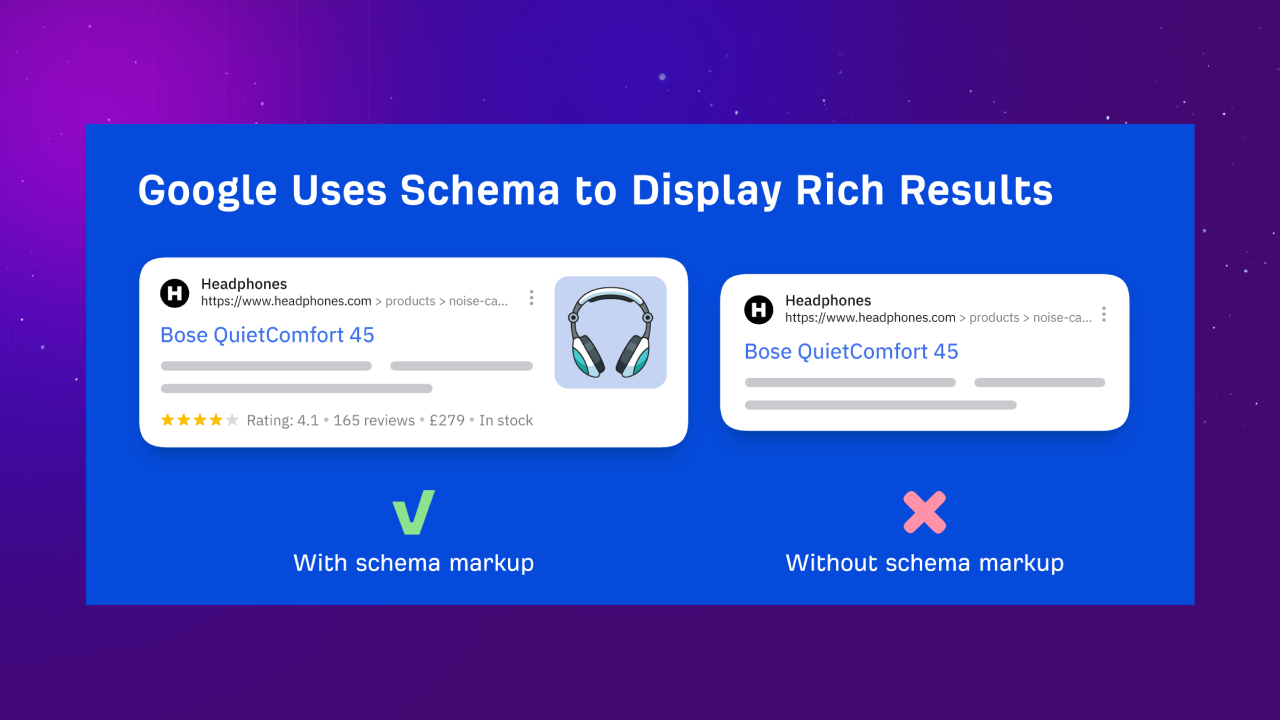
Google generally uses Schema to create Rich Snippets snippets for a specific website in search results, giving users full details such as reviews or product information. This lets customers see your website and your business more clearly and completely, and it noticeably increases the chance they will visit.
>> Read more: Top 5 best free rich snippets plugins for WordPress
If you have read the section on what Schema is, MONA now puts together the list of the most commonly used Schema types. Take a look.
A featured snippet, also called Position 0 on Google, is a short block that appears at the very top of Google's organic results. It is pulled from a passage in an article, a heading, an image, a video, or sometimes a URL pointing to the article. Snippets like this answer a user's query quickly. Common formats include definitions, tables, lists and step-by-step content.
Breadcrumbs plays an important role in showing a site's structure and usually sits at the top of the page. It is a small trail that tells users where they are on the site. Breadcrumbs Schema Markup shows the site category or the page's position in search results.
Sitelinks are the links shown under the main link of the website you searched for. They help raise the natural CTR to your site.
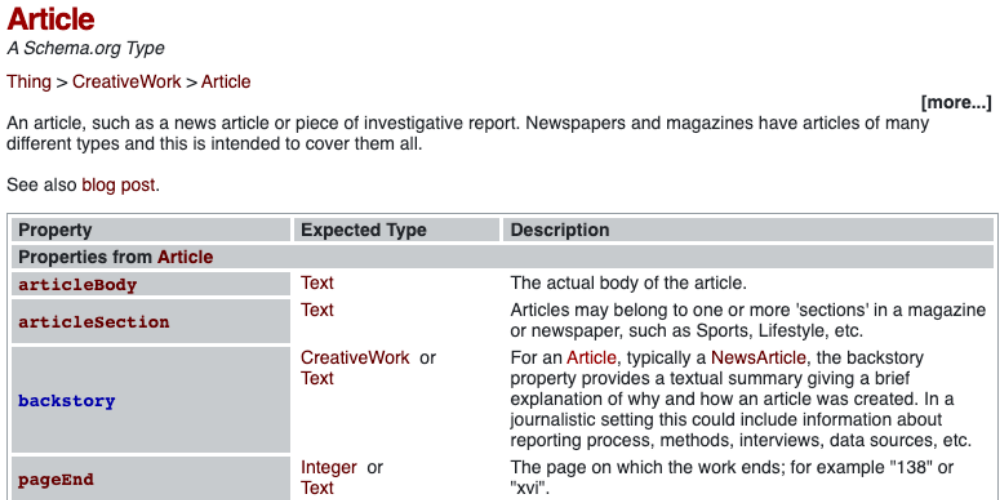
Usually seen on news sites. With Article schema, Google understands your article more easily, so your posts are more likely to appear at the top of search results.
This markup shows a website's ratings and reviews, which noticeably raises the unpaid click rate on your site.
Local Business Schema Markup helps search engines identify your type of business and the products you offer. It enriches your Google My Business listing and optimizes your website with Local SEO.
As the name suggests, this is structured markup for products, shown alongside your search results. Product Schema helps Google display product details such as ratings and prices, which improves the user experience.
For websites about cooking, beauty and similar topics, Recipe Schema shows information as a recipe, with the steps in the snippet, so users can preview it before opening the page.
This markup usually shows key event details such as time and place, making the result look better and draw more attention.
This type of Schema Markup helps Google better understand who is responsible for the content on your website.
Video markup gives clear details such as the description, upload date and duration so Google can quickly understand your video. The video can then appear in Google search results, video search, Google Images and Google Discover.
Organization markup helps your website show its brand name prominently on the search results page. It affects the Google Knowledge Graphfeature and signals how well known the brand is.
This markup makes your job postings appear on Google's jobs page and attracts more potential candidates. Job Posting shows information about the open position, so candidates can filter and find a job that suits them.
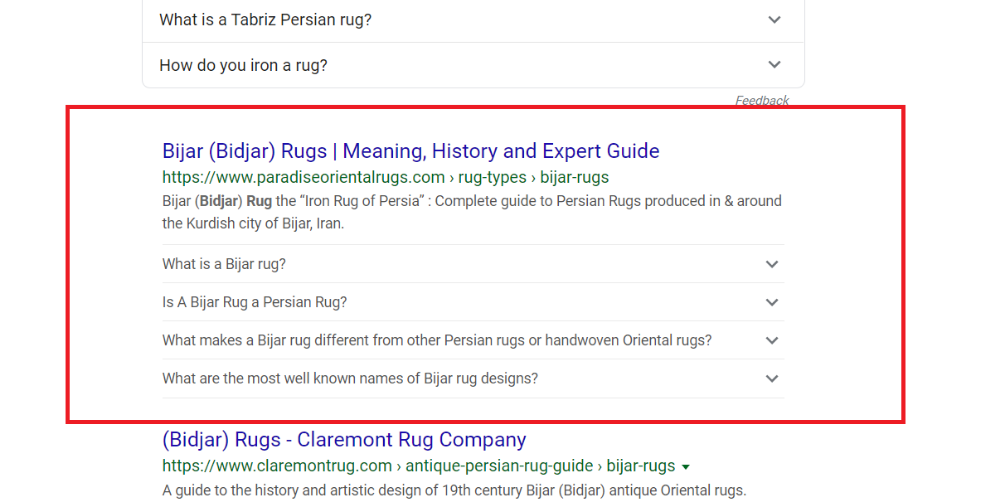
FAQ Schema will list answers to the question posed in an expandable format. This raises the chance of users clicking and increases traffic considerably. Note that you should ask questions that match what users actually search for.
Alongside the benefits of Entity techniques, some people argue that Entities are just like SEO Google Map or SEO on social networks. But you should know that social is only a grain of sand in the desert of Entity Building. There are countless Entity-building techniques around the world, and Schema Markup is one of them. The problem is that very few articles cover this technique in detail. So to build up your knowledge of complete SEO, newcomers need to keep learning, researching and keeping up with the latest information.
For Entity Building, to earn Google's trust you need 2 types of schema:
When Google checks a website, if the site's information and data match what is declared elsewhere on the internet, Google verifies the site as a defined entity. This lifts the site's overall rankings.
By now you should understand what Schema is and why declaring it for your website is essential. But if you do not have much experience with this, consider using full-scope SEO services from MONA Media.
At MONA Media, we have a team of experts who know SEO inside out, including Schema and Entity Building. With a clear full-scope SEO process to help your website climb the rankings quickly and effectively. With more than 10 years in SEO, we know the best way to approach each industry, taking into account researching keywordsand market demand to get the best results. 100% of clients were satisfied after using our full-scope SEO service at MONA Media.
Call our HOTLINE 1900 636 648 for the fastest offer!
To check whether your website has complete Schema Markup, or whether your structured data has any problems, a checking tool is a simple and effective answer. Using Google's structured data testing tool takes just a few simple steps:
Besides those two steps, pay attention to the "Errors" and "Warnings" sections. If there are any, click each notice, see what is wrong with the Schema and fix it thoroughly so your website keeps running well and stably.
You can insert Schema easily, even without knowing any code, with the help of Schema plugins. Below are the top 5 plugins we recommend for your website.

What is Schema Pro? It is a very widely used plugin that makes it easy and quick to add Rich Snippets to your site. However, Schema Pro is a paid plugin: $67/month or $937 for a lifetime license.
Schema Pro supports 13 Schema types, including:
This is a free, fairly simple plugin that supports schema types such as reviews, ratings, events, articles and software applications.
Although the design is minimal and not very varied, it provides all the basics needed to produce a detailed code snippet for your site. Its limitation is that it does not support automation, so you add Schema manually, which takes a little more time. On the plus side, you can trust its quality because it is made by the same developer as Schema Pro.
Schema and Structured Data for WP & AMP supports up to 33 Schema types, covering a wide range of website content.
The plugin's main strengths are:
Like Schema Pro, this is a paid plugin. Pricing: $99/Personal, $149/Webmaster, $299/Freelancer, $499/Agency.
WP Review Plugin helps improve user interaction with product and service reviews and ratings, so it suits e-commerce websites well.
This plugin also suits bloggers. You can use it to review tools, software applications or recipes.
Key features of WP Review Plugin:
Simple, easy setup. WP Review Plugin pricing:
WP SEO Structured Data Schema is a free plugin that still offers most of the basic features needed for Schema Markup. The Schema types it supports include Organizations, Local Businesses, Videos, Events and Ratings. You can freely add coordinates, names, a logo, a business description and more.
JSON-LD is the leading way to install Schema and the one Google recommends. You can add Schema Markup in the following steps:
To start, enter the line <script type=”application/ld+json”>
Put the JSON-LD code inside curly braces to separate the data; this is called the object structure. In general, the code will look like this:
<script type=”application/ld+json”>
{
code
}
</script>
We use context and add a comma at the end of each line of code.
“@context”: “http://schema.org”,
Use the type property to mark it up. This property is equivalent to itemtype in Microdata and typeof in RDFa. Then define any other elements if needed. When you are done, close the script block. You now have a complete markup.
Just as with JSON-LD, you need to declare the Schema Markup. For RDFa, we use the vocab tag with http://schema.org/ to define the markup data, and the page type is defined with the typeof tag.
Example: <div vocab=”http://schema.org/” typeof=”Restaurant”>
Next, define the properties of the elements using property. Finally, close with </div> to complete the markup.
To add Schema, declare the Schema Markup. Add itemscope to the <div> tag to define the marked-up content, then add the itemtype attribute to define the type of content.
Example: <div itemscope itemtype=”http://schema.org/restaurant”>
Next, declare the properties of the elements. This part sits between the <h1> tags and is called itemprop.
Installing Schema in WordPress requires going through the steps in order, one by one. Of the various methods, using a Schema plugin is always preferred for its effectiveness and simplicity.
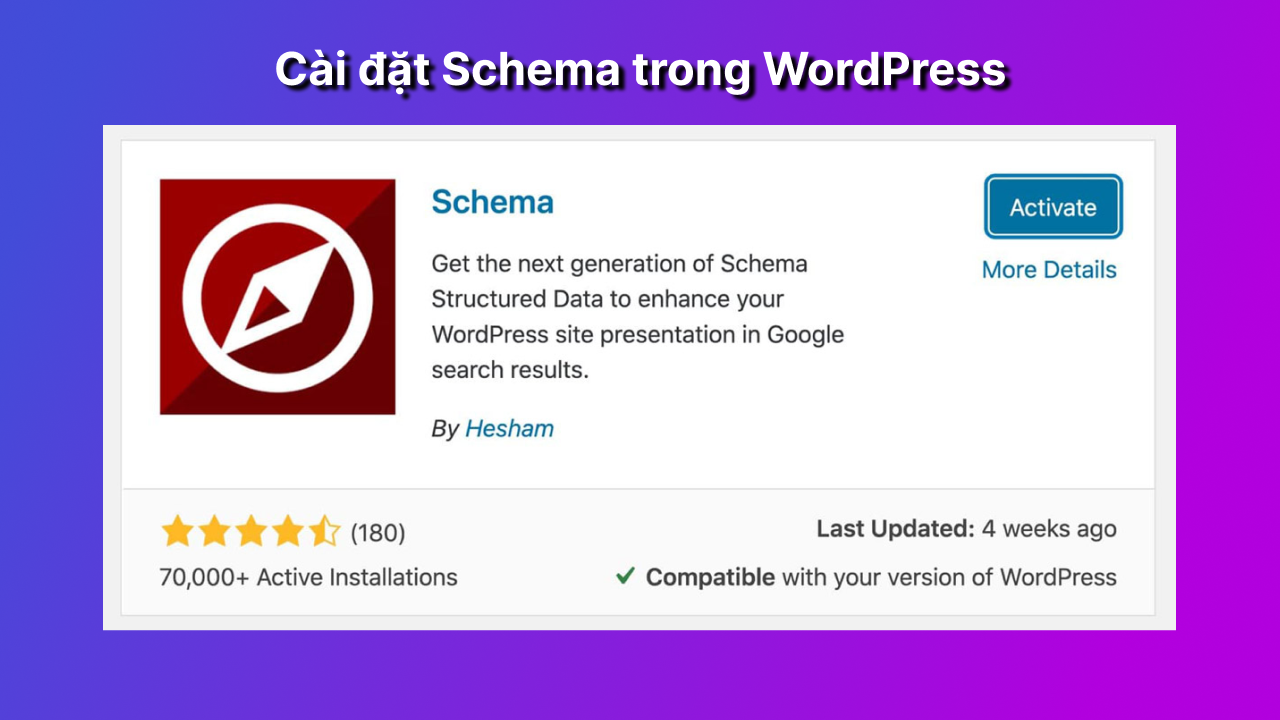
Install Schema in WordPress with the following steps.
What is schema markup?
You can think of it as a way of adding context to your website, so search engines understand and highlight the information in your content.
What is the Sandbox?
A sandbox is an isolated area for running applications and malicious software, so they cannot damage the computer system or install malicious code to steal information.
Where should schema be inserted?
Schema must be inserted on each page, to avoid the risk of a Google Panda penalty for duplicate content. For Schema to work at its best, insert it in the header.
How do I track the performance of my markup?
You can track markup performance in Google Search Console by pasting in the URL of the website you want to monitor.
We hope the information above gives you a better understanding of what is Schema and the useful related details, and shows why it matters for your website. Besides carrying out a backlinkplan, schema is also an off-page SEO option that strengthens your website, keeps it running stably and helps it rank higher on search engines. If you want to improve revenue quickly and reach lasting rankings, consider MONA's SEO service. Contact us today to receive website SEO price list with full details.

CEO & Founder · The MONA
Founder of The MONA, who built a services company of 200+ staff with 14,000+ projects delivered. Khánh Hùng shares how he thinks about building systems that run themselves, automating a business, and the real lessons from delivering projects at MONA.
 1,5K
1,5K




Professional website
design services
Own a website with a beautiful, 100% exclusive design and a lifetime warranty, with the ability
to expand features flexibly as your business grows, starting today!








 MONA will never sell your information or send you spam
MONA will never sell your information or send you spam
MONA will never sell your information or send you spam


 MONA will never sell your information or send you spam