
 MONA OS 2.0


 Tự động hoá doanh nghiệp
 Cẩm nang SEO
 Digital Marketing
 Kinh nghiệm thiết kế website
 Hạ Tầng Server
 Giáo dục


 VI
VI
 EN
EN
















Message us on
Zalo Official


 Products

 ProductsProducts









 Website designLooks good and convinces your customers.
SEO servicesBrings in customers searching for exactly what you sell.
Website designLooks good and convinces your customers.
SEO servicesBrings in customers searching for exactly what you sell.
 Tư vấn digital marketingKéo khách từ nhiều kênh, đo bằng số thật.
Corporate video productionVideos introducing your company, factory and team.
Tư vấn digital marketingKéo khách từ nhiều kênh, đo bằng số thật.
Corporate video productionVideos introducing your company, factory and team.
 NewAI video productionCompany story films made with AI.
 Custom software developmentCRM, ERP and HRM built for your business.
 Viết AI Agent theo yêu cầuĐặt riêng một trợ lý AI cho đúng việc của mình.
 Tư vấn chuyển đổi AIĐưa AI vào vận hành của cả công ty.
NewMONA LMSManagement for centers and schools.
MONA SkillHubInternal training for company staff.
Tư vấn chuyển đổi AIĐưa AI vào vận hành của cả công ty.
NewMONA LMSManagement for centers and schools.
MONA SkillHubInternal training for company staff.
 NHTQ systemEnd-to-end China–Vietnam shipping operations.
MONA JMSManagement for gold, diamond and pawn shops.
NHTQ systemEnd-to-end China–Vietnam shipping operations.
MONA JMSManagement for gold, diamond and pawn shops.
 MONA E-LearningA website with every feature you need to sell courses.
 Course on selling online coursesMore than 30 free lessons on selling courses automatically.
 MONA Cloudmonacloud.vnServers to get your apps and websites running.
 MONA Basemonabase.vnPostgres database, sign-in and file storage.
 MONA Mailmonamail.vnSend OTP, order and invoice emails from your software.
 MONA Paymonapay.vnReceive bank transfers via VietQR, with payment alerts sent to your software.
 MONA eInvoiceComing soonIssue e-invoices that meet tax standards.
Gấu CườiTrả lời khách 24/7 trên web, Fanpage, Zalo và thu lead cho sale.
MONA eInvoiceComing soonIssue e-invoices that meet tax standards.
Gấu CườiTrả lời khách 24/7 trên web, Fanpage, Zalo và thu lead cho sale.
 Gấu TeleSalesGọi điện tư vấn, chăm khách như tổng đài viên thật.
Dê CườiTư vấn và chốt đơn cho shop ngay trong khung chat.
Gấu WebmasterNhắn nhóm Zalo là website được sửa xong.
Gấu TeleSalesGọi điện tư vấn, chăm khách như tổng đài viên thật.
Dê CườiTư vấn và chốt đơn cho shop ngay trong khung chat.
Gấu WebmasterNhắn nhóm Zalo là website được sửa xong.
 Gấu Pháp ChếSoạn hợp đồng, rà điều khoản trong vài phút.
 Gấu Báo GiáLên báo giá đúng mẫu và gửi khách ngay.
 AI chăm sóc khách hàngTheo dõi và giữ chân khách hàng cũ.
 Gấu Tuyển DụngLọc hồ sơ, hẹn lịch, phỏng vấn ứng viên.
 AI
Gấu Cười MONA ĐANG TỰ XÀITrả lời khách 24/7 trên website, Zalo OA, Messenger và thu lead về cho sale.
Dê CườiChốt đơn bán lẻ và sàn: Shopee, TikTok Shop, web. Chăm cả khách sỉ, đại lý.
Gấu WebmasterCập nhật nội dung, tối ưu SEO website mỗi ngày.
Gấu TeleSalesGọi điện tư vấn, chăm khách như tổng đài viên thật.
Gấu Tuyển DụngLọc hồ sơ, hẹn lịch, phỏng vấn ứng viên tự động.
AI chăm sóc khách hàngGiữ khách cũ, cứu lead đã rớt cho phòng kinh doanh.
Gấu Pháp ChếSoạn hợp đồng, rà điều khoản trong vài phút.
Gấu Báo GiáLên báo giá đúng mẫu, gửi khách ngay khi có yêu cầu.
AI
Gấu Cười MONA ĐANG TỰ XÀITrả lời khách 24/7 trên website, Zalo OA, Messenger và thu lead về cho sale.
Dê CườiChốt đơn bán lẻ và sàn: Shopee, TikTok Shop, web. Chăm cả khách sỉ, đại lý.
Gấu WebmasterCập nhật nội dung, tối ưu SEO website mỗi ngày.
Gấu TeleSalesGọi điện tư vấn, chăm khách như tổng đài viên thật.
Gấu Tuyển DụngLọc hồ sơ, hẹn lịch, phỏng vấn ứng viên tự động.
AI chăm sóc khách hàngGiữ khách cũ, cứu lead đã rớt cho phòng kinh doanh.
Gấu Pháp ChếSoạn hợp đồng, rà điều khoản trong vài phút.
Gấu Báo GiáLên báo giá đúng mẫu, gửi khách ngay khi có yêu cầu.
 Chuyển đổi AI toàn phầnGiải pháp tổng cho doanh nghiệp, 3 lớp triển khai.
 Viết AI Agent theo yêu cầuĐặt riêng một con AI gánh đúng nghiệp vụ của bạn.
 Custom softwareCRM, ERP and HRM with built-in AI automation.
 SEO & AEO thời đại AIĐược Google lẫn AI trích dẫn, không chỉ xếp hạng.
 Kiến thức AI cho doanh nghiệpBài phân tích, hướng dẫn ứng dụng AI vào vận hành.
 Free AI courses
 AI tools at work
18 March, 2023
Have you ever wondered how many people visit your website each day? Where do they come from, how long do they stay, and what content interests them most? This data is extremely important for judging the results of SEO, marketing campaigns and the customer experience. In practice, many website owners focus only on producing content and running ads and skip tracking traffic. As a result, they don’t know which strategy works or which channel brings in the best customers.
If you are also unsure where to start, don’t worry. There are plenty of free, easy-to-use and visual SEO tools that help you track website traffic in detail and accurately. In this article, MONA Media shares the top 10 popular website traffic statistics tools, so let’s take a look.
Google Analytics is a useful and popular tool for checking website traffic for free, with accurate and reliable analysis provided by Google. It is a highly effective tool, especially for webmasters and SEO practitioners who want statistics on everything related to their website.
With Google Analytics, you don’t just know how many people visit your website, you also understand who they are, what they need, and how to turn them into customers.
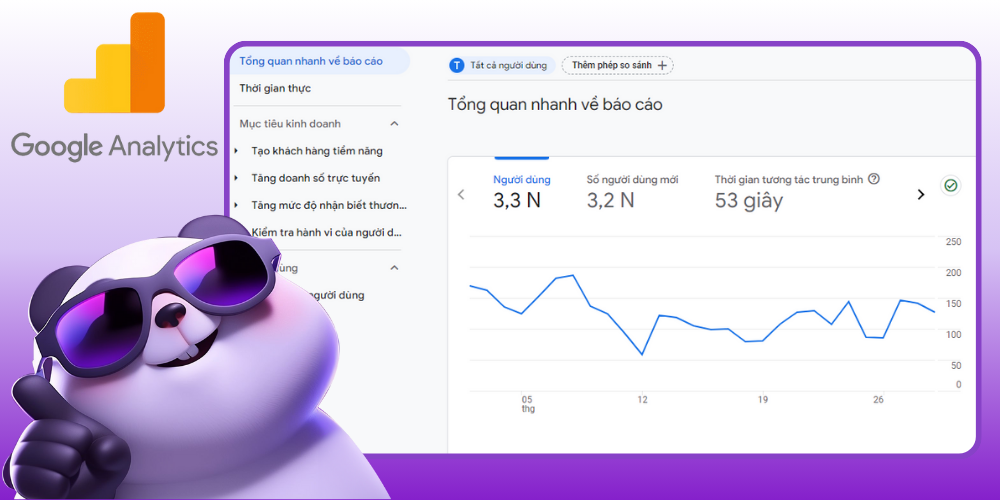
Steps to check website traffic for free with GA4:
Pros and cons of the free website traffic statistics tool:
| Advantages | Disadvantages |
| Completely free, suitable for many businesses | Cannot see competitors’ traffic |
| Analyzes many important metrics such as traffic sources, bounce rate and user engagement | Data may be incomplete if users decline cookies |
| Lets you filter data by channel, country, device or demographics | You need to know how to read the numbers to get the most out of it |
This is also one of the key SEO tools MONA Media uses to track Marketing projects and the selected projects Website management services that we run.
With the help of many analytics tools, MONA Media can clearly see a business’s market, industry and customer profile. Combined with SEO techniques proven in practice and more than 10 years of experience, we have helped more than +2000 businesses across many industries reach the top of Google, grow sales and reach more potential customers.
|You can look at the case study SEO HCM that the MONA team was proud to work on with the business.
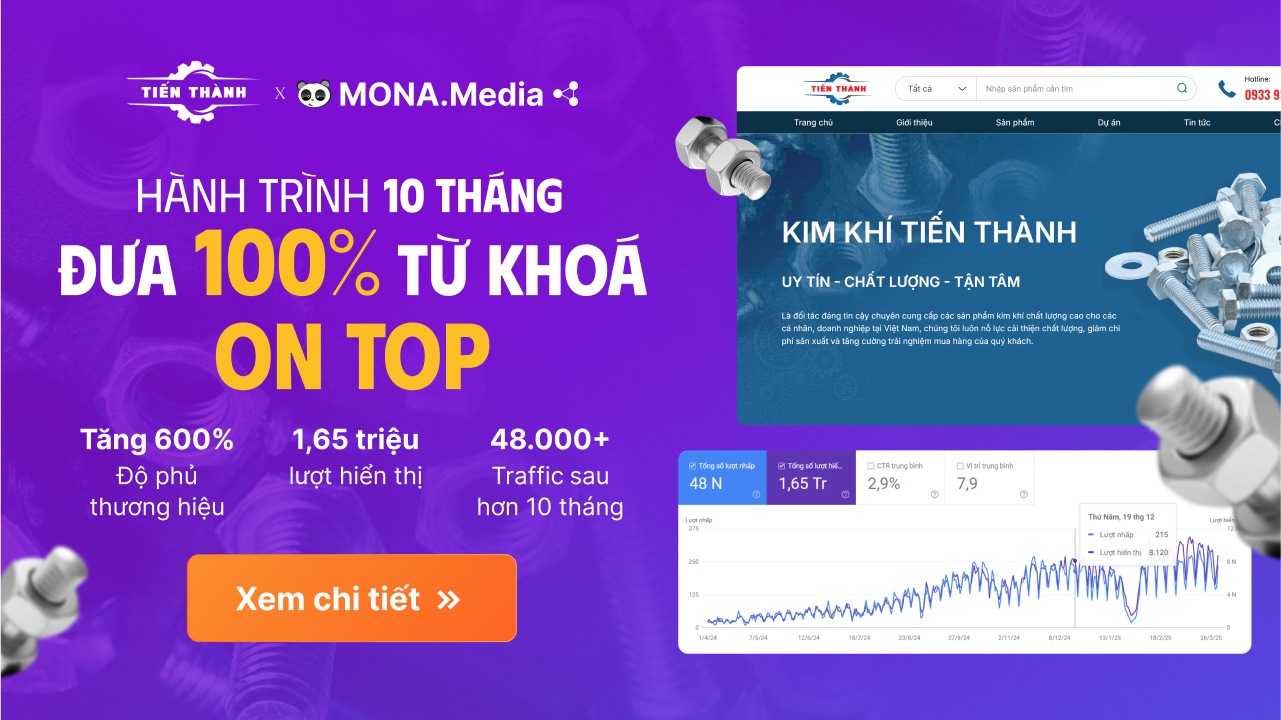
Kim Khí Tiến Thành, a hardware business that relied mainly on its offline store and a small number of retail customers from Facebook ads, was facing stalled growth. For a long time the number of customers barely changed, and the brand had little reach online.
Sau 10 months working with the MONA team, the Kim Khí Tiến Thành brand changed noticeably. Brand reach grew by 600%, and the website not only ranks on top of the SERP but has also improved its ranking in AI Overviews and gets many mentions from AI tools. Besides attracting organic traffic, Tiến Thành also gets quality leads and higher conversion value. See the case study to find out more.
Doing SEO just to raise traffic isn’t enough, it also has to produce conversion value. To know whether your website SEO is working, you have to track it; without tracking, how do you know who your content is holding on to? If you’re not familiar with this yet, watch Huy’s new video, which covers everything about tracking the important metrics.
Alexa.com used to be one of the most popular website traffic checkers for viewing website visits and gauging online reputation. It ranked websites on two main factors: traffic and Page Views.
This made it easy for users to check the traffic of e-commerce websites online, compare their ranking with competitors and understand their market position, both in Vietnam and globally.
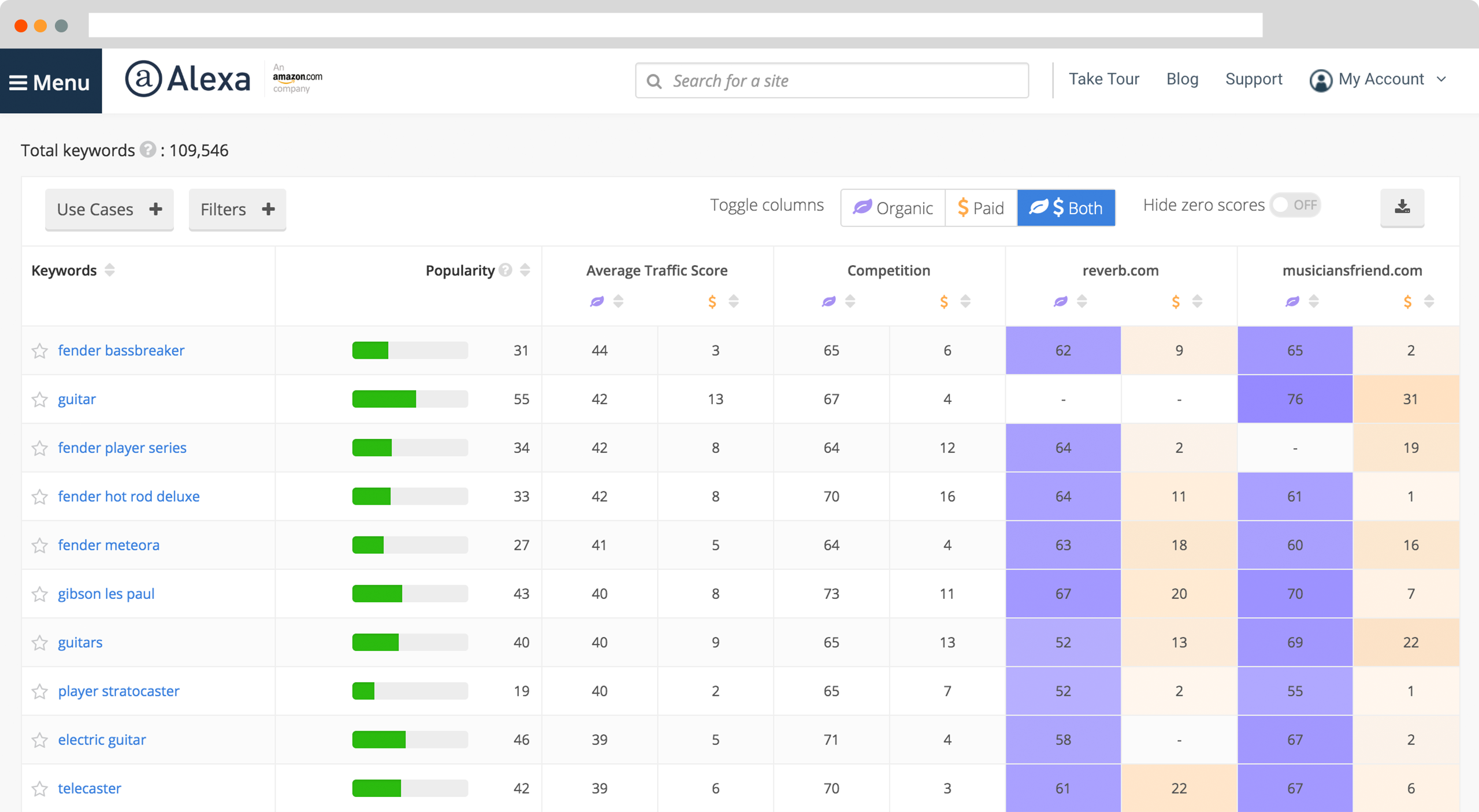
How to view detailed website traffic:
Comparison of the pros and cons of the website traffic statistics tool:
| Advantages | Disadvantages |
| Checks website traffic fairly quickly | More data requires payment |
| Used to support viewing both your own and competitors’ websites | Data is only an estimate |
| Shows several important metrics such as traffic, bounce rate, time on site and traffic sources | The tool has now been shut down, so it is no longer practical to use |
If you are looking for a way to view website traffic and gauge how popular your competitors are, Alexa.com is an ideal choice for you.
SimilarWeb is an SEO tool highly rated by users on social networks. It is a top choice when you want website traffic statistics.
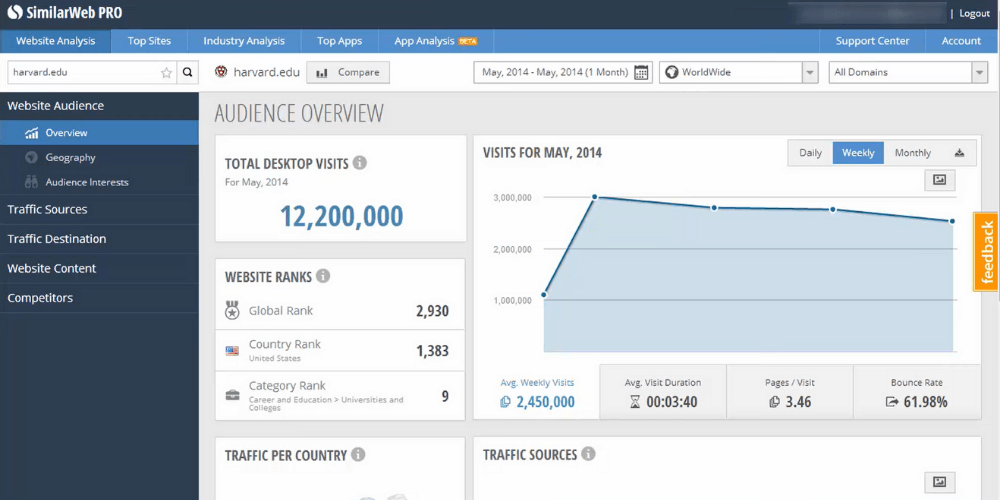
How to view website traffic with Similarweb:
Note: if Similarweb returns no data for a website, that website’s traffic may be too low for the system to measure.
Pros and cons of the website traffic statistics tool:
| Advantages | Disadvantages |
| Free Google Chrome extension, easy for beginners | The free version has quite limited features |
| Shows total traffic from many different sources | Usually only shows data for a recent period |
| Simple, easy-to-use interface | Deeper analysis requires a paid plan |
| Lets you look at competitors’ website data | The advanced version is fairly expensive |
With SimilarWeb, you don’t just see website traffic, you also get a full picture of where customers come from, search behavior and online brand reach.
If you run a WordPress website, Jetpack is one of the plugins you shouldn’t skip. It is an ideal tool for tracking and managing website traffic quickly and accurately, even if you are not technical. With Jetpack, you can easily learn how to check website traffic without any complicated steps.
Steps to check website traffic with Jetpack:
Pros and cons of the website traffic checker:
| Advantages | Disadvantages |
| Easy to use, visual interface | Can make the website heavier if too many features are enabled |
| Works well with WordPress | Requires a connection to a WordPress.com account |
| Includes many other features such as security, social sharing and image acceleration | Advanced features usually require payment |
| Statistics are processed on WordPress.com servers, so queries don’t put a heavy load on your site | Analysis is not as deep as Google Analytics |
With Jetpack, managing and analyzing traffic is easier than ever, helping you understand your readers and optimize your website effectively.
Google Search Console is Google’s free website traffic checker that helps you monitor your website’s performance in search results. With it you can see key metrics such as impressions, clicks, CTR, average position, index status, crawl errors and SEO issues affecting your website.
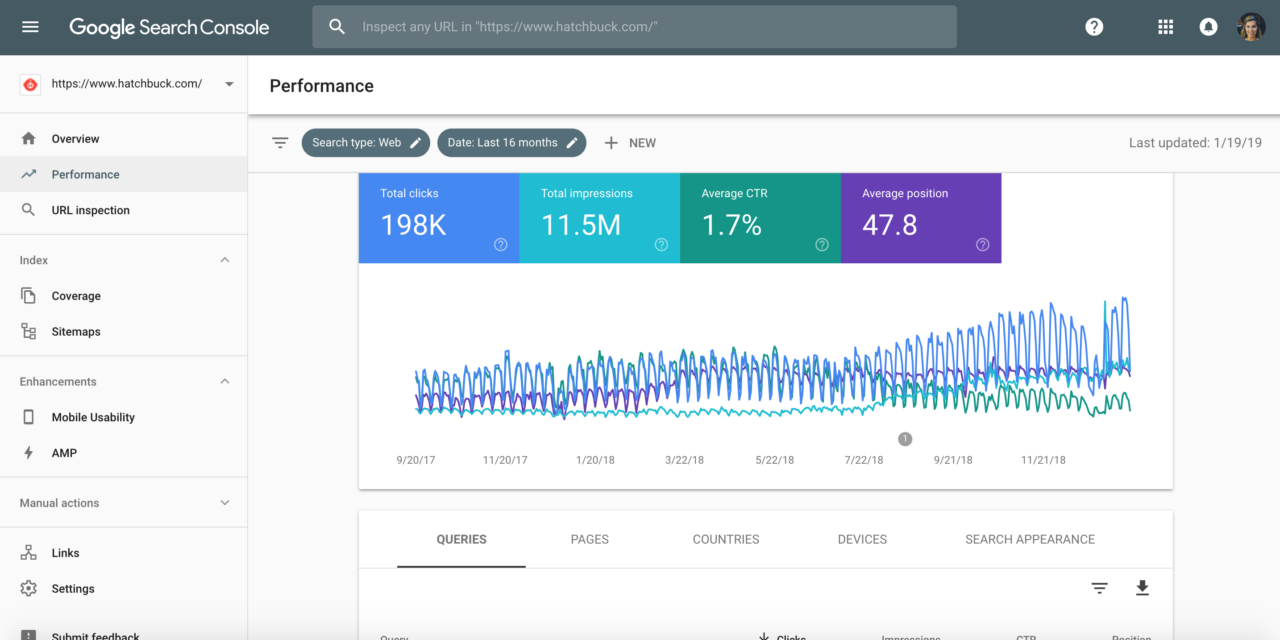
Detailed steps to check website traffic for free:
Pros and cons of the website traffic statistics tool:
| Advantages | Disadvantages |
| Completely free | Only analyzes your own website, not competitors’ |
| Shows how many times your website appears in Google search results | Does not show all traffic sources such as social, direct or referral |
| Provides many important metrics such as clicks, CTR, average position, backlinks and internal links | Cannot check traffic from paid ads |
| Good for monitoring SEO results and website visibility | Does not analyze user behavior in detail like Google Analytics |
Over 10 months of working together, MONA had the chance to partner with Double H on a full-scope SEO strategy. Throughout, the MONA team regularly used Google Search Console to gather and analyze traffic, keeping the data objective at every stage.
Besides transparent weekly progress reports to the client, MONA also used the measured data KPI SEO to adjust and replan SEO strategy, helping the Double H website quickly climb to the top of Google. Take a look at this case study in detail.
AWStats is one of the most detailed and visual website traffic checkers. What makes AWStats special is that you can use it online for free or download it to track anytime. Even the online version alone gives you accurate statistics and makes it easy to check website traffic quickly.
Steps to check website traffic online AWStats:
Pros and cons of the online website traffic checker AWStats:
| Advantages | Disadvantages |
| Included in many cPanel hosting plans, so it is convenient to use | The interface is rather dated and less visual than modern tools |
| Quickly shows basic metrics such as visits, countries, popular pages and browsers | Data is mostly at an overview level and doesn’t go deep into user behavior |
| No complicated setup steps | Not suitable if you need in-depth marketing or SEO analysis |
| Useful when you want to check traffic directly from hosting | Hard to track competitors or compare multiple traffic sources in detail |
If you need a solution that is both simple and effective for viewing website traffic and analyzing user behavior, AWStats is definitely worth a try.
Quantcast is one of the tools used for website traffic statistics and user behavior analysis. Unlike many other platforms, Quantcast must be installed directly on the website to collect complete data. C
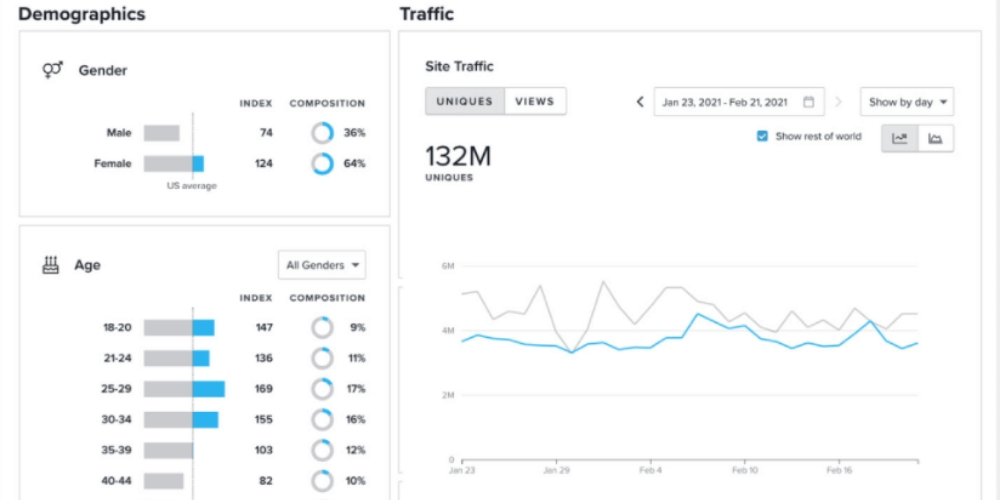
Highlights of the Quantcast website traffic checker
Steps to check website traffic online with Quantcast:
Note: Quantcast usually gives better data for websites with its measurement tag installed. If a website is not Quantified or its traffic is too low, the data may be limited or only an estimate.
Pros and cons of the website traffic checking tool:
| Advantages | Disadvantages |
| Can provide extra data on demographics, interests and audience characteristics, not just traffic | Detailed data is usually more accurate when the website has Quantcast Measure installed |
| Can measure directly for websites with the tag installed, making reports more reliable | For websites that aren’t Quantified, the numbers are mostly estimates |
| Suitable for publishers or websites that want a deeper understanding of their audience | Small or low-traffic websites may not show enough data |
| Offers free measurement for publishers via Quantcast Measure | Some advanced features or deep analysis needs still require a more specialized platform |
SEMRUSH is the SEO tools popular today for accurate website traffic statistics. It is seen as a powerful assistant for SEO practitioners, helping check rankings and website traffic (including competitors’ websites),…. With it, SEO practitioners can plan their website’s growth more effectively.
SEMRUSH traffic checking tool provides important figures for the website you want to analyze, including:
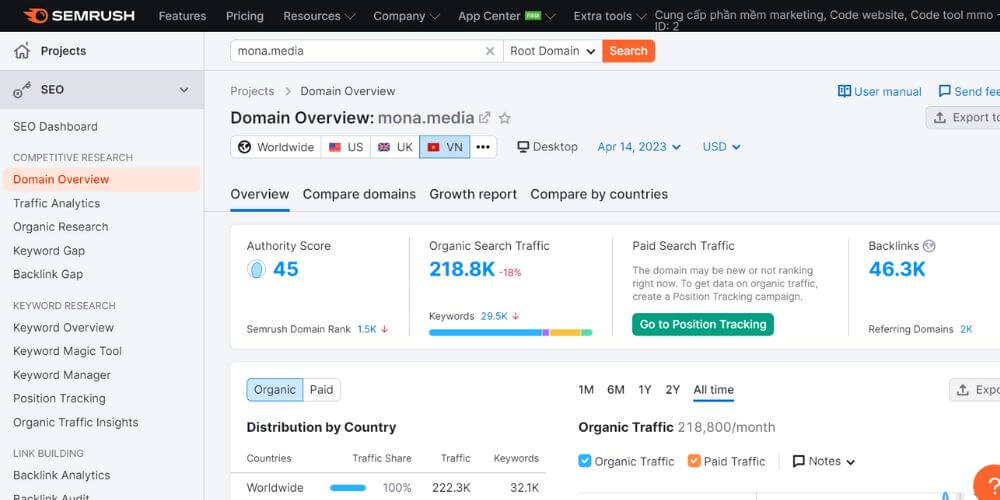
One standout advantage of SEMRush is that it can analyze traffic for several competitor websites at once. This gives you a broader view of the market and of which pages on competitors’ websites get the most traffic, so you can then optimize your own website.
MONA Media rates SEMRush as a leading SEO tool, helping businesses monitor and grow everything on their website, from traffic statistics and backlink analysis to SEO audits and rank tracking… The free version of SEMrush lasts 7 days; if you want to get more out of the tool, you can upgrade to a paid plan.
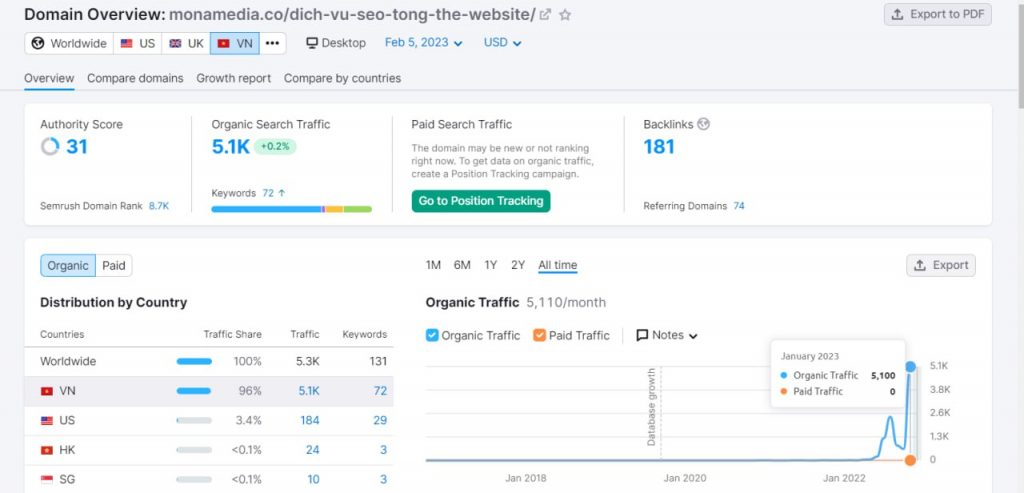
Traffic results for the SEO services page measured with SEMRUSH
Steps to check website traffic:
Note: according to Semrush’s current information, the trial lasts 7 days. The Traffic & Market toolkit in free mode only shows sample domains; analyzing real domains requires a paid plan.
Pros and cons of the website traffic statistics tool:
| Advantages | Disadvantages |
| Supports market and competitor research | The free version has quite limited features |
| Analyzes websites with many important metrics | Deeper analysis requires a paid plan |
| Supports market and competitor research | Upgrading is relatively expensive |
| Visual, easy-to-follow interface | Upgrading is relatively expensive |
Ahrefs is one of the most powerful and popular SEO tools today, trusted by millions of marketers and webmasters worldwide. Every day, Ahrefs crawls more than 6 billion web pages and has more than 200 million websites in its index.
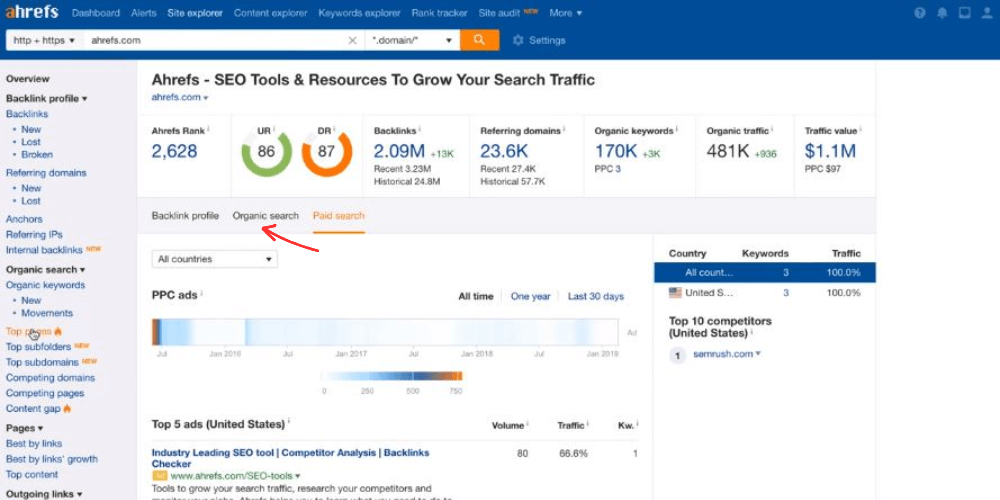
Steps to check website traffic with Ahrefs:
Pros and cons of the website traffic statistics tool:
| Advantages | Disadvantages |
| Can check both your own website and competitors’ | The free version is only good for a quick look; many in-depth features are still limited |
| Easy-to-use interface | Deeper analysis requires a paid plan |
| Analyzes many important metrics such as traffic, backlinks, keywords, DR and UR | Upgrading is fairly expensive |
| Helps identify the keywords and pages bringing in traffic so you can optimize SEO better | Ahrefs traffic data is estimated, not direct first-party data like Google Analytics or Search Console. |
If you are looking for a tool that both tracks keywords and gives you a detailed way to check website traffic and analyze competitors, Ahrefs is definitely worth the investment.
StatCounter is a free tool many website administrators rely on to check website traffic and analyze performance. Besides offering a quick way to check website traffic, it provides many advanced features that help you track user behavior and evaluate SEO and ad campaign results.
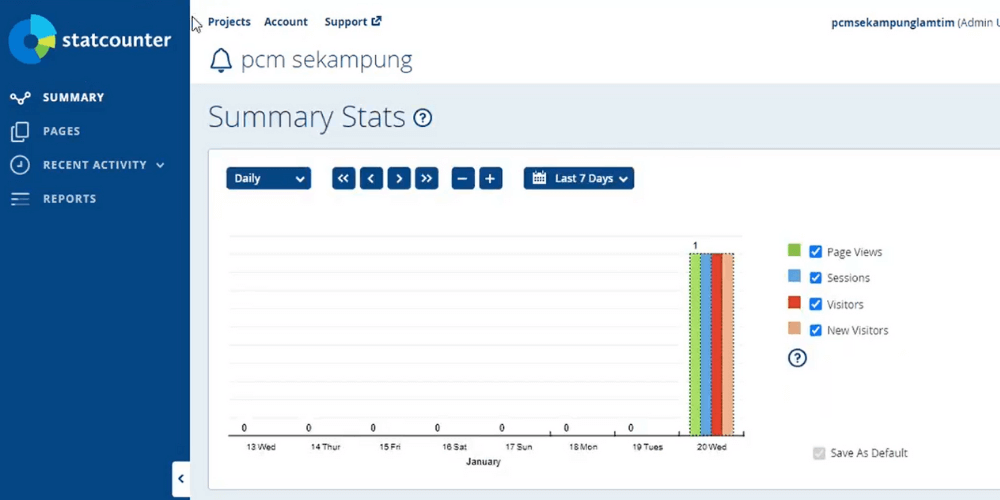
Highlights of the StatCounter website traffic statistics tool
Steps to check website traffic:
Pros and cons of the website traffic statistics tool:
| Advantages | Disadvantages |
| Automatic statistics by email | The free version limits data storage capacity and how long data is kept |
| Click fraud protection for ads | Not suitable for competitor analysis |
| Tracks visitor behavior | Some advanced features such as Session Replay are paid add-ons, not fully included in the free plan. |
| Supports varied analysis | If users block cookies or tracking scripts, the data may be incomplete |
If you are looking for a tool that is both simple and effective for web traffic statistics and detailed user behavior tracking, StatCounter is definitely worth a try.
And if using these tools to analyze and plan strategy is a challenge for you, let SEO services of MONA Media handle it!

MONA Media is an SEO agency with more than 10 years of hands-on experience and more than 2000 projects across many industries. MONA’s specialists closely follow Under the SEO trends, applying both traditional SEO and AI SEO services to help businesses hold their top Google positions while increasing their chances of appearing in AI Overviews, a search channel users are paying more and more attention to.
When you choose MONA’s full-scope website SEO service , you get benefits such as:
If your business wants to break through online and build lasting growth, contact MONA for a detailed consultation on full-scope SEO and AI SEO services.
Above are some of the best website traffic statistics tools based on the 3 criteria people care about most today: free, easy to use and highly effective. MONA hopes this article gives you enough knowledge to choose the tools best suited to your website.
See more:

CEO & Founder · The MONA
Founder of The MONA, who built a services company of 200+ staff with 14,000+ projects delivered. Khánh Hùng shares how he thinks about building systems that run themselves, automating a business, and the real lessons from delivering projects at MONA.
 2,8K
2,8K




Professional website
design services
Own a website with a beautiful, 100% exclusive design and a lifetime warranty, with the ability
to expand features flexibly as your business grows, starting today!









 MONA promises never to use your information for sale or SPAM
MONA promises never to use your information for sale or SPAM
MONA promises never to use your information for sale or SPAM


 MONA promises never to use your information for sale or SPAM