
 MONA OS 2.0


 Tự động hoá doanh nghiệp
 Cẩm nang SEO
 Digital Marketing
 Kinh nghiệm thiết kế website
 Hạ Tầng Server
 Giáo dục


 VI
VI
 EN
EN
















Message us on
Zalo Official


 ProductsNew

 ProductsProducts
 Mới ra mắtKHA AI 2027App tự edit video, tự đăng mọi mạng xã hội, 2 phút mỗi ngày










 Website designLooks good and wins customers over.
SEO servicesBrings in customers searching for exactly what you sell.
Website designLooks good and wins customers over.
SEO servicesBrings in customers searching for exactly what you sell.
 Tư vấn digital marketingKéo khách từ nhiều kênh, đo bằng số thật.
Corporate video productionVideos introducing your company, factory and team.
Tư vấn digital marketingKéo khách từ nhiều kênh, đo bằng số thật.
Corporate video productionVideos introducing your company, factory and team.
 NewAI video productionCompany story films made with AI.
 Custom software developmentCRM, ERP and HRM built for your business.
 Viết AI Agent theo yêu cầuĐặt riêng một trợ lý AI cho đúng việc của mình.
 Tư vấn chuyển đổi AIĐưa AI vào vận hành của cả công ty.
NewMONA LMSManagement for centers and schools.
MONA SkillHubInternal training for company staff.
Tư vấn chuyển đổi AIĐưa AI vào vận hành của cả công ty.
NewMONA LMSManagement for centers and schools.
MONA SkillHubInternal training for company staff.
 NHTQ systemEnd-to-end China–Vietnam shipping operations.
MONA JMSManagement for gold, diamond and pawn shops.
NHTQ systemEnd-to-end China–Vietnam shipping operations.
MONA JMSManagement for gold, diamond and pawn shops.
 MONA E-LearningA website with every feature you need to sell courses.
 How to sell online courses (course)More than 30 free lessons on selling courses on autopilot.
 MONA Cloudmonacloud.vnServers to get your apps and websites running.
 MONA Basemonabase.vnPostgres database, sign-in and file storage.
 MONA Mailmonamail.vnSend OTP, order and invoice emails from your software.
 MONA Paymonapay.vnAccept bank transfers via VietQR and notify your software when the money arrives.
 MONA eInvoiceComing soonIssue e-invoices that meet tax standards.
Gấu CườiTrả lời khách 24/7 trên web, Fanpage, Zalo và thu lead cho sale.
MONA eInvoiceComing soonIssue e-invoices that meet tax standards.
Gấu CườiTrả lời khách 24/7 trên web, Fanpage, Zalo và thu lead cho sale.
 Gấu TeleSalesGọi điện tư vấn, chăm khách như tổng đài viên thật.
Dê CườiTư vấn và chốt đơn cho shop ngay trong khung chat.
Gấu WebmasterNhắn nhóm Zalo là website được sửa xong.
Gấu TeleSalesGọi điện tư vấn, chăm khách như tổng đài viên thật.
Dê CườiTư vấn và chốt đơn cho shop ngay trong khung chat.
Gấu WebmasterNhắn nhóm Zalo là website được sửa xong.
 Gấu Pháp ChếSoạn hợp đồng, rà điều khoản trong vài phút.
 Gấu Báo GiáLên báo giá đúng mẫu và gửi khách ngay.
 AI chăm sóc khách hàngTheo dõi và giữ chân khách hàng cũ.
 Gấu Tuyển DụngLọc hồ sơ, hẹn lịch, phỏng vấn ứng viên.
 Mới ra mắt
KHA AI 2027
Xây kênh chuyên gia 2 phút mỗi ngày
Quay bằng điện thoại, AI tự edit video, tự đăng lên 16 nền tảng và tự trả lời bình luận, tin nhắn.
308.305lượt xem trên kênh CEO MONA sau 17 ngày
Mới ra mắt
KHA AI 2027
Xây kênh chuyên gia 2 phút mỗi ngày
Quay bằng điện thoại, AI tự edit video, tự đăng lên 16 nền tảng và tự trả lời bình luận, tin nhắn.
308.305lượt xem trên kênh CEO MONA sau 17 ngày
 Anh Khánh HùngCEO MONA đang dùng mỗi ngày
Xem app làm được gì
Anh Khánh HùngCEO MONA đang dùng mỗi ngày
Xem app làm được gì
 AI
Gấu Cười MONA ĐANG TỰ XÀITrả lời khách 24/7 trên website, Zalo OA, Messenger và thu lead về cho sale.
Dê CườiChốt đơn bán lẻ và sàn: Shopee, TikTok Shop, web. Chăm cả khách sỉ, đại lý.
Gấu WebmasterCập nhật nội dung, tối ưu SEO website mỗi ngày.
Gấu TeleSalesGọi điện tư vấn, chăm khách như tổng đài viên thật.
Gấu Tuyển DụngLọc hồ sơ, hẹn lịch, phỏng vấn ứng viên tự động.
AI chăm sóc khách hàngGiữ khách cũ, cứu lead đã rớt cho phòng kinh doanh.
Gấu Pháp ChếSoạn hợp đồng, rà điều khoản trong vài phút.
Gấu Báo GiáLên báo giá đúng mẫu, gửi khách ngay khi có yêu cầu.
AI
Gấu Cười MONA ĐANG TỰ XÀITrả lời khách 24/7 trên website, Zalo OA, Messenger và thu lead về cho sale.
Dê CườiChốt đơn bán lẻ và sàn: Shopee, TikTok Shop, web. Chăm cả khách sỉ, đại lý.
Gấu WebmasterCập nhật nội dung, tối ưu SEO website mỗi ngày.
Gấu TeleSalesGọi điện tư vấn, chăm khách như tổng đài viên thật.
Gấu Tuyển DụngLọc hồ sơ, hẹn lịch, phỏng vấn ứng viên tự động.
AI chăm sóc khách hàngGiữ khách cũ, cứu lead đã rớt cho phòng kinh doanh.
Gấu Pháp ChếSoạn hợp đồng, rà điều khoản trong vài phút.
Gấu Báo GiáLên báo giá đúng mẫu, gửi khách ngay khi có yêu cầu.
 Chuyển đổi AI toàn phầnGiải pháp tổng cho doanh nghiệp, 3 lớp triển khai.
 Viết AI Agent theo yêu cầuĐặt riêng một con AI gánh đúng nghiệp vụ của bạn.
 Custom softwareCRM, ERP and HRM with built-in AI automation.
 SEO & AEO thời đại AIĐược Google lẫn AI trích dẫn, không chỉ xếp hạng.
 Kiến thức AI cho doanh nghiệpBài phân tích, hướng dẫn ứng dụng AI vào vận hành.
 Free AI courses
 AI tools at work
App mới · KHA AI 2027
Xây kênh 2 phút mỗi ngày
AI tự edit video, tự đăng mọi mạng xã hội
Free consultation, 8am–10pm every day
AI tools at work
App mới · KHA AI 2027
Xây kênh 2 phút mỗi ngày
AI tự edit video, tự đăng mọi mạng xã hội
Free consultation, 8am–10pm every day

18 March, 2023

Google AdSense is an online advertising platform that lets websites earn money by showing ads from Google. When a user clicks, or an ad reaches 1,000 impressions, the website owner earns the corresponding income. That makes AdSense the main revenue source for many websites and one of the most popular and sustainable ways to earn money online today. In this article, MONA Media shares what Google AdSense is and and a guide to earning money from Google AdSense, one of the most popular ways to make your website earn from ads today.
Google AdSense is a free Google program that lets you earn money from your website, blog, app or YouTube channel by showing ads that match your content and visitors. Instead of finding advertisers yourself, you simply set up ad spaces on the page, and Google distributes the ads and pays you based on clicks or impressions. It is one of the simplest and most popular ways to earn online, chosen by many website owners and YouTube creators.

AdSense currently has two common account types:
AdSense for Content: place ads on a website or blog.
AdSense cho YouTube (AdSense for YouTube): lets creators earn income from their videos.
≫ Find out more: What is Google MCC? How to create and link a Google Ads account
Google AdSense works as a bridge between advertisers and content owners. Businesses pay Google through the Google Ads platform to put their products and services in front of potential customers. Google then distributes those ads to your website, blog or YouTube channel through AdSense.

Once approved, you just insert the ad code Google gives you into your website. From there, Google's system automatically analyzes the page content and visitor behavior to show the most suitable ads.
You start earning from:
Impressions: ads appearing on your web page.
Clicks: users clicking on an ad.
Google shares this revenue with you at a set rate. With its automatic, transparent mechanism, AdSense is one of the simplest and most popular ways to earn money online.
Google AdSense is one of the most popular ways to earn money online today. Like any platform, though, AdSense has strengths and limits you should understand before you start.
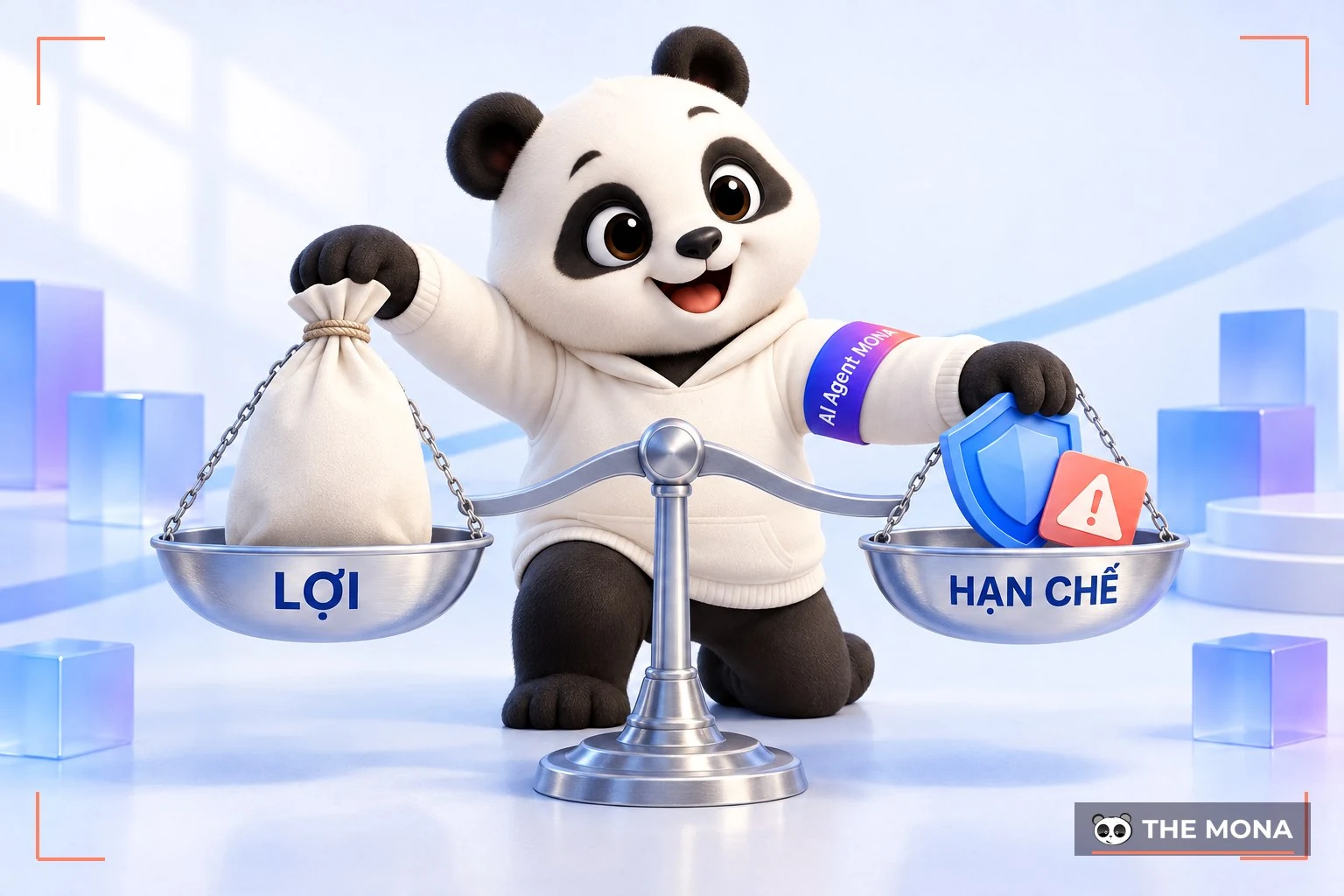
Here are the advantages Google AdSense brings:
Free and easy to sign up: Get started quickly, with no joining fee.
No product of your own needed: Just build quality content; you don't have to sell anything yourself.
Passive income: Earn automatically when ads are shown or clicked.
Simple integration: Easy to add the ad code to your website or turn on YouTube monetization.
Varied, customizable ads: Many formats (banner, video, text) with customizable colors and sizes.
Clear reporting: Track performance and income in real time.
Reliable payments: Paid on time every month once you reach the minimum threshold
Alongside the advantages, AdSense has drawbacks you should be aware of, such as:
High competition: Many publishers take part, making it hard to optimize ad placement.
Quality content required: To keep AdSense, your website must meet high standards.
Unstable income: Depends on traffic, content topic and user location.
Limited control over ads: Google decides which ads appear, based on its algorithm.
Strict policies: Violations can lead to permanent account suspension.
Signing up for Google AdSense is not very hard, but to be approved you must meet some mandatory Google requirements. First, you must be 18 or older, have a Google account, and own a website or YouTube channel with original content you created yourself. The content must be clean, with nothing prohibited such as violence, pornography, scams or copyright infringement. You also need to provide accurate information (address, payment account) so Google can send a PIN and make payments.
Another prerequisite is that the website has fairly steady monthly traffic. Google generally favors sites with real readers and useful content.
The three types of website most commonly approved to earn from Google AdSense are:
News sites with regularly updated information.
Knowledge blogs sharing professional, useful content for readers.
Blogs offering downloadable documents for study, research or work.
YouTube channels have more specific requirements: you need at least 1,000 subscribers and 4,000 public watch hours in the past 12 months , while also fully complying with the policies of both YouTube and AdSense.
You don't always need to spend on links or ads to reach the top in SEO. Sometimes understanding the customer journey and optimizing your website is enough to rise on its own. In this video Huy walks you through a complete CRO approach and a simple SEO method that really works. Watch it now.
How to create an AdSense account The process, from having nothing to signing in to Google AdSense, comes down to 3 steps:
To get approved for Google AdSense, you need to design a an SEO-ready website, professional and easy to use. Many platforms let you build one quickly with ad integration:
WordPress.org: The most popular blogging platform, thanks to its friendly interface, ease of use and large support community.
Hubspot CMS: A content management system with a handy drag-and-drop tool, letting you design a website quickly with full functionality.
Blogger: Google's free platform, suited to beginners, with high security and safety.
Once you have a website, the most important step is building content. Pick a specific topic, then research and write related posts. If you run a news site, publish current news and trends that many people care about.
Want a website with its own character and a responsive build? Work with the MONA team, from the first idea to the finished site. website design for professional services. Contact to get detailed advice and start building a professional website for your brand.

To start, you need a Google account. Go to gmail.com to create a new Gmail address and fill in accurate details to make verification and payment easier later.
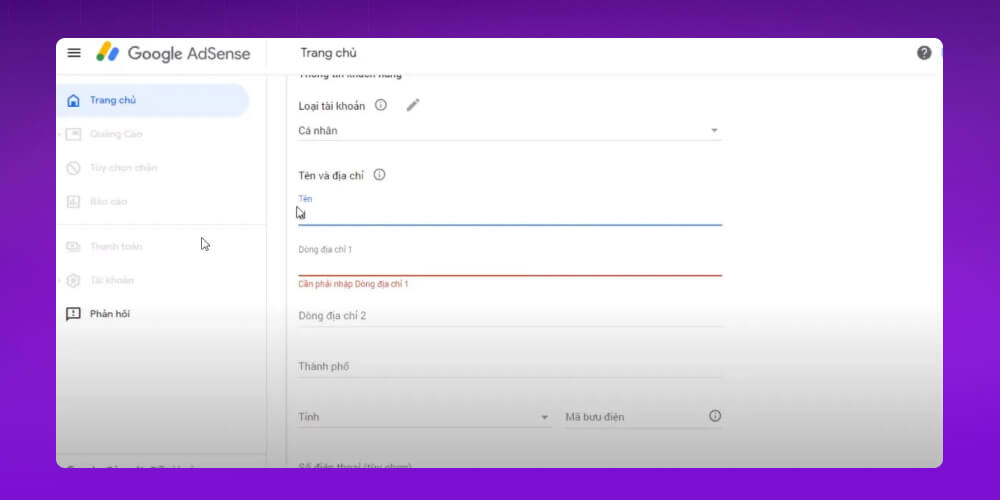
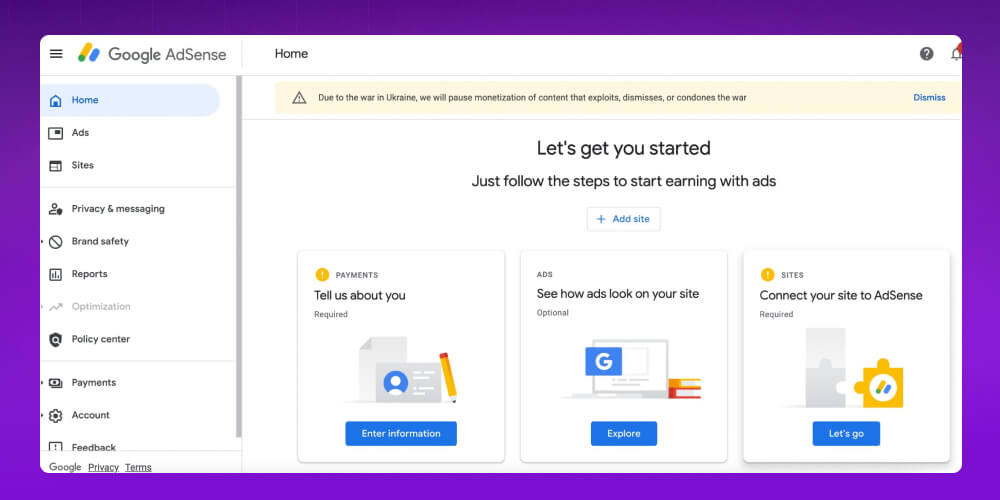
Then go to Google AdSense Signup to register. Follow the steps and enter accurate information, and you will complete registration easily.
Once your application is initially accepted, you need to verify your website so Google can review it. Here is how:
Get the verification code: Sign in to your AdSense account and copy the code Google gives you.
Insert the code into your website: Paste the code into the <head> section of your site. If you use WordPress, you can install a plugin to add the code more easily.
Wait for Google's review: After installation, Google reviews your website to make sure it complies with policy. Approval usually takes 1–2 weeks, and the result is sent by email.
Verification is an important step that lets Google confirm your website is transparent, has quality content and follows policy. Once approved, you can officially start earning with Google AdSense ads.
Earning with Google AdSense isn't simple, beyond meeting Google's evaluation standards. Follow the tips below to grow your website traffic so earning with AdSense gets easier.
To earn well with Google AdSense, you need more traffic to your website, and SEO is the strategy that grows traffic organically. When your website ranks in the top 10 search results, its chances of being clicked rise significantly.

To get your website to the top of Google, focus on optimizing it by:
Optimizing heading tags (H1, H2, H3), Title and Meta Description to SEO standards.
Adding Alt tags to images to improve how they appear in search.
Improving page load speed and user experience.
To build your website's credibility, also do off-page optimization such as:
Guest post: Writing guest posts on other blogs (free or paid).
Forum: Joining forums on the same topic, adding value and leaving natural backlinks.
Social group: Engaging in social media groups, sharing content and driving traffic to your site.
Combining on-page and off-page SEO helps your website rank higher and attract more visits, which in turn raises what you can earn from Google AdSense.
Keyword is a key factor in your website's ranking on search engines. Analyzing the keywords your competitors use helps you find the keyword gap, the terms they've missed, so you can take advantage and get ahead.
Short keywords usually face very high competition and make it hard to stand out. By contrast, long-tail keywords face less competition and also bring a high conversion rate. These are the keywords to focus on to improve your SEO and your earnings with Google AdSense.
Another way to increase traffic and improve your Google AdSense income is paid ads. It may sound costly, but it is a strategy proven to work.
You can set ads to show only to your target customer group, which saves budget while maximizing reach and conversion rate. To get the most from paid ads, though, you need a suitable budget and the experience to set up campaigns effectively.
Running Google Ads can bring customers quickly, but without optimization experience it is easy to burn money with poor results. Knowing that, MONA offers a professional Google Ads management service , where an experienced team works with you from planning and campaign optimization to budget management.

Highlights of MONA's Google Ads management service:
Complete solution: Covers Google Search, Display, Remarketing and multi-channel ads.
Tailored strategy: Solutions adapted to each business's specifics and goals.
Control and optimization: Transparent account management and budget optimization for the best performance.
Budget protection: Click-fraud protection technology so your ad spend isn't wasted.
Transparent reporting: Regular campaign updates that are clear and easy to read.
If you want Google advertising that is effective, economical and safe, feel free to contact MONA to get detailed advice from our experts and a quote that fits.
To earn well from Google AdSense, ad placement matters as much as content. The right position raises the click-through rate (CTR) while keeping the reading experience intact.
Top of the article: Ads appear as soon as the user opens the page, improving visibility and CTR.
Within the content: Ads placed in between paragraphs feel natural, aren't annoying and catch attention easily.
End of the article: Reaches people who are genuinely interested and likely to convert.
Color affects not only user experience but also how well ads perform. The right color makes ads easy to see and eye-catching while staying in harmony with your website.

Ways to choose ad colors:
Blend: Use a color close to the article background for a natural feel, but keep enough separation to be recognizable.
Contrast: Use a contrasting color to make the ad stand out and catch the eye.
Complement: Choose a complementary color that fits your website's look, and avoid matching the background or border exactly.
Depending on the ad type, try different color combinations to find the one that performs best.
Call to Action (CTA) is a key element that pushes users to act, usually a button such as “Sign up now” or “Contact us”. Placing ads near a CTA lets you use the user's attention to improve clicks and Google AdSense revenue.
However, you also need to consider and balance the attention between the CTA and the ad, since each has its own value and serves a different purpose on your website.
To get the most from Google AdSense, you can't set up ads and leave them alone. Regular checking and measurement is key to keeping performance up and improving it.

Compare new results with old ones, and track revenue and engagement to see which placements work best. Then drop the methods that underperform and test new strategies that fit better.
The Google Ads service and Google AdSense are two online advertising services from Google, serving different goals and audiences. Here are the differences between Google Ads and Google AdSense:
| Criterion | Google Ads | Google AdSense |
|---|---|---|
| Users | Advertisers who want to run campaigns that reach customers | Publishers and website owners who want to earn from ads |
| Purpose | Create and manage ads to increase traffic and revenue | Earn money from showing ads on your website |
| How it works | Advertisers bid for their ads to appear on Google and its partner network | Google places suitable ads on the publisher's website |
| Payment model | Advertisers pay per click, impression or action | Publishers earn based on ad clicks or views |
| Ad control | Advertisers control the content, keywords and placement | Publishers control where ads sit on the page, but not the ad content |
| Main goal | Attract customers and increase revenue | Earn passive income from your existing traffic |
| Ad scope | Ads appear on Google Search, YouTube and the Google Display Network | Ads appear on publishers' websites, blogs and apps |
| Technical requirements | Campaign setup and optimization take some know-how | Easy to add the ad code to your website |
In short, Google Ads is an online advertising platform for advertisers who want to promote their products or services. Google AdSense is the reverse: a service that lets website owners earn money by showing ads.
When you use Google AdSense, it is easy to break Google's rules without realizing it. Below, Mona rounds up 6 common AdSense mistakes that you need to avoid so your campaign performs well.
Before you submit your AdSense application to Google, make sure you meet a set of policies that includes 15 mandatory conditions set by Google (see HERE). Even so, you may overlook a small Google requirement without knowing it and end up with a warning email from Google.

This usually happens for a few different reasons, such as:
To avoid this, list even the smallest Google requirements and build your site's content and links to meet each one.
Under Google's policy, each individual or organization may own only one Google AdSense account. This is mandatory and everyone must follow it.
If Google finds that you have registered several accounts, all of them will be banned immediately. That means you lose the chance to earn from AdSense. Instead, use a single Google AdSense login to register several of your websites, which increases your earning potential.
Under Google AdSense policy, transferring or selling a Google AdSense account is not allowed. An AdSense account is personal and cannot be handed over to any other person or organization. Breaking this policy can get your account banned from AdSense and cost you the chance to earn from ads on your site.

Google encourages advertisers and publishers to build their own AdSense accounts, follow the rules and create quality content to get the most out of their earning potential.
A common mistake among website content creators is not fully understanding their site, how it displays and how it is structured. Websites with many broken links or a lack of original content will be turned down by Google, because Google considers these factors to directly affect traffic and the number of ad clicks from visitors to your site.
Editing the ad code yourself interferes with Google's campaign tracking and ad measurement. Worse, Google may conclude that you are trying to cheat and are not following its policies.

So if you plan to change the ad code on your site, MONA advises you to make code changes directly in Google AdSense. That keeps you within Google's rules and preserves accurate measurement of your campaign results.
You should not click the ads placed on your own site. Google does not accept fraudulent clicks on ads. Using automated tools or paying a third party to click your ads is not smart. If Google becomes suspicious and investigates, you will be in a bad position, and in the worst case Google ends the partnership.
1. How does Google AdSense pay?
Google AdSense pays publishers through the payment method selected in the AdSense account. Common methods include:
2. How do you keep your Google Ads account from getting “wiped out”?
Here are a few things that help keep your Google AdSense account from being suspended or disabled:
3. How do you make money with Google AdSense?
To earn with Google AdSense you need one of three things: a YouTube channel, a Blogspot blog, or a website with steady monthly traffic. Then you can register an AdSense account and show Google's ads. You earn money from Google in two ways:
Which payment model applies depends on the agreement between the advertiser and Google AdSense.
Above is the guide to making money with Google AdSense. The first requirement is a working website with a fair amount of traffic. Then register with Google AdSense and keep growing your blog with effective tactics. We hope what Mona Media shared above helped you understand what Google AdSense is, how to register and how to earn with it easily.

CEO & Founder · The MONA
Founder of The MONA, who built a services company of 200+ staff with 14,000+ projects delivered. Khánh Hùng shares how he thinks about building systems that run themselves, automating a business, and the real lessons from delivering projects at MONA.
 1,6K
1,6K




Professional website
design services
Own a website with a beautiful, 100% exclusive design and a lifetime warranty, with the ability
to expand features flexibly as your business grows, starting today!








 MONA will never sell your information or send you spam
MONA will never sell your information or send you spam
MONA will never sell your information or send you spam


 MONA will never sell your information or send you spam