
 MONA OS 2.0


 Tự động hoá doanh nghiệp
 Cẩm nang SEO
 Digital Marketing
 Kinh nghiệm thiết kế website
 Hạ Tầng Server
 Giáo dục


 VI
VI
 EN
EN


























Message us on
Zalo Official


 ProductsNew

 ProductsProducts
 Mới ra mắtKHA AI 2027App tự edit video, tự đăng mọi mạng xã hội, 2 phút mỗi ngày










 Website designLooks good and wins customers over.
SEO servicesBrings in customers searching for exactly what you sell.
Website designLooks good and wins customers over.
SEO servicesBrings in customers searching for exactly what you sell.
 Tư vấn digital marketingKéo khách từ nhiều kênh, đo bằng số thật.
Corporate video productionVideos introducing your company, factory and team.
Tư vấn digital marketingKéo khách từ nhiều kênh, đo bằng số thật.
Corporate video productionVideos introducing your company, factory and team.
 NewAI video productionCompany story films made with AI.
 Custom software developmentCRM, ERP and HRM built for your business.
 Viết AI Agent theo yêu cầuĐặt riêng một trợ lý AI cho đúng việc của mình.
 Tư vấn chuyển đổi AIĐưa AI vào vận hành của cả công ty.
NewMONA LMSManagement for centers and schools.
MONA SkillHubInternal training for company staff.
Tư vấn chuyển đổi AIĐưa AI vào vận hành của cả công ty.
NewMONA LMSManagement for centers and schools.
MONA SkillHubInternal training for company staff.
 NHTQ systemEnd-to-end China–Vietnam shipping operations.
MONA JMSManagement for gold, diamond and pawn shops.
NHTQ systemEnd-to-end China–Vietnam shipping operations.
MONA JMSManagement for gold, diamond and pawn shops.
 MONA E-LearningA website with every feature you need to sell courses.
 How to sell online courses (course)More than 30 free lessons on selling courses on autopilot.
 MONA Cloudmonacloud.vnServers to get your apps and websites running.
 MONA Basemonabase.vnPostgres database, sign-in and file storage.
 MONA Mailmonamail.vnSend OTP, order and invoice emails from your software.
 MONA Paymonapay.vnAccept bank transfers via VietQR and notify your software when the money arrives.
 MONA eInvoiceComing soonIssue e-invoices that meet tax standards.
Gấu CườiTrả lời khách 24/7 trên web, Fanpage, Zalo và thu lead cho sale.
MONA eInvoiceComing soonIssue e-invoices that meet tax standards.
Gấu CườiTrả lời khách 24/7 trên web, Fanpage, Zalo và thu lead cho sale.
 Gấu TeleSalesGọi điện tư vấn, chăm khách như tổng đài viên thật.
Dê CườiTư vấn và chốt đơn cho shop ngay trong khung chat.
Gấu WebmasterNhắn nhóm Zalo là website được sửa xong.
Gấu TeleSalesGọi điện tư vấn, chăm khách như tổng đài viên thật.
Dê CườiTư vấn và chốt đơn cho shop ngay trong khung chat.
Gấu WebmasterNhắn nhóm Zalo là website được sửa xong.
 Gấu Pháp ChếSoạn hợp đồng, rà điều khoản trong vài phút.
 Gấu Báo GiáLên báo giá đúng mẫu và gửi khách ngay.
 AI chăm sóc khách hàngTheo dõi và giữ chân khách hàng cũ.
 Gấu Tuyển DụngLọc hồ sơ, hẹn lịch, phỏng vấn ứng viên.
 Mới ra mắt
KHA AI 2027
Xây kênh chuyên gia 2 phút mỗi ngày
Quay bằng điện thoại, AI tự edit video, tự đăng lên 16 nền tảng và tự trả lời bình luận, tin nhắn.
355.527lượt xem trên kênh CEO MONA sau 21 ngày
Mới ra mắt
KHA AI 2027
Xây kênh chuyên gia 2 phút mỗi ngày
Quay bằng điện thoại, AI tự edit video, tự đăng lên 16 nền tảng và tự trả lời bình luận, tin nhắn.
355.527lượt xem trên kênh CEO MONA sau 21 ngày
 Anh Khánh HùngCEO MONA đang dùng mỗi ngày
Xem app làm được gì
Anh Khánh HùngCEO MONA đang dùng mỗi ngày
Xem app làm được gì
 AI
Gấu Cười MONA ĐANG TỰ XÀITrả lời khách 24/7 trên website, Zalo OA, Messenger và thu lead về cho sale.
Dê CườiChốt đơn bán lẻ và sàn: Shopee, TikTok Shop, web. Chăm cả khách sỉ, đại lý.
Gấu WebmasterCập nhật nội dung, tối ưu SEO website mỗi ngày.
Gấu TeleSalesGọi điện tư vấn, chăm khách như tổng đài viên thật.
Gấu Tuyển DụngLọc hồ sơ, hẹn lịch, phỏng vấn ứng viên tự động.
AI chăm sóc khách hàngGiữ khách cũ, cứu lead đã rớt cho phòng kinh doanh.
Gấu Pháp ChếSoạn hợp đồng, rà điều khoản trong vài phút.
Gấu Báo GiáLên báo giá đúng mẫu, gửi khách ngay khi có yêu cầu.
AI
Gấu Cười MONA ĐANG TỰ XÀITrả lời khách 24/7 trên website, Zalo OA, Messenger và thu lead về cho sale.
Dê CườiChốt đơn bán lẻ và sàn: Shopee, TikTok Shop, web. Chăm cả khách sỉ, đại lý.
Gấu WebmasterCập nhật nội dung, tối ưu SEO website mỗi ngày.
Gấu TeleSalesGọi điện tư vấn, chăm khách như tổng đài viên thật.
Gấu Tuyển DụngLọc hồ sơ, hẹn lịch, phỏng vấn ứng viên tự động.
AI chăm sóc khách hàngGiữ khách cũ, cứu lead đã rớt cho phòng kinh doanh.
Gấu Pháp ChếSoạn hợp đồng, rà điều khoản trong vài phút.
Gấu Báo GiáLên báo giá đúng mẫu, gửi khách ngay khi có yêu cầu.
 Chuyển đổi AI toàn phầnGiải pháp tổng cho doanh nghiệp, 3 lớp triển khai.
 Viết AI Agent theo yêu cầuĐặt riêng một con AI gánh đúng nghiệp vụ của bạn.
 Custom softwareCRM, ERP and HRM with built-in AI automation.
 SEO & AEO thời đại AIĐược Google lẫn AI trích dẫn, không chỉ xếp hạng.
 Kiến thức AI cho doanh nghiệpBài phân tích, hướng dẫn ứng dụng AI vào vận hành.
 Free AI courses
 AI tools at work
App mới · KHA AI 2027
Xây kênh 2 phút mỗi ngày
AI tự edit video, tự đăng mọi mạng xã hội
Free consultation, 8am–10pm every day
AI tools at work
App mới · KHA AI 2027
Xây kênh 2 phút mỗi ngày
AI tự edit video, tự đăng mọi mạng xã hội
Free consultation, 8am–10pm every day

06 June, 2023

Many people in SEO and content still write by gut feeling and assume good writing is enough. Then the post goes live with no traffic, no ranking and almost nobody finds it, simply because the wrong keyword was chosen at the start. To avoid repeating that mistake, keyword research is always an essential step if you want your content to meet what users need and have a chance of reaching the top of Google. And to find keywords that match search intent, you will need keyword research tools. So which SEO keyword analysis tools are actually effective today? Let MONA Media walk you through them below.
Keyword research is a foundational and important step in SEO. It helps businesses identify exactly which words or phrases customers use when searching for information, products or services on Google.
By analyzing SEO keywords, you can understand the needs, problems and search intent of your target customers, then build suitable content and optimize your website in the right direction. Keyword research also does more than improve search rankings. It supports long-term content strategy, avoids wasting resources on low-value topics and focuses on keywords with good traffic and conversion potential.
Not sure where to start with SEO? SEE NOW video "SEO from zero" to learn how to research SEO keywords in detail.
Looking for an effective keyword analysis tool but worried about a limited budget? The good news is that besides paid SEO keyword research tools, there are plenty of free options for finding keywords, analyzing competition and generating content ideas very conveniently. Whether you are new to SEO or experienced, the list of keyword analysis tools below can meet your needs.
Let's explore the top 18 free and paid SEO keyword research tools with MONA.
Google Trends is Google's free keyword research tool. It lets you analyze search trends by several criteria, for content planning and for building SEO strategy as well as possible.
You can also compare several keywords at once to judge their potential or spot seasonal and event-driven changes. The tool also suggests related topics people are interested in, opening up new content ideas.
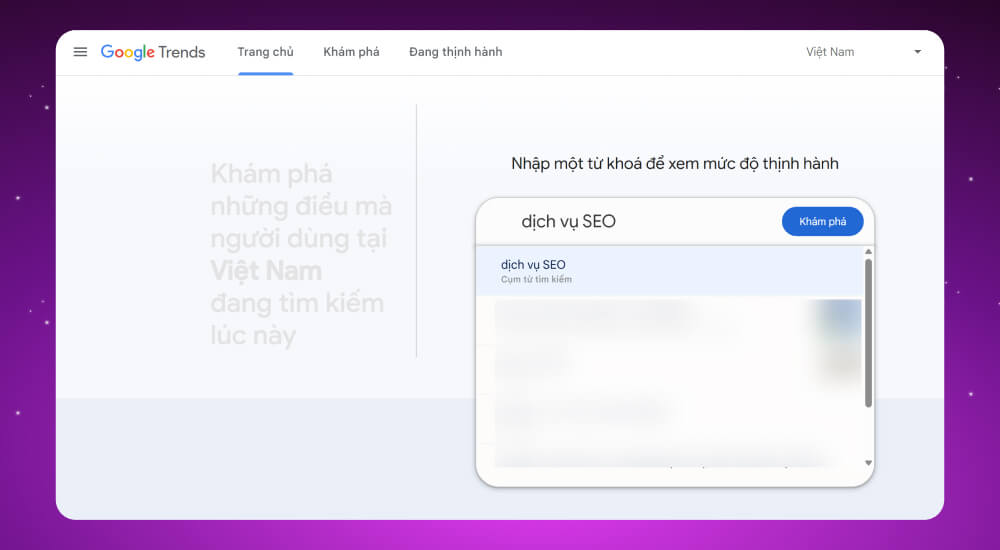
Google Trends is a free keyword search tool from Google that shows how popular a keyword is over time. It is ideal for researching and planning seasonal or trending keywords, since it shows search trends for specific periods. Its main advantages as a keyword suggestion tool are:
Google Trends is a keyword research tool that Google provides completely free for analyzing search trends.
Step 1: Go to the link HERE
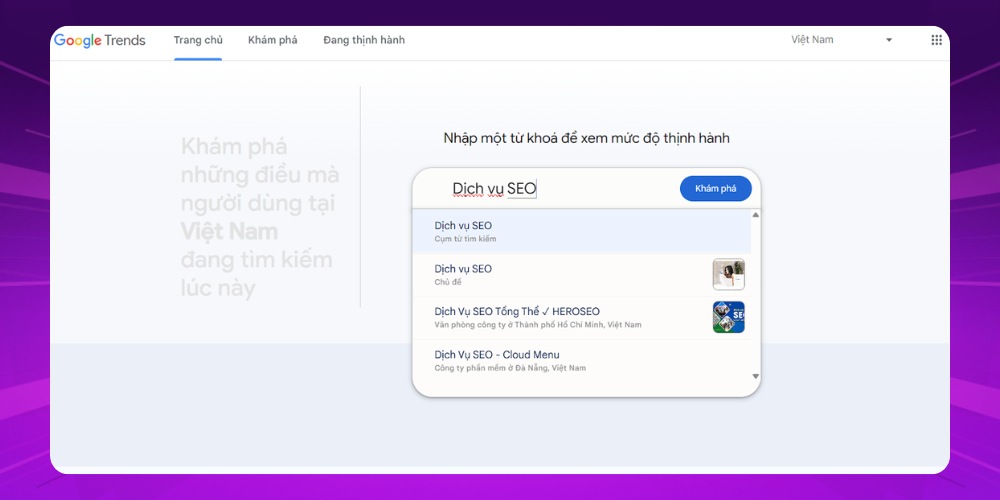
Step 2: Enter the topic you want to research, or a search phrase, in the search bar, then click “Khám phá” (Explore)
Step 3: Click “Cụm từ tìm kiếm có liên quan” (Related queries), then click the download icon to get the keyword suggestions from Google Trends.
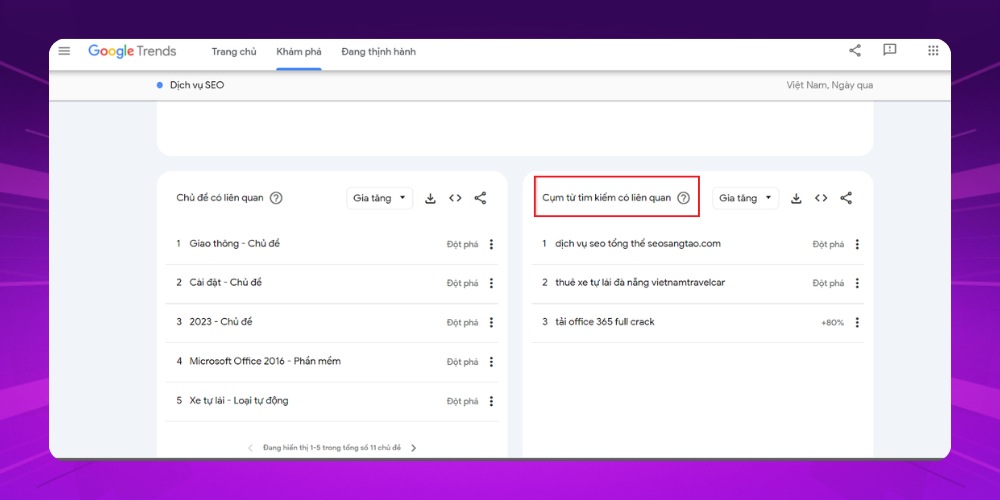
*Note: To avoid font errors when downloading as .CSV, you can upload the file to Google Sheets. Also, not every keyword fits your customers' search intent, so filter and keep only the most suitable ones.
Google Search Box is the keyword search on Google itself, and it is very useful for finding keyword ideas. Type a word or phrase and you get a list of automatic suggestions that reflect what users actually search for.
That's not all: scroll to the bottom of the results page and you will find more extended keyword suggestions. It isn't a professional SEO analysis tool, but it is very effective when you want to quickly find topics with potential, in a short time and at no cost.

Google Search Box is an ideal keyword search tool for finding website content ideas quickly. Its main strengths as a free keyword search tool are:
Although useful for quick searching, Google Search Box has limitations you should know about:
Google Search Box is a completely free, easy-to-use SEO keyword research tool that helps you find keywords by search intent quickly.
Step 1: Go to the link https://www.google.com.vn/
Step 2: Type the keyword you want to research in the search bar. As you type, Google also suggests some related keywords that you can add to your keyword list.

*Tip: To avoid spending too much time typing suggested keywords again and again, you can use the “Report inappropriate predictions” feature in Google Search Box, which lets you copy keywords faster.
Keywordtool.io is an effective, easy-to-use SEO keyword planning tool. Just enter a keyword, choose a region and language, and you quickly get a list of suggestions with key data such as:
Each keyword also shows its search volume, seasonal trend, CPC in USD and competition clearly, with smart filters and data export to make SEO or advertising plans easier.
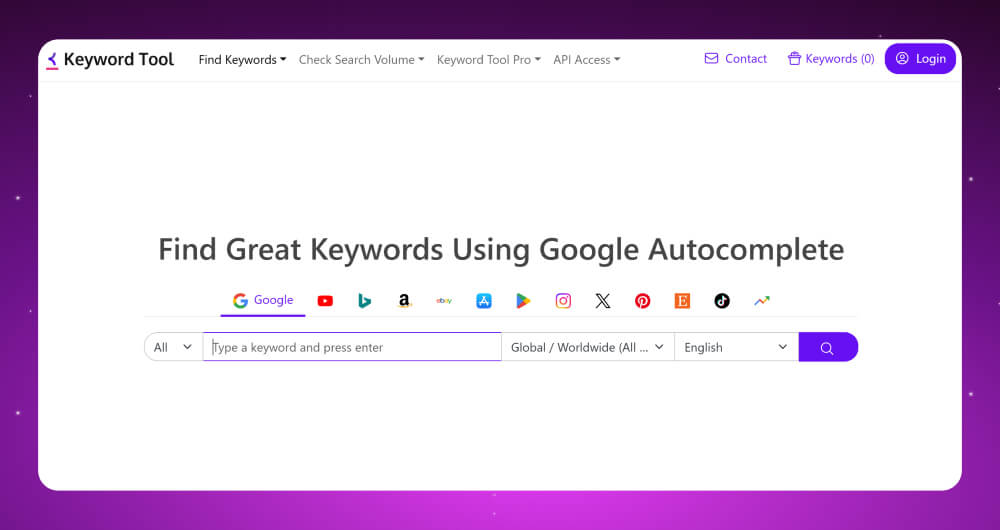
Keyword Tool.io is a broad-scope SEO keyword research tool. It can pull keyword suggestions from many sources such as Google, YouTube, Google Trends and other social platforms like Instagram and X (Twitter). Its main advantages are:
Keywordtool.io offers both free and paid versions, with upgrade prices from about 69 to 199 USD per month.
Step 1: Go to the website at https://keywordtool.io/
Step 2: Type the keyword phrase you want to research in the search box, choose Vietnamese as the language and click the search icon.
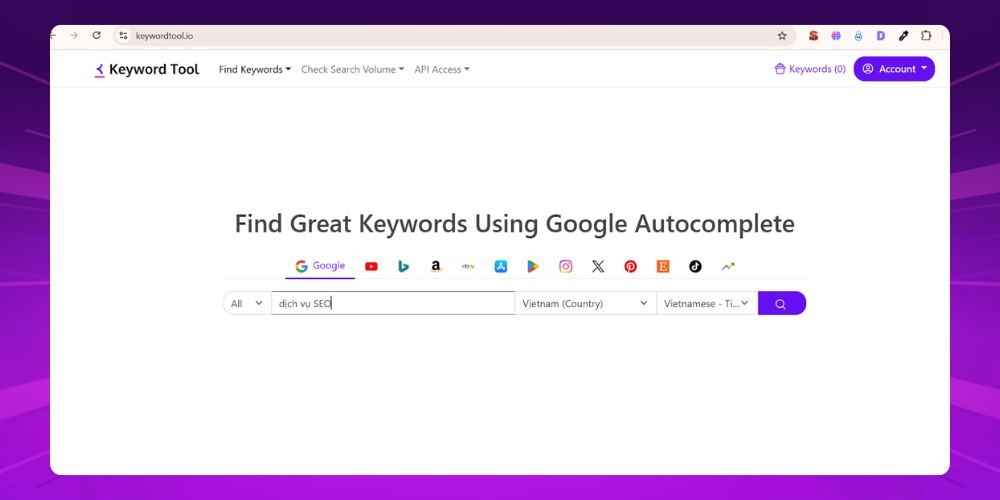
Step 3: After about 3 to 15 seconds, Keyword Tool shows a list of keywords related to your phrase. Just click “Copy/Export” and choose the data format you want to export, and you can download this keyword list to your device.
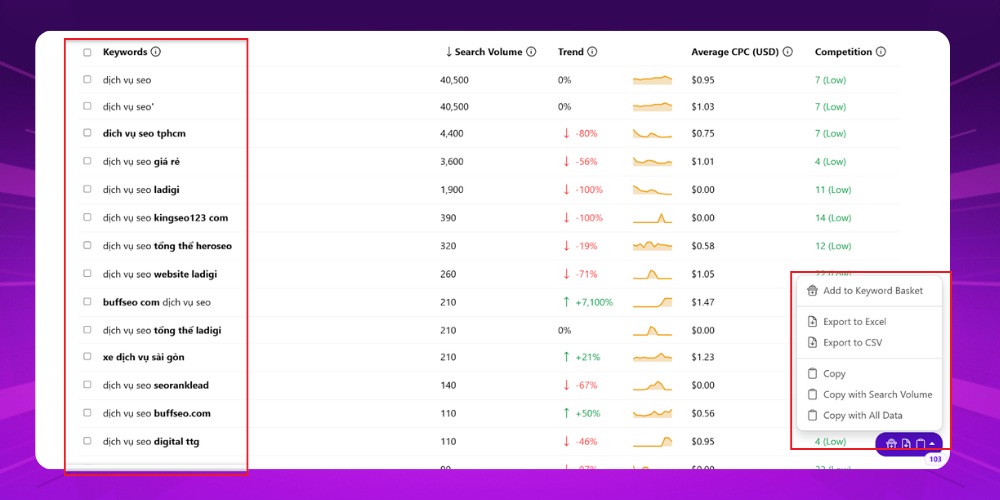
*Note: With the free version you can only view the keyword list. With the paid version you also see keyword volume, bid prices, trends and more.
LSI Graph is a paid SEO keyword research tool trusted by many experts for finding secondary keywords that support the main keyword.
The tool provides a visual graph so you can picture the whole keyword set, plus keyword mapping that helps you build a silo content structure, optimize internal links and shape an effective content strategy.

LSI Graph is SEO keyword software that finds related keywords, which are not only synonyms but also phrases that commonly appear within the same topic.
The tool stands out for its ability to:
Suggest LSI keywords that raise your content's relevance to your site
Show metrics such as search volume, SEO and ad competition, and relevance
Present data visually in charts and export it to Excel or CSV
Filter keywords by user behavior: know, search, buy
LSI Graph has paid plans from about 15 to 44 USD per month, with keyword lookups and unlimited AI content use for SEO research.
Step 1: Click the link https://lsigraph.com/
Step 2: Enter the keyword or topic you want to research in the search box, then click “Research Keyword”.
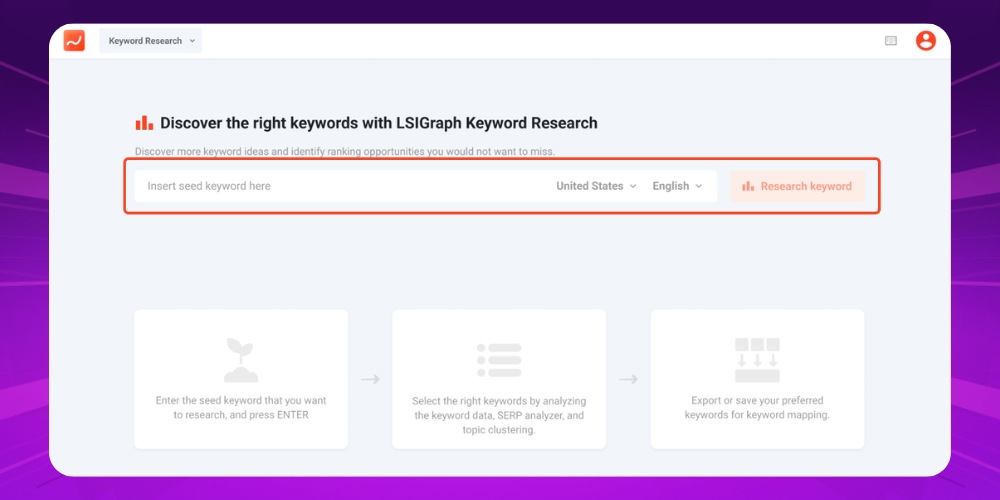
Step 3: If you want to export the keyword file to filter out suitable keywords, click “Save report”. This feature is only available in the paid version.
Google Keyword Planner is a free keyword analysis tool widely used to plan SEO and advertising. Even if you don't run ads, it is still a very effective tool for finding potential keywords for your overall SEO strategy.
When you enter a starting keyword, Google's keyword checking tool returns a list of suggestions with data such as:
You can filter keywords by region, language, platform (Google Search, YouTube and so on) and time period (the last 12 months). All the data can also be exported easily to Google Sheets or a CSV file for SEO or advertising.
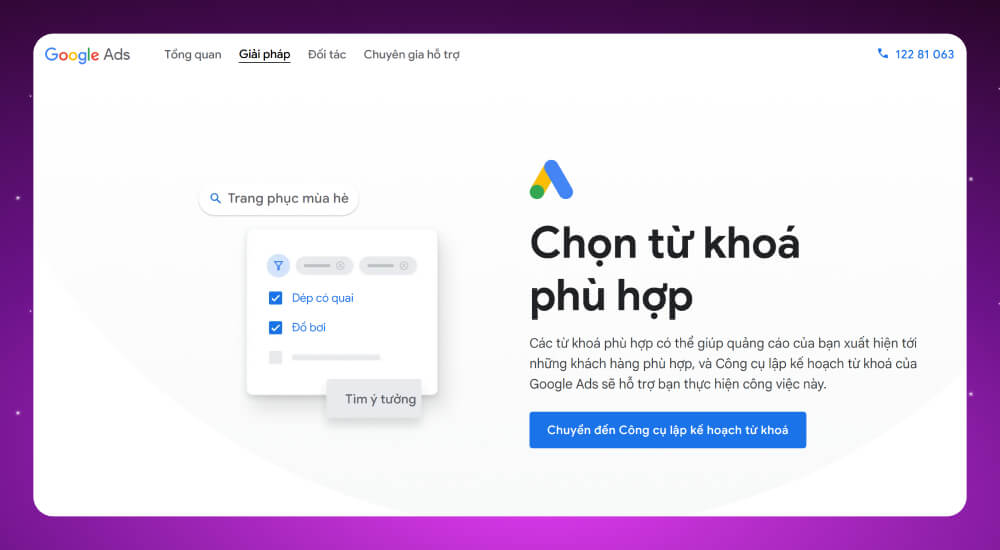
Google Keyword Planner is also known as Google Keyword Tool. It has become the familiar Google keyword research tool for anyone doing SEO Google or running Google Ads, helping with keyword research and analysis in a visual way. Google Keyword Planner offers several clear benefits:
Alongside the advantages, this keyword tool has these limitations:
Google Keyword Planner is completely free, but to use it you first need to create and activate a Google Ads account.
Step 1: Open Google Keyword Planner HERE. If you don't have an account yet, register for free to use it.
Step 2: After logging in, click “Discover new keywords” to start your research.
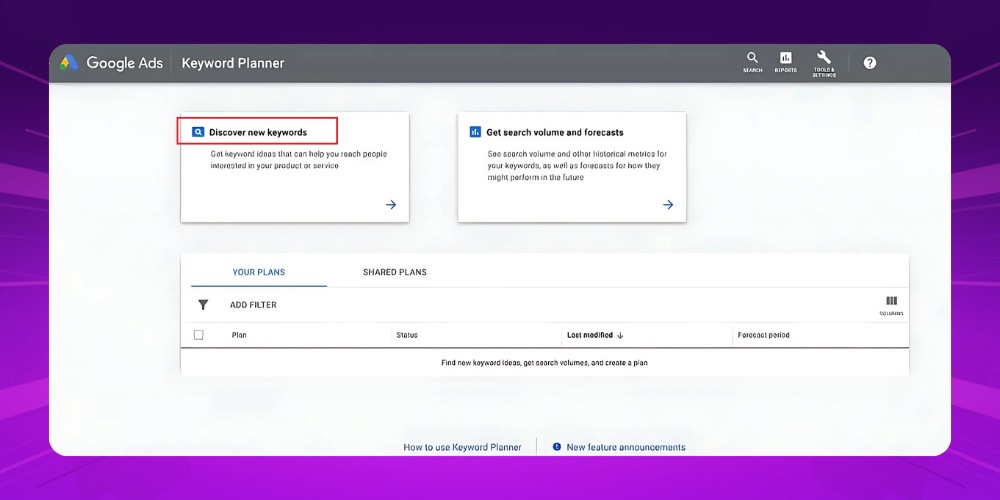
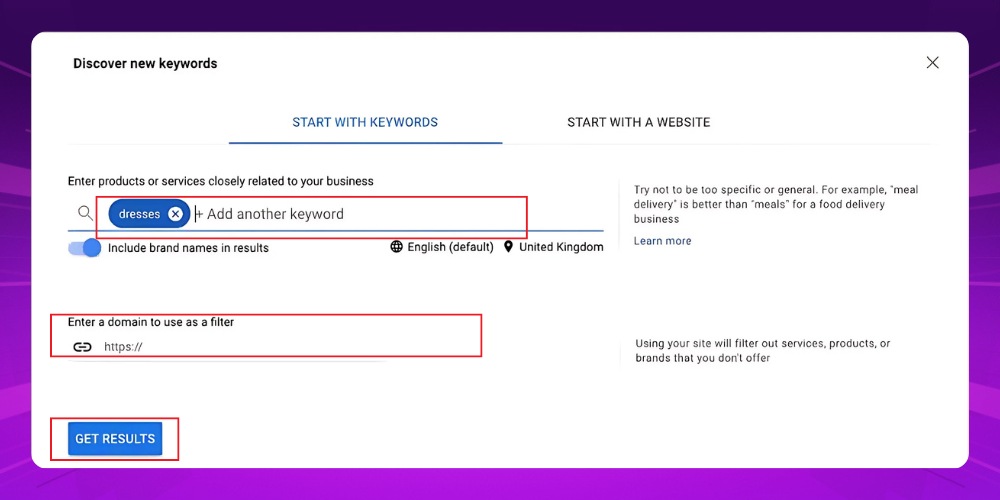
Step 3: Enter a keyword or paste the URL of the website you want to analyze. The tool suggests related keywords with information such as search volume and competition level.
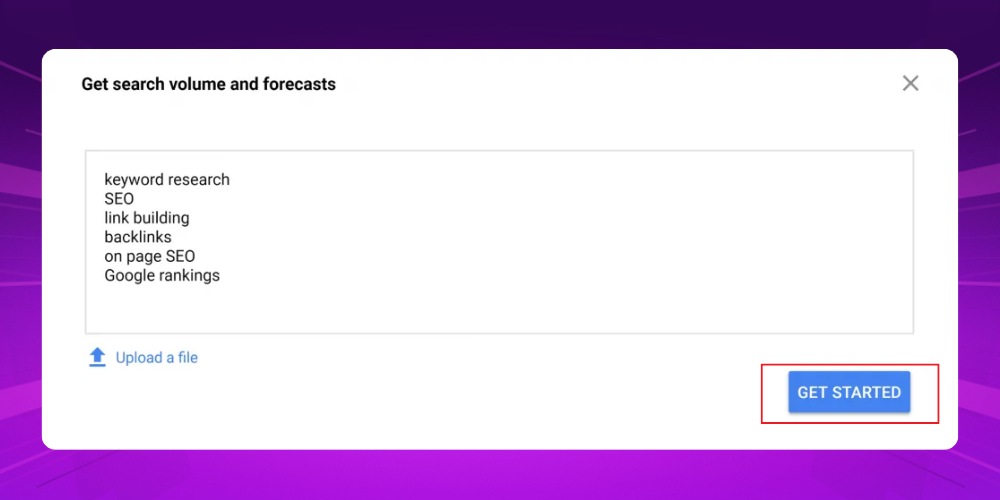
Step 4: Download the keyword list to your computer by clicking “Download keyword ideas”.
ChatGPT is not an in-depth keyword research tool like Ahrefs or Google Keyword Planner, but it is a very effective helper for ideation and quick analysis. With the right prompts, ChatGPT can generate seed keywords, expand long-tail keywords, group keywords by topic and analyze search intent in a short time.
When you combine ChatGPT with dedicated SEO tools to check search volume and competition, an SEO specialist can cut keyword research time considerably while keeping the content strategy on track.

ChatGPT is one of the AI helpers that make keyword research faster and easier. Instead of depending entirely on complex SEO software, ChatGPT shortens analysis time and helps shape your content direction from the very first step.
The standout advantages of ChatGPT in SEO keyword research
Pairing ChatGPT with dedicated SEO tools to check volume and competition makes keyword research far more effective.
Although it is great for generating ideas and running quick analysis, ChatGPT has real limits when used for SEO keyword research, such as:
ChatGPT is inexpensive to use for keyword research. The free version covers the basics, such as generating keyword ideas and analyzing search intent. For heavier use, ChatGPT Plus costs about 20 USD per month, which suits a professional working on SEO alone. Companies can choose the Team or Enterprise plans for large-scale keyword research and smoother teamwork.
To research keywords well with ChatGPT, start from your main seed keyword, then write prompts in the Role – Task – Context – Format structure. A clear prompt tells ChatGPT its role, its goal and the output format you want, so it can suggest related keywords, LSI terms and long-tail keywords, or group them by search intent, in an organized way.
For example, say the seed keyword is "ắc quy ô tô" (car battery). You could use a prompt like: "You are an SEO expert. Create a list of long-tail keywords and sort them by intent for the topic car battery, in a table with keyword and intent columns."
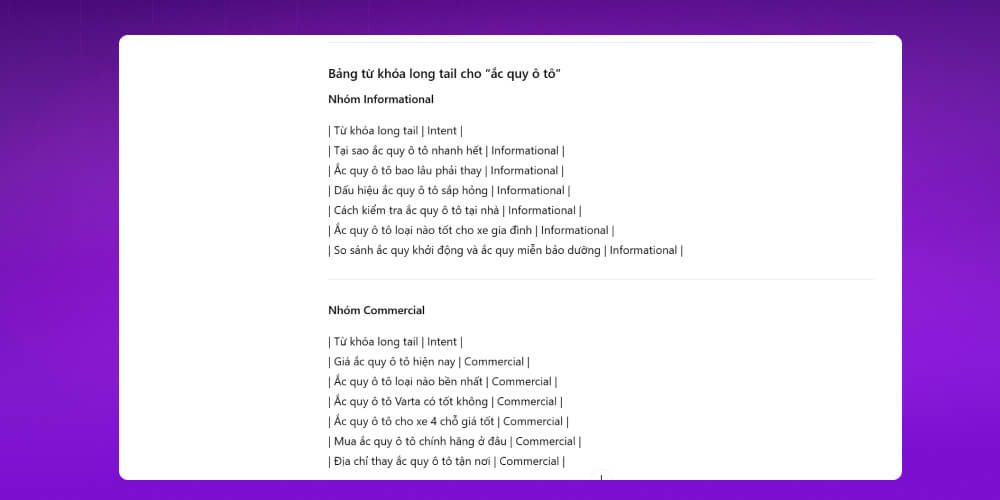
ChatGPT will return keyword groups such as: buy a car battery, which car battery is good, car battery prices by brand, and so on. Then take each group into Ahrefs or Google Keyword Planner and pick the keywords with good search volume and manageable competition. These form the base of your SEO content strategy.
Ahrefs is a powerful SEO keyword research tool with a large global database. Beyond search volume and keyword difficulty, Ahrefs also estimates the actual number of clicks, which helps you judge how much potential a keyword really has.
As a full keyword analysis tool, Ahrefs lets you:
Explore keywords in detail: volume, difficulty, CTR and more
Filter smartly by your SEO goals
Get related questions to expand your content
Export data, mark keywords and analyze SERP results directly
Thanks to these features, Ahrefs is one of the keyword tools that companies and SEO specialists trust to build an effective content strategy.
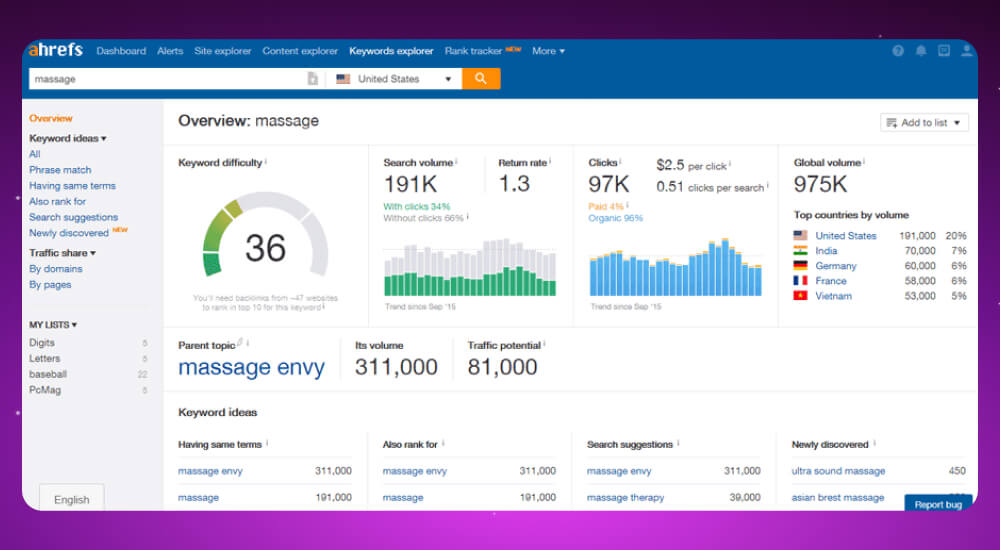
Whether you are a content strategist, a market analyst or SEO specialists, Ahrefs fits almost any keyword analysis need. It is a paid tool. SEO teams can see nearly all the data about their own website and their competitors' websites to assess a site's "health". This SEO keyword research tool stands out for the following strengths:
Ahrefs starts at 99 USD per month for the Lite plan, 399 USD for Advanced and up to 999 USD for Agency. It suits individuals and companies that need in-depth keyword analysis to refine their keyword strategy.
Step 1: Go to the link HERE and log in.
Step 2: Enter your keyword phrase and choose the country or region you want to research.
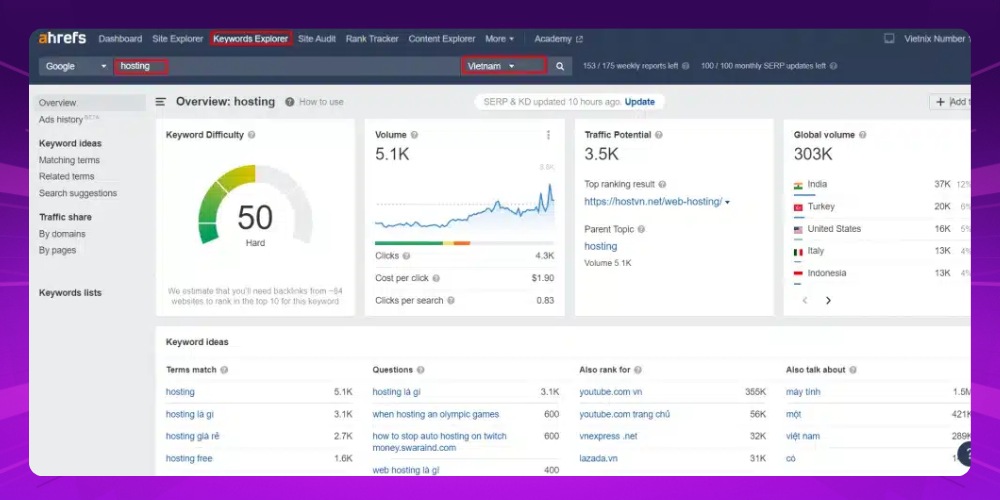
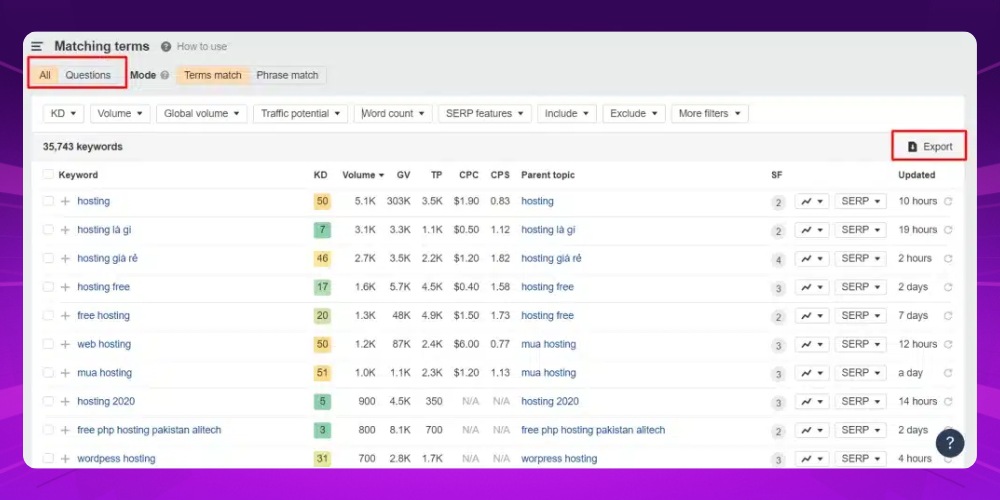
Step 3: Click “All keyword ideas” to see a list of related keywords with all the metrics, such as search volume, difficulty and potential traffic.
Step 4: Select “Export” to download the keyword list to your device.
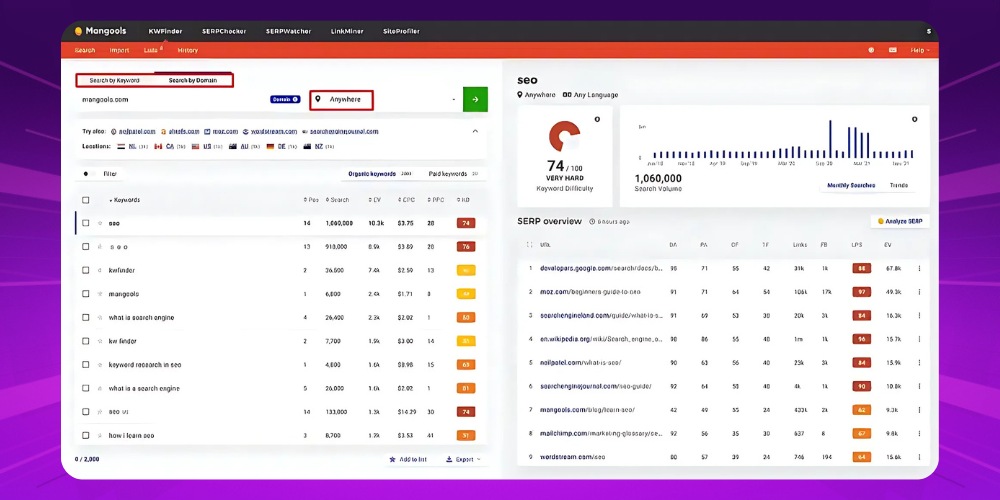
KWFinder is a paid SEO keyword research tool that specializes in long-tail keywords with high conversion rates. It gives detailed data on keyword difficulty, so you can easily judge the competition and the SEO potential.
KWFinder is a smart keyword search tool. It lets you filter by volume, difficulty and CPC, and it also supports keyword research by domain, so you can analyze your competitors' content strategy. You can also export all the data to Excel for later SEO or advertising plans.
If you need an accurate, visual and easy-to-use keyword planning tool, KWFinder is worth considering.
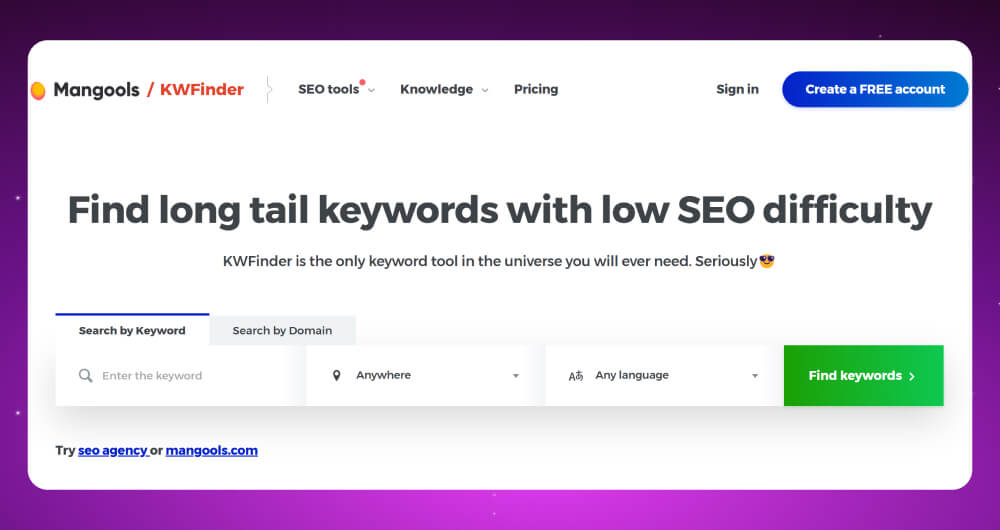
KWFinder is one of the effective keyword research tools developed by Mangools. People like it for its friendly interface and its ability to find simple, low-difficulty keywords, long-tail keyword along with other advantages such as:
KWFinder is part of the Mangools suite. Prices start at about 29.90 USD per month for the Basic plan billed yearly, up to 89.90 USD per month for the Agency plan with full features and extended access.
Step 1: Go to the link HERE to create an account.
Step 2: Enter a keyword or paste a URL into the search bar, choose a country and language, then click “Find keywords”.
Step 3: After a few seconds, KWFinder returns a list of keywords with detailed information. On the paid version you can also use the Autocomplete and Question features to expand your keywords.
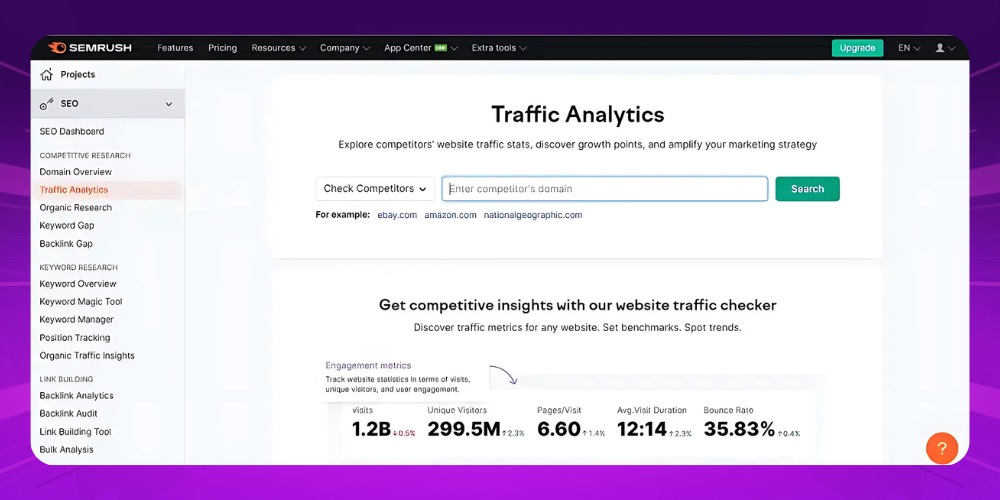
SEMrush analyzes SEO keywords for any website you are working on, including your competitors. This in-depth analysis shows you your competitors' keyword strategy, so you can plan a proper approach to improving your rankings. It is also one of the tools used by professional providers of SEO services services.
With this SEO keyword software, you can track keyword rankings over time and analyze detailed keyword lists for traffic, competition and search trends. SEMrush also offers visual market charts that make it easy to spot potential competitors and growth opportunities in your industry.
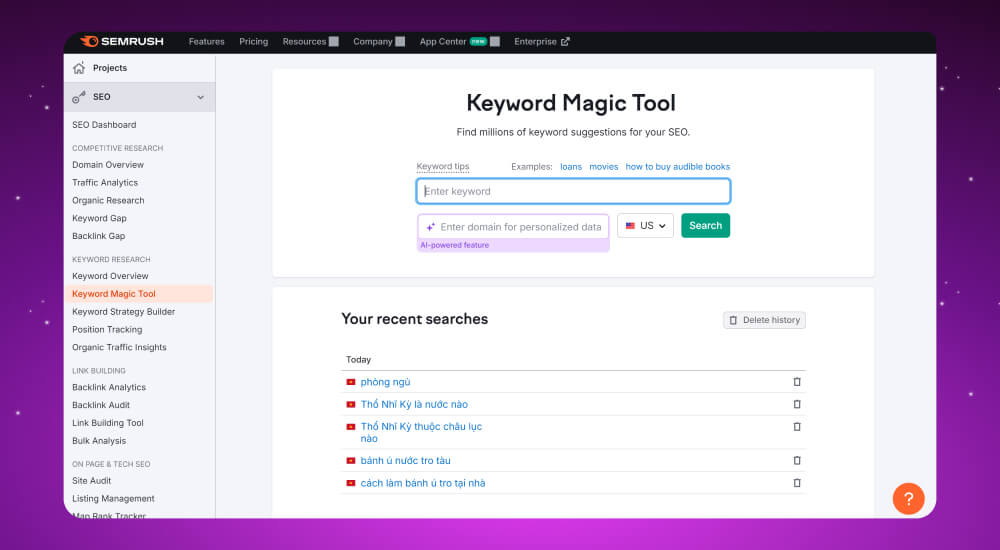
SEMRush The full name is SEMrush Keyword Magic Tool. SEMrush comes in a free version and a paid version of its keyword search tool, with these advantages:
SEMrush has three price plans: Pro at about 139.95 USD per month, Guru at 249.95 USD and Business at 499.95 USD. It suits both individuals and companies, depending on how much they need.
Step 1: Accessibility https://www.semrush.com/ and log in to your account.
Step 2: Enter the keyword you want to analyze and click “Search”.
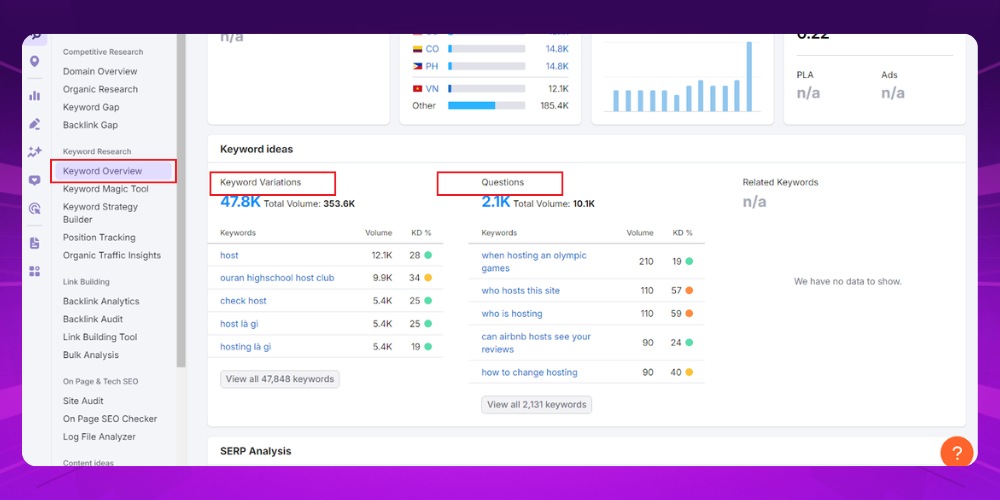
Step 3: In the “Keyword Overview”section, you will see an overview of metrics such as keyword ideas and questions.
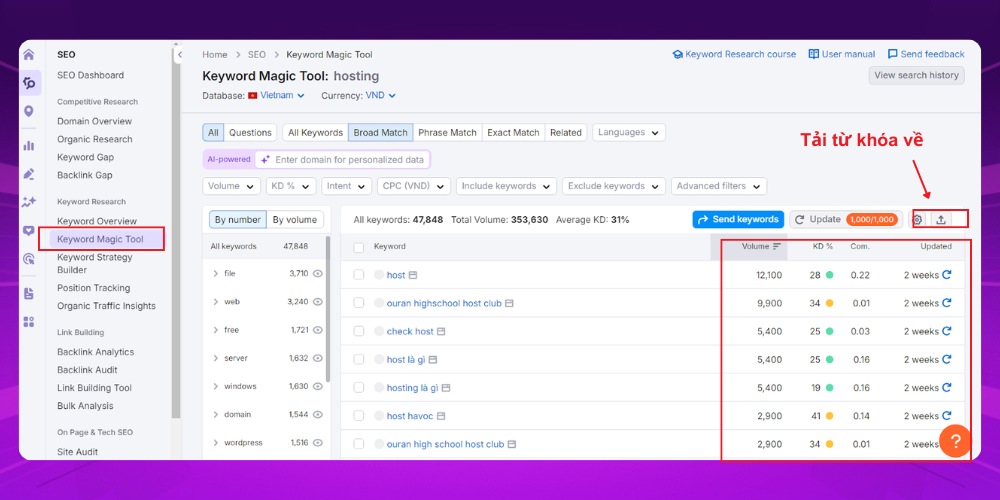
Step 4: Use the Keyword Magic Tool to expand your keyword ideas, then click the arrow icon at the right of the screen to download the keyword list.
Spineditor is a well-known keyword research tool that SEO people are familiar with. It analyzes keywords and groups them by search intent, and it expands your keyword list with related suggestions. It is useful for optimizing content and ads for the Vietnamese market.
You enter the keyword you want to research and get a list of suggested keywords right away. The tool also lets you export keyword data to a file for easy storage and reuse.
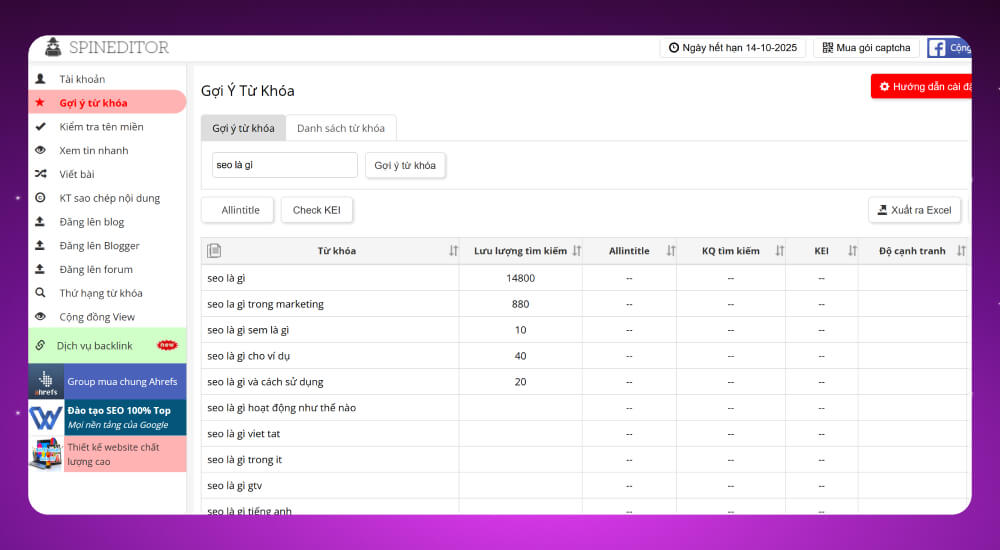
The Spineditor keyword research tool has a free version with limited features and three paid plans: Basic at 12 USD per month, Premium at 17 USD and Agency at 54 USD. It suits individuals up to small businesses.
Step 1: Sign up for a Spineditor account HERE.
Step 2: Click "Gợi ý từ khóa" (Keyword suggestions) in the menu on the left side of the screen.
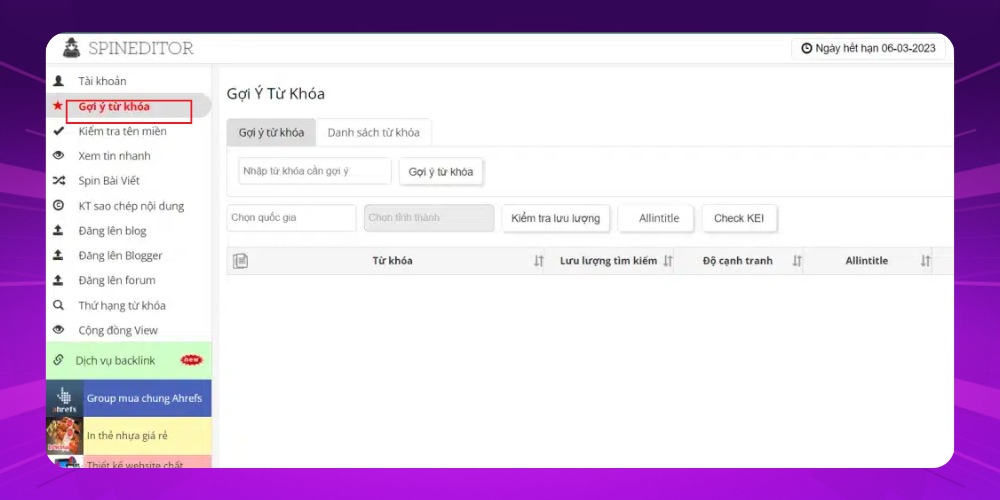
Step 3: Choose one of two ways: enter a single keyword or a group of keywords, then choose a country and click "Kiểm tra lưu lượng" (Check traffic).
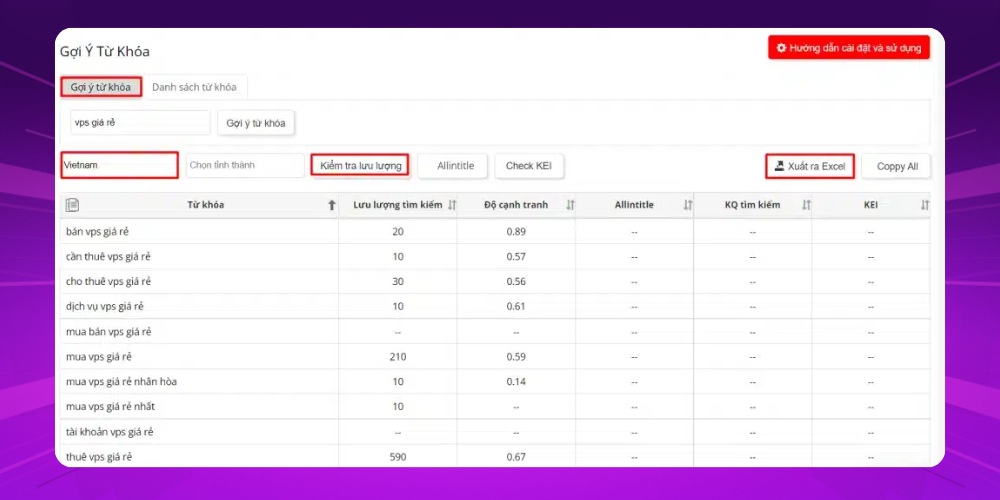
Step 4: Download the keyword file by clicking "Xuất ra Excel" (Export to Excel).
Moz Keyword Explorer is known as a useful keyword tool for finding supporting semantic keywords and forecasting traffic potential. It helps you pick keywords with the right level of competition for your SEO strategy.
It also lets you analyze SERP factors, and it offers clear analysis charts and powerful filters to improve your keyword research.
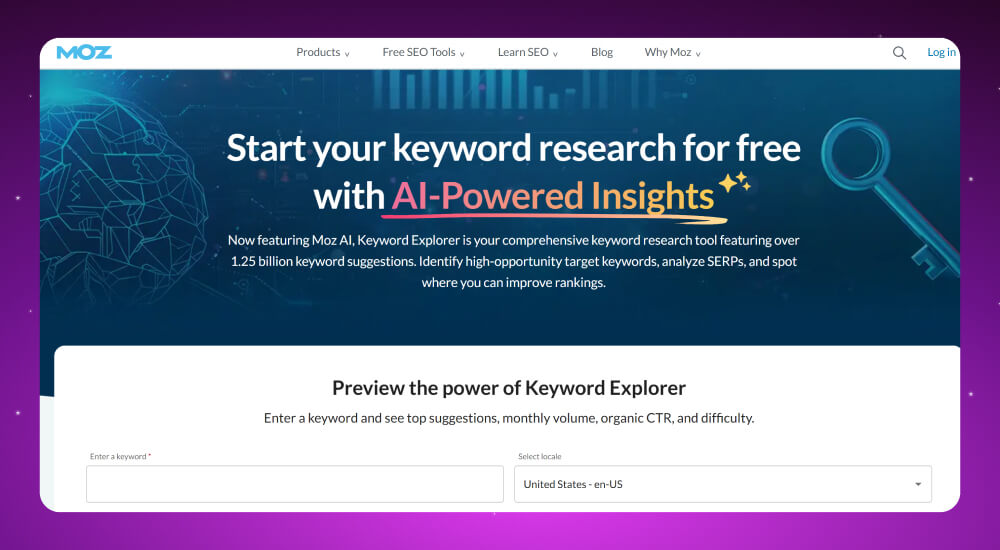
Moz Keyword Explorer offers both a free and a paid version of its keyword search tool. With the free version, you can run 10 keyword queries per month. So what are the strengths of this SEO keyword software?
Moz is a popular SEO keyword research tool priced from 99 to 599 USD per month depending on the plan, with a 30-day trial for new users. It suits companies of any size that want in-depth keyword analysis and SEO optimization.
Step 1: Click the Moz Keyword Explorer link HERE and sign up for an account.
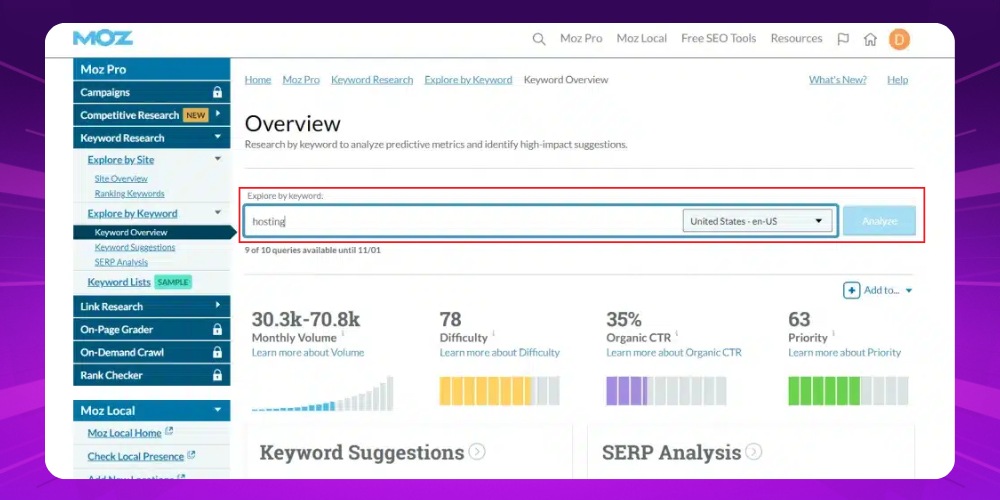
Step 2: Enter the keyword, domain or specific page you want to analyze in the search bar, then click “Analyze” to get the analysis data. You can then choose “Keyword Suggestions” to see more related keywords.
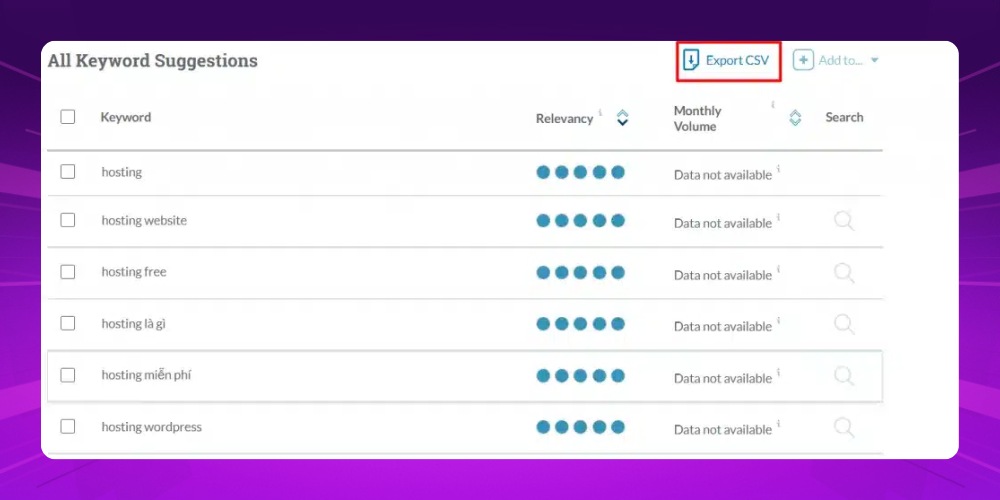
Step 3: Click “Export” to download the list to your computer.
Soovle is a keyword tool built around user search intent. It suits building an SEO keyword strategy for a website, especially in e-commerce.
With drag and drop you can save keyword ideas quickly, and you can download the keyword list as a CSV with a single click. Soovle is completely free with no limit on searches, which helps increase organic traffic without spending on advertising.
Soovle is an effective, easy-to-use keyword research tool. You just enter a keyword or phrase on the home page, and the tool automatically collects and analyzes it to give detailed, accurate results. Soovle's strengths include:
Useful as it is, Soovle has some limits:
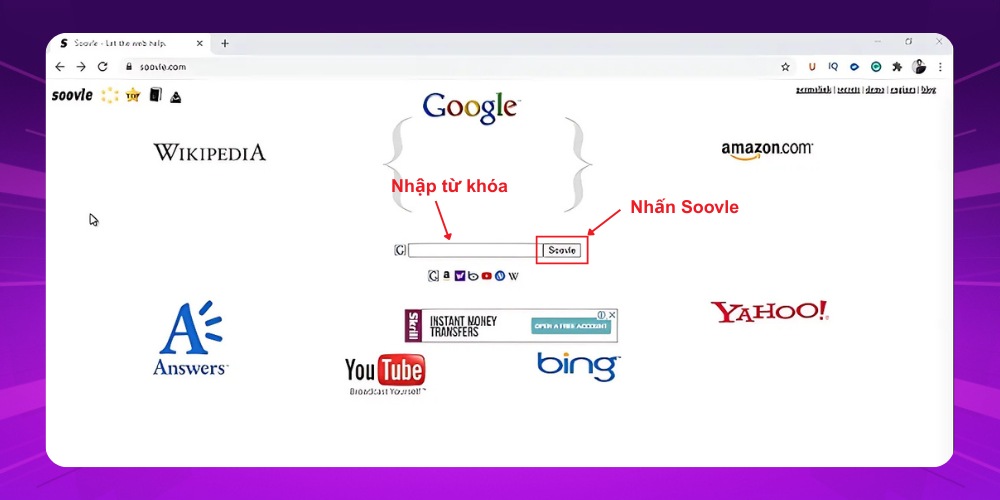
Soovle is a completely free Google keyword research tool. It gathers keyword suggestions from many sources, including Google, Bing, Yahoo, Amazon and Wikipedia, so you can find ideas quickly.
Step 1: Go to the official website of the Soovle keyword research tool at https://www.seo.com/soovle/
Step 2: Enter the keyword you want to research in the search bar, then click “Soovle” to start the research.
Google Search Console is an essential tool in the SEO tools toolkit used on any SEO project. It shows you exactly which keywords your website is being found for, at what position, and what percentage of users click.
Just by looking at keywords sitting at positions 11–20, you can see which pages are the easiest opportunities to push onto page one. And if an article ranks near the top but has a low CTR, that is a sign you need to improve its title, description or how it appears in results.
Google Search Console is not just a tool for tracking and analyzing your keyword set. It is also the platform that helps you make smart, timely SEO decisions. With an easy interface and no cost at all, it deserves to be a long-term companion in any strategy for growing organic search traffic.
→ Link to the tool: HERE
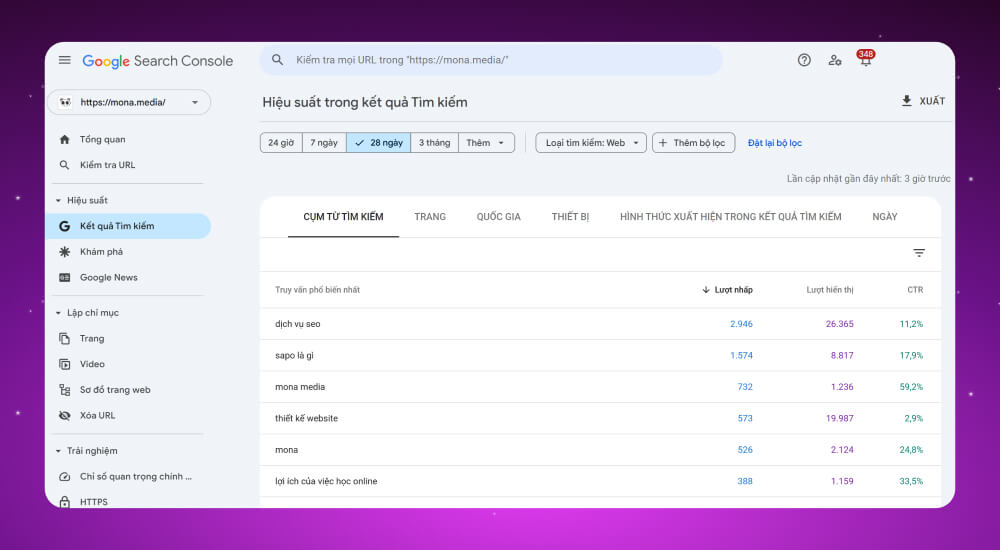
Google Search Console is a free keyword research tool provided by Google itself. It helps you track and improve your SEO performance directly, accurately and effectively. Its main strengths include:
Powerful and accurate as it is, Google Search Console has a few limits:
Google Search Console is Google's free keyword analysis tool, so you can use it for keyword research at no cost.
Step 1: Log in to the Google Search Console account where your company's website has been added.
Step 2: Click Add filter => choose Page => paste the specific URL you want to research, then click Apply.
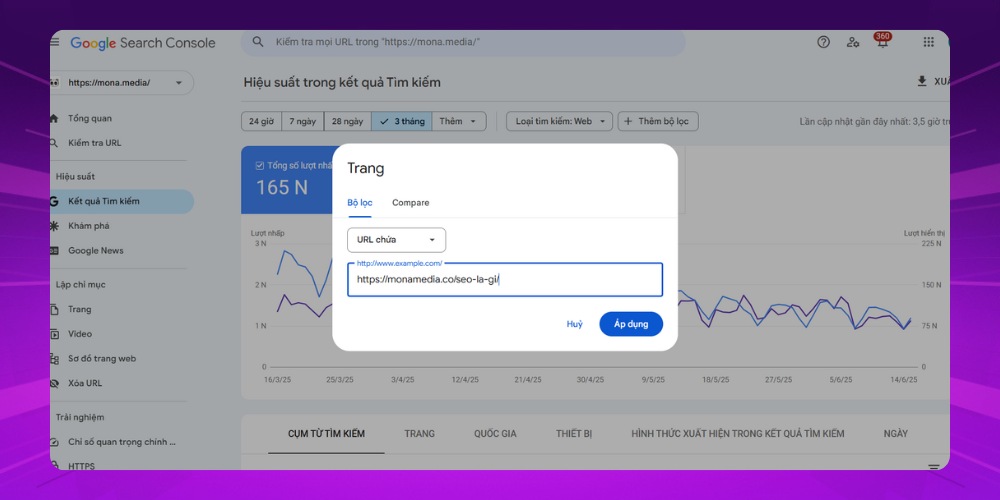
Step 3: A list of keywords will now appear on the screen. Just pick the promising ones and add them to your keyword list.
Rank Checker is a keyword research tool that tracks keyword rankings on Google. Enter a keyword and the tool returns its current position in search results, along with a chart of how it changes over time.
Rank Checker also tracks by region, device and browser, which gives you a multi-angle view of keyword performance. You can check many words at once and export the data to CSV for tracking or reporting.
Free or paid, it is a good fit for individuals or small businesses who want to find keywords on Google and keep SEO results under control.
Rank Checker is a reliable choice for tracking keyword rankings on Google, with a clear, easy-to-use interface. This keyword tool quickly shows you which keywords are performing best and which need adjusting. Rank Checker's main strengths include:
Despite its many useful features, Rank Checker has a few limits you should consider before using it:
Rank Tracker in the SEO PowerSuite bundle costs from 299 USD per year for the Professional plan to 499 USD for Enterprise, and a free trial is available to try the keyword ranking features.
Step 1: Download Rank Tracker HERE and connect the software to your Google Adwords and Google Analytics accounts.
Step 2: In the Recherche de mots-clés, enter the keyword you want to research in the search bar, then choose the country and Vietnamese as the language.
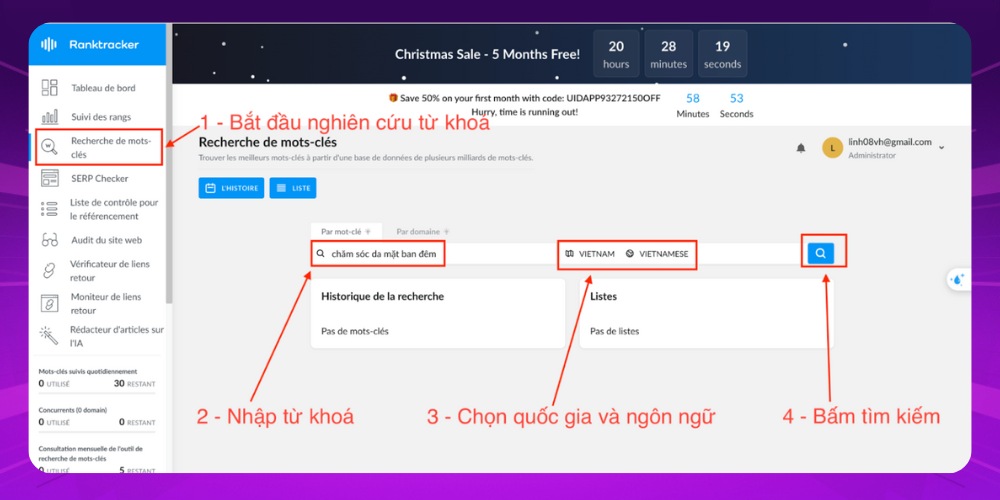
Step 3: The Rank Tracker keyword research tool lists keywords related to the one you entered and adds a trend chart, search volume, CPC and PPC figures.
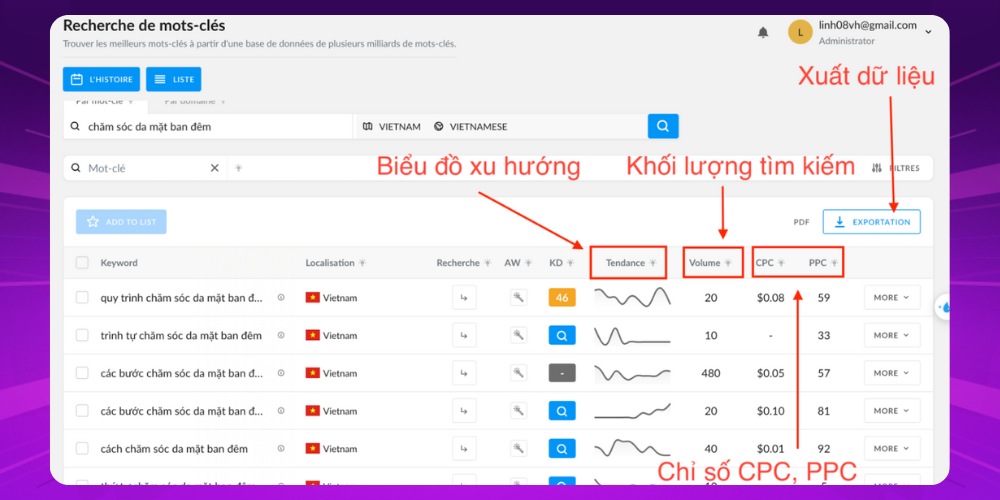
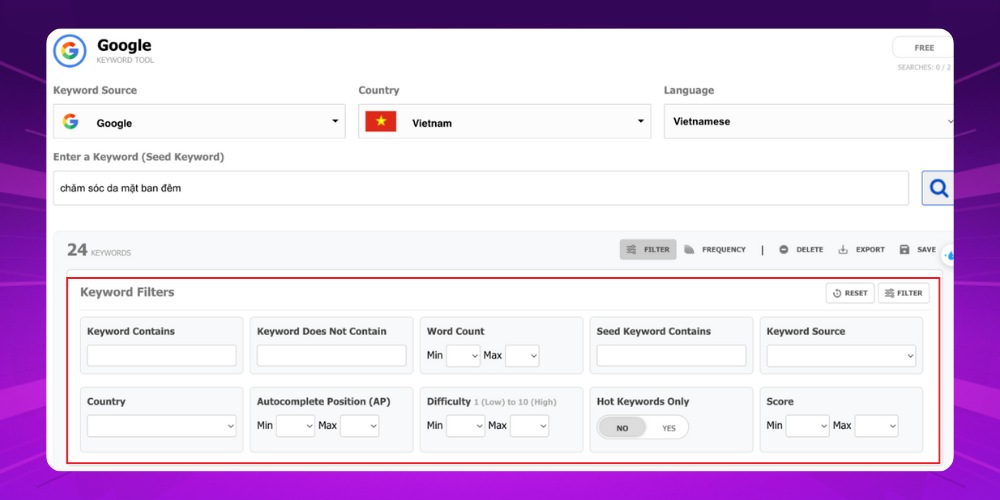
With the Keyword Tool Dominator keyword analysis tool, you get a list of related keywords with details such as source platform, geographic location and keyword type. You can also filter the results by criteria such as required or excluded words, word count, search source or region.
At about $50-$100 per platform, this tool is not cheap, but it is well worth considering if you focus on developing content or selling products on e-commerce marketplaces. It is a good choice for anyone who needs to optimize product listings and understand buyer demand in specific terms.
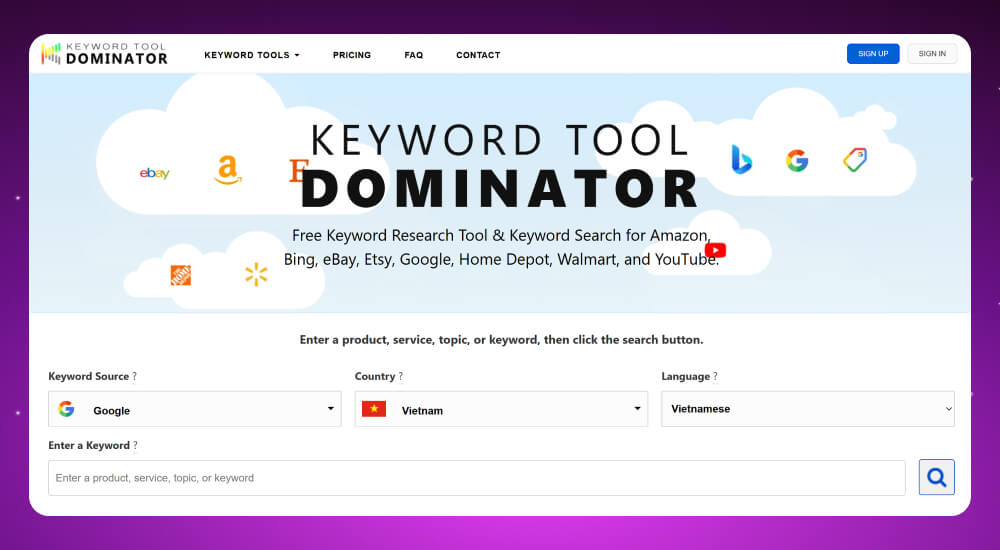
Keyword Tool Dominator is an ideal keyword tool for people doing SEO or selling on e-commerce platforms. Its strength is in digging out long-tail and product keywords in detail, using the autocomplete data of platforms such as Google, Amazon, eBay, YouTube and Bing. Notable advantages of this SEO keyword software include:
Despite its advantages, Keyword Tool Dominator has a few limits:
Keyword Tool Dominator is an SEO keyword tool that does not charge monthly. Instead it sells an unlock key for each platform, at about 49.99 to 99.99 USD per platform such as Google, Amazon or YouTube. Once you buy, you can use it permanently, and there is still a free version limited to 3 searches per day.
Step 1: Go to Keyword Tool Dominator through the link https://www.keywordtooldominator.com/
Step 2: Choose the platform you want to research, then choose the country and language and enter your keyword.
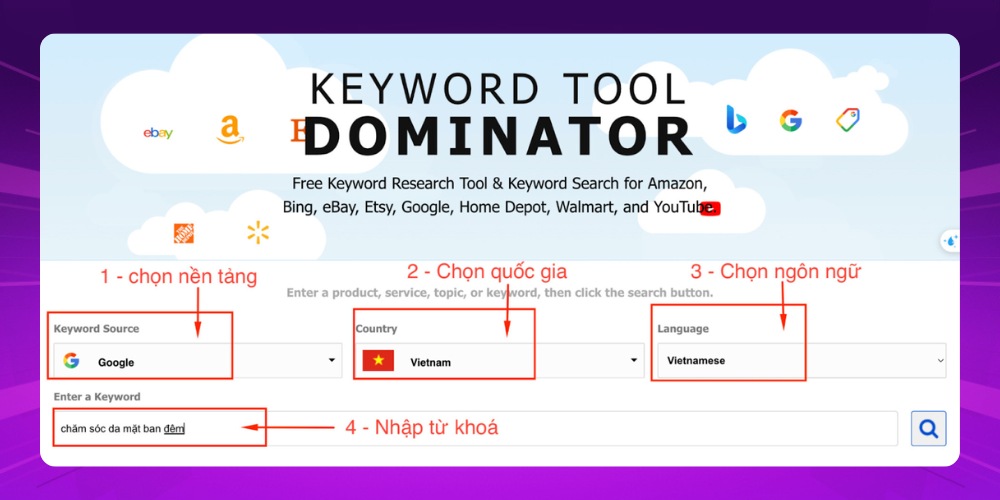
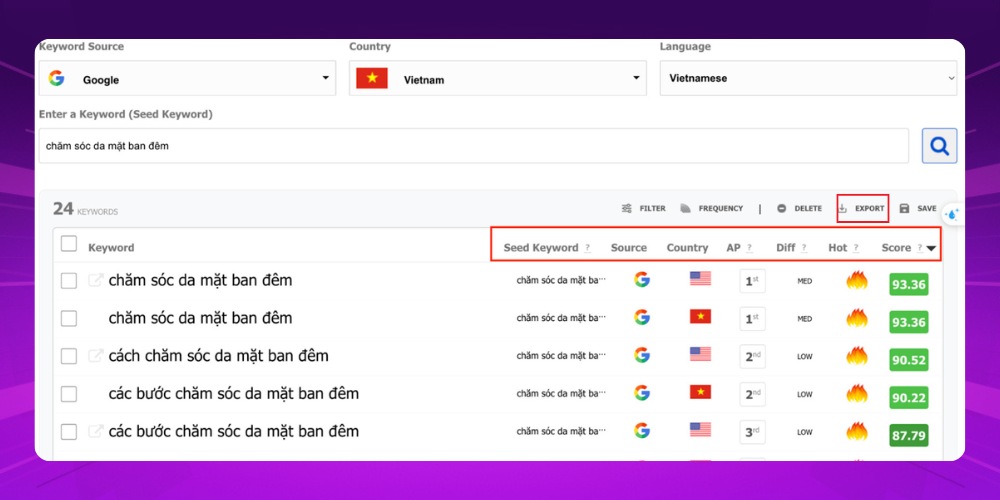
Step 3: After you click search, the system returns a keyword list with data such as Seed keyword, data source and more. You can download this keyword list by clicking Export.
You can also filter keywords right in this SEO tool by entering details such as words to include or exclude, word count, keyword difficulty (KD) and more.
AnswerThePublic is a Google keyword research tool that shows you the questions, comparisons and phrases people commonly search on Google, Bing or YouTube. Enter a keyword and you get a visual map split into groups such as "what", "how", "vs" and "for".
It is an ideal keyword research tool for beginners, helping you plan articles, videos or ads. The free version has limits, but it is still enough for quick idea generation. The paid version adds more data and removes the search limit.
AnswerThePublic is a keyword research tool that expands content ideas from a single keyword by showing everything people search around that topic. Its main strengths include:
Although useful for exploring topics, AnswerThePublic has a few limits to keep in mind:
AnswerThePublic is an SEO keyword tool with a free version that limits daily searches, and a Pro version at about 49 USD per month that allows unlimited lookups and unlocks the full analysis features.
Step 1: Go to the AnswerThePublic tool HERE
Step 2: Choose the platform, enter the keyword, choose the country and language, then click Search.
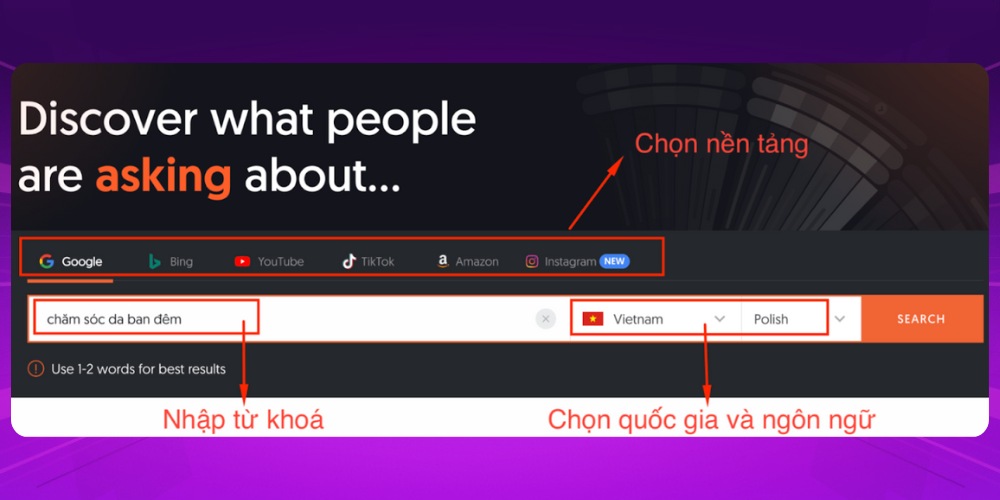
Step 3: The system gives you an overview of the keyword data. You can view it as a table, a chart or a list, whichever you prefer, to guide your content ideas.
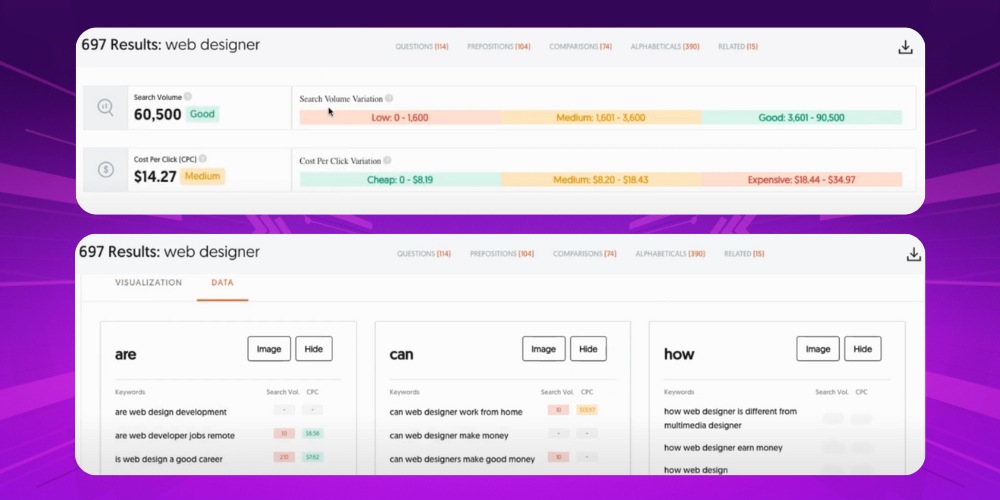
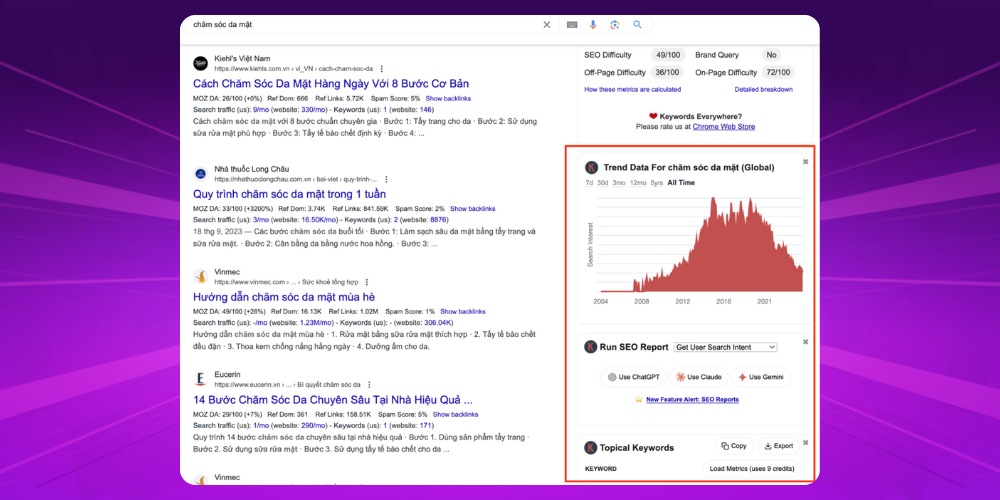
Keywords Everywhere is a Google keyword research tool built into your browser. It shows search volume, CPC and competition right next to the Google results. That way you can analyze keywords without switching tools, which saves time and keeps you close to search trends.
Unlike tools with a monthly subscription, this Google keyword analysis tool uses a flexible credit system (from $2), so you control the cost according to how much you actually look up.

Keywords Everywhere is one of the top keyword research tools. Its browser extension lets you see keyword data quickly while you search on Google, YouTube, Bing and other platforms. Notable points include:
Keywords Everywhere also has some limits to note:
Keywords Everywhere is a browser extension that shows keyword search volume, CPC and competition. The paid version works on credits, at about 10 USD for 100,000 credits, and each keyword lookup uses one credit. It supports many platforms and lets you export data flexibly.
Step 1: Download Keywords Everywhere at https://keywordseverywhere.com/ to install the extension in your browser.
Step 2: After installing, you need to sign up and enter the API key the system emails you to activate the extension.
Step 3: When you use Google, YouTube or Amazon, just type your keyword in the search bar as usual. Keywords Everywhere immediately shows the monthly search volume, CPC and competition for that keyword below the search box and in the results table.
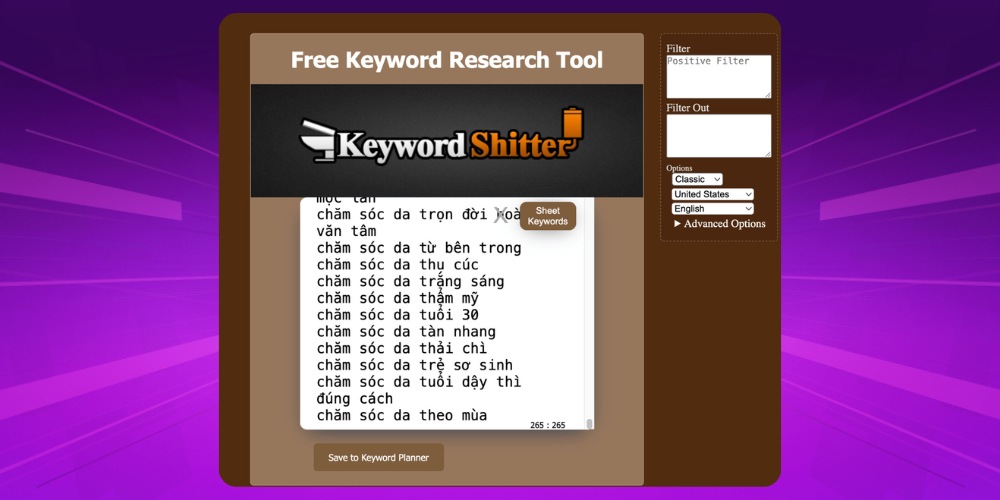
Keyword Shitter is a free keyword research tool, and a good fit if you are still exploring keyword ideas or widening your content. To get deeper analysis and judge how well a keyword really performs, though, combine Keyword Shitter with other keyword analysis tools such as Google Keyword Planner or Ahrefs.
→ Link to the tool: HERE
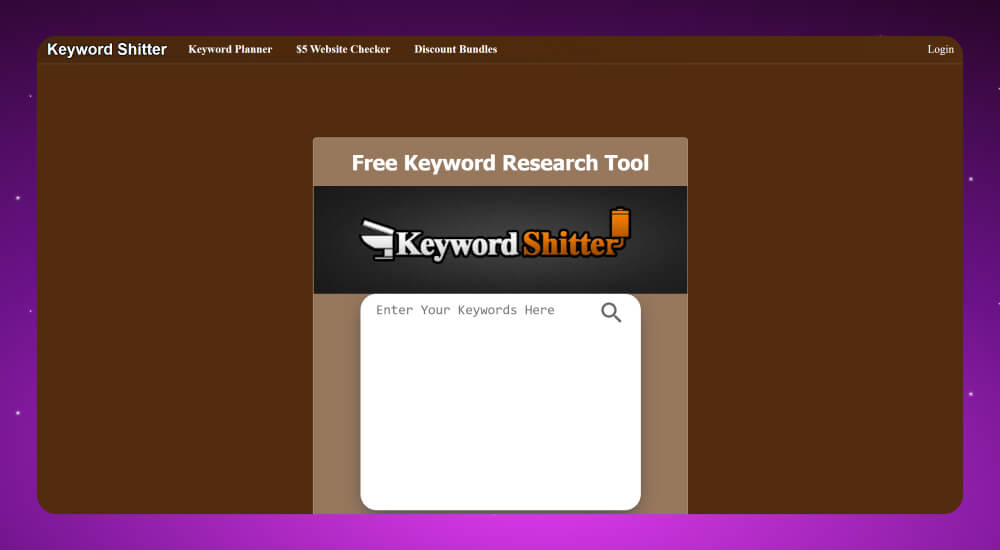
Keyword Shitter is the best keyword analysis tool when you need a long keyword list fast, without signing up or paying. Its strengths include:
Keyword Shitter also has a few limits worth noting:
Keyword Shitter is free and generates keywords in bulk. If you need advanced data such as volume, difficulty or backlinks, you can buy individual reports at roughly 0.0012 to 0.06 USD per keyword.
Just enter one or more keywords in the Keyword Shitter bar and click the “Sheet keywords”button. The tool processes them automatically and gives you more promising keywords.
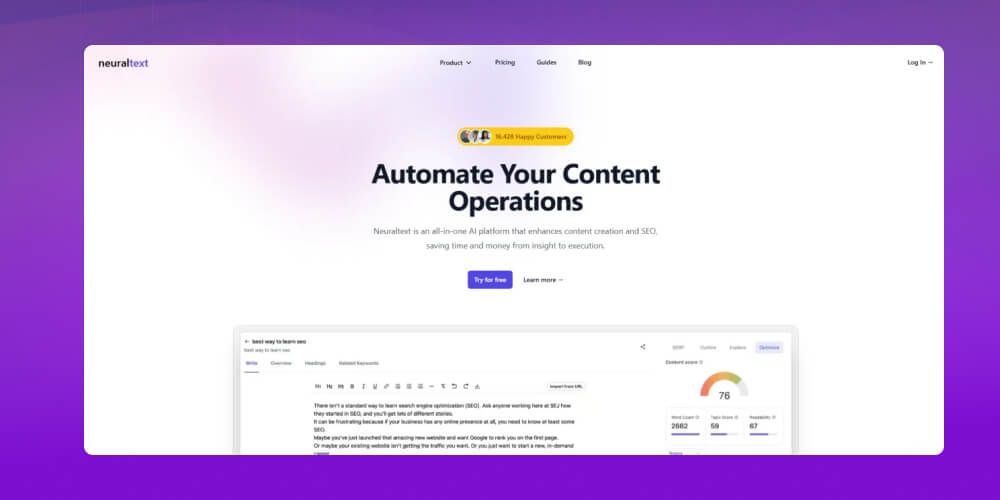
NeuralText is an AI SEO tool focused on content optimization and fast keyword research. If you want an all-round tool that helps you plan content strategy and write SEO-focused articles, NeuralText is worth considering. It analyzes the SERP, builds outlines and groups keywords conveniently in one content workflow.
Advantages
Disadvantages
Step 1: Create a project
Go to app.neuraltext.com, log in and create a new Project. Choose a language and country so the keyword data matches the market you work in.
Step 2: Find keywords
Go to Discovery and choose Keyword Research. Enter your seed keyword and click Run to get a keyword list with volume and difficulty. You can filter by intent, such as informational or commercial.
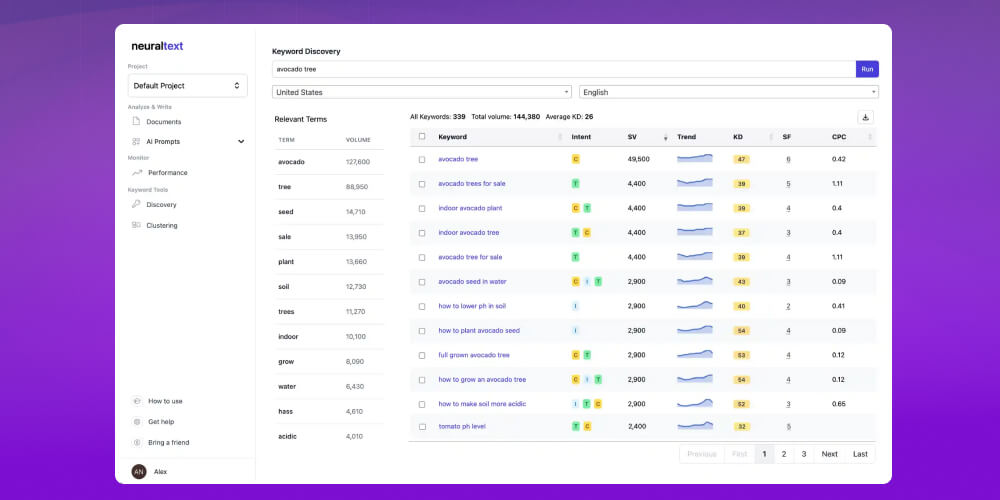
Step 3: Analyze and cluster keywords
Select the keywords you want to work on, then run SERP analysis or clustering to group related words. After that, Export them into your content plan.
Step 4: Write and optimize the article
Use the AI assistant to build an outline based on the SERP, write the content and check optimization right in the tool. Connect Google Search Console to track results after you publish.
In SEO, using keyword research tools does more than show you what people are searching for. It also guides your whole SEO content strategy in a more organized way.
Instead of writing on gut feeling, keyword data lets you see demand, competition and your chances of ranking clearly from the start. This is why keyword analysis tools have become a core foundation for SEO specialists who want to build quality content and optimize their websites.

Benefits of using SEO keyword research tools:
Why is keyword research important in SEO?
Keywords help define the content and scope of a study. When you do Keyword SEO, you can find out whether earlier research already exists on the topic you care about. Keywords are also used to find and identify suitable reference material for the study.
What are the most popular SEO keyword research tools?
Popular keyword research tools include SEMrush and Ahrefs (deep competitor and SEO analysis), Google Keyword Planner, Google Trends and Search Console (real data and trends from Google), and easy options such as Keyword Tool.io and KWFinder (focused on long-tail keywords).
What is the best free keyword research tool?
The best free keyword research tools include Google Keyword Planner, Google Trends and Google Search Console, plus some AI tools such as ChatGPT, Perplexity or Gemini. All of them can help you find keyword ideas at no cost.
Is there a keyword research tool for Facebook?
Yes. Some popular keyword research tools for Facebook, such as Facebook Insights, KeywordTool.io and Connectio.io, help you come up with content ideas and keywords that suit your target audience on the platform.
What other factors should I consider when using keyword research tools?
Besides monthly search volume and competition, consider how well the keyword fits the content you want to research, how complete it is (whether it covers the important aspects of the topic) and the audience you want to reach. If you are creating content for marketing, also consider whether the keyword can attract traffic and potential customers.
Keyword research tools is an effective way for SEO teams to carry out a search engine optimization strategy for a website. We hope the article from MONA Media has helped you quickly go through the top keyword research tools so you can choose what fits your SEO plan. And if you are looking for a partner to help you reach the TOP 1 spot on Google, contact an SEO company in Vietnam – MONA Media through the channels below for a consultation, detailed SEO quote :
Not sure how many keywords to use in an article? Worried that keyword stuffing will make your writing unnatural and hurt the reading experience? In fact, good keyword optimization is not about quantity. It is about how well you meet the user's intent.
Watch the video "4 Core Factors That Help Your Website Rank on Google" to learn how to use keywords naturally, smartly and in line with SEO best practice.

CEO & Founder · The MONA
Founder of The MONA, who built a services company of 200+ staff with 14,000+ projects delivered. Khánh Hùng shares how he thinks about building systems that run themselves, automating a business, and the real lessons from delivering projects at MONA.
 1,7K
1,7K




Professional website
design services
Own a website with a beautiful, 100% exclusive design and a lifetime warranty, with the ability
to expand features flexibly as your business grows, starting today!



NHẬN TƯ VẤN SEO MIỄN PHÍ !








 MONA will never sell your information or send you spam
MONA will never sell your information or send you spam
MONA will never sell your information or send you spam


 MONA will never sell your information or send you spam