
 MONA OS 2.0
 Partner with MONA


 Tự động hoá doanh nghiệp
 Cẩm nang SEO
 Digital Marketing
 Kinh nghiệm thiết kế website
 Hạ Tầng Server
 Giáo dục


 VI
 EN















Message us on
Zalo Official


 ProductsNew

 ProductsProducts
 Mới ra mắtKHA AI 2027App tự edit video, tự đăng mọi mạng xã hội, 2 phút mỗi ngày










 Website designLooks good and wins customers over.
SEO servicesBrings in customers searching for exactly what you sell.
 Tư vấn digital marketingKéo khách từ nhiều kênh, đo bằng số thật.
Corporate video productionVideos introducing your company, factory and team.
 NewAI video productionCompany story films made with AI.
 Custom software developmentCRM, ERP and HRM built for your business.
 Viết AI Agent theo yêu cầuĐặt riêng một trợ lý AI cho đúng việc của mình.
 Tư vấn chuyển đổi AIĐưa AI vào vận hành của cả công ty.
NewMONA LMSManagement for centers and schools.
MONA SkillHubInternal training for company staff.
 NHTQ systemEnd-to-end China–Vietnam shipping operations.
MONA JMSManagement for gold, diamond and pawn shops.
 MONA E-LearningA website with every feature you need to sell courses.
 How to sell online courses (course)More than 30 free lessons on selling courses on autopilot.
 MONA Cloudmonacloud.vnServers to get your apps and websites running.
 MONA Basemonabase.vnPostgres database, sign-in and file storage.
 MONA Mailmonamail.vnSend OTP, order and invoice emails from your software.
 MONA Paymonapay.vnAccept bank transfers via VietQR and notify your software when the money arrives.
 MONA eInvoiceComing soonIssue e-invoices that meet tax standards.
Gấu CườiTrả lời khách 24/7 trên web, Fanpage, Zalo và thu lead cho sale.
 Gấu TeleSalesGọi điện tư vấn, chăm khách như tổng đài viên thật.
Dê CườiTư vấn và chốt đơn cho shop ngay trong khung chat.
Gấu WebmasterNhắn nhóm Zalo là website được sửa xong.
 Gấu Pháp ChếSoạn hợp đồng, rà điều khoản trong vài phút.
 Gấu Báo GiáLên báo giá đúng mẫu và gửi khách ngay.
 AI chăm sóc khách hàngTheo dõi và giữ chân khách hàng cũ.
 Gấu Tuyển DụngLọc hồ sơ, hẹn lịch, phỏng vấn ứng viên.
 Mới ra mắt
KHA AI 2027
Xây kênh chuyên gia 2 phút mỗi ngày
Quay bằng điện thoại, AI tự edit video, tự đăng lên 16 nền tảng và tự trả lời bình luận, tin nhắn.
882.681lượt xem trên kênh CEO MONA sau 36 ngày
 Anh Khánh HùngCEO MONA đang dùng mỗi ngày
Xem app làm được gì
 AI
Gấu Cười MONA ĐANG TỰ XÀITrả lời khách 24/7 trên website, Zalo OA, Messenger và thu lead về cho sale.
Dê CườiChốt đơn bán lẻ và sàn: Shopee, TikTok Shop, web. Chăm cả khách sỉ, đại lý.
Gấu WebmasterCập nhật nội dung, tối ưu SEO website mỗi ngày.
Gấu TeleSalesGọi điện tư vấn, chăm khách như tổng đài viên thật.
Gấu Tuyển DụngLọc hồ sơ, hẹn lịch, phỏng vấn ứng viên tự động.
AI chăm sóc khách hàngGiữ khách cũ, cứu lead đã rớt cho phòng kinh doanh.
Gấu Pháp ChếSoạn hợp đồng, rà điều khoản trong vài phút.
Gấu Báo GiáLên báo giá đúng mẫu, gửi khách ngay khi có yêu cầu.
 Chuyển đổi AI toàn phầnGiải pháp tổng cho doanh nghiệp, 3 lớp triển khai.
 Viết AI Agent theo yêu cầuĐặt riêng một con AI gánh đúng nghiệp vụ của bạn.
 Custom softwareCRM, ERP and HRM with built-in AI automation.
 SEO & AEO thời đại AIĐược Google lẫn AI trích dẫn, không chỉ xếp hạng.
 Kiến thức AI cho doanh nghiệpBài phân tích, hướng dẫn ứng dụng AI vào vận hành.
 Free AI courses
 AI tools at work
App mới · KHA AI 2027
Xây kênh 2 phút mỗi ngày
AI tự edit video, tự đăng mọi mạng xã hội
Free consultation, 8am–10pm every day

09 June, 2026
Sample chatbot scripts are something every shop selling through chat should have ready, because a customer who messages and waits 3 minutes without a reply is a lost customer. Every shop owner has tasted that scene, and it repeats every day. In this article MONA gives you 12 sample dialogues for real situations (a customer asks the price, says it's too expensive, asks about size, asks about shipping, puts you off, complains). Copy them, change the shop name, and they're ready to use. At the end we also explain the difference between fixed scripts and an AI chatbot, so you know which one your shop needs.
▶ See 12 scripts running for real: AI closing orders automatically on marketplaces, websites and fanpages 24/7
Before we get into the samples, we'd like to ask for one minute to look at your shop's message inbox. A great script means nothing if nobody can reply in time, and the problem of “nobody can reply in time” is more real than you think.
Picture this: at 11 pm a customer is scrolling their phone, loves a shirt, and messages asking if size M is still available. Your staff are asleep. In the morning you open your phone to reply, and the customer already ordered from another shop in the middle of the night, because they have no obligation to wait for you. Today's customers, especially those under 40, prefer messaging to calling, and they message right when the mood strikes, not waiting for anyone's office hours.
And the volume is not small. A shop running Facebook ads at retail scale easily sees a few thousand to 10,000 people messaging every day. I say people, not messages, because each person also sends dozens of messages back and forth. The number sounds scary, but anyone running ads will nod right away, because their inbox looks exactly like that every morning.
And they don't message in one place. Messenger has a pile, Zalo has a pile, TikTok Shop and Shopee have another pile. Staff keep 4-5 screens open at once, eyes darting back and forth all day, and missing messages is certain. The only question is how many.
The most painful part is this: you paid ad money for every one of those messages. A customer clicks the ad, sends one line, waits 5 minutes with no reply, closes the chat, and buys from the shop next door that is running ads for the very same shirt. The ad money is gone, the customer is gone, yet the ad report still looks great, because messages keep coming in steadily. That loss is very quiet, and you only see it when you add up the books at month end.
A shop not yet big enough to hire a team means the owner is the one covering the page. You sell all day, then at night you hold your phone and reply until 1-2 am, knowing that every message you skip is money lost. We hear this over and over from shop owners who come to work with MONA, and everyone tells the same story.
That lasts a few months before exhaustion sets in. You reply while eating, sneak your phone open at weddings, glance at the screen when your child is sick. Take just one day off, and the next morning you open the inbox to dozens of customers who asked yesterday, and by the time you reply they have bought elsewhere. That mix of tiredness and regret is something everyone who sells through chat understands.
Then when you do hire someone to take over, a new problem appears: they don't know the products as well as you, don't dare decide like you, and screenshot hard questions into the group chat to ask. The customer is still waiting on the other end. You hired someone and the owner still has to hover over the phone, so you haven't really escaped.
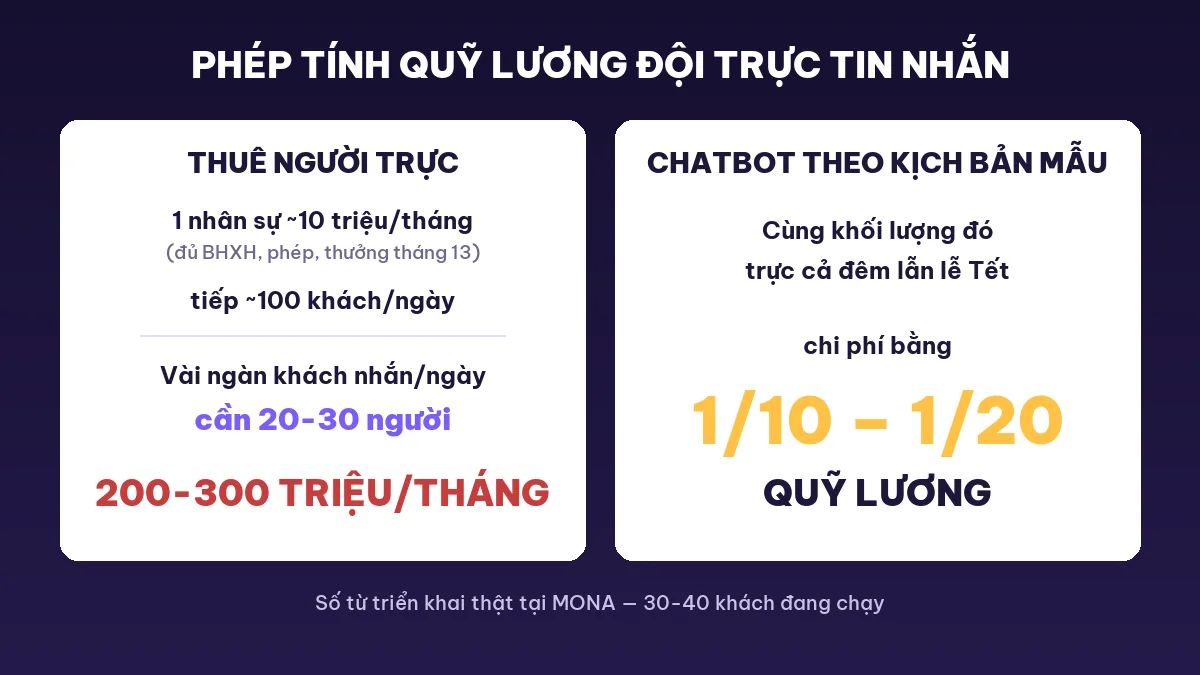
Now let's do a calculation every shop owner should do once. One person covering messages, with full insurance, annual leave and a 13th-month bonus, costs around 10 million VND a month. One person can handle roughly 100 customers a day before getting overwhelmed, and above that replies start coming late and sloppy.
So a shop with a few thousand customers messaging daily needs 20-30 people covering the page. That means 200-300 million VND in salaries every month, just to answer messages. Many of you have never added this number up, because it grows slowly: one more person this month, two more next quarter, and by the time you look back the page payroll is bigger than the ad budget.
That's not all. Hiring 20-30 people is hard, and keeping them working steadily is harder. Covering a call center or a page is a profession of its own, and hiring, training and managing this team is as complicated as selling. Raise a team just to answer messages, and in the end the shop owner becomes the manager of a small company inside their own company.
A customer messaging a fanpage doesn't think they're talking to one staff member. They think they're talking to the whole shop, the whole brand. If the person covering the page answers curtly, quotes the wrong price, or makes a careless promise, the customer blames your brand, because they don't know that person joined last week.
To answer correctly, the person on duty must know the product: say, what fabric this shirt is, how tall and heavy someone should be for size L versus M. They also have to know the shop's current state: which warehouse is out of size L, which discount code is still valid this round. Those two things together are already messy enough, and each person knows and remembers them differently.
A sales chat session also runs very long. A customer asks about a shirt in the morning, replies in early afternoon, and transfers money late in the afternoon, so one session stretches across a whole working day. When one person carries 200-300 such sessions a day, they can't stay consistent, and they absolutely can't remember which past customer bought what in order to greet them again.
Then comes the day your best page operator quits. All the ways of talking to customers, handling a customer who says it's too expensive, and calming an angry customer leave with them, because it all lives in their head and not on paper. The new person starts from zero, and customers take the hit for months. Any shop owner who has been through this knows the feeling of stumbling: suddenly your shop talks to customers worse, clearly, and you don't know where to start fixing it.
In short: you lose customers not because staff are lazy. You lose them because the volume exceeds what people can handle, and because everyone speaks in their own way. A well-written set of sample chatbot scripts solves exactly these two problems: it turns the dialogue into a shop asset, then hands it to a machine to cover so you don't depend on anyone's memory.
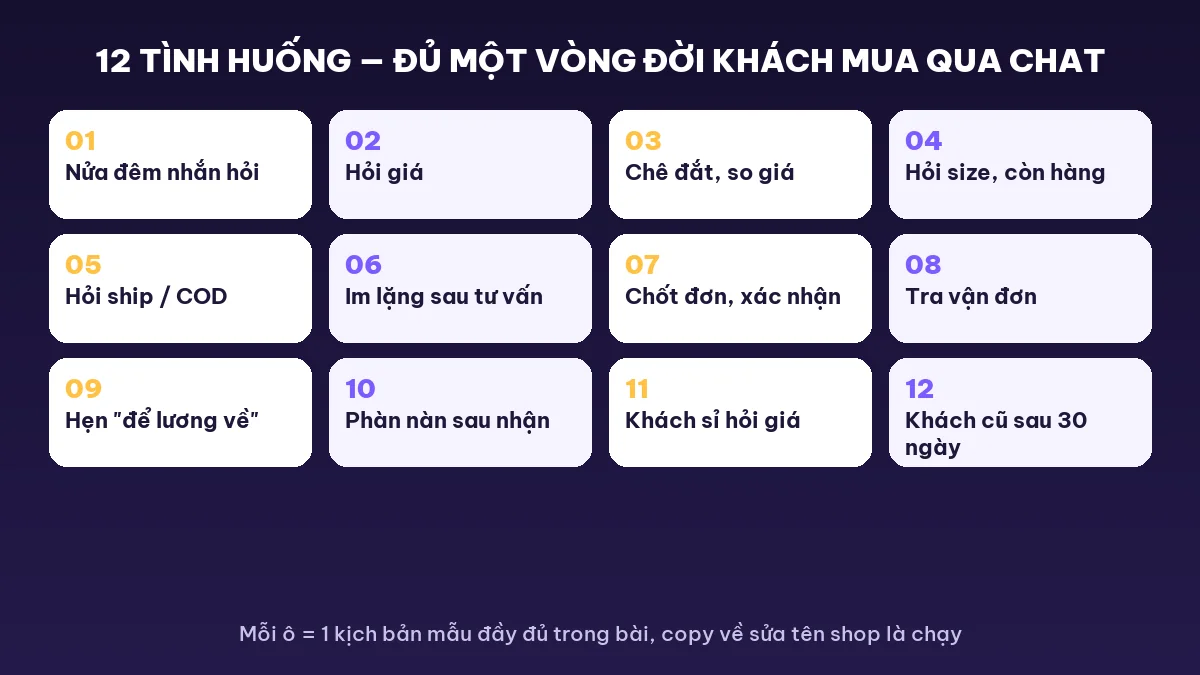
The sample chatbot scripts below were distilled by MONA from bots actually working for retail shops. Each sample includes the situation, the dialogue, and why it works, meaning the reason the line is written that way and not another. As you read, think of your own shop's customers: change the item name, the price and the way you address people, and it's yours.
General rule for every sample: the bot calls itself “em”, opens each sentence politely with “Dạ”, and ends every message with an invitation for the customer to reply. As long as the customer keeps replying, the order is still alive.
Situation: a customer scrolling their phone sees an ad at 11:47 pm and messages right away, in the mood. The whole shop is asleep.
Customer: “Shop ơi còn mẫu này ko?”
Bot: “Hi there! This style is in stock, sizes S to XL. Could you tell me your height and weight? I'll suggest a size and hold one for you first.”
Why it works: it replies within seconds at any hour, and asks back one easy question. Once the customer replies with height and weight, the order is halfway done, and the next morning staff only need to finish closing. Buying a shirt or pants is often a 5-minute impulse, and if you let it sit overnight the mood is gone. Those seemingly small orders add up across a month, and that's when you feel the loss.
Situation: the most common question in every sales inbox, and also the one many shops answer worst.
Customer: “Cái này giá nhiêu?”
Bot: “This one is 590,000 VND, and there's an offer: buy 2 and get an extra 10% off. Would you like 1 or 2? I'll work out the total for you.”
Why it works: state the price directly. Try putting yourself in the customer's shoes: you ask the price and are told “leave your phone number and I'll advise you.” You'd be annoyed and leave too. Hiding the price is the number one reason customers leave a chat window. The “1 or 2 items” question moves the customer to the payment step without pushing.
Situation: the customer has already shopped around a few shops before messaging, and says so bluntly.
Customer: “Bên kia có 450 à”
Bot: “I understand, 140,000 VND more is worth comparing. At our price you get 30-day returns, and delivery lets you inspect the item before paying. Go ahead and order to try it; if you don't like it, returning it is free.”
Why it works: acknowledge what the customer said first, name exactly 2 things you do better, then close with a risk-free option. A customer who says it's too expensive actually wants to buy: they just need a reason to not feel they overpaid, and the bot's job is to supply that reason. Arguing about price loses, even when you're right.
Situation: the customer asks curtly, with no extra information.
Customer: “65kg mặc size gì”
Bot: “At 65 kg, size L fits you well. We have exactly 2 black L left, so if you confirm I'll place the order right away to catch tomorrow morning's shipment.”
Why it works: advise one size decisively instead of throwing a whole measurement chart at them. A customer who has to go find a tape measure is basically gone from the session. The reason to push for a quick decision must be real: really 2 left, really a shipment, because if you make it up once and the customer finds out, trust is gone for good. For the bot to report real stock, it has to be connected to your inventory software, which is covered in the 3 layers section below.
Situation: the customer likes the item but is still unsure about delivery.
Customer: “Do you ship COD, how much is the fee shop”
Bot: “We ship COD nationwide, so you inspect the package before paying. The fee is 20,000 VND in the city and 30,000 VND for other provinces, and orders of 2 or more items ship free. Which area are you in so I can give you the exact fee?”
Why it works: it covers all 3 things the customer worries about in one message: COD is available, they can inspect the goods, and the fees are clear. It also plants a free-shipping threshold so the customer weighs adding a second item. Many fake orders and returned parcels start from vague shipping fees at checkout, and stating it clearly up front saves arguments later.
Situation: the advice is done and the customer disappears.
Bot (after 30 minutes): “I'm still holding the black size L for you. If anything is making you hesitate, just ask and I'll help you decide.”
Why it works: a silent customer doesn't mean they no longer want to buy. Often they're busy feeding the kids, and once the message is pushed down they forget it. Every shop has a whole basket of customers like this. So remind them exactly once, mention exactly the item they were looking at, and ask an open question instead of pressing “have you decided?”. If the customer is still silent after 24 hours, move to the returning-customer care script like Sample 12, and never message them repeatedly.
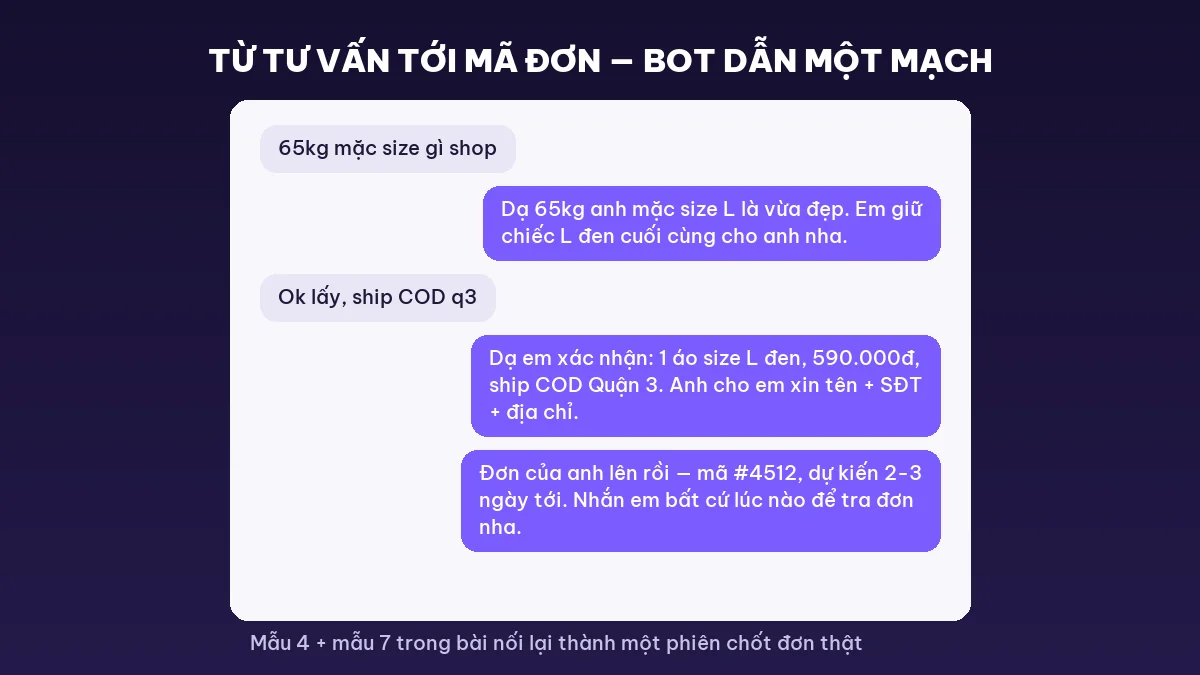
Situation: the customer agrees to buy, and this is the moment details are most likely to go wrong.
Bot: “Let me confirm your order: 1 black size L shirt, 590,000 VND, COD with inspection. Could you give me your name, phone number and delivery address?”
Customer: sends details.
Bot: “Your order is placed. Your order number is #4512 and it should arrive in 2 to 3 days. If you need to track it, just send me this number.”
Why it works: summarize the order before asking for the address so the customer feels safe they won't get the wrong item, and return the order number right away. An order shipped in the wrong size costs two-way shipping, repacking, and often the customer too, so a confirmation message that takes a few seconds is far cheaper. With an order number, customers message less to ask “where's my order,” and staff lose a whole task.
Situation: open your inbox and look: out of every ten messages, several are this type, all things that must be answered but never produce a new order.
Customer: “Đơn em tới đâu rồi shop”
Bot: “Let me check that for you right now. Order #4512 is at the sorting warehouse and should reach you tomorrow. Please keep an eye on your phone tomorrow: if the courier can't reach you, the parcel gets returned, which would be a shame.”
Why it works: when the bot is connected to the carrier, it looks up and answers all of this type of message itself, and no human has to touch it. What tires page staff most isn't the sales advising, but these small chores that interrupt them all day. The reminder to pick up the shipper's call also lowers the return rate.
Situation: the customer hasn't refused, only postponed. A real person hearing this nods along and then forgets, and you can't blame them with hundreds of other customers waiting for a reply.
Customer: “I'll get it at the end of the month when my salary comes in”
Bot: “Of course, I've made a note. I'll message you at the start of the month, and I'll keep today's offer exactly as it is for you. No rush, I can wait.”
Bot (on the agreed date): “I'm keeping my word! The black L with the offer from last time is still reserved for you. If you want it, I'll place the order right away.”
Why it works: the bot logs the appointment and messages back on the right day, missing no one who set a date. Almost every shop is ignoring a whole basket of these “payday” customers, even though they liked the item enough to set their own buying date. Keeping the old promotion is a natural excuse to reopen the conversation.
Situation: the customer is upset. Wait a bit longer and that anger becomes a comment sitting right under an ad you're paying to run.
Customer: “What kind of shirt has stitching this ugly, so disappointing”
Bot: “I'm sorry about that. Could you send a photo of the flaw so I can pass it to our quality team right away? If the fault is ours, we'll swap it for a new one or refund you, and we cover the exchange shipping.”
Why it works: admit the fault immediately and give a clear way to resolve it (take a photo, exchange or refund) to cool things down first. A customer who complains and is handled well will often come back to buy again, because they know this shop takes responsibility. For a truly tense case, the bot hands it to the person in charge along with the full chat history so the customer doesn't have to retell it from the start. Making an upset person tell the story a second time just pours more oil on the fire.
Situation: a big order, but mixed in among many people who are “just asking.”
Customer: “Lấy 50 cái có giá sỉ ko”
Bot: “Yes, we do. Orders of 30 pieces or more get a separate wholesale price list, and 50 pieces gets a good rate. Could you leave a phone number or Zalo? Our wholesale person will call you back today with a quote and detailed samples.”
Why it works: a wholesale order is a big order, so don't let the bot negotiate the price all the way. If the machine carelessly agrees to a price, you eat the loss on the whole lot. But making a wholesale buyer queue like a retail customer sends them off to find another factory. The bot's job is to stand in the middle: filter out genuine wholesale customers, collect their contact details and hand them to the person in charge right away, while people just browsing still get a proper reply without costing a real person any effort.
Situation: the customer bought a month ago. Selling to existing customers is easier than finding new ones, and every shop owner knows this by heart. It's just that nobody has the free hands to do it.
Bot: “Hi! How is the black shirt you received last month? That style just came in 3 new colors, and returning customers get 15% off until this Sunday. Come take a look!”
Why it works: it opens by asking how the purchased item is doing, so the customer feels remembered rather than pitched, and that feeling makes a world of difference. The discount code has a real deadline to give the customer a reason to come back within the week. And only a bot can remember thousands of customers, what each bought and on what day, to message each one like this. However good a real person is, they only remember a few dozen regulars.
Take these 12 sample chatbot scripts and use them as they are, no need to ask MONA for permission. But we know one thing in advance, because we have seen it at so many shops: you'll print the scripts, gather the whole page team and brief them carefully (adding a night shift, adding a shared file for prices and stock, adding an internal chat group to stay consistent), and everything goes well for exactly two weeks. Then it all slides back: people still sleep when a customer messages at 11 pm, still forget to follow up with the customer who said end of month, and your best page operator quits and takes with them the way of talking they had mastered. It's not that your team is bad. A page operator you pay around 10 million VND a month who can handle about 100 customers a day is already overwhelmed, and if messages arrive at twice that number it isn't their fault, it's beyond human capacity. What you lack isn't one more person on duty. What you lack is a bot that has learned these 12 scripts and covers for the whole team around the clock, at 1/10 to 1/20 of that payroll. Try sending a few messages to the one demo chatbot we built, and see for yourself how human it sounds.
The 12 sample chatbot scripts above are the dialogue, the most visible part. But notice: Sample 4 dares to say “only 2 left,” Sample 8 can look up shipping, and Sample 12 remembers what the customer bought last month. Those lines aren't done just by writing them well, they need a system behind them. For a bot to run in real life, you need to build all 3 layers, in order from easy to hard.
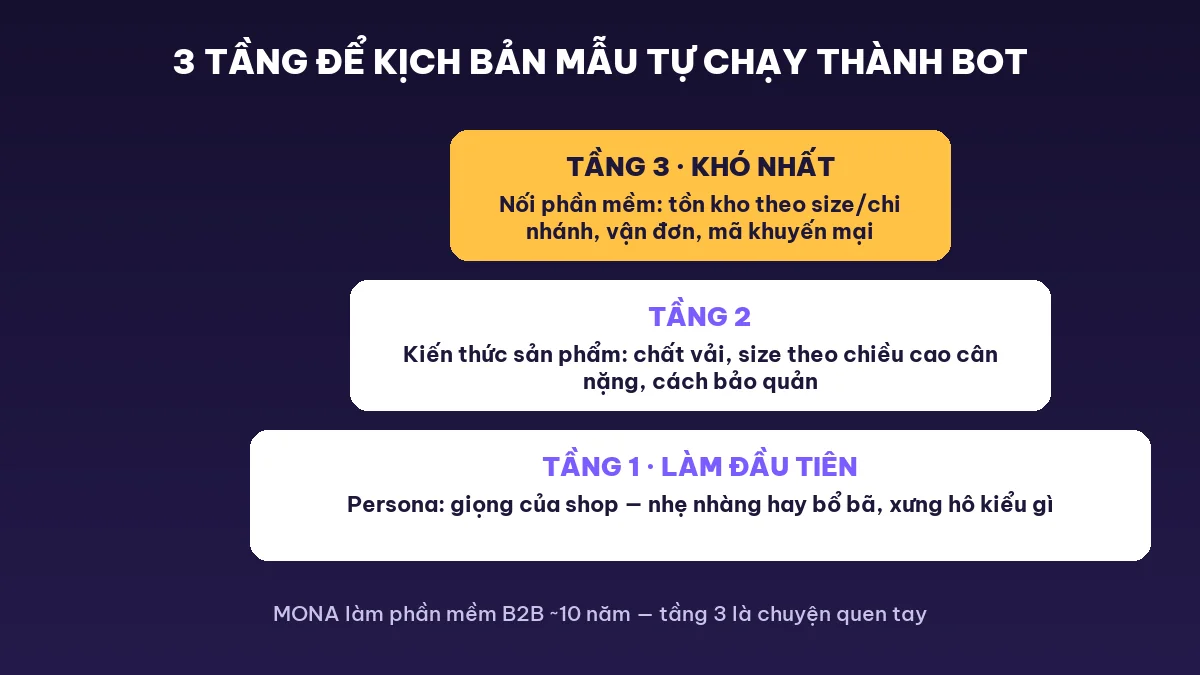
Every shop has its own way of talking, and regular customers love the shop for exactly that. Some shops call customers “mấy cưng,” some are gentle and proper, and some take the stance of “you don't have to buy, let me show you how to use it first,” selling without pressure so customers end up fond of them.
Persona is the first setup step: how it addresses people, how far it can joke, and whether it yields or holds the price with a difficult customer. Skip this step and the bot answers the right content, but regular customers read one line and know right away “this isn't my shop.” The goodwill customers give a shop takes years to build, so letting a bot speak off-voice for a few days is a real waste.
This is the easiest part to load. Say, what fabric this shirt is, whether it's machine washable, which size suits 1m60 and 55kg, how this item differs from that one: put it all in for the bot to learn, and it answers without gaps and without making things up. A new employee needs a whole month to learn that much, while the bot loads it once, remembers it forever, and remembers it identically in every chat.
Loading knowledge is also where you plant the shop's own signature. For example “this fabric is made only by us in Vietnam”: if that is true, teach the bot to say it at the right moment, and it becomes a selling edge repeated in every chat, regardless of whether a staff member remembers to mention it.
Many of you get put off when you hear “software connection,” because it touches technical work. The worry is fair: stock by size and by branch, promo codes for each campaign, shipping status at the carrier, how much stock is on TikTok and how much on Shopee. Each lives in a different piece of software, and having a bot read all of it is genuinely tangled work.
But this is exactly what separates a toy bot from one that does real work. A bot that can't read inventory is stuck when asked “is size L still available,” or worse, it answers carelessly and staff have to go apologize to the customer. MONA has built management software for businesses for over 10 years, and connecting data across many systems is routine work for us, so this hardest layer is no big deal for us. You take care of selling, and we take care of the tangled part.
With all 3 layers built, you unlock two money-making features that plain scripts can't do. First is messaging customers back within the 24-hour window: Messenger and Zalo officially allow messaging a customer again within 24 hours, and the bot uses this to send things like “yesterday you looked at that color, I just got in these pants that would suit you.” If a customer browsed for a long time but didn't buy, it automatically sends a 15% discount code to push the decision, aimed at exactly the person who is wavering, at the moment they still remember the item.
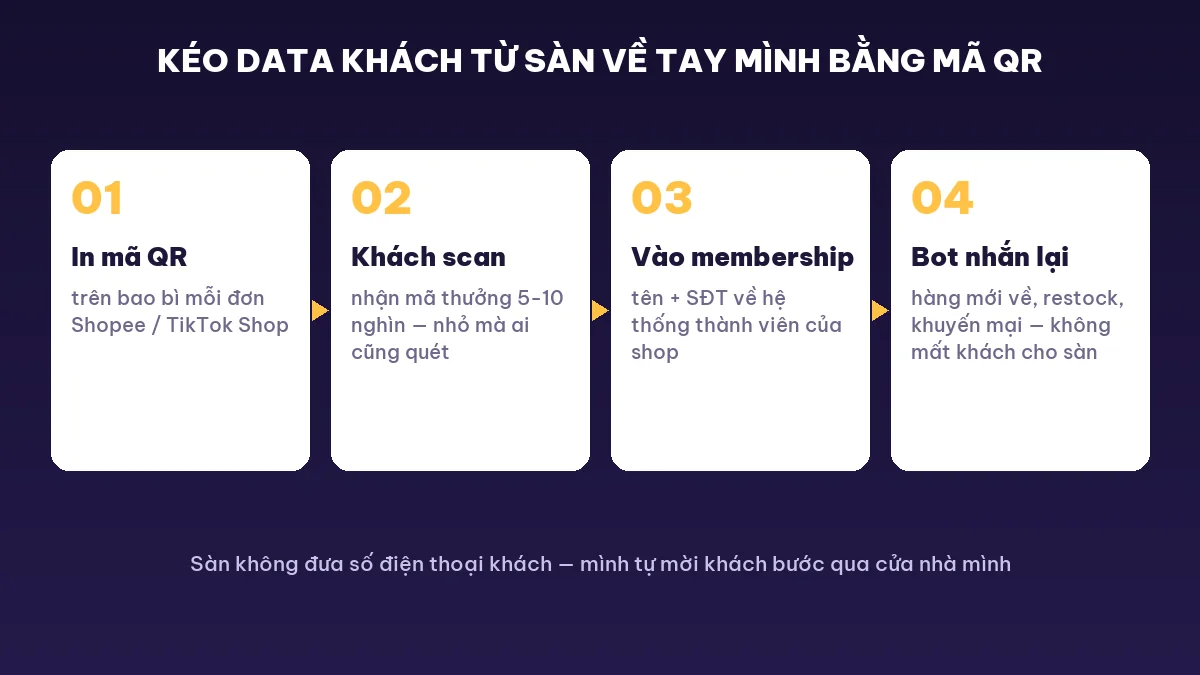
Second is pulling customer data from marketplaces. TikTok Shop and Shopee don't give the shop customer information. After selling on a marketplace for five or seven years, the day you leave you realize you don't even have a list of your own customers. The fix: print a QR code on the packaging, and customers scan it to the website for points or a reward code worth 5-10 thousand VND. It sounds small, but for a retail buyer, 5-10 thousand VND is worth scanning for. From there the customer enters the shop's membership system, and the bot can message them when new items arrive, when there are promotions, or when items are restocked, so marketplace customers gradually become your own customers.
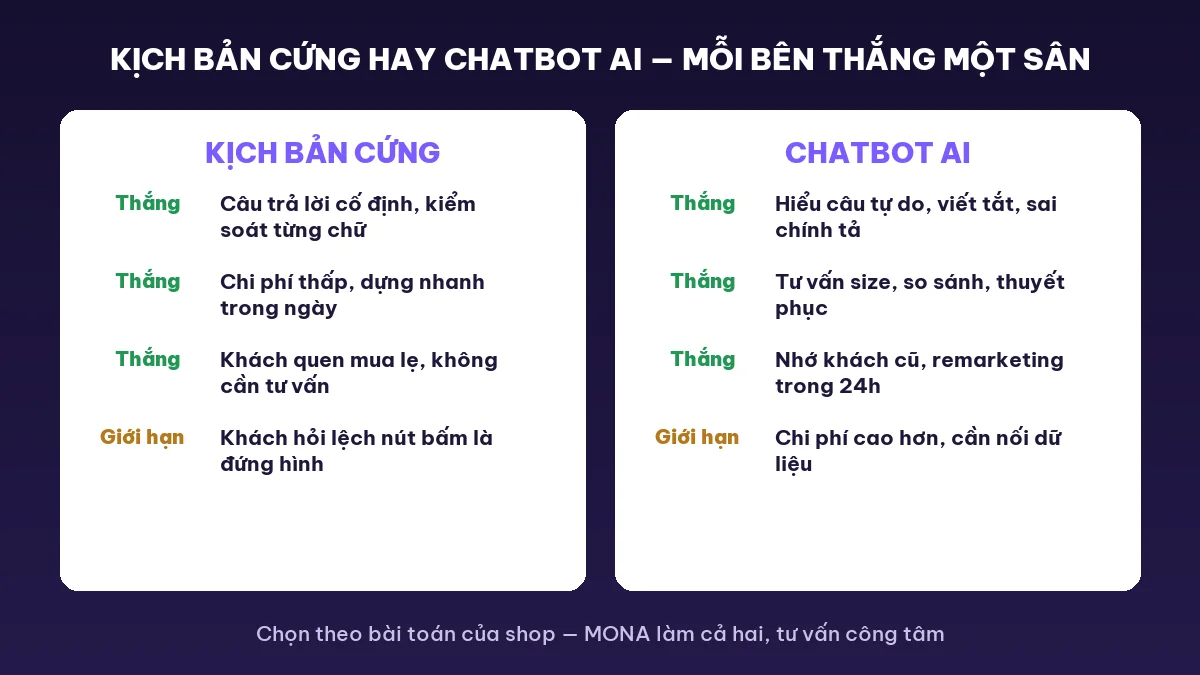
At this point, to be fair: MONA is a software company, not a course seller, so we'll say it plainly: not every shop needs an AI chatbot. Each of the two types wins in a different place. Look at your shop's real situation and choose, and don't let anyone scare you.
Fixed scripts (button menus, fixed answers) win on questions that repeat exactly and on places where mistakes are not allowed: listed prices, return policy, opening hours, address. They are cheap, take an afternoon to set up, and never improvise. For a small shop with a few dozen messages a day and questions that circle around price and shipping, fixed scripts plugged straight into the fanpage's auto-reply tool are enough. We say honestly that at that scale, paying for AI isn't worth it yet.
Chatbot AI wins on everything else, and everything else is the hard part. Customers don't type according to your script: they type “65kg bận size j z shop,” misspell words, and ask two things in one message. A fixed script hits a message that misses its keywords and freezes. You've probably seen a bot answer completely off-topic and the customer message “let me talk to a real person.” An AI sales chatbots reads the 12 sample chatbot scripts above as training material, then improvises for each customer: advising size from measurements, taking the edge off when a customer says it's expensive, and remembering what past customers bought.
The rule for choosing is simple. Few messages, repeated questions, thin budget: fixed scripts. Hundreds or thousands of messages a day, customers asking all kinds of things, and a need to close orders and remind past customers: an AI chatbot. Many shops do it the right way by starting with fixed scripts and upgrading to AI only when the page team is overwhelmed. The sample chatbot scripts you write today become the training material for tomorrow's AI bot, and nothing is thrown away.
By now you have two paths. Path one: take the 12 sample chatbot scripts above, spend one evening setting them into your fanpage's auto-reply, and it runs. We mean this honestly and not as a courtesy: if your shop gets a few dozen messages a day, that's enough, and you don't need to pay anyone a dong. Path two is for those running ads, with hundreds or thousands of messages a day and a page team of five or seven people while customers still wait, which means you already live in the very scenes we described at the start of this article, every day: let MONA build a complete automatic order-closing AI chatbot for your shop: set up the persona in the right voice, load product knowledge, connect inventory and shipping, and also switch on re-messaging past customers and Zalo order-closing chatbot if you sell heavily on Zalo.
MONA has built software since 2016, over 10 years, delivering over 14,000 projects. This order-closing bot alone is working live for about 30-40 shops: message their fanpages and you'll meet it at work, not a demo built to look good. Call 1900 636 648, say your shop name and the channels you sell on, and we'll schedule a demo within the week so you can see how the bot answers your own customers. If calling feels awkward, send it to info@themona.global, along with your fanpage link, and we'll look first and reply directly about your shop's situation.
Before downloading any sample to use, you should know how a chatbot script runs inside the machine, because only then can you adapt a sample to your shop. MONA calls this kind of script-running chatbot the “Situation” chatbot. The approach has been around for 20 years and still has its own place: where you need to control every word and answer quickly, briefly and exactly, it remains the right choice.
Inside the machine, it happens in 4 steps. Step one, the script file you write is loaded as a tree of situations: each branch is something customers often ask, such as price, shipping or size, with a prewritten answer. Step two, the customer messages or taps a button and the machine matches: it sees the word “giá” or “nhiêu tiền” and falls into the pricing branch. The machine doesn't guess or think, it only matches and returns the approved answer, so every word sent to the customer is in your hands. Step three, the machine fills personalization variables into the blanks: the customer's name from the chat account, the sizes in stock from inventory data if software is connected. With the same sample sentence, each customer receives a version with their own name.
Step four decides the experience: when a customer asks something outside every branch, the tree has no path, so the machine passes them to a real person along with the whole earlier chat so staff don't make the customer retell it from the start. A sample without a “talk to a staff member” branch is an incomplete sample, because however carefully a tree is written, it can't cover everything customers say.
They work on every chat channel: Messenger, Zalo OA, website live chat, and the chat windows on TikTok Shop and Shopee. The dialogue stays the same, and only the technical connection is adjusted per channel. If you want a system that chats on Zalo or automatically replies to fanpage messages, it also starts from this same set of scripts.
You can write the dialogue yourself: take the 12 samples in this article and adapt them to your products, because nobody understands a shop's customers better than you. The part to outsource is the technical layer: connecting the bot to inventory, shipping and the customer list so it reports real numbers and remembers past customers. That part needs a software company that knows the craft.
A sample script is prewritten dialogue for each situation: when the customer asks the expected question, the machine gives the right answer. An AI chatbot uses those same scripts as training material, then improvises when customers type off-script, misspell, or ask several things at once. The two complement each other: the script is the textbook, and AI is the student who knows how to apply it.
About 10-12 sample chatbot scripts like the set in this article cover most of a retail shop's repeated conversations. After that, review a month of chat history, and if there is a question customers keep asking that has no template, write one. Growing your script set around real customers matters more than writing a huge number up front.
No, and you shouldn't set that goal. The bot handles the repetitive part: late-night replies, quoting prices, checking orders, reminding customers of appointments, which is the part that eats the most hours. Real people keep the parts that need judgment: an upset customer, a large wholesale order, a complicated return. The bot filters and passes the right case along with the chat history, so one person can manage a customer load that once needed a whole team. Using sample chatbot scripts properly means letting the machine take the heavy part off people, not replacing all of them.
However good a script is, it still needs a bot smart enough to run it. See MONA's Gấu Cười AI chatbot working live to picture how the 12 samples above operate when there is a language brain behind them.

CEO & Founder · The MONA
The founder of The MONA built a service company of 60+ staff with 14,000+ projects delivered. Khánh Hùng shares his thinking on building self-running systems, automating a business, and the real lessons behind MONA's projects.
 452




Professional website
design services
Own a website with a beautiful, 100% exclusive design and a lifetime warranty, with the ability
to expand features flexibly as your business grows, starting today!






 MONA will never sell your information or send you spam


 MONA will never sell your information or send you spam
