
 MONA OS 2.0


 Tự động hoá doanh nghiệp
 Cẩm nang SEO
 Digital Marketing
 Kinh nghiệm thiết kế website
 Hạ Tầng Server
 Giáo dục


 VI
VI
 EN
EN
















Message us on
Zalo Official


 ProductsNew

 ProductsProducts
 Mới ra mắtKHA AI 2027App tự edit video, tự đăng mọi mạng xã hội, 2 phút mỗi ngày










 Website designLooks good and wins customers over.
SEO servicesBrings in customers searching for exactly what you sell.
Website designLooks good and wins customers over.
SEO servicesBrings in customers searching for exactly what you sell.
 Tư vấn digital marketingKéo khách từ nhiều kênh, đo bằng số thật.
Corporate video productionVideos introducing your company, factory and team.
Tư vấn digital marketingKéo khách từ nhiều kênh, đo bằng số thật.
Corporate video productionVideos introducing your company, factory and team.
 NewAI video productionCompany story films made with AI.
 Custom software developmentCRM, ERP and HRM built for your business.
 Viết AI Agent theo yêu cầuĐặt riêng một trợ lý AI cho đúng việc của mình.
 Tư vấn chuyển đổi AIĐưa AI vào vận hành của cả công ty.
NewMONA LMSManagement for centers and schools.
MONA SkillHubInternal training for company staff.
Tư vấn chuyển đổi AIĐưa AI vào vận hành của cả công ty.
NewMONA LMSManagement for centers and schools.
MONA SkillHubInternal training for company staff.
 NHTQ systemEnd-to-end China–Vietnam shipping operations.
MONA JMSManagement for gold, diamond and pawn shops.
NHTQ systemEnd-to-end China–Vietnam shipping operations.
MONA JMSManagement for gold, diamond and pawn shops.
 MONA E-LearningA website with every feature you need to sell courses.
 How to sell online courses (course)More than 30 free lessons on selling courses on autopilot.
 MONA Cloudmonacloud.vnServers to get your apps and websites running.
 MONA Basemonabase.vnPostgres database, sign-in and file storage.
 MONA Mailmonamail.vnSend OTP, order and invoice emails from your software.
 MONA Paymonapay.vnAccept bank transfers via VietQR and notify your software when the money arrives.
 MONA eInvoiceComing soonIssue e-invoices that meet tax standards.
Gấu CườiTrả lời khách 24/7 trên web, Fanpage, Zalo và thu lead cho sale.
MONA eInvoiceComing soonIssue e-invoices that meet tax standards.
Gấu CườiTrả lời khách 24/7 trên web, Fanpage, Zalo và thu lead cho sale.
 Gấu TeleSalesGọi điện tư vấn, chăm khách như tổng đài viên thật.
Dê CườiTư vấn và chốt đơn cho shop ngay trong khung chat.
Gấu WebmasterNhắn nhóm Zalo là website được sửa xong.
Gấu TeleSalesGọi điện tư vấn, chăm khách như tổng đài viên thật.
Dê CườiTư vấn và chốt đơn cho shop ngay trong khung chat.
Gấu WebmasterNhắn nhóm Zalo là website được sửa xong.
 Gấu Pháp ChếSoạn hợp đồng, rà điều khoản trong vài phút.
 Gấu Báo GiáLên báo giá đúng mẫu và gửi khách ngay.
 AI chăm sóc khách hàngTheo dõi và giữ chân khách hàng cũ.
 Gấu Tuyển DụngLọc hồ sơ, hẹn lịch, phỏng vấn ứng viên.
 Mới ra mắt
KHA AI 2027
Xây kênh chuyên gia 2 phút mỗi ngày
Quay bằng điện thoại, AI tự edit video, tự đăng lên 16 nền tảng và tự trả lời bình luận, tin nhắn.
324.230lượt xem trên kênh CEO MONA sau 18 ngày
Mới ra mắt
KHA AI 2027
Xây kênh chuyên gia 2 phút mỗi ngày
Quay bằng điện thoại, AI tự edit video, tự đăng lên 16 nền tảng và tự trả lời bình luận, tin nhắn.
324.230lượt xem trên kênh CEO MONA sau 18 ngày
 Anh Khánh HùngCEO MONA đang dùng mỗi ngày
Xem app làm được gì
Anh Khánh HùngCEO MONA đang dùng mỗi ngày
Xem app làm được gì
 AI
Gấu Cười MONA ĐANG TỰ XÀITrả lời khách 24/7 trên website, Zalo OA, Messenger và thu lead về cho sale.
Dê CườiChốt đơn bán lẻ và sàn: Shopee, TikTok Shop, web. Chăm cả khách sỉ, đại lý.
Gấu WebmasterCập nhật nội dung, tối ưu SEO website mỗi ngày.
Gấu TeleSalesGọi điện tư vấn, chăm khách như tổng đài viên thật.
Gấu Tuyển DụngLọc hồ sơ, hẹn lịch, phỏng vấn ứng viên tự động.
AI chăm sóc khách hàngGiữ khách cũ, cứu lead đã rớt cho phòng kinh doanh.
Gấu Pháp ChếSoạn hợp đồng, rà điều khoản trong vài phút.
Gấu Báo GiáLên báo giá đúng mẫu, gửi khách ngay khi có yêu cầu.
AI
Gấu Cười MONA ĐANG TỰ XÀITrả lời khách 24/7 trên website, Zalo OA, Messenger và thu lead về cho sale.
Dê CườiChốt đơn bán lẻ và sàn: Shopee, TikTok Shop, web. Chăm cả khách sỉ, đại lý.
Gấu WebmasterCập nhật nội dung, tối ưu SEO website mỗi ngày.
Gấu TeleSalesGọi điện tư vấn, chăm khách như tổng đài viên thật.
Gấu Tuyển DụngLọc hồ sơ, hẹn lịch, phỏng vấn ứng viên tự động.
AI chăm sóc khách hàngGiữ khách cũ, cứu lead đã rớt cho phòng kinh doanh.
Gấu Pháp ChếSoạn hợp đồng, rà điều khoản trong vài phút.
Gấu Báo GiáLên báo giá đúng mẫu, gửi khách ngay khi có yêu cầu.
 Chuyển đổi AI toàn phầnGiải pháp tổng cho doanh nghiệp, 3 lớp triển khai.
 Viết AI Agent theo yêu cầuĐặt riêng một con AI gánh đúng nghiệp vụ của bạn.
 Custom softwareCRM, ERP and HRM with built-in AI automation.
 SEO & AEO thời đại AIĐược Google lẫn AI trích dẫn, không chỉ xếp hạng.
 Kiến thức AI cho doanh nghiệpBài phân tích, hướng dẫn ứng dụng AI vào vận hành.
 Free AI courses
 AI tools at work
App mới · KHA AI 2027
Xây kênh 2 phút mỗi ngày
AI tự edit video, tự đăng mọi mạng xã hội
Free consultation, 8am–10pm every day
AI tools at work
App mới · KHA AI 2027
Xây kênh 2 phút mỗi ngày
AI tự edit video, tự đăng mọi mạng xã hội
Free consultation, 8am–10pm every day

18 March, 2023
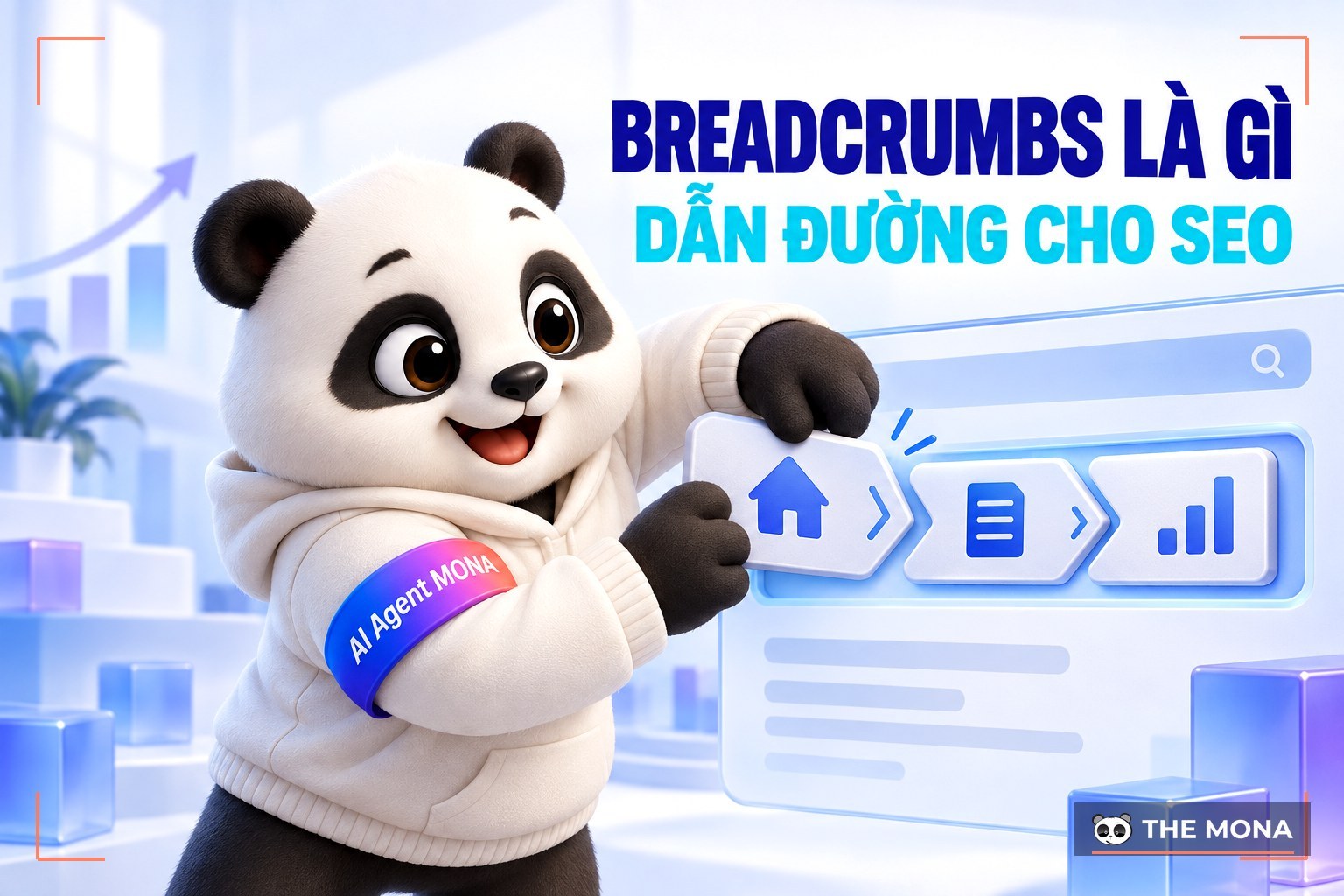
Have you ever landed on a website, felt overwhelmed and couldn't find what you were looking for? And do you want your own website to be friendly to both users and search engines?
If so, breadcrumbs are the solution. They don't just help users see where they are on the page; they make the experience smoother and help lift your site's SEO. So what exactly do breadcrumbs do for SEO? And how do you use them well? Let's MONA Media find out below.
A breadcrumb (also called a breadcrumb trail or breadcrumb navigation) is a small horizontal navigation bar that tells you exactly where you are on a website. Think of it as a set of road signs that guide you from the home page to your current spot.
Breadcrumbs usually sit at the top of each page, just below the main navigation bar and above the content heading. This spot is easy to see and quick to use when needed.
For example, if you open the blog on monamedia.co and read any news article, the breadcrumb looks like this:
Home > News > What is direct traffic? How to measure and optimize direct traffic
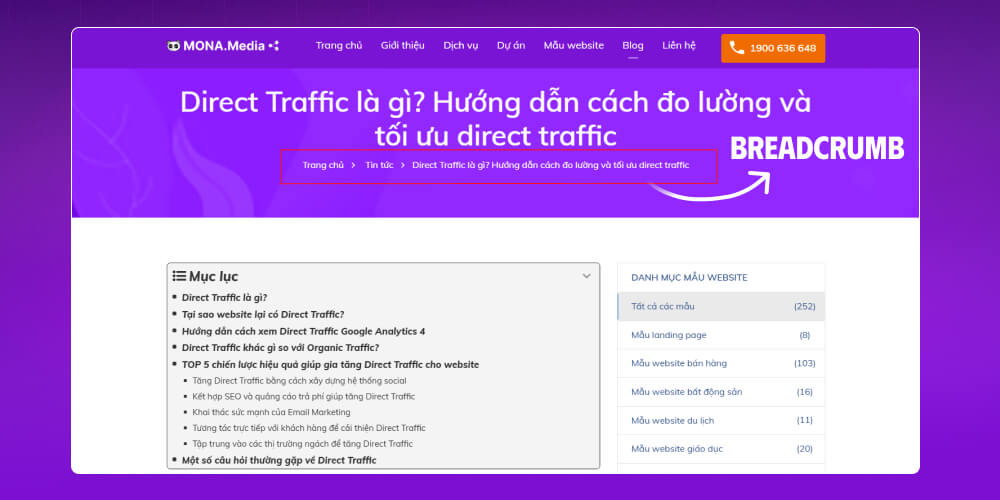
With a breadcrumb, you instantly know which blog post you are reading and can go back to a service page, or even the home page, with a single click.
There are 3 common types of web breadcrumbs:
Each type of breadcrumb navigation serves a different purpose, so before designing your navigation path, decide the main purpose and pick the matching type.
Of all the breadcrumb types in SEO, location breadcrumbs are the most common, and you have surely seen plenty of them while browsing. This type of navigation shows you where you are on a website within a specific hierarchy.
To picture it, imagine you are on an e-commerce site looking for a pair of sports shoes. The breadcrumb looks like this:
Home > Footwear > Sports shoes > Adidas running shoes
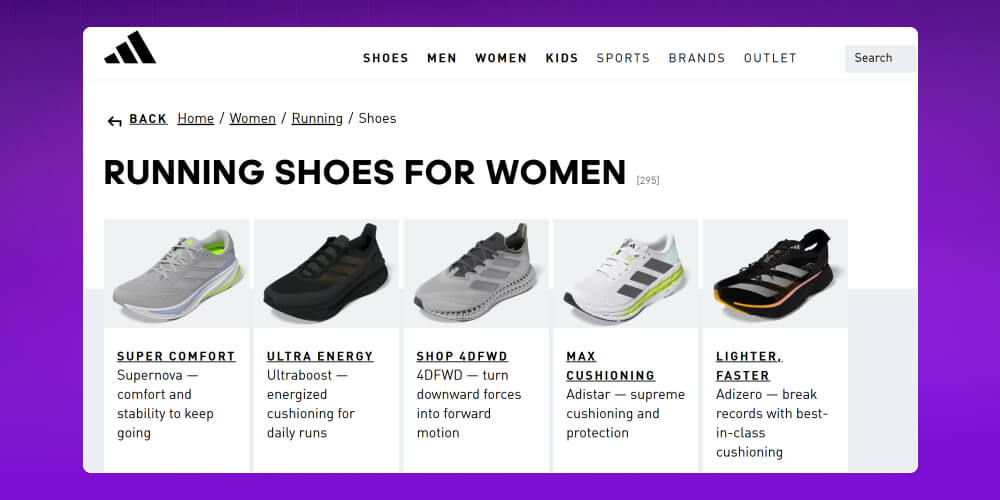
Thanks to this breadcrumb, you know right away that you are viewing the “Adidas running shoes” product. If you want to go back to a broader category such as “Sports shoes” or “Footwear,” just click the matching link.
Key advantages of location-based breadcrumb schema:
Among breadcrumb navigation types, attribute-based breadcrumbs are quite familiar, especially on online stores with many products that vary in style and features.
For example, if you are shopping for a laptop, the breadcrumb might look like this:
Home > Laptops > Acer laptops > Acer i3, i5 laptops (gray)
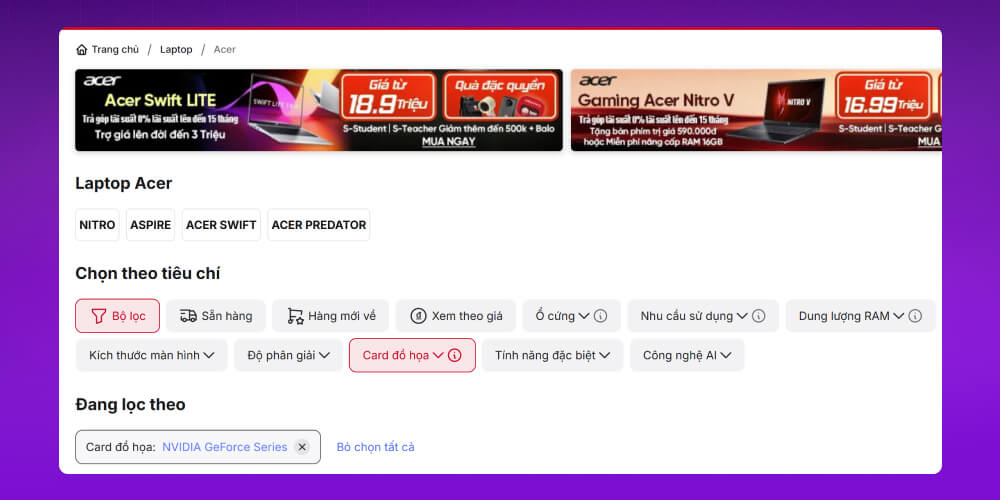
Advantages of using Schema Breadcrumbs attribute-based ones:
Besides location-based and attribute-based breadcrumbs, history-based breadcrumbs work a little differently.
Path breadcrumbs simply show the pages you visited just before, much like the “Back” button in a browser. They don't follow the site's structure; they follow only your browsing behavior and history.
For example, if you are viewing a product and keep clicking through different versions, the breadcrumb looks like this:
Home > Category > Product A > Product A page > Product A page (version 2)
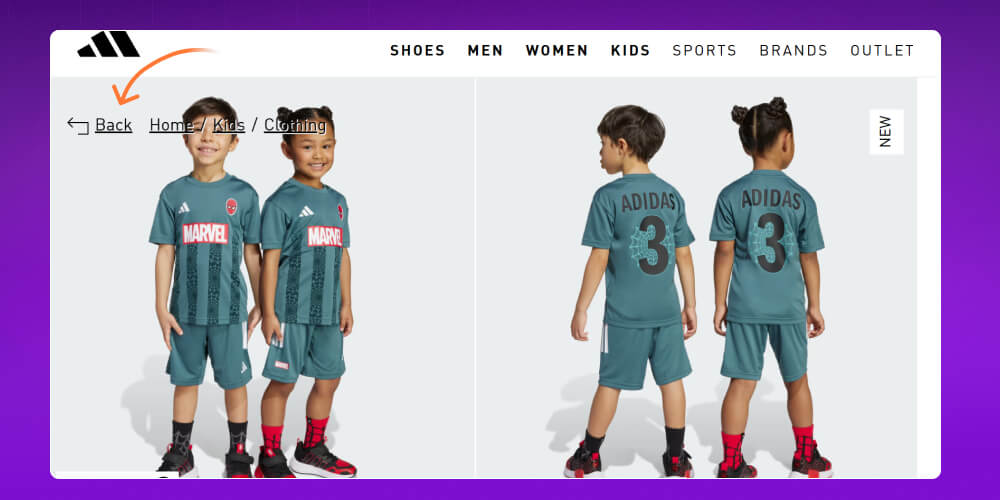
You can jump back to earlier pages by clicking links in this breadcrumb, just like a back button.
Advantages of history-based breadcrumb navigation:
A breadcrumb bar plays an important role in SEO website such as making the user experience smoother and helping Google quickly understand your site's structure and the context of each page. Specifically:

How do breadcrumbs help SEO by improving user experience?
Helps users see where they are and quickly find the information they want.
Lowers bounce rate thanks to clear navigation.
Increases time on site and improves user engagement time on the page.
Breadcrumbs also help your overall website SEO strategy such as:
A breadcrumb bar helps search engine bots crawl data and index pages faster.
Helps Google understand your site structure, content hierarchy and the relationships between pages.
Breadcrumbs can also appear in search results as rich snippets, drawing users to click through to your site.
Using breadcrumb navigation gives your site natural, balanced and effective internal links, which help distribute authority between pages and improve rankings. It is a small element, but breadcrumbs bring great benefits to SEO strategy your site overall.

Breadcrumbs are a small navigation tool but an extremely useful one, especially for websites with lots of content or a layered structure.

So when exactly should you use breadcrumbs to get the best results?
Websites with a hierarchical structure or many categories: When a site has several levels of content (for example Home > Category > Product), breadcrumbs make it easy for users to navigate and go back a level.
E-commerce websites: On stores with many categories and products, breadcrumbs help shoppers navigate and search faster.
Websites with complex content or many sub-pages: Breadcrumbs keep users from getting “lost” in article series, guides or multi-level documentation.
Users arriving from external sources: When users come from Google, social media or a shared link, breadcrumbs help them see quickly where they are and discover more related content.
To add breadcrumbs to your website, you can use Yoast SEO (for website wordpress) or insert a piece of code (for other CMS websites). You can follow the detailed steps here:
Suppose you write a snippet of code like the one below:
|
<ol class=”breadcrumbs”> <li> <a href=”http://www.example.com/books”>Books</a> </li> <li> <a href=”http://www.example.com/sciencefiction”>Science Fiction</a> </li> <li> <a href=”http://www.example.com/books/sciencefiction/awardwinners”>Award Winners</a> </li> <ol> |
You will get a breadcrumb like this:
| Books › Science Fiction › Award Winners |
If you want to add breadcrumbs to a WordPress website to improve user experience and support SEO, follow these steps.
Step 1: Enable breadcrumbs in Yoast SEO
First, log in to the WordPress admin, then install and activate the Yoast SEO plugin. Next, go to SEO → Search Appearance → Breadcrumbs → Enabled
Then switch the toggle to On to enable the feature, and adjust the breadcrumb settings as you like (for example, whether to show categories or tags).
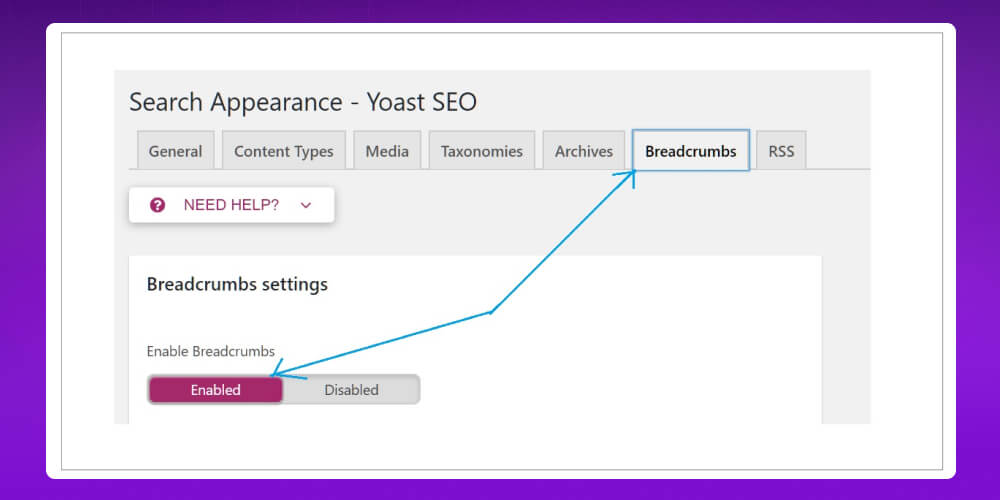
Step 2: Add the breadcrumb code to your theme (if the theme doesn't support it automatically)
Many modern themes support breadcrumbs automatically. If yours doesn't, just add the following code to the header.php file, or another suitable file in your theme:
<?php
if ( function_exists(‘yoast_breadcrumb’) ) {
yoast_breadcrumb( ‘<p id=”breadcrumbs”>’,'</p>’ );
}
?>
Option 1: Add a JSON-LD code snippet
|
<script type=”application/ld+json”> { “@context”: “http://schema.org”, “@type”: “BreadcrumbList”, “itemListElement”: [{ “@type”: “ListItem”, “position”: 1, “name”: “Books”, “item”: “https://example.com/books” }, { “@type”: “ListItem”, “position”: 2, “name”: “Science Fiction”, “item”: “https://example.com/sciencefiction” }, { “@type”: “ListItem”, “position”: 3, “name”: “Award Winners”, “item”: “https://example.com/books/sciencefiction/awardwinners” }] } </script> |
Option 2: Convert the breadcrumbs on your site to RDFa
|
<ol vocab=”http://schema.org/” typeof=”BreadcrumbList”> <li property=”itemListElement” typeof=”ListItem”> <a property=”item” typeof=”WebPage” href=”https://example.com/books”> <span property=”name”>Books</span></a> <meta property=”position” content=”1″> </li> › <li property=”itemListElement” typeof=”ListItem”> <a property=”item” typeof=”WebPage” href=”https://example.com/books/sciencefiction”> <span property=”name”>Science Fiction</span></a> <meta property=”position” content=”2″> </li> › <li property=”itemListElement” typeof=”ListItem”> <a property=”item” typeof=”WebPage” href=”https://example.com/books/sciencefiction/awardwinnders”> <span property=”name”>Award Winners</span></a> <meta property=”position” content=”3″> </li> </ol> |
Option 3: Convert the breadcrumbs on your site to Microdata:
|
<ol itemscope itemtype=”http://schema.org/BreadcrumbList”> <li itemprop=”itemListElement” itemscope itemtype=”http://schema.org/ListItem”> <a itemtype=”http://schema.org/Thing” itemprop=”item” href=”https://example.com/books”> <span itemprop=”name”>Books</span></a> <meta itemprop=”position” content=”1″ /> </li> › <li itemprop=”itemListElement” itemscope itemtype=”http://schema.org/ListItem”> <a itemtype=”http://schema.org/Thing” itemprop=”item” href=”https://example.com/books/sciencefiction”> <span itemprop=”name”>Science Fiction</span></a> <meta itemprop=”position” content=”2″ /> </li> › <li itemprop=”itemListElement” itemscope itemtype=”http://schema.org/ListItem”> <a itemtype=”http://schema.org/Thing” itemprop=”item” href=”https://example.com/books/sciencefiction/ancillaryjustice”> <span itemprop=”name”>Ancillary Justice</span></a> <meta itemprop=”position” content=”3″ /> </li> </ol> |
With what we've covered, you now know why breadcrumb navigation matters for website SEO. But how do you optimize breadcrumbs most effectively? Here are simple ways to optimize breadcrumbs for SEO that you can apply right away.

The first step in optimizing breadcrumbs is to design the navigation from the user's point of view:
Design breadcrumbs from the user's perspective: Make the navigation bar clear, intuitive and easy to follow, without clutter.
Don't stuff keywords: Keywords should appear naturally and relate directly to the content. Don't stuff keywords, which looks off-putting and hurts the user experience.
Simple and short: Avoid too many links or complicated symbols that leave users disoriented.

A breadcrumb works best when it is easy to see and fits the overall design:
Ideal position: Usually directly below the main navigation bar or above the page title.
Consistent, clear design: Use simple separators such as >, / or | so the breadcrumb is easy to recognize and looks good.
Displays well on mobile: Check the breadcrumb carefully on mobile devices so the experience stays smooth.
The breadcrumb structure should be clear so that it supports your website SEO plan:
Standard structure: Use a simple structure, for example: Home > Category > Page title.
Related keywords: Work the main keyword into the breadcrumb skillfully, but don't overdo it.
Don't link to the current page: A breadcrumb doesn't need a link to the page the user is already viewing.
Limit the breadcrumb length: The shorter the breadcrumb, the easier it is for users to navigate and follow.

To optimize breadcrumbs for SEO more effectively, you can combine them with schema markup.
Use schema markup: BreadcrumbList schema markup helps Google understand your breadcrumb and show it as a rich snippet in search results.
Check your schema regularly: Use Google's structured data testing tool to make sure the schema markup works and has no errors.
Track and measure results: Track clicks on the breadcrumb to see how well it performs and adjust in time.
Website breadcrumbs don't just improve user experience; they also help Google understand your site's content structure. To create and check breadcrumb schema to SEO standards, follow the steps below.
Before you set it up, make sure your website meets the following requirements so it has a chance of displaying correctly in search results (SERPs).
Google's webmaster guidelines
Structured data guidelines
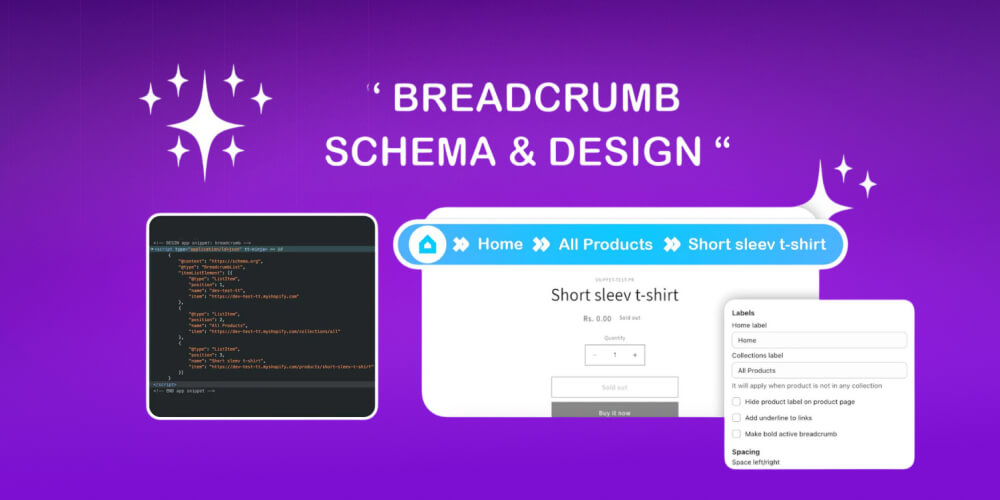
Next, you can create breadcrumbs in one of three common ways:
Option 1 – Add a JSON-LD snippet: This is the method Google recommends. JSON-LD is a block of structured data placed in the <head> section of the page.
Option 2 – Convert HTML breadcrumbs to RDFa: Insert RDFa-standard attributes directly into the HTML. Usually used when the breadcrumb already exists in the interface.
Option 3 – Convert HTML breadcrumbs to Microdata: Similar to RDFa, but simpler, and it uses its own attributes for Google to recognize.
Once your breadcrumb is set up, you can check it in these ways:
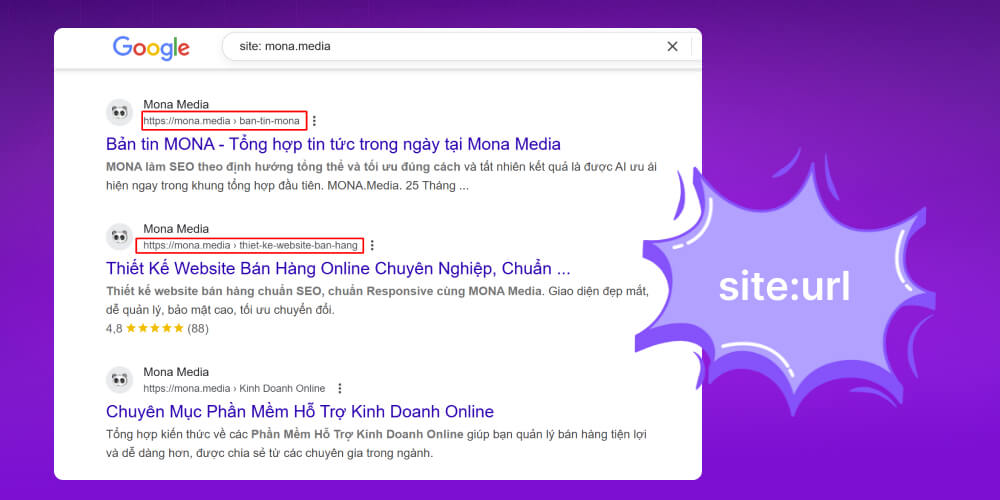
Search on Google with the syntax: site:tenmiencuaban.com to see whether the breadcrumb appears in the search results
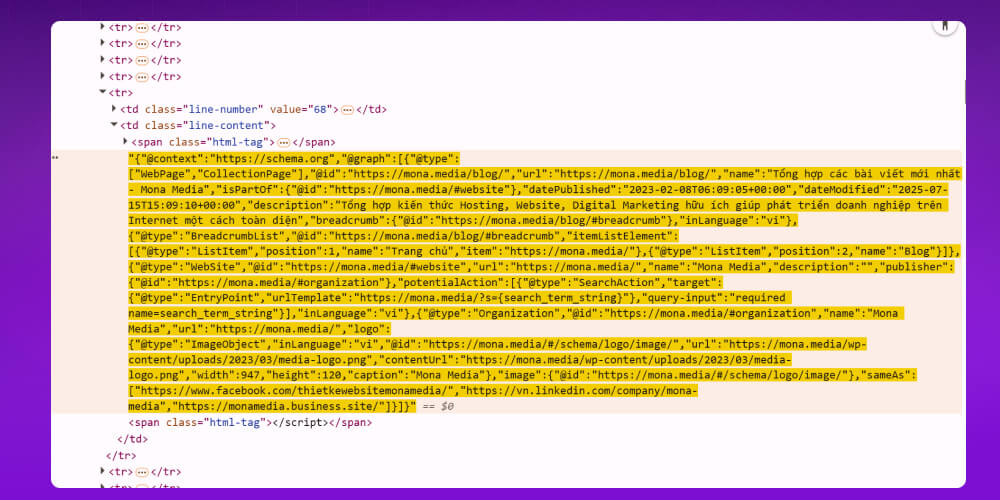
Open the page source (view source) and find the breadcrumb code to check its position and content.
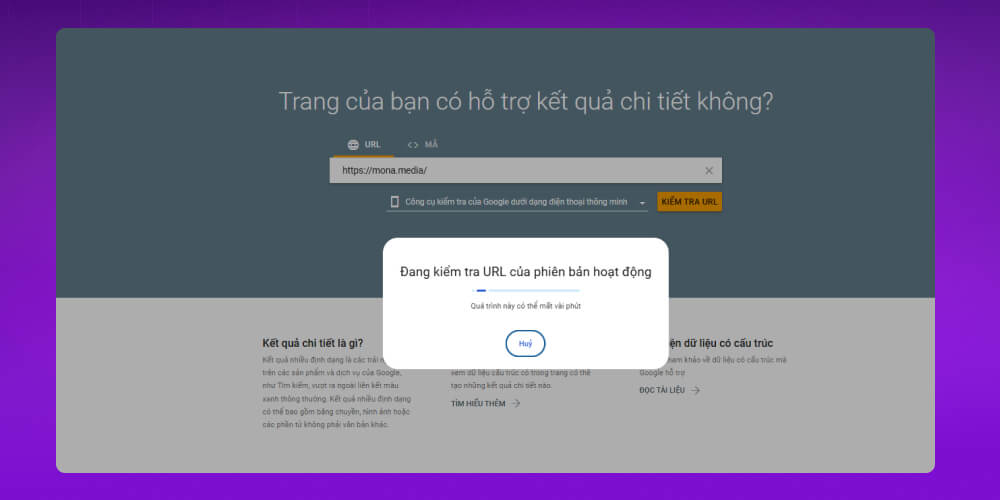
Use the Google Rich Results Test tool to check that your structured data is valid.
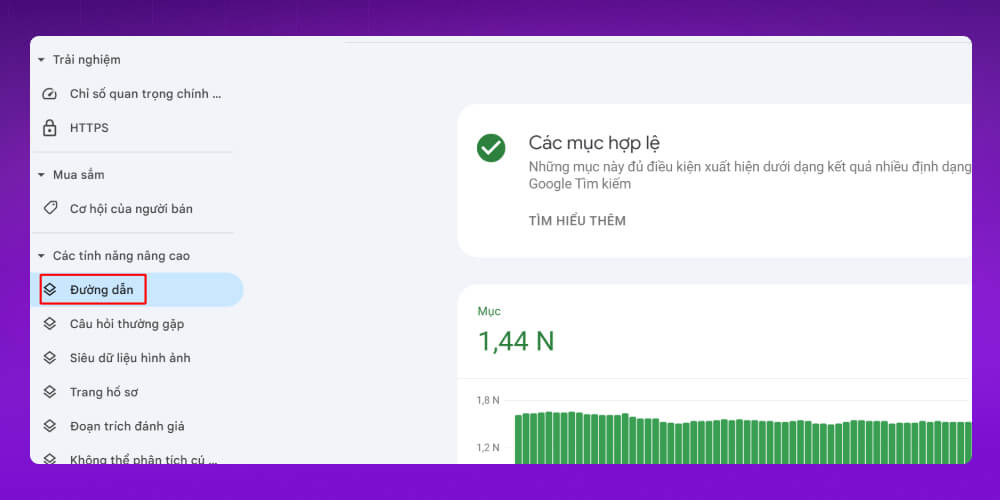
Check breadcrumbs quickly in Search Console
A breadcrumb is a very useful secondary navigation tool, but it backfires when used the wrong way.

Here are important points for using website breadcrumbs effectively and in a user-friendly way:
Don't replace the main menu: A breadcrumb only supports navigation; it is not a substitute for the top menu.
Sensible position: Place it directly below the main navigation bar, above the page title.
Keep the design tidy: Compact, taking little space, no clutter.
Use one separator throughout: Use “>”, “/” or “|” and keep it the same across the whole site.
Not needed on simple sites: A website with only 1 to 2 levels of content doesn't need breadcrumbs.
Don't link the current page: Users are already on that page, so there is no need to link back to it.
Write naturally, avoid keyword stuffing: Put clarity first and avoid over-optimizing for SEO.
Show only one breadcrumb: Avoid displaying several breadcrumbs on the same page.
Optimize for mobile: A breadcrumb should be easy to see and easy to tap on mobile devices.
Breadcrumbs are a great tool, a technical SEO technique that helps Google rate your site more highly and helps users get around it better. MONA Media hopes the information above has helped you understand breadcrumbs what they are and how to optimize breadcrumbs for SEO effectively. If you need full-scope SEO for your website, let us work with you to reach the top of Google. Contact us today for a more detailed consultation and to receive SEO price list .

CEO & Founder · The MONA
Founder of The MONA, who built a services company of 200+ staff with 14,000+ projects delivered. Khánh Hùng shares how he thinks about building systems that run themselves, automating a business, and the real lessons from delivering projects at MONA.
 1,5K
1,5K




Professional website
design services
Own a website with a beautiful, 100% exclusive design and a lifetime warranty, with the ability
to expand features flexibly as your business grows, starting today!








 MONA will never sell your information or send you spam
MONA will never sell your information or send you spam
MONA will never sell your information or send you spam


 MONA will never sell your information or send you spam