
 MONA OS 2.0
 Partner with MONA


 Tự động hoá doanh nghiệp
 Cẩm nang SEO
 Digital Marketing
 Kinh nghiệm thiết kế website
 Hạ Tầng Server
 Giáo dục


 VI
 EN













Message us on
Zalo Official


 ProductsNew

 ProductsProducts
 Mới ra mắtKHA AI 2027App tự edit video, tự đăng mọi mạng xã hội, 2 phút mỗi ngày










 Website designLooks good and wins customers over.
SEO servicesBrings in customers searching for exactly what you sell.
 Tư vấn digital marketingKéo khách từ nhiều kênh, đo bằng số thật.
Corporate video productionVideos introducing your company, factory and team.
 NewAI video productionCompany story films made with AI.
 Custom software developmentCRM, ERP and HRM built for your business.
 Viết AI Agent theo yêu cầuĐặt riêng một trợ lý AI cho đúng việc của mình.
 Tư vấn chuyển đổi AIĐưa AI vào vận hành của cả công ty.
NewMONA LMSManagement for centers and schools.
MONA SkillHubInternal training for company staff.
 NHTQ systemEnd-to-end China–Vietnam shipping operations.
MONA JMSManagement for gold, diamond and pawn shops.
 MONA E-LearningA website with every feature you need to sell courses.
 How to sell online courses (course)More than 30 free lessons on selling courses on autopilot.
 MONA Cloudmonacloud.vnServers to get your apps and websites running.
 MONA Basemonabase.vnPostgres database, sign-in and file storage.
 MONA Mailmonamail.vnSend OTP, order and invoice emails from your software.
 MONA Paymonapay.vnAccept bank transfers via VietQR and notify your software when the money arrives.
 MONA eInvoiceComing soonIssue e-invoices that meet tax standards.
Gấu CườiTrả lời khách 24/7 trên web, Fanpage, Zalo và thu lead cho sale.
 Gấu TeleSalesGọi điện tư vấn, chăm khách như tổng đài viên thật.
Dê CườiTư vấn và chốt đơn cho shop ngay trong khung chat.
Gấu WebmasterNhắn nhóm Zalo là website được sửa xong.
 Gấu Pháp ChếSoạn hợp đồng, rà điều khoản trong vài phút.
 Gấu Báo GiáLên báo giá đúng mẫu và gửi khách ngay.
 AI chăm sóc khách hàngTheo dõi và giữ chân khách hàng cũ.
 Gấu Tuyển DụngLọc hồ sơ, hẹn lịch, phỏng vấn ứng viên.
 Mới ra mắt
KHA AI 2027
Xây kênh chuyên gia 2 phút mỗi ngày
Quay bằng điện thoại, AI tự edit video, tự đăng lên 16 nền tảng và tự trả lời bình luận, tin nhắn.
882.681lượt xem trên kênh CEO MONA sau 36 ngày
 Anh Khánh HùngCEO MONA đang dùng mỗi ngày
Xem app làm được gì
 AI
Gấu Cười MONA ĐANG TỰ XÀITrả lời khách 24/7 trên website, Zalo OA, Messenger và thu lead về cho sale.
Dê CườiChốt đơn bán lẻ và sàn: Shopee, TikTok Shop, web. Chăm cả khách sỉ, đại lý.
Gấu WebmasterCập nhật nội dung, tối ưu SEO website mỗi ngày.
Gấu TeleSalesGọi điện tư vấn, chăm khách như tổng đài viên thật.
Gấu Tuyển DụngLọc hồ sơ, hẹn lịch, phỏng vấn ứng viên tự động.
AI chăm sóc khách hàngGiữ khách cũ, cứu lead đã rớt cho phòng kinh doanh.
Gấu Pháp ChếSoạn hợp đồng, rà điều khoản trong vài phút.
Gấu Báo GiáLên báo giá đúng mẫu, gửi khách ngay khi có yêu cầu.
 Chuyển đổi AI toàn phầnGiải pháp tổng cho doanh nghiệp, 3 lớp triển khai.
 Viết AI Agent theo yêu cầuĐặt riêng một con AI gánh đúng nghiệp vụ của bạn.
 Custom softwareCRM, ERP and HRM with built-in AI automation.
 SEO & AEO thời đại AIĐược Google lẫn AI trích dẫn, không chỉ xếp hạng.
 Kiến thức AI cho doanh nghiệpBài phân tích, hướng dẫn ứng dụng AI vào vận hành.
 Free AI courses
 AI tools at work
App mới · KHA AI 2027
Xây kênh 2 phút mỗi ngày
AI tự edit video, tự đăng mọi mạng xã hội
Free consultation, 8am–10pm every day

25 July, 2026
🎓 Free course: Claude Code basics, lesson 8/10. The whole course is in the category Free AI courses package from MONA?
After this lesson, you'll know how to plug extra “outside tools” into Claude Code through the MCP standard: have the machine control the Chrome browser, read and label a Gmail inbox, and work with task-management software. Just as important, you'll know the token cost of each item you plug in, and the experienced users' strategy of “try with MCP, lock in with a skill”.
In lesson 7 you learned skills: SOPs you write for the machine. MCP (Model Context Protocol) is a skill that someone else has written for you, usually by the team behind a major piece of software. It's a connection standard introduced by Anthropic so outside software can “reach a hand out” to the AI: plug one in, and your machine suddenly knows a new set of actions, like hiring an employee who already knows a certain software well.
Installation is surprisingly easy. Each MCP comes with a short JSON config snippet (find it by searching “software name + MCP server”, or browse directories like mcpservers.org). Paste that snippet into Claude Code with a line like “install this MCP into my workspace”, and the machine handles the rest. For services that need a login (Gmail, task management software and so on), it walks you through getting an API key or clicking an allow-access button, just like issuing an access badge to a new employee. Remember the rule from lesson 5: an API key is the key to the safe. Don't paste it around, and don't show it in screen recordings.
A safety note, stated plainly: MCP directories on the internet are third-party stuff, with uneven quality and safety. Prefer official MCPs from the software's own developer or from Anthropic; obscure ones with few stars and few users shouldn't be plugged into a machine holding business data.
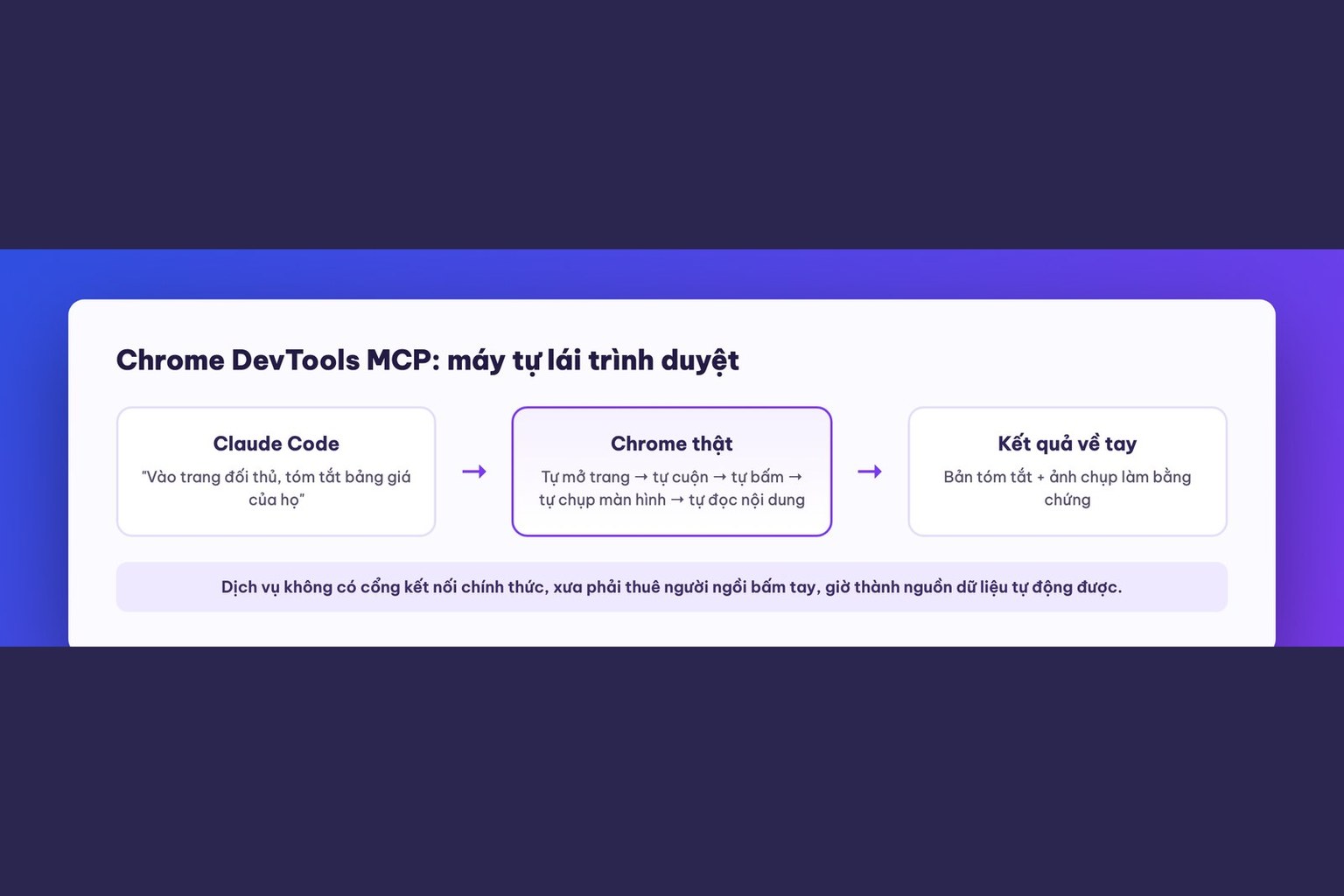
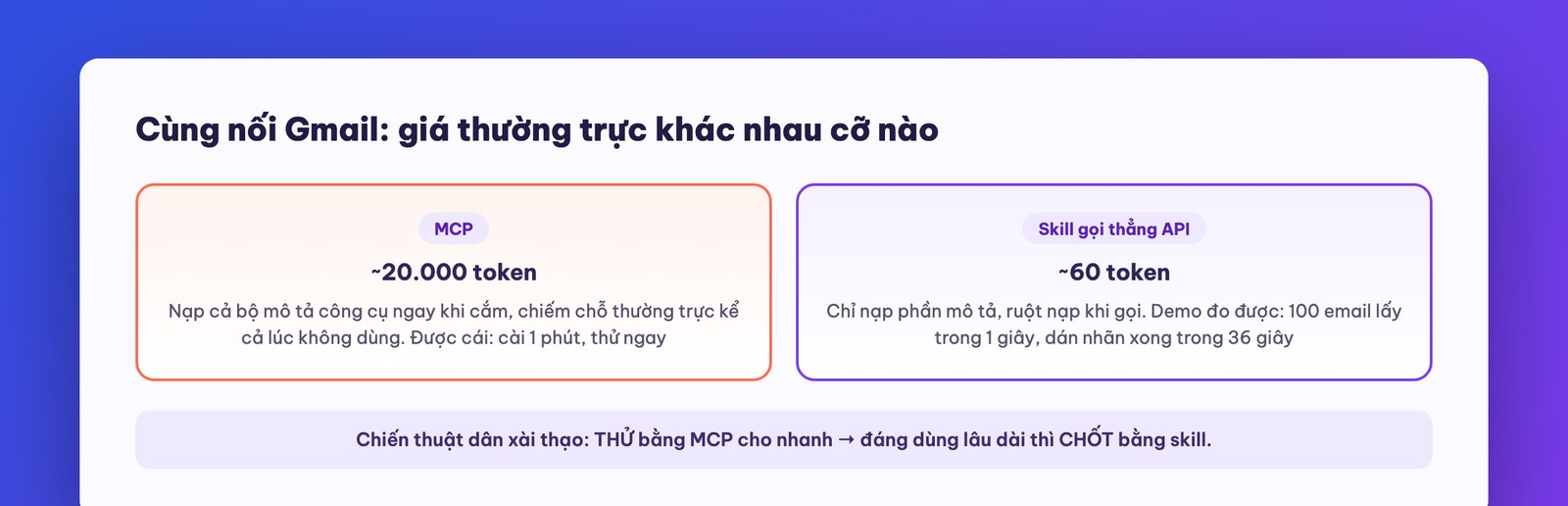
If you plug in just one, heavy users almost unanimously choose Chrome DevTools MCP: it lets Claude Code control and observe a real Chrome browser. That means the machine opens pages, scrolls, clicks buttons, takes screenshots and reads content by itself.
The business value of this is bigger than it looks: many services have no official connection port for outside software, getting data out of it used to mean hiring someone to sit and click by hand. With Chrome DevTools MCP, the machine can do things like: visit a competitor's page, capture it and summarize the price table; browse e-commerce marketplaces and collect product information by the criteria you set; check that your own website displays correctly on each page. Combined with skills (lesson 7), it becomes the hands and feet for processes that until now “only a person could do because they had to look at a screen”.
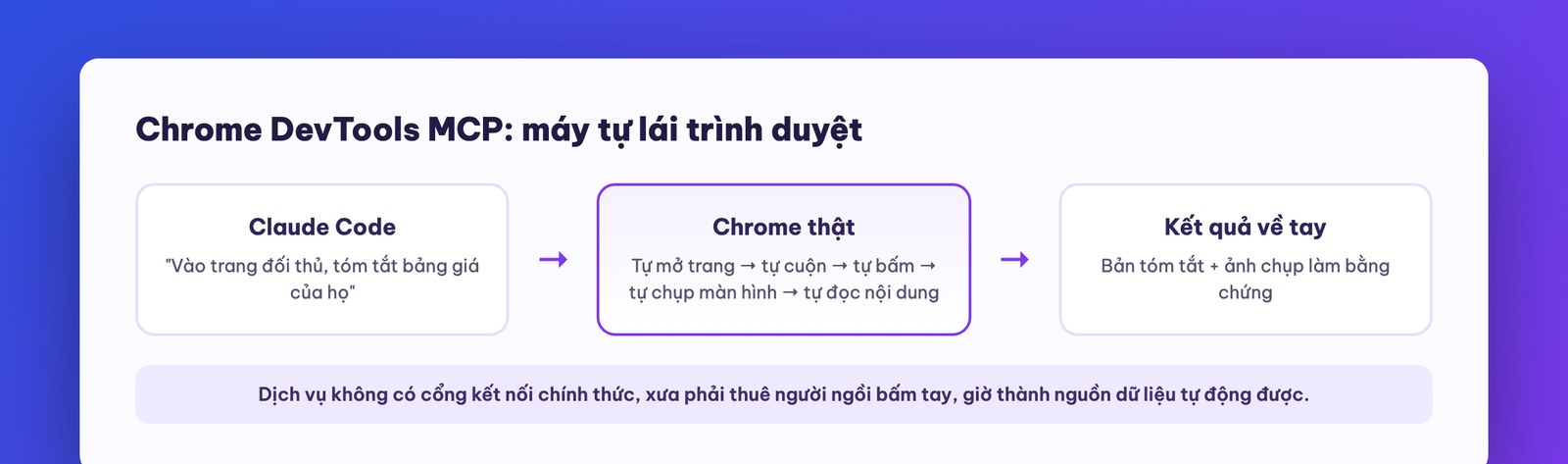
Now for the part lesson 6 set up. Once you've plugged in a mid-sized MCP (for example, the MCP of a task management tool), type /context and look: its tool-description set alone can eat nearly 20,000 tokens, taking up more room than Claude Code's own built-in toolkit. Before you type a single command, a quarter of the “desk” is taken, and that's the start of the prompt, the highest-quality stretch.
A comparison to make it sink in: a skill loads only the description at the top of the file, and loads its full contents only when called. An MCP loads its whole tool-description set the moment it's plugged in. Connect to Gmail the same way: the MCP version permanently costs thousands of tokens and runs slower; the skill version that calls the API directly costs only a few dozen tokens of description, and in the original course's demo, processing 100 emails was roughly 5 to 10 times faster. (Newer versions of Claude Code have a built-in way to avoid some of this: when an MCP's description is too bulky, the machine only fetches the exact tool it needs. But that's no reason to plug things in carelessly.)
From here comes the two-step strategy of experienced users, and also the most valuable lesson in this one:
A real example from the original course, and the one you should follow: labeling your Gmail inbox. Step one, ask the machine to propose a sensible set of labels (prefer action-based labels: “needs action”, “awaiting reply”, “save for reference”). Step two, plug in the Gmail MCP, let the machine read and label 15 emails as a trial, and if it looks good, run 100. Step three, turn it into a skill that calls the API directly: the measured result was fetching 100 emails in 1 second, then classifying and labeling them in 36 seconds. From now on, clearing your inbox each morning is a single command.
Claude Code also has a whole plugin (open the plugin management section in settings to see them, along with Anthropic's official directory and a few third-party marketplaces). Some are genuinely useful, like Context7 (which compresses the API docs of the tools you often use so the machine can read them in a token-saving way). Others improve interface aesthetics, which the original course instructor himself rated as far weaker than the “reference image + screenshot loop” from lesson 2. The overall view, from both the original instructor and us: the stock version without plugins is already plenty, and the plugin area will likely be folded into skills over time. Knowing it exists is enough, so don't waste time collecting plugins.
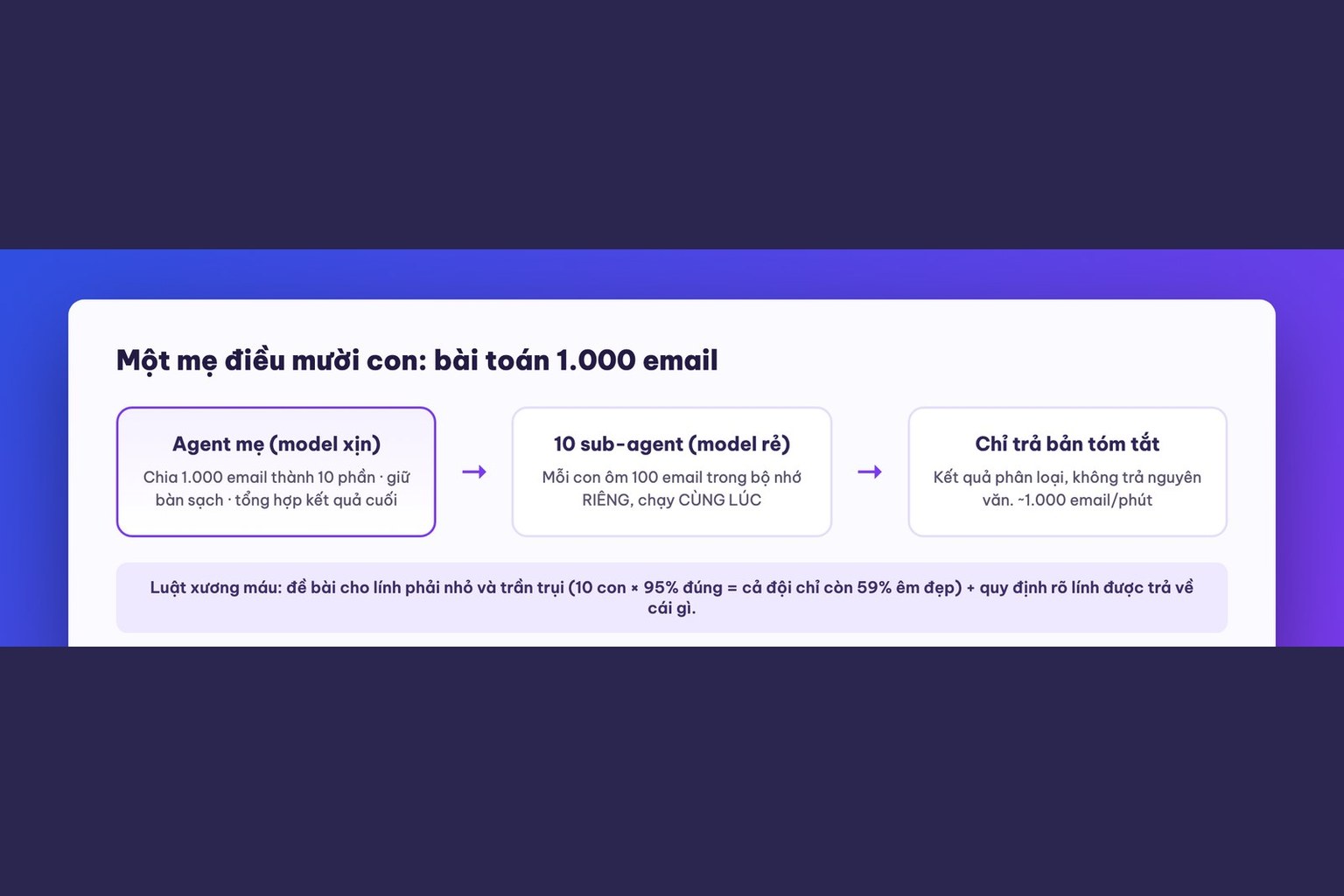
Lesson 9 moves up to orchestration: sub-agents and agent teams. How to split work among “sub-employees” running in parallel, each with its own memory space, and how the 100-email job drops from 36 seconds to a few seconds.

CEO & Founder · The MONA
The founder of The MONA built a service company of 60+ staff with 14,000+ projects delivered. Khánh Hùng shares his thinking on building self-running systems, automating a business, and the real lessons behind MONA's projects.
 356




Professional website
design services
Own a website with a beautiful, 100% exclusive design and a lifetime warranty, with the ability
to expand features flexibly as your business grows, starting today!






 MONA will never sell your information or send you spam


 MONA will never sell your information or send you spam
