
 MONA OS 2.0
 Partner with MONA


 Tự động hoá doanh nghiệp
 Cẩm nang SEO
 Digital Marketing
 Kinh nghiệm thiết kế website
 Hạ Tầng Server
 Giáo dục


 VI
 EN













Message us on
Zalo Official


 ProductsNew

 ProductsProducts
 Mới ra mắtKHA AI 2027App tự edit video, tự đăng mọi mạng xã hội, 2 phút mỗi ngày










 Website designLooks good and wins customers over.
SEO servicesBrings in customers searching for exactly what you sell.
 Tư vấn digital marketingKéo khách từ nhiều kênh, đo bằng số thật.
Corporate video productionVideos introducing your company, factory and team.
 NewAI video productionCompany story films made with AI.
 Custom software developmentCRM, ERP and HRM built for your business.
 Viết AI Agent theo yêu cầuĐặt riêng một trợ lý AI cho đúng việc của mình.
 Tư vấn chuyển đổi AIĐưa AI vào vận hành của cả công ty.
NewMONA LMSManagement for centers and schools.
MONA SkillHubInternal training for company staff.
 NHTQ systemEnd-to-end China–Vietnam shipping operations.
MONA JMSManagement for gold, diamond and pawn shops.
 MONA E-LearningA website with every feature you need to sell courses.
 How to sell online courses (course)More than 30 free lessons on selling courses on autopilot.
 MONA Cloudmonacloud.vnServers to get your apps and websites running.
 MONA Basemonabase.vnPostgres database, sign-in and file storage.
 MONA Mailmonamail.vnSend OTP, order and invoice emails from your software.
 MONA Paymonapay.vnAccept bank transfers via VietQR and notify your software when the money arrives.
 MONA eInvoiceComing soonIssue e-invoices that meet tax standards.
Gấu CườiTrả lời khách 24/7 trên web, Fanpage, Zalo và thu lead cho sale.
 Gấu TeleSalesGọi điện tư vấn, chăm khách như tổng đài viên thật.
Dê CườiTư vấn và chốt đơn cho shop ngay trong khung chat.
Gấu WebmasterNhắn nhóm Zalo là website được sửa xong.
 Gấu Pháp ChếSoạn hợp đồng, rà điều khoản trong vài phút.
 Gấu Báo GiáLên báo giá đúng mẫu và gửi khách ngay.
 AI chăm sóc khách hàngTheo dõi và giữ chân khách hàng cũ.
 Gấu Tuyển DụngLọc hồ sơ, hẹn lịch, phỏng vấn ứng viên.
 Mới ra mắt
KHA AI 2027
Xây kênh chuyên gia 2 phút mỗi ngày
Quay bằng điện thoại, AI tự edit video, tự đăng lên 16 nền tảng và tự trả lời bình luận, tin nhắn.
882.681lượt xem trên kênh CEO MONA sau 36 ngày
 Anh Khánh HùngCEO MONA đang dùng mỗi ngày
Xem app làm được gì
 AI
Gấu Cười MONA ĐANG TỰ XÀITrả lời khách 24/7 trên website, Zalo OA, Messenger và thu lead về cho sale.
Dê CườiChốt đơn bán lẻ và sàn: Shopee, TikTok Shop, web. Chăm cả khách sỉ, đại lý.
Gấu WebmasterCập nhật nội dung, tối ưu SEO website mỗi ngày.
Gấu TeleSalesGọi điện tư vấn, chăm khách như tổng đài viên thật.
Gấu Tuyển DụngLọc hồ sơ, hẹn lịch, phỏng vấn ứng viên tự động.
AI chăm sóc khách hàngGiữ khách cũ, cứu lead đã rớt cho phòng kinh doanh.
Gấu Pháp ChếSoạn hợp đồng, rà điều khoản trong vài phút.
Gấu Báo GiáLên báo giá đúng mẫu, gửi khách ngay khi có yêu cầu.
 Chuyển đổi AI toàn phầnGiải pháp tổng cho doanh nghiệp, 3 lớp triển khai.
 Viết AI Agent theo yêu cầuĐặt riêng một con AI gánh đúng nghiệp vụ của bạn.
 Custom softwareCRM, ERP and HRM with built-in AI automation.
 SEO & AEO thời đại AIĐược Google lẫn AI trích dẫn, không chỉ xếp hạng.
 Kiến thức AI cho doanh nghiệpBài phân tích, hướng dẫn ứng dụng AI vào vận hành.
 Free AI courses
 AI tools at work
App mới · KHA AI 2027
Xây kênh 2 phút mỗi ngày
AI tự edit video, tự đăng mọi mạng xã hội
Free consultation, 8am–10pm every day

25 July, 2026

🎓 Free course: Claude Code basics, lesson 7/10. The whole course is in the category Free AI courses package from MONA?
After this lesson, you'll be able to turn a repetitive process in your company (qualifying leads, preparing a quote package, compiling research…) into a skill: a trade-teaching file for the machine, after which one sentence is all it takes for the machine to run the whole process. This is the area we rate as the best value of Claude Code for businesspeople.
Every properly run company has SOPs, meaning standard procedures: do task X in steps 1-2-3, note A, never do B. A new employee holding the SOP can do the job without anyone coaching them. A skill is exactly an SOP written for Claude Code: a small folder inside .claude/skills/, containing a file describing “what this trade does, when to use it, and what the steps are”.
The payoff is in the phrase “when to use”: each skill has a description of the situation that triggers it. Just talk normally (“find me 1,000 dental clinics in the US”), and the machine recognizes that the sentence matches the “scrape-leads” skill and runs it. No syntax to remember, no need to name the skill. And as lesson 6 explained: skill is only loaded into memory when called, so even a hundred skills don't make the chat session any heavier.
The original course instructor demos a lead-filtering skill he uses for his own company. He used to do that process by hand: set the search filters (15-20 minutes), run a small test batch and check quality (10-15 minutes), run the big batch, dump it into Google Sheets, cross-check and add emails… about half an hour to a full hour in total, every week.
After packaging it as a skill, he types a single sentence. The machine first runs a 25-row test batch to check quality, and if it passes, it launches 4 parallel streams and gathers 1,000 rows of data in 87 seconds, pours it into the spreadsheet and fills in the missing emails itself. Midway it hit a file-name formatting error; the machine read the documentation, fixed it itself, then updated the skill file itself so it won't stumble again next time. This is worth pondering: a skill isn't rigid software that dies on an error; it's a process with a flexible brain in the middle that adapts when something goes wrong, like an employee who knows the job.
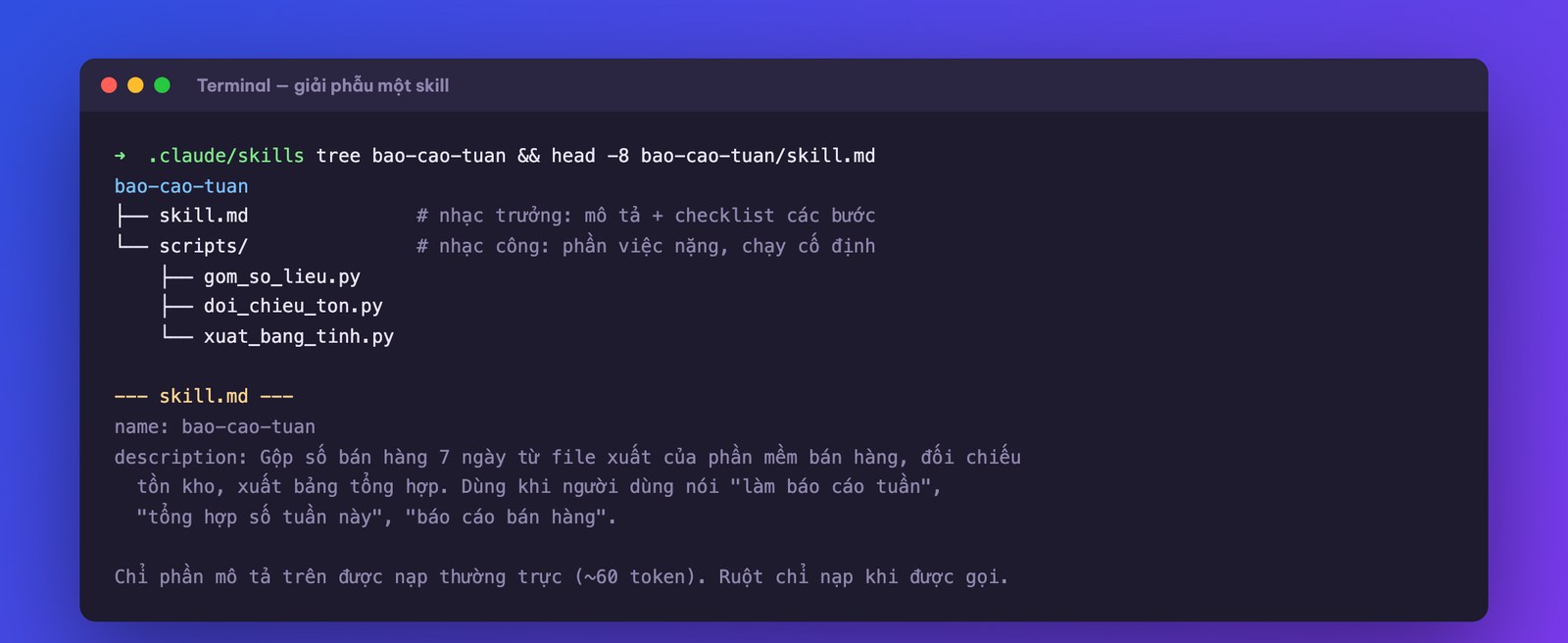
Open a skill folder and the structure is just this:
Why have scripts, why not let the machine do it from scratch every time? Because any job done the same way each time should be packaged into a fixed program: fast, cheap and consistent. The AI plays the person who presses the buttons and handles exceptions, not the person who plows through line by line. Combining the two, you get the best of both worlds: the steadiness of machinery + the adaptability of intelligence. And the nicest part: you don't need to read or understand those scripts. The original instructor admits he has never opened the script file of the skill he uses every day. Who wrote it? Claude did. He just sets the task and signs off on the result.
Step 1: pick the right job. The golden criteria: a job that repeats weekly, has stable steps, and takes 30 minutes or more each time. A few suggestions close to Vietnamese businesses: compile the weekend sales report from the export file of the sales software; prepare a quote package from the company template using customer info; check orders undelivered for more than 3 days and draft reminder messages; gather customer reviews from various channels into one table.
Step 2: unload the process by voice. Tell the machine how you currently do the job, as if handing over to a new employee: what comes first and what comes after, where the data comes from, which template to follow, which spots tend to go wrong and should be avoided. Attach a sample of a correct result (the best quote file you've ever made, a standard report table) and a sample of input data. Then close with: “package this process as a skill following the Claude Code skill standard.”
Step 3: the machine asks back, you decide. It will ask things like: where should the output go, what is the data input, which image source to use. Answer from your business knowledge, and for questions that are too technical, choose the option the machine recommends.
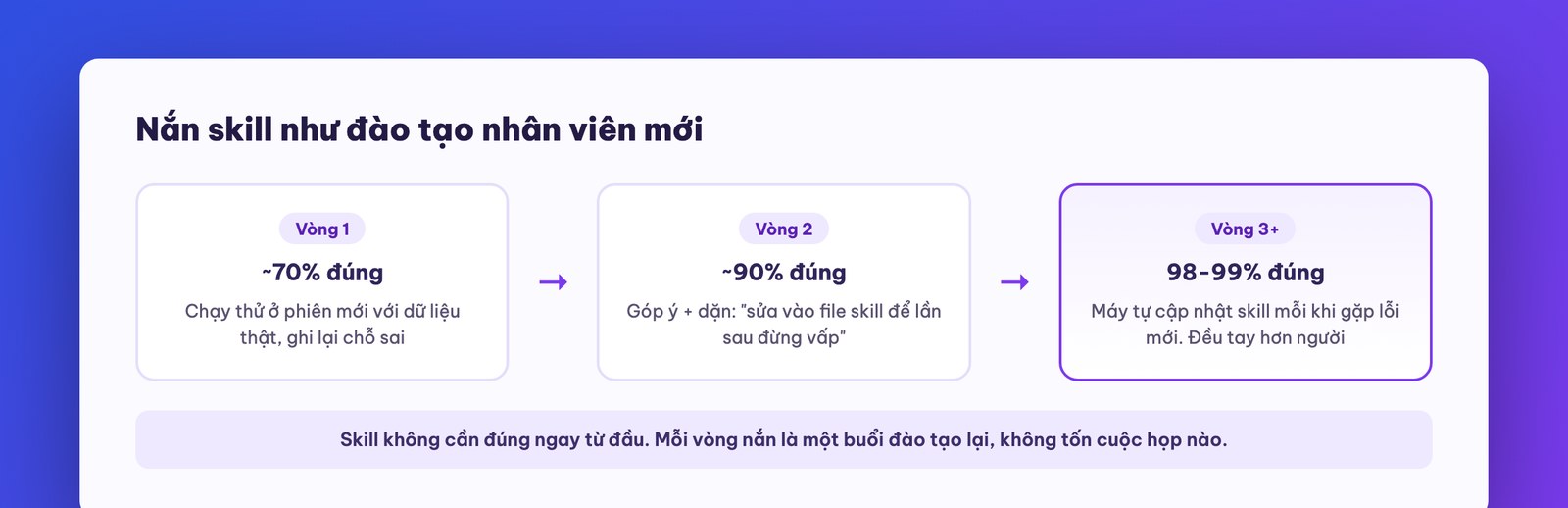
Step 4: test run and refine. Hand the skill to a brand-new session (one with no context from when it was created) and run it on real data. Wherever it goes wrong, give feedback on that spot and say: “fix it in the skill file so it doesn't stumble next time.” After a few rounds like that, accuracy climbs from around 70% to 90%, then to 98-99%. At that threshold, honestly, few flesh-and-blood employees do the work more consistently.
The original instructor says that thanks to this skill library, his company earns a large profit every month while almost no longer hiring people for repetitive operations work. That's a true story from a lean US service company, and it shows how high the ceiling of this tool is. But we want you to keep a cool head: a skill running on a personal machine is only suited to the process of one person or a small team. When a process touches several departments, sensitive customer data, and needs access control and legal accountability, the problem moves into the realm of disciplined operational software, in line with what we analyzed in the automation series on mona.media. Use skills to speed yourself up first, that's the surest gain.
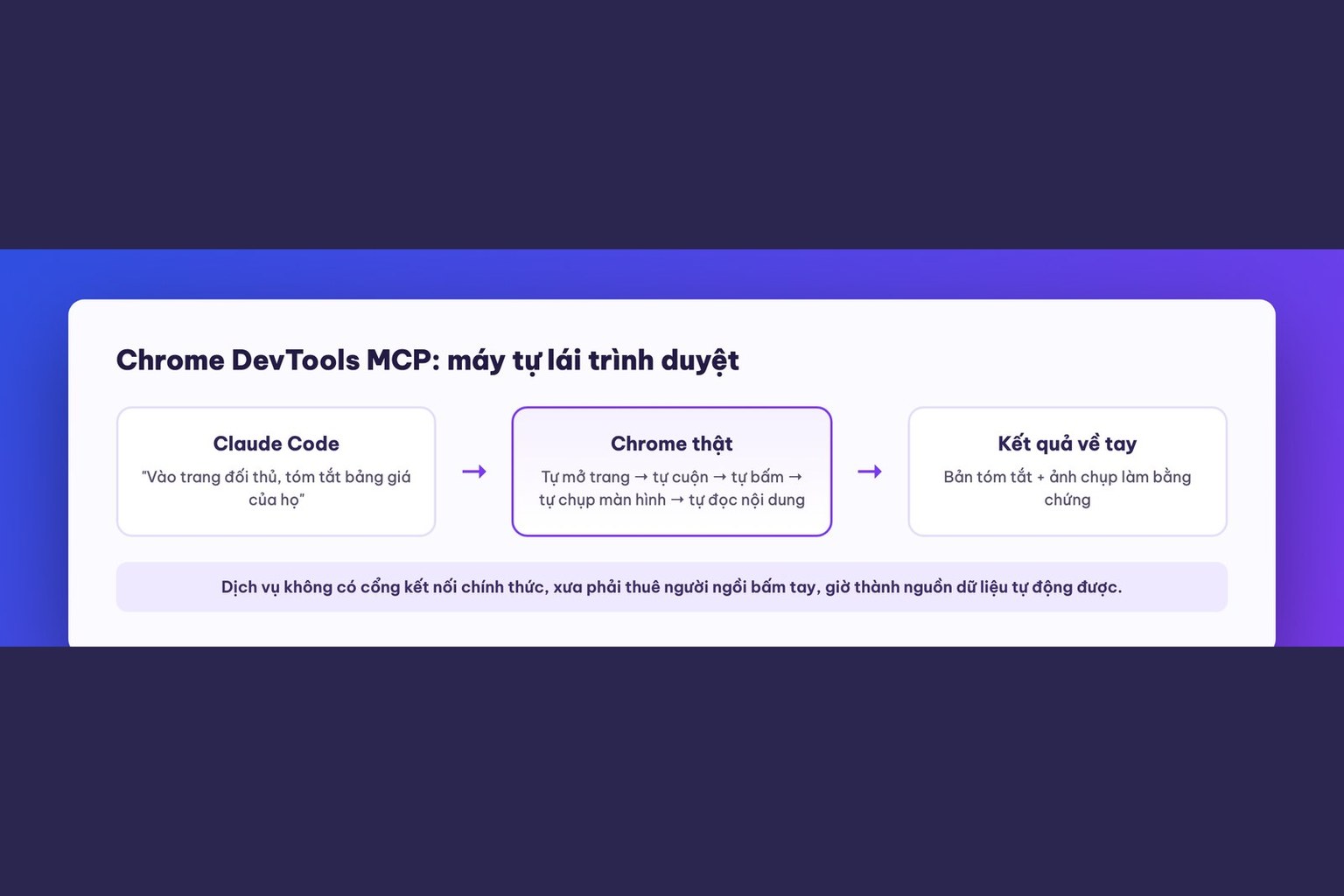
Lesson 8 covers MCP (Model Context Protocol): put plainly, “skills written in advance by other people”, a way to plug outside tools into Claude Code so it can control the Chrome browser, read outside services, plus the caution needed when plugging unknown tools into your own machine.

CEO & Founder · The MONA
The founder of The MONA built a service company of 60+ staff with 14,000+ projects delivered. Khánh Hùng shares his thinking on building self-running systems, automating a business, and the real lessons behind MONA's projects.
 330




Professional website
design services
Own a website with a beautiful, 100% exclusive design and a lifetime warranty, with the ability
to expand features flexibly as your business grows, starting today!






 MONA will never sell your information or send you spam


 MONA will never sell your information or send you spam
