
 MONA OS 2.0
 Partner with MONA


 Tự động hoá doanh nghiệp
 Cẩm nang SEO
 Digital Marketing
 Kinh nghiệm thiết kế website
 Hạ Tầng Server
 Giáo dục


 VI
 EN













Message us on
Zalo Official


 ProductsNew

 ProductsProducts
 Mới ra mắtKHA AI 2027App tự edit video, tự đăng mọi mạng xã hội, 2 phút mỗi ngày










 Website designLooks good and wins customers over.
SEO servicesBrings in customers searching for exactly what you sell.
 Tư vấn digital marketingKéo khách từ nhiều kênh, đo bằng số thật.
Corporate video productionVideos introducing your company, factory and team.
 NewAI video productionCompany story films made with AI.
 Custom software developmentCRM, ERP and HRM built for your business.
 Viết AI Agent theo yêu cầuĐặt riêng một trợ lý AI cho đúng việc của mình.
 Tư vấn chuyển đổi AIĐưa AI vào vận hành của cả công ty.
NewMONA LMSManagement for centers and schools.
MONA SkillHubInternal training for company staff.
 NHTQ systemEnd-to-end China–Vietnam shipping operations.
MONA JMSManagement for gold, diamond and pawn shops.
 MONA E-LearningA website with every feature you need to sell courses.
 How to sell online courses (course)More than 30 free lessons on selling courses on autopilot.
 MONA Cloudmonacloud.vnServers to get your apps and websites running.
 MONA Basemonabase.vnPostgres database, sign-in and file storage.
 MONA Mailmonamail.vnSend OTP, order and invoice emails from your software.
 MONA Paymonapay.vnAccept bank transfers via VietQR and notify your software when the money arrives.
 MONA eInvoiceComing soonIssue e-invoices that meet tax standards.
Gấu CườiTrả lời khách 24/7 trên web, Fanpage, Zalo và thu lead cho sale.
 Gấu TeleSalesGọi điện tư vấn, chăm khách như tổng đài viên thật.
Dê CườiTư vấn và chốt đơn cho shop ngay trong khung chat.
Gấu WebmasterNhắn nhóm Zalo là website được sửa xong.
 Gấu Pháp ChếSoạn hợp đồng, rà điều khoản trong vài phút.
 Gấu Báo GiáLên báo giá đúng mẫu và gửi khách ngay.
 AI chăm sóc khách hàngTheo dõi và giữ chân khách hàng cũ.
 Gấu Tuyển DụngLọc hồ sơ, hẹn lịch, phỏng vấn ứng viên.
 Mới ra mắt
KHA AI 2027
Xây kênh chuyên gia 2 phút mỗi ngày
Quay bằng điện thoại, AI tự edit video, tự đăng lên 16 nền tảng và tự trả lời bình luận, tin nhắn.
925.105lượt xem trên kênh CEO MONA sau 41 ngày
 Anh Khánh HùngCEO MONA đang dùng mỗi ngày
Xem app làm được gì
 AI
Gấu Cười MONA ĐANG TỰ XÀITrả lời khách 24/7 trên website, Zalo OA, Messenger và thu lead về cho sale.
Dê CườiChốt đơn bán lẻ và sàn: Shopee, TikTok Shop, web. Chăm cả khách sỉ, đại lý.
Gấu WebmasterCập nhật nội dung, tối ưu SEO website mỗi ngày.
Gấu TeleSalesGọi điện tư vấn, chăm khách như tổng đài viên thật.
Gấu Tuyển DụngLọc hồ sơ, hẹn lịch, phỏng vấn ứng viên tự động.
AI chăm sóc khách hàngGiữ khách cũ, cứu lead đã rớt cho phòng kinh doanh.
Gấu Pháp ChếSoạn hợp đồng, rà điều khoản trong vài phút.
Gấu Báo GiáLên báo giá đúng mẫu, gửi khách ngay khi có yêu cầu.
 Chuyển đổi AI toàn phầnGiải pháp tổng cho doanh nghiệp, 3 lớp triển khai.
 Viết AI Agent theo yêu cầuĐặt riêng một con AI gánh đúng nghiệp vụ của bạn.
 Custom softwareCRM, ERP and HRM with built-in AI automation.
 SEO & AEO thời đại AIĐược Google lẫn AI trích dẫn, không chỉ xếp hạng.
 Kiến thức AI cho doanh nghiệpBài phân tích, hướng dẫn ứng dụng AI vào vận hành.
 Free AI courses
 AI tools at work
App mới · KHA AI 2027
Xây kênh 2 phút mỗi ngày
AI tự edit video, tự đăng mọi mạng xã hội
Free consultation, 8am–10pm every day

10 June, 2026

ChatGPT for sales only works when you hand off work the way you would to a staff member who already knows the product, the customers and the brand voice. Used carelessly, the tool gives generic answers, drifts off in advice and loses your own character. In this article, MONA goes straight to how to use ChatGPT to write consulting scripts, handle objections, draft customer care messages, summarize conversations and create data for your sales team. We also point out the ceiling of standalone tools, so you know when a business needs custom software.

ChatGPT for sales is only worth the money when you do not hand it vague work. A prompt without context produces a generic answer that sounds right but is hard to use for closing an order.
The formula we use inside MONA is simple: role, data and goal. With all 3 layers, ChatGPT can write for the actual sales and customer care situation.
Start with the role. Then add the data. Finally, set the goal.
You need to say clearly who ChatGPT is playing in the conversation. The closer the role is to the real job, the less the answer rambles.
For example, a consultant needs soft, easy-to-understand wording that leads the customer to the next step. A sales team lead needs to spot the bottlenecks in a script. Post-purchase customer care needs to stay calm and protect the customer experience.
A role is a frame of thinking. Without one, ChatGPT tends to answer like a sample essay.
Data decides quality. ChatGPT cannot advise correctly if all you write is “write a better sales message”.
Give it real data before you ask it to write. Data includes the product, customer segment, price level, offers, purchase barriers and return policy.
We usually advise customers to create a fixed block of data. Each time you need to write a message, you only change the situation and the goal.
The goal has to be clear. A sales reply should not carry too many jobs at once.
Say plainly what result you want after the chat. ChatGPT will pick a different way to lead the conversation for each goal.
One goal, one answer. This keeps the content tighter and easier to use in practice.
You can save the base prompt template below. After that, you only replace the parts in square brackets for each product and situation.
MONA uses ChatGPT and other AI tools internally to speed up drafting, test scripts and train customers to use them well. MONA has operated since 2016 with 14,000+ projects.
But standalone tools always have a ceiling. When sales data is scattered across messages, spreadsheets and internal files, ChatGPT can only support individual tasks.
To make sales, customer care and marketing run more smoothly, a business needs its own system. MONA usually settles on this direction with a website, SEO, CRM, ERP or which automation software built around the business's real data.
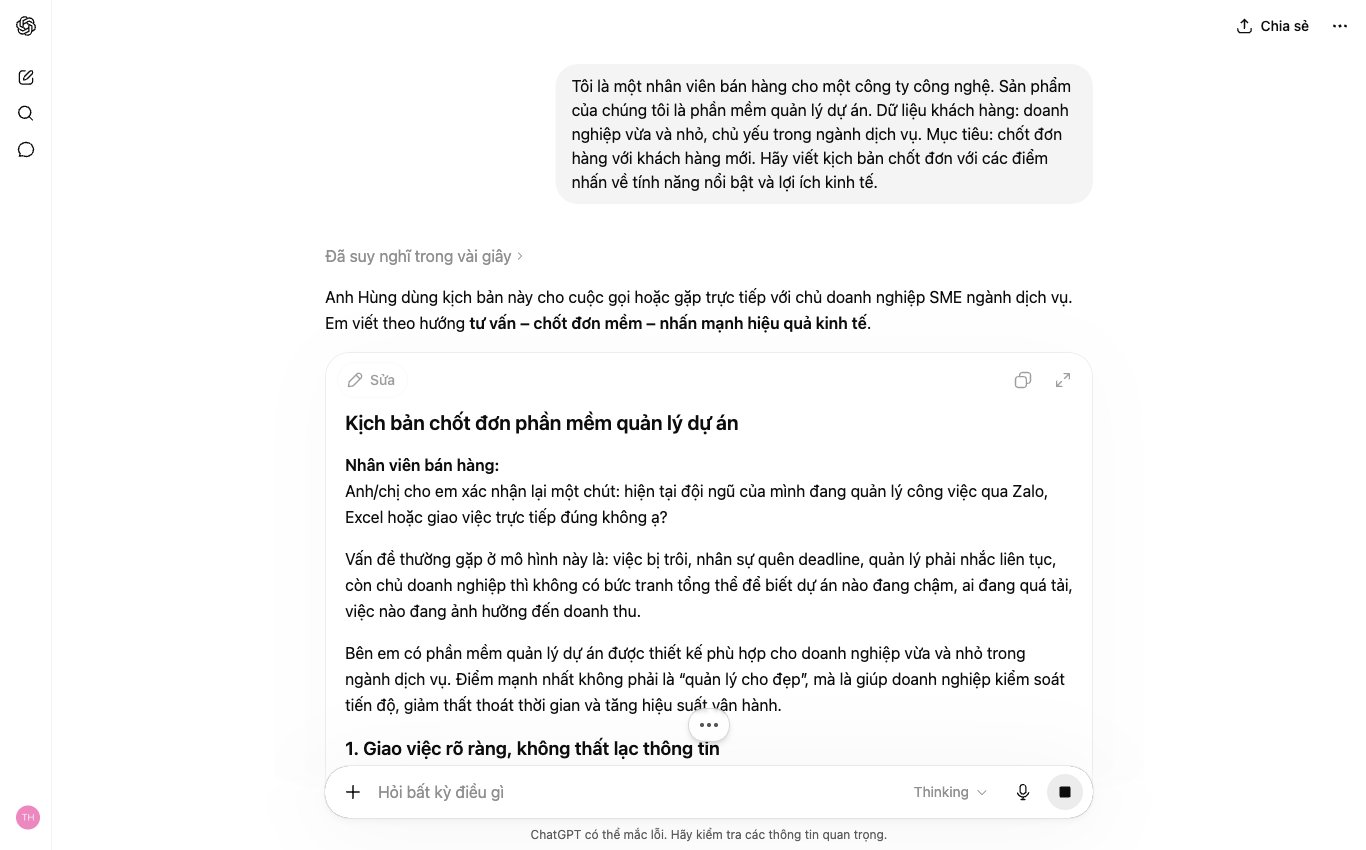

Sales messages are often messy because customers raise many points at once. Staff answer by reflex, so the advice runs long but the closing power is weak.
The 5-line formula helps ChatGPT put the advice back in the right order. It is very easy to apply.
You just paste the raw chat into ChatGPT and ask it to turn it into a 5-line script. MONA often uses this when training marketing and customer care teams to write tighter replies.
The first line has to pull the customer back to the main need. Do not open with a product introduction.
ChatGPT needs to read the chat and boil it down to one short sentence. That sentence shows the customer that your staff understood the problem.
This line cuts the noise. The customer feels heard.
A customer who has not bought rarely lacks information. They are stuck on a worry nobody has named yet.
ChatGPT should look in the chat for signals such as price, timing, fit, rollout risk, or fear of buying something that goes unused.
Do not dodge this part. Naming the real bottleneck cuts the going in circles.
Generic benefits make it hard for the customer to picture. ChatGPT needs to attach the benefit to the exact context the customer just described.
Instead of saying “saves time”, the script should say which time, which task, and who is stuck. The more specific, the easier it is to believe.
For campaigns from website and SEO, this line matters a great deal. When a lead arrives on time, the reply has to keep the same pace.
Proof gives the closing line weight. But exaggeration makes the customer defensive.
Ask ChatGPT to use soft proof if you do not have verified figures. For example the rollout process, screenshots, real feedback, a demo, or warranty principles.
MONA always reminds its internal team to separate real data from interpretation. That boundary keeps sales content trustworthy.
The last line does not need to pressure anyone. The goal is to move the conversation to the next step.
ChatGPT should write a specific, small invitation that is easy to say yes to. A short call, a demo or a comparison table is enough.
A gentle close still has power, because the customer knows exactly what comes next.
This 5-line formula helps ChatGPT turn a long chat into an ordered script. You can use it for web consulting, SEO, advertising, CRM and customer care.
Standalone tools handle individual chats well. But when customer data, the website, CRM and the sales team need to run together smoothly, a business will need custom software. MONA builds that system for real automation, not just manual steps.
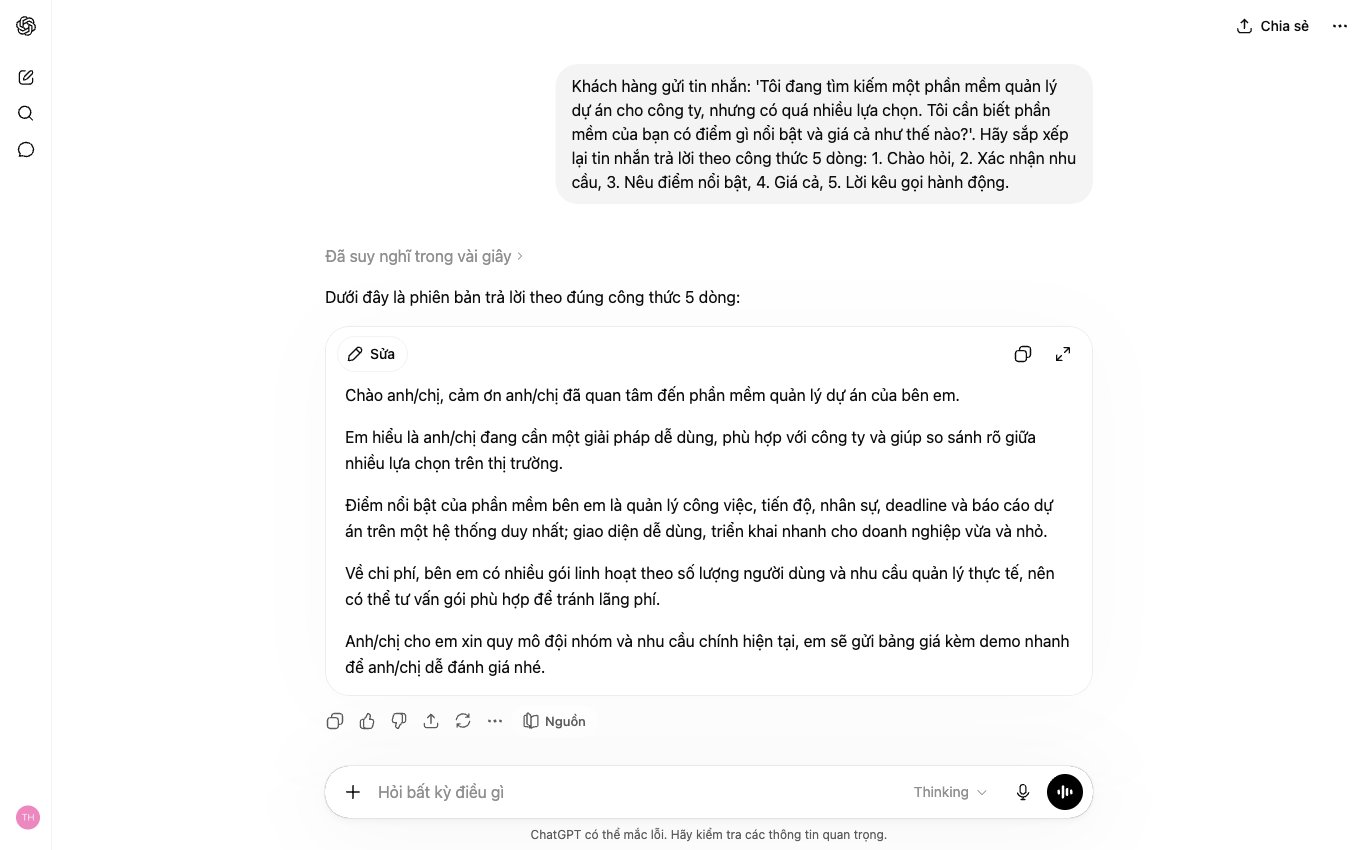

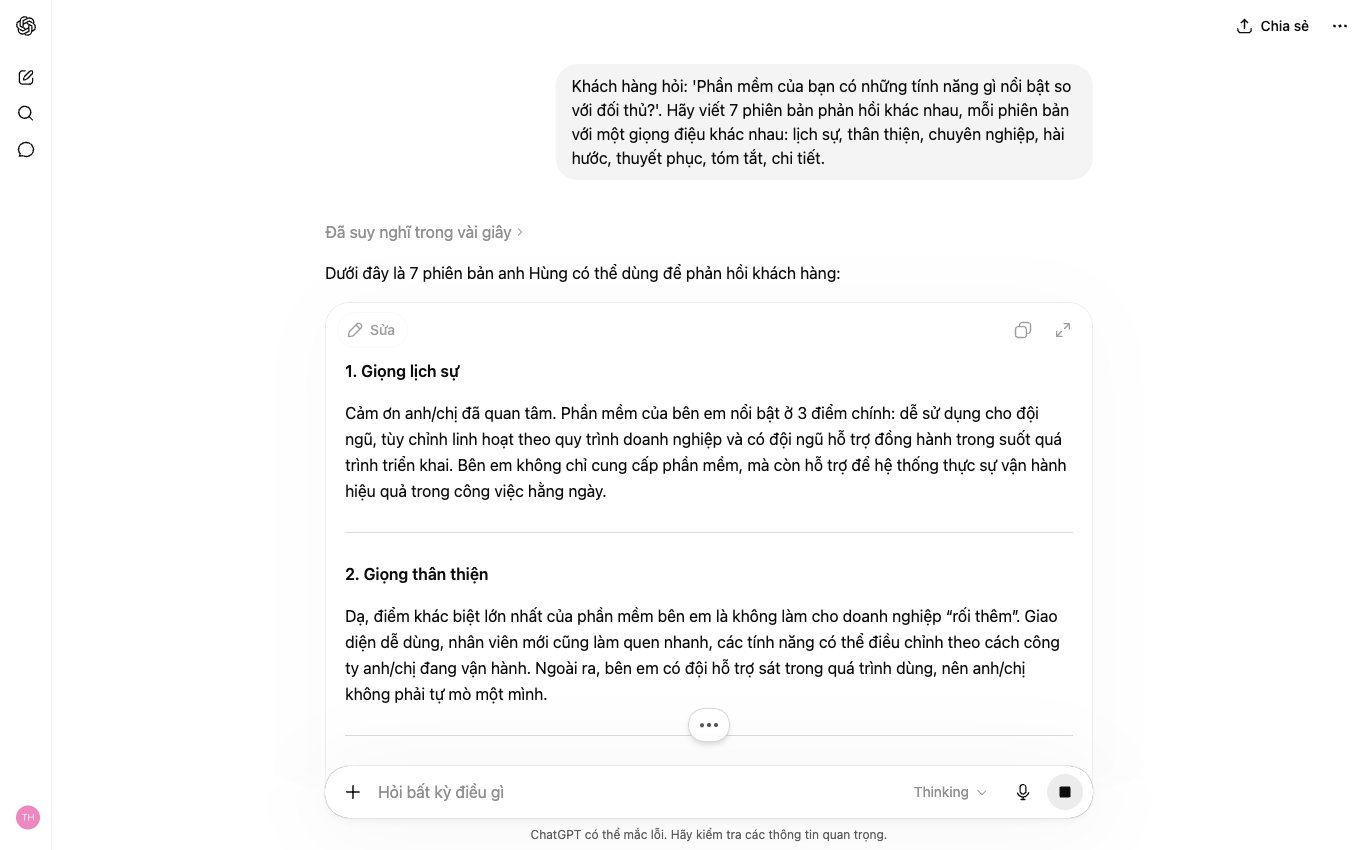
A very common mistake when using ChatGPT for sales is taking the first answer straight away. That answer is usually on target, but tends to sound monotone.
The tone drifts easily. A cold customer finds it too long. A customer comparing prices finds it unconvincing. An annoyed customer finds it lacking in tact.
You should ask ChatGPT for 7 versions, one for each customer mood. Then your sales team picks the right line and adjusts it to your brand voice.
We usually teach sales teams to use this prompt frame before replying to a customer:
A sample prompt you can use right away:
Customers who message fast rarely want to read long replies. A 5-line answer can make them leave the conversation.
What a waste of an opportunity. You need a short, clear line with a direction for what comes next.
Sample reply:
Do not send it as is. Swap “I” for your salesperson's name if you want it to feel more real.
Some customers do not mind the price, but they need to understand why they should choose you. If the answer is too short, they feel the advice is superficial.
This group needs structure. ChatGPT should write in 3 parts: the need, why it fits, and the next step.
Sample reply:
This reply is longer, but it is orderly. A customer who needs explanations will find it easy to follow.
A customer comparing prices does not always want the cheapest option. Many are just checking whether the quote is reasonable.
If your sales team reacts defensively, the conversation gets tense. If you cut the price too fast, margins wear away.
Sample reply:
Holding your ground matters a lot. The reply should be soft without lowering its own value.
A customer who is not buying yet can still come back. But many sales teams end the conversation too abruptly.
This is the point where the relationship is won or lost. A well-judged closing line keeps your brand in the customer's memory.
Sample reply:
Close with an action. No pushing. No leaving things hanging.
When a customer complains, a robotic reply makes things heavier. They need to be acknowledged before they hear an explanation.
Your sales team also needs safe wording. Speaking in a hurry can admit fault beyond the real scope, or leave the customer feeling brushed off.
Sample reply:
This reply does not dodge the problem. It does not overpromise either. That is the safe approach when customer care handles a sensitive situation.
Inside MONA, we do not use ChatGPT as a place to copy answers and send them out in bulk. We use it to create variations, check tone and cut drafting time.
But standalone tools always have a ceiling. When customer data is scattered across Zalo, CRM, the website and internal files, staff still do many steps by hand.
For businesses that need smoother selling, MONA usually advises custom software tied to the website, CRM and the customer care process. ChatGPT supports the wording, while only a custom system holds the data, permissions and real automation.
ChatGPT writes fast, but sales needs more than speed. One line with the wrong price, an overpromise, or an off-brand tone can leave a customer with the wrong idea.
A safer approach is to have ChatGPT act as a content checker before staff send anything to a customer. This does not replace the salesperson, but it helps you cut basic errors in every message.
Well worth doing. Very easy to apply.
Ask ChatGPT to score a reply against a 5-criteria table. Each criterion should get a score, a short comment and a suggested fix.
You can use this prompt template:
“Score the reply below against 5 criteria: accurate info, clear benefit, right brand tone, no overpromising, has a next step. Give each criterion a score from 1 to 5. Then point out what needs fixing.”
At MONA, we often standardize this kind of checklist for sales, customer care and marketing teams. When everyone uses the same standard, reply quality is steadier.
Many sales mistakes hide in sentences that sound perfectly ordinary. The problem is that the customer reads them differently and then expects more than you can deliver.
Have ChatGPT inspect every sentence that risks being misunderstood. Keep this part separate from the scoring.
Sample prompt:
“Read this reply as a demanding customer would. Point out sentences that could cause misunderstanding about price, commitments, timing, support scope or results. Briefly explain each risk.”
This part is very important. It lets staff see the error before the customer does.
Making it safe does not mean making it bland. The reply still needs a clear benefit, selling power and goodwill.
Ask ChatGPT to rewrite it to cut risk without cutting persuasiveness. The prompt should state the role and the limits.
Sample prompt:
“Rewrite this reply to be safer legally and operationally. Do not overpromise. Do not overstate results. Keep a friendly advisory tone, a clear benefit and a soft call to action.”
This way of writing helps sales teams avoid slips. Customers also get clearer information.
You should not let each staff member work out their own way of using ChatGPT. When everyone types differently, results drift apart.
Save the checklist as a fixed template prompt. Sales and customer care teams only swap in the message content and run the check before sending.
A combined template you can use right away:
“Check the reply below before it goes to the customer. Score it on 5 criteria: accurate info, clear benefit, right brand tone, no overpromising, has a next step. Then point out sentences that risk causing misunderstanding and rewrite a safer version that is still persuasive.”
MONA uses this in internal training and when guiding customers on applying ChatGPT to their work. We always remind the team that AI only supports the check; the person in charge still makes the final call.
ChatGPT handles individual tasks well, but hits a ceiling when data is scattered. When you need CRM, CSKH, website, SEO and the sales process to connect, custom software is a better fit.
MONA builds custom software, designs websites and delivers SEO services around a business's real cash flow. AI then becomes part of the system, no longer a tool each person uses on their own.
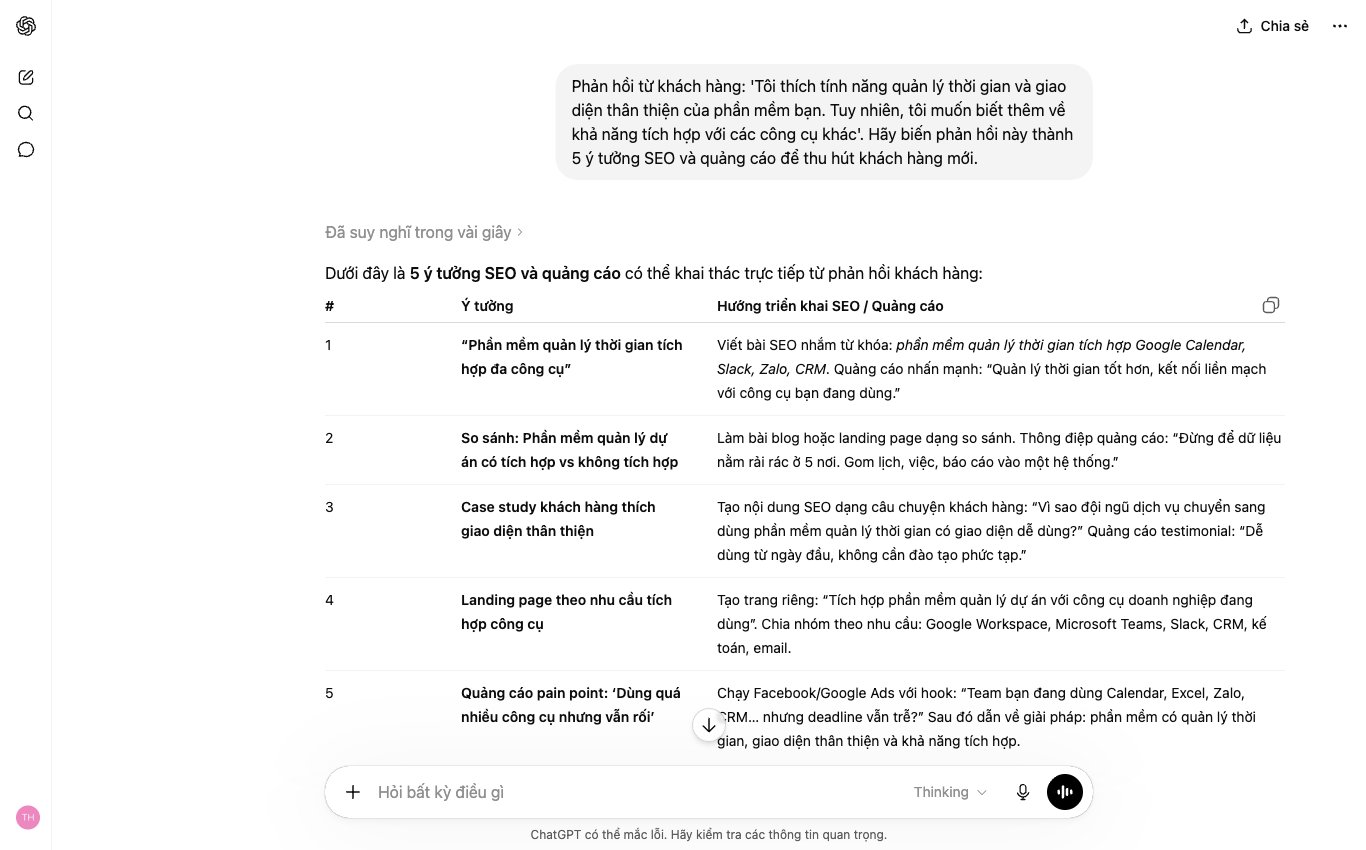
Customer feedback is not just for customer care to read and handle case by case. It is real raw material for writing web copy, doing SEO, running ads and following up.
Do not waste this data. It is worth real money.
MONA usually guides you to collect what customers actually say before writing new content. ChatGPT does better when it is given the right sales context.
Group the feedback into clear categories. Do not paste every message in at once in no particular order.
A simple way to group them:
Then paste them into ChatGPT using this structure:
“I sell [product or service]. Below is real feedback from customers. Please read and analyze it from a marketing, sales, SEO and follow-up angle.”
Then paste 20 to 50 replies below. That is enough for ChatGPT to see repeating patterns, but not so long that the answer gets diluted.
A small tip. Do not fix the customer's voice.
If a customer misspells something, keep it as is. The way customers word things is valuable data for headlines, ad copy and FAQ sections.
After pasting the data, you need to push ChatGPT to categorize it. If you only ask “analyze this for me”, the result is usually generic.
The prompt we use in MONA's internal training looks like this:
“Sort the feedback above into 4 groups: main concerns, reasons the customer has not bought, keywords customers naturally use, and frequently asked questions. Present it as a table.”
You can ask for 2 extra columns to use right away in marketing:
The “keywords customers naturally use” part is very important for SEO. It is how real customers describe the problem they need solved.
Not every keyword sits in a tool. Many valuable phrases are in sales messages, comments and inboxes.
Once you have the data groups, ask ChatGPT to turn each one into specific content. At this point the prompt needs to be tied to your web goals.
Sample prompt:
“From the table above, suggest SEO article ideas, H1 headlines, angles, FAQs and landing page copy. Prioritize the language customers actually used.”
For SEO articles, ask ChatGPT to separate clearly:
For a sales website, this keeps the landing page from talking one way. The content starts answering exactly what the customer is stuck on.
This is a spot many marketing teams miss. The content looks good but never touches the reason customers have not bought.
MONA often uses this approach when advising on site structure, SEO and conversion content. ChatGPT helps gather ideas fast, but strategy still needs someone who understands the product.
Old feedback can also become a follow-up sequence. You do not need to send the same content to every customer.
Ask ChatGPT to write for each group:
Sample prompt:
“For the customer groups above, write 3 follow-up messages for each group. Natural tone, short, no pressure to buy, with a reason for the customer to reply.”
Also ask for versions for Zalo, Messenger and email. Each channel needs a different length.
Shorter is easier to read. Clearer is easier to reply to.
ChatGPT saves your sales and marketing teams many hours of manual idea gathering. But standalone tools still hit a ceiling when data sits apart across the web, CRM, ads and customer care.
When a business needs connected data, automatic grouping and follow-up based on real behavior, MONA goes the custom software route. ChatGPT then becomes one part of the system, not the whole system.
We still use ChatGPT and AI tools inside MONA. We also train customers to use them for the right jobs, then connect them to your web platform, SEO, CRM or automation when your business is ready.
Sales teams that use ChatGPT in scattered ways tend to produce answers with inconsistent tone, priorities and closing style. A strong person asks one way, a new hire asks another, and managers struggle to control the quality of advice.
What we do at MONA is group prompts by 5 customer stages. New customer asking, customer weighing options, customer about to buy, customer after purchase and returning customer.
This is easy to control. The team just picks the right stage, fills in the right data, and lets ChatGPT help write the first draft of the reply.
New customers rarely state the whole problem. If staff ask rambling questions, the conversation slips away without producing any sales data.
Build a prompt group that helps ChatGPT suggest questions to uncover the need. The goal is to learn what the customer needs, what is holding them back, their budget and whether the purchase is near or far.
Do not ask too broadly. A good prompt includes the industry, product, price range and the channel the customer came from.
A customer refusing does not mean the chance is gone. Most of the time they just lack a clear enough reason to move forward.
The prompt library should separate 3 common objections. Price too high, no need right now, and not trusting enough yet.
This is where orders are easily lost. MONA usually advises sales teams to save both good and bad answers so ChatGPT learns the right pattern.
Once the customer shows buying signals, staff need to go straight to the next action. Wording that is too long cools the customer off.
Prepare several gentle closing styles in this group. Closing on a call time, on sending a quote, on a deposit, on confirming the order.
A closing line needs to be short. One message should carry only one main action.
A sale should not be the end. This is when the customer remembers the experience best, and is most likely to review and refer.
Have a post-purchase prompt group for each milestone. Confirming receipt, usage guidance, asking about the experience and asking for a review.
This part directly affects trust. We usually put the post-purchase prompt group into internal training materials for the customer care team.
Past customers are often forgotten because sales teams are busy chasing new ones. This makes the cost of selling climb over time.
The prompt library should include a group for re-engaging past customers. Send offers, and also send content that reminds customers of their need.
ChatGPT does well at drafting and suggesting angles. But customer data, purchase history and follow-up status still need to live in your own system.
That is why MONA usually uses ChatGPT as a content support layer, not a replacement for CRM or sales software. When a business needs connected data, we design custom software so the sales team can use it consistently.
ChatGPT can help each salesperson work faster. However, as a business grows, this way of working leads to dependence on whoever enters data by hand and leaves data scattered. Managing and controlling data accurately becomes much more complicated.
ChatGPT is very handy for automating frequent customer care replies or drafting ad copy. But to optimize larger processes, such as customer management or full sales tracking, you need dedicated software integrated with a CRM or ERP system.
A system that integrates the web, SEO, CRM, customer care and reporting creates a continuous, seamless flow of information. This saves time and also keeps data managed and updated in sync.
MONA has built AI into its internal processes to improve work performance and guide customers in applying AI to theirs. This helps businesses reach real automation with secure data that stays in sync.
More related articles from MONA:
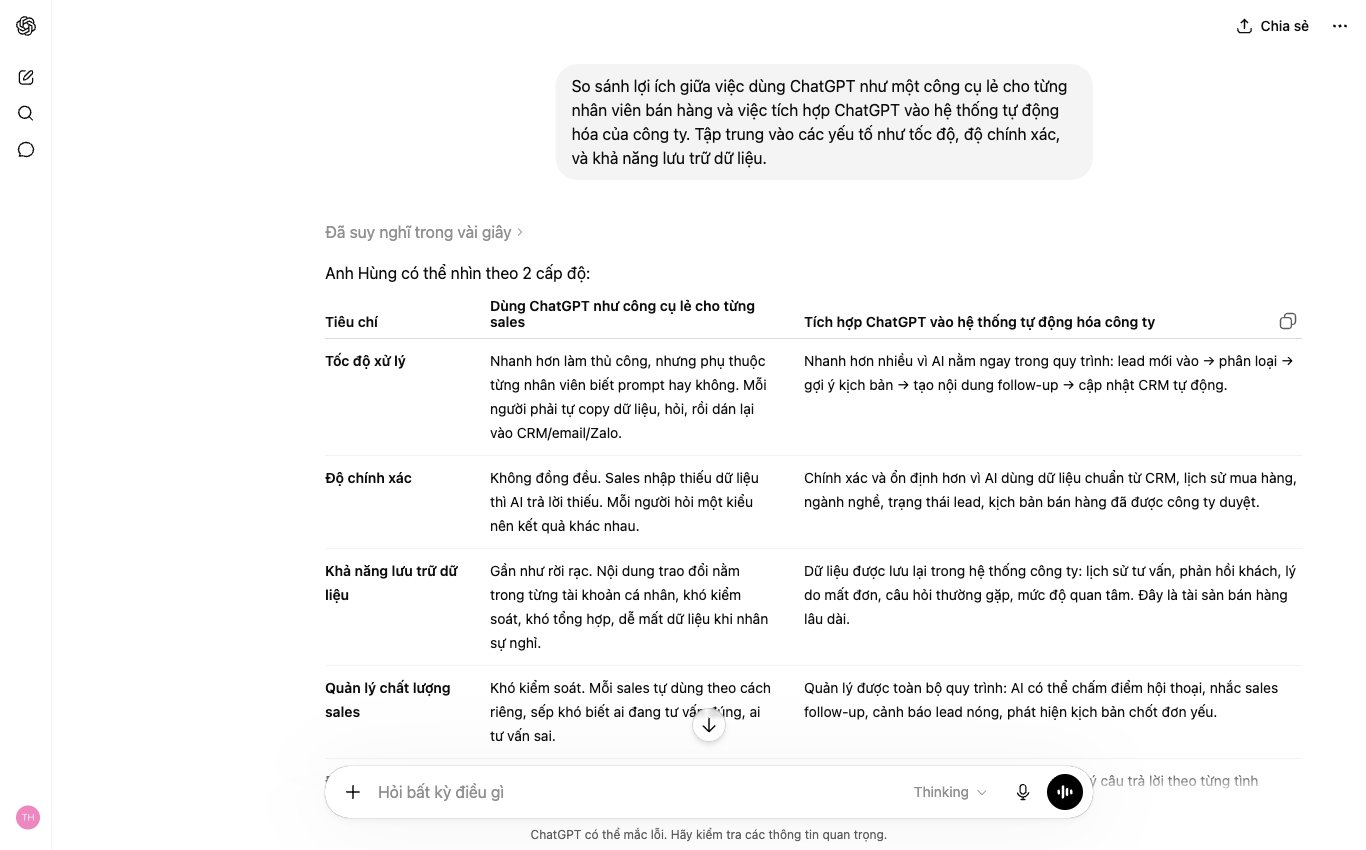
You can use ChatGPT yourself to draft variations of Zalo messages, emails and objection-handling scripts while staff still choose and edit each line. When you need it to read customer records from a CRM, suggest replies according to policy and then save the sales progress, we can build an integrated sales assistant for you; call 1900 636 648 to review one real conversation.
Right data is what closes the right step.

CEO & Founder · The MONA
Founder of The MONA, who built a services company of 60+ staff with 14,000+ projects delivered. Khánh Hùng shares how he thinks about building systems that run themselves, automating a business, and the real lessons from delivering projects at MONA.
 213




Professional website
design services
Own a website with a beautiful, 100% exclusive design and a lifetime warranty, with the ability
to expand features flexibly as your business grows, starting today!






 MONA will never sell your information or send you spam


 MONA will never sell your information or send you spam
