
 MONA OS 2.0
 Partner with MONA


 Tự động hoá doanh nghiệp
 Cẩm nang SEO
 Digital Marketing
 Kinh nghiệm thiết kế website
 Hạ Tầng Server
 Giáo dục


 VI
 EN
























Message us on
Zalo Official


 ProductsNew

 ProductsProducts
 Mới ra mắtKHA AI 2027App tự edit video, tự đăng mọi mạng xã hội, 2 phút mỗi ngày










 Website designLooks good and wins customers over.
SEO servicesBrings in customers searching for exactly what you sell.
 Tư vấn digital marketingKéo khách từ nhiều kênh, đo bằng số thật.
Corporate video productionVideos introducing your company, factory and team.
 NewAI video productionCompany story films made with AI.
 Custom software developmentCRM, ERP and HRM built for your business.
 Viết AI Agent theo yêu cầuĐặt riêng một trợ lý AI cho đúng việc của mình.
 Tư vấn chuyển đổi AIĐưa AI vào vận hành của cả công ty.
NewMONA LMSManagement for centers and schools.
MONA SkillHubInternal training for company staff.
 NHTQ systemEnd-to-end China–Vietnam shipping operations.
MONA JMSManagement for gold, diamond and pawn shops.
 MONA E-LearningA website with every feature you need to sell courses.
 How to sell online courses (course)More than 30 free lessons on selling courses on autopilot.
 MONA Cloudmonacloud.vnServers to get your apps and websites running.
 MONA Basemonabase.vnPostgres database, sign-in and file storage.
 MONA Mailmonamail.vnSend OTP, order and invoice emails from your software.
 MONA Paymonapay.vnAccept bank transfers via VietQR and notify your software when the money arrives.
 MONA eInvoiceComing soonIssue e-invoices that meet tax standards.
Gấu CườiTrả lời khách 24/7 trên web, Fanpage, Zalo và thu lead cho sale.
 Gấu TeleSalesGọi điện tư vấn, chăm khách như tổng đài viên thật.
Dê CườiTư vấn và chốt đơn cho shop ngay trong khung chat.
Gấu WebmasterNhắn nhóm Zalo là website được sửa xong.
 Gấu Pháp ChếSoạn hợp đồng, rà điều khoản trong vài phút.
 Gấu Báo GiáLên báo giá đúng mẫu và gửi khách ngay.
 AI chăm sóc khách hàngTheo dõi và giữ chân khách hàng cũ.
 Gấu Tuyển DụngLọc hồ sơ, hẹn lịch, phỏng vấn ứng viên.
 Mới ra mắt
KHA AI 2027
Xây kênh chuyên gia 2 phút mỗi ngày
Quay bằng điện thoại, AI tự edit video, tự đăng lên 16 nền tảng và tự trả lời bình luận, tin nhắn.
886.120lượt xem trên kênh CEO MONA sau 36 ngày
 Anh Khánh HùngCEO MONA đang dùng mỗi ngày
Xem app làm được gì
 AI
Gấu Cười MONA ĐANG TỰ XÀITrả lời khách 24/7 trên website, Zalo OA, Messenger và thu lead về cho sale.
Dê CườiChốt đơn bán lẻ và sàn: Shopee, TikTok Shop, web. Chăm cả khách sỉ, đại lý.
Gấu WebmasterCập nhật nội dung, tối ưu SEO website mỗi ngày.
Gấu TeleSalesGọi điện tư vấn, chăm khách như tổng đài viên thật.
Gấu Tuyển DụngLọc hồ sơ, hẹn lịch, phỏng vấn ứng viên tự động.
AI chăm sóc khách hàngGiữ khách cũ, cứu lead đã rớt cho phòng kinh doanh.
Gấu Pháp ChếSoạn hợp đồng, rà điều khoản trong vài phút.
Gấu Báo GiáLên báo giá đúng mẫu, gửi khách ngay khi có yêu cầu.
 Chuyển đổi AI toàn phầnGiải pháp tổng cho doanh nghiệp, 3 lớp triển khai.
 Viết AI Agent theo yêu cầuĐặt riêng một con AI gánh đúng nghiệp vụ của bạn.
 Custom softwareCRM, ERP and HRM with built-in AI automation.
 SEO & AEO thời đại AIĐược Google lẫn AI trích dẫn, không chỉ xếp hạng.
 Kiến thức AI cho doanh nghiệpBài phân tích, hướng dẫn ứng dụng AI vào vận hành.
 Free AI courses
 AI tools at work
App mới · KHA AI 2027
Xây kênh 2 phút mỗi ngày
AI tự edit video, tự đăng mọi mạng xã hội
Free consultation, 8am–10pm every day

15 May, 2025

Ahrefs is one of the most popular SEO tools today, helping you analyze backlinks, research keywords and track content performance accurately. As of 2025, Ahrefs has more than 49,000 paying customers worldwide (according to sqmagazine), which shows how trusted and widely used it is in the SEO community. So what exactly is Ahrefs? How do you use it to improve your search rankings and beat your competitors? In this article, MONA Media will help you understand Ahrefs and apply it effectively in your SEO strategy. Let's get started.
Ahrefs is a comprehensive analysis and intelligence platform SEO marketing built on big data. Launched in 2010 as a tool for analyzing backlinks, Ahrefs quickly grew into a full SEO toolkit. Today it supports more than SEO. It also helps marketers make better decisions in content marketing, paid advertising (PPC), digital PR and overall digital strategy, all based on real, continuously updated data.

What stands out about Ahrefs is that it collects and processes data continuously, 24/7, from all over the Internet. Its system indexes and analyzes petabytes of information to help you understand:
A big reason Ahrefs is so widely used is the quality and scale of its data. AhrefsBot is the second most active crawler in the world, behind only Googlebot. As a result, Ahrefs holds one of the largest and most up-to-date databases of backlinks, keywords and content performance available today.

In essence, Ahrefs works much like Google: every day the system sends out “spiders” (bots) that scan millions of websites on the Internet. They collect data on how websites link to each other, what content they contain and which keywords they rank for in search engines.
According to a third-party study of crawler activity, Ahrefs ranks second, behind only Google. It even surpasses big names such as Bing, Yahoo and Baidu. This partly reflects how well Ahrefs SEO helps users track, analyze and optimize their websites.
On top of that, on February 24, 2017, Ahrefs' CEO Dmitry Gerasimenko shared that their search bot had been upgraded to double its speed, able to crawl up to 10 billion pages a day, and that the figure had since risen to 14 billion.
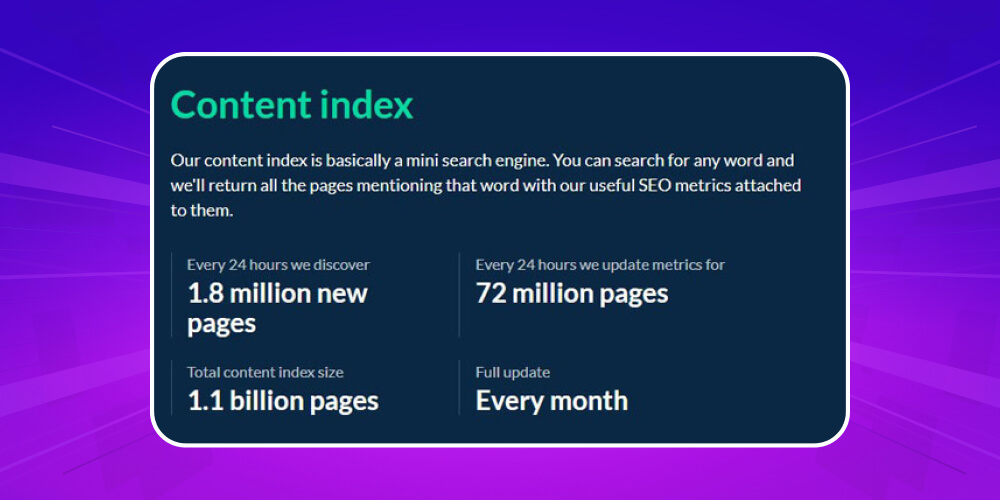
On average each day, Ahrefs discovers about 1.8 million new pages and updates the data of about 72 million pages. The total content indexed is around 1.1 billion trang.
Thanks to this fast crawling and updating, Ahrefs has become a leading tool for discovering keyword research tools and tracking content, well ahead of Bing and Yahoo when it comes to aggregating information.
You just enter a keyword, and the system returns a list of related pages along with the SEO metrics you need for analysis and content strategy.

One reason Ahrefs is rated so highly is its keyword analysis based on real data. So far the system has collected about 10.1 billion keywords in keywords in 171 countries across different search engines, including Google, YouTube, Amazon, Naver and Yandex.
What sets Ahrefs apart from other tools is how it approaches keywords. Beyond search volume, Ahrefs also provides data on actual clicks, which is extremely important for judging a keyword's potential in SEO strategy.
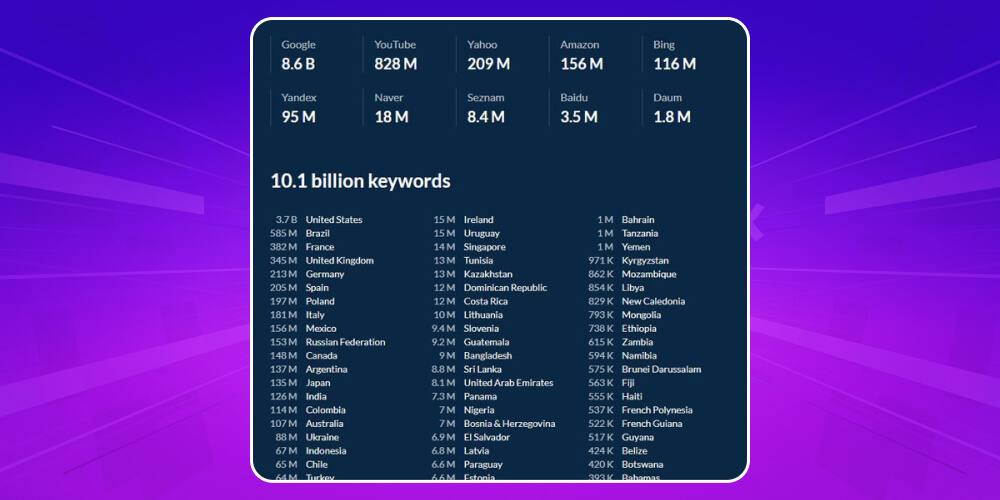
Ahrefs has a huge database of 494 million keywords tracked in 155 countries. This data is used to accurately estimate the traffic of any website and to provide the list of keywords a website ranks for on Google. It is very useful for evaluating how well a page performs and finding content optimization opportunities.
Every 15 to 30 minutes, the Ahrefs system updates backlink new data. This data not only helps you understand the links pointing to your website but also underpins key metrics such as Ahrefs Rank and Domain Rating (DR) hay URL Rating (UR).
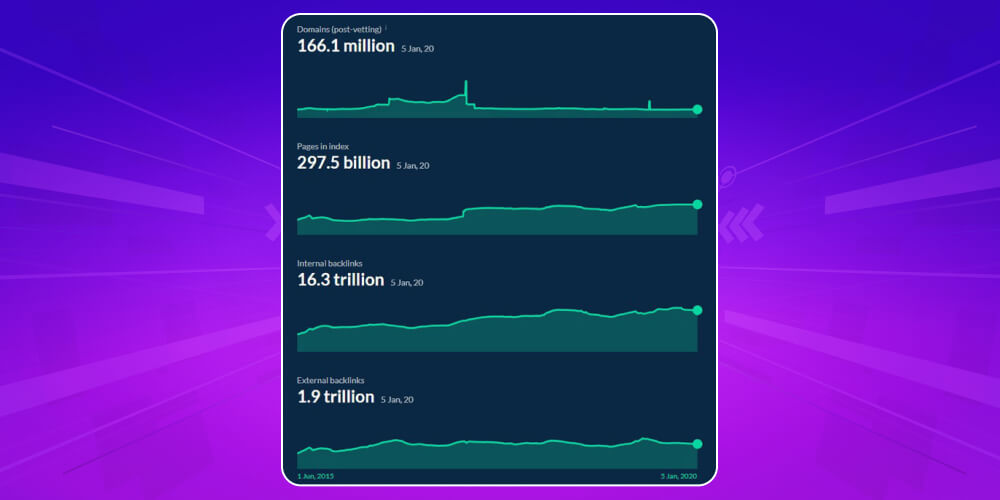
As of early 2020, the Ahrefs SEO tool had collected:
This scale partly shows how reliable Ahrefs is and how well it supports in-depth analysis for any SEO strategy.
Ahrefs is trusted by many marketers and SEO specialists SEO professionals because it turns complex SEO data into clear, easy-to-understand insight that you can apply right away. Instead of dry numbers, Ahrefs helps users see the real nature of a problem, so they can make faster and more accurate decisions when building content marketing, SEO and overall digital marketing strategies. Other reasons Ahrefs is so widely used include:
Its backlink data is regarded as among the most reliable and is preferred by most SEO professionals
By combining depth of data with practical usability, Ahrefs has become a familiar tool for marketers and SEO professionals around the world.
Now that you know what Ahrefs is, you are probably curious what it can do for your SEO campaign. If you are looking for a comprehensive way to improve SEO performance, the features below will make you think seriously about using Ahrefs long term.
The backlink analysis function in Ahrefs lets you check every link pointing to your website. With such a large amount of data, the tool gives you a full view of your link profile. You can easily identify high-quality backlinks and spot unsafe links in time to deal with them, so they do not hurt your rankings. full-scope SEO.
Ahrefs not only helps you control your own backlinks but also lets you analyze your competitors' link sources to find better link-building opportunities. SEO professionals rate this as one of its best features.
Here is how:

In practice, getting a backlink depends heavily on how you build relationships with the administrators of the target website. A few simple ways to start:
Each type of backlink needs a different approach; for example, a Guest Post post is completely different from a Broken Link tactic.
Although some people doubt how strong the keyword search feature in Ahrefs is, in practice it is one of the most reliable keyword research tools, especially when you need to build a content strategy or find new topics to write about. The steps are:
Once you have a list of potential keywords, you need to pick the ones truly worth investing in. Ahrefs helps you do this in the following 7 steps:

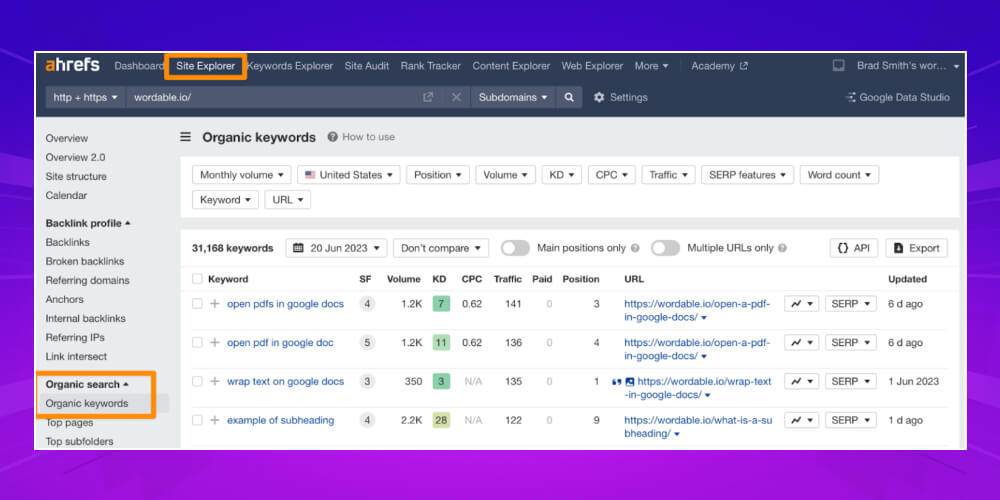
One of the most effective ways to use Ahrefs SEO is to track competitors' keywords and look for opportunities to grow traffic. Just go to Site Explorer, enter the competitor's domain, then open the “Organic Search” section and choose “Organic Keywords”.
Right away you will get a list of the keywords your competitor ranks for. From there, you can select the keywords that fit your content direction and turn them into articles with strong traffic potential. Done well, you can take a share of the traffic your competitor currently holds.
If you only track keyword rankings one by one, it is hard to judge exactly how well an SEO campaign is working. What you really need to look at is total organic traffic, and that is where the Organic Visibility metric becomes important.
Besides Google Analytics, you can also look at the “Total Organic Keywords” metric and the traffic chart in Ahrefs to see the growth trend clearly. It is a useful way to see overall SEO performance without analyzing every small keyword.

Ahrefs can also send alerts when other websites mention your brand, product names or keywords related to your business. Knowing who is saying what about you online is an important part of reputation management.
Beyond brand building, this feature also helps you catch negative reviews or media partnership opportunities in time. You can also use it to ask for backlinks from articles that mention you but do not link to you.
Ahrefs in SEO does more than analyze keywords and backlinks. It also works as a tool for checking a website's technical health. Site Audit scans your whole website to find problems such as redirect errors, missing meta tags, slow page loading and duplicate content.
From there, you get specific recommendations to improve your website's visibility in search engines. For anyone who needs to optimize a website to a full SEO standard, this is a feature you cannot skip.
If you are new to Ahrefs, you may find it hard to face the many metrics and technical terms in the interface. Understanding what each term means helps you use the features fully and build a more effective SEO strategy.
Here are the key concepts you should know when using Ahrefs:
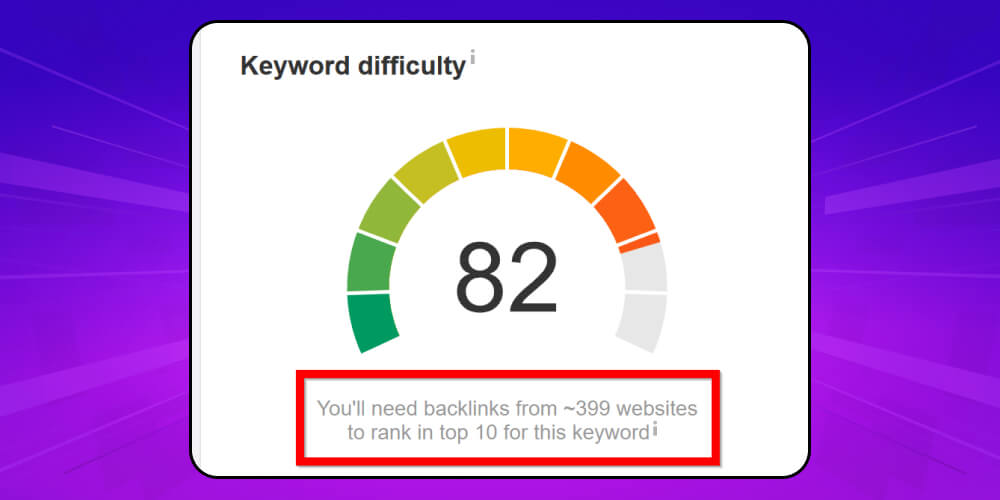
Keyword Difficulty is a metric showing how competitive a keyword is on Google, rated on a scale from 1 to 100. The higher the score, the harder it is to reach the top for that keyword. KD is determined by several factors, such as competition in the industry, the number of websites doing SEO for that keyword, the cost per click and the strength of the pages already ranking high.
These are three types of data that directly reflect a website's natural presence and appeal in search engines, where:
UR is a metric showing the strength of a specific page on a website, based on the backlink profile Ahrefs has collected. If you are learning how to use Ahrefs for SEO, the UR metric tells you whether a URL is trustworthy and likely to reach the top. The higher the UR score, the better the chance that page reaches a good position on Google.
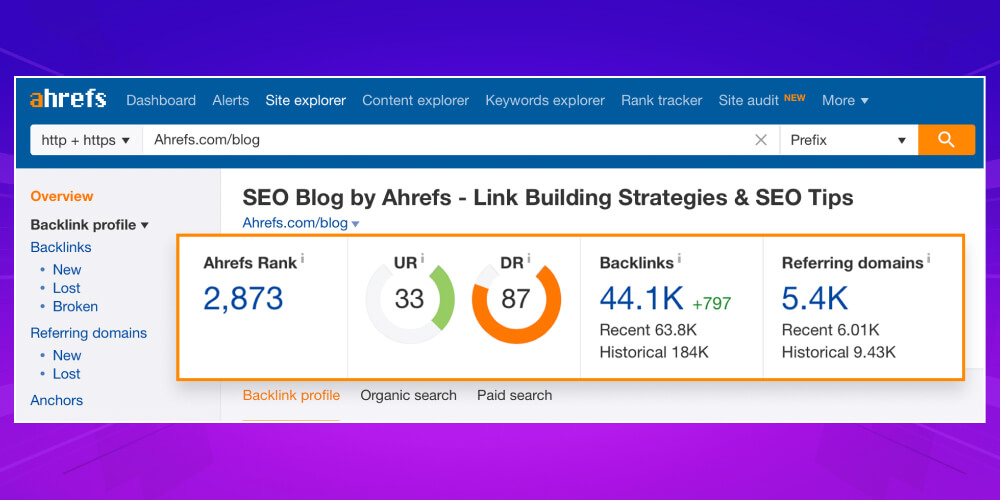
Unlike UR, Domain Rating (DR) shows the overall strength of the entire domain, also based on backlinks. The higher the DR, the more likely the website is seen as reputable. However, this metric leans toward off-page SEO, so it does not reflect individual subpages as accurately as UR does.
This is the number of different domains that have backlinks pointing to your website. Each domain is counted once, no matter how many URLs it links to. When using Ahrefs SEO, watch this metric to make sure your backlinks are not spam and are of real quality.
Ahrefs Rank is Ahrefs' overall ranking system, based on the number and quality of the backlinks a website has. A website with a lower AR has a better overall ranking. When researching competitors or tracking your SEO progress, this is a metric you should not overlook.
This metric shows the average number of monthly searches for a specific keyword. When using the Ahrefs keyword research tool, volume is the first thing to look at, because it tells you how popular a topic is, lets you track search trends and helps you predict how much potential a keyword may bring your website.
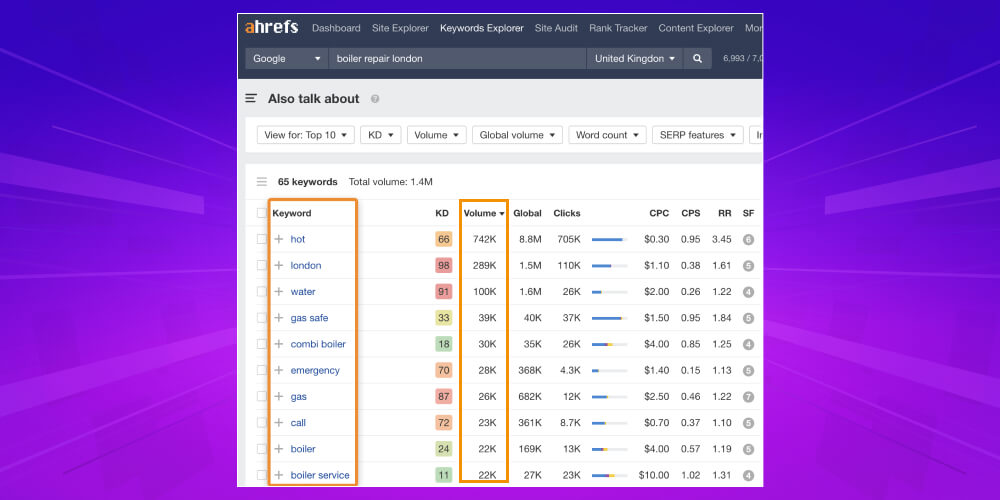
The Return Rate reflects how often users come back to search for a keyword within about 30 days. This is something you will not find in many SEO tools other tools. If you are wondering what Ahrefs is and why so many SEO people like it, RR is one of the reasons. This metric is very useful for judging how much users really care about a specific keyword.
The Clicks shows the actual number of clicks on results after each search. However, not every keyword with high volume generates many clicks. Some queries get their answer right on the search results page, so users do not need to click any link. That is why, when using Ahrefs in SEO, you should analyze both Clicks and volume to understand user behavior better.
CPC is the average amount advertisers pay each time a user clicks an ad for that keyword. Even if you do not run ads, CPC is still very useful when researching keywords with Ahrefs SEO. A high CPC usually comes with high competition and shows that the keyword carries great commercial value.
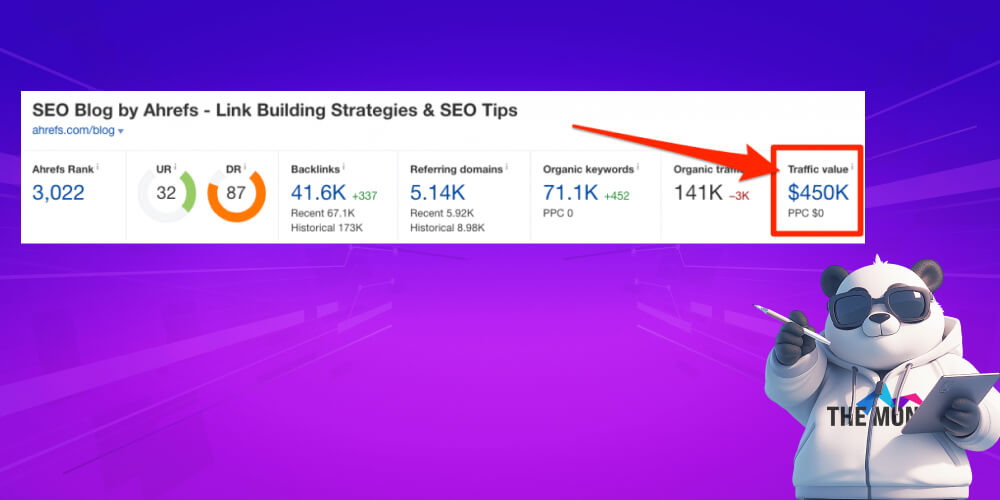
Traffic Value is an estimate of the monetary value your website could receive from organic traffic, based on CPC. It helps you judge the quality of keywords and page content more accurately. A page with a lot of traffic but low value may be focusing on topics that rarely convert. Conversely, if Traffic Value is high, you are likely doing SEO in the right direction and have content that can earn well.
Ahrefs offers two types of crawl indexes:
Understanding the difference between these two indexes gives you a more accurate view when analyzing backlinks, especially when tracking changes in your link profile.
With its in-depth feature set, Ahrefs is a powerful weapon for optimizing your content strategy and raising your website's rankings. If you are looking at the cost of investing in this keyword research tool, here is the latest price list for you to review and choose the plan that fits:
All the plans above are billed monthly. So even if you only choose the most basic plan, the investment comes to about 25 million VND a year. Of course, this is well worth it if you want to get the most from Ahrefs SEO for long-term website growth.
Understanding what Ahrefs is is only the first step. For the tool to really help your SEO strategy, you need to use it selectively and with focus. Below, MONA will walk you through using Ahrefs effectively for your goals.
One of the most common and effective uses of Ahrefs is keyword research. Below is a detailed guide to finding keywords with Ahrefs that you can follow right away to optimize your content and raise your website's rankings.
Step 1: Analyze a competitor's URL with Site Explorer
Once you have identified a competitor's website in your field, paste its link into the Site Explorer tool in Ahrefs.

Step 2: Open the Organic Keywords section
After the tool finishes scanning the data, go to the Organic Keywords section to see all the keywords that bring your competitor organic traffic.
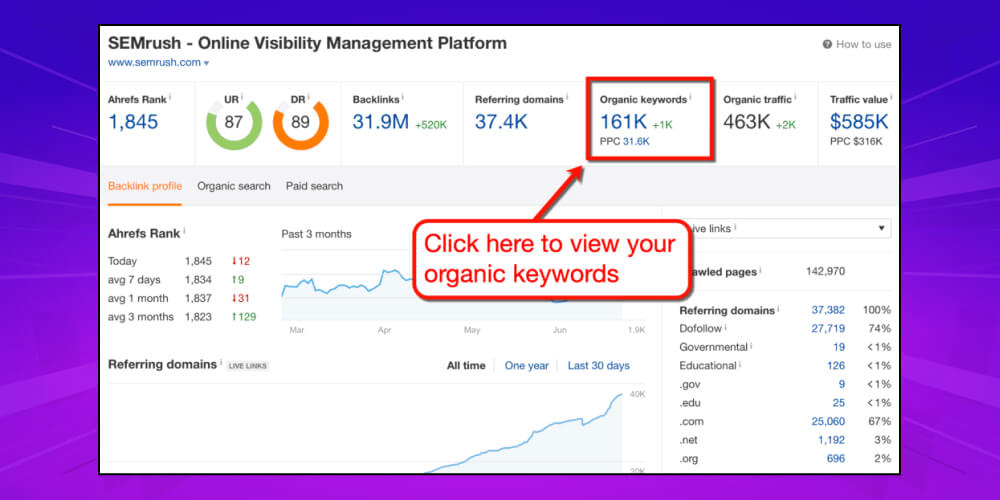
Step 3: Use filters to pick suitable keywords
At this step, filter for keywords with a search volume in the range of 100 to 1,000 searches per month. This group has moderate competition and is well suited to starting your content.
Step 4: Watch the new keywords your competitor is targeting
Do not overlook new keywords appearing in your competitor's content strategy. This data helps you catch trends and publish articles in time so you are not left behind.
Step 5: Explore your competitor's best-performing pages
In the advanced data of Ahrefs SEO, you can see which pages bring your competitor the most traffic. This is a chance to find target keywords and shape your content around what searchers actually need.
Step 6: Find more competitors
Ahrefs in SEO also provides a list of websites operating in the same field as you. Analyzing several competitors at once opens up more new keyword ideas.
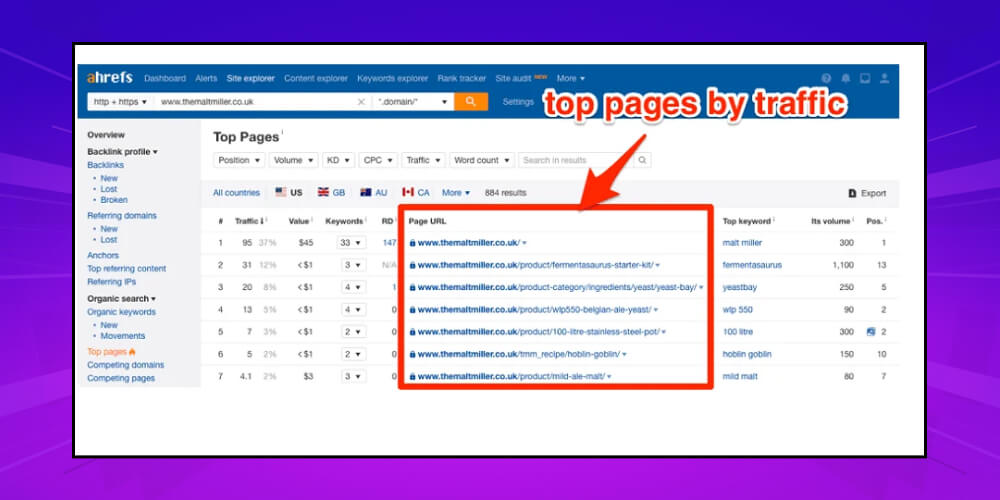
Step 7: Use Content Gap to spot opportunities
Just enter the URL of your website and your competitors in the “Show keywords that any of the below targets rank for” section. Ahrefs will immediately list the keywords your competitors rank at the top for and you do not.
Step 8: Find related keywords in Keywords Explorer
Finally, use the Keywords Explorer tool. Enter the keyword you are targeting, then click “All keywords ideas” in the left sidebar. Here you will find many more related keywords that help you expand your content in a natural and sensible way.
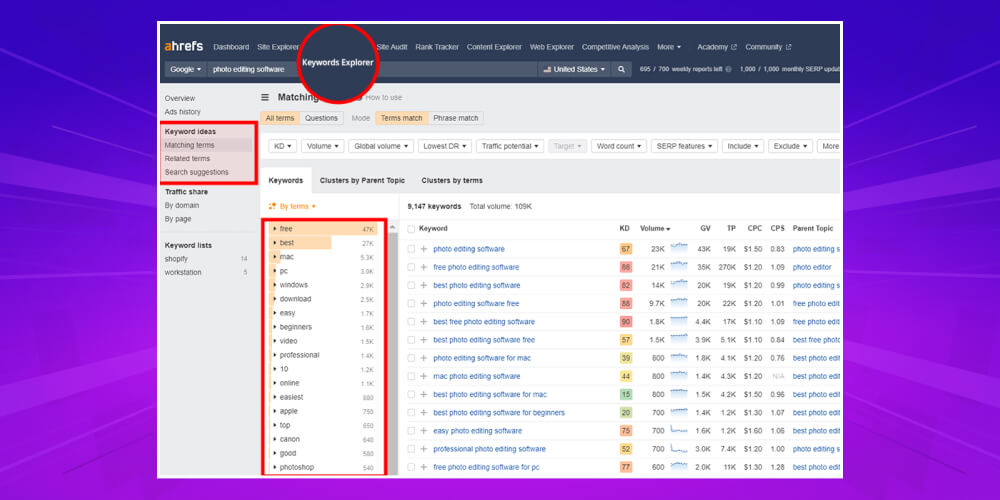
To know whether a keyword is really worth investing content in, start with the Ahrefs keyword research tool. Go to the Keywords Explorer section in the navigation bar, enter the keyword you are targeting and hit search. You will immediately see a range of important data such as monthly search volume, actual clicks and the traffic potential estimated by Ahrefs SEO.
Next, scroll down to the SERP Overview and choose Export section in the right corner of the screen to download all the data. Open the Excel file you just downloaded and keep the columns: URL, Backlinks, Referring Domains, URL Rating, Domain Rating and Facebook. You can delete the other columns to make the table tidier and easier to analyze.
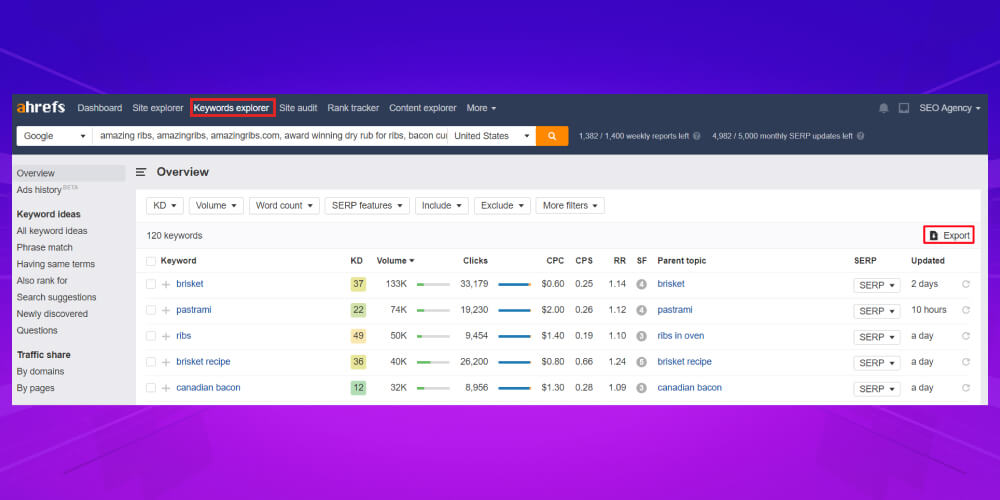
Then paste your website or landing page URL into the “URL” column and enter the DR value in the matching row. This makes it easy to compare how competitive your site is against the competitors already ranking high.
Finally, review each page that has reached the top and judge whether your website can outrank it. If competitors' metrics such as DR and UR are too strong, you can set that keyword aside for now or plan a more thorough content investment.
If you are looking up what Ahrefs is, or just starting to learn how to use Ahrefs for SEO, this is one of the most basic steps for choosing keywords strategically and avoiding time spent on opportunities that are not realistic.
Finding broken backlink (broken links) is one of the simple and effective tricks for building quality backlinks without much effort. First, open the Site Explorer feature in Ahrefs and enter your domain. The tool quickly scans the whole website and lists pages that have links pointing to them but no longer exist or return a 404 error.

One smart way to grow your link profile is to watch what competitors do well. Open Ahrefs Site Explorer, paste the competitor's website URL into the search bar and start analyzing. After a few seconds, go to the Backlink Profilesection, click Backlinks to see the list of links pointing to their pages.
Now you have a detailed backlink list. The next job is to assess the quality of each link, pick the backlinks with real potential and start trying outreach. This process takes time to refine, from deciding which types of links you want to building relationships with the owners of relevant sites.
From the article above, you can see that Ahrefs SEO is not just a statistics or tracking tool, but a complete ecosystem that strongly supports every search optimization campaign. Whether you are new to Ahrefs or looking to sharpen your skills, using each feature well saves time, strengthens your competitiveness and clearly improves SEO performance. Regularly using Ahrefs keyword research also helps you steer content more accurately while focusing on real user insight. If you want to improve your Google rankings sustainably with SEO services from MONA, contact us to get SEO price list .
-> See more articles on the SEO topic:

CEO & Founder · The MONA
Founder of The MONA, who built a services company of 60+ staff with 14,000+ projects delivered. Khánh Hùng shares how he thinks about building systems that run themselves, automating a business, and the real lessons from delivering projects at MONA.
 1,5K




Professional website
design services
Own a website with a beautiful, 100% exclusive design and a lifetime warranty, with the ability
to expand features flexibly as your business grows, starting today!



NHẬN TƯ VẤN SEO MIỄN PHÍ !






 MONA will never sell your information or send you spam


 MONA will never sell your information or send you spam
