
 MONA OS 2.0


 Tự động hoá doanh nghiệp
 Cẩm nang SEO
 Digital Marketing
 Kinh nghiệm thiết kế website
 Hạ Tầng Server
 Giáo dục


 VI
VI
 EN
EN

















Message us on
Zalo Official


 ProductsNew

 ProductsProducts
 Mới ra mắtKHA AI 2027App tự edit video, tự đăng mọi mạng xã hội, 2 phút mỗi ngày










 Website designLooks good and wins customers over.
SEO servicesBrings in customers searching for exactly what you sell.
Website designLooks good and wins customers over.
SEO servicesBrings in customers searching for exactly what you sell.
 Tư vấn digital marketingKéo khách từ nhiều kênh, đo bằng số thật.
Corporate video productionVideos introducing your company, factory and team.
Tư vấn digital marketingKéo khách từ nhiều kênh, đo bằng số thật.
Corporate video productionVideos introducing your company, factory and team.
 NewAI video productionCompany story films made with AI.
 Custom software developmentCRM, ERP and HRM built for your business.
 Viết AI Agent theo yêu cầuĐặt riêng một trợ lý AI cho đúng việc của mình.
 Tư vấn chuyển đổi AIĐưa AI vào vận hành của cả công ty.
NewMONA LMSManagement for centers and schools.
MONA SkillHubInternal training for company staff.
Tư vấn chuyển đổi AIĐưa AI vào vận hành của cả công ty.
NewMONA LMSManagement for centers and schools.
MONA SkillHubInternal training for company staff.
 NHTQ systemEnd-to-end China–Vietnam shipping operations.
MONA JMSManagement for gold, diamond and pawn shops.
NHTQ systemEnd-to-end China–Vietnam shipping operations.
MONA JMSManagement for gold, diamond and pawn shops.
 MONA E-LearningA website with every feature you need to sell courses.
 How to sell online courses (course)More than 30 free lessons on selling courses on autopilot.
 MONA Cloudmonacloud.vnServers to get your apps and websites running.
 MONA Basemonabase.vnPostgres database, sign-in and file storage.
 MONA Mailmonamail.vnSend OTP, order and invoice emails from your software.
 MONA Paymonapay.vnAccept bank transfers via VietQR and notify your software when the money arrives.
 MONA eInvoiceComing soonIssue e-invoices that meet tax standards.
Gấu CườiTrả lời khách 24/7 trên web, Fanpage, Zalo và thu lead cho sale.
MONA eInvoiceComing soonIssue e-invoices that meet tax standards.
Gấu CườiTrả lời khách 24/7 trên web, Fanpage, Zalo và thu lead cho sale.
 Gấu TeleSalesGọi điện tư vấn, chăm khách như tổng đài viên thật.
Dê CườiTư vấn và chốt đơn cho shop ngay trong khung chat.
Gấu WebmasterNhắn nhóm Zalo là website được sửa xong.
Gấu TeleSalesGọi điện tư vấn, chăm khách như tổng đài viên thật.
Dê CườiTư vấn và chốt đơn cho shop ngay trong khung chat.
Gấu WebmasterNhắn nhóm Zalo là website được sửa xong.
 Gấu Pháp ChếSoạn hợp đồng, rà điều khoản trong vài phút.
 Gấu Báo GiáLên báo giá đúng mẫu và gửi khách ngay.
 AI chăm sóc khách hàngTheo dõi và giữ chân khách hàng cũ.
 Gấu Tuyển DụngLọc hồ sơ, hẹn lịch, phỏng vấn ứng viên.
 Mới ra mắt
KHA AI 2027
Xây kênh chuyên gia 2 phút mỗi ngày
Quay bằng điện thoại, AI tự edit video, tự đăng lên 16 nền tảng và tự trả lời bình luận, tin nhắn.
355.527lượt xem trên kênh CEO MONA sau 21 ngày
Mới ra mắt
KHA AI 2027
Xây kênh chuyên gia 2 phút mỗi ngày
Quay bằng điện thoại, AI tự edit video, tự đăng lên 16 nền tảng và tự trả lời bình luận, tin nhắn.
355.527lượt xem trên kênh CEO MONA sau 21 ngày
 Anh Khánh HùngCEO MONA đang dùng mỗi ngày
Xem app làm được gì
Anh Khánh HùngCEO MONA đang dùng mỗi ngày
Xem app làm được gì
 AI
Gấu Cười MONA ĐANG TỰ XÀITrả lời khách 24/7 trên website, Zalo OA, Messenger và thu lead về cho sale.
Dê CườiChốt đơn bán lẻ và sàn: Shopee, TikTok Shop, web. Chăm cả khách sỉ, đại lý.
Gấu WebmasterCập nhật nội dung, tối ưu SEO website mỗi ngày.
Gấu TeleSalesGọi điện tư vấn, chăm khách như tổng đài viên thật.
Gấu Tuyển DụngLọc hồ sơ, hẹn lịch, phỏng vấn ứng viên tự động.
AI chăm sóc khách hàngGiữ khách cũ, cứu lead đã rớt cho phòng kinh doanh.
Gấu Pháp ChếSoạn hợp đồng, rà điều khoản trong vài phút.
Gấu Báo GiáLên báo giá đúng mẫu, gửi khách ngay khi có yêu cầu.
AI
Gấu Cười MONA ĐANG TỰ XÀITrả lời khách 24/7 trên website, Zalo OA, Messenger và thu lead về cho sale.
Dê CườiChốt đơn bán lẻ và sàn: Shopee, TikTok Shop, web. Chăm cả khách sỉ, đại lý.
Gấu WebmasterCập nhật nội dung, tối ưu SEO website mỗi ngày.
Gấu TeleSalesGọi điện tư vấn, chăm khách như tổng đài viên thật.
Gấu Tuyển DụngLọc hồ sơ, hẹn lịch, phỏng vấn ứng viên tự động.
AI chăm sóc khách hàngGiữ khách cũ, cứu lead đã rớt cho phòng kinh doanh.
Gấu Pháp ChếSoạn hợp đồng, rà điều khoản trong vài phút.
Gấu Báo GiáLên báo giá đúng mẫu, gửi khách ngay khi có yêu cầu.
 Chuyển đổi AI toàn phầnGiải pháp tổng cho doanh nghiệp, 3 lớp triển khai.
 Viết AI Agent theo yêu cầuĐặt riêng một con AI gánh đúng nghiệp vụ của bạn.
 Custom softwareCRM, ERP and HRM with built-in AI automation.
 SEO & AEO thời đại AIĐược Google lẫn AI trích dẫn, không chỉ xếp hạng.
 Kiến thức AI cho doanh nghiệpBài phân tích, hướng dẫn ứng dụng AI vào vận hành.
 Free AI courses
 AI tools at work
App mới · KHA AI 2027
Xây kênh 2 phút mỗi ngày
AI tự edit video, tự đăng mọi mạng xã hội
Free consultation, 8am–10pm every day
AI tools at work
App mới · KHA AI 2027
Xây kênh 2 phút mỗi ngày
AI tự edit video, tự đăng mọi mạng xã hội
Free consultation, 8am–10pm every day

18 March, 2023

Google Trends is a free tool, yet extremely useful for anyone doing SEO or online marketing. By analyzing search trends over time and by region, Google Trends helps you understand user demand and build an accurate content strategy. In the article below, MONA Media will help you understand what Google Trends is and how to use it for effective SEO.
Google Trends is a free Google tool that gives users data and charts on how popular specific search terms are on Google and YouTube. Google Trends was first launched in 2006 and has been updated over the years to work better.

Google Trends can explore trend data going back to 2004. The tool is useful in several ways, such as:
>> Read more: 7 steps to analyze competitors in business
With Google's top trends, you can keep up with what is being searched most, and adjust your SEO strategy, content and marketing flexibly. So what exactly are the benefits of Google Trends? Here are the specific benefits when you know how to use it:
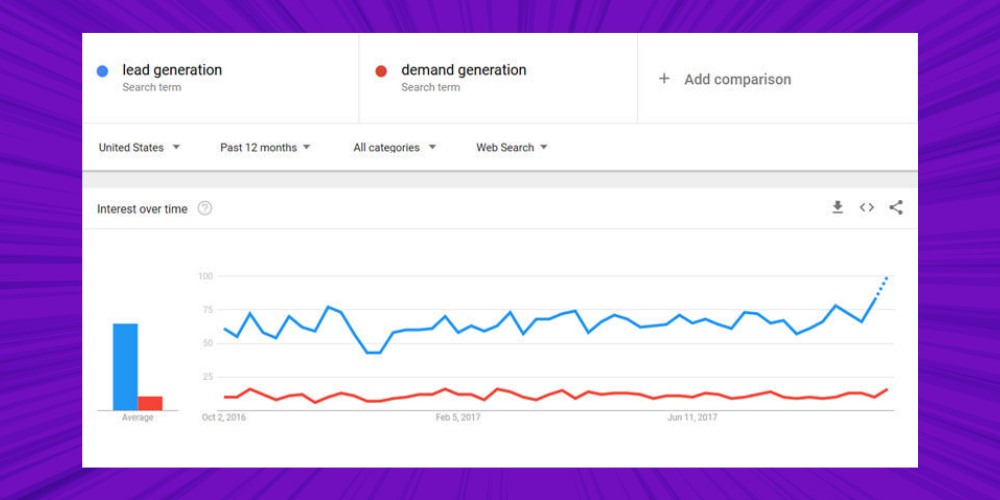
Internet users keep changing how they search, and Google Trends lets you watch that change. Enter a keyword and you can see how much interest there is in each period of time, so you can spot which topics are surging and avoid missing valuable data opportunities.
When you know how to use Google Trends well, you can quickly pick up rising topics and see what is an opportunity and what is a challenge. For example, by looking up trends on Google you will know which products, services or topics people care about most, worldwide or in each country. This is key data for adjusting your SEO strategy, building suitable content and boosting marketing results.
A standout feature of Google Trends is that it lets you compare 5 keywords at once and immediately see which is growing and which is losing interest.
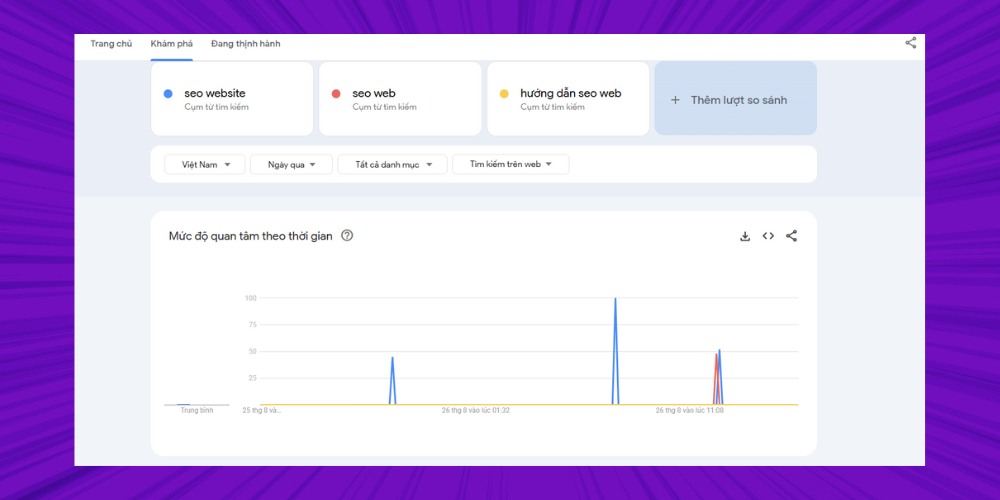
This keeps SEOers and marketers from investing in the wrong direction or running ads on keywords that are no longer hot. Instead, you have real data to make more accurate decisions, from choosing topics SEO to assessing content potential before you start.
With data from Google's top trends, you will know which market segments are worth investing in and which content to limit to avoid wasting budget. When you apply Google Trends correctly, a business can focus resources on campaigns likely to convert well instead of spreading them across many low-potential channels.
To catch search trends and plan a structured full-scope effectively, turning on and setting up the Google Trends website is an important step. In this section, MONA shows you how to open Google Trends to track data and analyze SEO.
To open Google Trends on a computer, follow these steps:
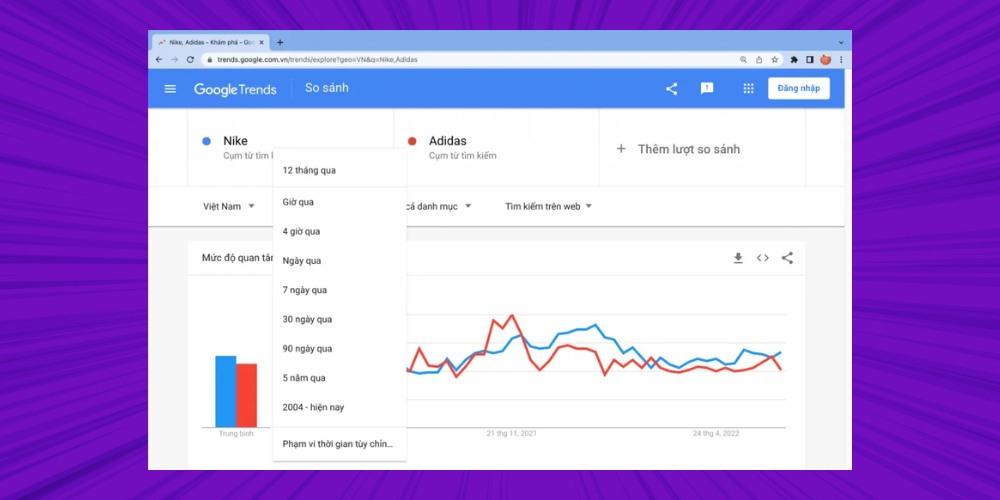
Here you will see the Google top trends list and the keywords that stand out by region, time or specific category. You can also customize by 4 criteria:
Google also supports the "+ Compare" feature so you can place several keywords side by side and analyze the level of interest.
*Tip: Bookmark this page in your browser for quick access next time, especially when you need to follow market trends to plan your SEO strategy.
If you are not using a computer, you can open Google Trends on your phone like this:
https://trends.google.com is the only official link for opening Google Trends. The site now supports a Vietnamese interface, so users can easily follow trends at home and abroad.
Just save this link and you will quickly reach a valuable data source for finding trends on Google, then apply it effectively in SEO, market research or content creation.
While using Google Trends, you sometimes run into errors that interrupt your work. Here are the common Google Trends errors and how to fix them quickly:
*Tip: MONA suggests opening Google Trends in incognito mode so you can identify the error faster and more easily.
By using data from Google Trends, SEOers can pinpoint what users are searching for and shape content and SEO strategy accordingly. Here is a detailed guide to using Google Trends to optimize SEO cho website, improve search rankings and grow steadily on Google.
Keyword research is the foundation for building an effective content strategy, helping you identify keywords that are rising and keywords that are cooling off. With the free keyword research tools Google Trends tool, just enter the keyword you want to analyze in the search box, and the system returns a chart of how popular it has been over time. You can widen the time range to compare, analyze and decide more accurately about keyword trends.
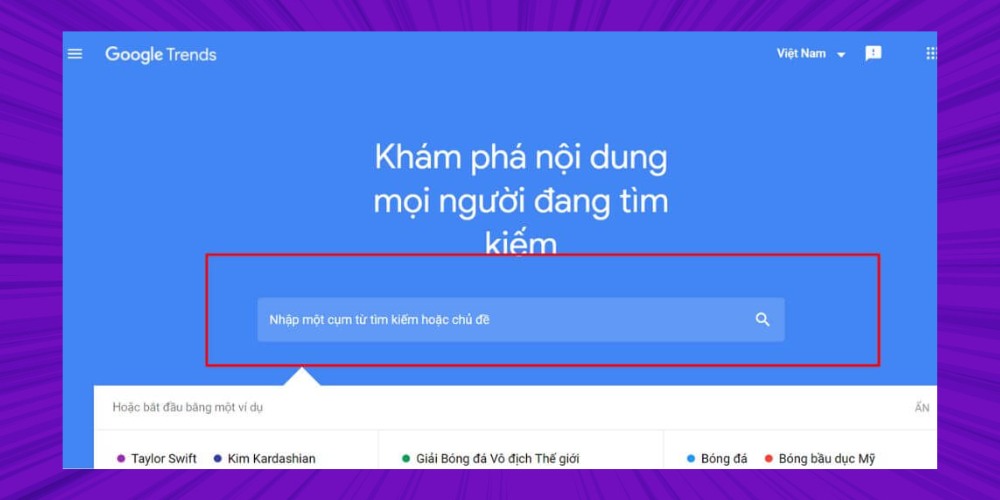
When you open Google Trends, you can also easily spot keywords with sudden spikes in search volume. These keywords are the basis for creating on-trend content that attracts readers and quickly raises traffic.
When you enter a keyword in the main interface of Google Trends, you get a list of closely related keywords, sorted by popularity. The tool also shows the percentage of search volume for each keyword. If the percentage is replaced by the word "Breakout", the keyword is growing very strongly, possibly by more than 5000%.
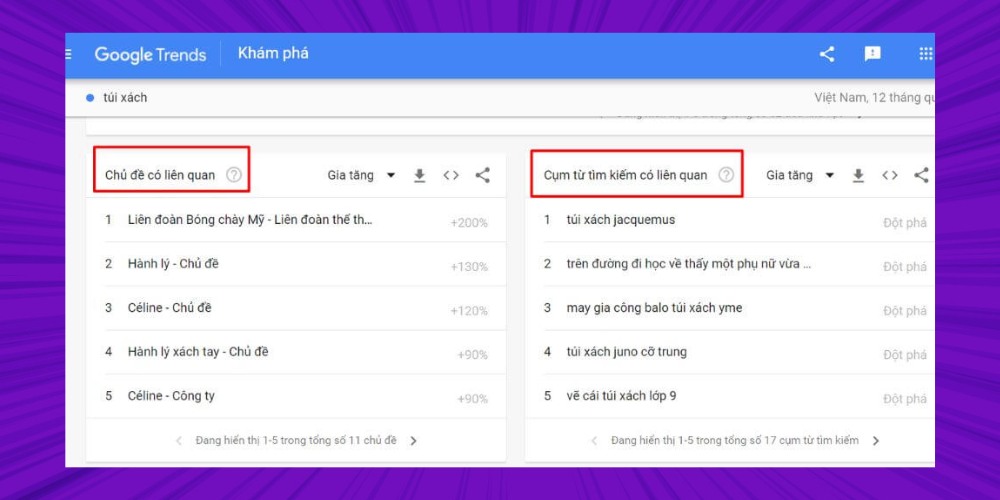
*Note: Trending keywords are often temporary and not always a long-term trend. So when building a SEO contentstrategy, combine trending keywords with keywords of lasting, long-term value.
Besides related keywords, Google Trends can also be used to find related topics for the future. Instead of specific search terms, this table gives details on broader topics people search for often, helping you widen your content ideas and build a long-term SEO strategy.
You can dig into deeper topics with detailed filters such as country or region, time range, industry category and search type. These options help you analyze trends accurately and identify topics with value in both the short and long term.
Seasonal trends are trends that recur regularly around a particular holiday or season. By researching trending topics in Google Trends, you can find the right time to start running ads for your major holidays.
For example, say you own a chocolate shop. Search the keyword "socola" and you will see search volume spike around Valentine's Day (14/2), White Day (14/3) and Mother's Day. Choose a window of about 3 years to judge the seasonal popularity of this word accurately.
A harder keyword is one you choose for a content campaign for an insurance company. You can look back over several years to see whether demand for insurance rises before storm season. Your content and advertising strategy can then market more effectively in that period.
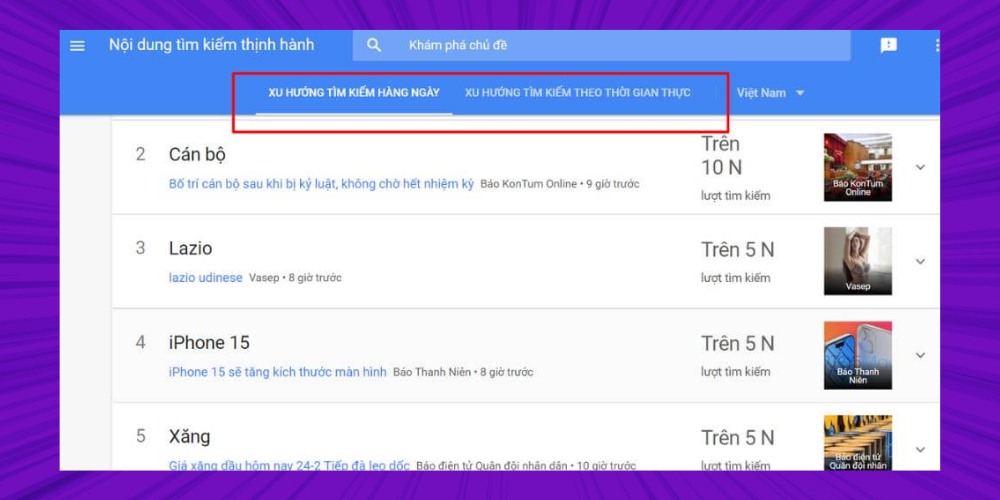
Finding trending topics helps you plan content design and stay relevant to your brand. From the Google Trends homepage, scroll down to the global "Recent trends" section. These topics may not suit a blog post because they are short-lived. But the trend could make a fun image or meme to share on social media.
Using Google Trends to analyze data helps you identify keywords that are growing and have the potential to last. Once you know these trends, you can build a long-term SEO content strategy instead of just chasing passing fads.
Google Trends is also a great source of inspiration for topics on other content channels such as video, blogs or email marketing. With this tool, you can easily find topics people care about by region, field and search type. The content you produce is then not only rich but also close to real user needs.
Google Trends usually gives data in context. Today's result cannot be compared directly with the full historical popularity of a keyword. So without considering context, it is easy to draw the wrong conclusion about a search trend.
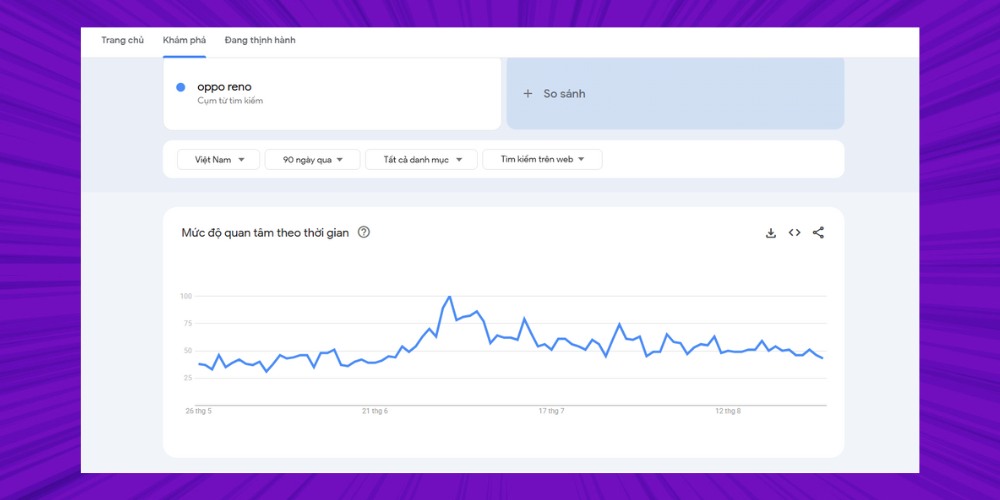
For example, if you enter the keyword "oppo", you will see search interest rise sharply when a new product launches or when there is major tech news. At other times, the keyword's popularity may drop sharply even though the product is still on the market.
To analyze Google Trends more accurately, add context to the data in these ways:
If you want more new ideas or want to look at competitors' keywords, use the advanced options on Google Trends such as:
Each option shows a different view of the market, helping you find trends on Google more accurately and from more angles.
A small tip for getting the most from Google Trends is to use the "Rising" tab instead of looking only at the list of popular keywords. This is where phrases growing strongly are collected; for example, a keyword like "lightweight running shoes" can rise by more than 2,000% in a short period. If you spot it early, you can create content, products or marketing campaigns ahead of the trend and gain an edge over competitors.
One of the most powerful features of Google Trends is tracking search trends by geographic location. With the Location filter, you can see exactly which areas have the highest search demand for your products or services. This is very valuable data for building SEO Local or optimizing content for each specific market.
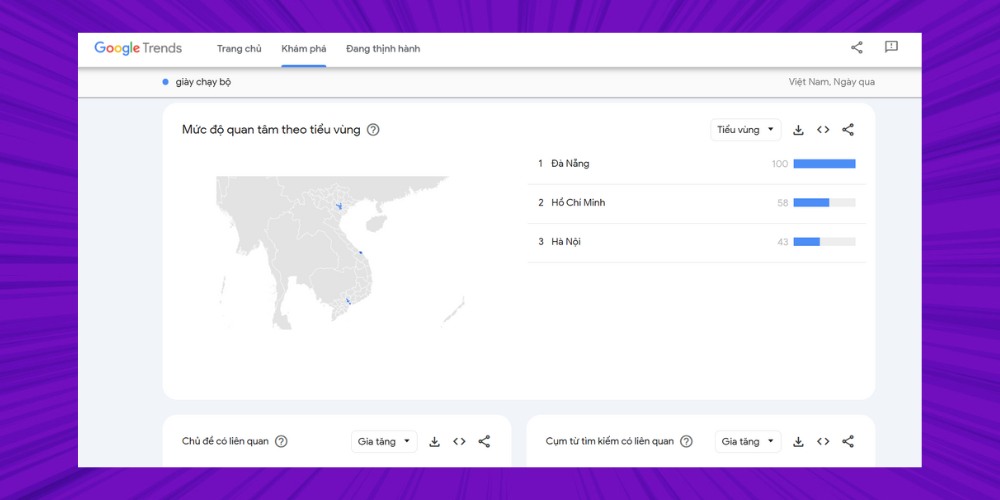
For example: if you research the keyword "running shoes", Google Trends shows strong interest in big cities like Da Nang and Hanoi, while Ho Chi Minh City has lower search volume. This helps you not only find trends on Google but also target the right potential audience in each location.
Besides analyzing current data, you can use Google Trends to predict future trends by:
One effective way to use Google Trends is to explore long-tail keywords (long-tail keywords). This is a good option when the main keyword is too competitive or has too much search volume.
Example: Instead of trying to rank for the keyword "office fashion", you can find long-tail phrases such as "how to style women's office outfits" or "women's white office shirt".
Long-tail phrases not only make it easier to find trends on Google, they also give concrete content ideas that match real search needs. From there you can build engaging articles, videos or social posts and reach more potential customers.
If you are developing video content, do not skip finding trends on Google through the YouTube Search option in Google Trends. Enter the keyword you care about, switch from Web search to YouTube, and you will see the related topics (Related Topics) and popular queries (Related Queries) users are searching for.
You can also sort results by Top searches or Rising, depending on your needs. With this data you can optimize titles, descriptions and even video content to increase visibility and attract more views.
Not every trend lasts, so you can use Google Trends to identify dead points or trend divergence.
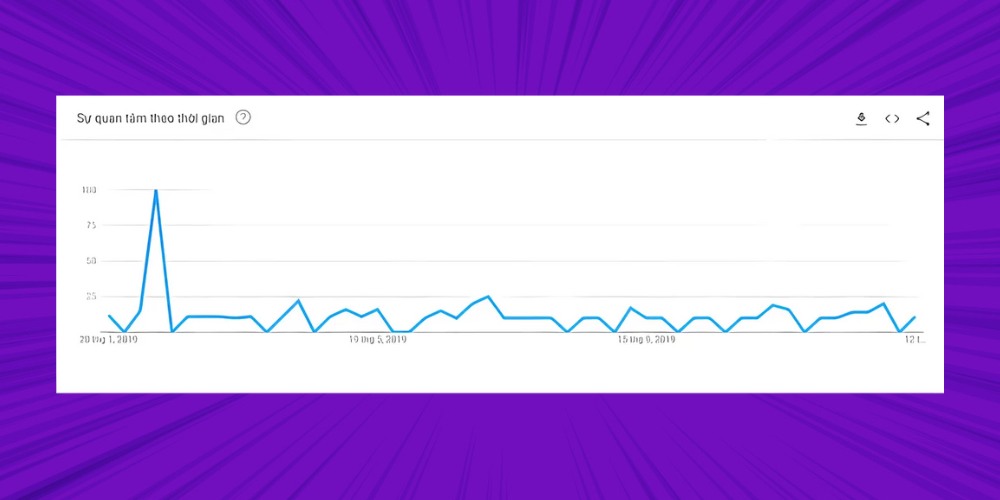
Example: A keyword can explode for a short time because of an unexpected event, then cool off quickly. If you rely only on data from the current moment, you can easily make the wrong decision.
From MONA's experience using Google Trends to optimize SEO, widen the analysis time frame and combine it with related keywords and geographic location to understand the context. This helps you avoid the "trend trap" and find unique insights your competitors have not tapped.
How do you explore Google Trends in Vietnam?
To see what topics people care about in Vietnam, open the Google Trends menu, then choose "Trending now”.
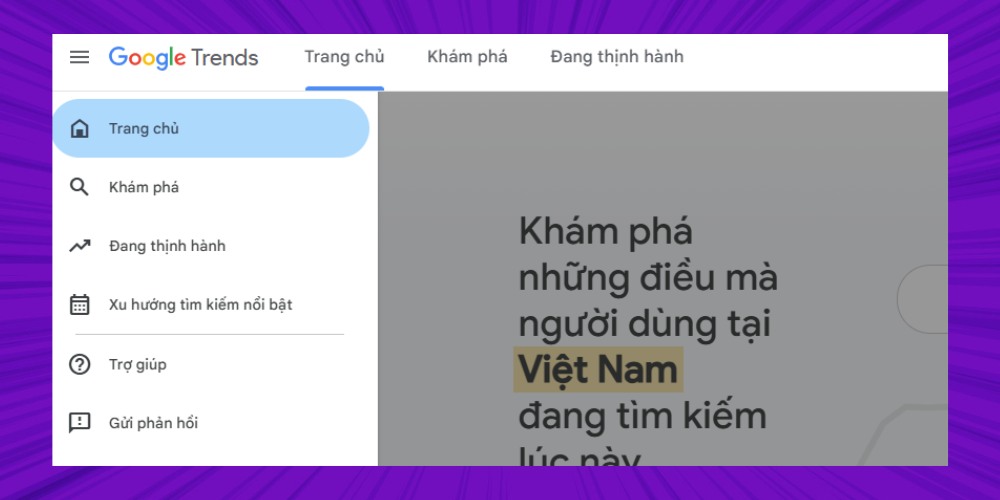
You will then see real-time search trends, the trends from the past 24 hours in Vietnam.
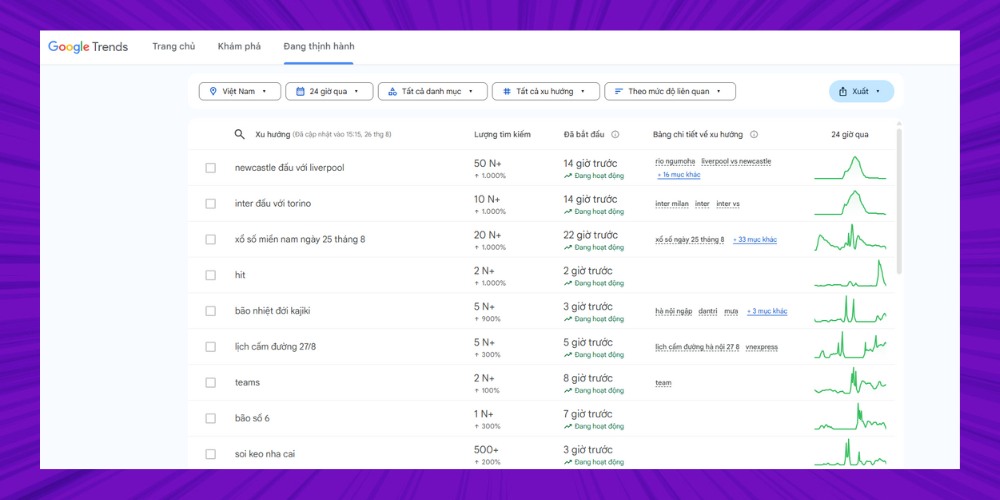
Can you subscribe to Google Trends updates?
The answer is YES. You can receive notifications from Google Trends by following these steps:
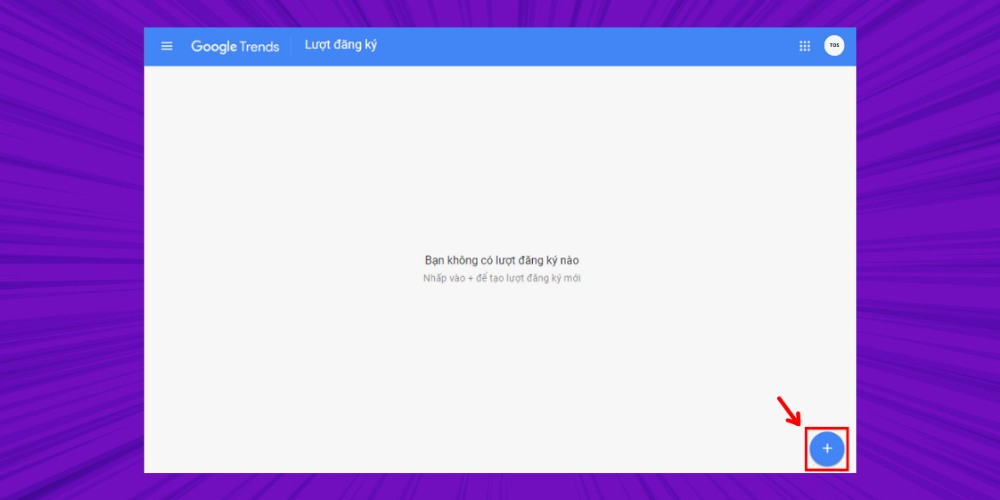
Step 1: Choose Subscribe in the menu bar or go to the link https://trends.google.com/trends/subscriptions.
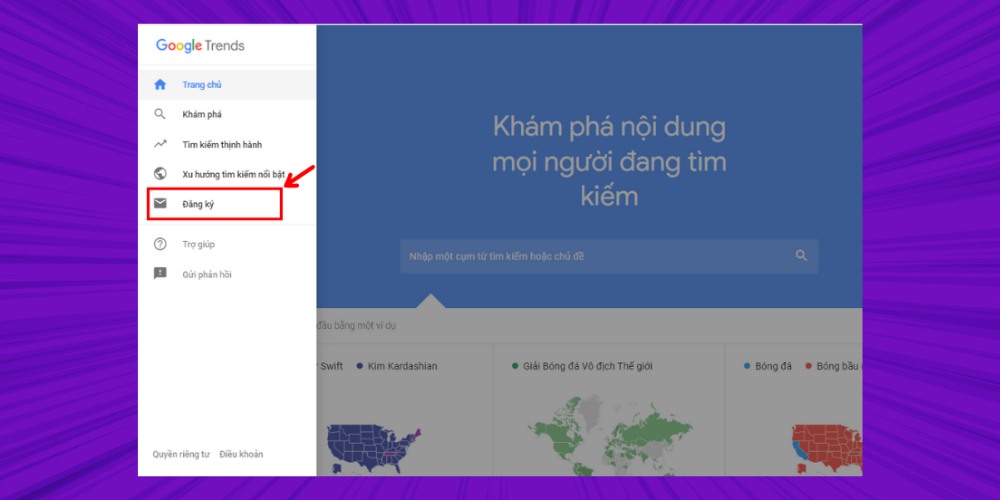
Step 2: Click the plus icon "+" at the bottom right of the screen.
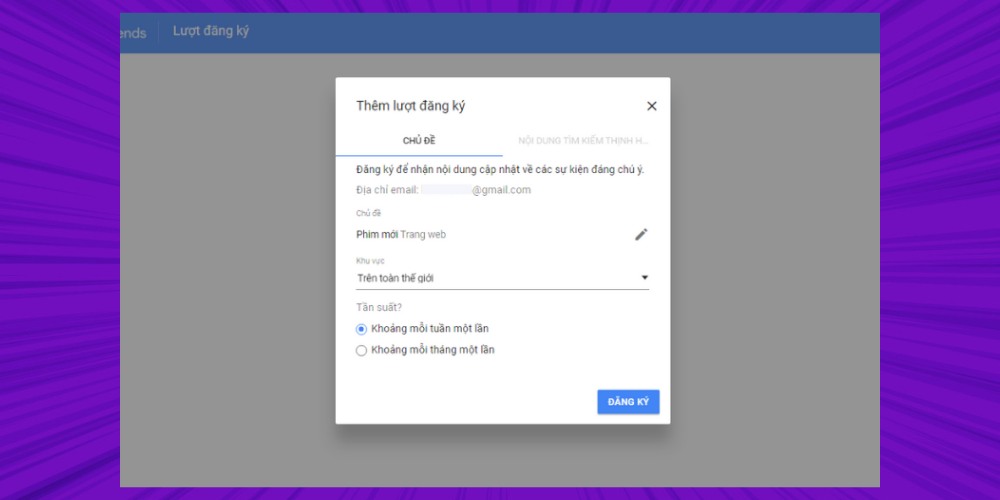
Step 3: Enter the topic you want to follow, then choose the region and frequency in turn.
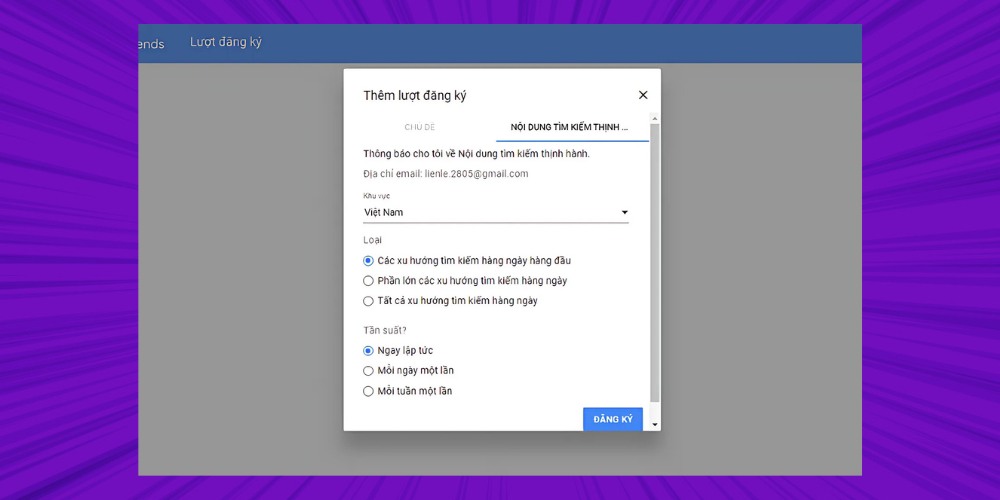
Step 4: In the Trending searches section, choose the criteria you want. Finally, just click Subscribe to finish.
This MONA article has given you detailed information about Google Trends, from the concept and benefits to how to use it effectively for SEO. Google Trends is a useful keyword research tool that lets you discover trending topics worldwide or in the region you are targeting as your market.
However, get your website to the top sustainably and get the most from Google Trends data, you need an overall strategy that combines several techniques. If you want to grow your rankings and online revenue comprehensively, let MONA work alongside you with SEO services professional, effective, full-service. Contact us now for advice and detailed SEO quote with full details.


CEO & Founder · The MONA
Founder of The MONA, who built a services company of 200+ staff with 14,000+ projects delivered. Khánh Hùng shares how he thinks about building systems that run themselves, automating a business, and the real lessons from delivering projects at MONA.
 1,6K
1,6K




Professional website
design services
Own a website with a beautiful, 100% exclusive design and a lifetime warranty, with the ability
to expand features flexibly as your business grows, starting today!



NHẬN TƯ VẤN SEO MIỄN PHÍ !








 MONA will never sell your information or send you spam
MONA will never sell your information or send you spam
MONA will never sell your information or send you spam


 MONA will never sell your information or send you spam