
 MONA OS 2.0


 Tự động hoá doanh nghiệp
 Cẩm nang SEO
 Digital Marketing
 Kinh nghiệm thiết kế website
 Hạ Tầng Server
 Giáo dục


 VI
VI
 EN
EN




















Message us on
Zalo Official


 Products

 ProductsProducts









 Website designLooks good and wins customers over.
SEO servicesBrings in customers searching for exactly what you sell.
Website designLooks good and wins customers over.
SEO servicesBrings in customers searching for exactly what you sell.
 Tư vấn digital marketingKéo khách từ nhiều kênh, đo bằng số thật.
Corporate video productionVideos introducing your company, factory and team.
Tư vấn digital marketingKéo khách từ nhiều kênh, đo bằng số thật.
Corporate video productionVideos introducing your company, factory and team.
 NewAI video productionCompany story films made with AI.
 Custom software developmentCRM, ERP and HRM built for your business.
 Viết AI Agent theo yêu cầuĐặt riêng một trợ lý AI cho đúng việc của mình.
 Tư vấn chuyển đổi AIĐưa AI vào vận hành của cả công ty.
NewMONA LMSManagement for centers and schools.
MONA SkillHubInternal training for company staff.
Tư vấn chuyển đổi AIĐưa AI vào vận hành của cả công ty.
NewMONA LMSManagement for centers and schools.
MONA SkillHubInternal training for company staff.
 NHTQ systemEnd-to-end China–Vietnam shipping operations.
MONA JMSManagement for gold, diamond and pawn shops.
NHTQ systemEnd-to-end China–Vietnam shipping operations.
MONA JMSManagement for gold, diamond and pawn shops.
 MONA E-LearningA website with every feature you need to sell courses.
 How to sell online courses (course)More than 30 free lessons on selling courses on autopilot.
 MONA Cloudmonacloud.vnServers to get your apps and websites running.
 MONA Basemonabase.vnPostgres database, sign-in and file storage.
 MONA Mailmonamail.vnSend OTP, order and invoice emails from your software.
 MONA Paymonapay.vnAccept bank transfers via VietQR and notify your software when the money arrives.
 MONA eInvoiceComing soonIssue e-invoices that meet tax standards.
Gấu CườiTrả lời khách 24/7 trên web, Fanpage, Zalo và thu lead cho sale.
MONA eInvoiceComing soonIssue e-invoices that meet tax standards.
Gấu CườiTrả lời khách 24/7 trên web, Fanpage, Zalo và thu lead cho sale.
 Gấu TeleSalesGọi điện tư vấn, chăm khách như tổng đài viên thật.
Dê CườiTư vấn và chốt đơn cho shop ngay trong khung chat.
Gấu WebmasterNhắn nhóm Zalo là website được sửa xong.
Gấu TeleSalesGọi điện tư vấn, chăm khách như tổng đài viên thật.
Dê CườiTư vấn và chốt đơn cho shop ngay trong khung chat.
Gấu WebmasterNhắn nhóm Zalo là website được sửa xong.
 Gấu Pháp ChếSoạn hợp đồng, rà điều khoản trong vài phút.
 Gấu Báo GiáLên báo giá đúng mẫu và gửi khách ngay.
 AI chăm sóc khách hàngTheo dõi và giữ chân khách hàng cũ.
 Gấu Tuyển DụngLọc hồ sơ, hẹn lịch, phỏng vấn ứng viên.
 KHA AI 2027
Xây kênh chuyên gia 2 phút mỗi ngày
Quay bằng điện thoại, AI tự edit video, tự đăng lên 16 nền tảng và tự trả lời bình luận, tin nhắn.
288.048lượt xem trên kênh CEO MONA sau 17 ngày
KHA AI 2027
Xây kênh chuyên gia 2 phút mỗi ngày
Quay bằng điện thoại, AI tự edit video, tự đăng lên 16 nền tảng và tự trả lời bình luận, tin nhắn.
288.048lượt xem trên kênh CEO MONA sau 17 ngày
 Anh Khánh HùngCEO MONA đang dùng mỗi ngày
Xem app làm được gì
Anh Khánh HùngCEO MONA đang dùng mỗi ngày
Xem app làm được gì
 AI
Gấu Cười MONA ĐANG TỰ XÀITrả lời khách 24/7 trên website, Zalo OA, Messenger và thu lead về cho sale.
Dê CườiChốt đơn bán lẻ và sàn: Shopee, TikTok Shop, web. Chăm cả khách sỉ, đại lý.
Gấu WebmasterCập nhật nội dung, tối ưu SEO website mỗi ngày.
Gấu TeleSalesGọi điện tư vấn, chăm khách như tổng đài viên thật.
Gấu Tuyển DụngLọc hồ sơ, hẹn lịch, phỏng vấn ứng viên tự động.
AI chăm sóc khách hàngGiữ khách cũ, cứu lead đã rớt cho phòng kinh doanh.
Gấu Pháp ChếSoạn hợp đồng, rà điều khoản trong vài phút.
Gấu Báo GiáLên báo giá đúng mẫu, gửi khách ngay khi có yêu cầu.
AI
Gấu Cười MONA ĐANG TỰ XÀITrả lời khách 24/7 trên website, Zalo OA, Messenger và thu lead về cho sale.
Dê CườiChốt đơn bán lẻ và sàn: Shopee, TikTok Shop, web. Chăm cả khách sỉ, đại lý.
Gấu WebmasterCập nhật nội dung, tối ưu SEO website mỗi ngày.
Gấu TeleSalesGọi điện tư vấn, chăm khách như tổng đài viên thật.
Gấu Tuyển DụngLọc hồ sơ, hẹn lịch, phỏng vấn ứng viên tự động.
AI chăm sóc khách hàngGiữ khách cũ, cứu lead đã rớt cho phòng kinh doanh.
Gấu Pháp ChếSoạn hợp đồng, rà điều khoản trong vài phút.
Gấu Báo GiáLên báo giá đúng mẫu, gửi khách ngay khi có yêu cầu.
 Chuyển đổi AI toàn phầnGiải pháp tổng cho doanh nghiệp, 3 lớp triển khai.
 Viết AI Agent theo yêu cầuĐặt riêng một con AI gánh đúng nghiệp vụ của bạn.
 Custom softwareCRM, ERP and HRM with built-in AI automation.
 SEO & AEO thời đại AIĐược Google lẫn AI trích dẫn, không chỉ xếp hạng.
 Kiến thức AI cho doanh nghiệpBài phân tích, hướng dẫn ứng dụng AI vào vận hành.
 Free AI courses
 AI tools at work
 App mới · KHA AI 2027
Xây kênh 2 phút mỗi ngày
AI tự edit video, tự đăng mọi mạng xã hội
Free consultation, 8am–10pm every day
App mới · KHA AI 2027
Xây kênh 2 phút mỗi ngày
AI tự edit video, tự đăng mọi mạng xã hội
Free consultation, 8am–10pm every day

19 May, 2023

The key to SEO effective campaigns today depends heavily on the keyword set you build. If you choose keywords that many people search and that are likely to convert, you have a chance to sell effectively at the lowest cost. To do this, you need to know the most popular tool right now, such as Google Keyword Planner. So what is Google Keyword Planner? How do you use this keyword planning tool to improve your SEO results? MONA Media will answer these questions in the article below.
Google Keyword Planner is a free keyword planning tool from Google. With it, you can easily check a keyword's average monthly searches worldwide or in a specific country. You also see how competitive the keyword is, so you can build SEO strategies that are more effective and better suited.
->See also: SEO vs Google Ads: which brings lasting results?
Google Keyword Planner is important for researching the keyword set for ad campaigns and for SEO. Specifically:
Google Keyword Planner gives the monthly search volume for each specific keyword. That helps advertisers gauge how much users care about the products and services they sell. With this information, advertisers can easily identify promising keywords to build content around and set up an effective keyword ad campaign.
Google Keyword Planner lets you add promising keywords to a campaign and gives a cost estimate for the whole campaign when you run ads on Google. This gives you an overview of the budget you need and how effective your chosen keywords are likely to be. The Google Ads Keyword Planner also provides detailed information to help you optimize your ad strategy and reach the results you want.
Google Keyword Planner helps you discover and choose related keywords that fit your business field, starting from individual keywords. That widens your pool of promising keywords and makes your website SEO campaigns more effective.
A notable feature of Google Keyword Planner is that you can download all the keyword data. This lets advertisers filter, analyze and use the full keyword data for later research without going back into the tool.
Why do two sites in the same industry end up so different, one reaching the top and the other stuck for a whole year? The secret is in how you assess the market and your competitors before building your web SEO strategy, WATCH THE VIDEO to learn more.
Using Google Ads Keyword Planner can be an interesting and useful experience once you know how it works, helping you discover new keywords easily. So don't skip the content how to use Google Keyword Planner in MONA's guide below, to help you build a stronger SEO strategy.
Google Keyword Planner is a completely free tool from Google. To start using it, you first need to follow the link and create a Google Ads account.
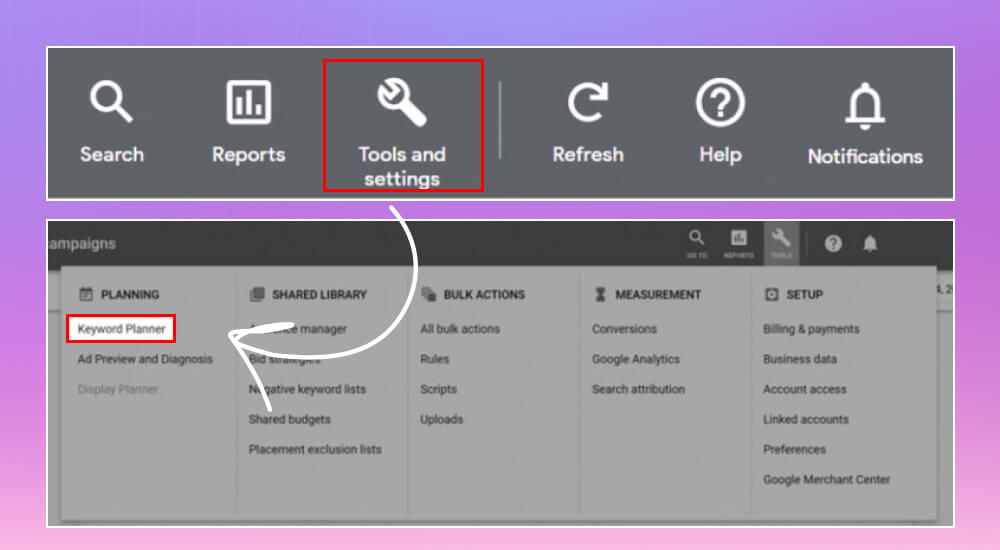
Once your Google Ads account is set up (you don't have to run an ad campaign to use Keyword Planner), go to the Google Ads home page and click Tools and settings >> Keyword Planner in the Planning section.
From there you'll see the two main features of Keyword Planner: Discover New Keywords and Get search volume and forecasts. Both help you come up with keywords worth targeting for SEO.
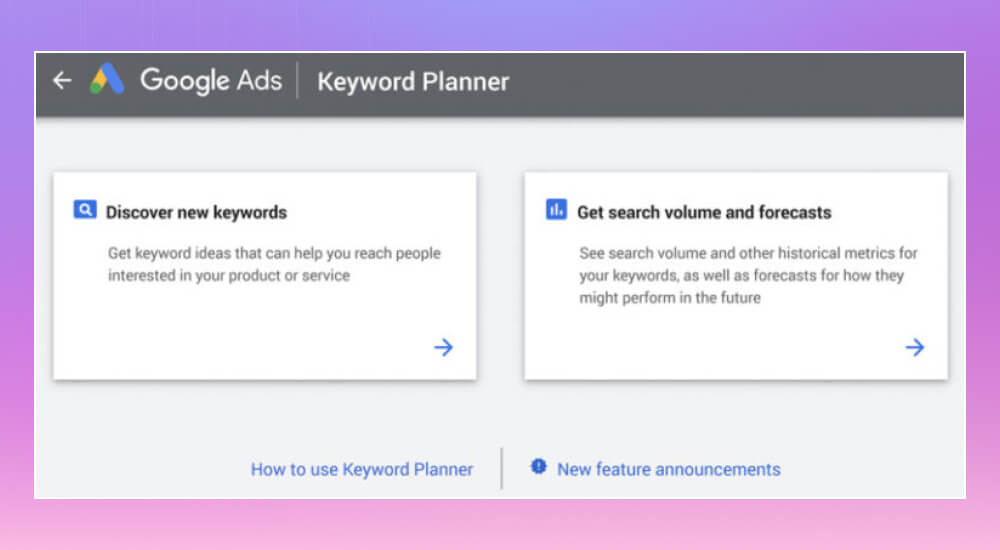
Since the tool was built to support ad campaigns, you can ignore the features related to PPC if you're only using it for your website's SEO.
As mentioned above, when you use Google Adwords services Keyword Planner offers two tools, and SEOs who haven't studied them closely often get confused. So MONA will walk through both features and how to use them, so you can get the most out of your own campaigns.
Discover New Keywords is very useful when you want to find new keywords closely related to your products or services. As the name says, it surfaces keywords you may never have thought of, which widens your keyword coverage and strengthens your SEO strategy.
When you use "Discover New Keywords", you enter words or phrases that describe your business. Google Keyword Planner then searches Google's own keyword database and returns a list of related keywords, including new ones that could improve your site's search performance. The results depend on what you enter, so think carefully about your input to get better results.
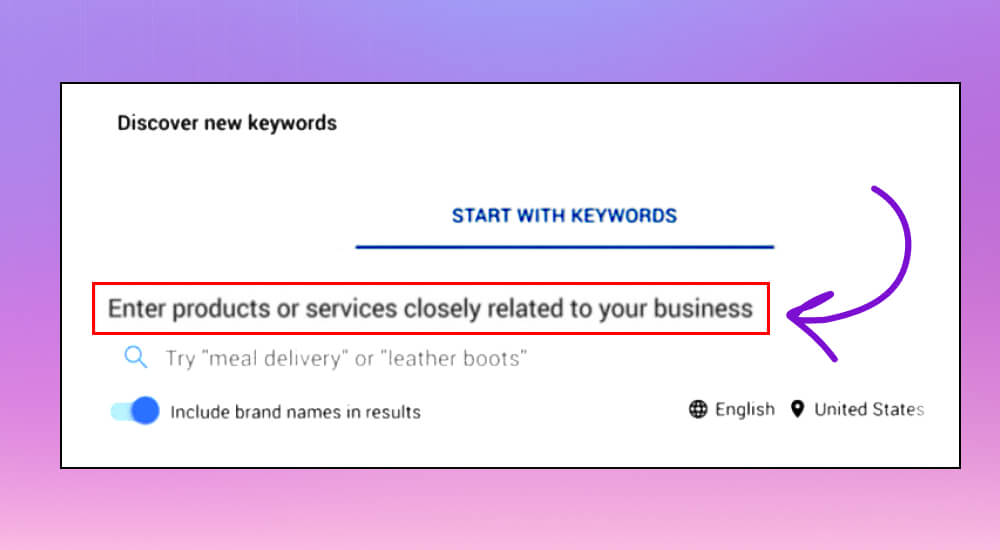
A small tip: you can enter several keywords at once, separated by commas.
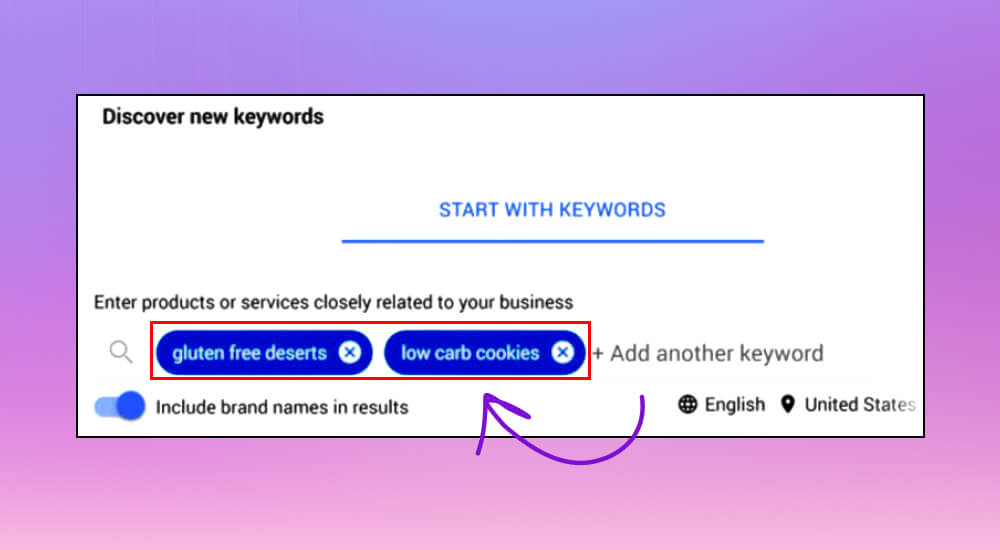
Example: If you run an e-commerce site selling international cookies, you could enter phrases like "gluten free deserts” or “low carb cookies". You'll get a range of related keywords and can pick the ones that fit your SEO strategy best.
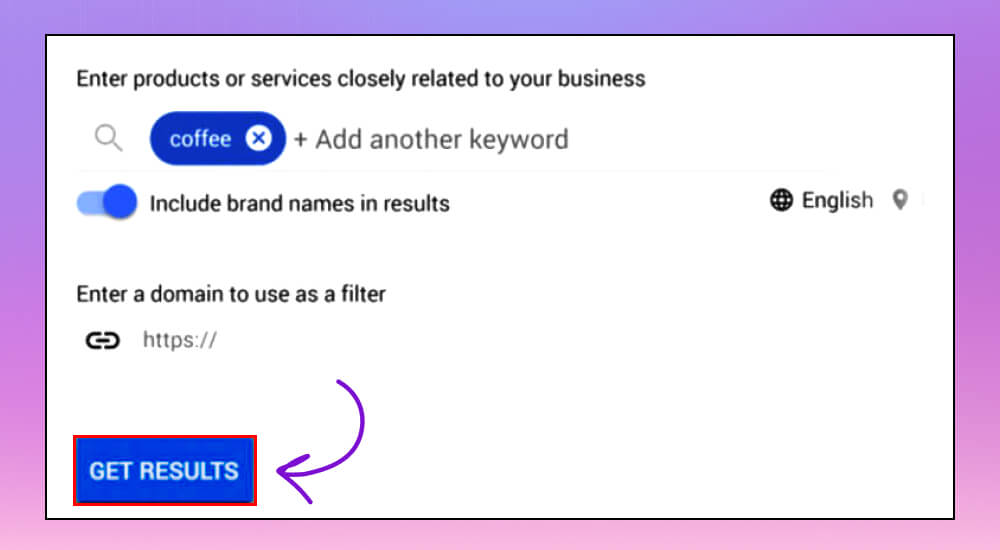
You can also start from a web page by entering the URL of your home page or of a specific article on your site. This feature isn't only for AdWords users. It helps any business that wants to find and expand its keywords.
After filling in the details, just click Get Results to get a list of new keywords and start refining your SEO strategy right away.
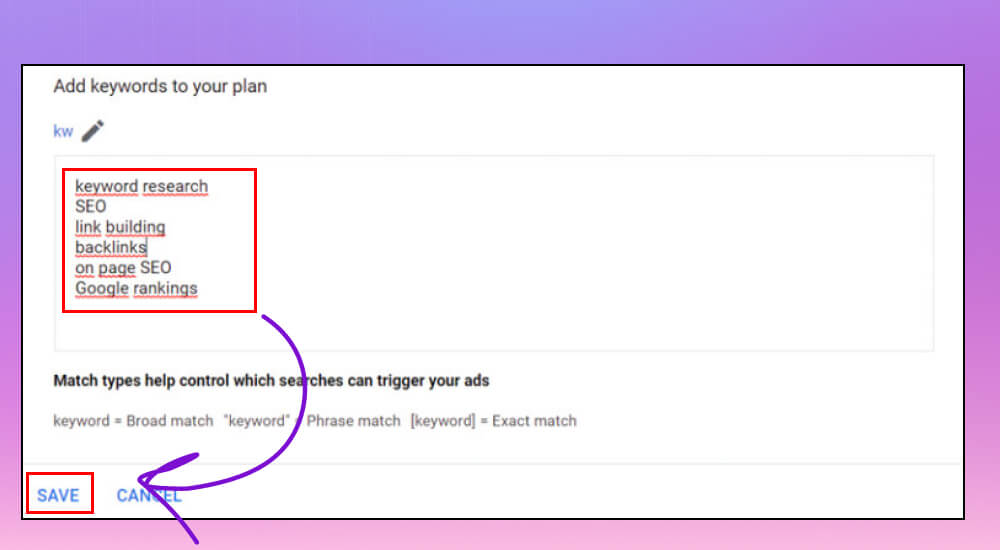
Checking search volume and forecasts is an important step in SEO. It shows how much interest users have in specific keywords. This feature doesn't generate new keyword ideas, so it only becomes useful once you already have a keyword list you want to check.
Once you have a keyword list, Keyword Planner lets you check its search volume and also gives forecasts for the clicks and impressions you could get. To use it, copy and paste your keyword list into the search field and click Save.
The results show monthly search volume, competition level and the estimated cost per click. This helps you spot promising keywords and also estimate how an SEO or ad campaign might perform.
Unlike "Discover new keywords", this feature gives you concrete data on the keywords you've already entered. It's handy for checking how your current keywords perform or for planning your next keyword strategy.
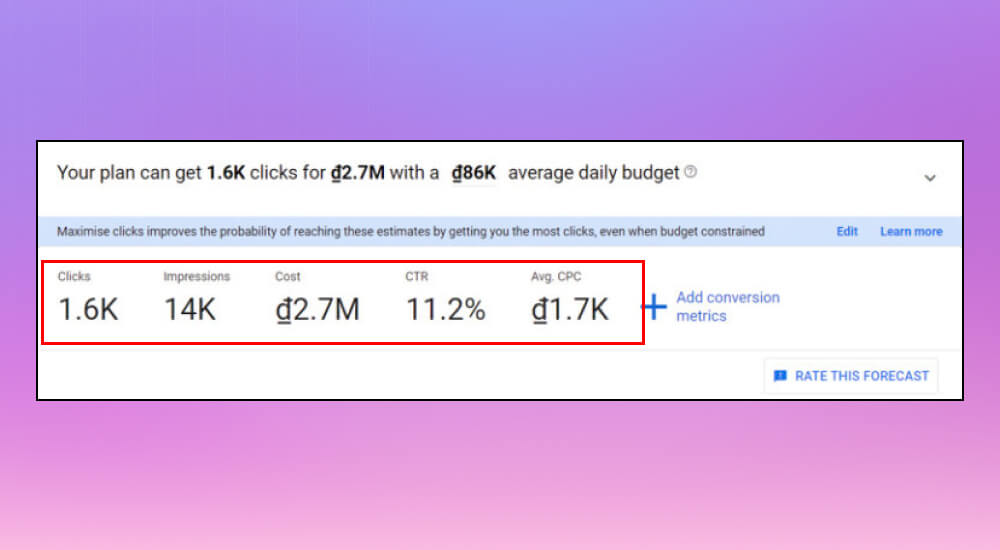
Filtering and sorting results is an important step in keyword analysis. It helps you find the most valuable keywords for your SEO strategy. Google Keyword Planner has powerful filtering and sorting options that let you adjust results by relevance, search volume and competition.
First, you can filter the keyword list by location, language, search network and date range.
Example: If you only want to see keywords that are popular in Vietnam, choose "Vietnam" under location. Likewise, you can choose "Google" under search network to focus on results from Google's main search engine.
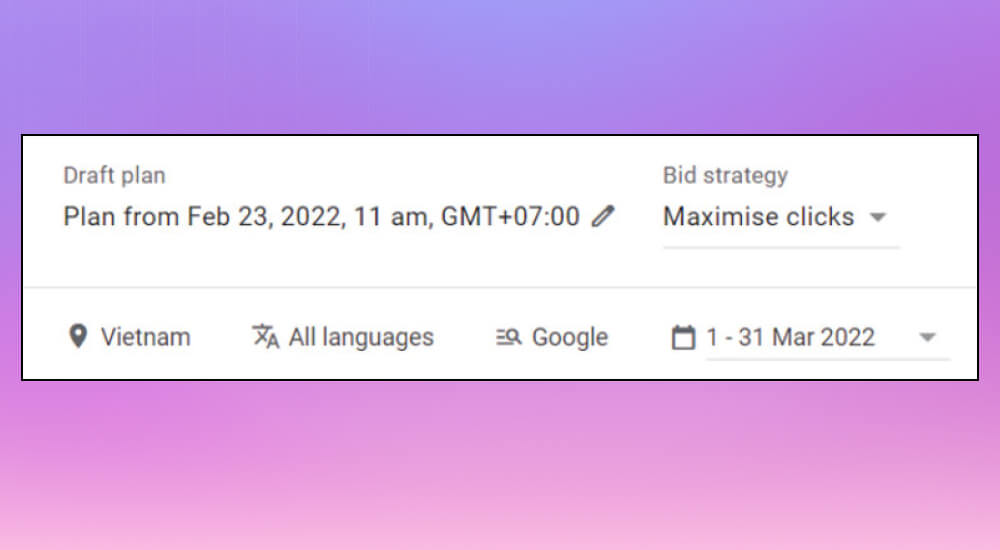
These are the main filter options in Google Keyword Planner:
Keyword Planner also has an option to add more filters (Add Filter) if the basic filters don't cover what you need. The extra filters include:
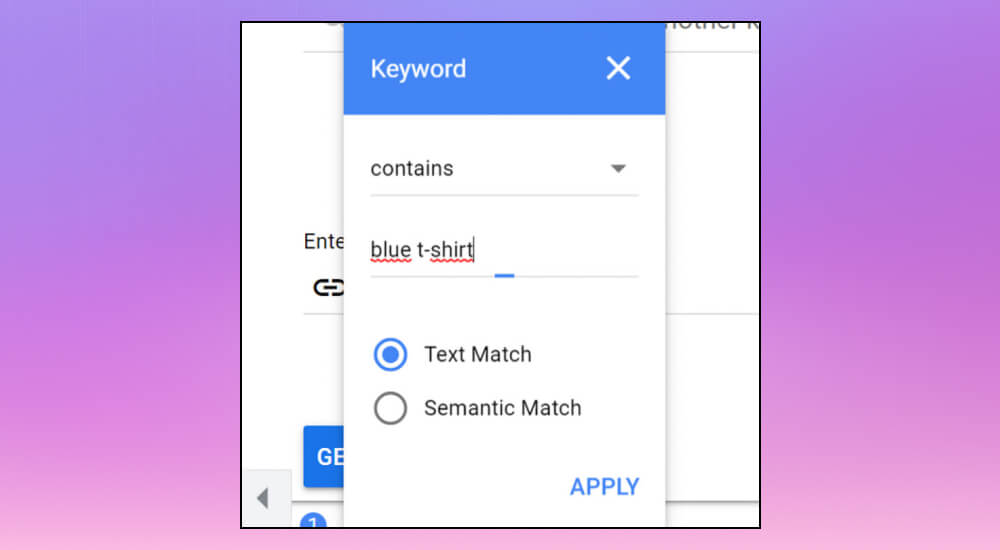
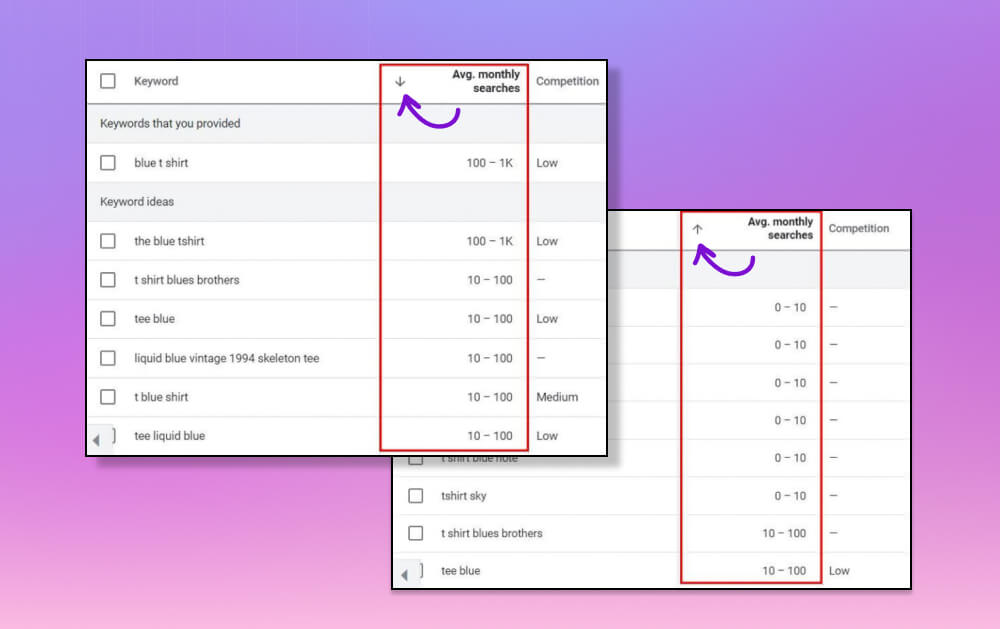
For example, if a business has just launched a line of blue T-shirts and wants the keyword "blue t shirt" in every keyword Google Keyword Planner suggests, you can set this filter to show only keywords that contain "blue t shirt“.
Specifically, once Keyword Planner returns a keyword list like the one below, you can click "Avg. monthly searches" to re-sort it however you like, so you only see the keywords with high search volume.
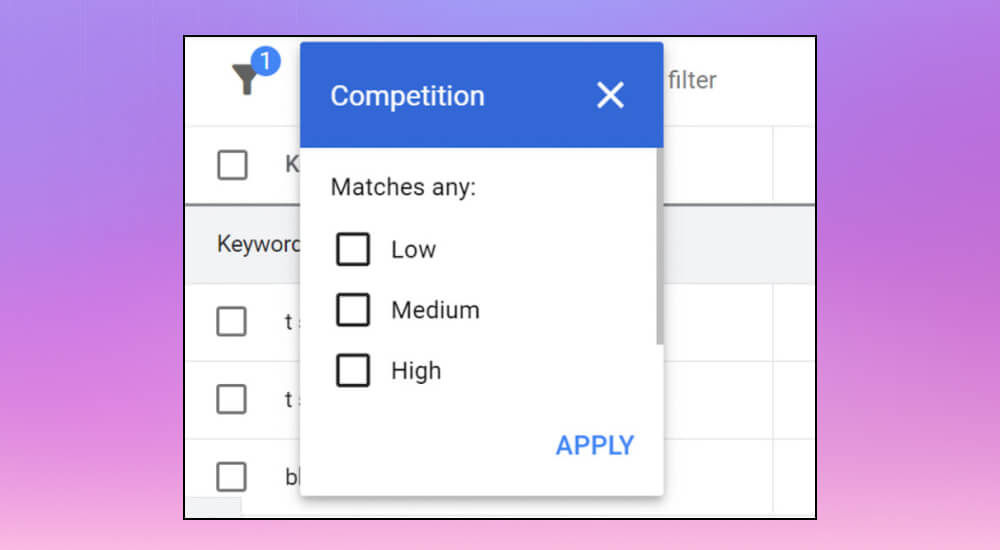
There are a few other filters you don't need, or that are only useful as extra reference in the SEO process. MONA will still cover them so you know everything the tool offers:
Analyzing keywords and generating ideas is the next step in SEO. It helps you find the best keywords for your content. After using Google Keyword Planner to filter and narrow your keyword list, going through the terms helps you understand what users are really searching for.
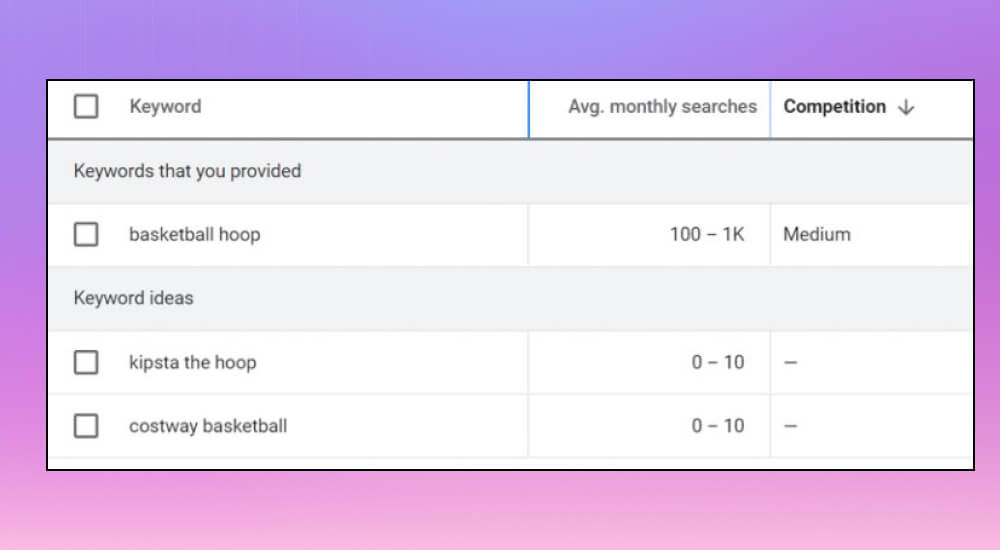
Here is what the key terms mean:
It's also smart to watch seasonal keywords, because they can bring large amounts of traffic at certain times, such as the surge in searches for traffic the keyword "Halloween costume" in October.
Once you know the features and filters, choosing keywords is the final and most important step in optimizing your site's content with Google Keyword Planner. Several factors affect the choice, because they decide whether a keyword fits your website.
To make this concrete, say you run a website selling organic food and you want to write a blog post about the health benefits of organic coffee. Here MONA will use the "Discover new keywords" feature to find new keywords.
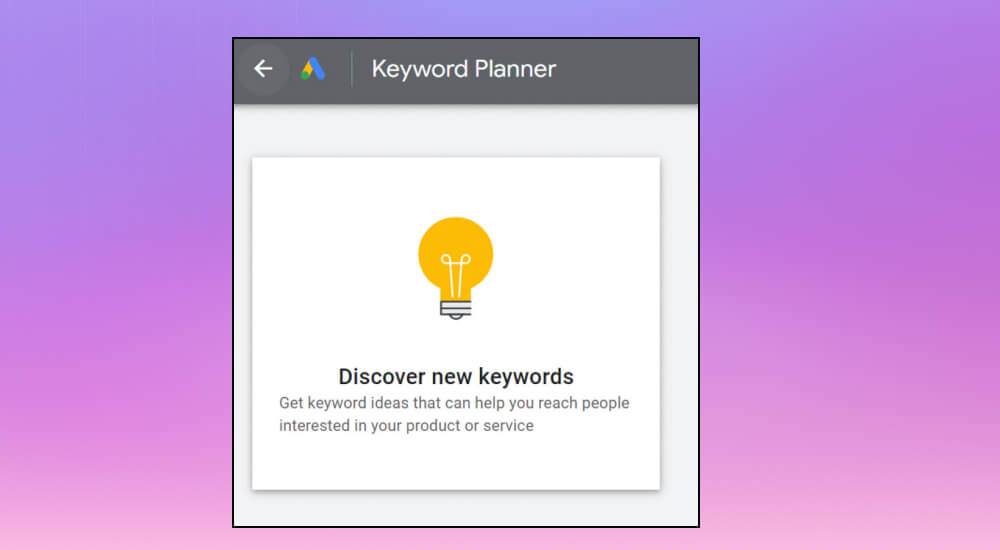
In this case, the keyword "coffee" is too broad and hard to target. The keyword "health benefits of organic coffee" is the opposite: too narrow, with few searches. So "organic coffee" is the best choice, balancing breadth and specificity for your site.
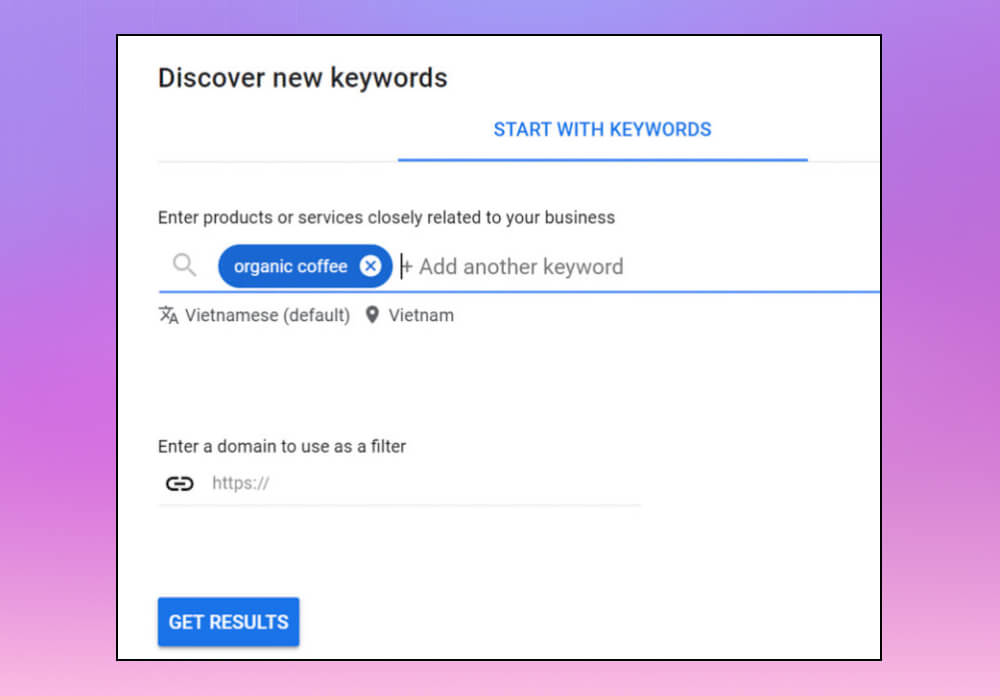
After entering the keyword in Google Keyword Planner and clicking "Get results", you'll see a list of related keywords with their monthly search volume and competition level.
From there you can filter and sort the keywords to pick the ones that fit your goals. To decide which keyword to choose, consider these criteria:
With its features, Google Keyword Planner helps SEOs plan and optimize keywords effectively. Used the wrong way, though, it can cause problems, so MONA suggests keeping two things in mind when using Google Keyword Planner:
Google Keyword Planner only gives highly accurate keyword data when you have an active AdWords campaign running. Otherwise, the numbers you see are estimates, not exact figures.
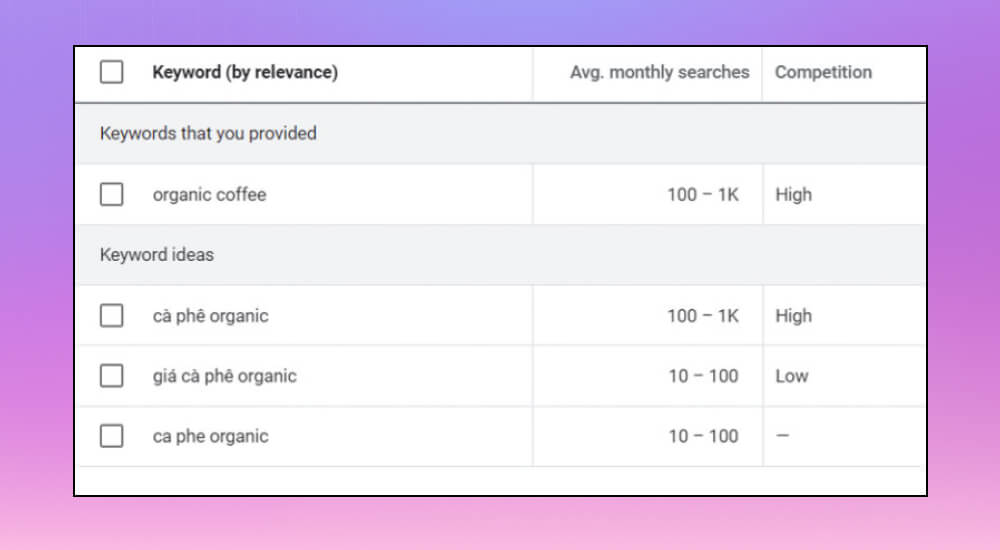
There is still a trick for getting accurate search volume without running ads. First, pick a keyword from the suggested list that you want to target.
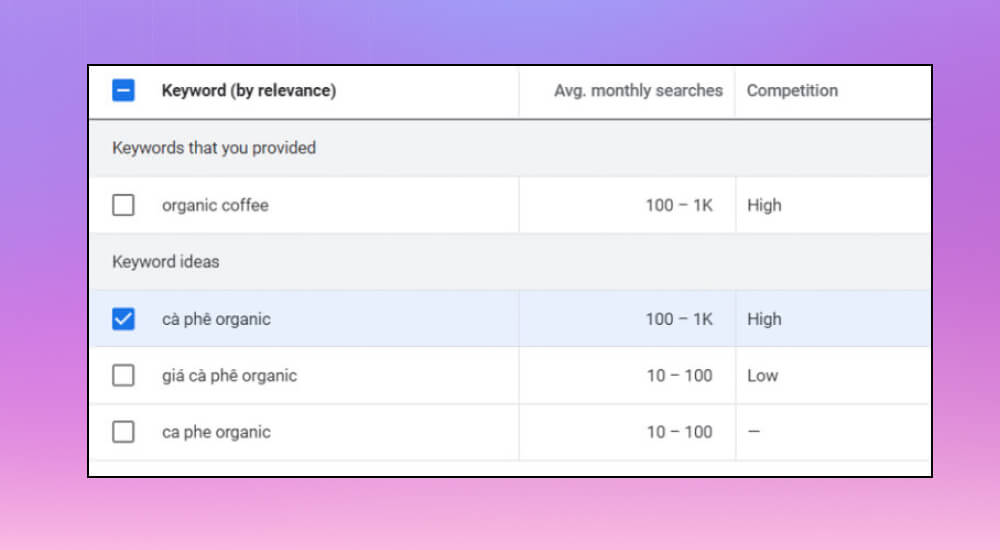
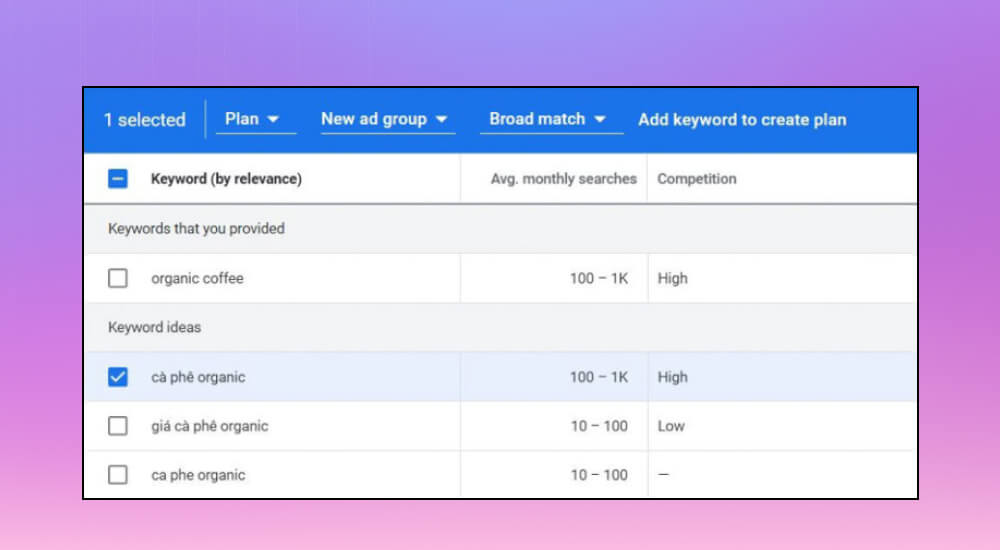
Then click Add keyword to create plan to add the keyword to your plan.
Next, go to the "Forecast" tab in the left-hand toolbar.
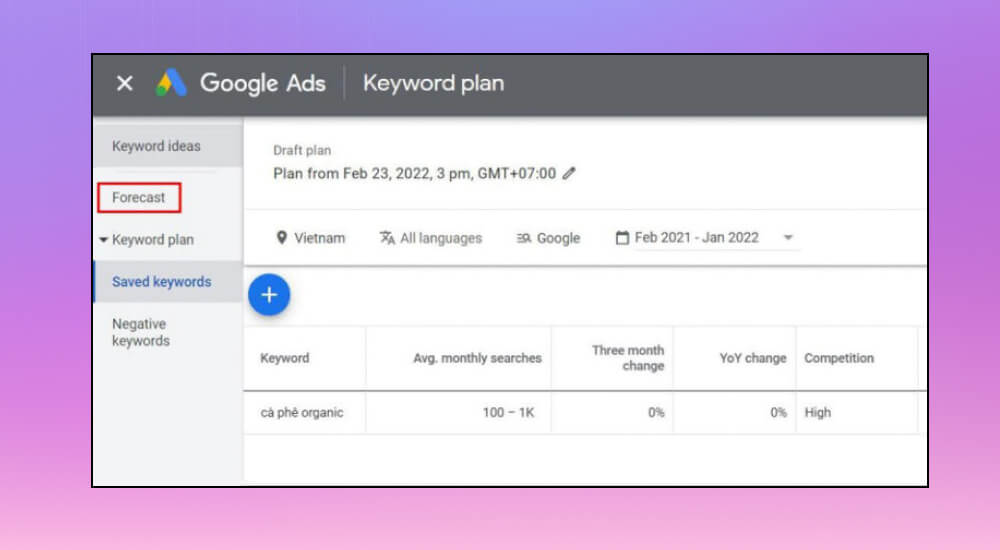
Here you'll see the number of impressions that keyword could get if you bid on it. This number reflects how many people search for the keyword each month, which gives you accurate data for strategic decisions.
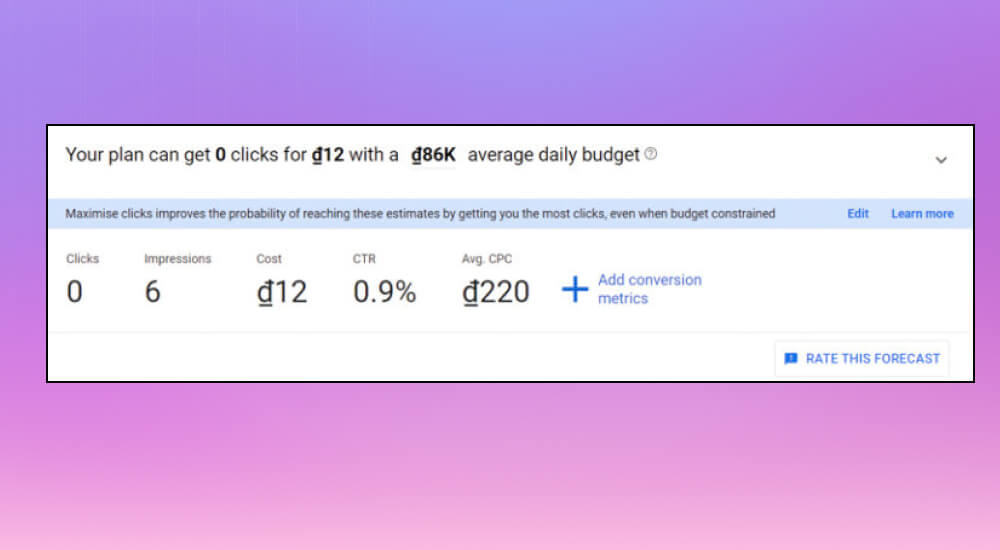
Google Keyword Planner is a powerful and popular keyword research tool, but it has some limits. To get the most from it, keep these tips in mind:
#1: The results only include keywords VERY close to what you entered
Google Keyword Planner is known for generating keyword ideas, but it has a clear limit: it only returns ideas that are highly relevant to the keyword you entered.
Example: If your business sells organic pet food and you enter "organic dog food", you'll get results very close to it, like "Natural dog food” hay “Dog food”.
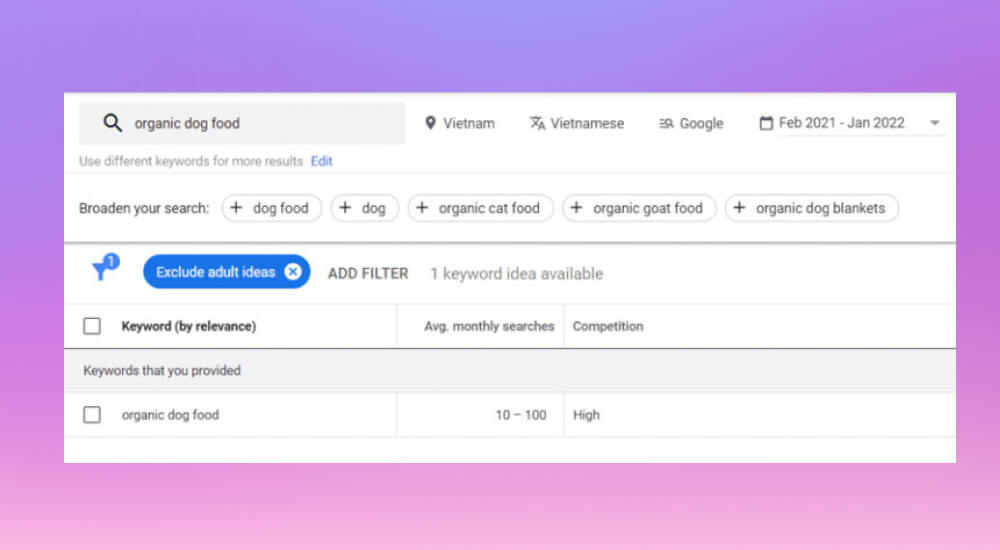
These keywords are all very close to your original keyword. The tool is not good at finding ideas outside that range, which limits your chances of finding keywords that bring new and different traffic to your site.
#2: The keyword set you get is shared with everyone
Because Google Keyword Planner is so popular, a lot of people end up with the same set of keywords. That means the keywords you get face high competition, since everyone is using the same ones. How do you get around this? MONA suggests using Google Keyword Planner Hack.
First, go to the Discover new keywordssection. But instead of entering keywords, enter the URL of a website in your niche under Start with a website.
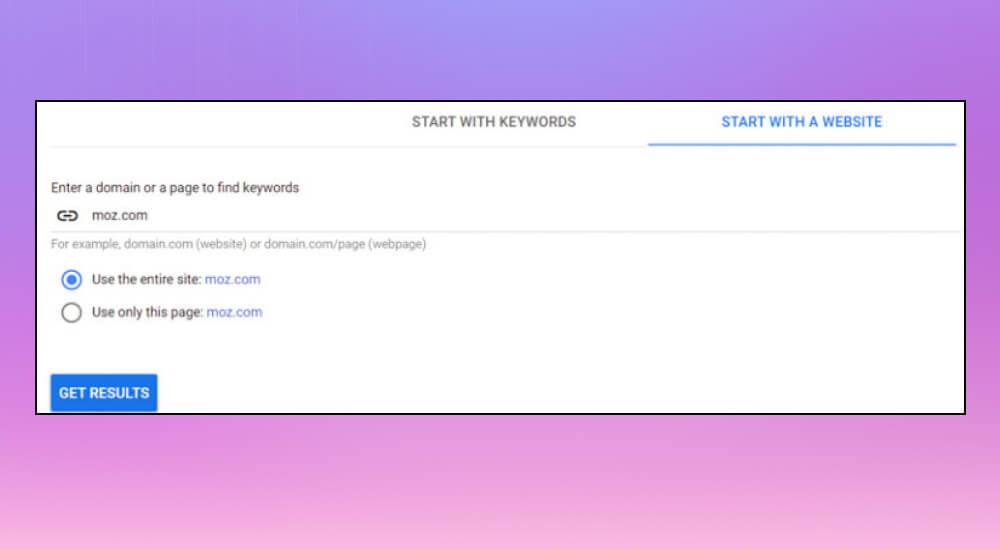
Example: Instead of entering the keyword "organic dog food", you could enter the URL of another business's dog food category page.
This gives you a list of keywords that most of your competitors never see. The results are more useful than relying only on your original keyword.
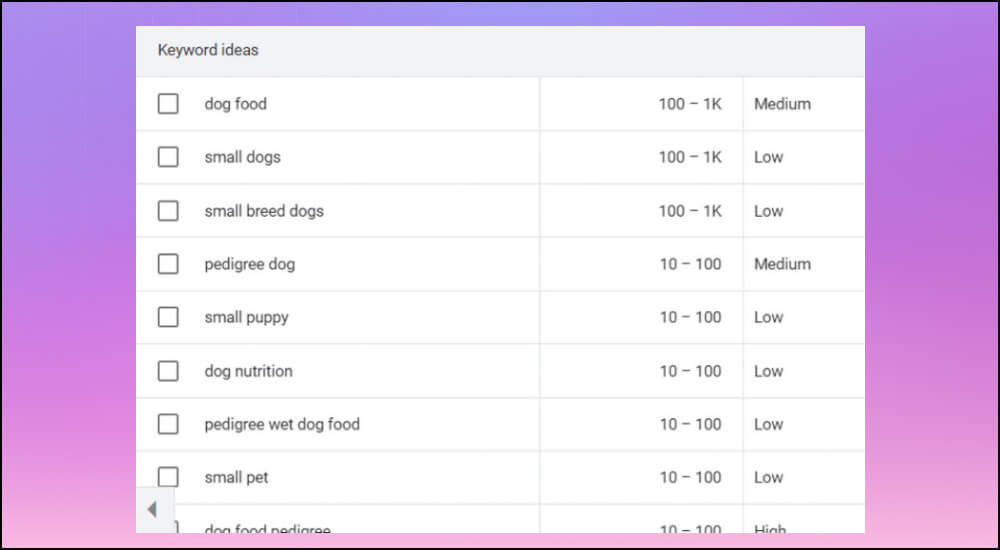
To get past this limit, try entering URLs from different sources, such as:
Google Keyword Planner is an essential tool, and a few key tips help you get the most from it. They'll help you find high-value keywords and improve your content and ad strategy. Let's go through them with MONA.
Although it's a powerful tool, Google no longer shows exact search volumes in Keyword Planner, and many users find the data less precise as a result. Don't worry: MONA has some free methods to estimate keyword search volume more accurately in Keyword Planner.
The first method uses the Get search volumes and metricsfeature. Enter your keyword list into the tool and choose Exact match when prompted, and you'll see an interface like the one below.
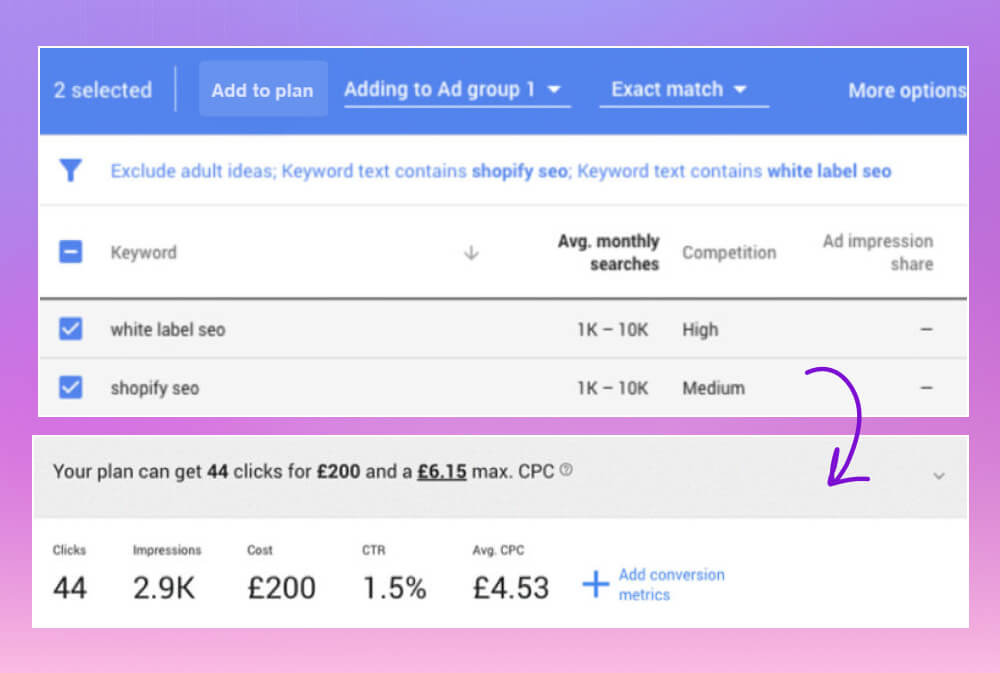
For accurate results, set the CPC (cost per click) as high as possible and look at the Impressions column, which shows the estimated ad impressions for the selected keyword over the next month.
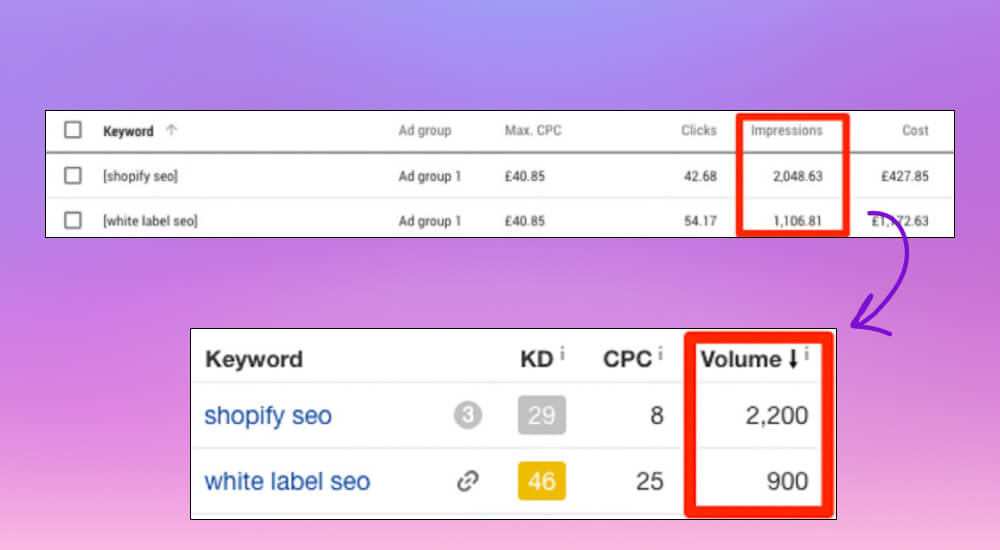
As you can see, with a high CPC the Impressions figure comes close to the real monthly search volume of the keyword.
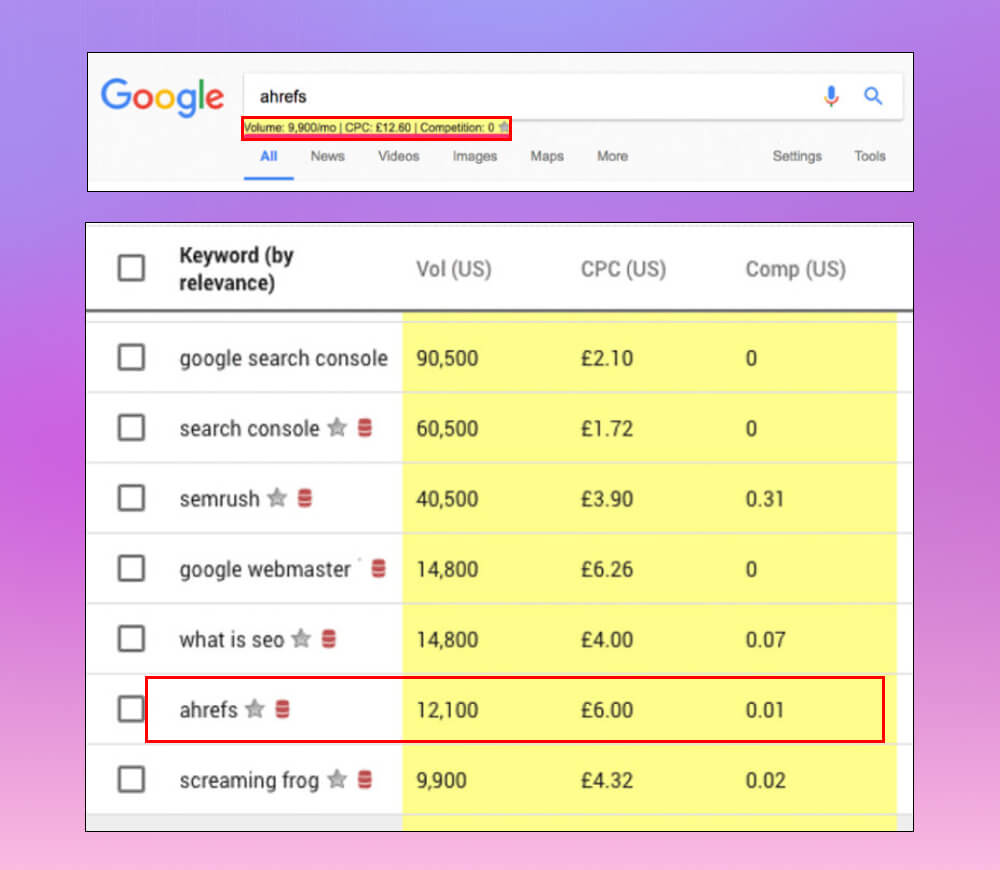
You can also install the Keywords Everywheretool. It adds search volume and CPC directly to pages like Google, YouTube and Amazon. It's a free and very useful extension that works once you install it in Chrome.
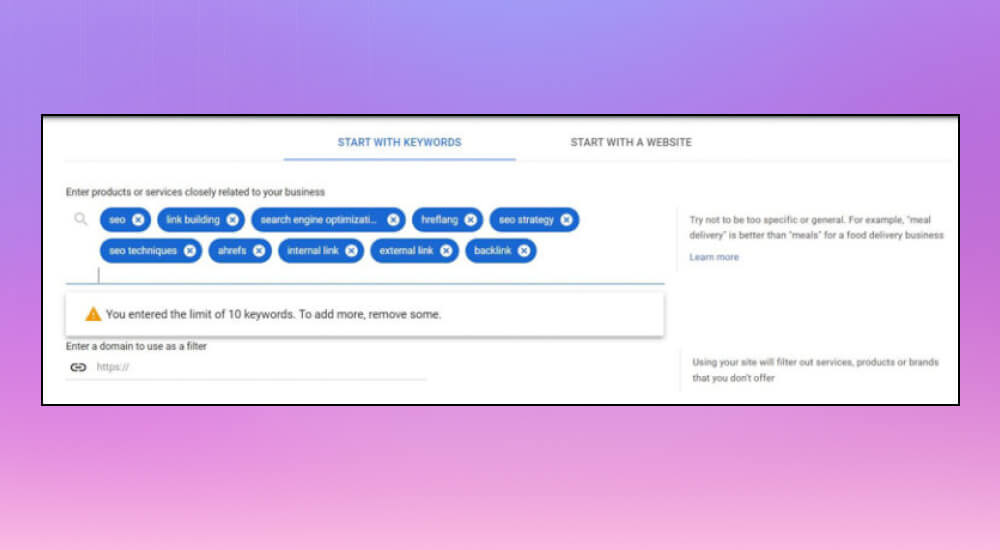
In keyword research, adding more than 10 related keywords at a time saves time and makes the work more efficient. But Google Keyword Planner only lets you add up to 10 related keywords per action. To get around this, use a couple of simple tricks:
You can use the keyword-from-URL feature in Google Keyword Planner to find the keywords your competitors use. First, copy a competitor's URL, paste it into the search box and choose Use the entire site from the drop-down menu.
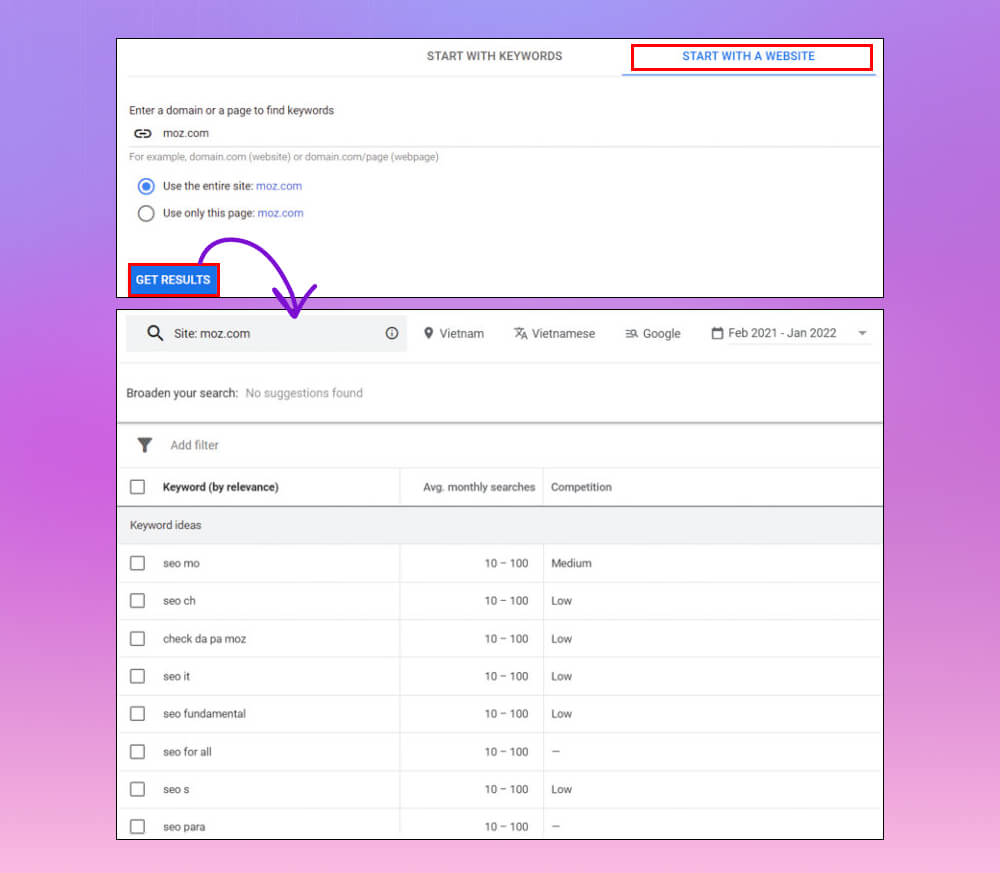
After you click Get Results, you'll get a list of the keywords your competitor ranks for. To refine the list, you can apply a filter that removes keywords related to their brand by using the Filter >> keyword text >> brand name.
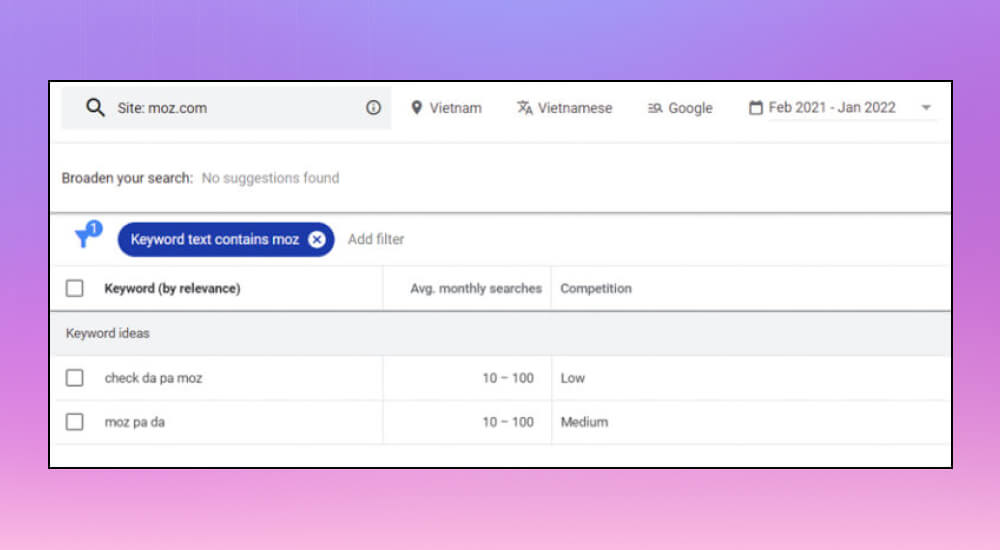
You can repeat this with several competitors to collect more valuable keyword ideas for your website.
Knowing what questions people ask is the key to creating quality content that meets readers' needs. With Google Keyword Planner, you can find the common questions in your field.
Start by entering a URL, then apply a filter by choosing Filter >> Keyword text >> contains and entering words such as: "is“, “how“, “when“, “what to do“, “where" to find the specific questions people often search for.
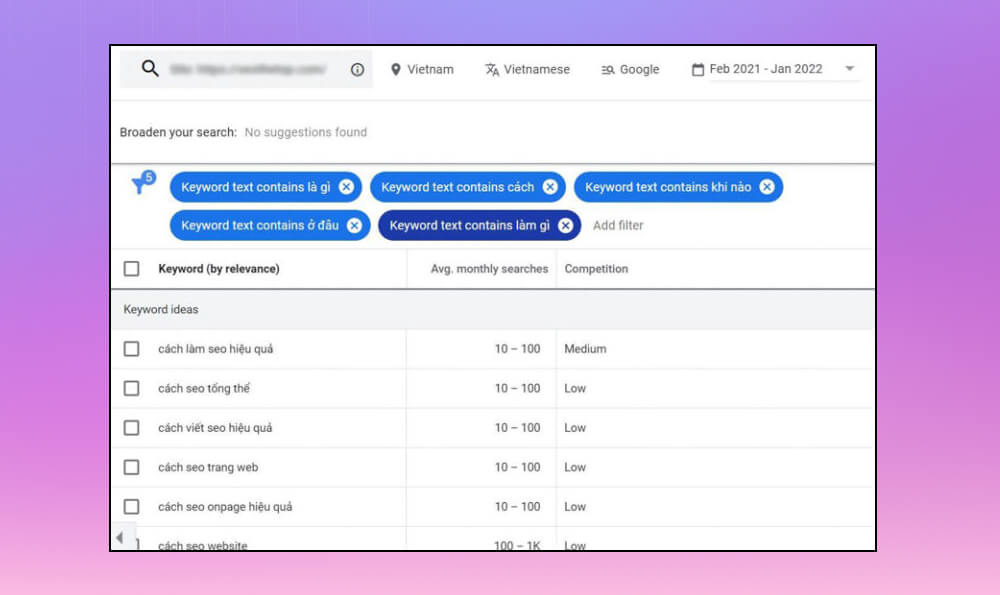
Repeating this a few times gives you a list of common questions, so you can write content that is engaging and matches what your readers care about.
Example: If you work in health, you might find questions like "how to lose weight safely” hay “what are the benefits of yoga“.
If Google Keyword Planner doesn't give you enough data, you can pair it with Ahrefs to widen your question list. Ahrefs Keywords Explorer finds related keywords and the common questions around a keyword.
When you do SEO for a specific area, you need to know keyword search volume by local region. But many keyword research tools only give data by country, which makes it hard to optimize for a specific region. With Google Keyword Planner, you can see keyword search volume for local areas and individual cities in just a few steps.
First, enter a location in the location filter at the top of the screen.
Example: If you want to see the search volume for the keyword "plumber" in the city of Los Angeles, just enter "Los Angeles" in the location filter. Google Keyword Planner shows the estimated monthly impressions for that keyword in that specific location, giving you a clearer view of search demand in the area.
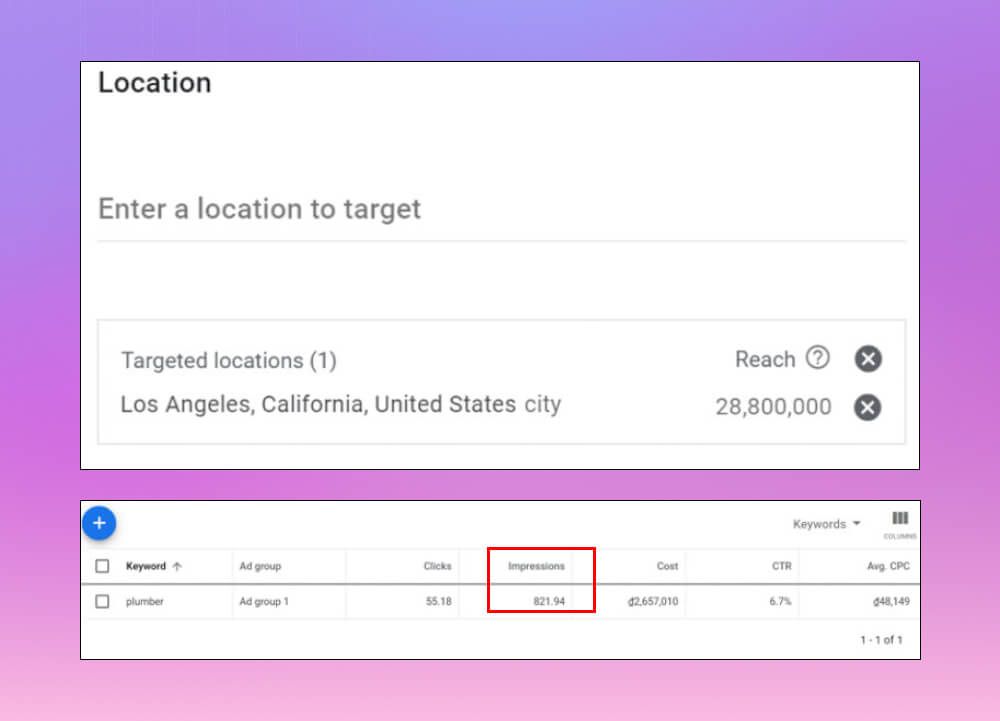
This feature is useful not only for local SEO but also for finding the most popular locations for the keyword you're researching.
To see more about which countries are searching for your keyword, click Plan Overview >> All locations in the location filter and scroll down for details under box Locations. With Google Keyword Planner, you can tune your SEO strategy more effectively and accurately.
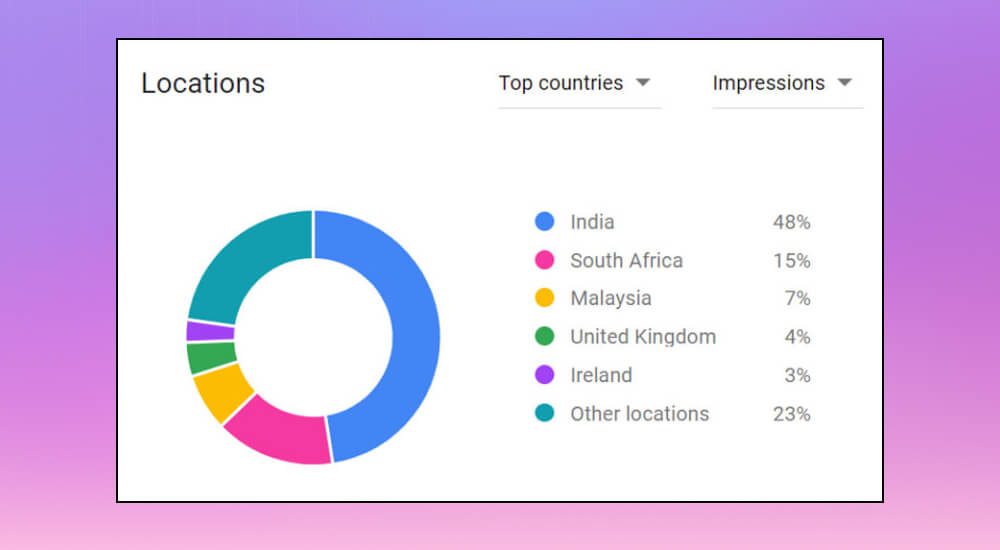
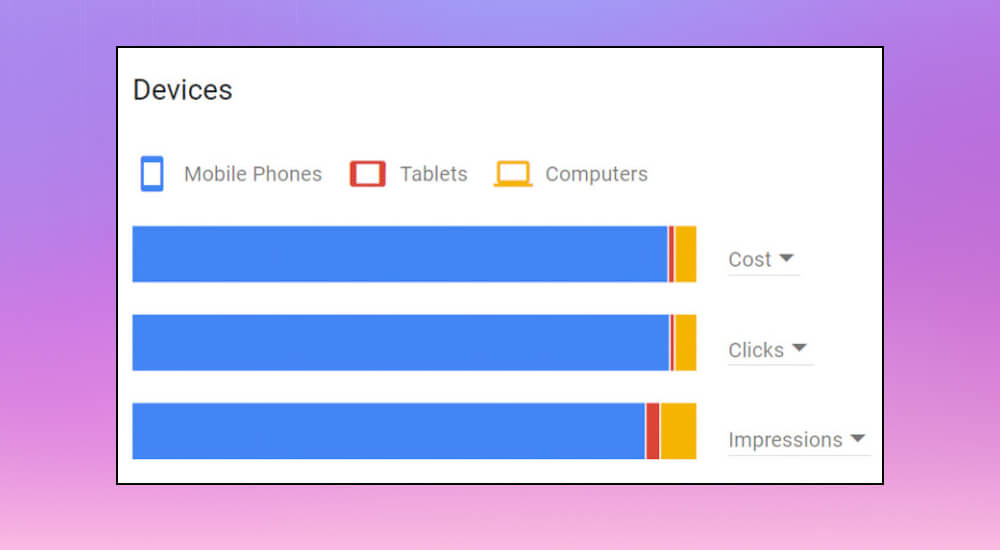
Knowing which devices your target customers use is key to improving the user experience on your website. Used well, Google Keyword Planner lets you track and analyze this data and shape your marketing strategy. It shows the percentage of impressions from different devices, such as computers, tablets and mobile phones.
To do this, add keywords to your plan, then choose Plan Overview and open Devices >> Impressions. There you'll see a chart showing the percentage of impressions from each device type.
Besides Google Keyword Planner, advertisers can use the following tools for reference and to researching keywords from more sources.

Ahrefs.com lets you analyze keywords from about 100 USD/month at the lowest price. It is one of the standard keyword research tools for Google, used by many advertisers today.
Ahrefs gives you detailed information about a keyword, such as:
Quick take on Ahrefs:
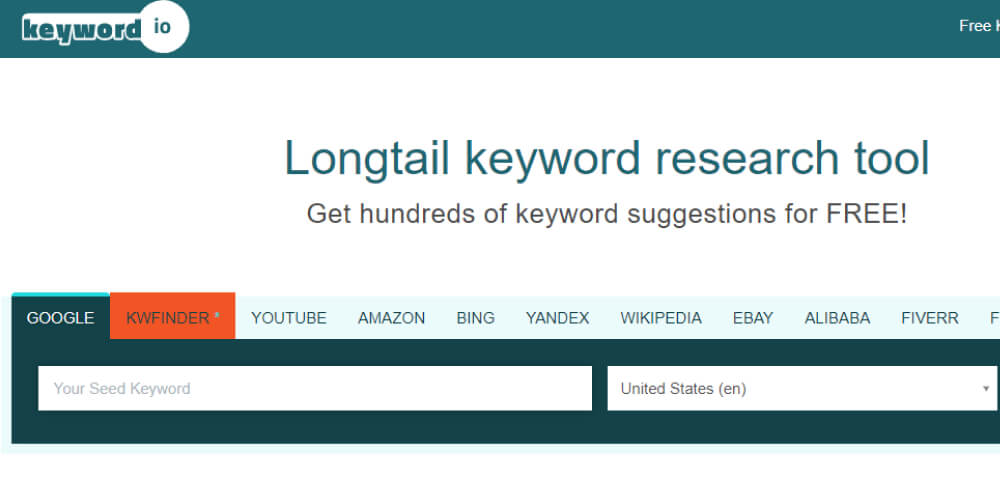
Keyword.io is a keyword planning tool with both free and paid versions. If you only need to expand your keyword list, the free version is enough. If you want fuller data, such as search volume and conversion rate, you can pay around 30-50 USD/month to track these numbers.
Quick take on Keyword.io:
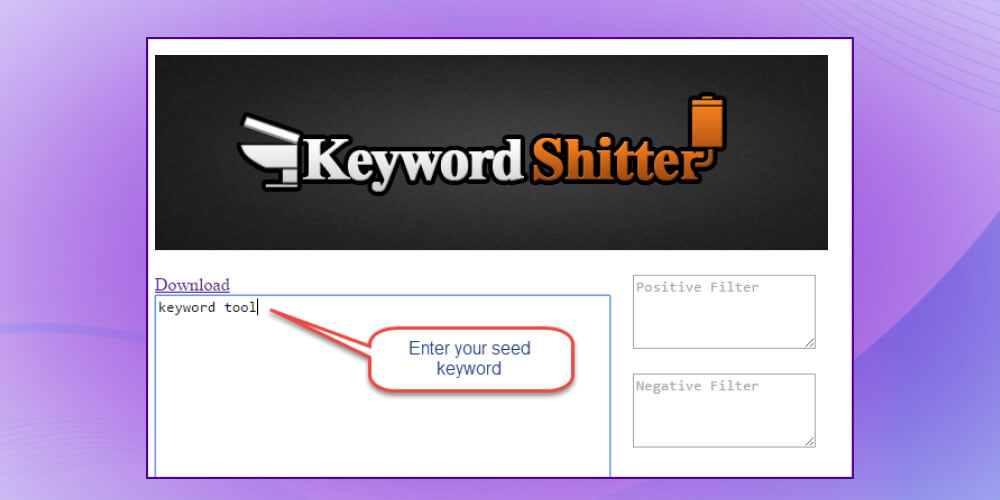
Like Keyword.io, Keywordshitter.com can expand an advertiser's keyword pool, but it improves on a few features.
In detail, here is how Keywordshitter rates:
Soovle is the the keyword research tool works not only on Google but also on other platforms like YouTube, Yahoo and Bing (Amazon and Answers don't support Vietnamese yet).
Quick take on Soovle:

This Google keyword research tool gives you keyword data from Google Keyword Planner without needing an AdWords account. It suits copywriters who need to write SEO-friendly articles.
Quick take on Ubersuggest:
Google built not only Google Keyword Planner but also Google Search Console. It lets you check how your site's keywords are doing through metrics such as Clicks, Impressions, CTR and Rank (last 90 days). That helps you shape a stronger overall SEO strategy by adjusting articles and the keywords you want to push.
Overall strengths and weaknesses of Google Search Console for keyword planning:
This isn't a typical keyword analysis tool. Google Trends suggests trends based on the keywords you give it, to help you widen your content ideas. With this tool, it's easier to come up with article ideas than to build a finished keyword list.
Quick take on Google Trends:
Besides specialist tools for finding keywords and building a keyword set, you can also use services like SEO services from MONA to make sure you get results!

MONA has successfully delivered thousands of SEO projects across many industries for more than 12,000 clients and partners clients in Vietnam and abroad over more than 10 years, our team at SEO company MONA has built a process for finding quality keyword sets and optimizing SEO factors that meets Google's algorithm requirements and delivers content that is useful to users, so your website gets the best SEO results. For more details, CONTACT US with MONA via hotline 1900 636 648 and our staff will advise you detailed SEO quote for your business.
Of all the tools available, it's clear that Google Keyword Planner remains a top choice for advertisers, with many features and an easy-to-use interface. We hope the information we've MONA Media shared above helps you use this keyword planning tool effectively and improve your website's SEO. Good luck!

CEO & Founder · The MONA
Founder of The MONA, who built a services company of 200+ staff with 14,000+ projects delivered. Khánh Hùng shares how he thinks about building systems that run themselves, automating a business, and the real lessons from delivering projects at MONA.
 1,6K
1,6K




Professional website
design services
Own a website with a beautiful, 100% exclusive design and a lifetime warranty, with the ability
to expand features flexibly as your business grows, starting today!














 MONA will never sell your information or send you spam
MONA will never sell your information or send you spam
MONA will never sell your information or send you spam


 MONA will never sell your information or send you spam