
 MONA OS 2.0


 Tự động hoá doanh nghiệp
 Cẩm nang SEO
 Digital Marketing
 Kinh nghiệm thiết kế website
 Hạ Tầng Server
 Giáo dục


 VI
VI
 EN
EN













Message us on
Zalo Official


 ProductsNew

 ProductsProducts
 Mới ra mắtKHA AI 2027App tự edit video, tự đăng mọi mạng xã hội, 2 phút mỗi ngày










 Website designLooks good and wins customers over.
SEO servicesBrings in customers searching for exactly what you sell.
Website designLooks good and wins customers over.
SEO servicesBrings in customers searching for exactly what you sell.
 Tư vấn digital marketingKéo khách từ nhiều kênh, đo bằng số thật.
Corporate video productionVideos introducing your company, factory and team.
Tư vấn digital marketingKéo khách từ nhiều kênh, đo bằng số thật.
Corporate video productionVideos introducing your company, factory and team.
 NewAI video productionCompany story films made with AI.
 Custom software developmentCRM, ERP and HRM built for your business.
 Viết AI Agent theo yêu cầuĐặt riêng một trợ lý AI cho đúng việc của mình.
 Tư vấn chuyển đổi AIĐưa AI vào vận hành của cả công ty.
NewMONA LMSManagement for centers and schools.
MONA SkillHubInternal training for company staff.
Tư vấn chuyển đổi AIĐưa AI vào vận hành của cả công ty.
NewMONA LMSManagement for centers and schools.
MONA SkillHubInternal training for company staff.
 NHTQ systemEnd-to-end China–Vietnam shipping operations.
MONA JMSManagement for gold, diamond and pawn shops.
NHTQ systemEnd-to-end China–Vietnam shipping operations.
MONA JMSManagement for gold, diamond and pawn shops.
 MONA E-LearningA website with every feature you need to sell courses.
 How to sell online courses (course)More than 30 free lessons on selling courses on autopilot.
 MONA Cloudmonacloud.vnServers to get your apps and websites running.
 MONA Basemonabase.vnPostgres database, sign-in and file storage.
 MONA Mailmonamail.vnSend OTP, order and invoice emails from your software.
 MONA Paymonapay.vnAccept bank transfers via VietQR and notify your software when the money arrives.
 MONA eInvoiceComing soonIssue e-invoices that meet tax standards.
Gấu CườiTrả lời khách 24/7 trên web, Fanpage, Zalo và thu lead cho sale.
MONA eInvoiceComing soonIssue e-invoices that meet tax standards.
Gấu CườiTrả lời khách 24/7 trên web, Fanpage, Zalo và thu lead cho sale.
 Gấu TeleSalesGọi điện tư vấn, chăm khách như tổng đài viên thật.
Dê CườiTư vấn và chốt đơn cho shop ngay trong khung chat.
Gấu WebmasterNhắn nhóm Zalo là website được sửa xong.
Gấu TeleSalesGọi điện tư vấn, chăm khách như tổng đài viên thật.
Dê CườiTư vấn và chốt đơn cho shop ngay trong khung chat.
Gấu WebmasterNhắn nhóm Zalo là website được sửa xong.
 Gấu Pháp ChếSoạn hợp đồng, rà điều khoản trong vài phút.
 Gấu Báo GiáLên báo giá đúng mẫu và gửi khách ngay.
 AI chăm sóc khách hàngTheo dõi và giữ chân khách hàng cũ.
 Gấu Tuyển DụngLọc hồ sơ, hẹn lịch, phỏng vấn ứng viên.
 Mới ra mắt
KHA AI 2027
Xây kênh chuyên gia 2 phút mỗi ngày
Quay bằng điện thoại, AI tự edit video, tự đăng lên 16 nền tảng và tự trả lời bình luận, tin nhắn.
348.391lượt xem trên kênh CEO MONA sau 20 ngày
Mới ra mắt
KHA AI 2027
Xây kênh chuyên gia 2 phút mỗi ngày
Quay bằng điện thoại, AI tự edit video, tự đăng lên 16 nền tảng và tự trả lời bình luận, tin nhắn.
348.391lượt xem trên kênh CEO MONA sau 20 ngày
 Anh Khánh HùngCEO MONA đang dùng mỗi ngày
Xem app làm được gì
Anh Khánh HùngCEO MONA đang dùng mỗi ngày
Xem app làm được gì
 AI
Gấu Cười MONA ĐANG TỰ XÀITrả lời khách 24/7 trên website, Zalo OA, Messenger và thu lead về cho sale.
Dê CườiChốt đơn bán lẻ và sàn: Shopee, TikTok Shop, web. Chăm cả khách sỉ, đại lý.
Gấu WebmasterCập nhật nội dung, tối ưu SEO website mỗi ngày.
Gấu TeleSalesGọi điện tư vấn, chăm khách như tổng đài viên thật.
Gấu Tuyển DụngLọc hồ sơ, hẹn lịch, phỏng vấn ứng viên tự động.
AI chăm sóc khách hàngGiữ khách cũ, cứu lead đã rớt cho phòng kinh doanh.
Gấu Pháp ChếSoạn hợp đồng, rà điều khoản trong vài phút.
Gấu Báo GiáLên báo giá đúng mẫu, gửi khách ngay khi có yêu cầu.
AI
Gấu Cười MONA ĐANG TỰ XÀITrả lời khách 24/7 trên website, Zalo OA, Messenger và thu lead về cho sale.
Dê CườiChốt đơn bán lẻ và sàn: Shopee, TikTok Shop, web. Chăm cả khách sỉ, đại lý.
Gấu WebmasterCập nhật nội dung, tối ưu SEO website mỗi ngày.
Gấu TeleSalesGọi điện tư vấn, chăm khách như tổng đài viên thật.
Gấu Tuyển DụngLọc hồ sơ, hẹn lịch, phỏng vấn ứng viên tự động.
AI chăm sóc khách hàngGiữ khách cũ, cứu lead đã rớt cho phòng kinh doanh.
Gấu Pháp ChếSoạn hợp đồng, rà điều khoản trong vài phút.
Gấu Báo GiáLên báo giá đúng mẫu, gửi khách ngay khi có yêu cầu.
 Chuyển đổi AI toàn phầnGiải pháp tổng cho doanh nghiệp, 3 lớp triển khai.
 Viết AI Agent theo yêu cầuĐặt riêng một con AI gánh đúng nghiệp vụ của bạn.
 Custom softwareCRM, ERP and HRM with built-in AI automation.
 SEO & AEO thời đại AIĐược Google lẫn AI trích dẫn, không chỉ xếp hạng.
 Kiến thức AI cho doanh nghiệpBài phân tích, hướng dẫn ứng dụng AI vào vận hành.
 Free AI courses
 AI tools at work
App mới · KHA AI 2027
Xây kênh 2 phút mỗi ngày
AI tự edit video, tự đăng mọi mạng xã hội
Free consultation, 8am–10pm every day
AI tools at work
App mới · KHA AI 2027
Xây kênh 2 phút mỗi ngày
AI tự edit video, tự đăng mọi mạng xã hội
Free consultation, 8am–10pm every day

02 November, 2023

After shooting, photographers need to run post-production to turn ordinary shots into polished works. In this article, MONA Media we explain the concept of post-production and some key points for editing, so you can produce your best images.
Post-production in English Post-production is a stage in photography, filmmaking and TVC production, among other things. In this stage, technicians edit, adjust and finish the photo or video. Post-production plays an important role in turning raw photos and footage into complete, striking works.
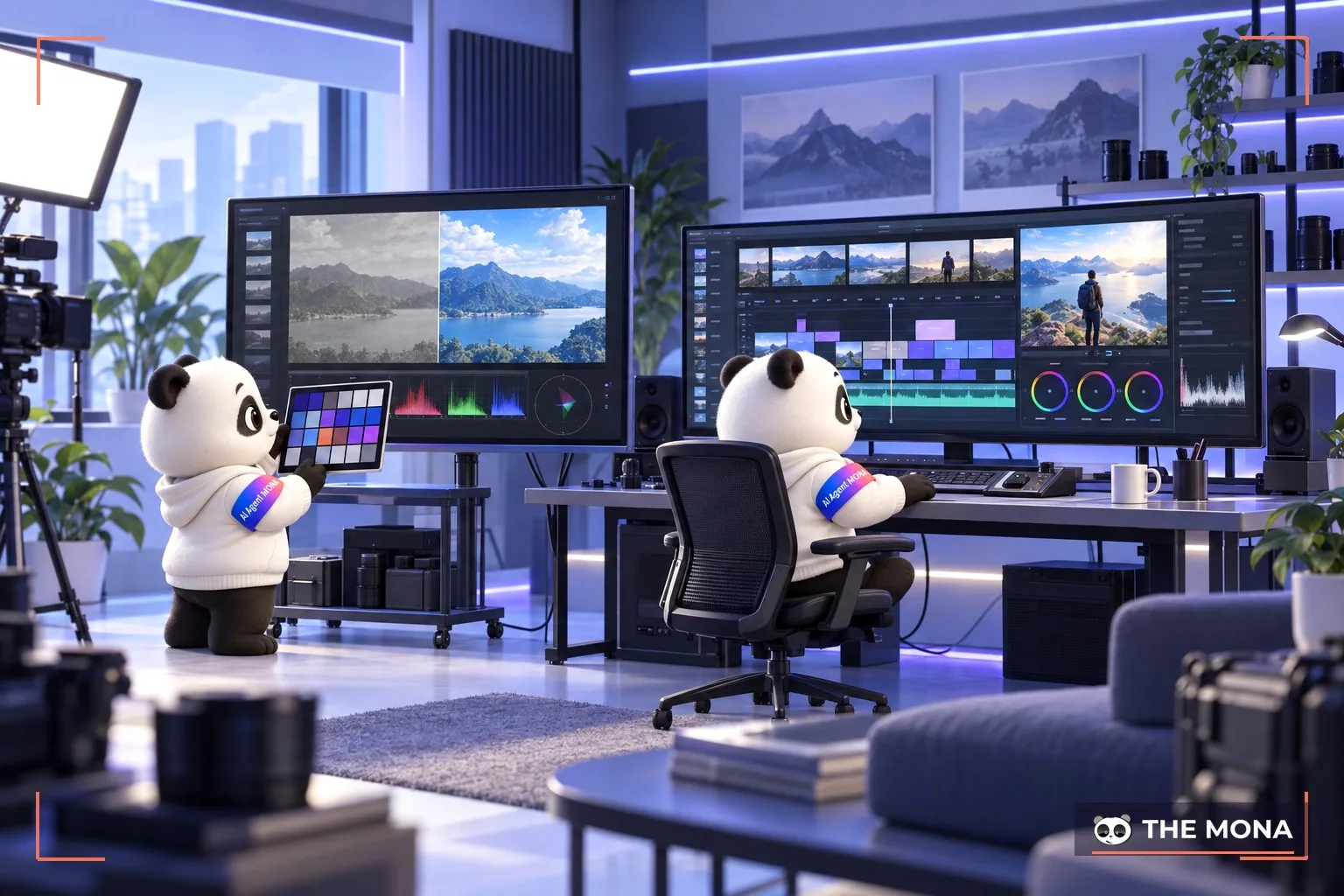
And what does photo post-production mean? Photo post-production is the important stage of processing and finishing a picture after it is shot. It covers editing and correcting problems that came up during the shoot, such as scenery, lighting, blur and loss of sharpness. So what steps does post-production include? Editing usually covers white balance, brightness adjustment, removing blemishes, adding effects, cropping and compositing, noise reduction and countless other steps, so that the picture meets the brief and carries the message it is meant to.
What does video post-production involve? Video post-production is the process after filming is finished, in which the video is edited, adjusted and finalized into its final version. It is key to producing a quality video that meets the original goals and requirements. It also includes color balancing, sound adjustment, special effects, audio recording and pre-processing before the video can be published.
In photography, understanding what post-production is and how it works is essential, because it determines the sharpness, scenery and basic lighting of each shot and sets the overall mood of a collection.

Just as women put on makeup to bring out their beauty, or a house needs a coat of paint to shine, photos need editing to look their best and catch the viewer's eye. It is an indispensable process for reaching the photographer's final goal.
That is why, besides product photography taking good photos, portrait retouching and film post-production always play an essential part.
So what does the photo post-production process involve? Post-production is a set of different processes grouped under one name. It usually includes:
You can learn more about photo retouching services, and professional photo editing and restoration at MONA. Contact us on HOTLINE 1900 636 648 for detailed advice.
You can also see how MONA's CEO & Founder walks through a simple studio setup and how MONA produced thousands of videos in 2024.
Key points to master when doing photo post-production? Check the notes below.
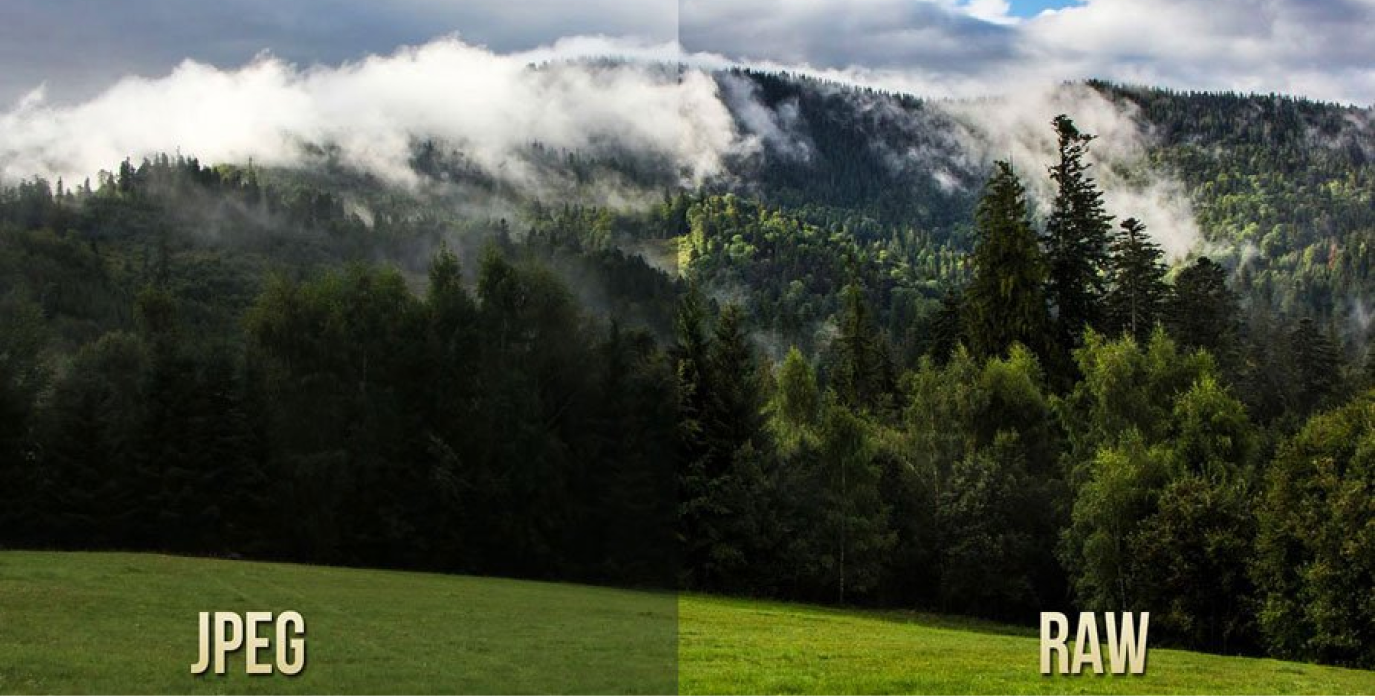
For an experienced photographer, shooting in RAW format always comes first. However impressive a shot looks straight out of the camera, do not hesitate to do the post-production step.
With RAW, the photographer works with the camera's raw “ingredients”, and post-production turns them into a polished, distinctive “dish”. Most professional photographers prefer RAW for the image quality and resolution it delivers.
With JPEG, on the other hand, they are bound by the settings the camera has already applied and have no options left to change after the shot. That means if they have to edit heavily, the JPEG loses quality and is no longer sharp.
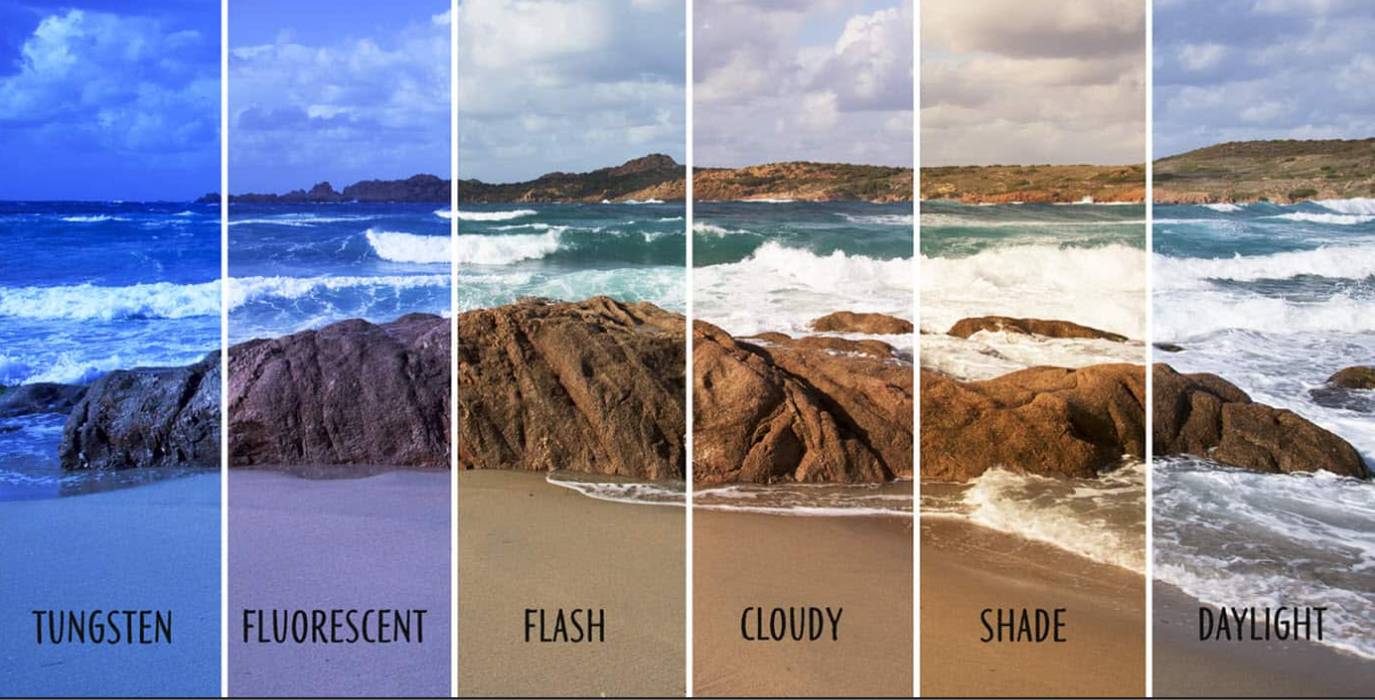
What key points should you watch when doing post-production? Most cameras today have a decent automatic white balance. But in special cases the camera may misread the surrounding light. So you should set white balance correctly before shooting. A useful tip is to use a grey card so the camera can balance white as accurately as possible.

One thing you should not skip in photo post-production is making sure your color-accurate monitor shows image colors as accurately as possible. Monitors designed for color work, such as Dell Ultrasharp, EIZO or Apple Cinema, usually ship with settings close to standard. To be sure, switch to Standard mode or do a factory reset so your monitor settings are right.
Cheap monitors, by contrast, are often tuned to make images look eye-catching by raising contrast, brightening colors and shifting tones. So you can follow these steps:
Ever wondered why the same photo looks better on the camera screen than on your computer? You may have skipped the camera's color-processing profile when working with RAW files.
Photo post-production software Adobe Lightroom uses one default color profile for all RAW files. The default is usually Adobe Standard, which renders color fairly flat and dull, with the focus on detail. The camera's own profile reproduces that camera's characteristic colors and gives a picture with more depth, like what you see on the camera screen.
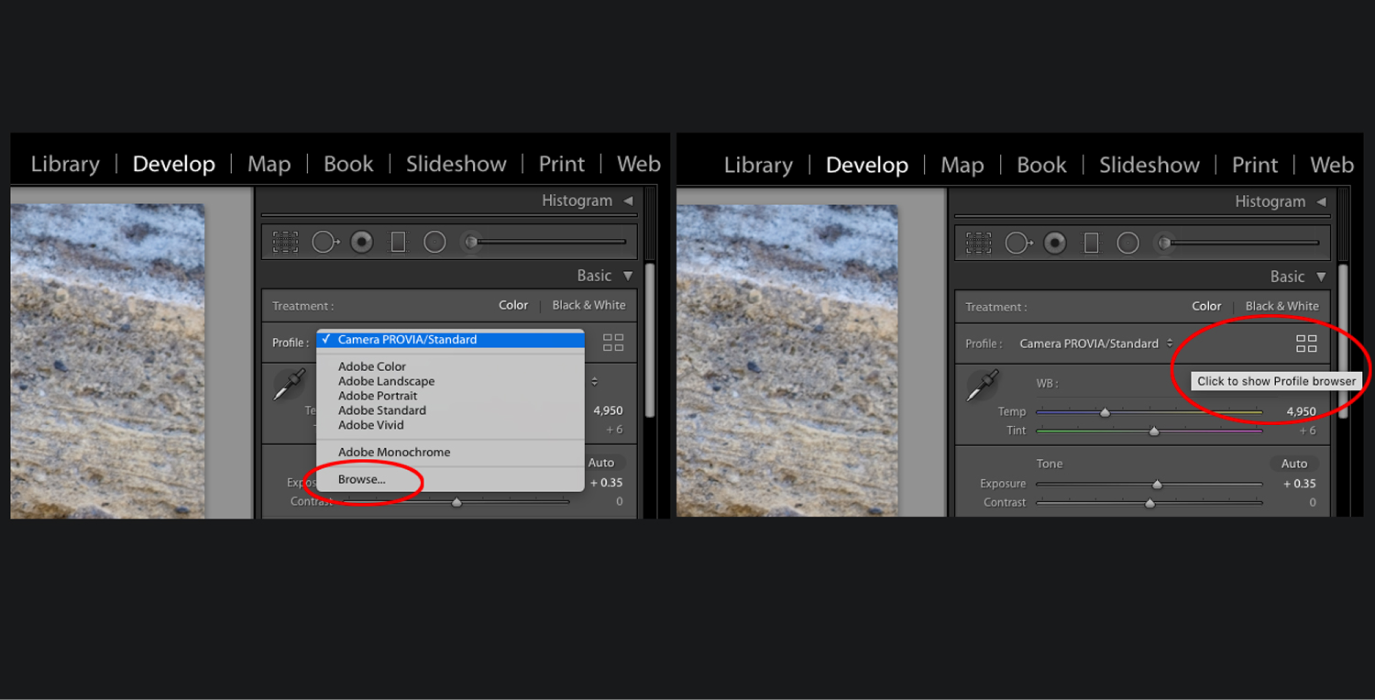
During post-production you can apply the camera's profile to a RAW file by going to Develop < Camera Calibration < switch from Adobe Standard to a custom profile. Note that these profiles work like adjusting Picture Control on your camera.

So, MONA Media this article has taken you through what post-production is,, what photo post-production is, and key notes for photo processing. We hope you now have what you need to produce your best images. For details, please contact us at HOTLINE 1900 636 648 for more specific advice on our filming and photography services at MONA Studio today.
→ See more MONA Media services:

CEO & Founder · The MONA
Founder of The MONA, who built a services company of 200+ staff with 14,000+ projects delivered. Khánh Hùng shares how he thinks about building systems that run themselves, automating a business, and the real lessons from delivering projects at MONA.
 1,6K
1,6K




Professional website
design services
Own a website with a beautiful, 100% exclusive design and a lifetime warranty, with the ability
to expand features flexibly as your business grows, starting today!



NHẬN TƯ VẤN SEO MIỄN PHÍ !








 MONA will never sell your information or send you spam
MONA will never sell your information or send you spam
MONA will never sell your information or send you spam


 MONA will never sell your information or send you spam