
 MONA OS 2.0
 Partner with MONA


 Tự động hoá doanh nghiệp
 Cẩm nang SEO
 Digital Marketing
 Kinh nghiệm thiết kế website
 Hạ Tầng Server
 Giáo dục

 VI
VI
 EN
EN















Message us on
Zalo Official


 ProductsNew

 ProductsProducts
 Mới ra mắtKHA AI 2027App tự edit video, tự đăng mọi mạng xã hội, 2 phút mỗi ngày










 Website designLooks good and wins customers over.
SEO servicesBrings in customers searching for exactly what you sell.
Website designLooks good and wins customers over.
SEO servicesBrings in customers searching for exactly what you sell.
 Tư vấn digital marketingKéo khách từ nhiều kênh, đo bằng số thật.
Corporate video productionVideos introducing your company, factory and team.
Tư vấn digital marketingKéo khách từ nhiều kênh, đo bằng số thật.
Corporate video productionVideos introducing your company, factory and team.
 NewAI video productionCompany story films made with AI.
 Custom software developmentCRM, ERP and HRM built for your business.
 Viết AI Agent theo yêu cầuĐặt riêng một trợ lý AI cho đúng việc của mình.
 Tư vấn chuyển đổi AIĐưa AI vào vận hành của cả công ty.
NewMONA LMSManagement for centers and schools.
MONA SkillHubInternal training for company staff.
Tư vấn chuyển đổi AIĐưa AI vào vận hành của cả công ty.
NewMONA LMSManagement for centers and schools.
MONA SkillHubInternal training for company staff.
 NHTQ systemEnd-to-end China–Vietnam shipping operations.
MONA JMSManagement for gold, diamond and pawn shops.
NHTQ systemEnd-to-end China–Vietnam shipping operations.
MONA JMSManagement for gold, diamond and pawn shops.
 MONA E-LearningA website with every feature you need to sell courses.
 How to sell online courses (course)More than 30 free lessons on selling courses on autopilot.
 MONA Cloudmonacloud.vnServers to get your apps and websites running.
 MONA Basemonabase.vnPostgres database, sign-in and file storage.
 MONA Mailmonamail.vnSend OTP, order and invoice emails from your software.
 MONA Paymonapay.vnAccept bank transfers via VietQR and notify your software when the money arrives.
 MONA eInvoiceComing soonIssue e-invoices that meet tax standards.
Gấu CườiTrả lời khách 24/7 trên web, Fanpage, Zalo và thu lead cho sale.
MONA eInvoiceComing soonIssue e-invoices that meet tax standards.
Gấu CườiTrả lời khách 24/7 trên web, Fanpage, Zalo và thu lead cho sale.
 Gấu TeleSalesGọi điện tư vấn, chăm khách như tổng đài viên thật.
Dê CườiTư vấn và chốt đơn cho shop ngay trong khung chat.
Gấu WebmasterNhắn nhóm Zalo là website được sửa xong.
Gấu TeleSalesGọi điện tư vấn, chăm khách như tổng đài viên thật.
Dê CườiTư vấn và chốt đơn cho shop ngay trong khung chat.
Gấu WebmasterNhắn nhóm Zalo là website được sửa xong.
 Gấu Pháp ChếSoạn hợp đồng, rà điều khoản trong vài phút.
 Gấu Báo GiáLên báo giá đúng mẫu và gửi khách ngay.
 AI chăm sóc khách hàngTheo dõi và giữ chân khách hàng cũ.
 Gấu Tuyển DụngLọc hồ sơ, hẹn lịch, phỏng vấn ứng viên.
 Mới ra mắt
KHA AI 2027
Xây kênh chuyên gia 2 phút mỗi ngày
Quay bằng điện thoại, AI tự edit video, tự đăng lên 16 nền tảng và tự trả lời bình luận, tin nhắn.
435.469lượt xem trên kênh CEO MONA sau 23 ngày
Mới ra mắt
KHA AI 2027
Xây kênh chuyên gia 2 phút mỗi ngày
Quay bằng điện thoại, AI tự edit video, tự đăng lên 16 nền tảng và tự trả lời bình luận, tin nhắn.
435.469lượt xem trên kênh CEO MONA sau 23 ngày
 Anh Khánh HùngCEO MONA đang dùng mỗi ngày
Xem app làm được gì
Anh Khánh HùngCEO MONA đang dùng mỗi ngày
Xem app làm được gì
 AI
Gấu Cười MONA ĐANG TỰ XÀITrả lời khách 24/7 trên website, Zalo OA, Messenger và thu lead về cho sale.
Dê CườiChốt đơn bán lẻ và sàn: Shopee, TikTok Shop, web. Chăm cả khách sỉ, đại lý.
Gấu WebmasterCập nhật nội dung, tối ưu SEO website mỗi ngày.
Gấu TeleSalesGọi điện tư vấn, chăm khách như tổng đài viên thật.
Gấu Tuyển DụngLọc hồ sơ, hẹn lịch, phỏng vấn ứng viên tự động.
AI chăm sóc khách hàngGiữ khách cũ, cứu lead đã rớt cho phòng kinh doanh.
Gấu Pháp ChếSoạn hợp đồng, rà điều khoản trong vài phút.
Gấu Báo GiáLên báo giá đúng mẫu, gửi khách ngay khi có yêu cầu.
AI
Gấu Cười MONA ĐANG TỰ XÀITrả lời khách 24/7 trên website, Zalo OA, Messenger và thu lead về cho sale.
Dê CườiChốt đơn bán lẻ và sàn: Shopee, TikTok Shop, web. Chăm cả khách sỉ, đại lý.
Gấu WebmasterCập nhật nội dung, tối ưu SEO website mỗi ngày.
Gấu TeleSalesGọi điện tư vấn, chăm khách như tổng đài viên thật.
Gấu Tuyển DụngLọc hồ sơ, hẹn lịch, phỏng vấn ứng viên tự động.
AI chăm sóc khách hàngGiữ khách cũ, cứu lead đã rớt cho phòng kinh doanh.
Gấu Pháp ChếSoạn hợp đồng, rà điều khoản trong vài phút.
Gấu Báo GiáLên báo giá đúng mẫu, gửi khách ngay khi có yêu cầu.
 Chuyển đổi AI toàn phầnGiải pháp tổng cho doanh nghiệp, 3 lớp triển khai.
 Viết AI Agent theo yêu cầuĐặt riêng một con AI gánh đúng nghiệp vụ của bạn.
 Custom softwareCRM, ERP and HRM with built-in AI automation.
 SEO & AEO thời đại AIĐược Google lẫn AI trích dẫn, không chỉ xếp hạng.
 Kiến thức AI cho doanh nghiệpBài phân tích, hướng dẫn ứng dụng AI vào vận hành.
 Free AI courses
 AI tools at work
App mới · KHA AI 2027
Xây kênh 2 phút mỗi ngày
AI tự edit video, tự đăng mọi mạng xã hội
Free consultation, 8am–10pm every day
AI tools at work
App mới · KHA AI 2027
Xây kênh 2 phút mỗi ngày
AI tự edit video, tự đăng mọi mạng xã hội
Free consultation, 8am–10pm every day

18 March, 2023
It is really annoying to get lots of junk mail from Gmailevery day. So how do you keep that spam out of your inbox? The best way is to block the sender, so you no longer receive mail from that address. So how do you block spam email ?
In this guide, MONA shows MONA Media will show you how to block mail in Gmail effectively.

Spam emails come from many sources. See which of these you are dealing with!
In this case, either the sender wants to harass you with spam, or they simply forgot to remove your email when sending.
This kind of spam from people you know happens most often when you leave a company where you used to work. People there may still know you but forget to remove your address, or do not know you have left, so they keep sending mail.
This is very common at large companies with many employees, where it is hard to control and coordinate information.
Your inbox surely has at least a few spam emails from people you do not know. They are usually advertisers trying to draw customers to their company or, worse, scammers. They may have found your address through:
So how do you block spam? Let's look at the details below with MONA.

Cyberbullying is the English term for cyberbullying. These emails can come from people you know or from strangers. As the internet and social media grow, this is happening more and more. If you often receive bullying or harassing messages and you are the target, follow the steps below.
Gmail already has a very good built-in spam filter, but it is not perfect. You can apply the techniques below to help keep junk mail out of your inbox.
Explore the solution: Reliable email marketing services, run professionally

Blocking spam or filtering mail in Gmail is not hard. You can stop a specific person from sending you mail by blocking them, or move their mail into a separate folder.
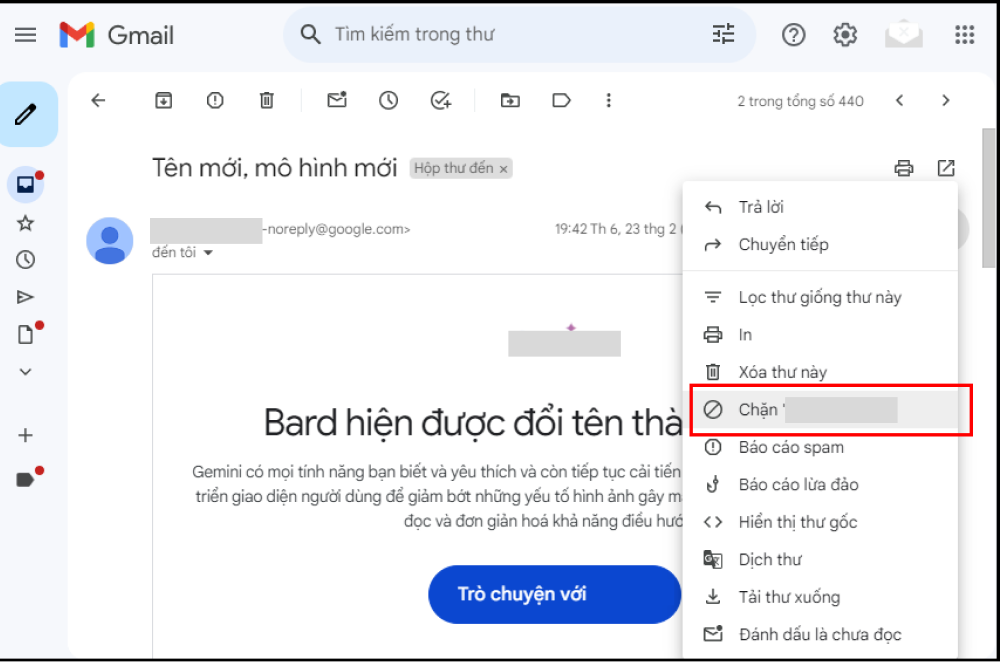
You can block a specific person's mail in Gmail with these steps:
In this case, choose Block “Laura Spencer”, then a confirmation box appears asking you to confirm that future messages from Laura Spencer will go to your Spam folder.
If you want to unblock, click the more options icon and choose Unblock. A confirmation box will say that future emails from this person will show up in your inbox. Click Unblock to confirm.
You can block mail in Gmail with an email filter, which can be used to filter mail from a fixed sender.
When a message matches your search, you have these options:

Through apps and software, advertising emails are sent in large volumes. If your email is on their list, the messages will reach you. Here is how to block spam in Gmail:
Method 1: The Unsubscribe link: Open the email and scroll to the bottom, where there is an Unsubscribe link. Follow the instructions or wait for the page to finish redirecting, and you will no longer receive mail from that sender.
Method 2: Gmail's own unsubscribe: If Gmail detects that an email has an unsubscribe button, it shows a link at the top of the email. Do the same as above: click unsubscribe and follow the instructions to block mail in Gmail.
Besides the methods above, you can block spam in Gmail by reporting it. Gmail has built a set of options for handling junk email, backed by a complex system of algorithms, which saves users time on filtering spam.
Emails are automatically recognized and sent to spam if they contain the following:
Or:
How to block spam in Gmail:
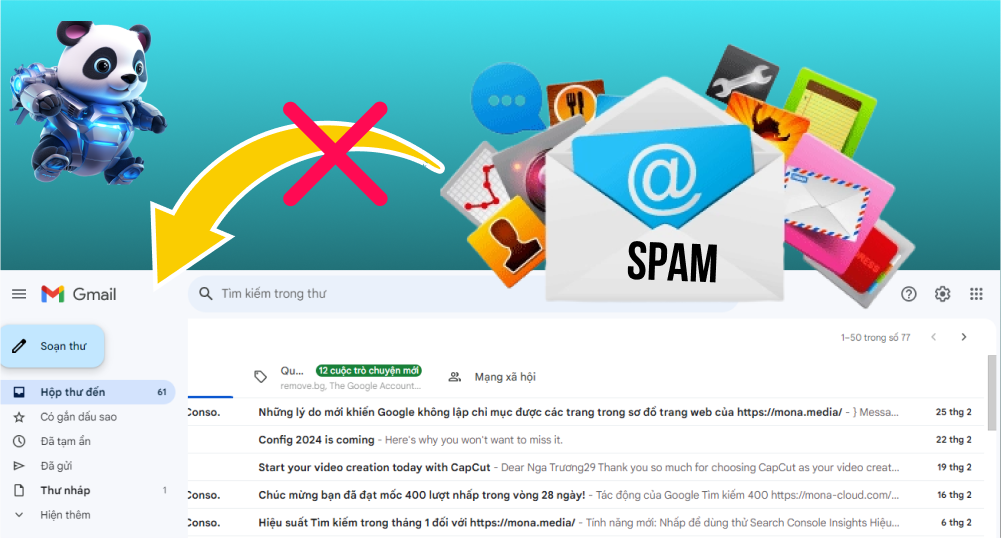
For emails you do not want to receive, mark them as spam. This helps Gmail learn which kinds of email you want to put in the spam folder.
If you marked an email as spam by accident, you can still move it back to your main inbox.
If you find an email that looks like fraud, an attempt to take your property, or impersonation of an organization or person, report it to Gmail or to the authorities.
Spam email is dangerous because the sender may be after your personal or financial information. These scams are sophisticated: attackers pose as financial institutions, government agencies and banks to steal data or money from users.

We have covered the ways to block email in Gmail above, but if you tag a message as spam, delete it and then realize it held important information, there is no need to worry too much.
A deleted email stays in Trash for 30 days before it is permanently removed. During that time you can restore it as follows:
According to Mr. Võ Nguyên Thoai, CTO of MONA Host: “Blocking junk mail in Gmail, or filtering out other unwanted messages keeps your inbox organized, shows you the important emails and lets you work more comfortably and productively.”
So how can you be sure your business email doesn't annoy people or get treated as spam? Take a look at business email service from MONA, with features that help your business promote itself and build a credible, professional brand image with customers.

With the information shared above, you now know how do you block spam email. If you have any questions, call hotline 1900 636 648 for advice and support.
→ You may be interested in:

It is eleven at night and a customer has just placed an order on your website. Ten minutes later they are still waiting for a confirmation email. Your admin system says the email was sent successfully. The next morning the customer complains angrily, and when you check, the confirmation email is sitting in their spam folder. Every business owner has felt that at some point, and it means a lost customer.
Some people suggest running your own VPS to send mail cheaply, or using the SMTP of a personal Gmail account. Both are traps. Transactional email from these homemade setups is very easily flagged as spam by Google or Microsoft, because you share an IP range with thousands of other senders and that range has no reputation. Self-built servers also often lack required security signatures such as DKIM and a proper SPF record. According to the documentation we checked on 19/09/2026, a trial Gmail account can send only 500 emails a day, and a paid Workspace plan tops out at 2,000 a day. Go over the limit and the account is blocked from sending for up to 24 hours, so a large campaign gets stuck.
In the system mail flow of MONA Cloud, which we operate ourselves, the three notices for hitting a quota threshold or downgrading a plan go out automatically and do not count against the customer's quota. A cron job runs every five minutes, and customers can follow the status of each email through webhooks instead of guessing whether it arrived. Instead of risky manual setup, MONA Mail verifies your domain with a single DKIM record using the selector mona1, with RSA 2048 encryption to the proper security standard. When the system processes an email, it goes into the queue and the API immediately returns code 201 with the status queued. We never report delivered until the recipient's server has actually logged a successful delivery. If the receiving network has an error, the worker retries automatically after 1 second, 5 seconds, 25 seconds, 2 minutes and then 10 minutes before it reports failed through the webhook.
Sending costs very little. In the price list we checked on 19/09/2026, the Startup plan is only 99,000 VND for 30,000 emails, and anything over the limit is charged at 3 VND per email. The higher Business tier is 299,000 VND for 150,000 emails, and the system also gives you 3,000 free emails a month to try. When the wallet runs out, the API automatically returns error 402 and pauses emails over the limit, so there are no surprise invoices. One caution: a brand-new domain can still land in spam for the first few days, so you always need a proper warm-up plan from the start.
Don't use a personal Gmail SMTP to send automated email for a large system. You save a few dong today, and tomorrow you risk losing your core customers because an important email never arrived. It is too risky.

Clients who come to us for a system often describe the same scene: the website goes down during a flash sale because traffic spikes, and the technician spends the whole morning fumbling to restart the server because the self-built configuration is too tangled. Thousands of orders can't be paid for and customers go buy elsewhere. MONA Mail is free for 3,000 emails a month, and the Startup plan is 99,000 VND for 30,000 emails, with 3 VND per extra email, based on the figures we checked on 19/09/2026.
Most business owners dread complicated technical work, and the more people touch the code, the more mistakes creep in. Configuring a server by hand wastes time and can open serious security holes. That is when you need infrastructure built for automation. MONA Cloud is The MONA Group's AI-friendly server platform: very fast for clients in Vietnam, rented by the hour and paid in VND. You log in through Claude Code, and the AI creates the virtual machine, deploys the source code, attaches the domain and hands back a secure link for you to continue with.
Billing is fully transparent. You pay only for the resources you use, by the hour, at a low rate for each hardware configuration. When you shut a machine down, CPU and RAM charges stop automatically, and you top up only what you will use. That ends paying for idle running time. Every transaction comes with a valid VAT invoice. The system includes a bank API and an automatic payment confirmation service to keep operations smooth. Choose MONA because you pay in VND, your data is stored in Vietnam, and a support team is always there.
To round out the ecosystem, we also offer MONA Domain at a reasonable price, so you can manage all your digital assets in one place. Registering a .vn domain is quick now: you only need eKYC and a digital signature once. The AI can also look up a domain, reserve it immediately with a VietQR code without an account, and then set the DNS correctly. Handing this to the AI shortens a tedious process.
Don't configure a VPS by hand if you don't have deep expertise. A real business system needs solid infrastructure from the foundation, and letting the AI and an optimized platform do it is the safest way. Mistakes cost money.
A manifesto for growing together
MONA is a software, digital transformation and AI transformation company, but above all, MONA is a B2B service company that benefits directly from this: THE MORE SUCCESSFUL VIETNAMESE BUSINESSES BECOME, THE MORE MONA BENEFITS, while a declining, slow market with weak technology is exactly what kills MONA's future business opportunities. So, more than anyone, MONA wants you to succeed, and MONA actually steps in to help you succeed.
And AI transformation is the key to that success for all of us.
MONA
A smooth-running system doesn't appear on its own. MONA Mail is free for 3,000 emails a month, with a webhook for the status of each email. Try it first at https://monamail.vn/, which takes about 5 minutes. One click and it's done.

CEO & Founder · The MONA
Founder of The MONA, who built a services company of 200+ staff with 14,000+ projects delivered. Khánh Hùng shares how he thinks about building systems that run themselves, automating a business, and the real lessons from delivering projects at MONA.
 1,7K
1,7K




Professional website
design services
Own a website with a beautiful, 100% exclusive design and a lifetime warranty, with the ability
to expand features flexibly as your business grows, starting today!








 MONA will never sell your information or send you spam
MONA will never sell your information or send you spam
MONA will never sell your information or send you spam


 MONA will never sell your information or send you spam