
 MONA OS 2.0
 Partner with MONA


 Tự động hoá doanh nghiệp
 Cẩm nang SEO
 Digital Marketing
 Kinh nghiệm thiết kế website
 Hạ Tầng Server
 Giáo dục


 VI
 EN













Message us on
Zalo Official


 ProductsNew

 ProductsProducts
 Mới ra mắtKHA AI 2027App tự edit video, tự đăng mọi mạng xã hội, 2 phút mỗi ngày










 Website designLooks good and wins customers over.
SEO servicesBrings in customers searching for exactly what you sell.
 Tư vấn digital marketingKéo khách từ nhiều kênh, đo bằng số thật.
Corporate video productionVideos introducing your company, factory and team.
 NewAI video productionCompany story films made with AI.
 Custom software developmentCRM, ERP and HRM built for your business.
 Viết AI Agent theo yêu cầuĐặt riêng một trợ lý AI cho đúng việc của mình.
 Tư vấn chuyển đổi AIĐưa AI vào vận hành của cả công ty.
NewMONA LMSManagement for centers and schools.
MONA SkillHubInternal training for company staff.
 NHTQ systemEnd-to-end China–Vietnam shipping operations.
MONA JMSManagement for gold, diamond and pawn shops.
 MONA E-LearningA website with every feature you need to sell courses.
 How to sell online courses (course)More than 30 free lessons on selling courses on autopilot.
 MONA Cloudmonacloud.vnServers to get your apps and websites running.
 MONA Basemonabase.vnPostgres database, sign-in and file storage.
 MONA Mailmonamail.vnSend OTP, order and invoice emails from your software.
 MONA Paymonapay.vnAccept bank transfers via VietQR and notify your software when the money arrives.
 MONA eInvoiceComing soonIssue e-invoices that meet tax standards.
Gấu CườiTrả lời khách 24/7 trên web, Fanpage, Zalo và thu lead cho sale.
 Gấu TeleSalesGọi điện tư vấn, chăm khách như tổng đài viên thật.
Dê CườiTư vấn và chốt đơn cho shop ngay trong khung chat.
Gấu WebmasterNhắn nhóm Zalo là website được sửa xong.
 Gấu Pháp ChếSoạn hợp đồng, rà điều khoản trong vài phút.
 Gấu Báo GiáLên báo giá đúng mẫu và gửi khách ngay.
 AI chăm sóc khách hàngTheo dõi và giữ chân khách hàng cũ.
 Gấu Tuyển DụngLọc hồ sơ, hẹn lịch, phỏng vấn ứng viên.
 Mới ra mắt
KHA AI 2027
Xây kênh chuyên gia 2 phút mỗi ngày
Quay bằng điện thoại, AI tự edit video, tự đăng lên 16 nền tảng và tự trả lời bình luận, tin nhắn.
886.668lượt xem trên kênh CEO MONA sau 36 ngày
 Anh Khánh HùngCEO MONA đang dùng mỗi ngày
Xem app làm được gì
 AI
Gấu Cười MONA ĐANG TỰ XÀITrả lời khách 24/7 trên website, Zalo OA, Messenger và thu lead về cho sale.
Dê CườiChốt đơn bán lẻ và sàn: Shopee, TikTok Shop, web. Chăm cả khách sỉ, đại lý.
Gấu WebmasterCập nhật nội dung, tối ưu SEO website mỗi ngày.
Gấu TeleSalesGọi điện tư vấn, chăm khách như tổng đài viên thật.
Gấu Tuyển DụngLọc hồ sơ, hẹn lịch, phỏng vấn ứng viên tự động.
AI chăm sóc khách hàngGiữ khách cũ, cứu lead đã rớt cho phòng kinh doanh.
Gấu Pháp ChếSoạn hợp đồng, rà điều khoản trong vài phút.
Gấu Báo GiáLên báo giá đúng mẫu, gửi khách ngay khi có yêu cầu.
 Chuyển đổi AI toàn phầnGiải pháp tổng cho doanh nghiệp, 3 lớp triển khai.
 Viết AI Agent theo yêu cầuĐặt riêng một con AI gánh đúng nghiệp vụ của bạn.
 Custom softwareCRM, ERP and HRM with built-in AI automation.
 SEO & AEO thời đại AIĐược Google lẫn AI trích dẫn, không chỉ xếp hạng.
 Kiến thức AI cho doanh nghiệpBài phân tích, hướng dẫn ứng dụng AI vào vận hành.
 Free AI courses
 AI tools at work
App mới · KHA AI 2027
Xây kênh 2 phút mỗi ngày
AI tự edit video, tự đăng mọi mạng xã hội
Free consultation, 8am–10pm every day

25 July, 2026

🎓 Free course: Claude Code basics, lesson 10 of 10. The whole course is in the category Free AI courses package from MONA?
The final lesson of the course. When you finish, you'll know how to let several agents work on one project without stepping on each other using git worktree, and you'll know how to put what you've built on the internet for other people to really use: from a static web page to an automatic link that serves a business process.
In lesson 9 you had several agents running in parallel. But letting them all edit one project together exposes a problem: the files in a project aren't perfectly separate, one file calls another, and when two agents touch the same file they trample each other, which people in the trade call a conflict. It's like two crews renovating the same house: the electricians and the plumbers will sooner or later collide at a shared wall.
Programmers solved this long ago with Git: a version control system that lets you split a project into branches (each branch is a copy for one separate job), and when the job is done you merge it back: the machine compares the two versions and applies the changes to the main one. Git worktree goes one step further, in a way that suits the age of agents: each branch is expanded into its own folder on your machine, sharing history but occupying separate ground. Each agent sits in its own folder, so there's no way left to step on each other.
A real example from the original course: a company website needs 3 more pages (about, contact, services). With one command, the machine creates 3 worktrees, and an agent in each folder builds one page in parallel. When they finish, everything merges back into the main version, with an agent stepping in to settle any conflicts. The secret to it “knowing the way on its own” is exactly what lessons 2 and 4 taught: write the worktree convention into CLAUDE.md (roughly: “this project uses git worktrees for parallel work, one folder per job, never edit another branch's files, merge into the main branch when done”). Say it once, and every later session just follows it.
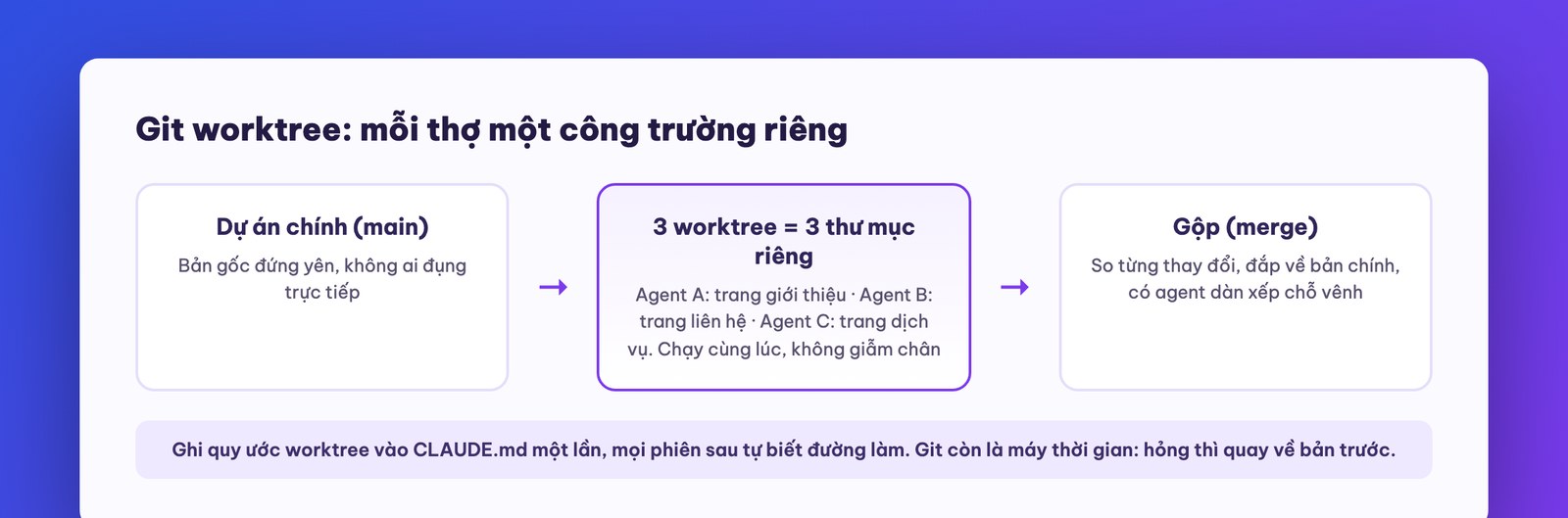
If you're not a professional software person, you don't need to learn a single Git command. Just remember two ideas: one, there is a mechanism for many agents to work in parallel safely, so just tell the machine you want to use worktrees; two, Git is also a time machine: every version is saved, so if something breaks you can go back to the previous one. That's why you should ask the machine to save a checkpoint (commit) after each stretch that works. It is also your real safety net when you use the broader permission modes from lesson 5.
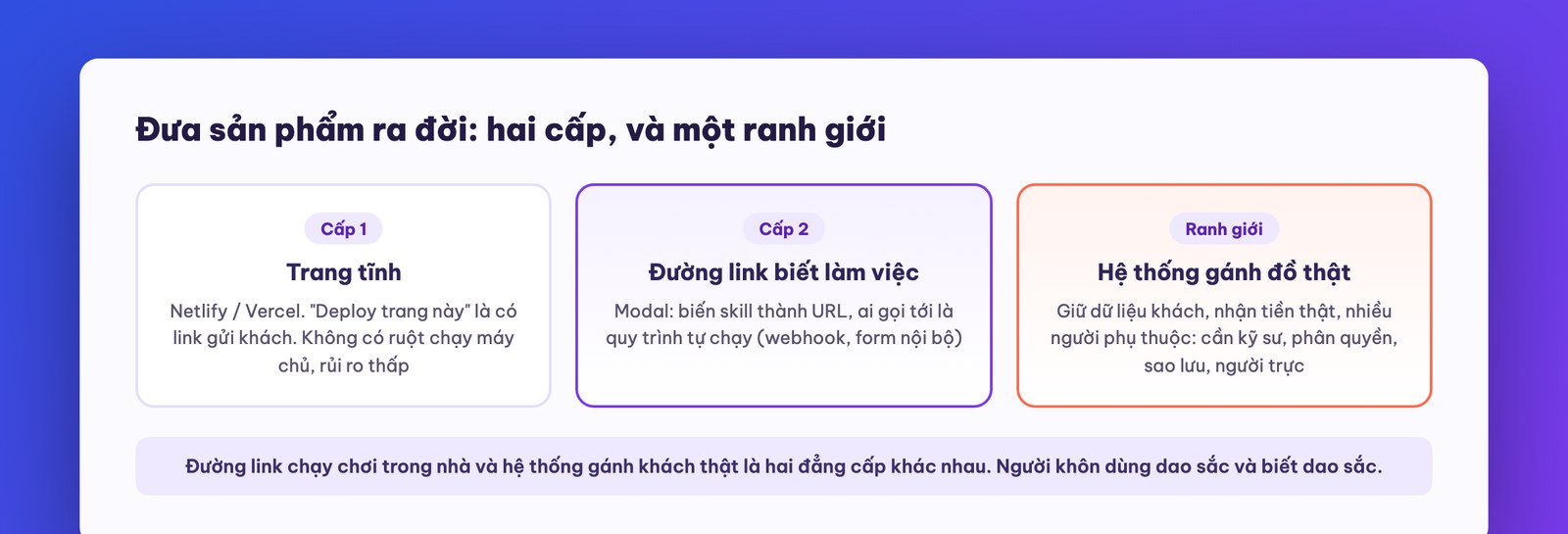
All course long, everything you built has sat on your own machine. The last loop is putting it in front of other people. There are two levels:
Level 1: a static web page. An About page or a campaign page that needs no server-side processing can use services like Netlify, Vercel: tell Claude Code “deploy this page to Netlify,” and it handles everything from creating the account and connecting it until you're holding a link to send to customers. It's fast, there's a free plan, and because a static page has no server-side “guts” running, the risk surface is low too.
Level 2: a link that does work (an API). This is the real payoff for automation people: turn a process into a link that runs the process whenever anyone calls it. The service the original course uses is Modal: sign up, get a token, hand it to Claude Code along with the command, and a few minutes later you have a public URL of your own. The demo in the course is a fun link (call it and it tells you “is it someone's birthday today?”), but taken seriously it becomes a door that connects your systems: a new order on the web fires a signal (webhook) into your link, and the link triggers a flow that classifies the order and drafts a reply. Or the lead-filtering skill from lesson 7 gets put on a link, and anyone in the company can open it and fill in a form to make the machine run, with no need to know what Claude Code is. This kind of setup is often surprisingly cheaper than subscriptions to drag-and-drop automation platforms.
Here we repeat the boundary we've stated all course, because it matters most in this very last lesson: a link that runs for fun in-house and a system carrying real customers are two different leagues. Anything that starts to hold customer data, take real money, and have many people depending on it every day, that needs a properly configured server, access control, backups, and someone on call who is accountable. The original course's own instructor, after making good money from these tools, came to the same conclusion: the products he builds with AI are only for internal use and regular clients, not sold at scale on the internet, because he has seen too many security breaches. A smart person uses a sharp knife and knows it is sharp.
Looking back at the ten lessons: installing and reading the tool (lesson 1), building a website by talking and CLAUDE.md (lesson 2), the habit of verifying (lesson 3), the .claude folder and rules for writing instructions (lesson 4), permission modes and plan mode with a full app including login and payment (lesson 5), managing context and tokens like managing cost (lesson 6), packaging a workflow into a skill (lesson 7), plugging in outside tools with care (lesson 8), orchestrating sub-agents and agent teams (lesson 9), and running in parallel safely and going live (lesson 10).
You now hold something most people talking about AI out there have never done with their own hands: a complete process from idea to a working product. Our closing advice for the course comes in three sentences. Start with the task you repeat most in your own week and turn it into a skill first. Anything meant for customers and real money should be reviewed by someone who does this for a living. And don't let this knowledge sit idle: automate one more task each week, and three months from now your company will run very differently.
If you want a partner for the “doing it for real for your business” stage, from validating an idea to building a system that holds up under load with someone accountable, visit MONA's in-depth consulting articles on mona.media or call 1900 636 648 directly. As for this free learning series, the next course we are releasing is Advanced Claude Code: hooks, scheduled automation, deeper Chrome DevTools, and architectures for running machines at the scale of real work.

Type a single command, and fifteen seconds later you get an HTTPS link you can actually touch. It feels very different from watching many people wrestle with server configuration for half a day. With Claude Code working alongside monacloud-mcp, you can easily take a project from your computer to the internet without many intermediate steps. This infrastructure provides a free simulated sandbox environment, and one plus we always stress is that all data stays on servers in Vietnam. Measurements from our internal system on September 5, 2026 show that creating a high-speed Cloud VPS takes only 11 seconds, with latency from the VNPT network in Ho Chi Minh City of about 5 to 15ms, far from the 30 to 50ms you get renting a server in Singapore. Once the system runs steadily, the built-in utility helps you register a custom domain and point traffic to it neatly. Pricing is transparent and billed by the hour, with the smallest plan from 550 VND per hour, paid entirely in Vietnamese dong, plus a 10% VAT invoice each month for your accountant to book. A heads-up: when you stop the system, storage is still charged at 15 VND per GB per hour, so to stop paying completely you need to delete the service yourself. Honest advice: if you are only writing a personal app to try things out, we'd stop you right there. Don't top up for a server, just use up the free sandbox first. Don't rush to burn money.

Picture this: your website runs smoothly and a customer puts items in the cart, but at checkout they have to message you for your account number, and they get discouraged. Meanwhile you scramble to open your banking app to check whether the money has arrived, manual work that costs effort and is easy to miss. To fix this, we wired the bank API and the automatic payment confirmation service of MONA Pay straight into your workflow. The VietQR code feature, which pre-fills the amount and order code, puts an end to customers mistyping numbers, so money lands directly in your account without waiting for reconciliation. On September 17, 2026, we successfully tested having an AI call our internal top-up tool by itself and show the scan code right in the chat window, so users can top up credits instantly. A few days earlier, on September 15, we had a taste of data mismatch when the security keys between two internal apps didn't match, so money was deducted but the customer's wallet got no credits. Learning hard from that, we now require every command passed back and forth to be signed with HMAC-SHA256, and to be rejected automatically if the delay exceeds 5 minutes, to protect the money flow. This secure payment integration works closely with the MONA Pass system, which automatically issues JWT credentials used across apps from user management to the mailbox, so customers don't have to log in repeatedly. In our view, compared with the user management service from Auth0 that pushes you onto a paid plan once you pass 25,000 monthly active users, our solution is much more economical. The free monthly plan of MONA Pay covers 500 transactions with every feature included, and takes no percentage of the real transaction amount. Our honest advice: once money is involved, don't stitch together software that reads phone notifications to process orders. One wrong bank signal and you lose real money, so hand that job to a dedicated platform. Let the machine handle it.
A manifesto for growing together
MONA is a software, digital transformation and AI transformation company, but above all, MONA is a B2B service company that benefits directly from this: THE MORE SUCCESSFUL VIETNAMESE BUSINESSES BECOME, THE MORE MONA BENEFITS, while a declining, slow market with weak technology is exactly what kills MONA's future business opportunities. So, more than anyone, MONA wants you to succeed, and MONA actually steps in to help you succeed.
And AI transformation is the key to that success for all of us.
MONA
No amount of reading the docs beats typing the launch command yourself once. MONA Cloud bills by the hour from 550 VND, with a free sandbox for the AI to try first. Head to https://monacloud.vn/ and try it first, it takes about 5 minutes. Just click and you're done.

CEO & Founder · The MONA
The founder of The MONA built a service company of 60+ staff with 14,000+ projects delivered. Khánh Hùng shares his thinking on building self-running systems, automating a business, and the real lessons behind MONA's projects.
 378




Professional website
design services
Own a website with a beautiful, 100% exclusive design and a lifetime warranty, with the ability
to expand features flexibly as your business grows, starting today!






 MONA will never sell your information or send you spam


 MONA will never sell your information or send you spam
