
 MONA OS 2.0
 Partner with MONA


 Tự động hoá doanh nghiệp
 Cẩm nang SEO
 Digital Marketing
 Kinh nghiệm thiết kế website
 Hạ Tầng Server
 Giáo dục


 VI
 EN















Message us on
Zalo Official


 ProductsNew

 ProductsProducts
 Mới ra mắtKHA AI 2027App tự edit video, tự đăng mọi mạng xã hội, 2 phút mỗi ngày










 Website designLooks good and wins customers over.
SEO servicesBrings in customers searching for exactly what you sell.
 Tư vấn digital marketingKéo khách từ nhiều kênh, đo bằng số thật.
Corporate video productionVideos introducing your company, factory and team.
 NewAI video productionCompany story films made with AI.
 Custom software developmentCRM, ERP and HRM built for your business.
 Viết AI Agent theo yêu cầuĐặt riêng một trợ lý AI cho đúng việc của mình.
 Tư vấn chuyển đổi AIĐưa AI vào vận hành của cả công ty.
NewMONA LMSManagement for centers and schools.
MONA SkillHubInternal training for company staff.
 NHTQ systemEnd-to-end China–Vietnam shipping operations.
MONA JMSManagement for gold, diamond and pawn shops.
 MONA E-LearningA website with every feature you need to sell courses.
 How to sell online courses (course)More than 30 free lessons on selling courses on autopilot.
 MONA Cloudmonacloud.vnServers to get your apps and websites running.
 MONA Basemonabase.vnPostgres database, sign-in and file storage.
 MONA Mailmonamail.vnSend OTP, order and invoice emails from your software.
 MONA Paymonapay.vnAccept bank transfers via VietQR and notify your software when the money arrives.
 MONA eInvoiceComing soonIssue e-invoices that meet tax standards.
Gấu CườiTrả lời khách 24/7 trên web, Fanpage, Zalo và thu lead cho sale.
 Gấu TeleSalesGọi điện tư vấn, chăm khách như tổng đài viên thật.
Dê CườiTư vấn và chốt đơn cho shop ngay trong khung chat.
Gấu WebmasterNhắn nhóm Zalo là website được sửa xong.
 Gấu Pháp ChếSoạn hợp đồng, rà điều khoản trong vài phút.
 Gấu Báo GiáLên báo giá đúng mẫu và gửi khách ngay.
 AI chăm sóc khách hàngTheo dõi và giữ chân khách hàng cũ.
 Gấu Tuyển DụngLọc hồ sơ, hẹn lịch, phỏng vấn ứng viên.
 Mới ra mắt
KHA AI 2027
Xây kênh chuyên gia 2 phút mỗi ngày
Quay bằng điện thoại, AI tự edit video, tự đăng lên 16 nền tảng và tự trả lời bình luận, tin nhắn.
890.855lượt xem trên kênh CEO MONA sau 36 ngày
 Anh Khánh HùngCEO MONA đang dùng mỗi ngày
Xem app làm được gì
 AI
Gấu Cười MONA ĐANG TỰ XÀITrả lời khách 24/7 trên website, Zalo OA, Messenger và thu lead về cho sale.
Dê CườiChốt đơn bán lẻ và sàn: Shopee, TikTok Shop, web. Chăm cả khách sỉ, đại lý.
Gấu WebmasterCập nhật nội dung, tối ưu SEO website mỗi ngày.
Gấu TeleSalesGọi điện tư vấn, chăm khách như tổng đài viên thật.
Gấu Tuyển DụngLọc hồ sơ, hẹn lịch, phỏng vấn ứng viên tự động.
AI chăm sóc khách hàngGiữ khách cũ, cứu lead đã rớt cho phòng kinh doanh.
Gấu Pháp ChếSoạn hợp đồng, rà điều khoản trong vài phút.
Gấu Báo GiáLên báo giá đúng mẫu, gửi khách ngay khi có yêu cầu.
 Chuyển đổi AI toàn phầnGiải pháp tổng cho doanh nghiệp, 3 lớp triển khai.
 Viết AI Agent theo yêu cầuĐặt riêng một con AI gánh đúng nghiệp vụ của bạn.
 Custom softwareCRM, ERP and HRM with built-in AI automation.
 SEO & AEO thời đại AIĐược Google lẫn AI trích dẫn, không chỉ xếp hạng.
 Kiến thức AI cho doanh nghiệpBài phân tích, hướng dẫn ứng dụng AI vào vận hành.
 Free AI courses
 AI tools at work
App mới · KHA AI 2027
Xây kênh 2 phút mỗi ngày
AI tự edit video, tự đăng mọi mạng xã hội
Free consultation, 8am–10pm every day

15 June, 2026
| Criterion | Nano Banana | Canva AI |
|---|---|---|
| Tool type | AI image generation | AI design |
| Strengths | quick photo editing in Gemini | easy drag-and-drop, plenty of templates |
| Best for | quick photo editing | posters and quick social posts |
| Free version | Yes (limited) | Yes (limited) |
Comparing Canva AI and Nano Banana helps you pick the right tool for each job, instead of trying every new tool and wasting time. Canva AI suits quick design for posts, slides, banners and sales materials. Nano Banana suits image generation, photo editing, scene changes and handling visual ideas from prompts. In this article, MONA goes straight to the comparison table, real usage, free and paid parts, and suggestions for choosing tools by marketing need. We also share how MONA uses AI tools internally and in client training.
You lose time easily when you use the wrong tool for the wrong job. For the same image request, Canva AI fits when you need a finished material, while Nano Banana fits when you need to work deep into the photo.
Quick summary first. Canva AI is strong at design templates, text, layout and file export. Nano Banana is strong at transforming photos, keeping characters, editing scenes and changing styles.
When we train teams internally, MONA usually splits the work into two layers. The first layer is creating the materials so marketing moves fast. The second is cleaning up the source image so the visuals are tidy before they go into a design.
This split means the marketing team does less trial and error. Anything that ends up as a finished piece goes into Canva AI. Anything that touches the original photo goes through Nano Banana first.
For social media posts, Canva AI has the edge because you need the image, text, layout and size all at once. A beautiful image without a layout is still hard to post right away.
For website banners, Canva AI is also easier to control. The marketing team needs a clear headline area, a call-to-action button, white space and the right display ratio.
For product photos, Nano Banana is the better choice when the original photo isn't clean enough. It suits swapping backgrounds, placing a product in a new setting and changing the photo style.
For ad images, we recommend splitting the job into two steps. Nano Banana handles the background or the person. Canva AI finishes the text, layout and the file that goes into the ad.
For slides, Canva AI is the better fit. Slides need presentation rhythm, a type system, color and page structure. Nano Banana should only support the illustrations.
Don't mix up the roles.
Canva AI fits when the output is a complete piece. You need a post, banner, poster, slide, cover image or sales document.
Its strength is the template library and drag-and-drop editing. The marketing team doesn't have to start from a blank page. People who aren't comfortable with design still have a frame to work in.
Canva AI also fits when you need many sizes. One idea can become a post, a story, a banner and a slide faster than doing it by hand.
MONA uses Canva AI to speed up the presentation side of some internal tasks. We still review the layout, message, branding and conversion goal before publishing.
One thing to keep in mind is that Canva AI does not replace marketing thinking. A nice template doesn't create the right message on its own. A fast piece still needs a professional to review it.
Fast, but it has to be right.
Nano Banana fits when you start from an existing photo. The main job is editing the image, not laying out a page.
Tasks to hand to Nano Banana include swapping backgrounds, changing lighting, editing the setting, keeping a character and changing the visual style. These are the tasks where Canva AI usually gives you less deep control.
For example, a product photo with an unattractive background can be handled first in Nano Banana. Then the marketing team brings the cleaned image into Canva AI to make a banner or a post.
For photos with real people, check faces, hands, logos and product details carefully. Even an image generation tool can still get small details wrong.
MONA usually advises operations teams to keep the original image, prompt the prompt and the approved version. That way, revisions don't depend on any one person's memory.
Save your prompts.
Platforms update the free and paid policies for Canva AI and Nano Banana from time to time. You should check directly in the account you are using before assigning work to the whole team.
With Canva AI, many features around templates, stock images, file export, Magic Studio or team permissions may sit in different plans. Each account has its own access level.
With Nano Banana, access is usually tied to the platform that offers the image creation or editing feature. Generation limits, image quality and processing speed may change.
MONA doesn't advise you to pick a tool just because it's free. The real cost is editing time, the number of review rounds and the risk of misusing brand imagery.
Standalone tools have a clear ceiling. Staff using Canva AI or Nano Banana will handle personal tasks well, but data, review processes and brand assets still tend to be scattered.
When a business needs a more connected system, we usually build custom software for CRM, ERP or internal automation. Canva AI and Nano Banana then become support tools, not the core of operations.
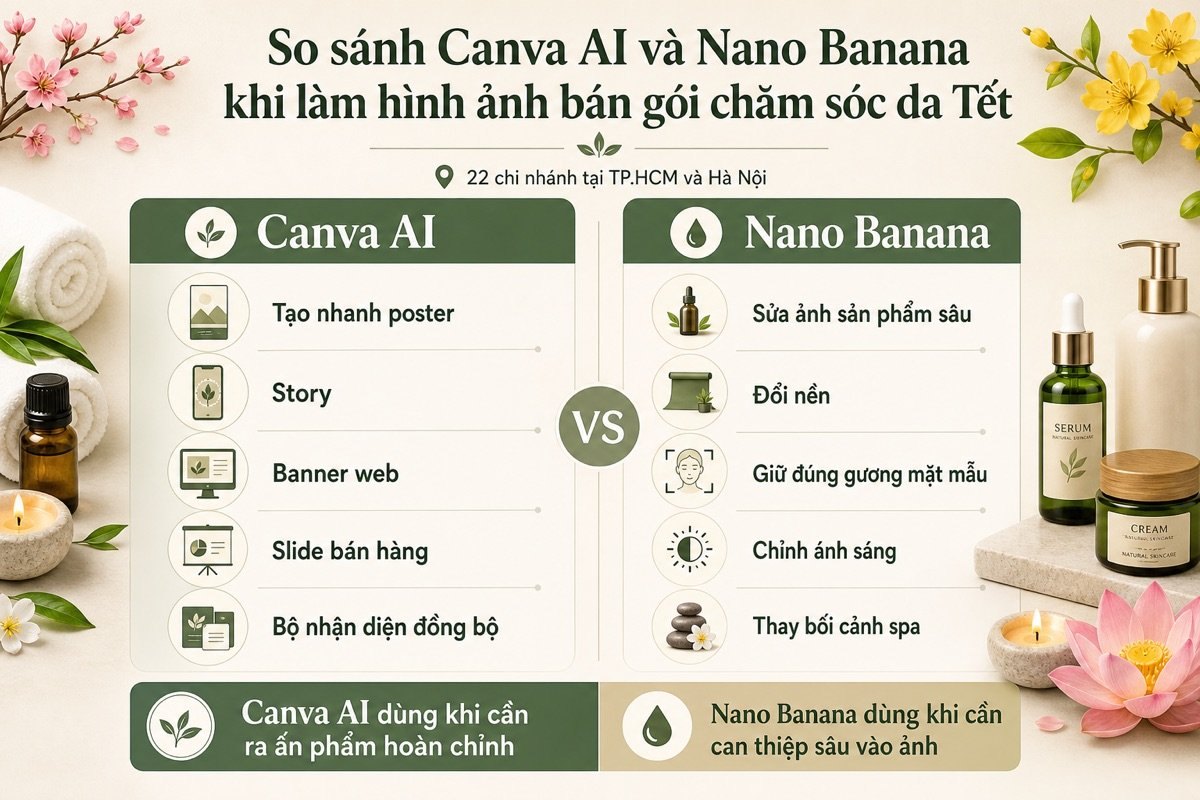

Tool names can send a marketing team in the wrong direction. You need to decide based on the job to be handed over, the level of editing and where the output will be used.
We often use this 3-layer formula inside MONA when making images for the web, SEO, ads and sales materials. It gets the whole team to agree on criteria before opening Canva AI or Nano Banana.
The first layer is classifying the job. Canva AI fits when you need a design with text, layout, color, content frames and a clear publishing format.
Nano Banana fits better when the input is already a photo. The main job is swapping the background, keeping a character, editing details, changing the viewing angle or creating image variations.
MONA doesn't pick tools by popularity. We pick based on the output the end customer will see on the website, SEO article, ad or sales material.
The second layer is measuring how much intervention is needed. The deeper you need to edit the original photo, the more Nano Banana has the advantage.
Canva AI is strong at the presentation layer. It is handy when the marketing team needs to assemble photos, text, icons, color palettes and brand templates in one workspace.
The common mistake is forcing Canva AI to do very deep photo editing. The opposite mistake is using Nano Banana to make designs with lots of text and sales layouts.
The last layer is where the image will be used. The same image has different requirements for the web, for ads and for sales slides.
For the web and SEO, you need an image with a clear topic that is light, fits the article context and is easy to place in the page layout. Canva AI is usually handy for the final packaging step.
On website and SEO projects, MONA usually decides where the image will be used before choosing the tool. This cuts down on rework caused by a wrong format from the start.
You can add this template to your internal process. Each line is a quick decision before handing work to design or content staff.
The 3-layer formula helps the marketing team choose less by gut feeling. Look at the job to be handed over, the level of editing and where it will be published, and the choice gets much clearer.
Canva AI and Nano Banana are both useful, but they still have a ceiling when used separately for each task. For data, image review processes, websites, SEO and sales, MONA usually builds custom software so the steps connect better.
Canva AI suits marketing work that needs many versions of a piece fast. Where it tends to break is that each format looks different, the text voice drifts and the colors drift from the brand identity.
Do it right from the start. Treat Canva AI as a fast layout builder, not as the keeper of your whole brand aesthetic. MONA usually uses Canva AI for quick sketches, then locks them in with branding, messaging and channel goals.
Don't rush to type a command. The first thing is to choose the right design type in Canva, such as a Facebook post, website banner, presentation or email header.
This small habit keeps the workflow tidier. A design in the wrong format usually leads to many unnecessary manual fixes.
Magic Design is good for quickly opening up several directions. Enter a clear description of the goal, the audience, the offer, the main color and the feeling you want to convey.
Pick the layout first. Don't edit the text too early. Once the layout works, the rest gets much lighter.
Canva templates look good but tend to look alike. Bring in your branding right after you pick a roughly right layout.
MONA often reminds its internal team of one simple principle. AI builds fast, people keep the taste. That way the materials stay fast without losing the brand feel.
Once the main version works, Magic Resize helps convert it into many formats. Duplicate from the version with locked branding instead of creating from scratch.
After resizing, you still have to review each version. Magic Resize saves effort, but it doesn't understand every crop point on its own.
A very common mistake is exporting everything as the same file type. It's quick at first, but it easily makes images blurry, heavy or wrong for their purpose.
Don't lump everything into one format. Each channel displays things differently. Exporting the right file means the marketing team has less to fix when posting for real.
Canva AI handles personal work and tasks that need speed very well. Its ceiling is that data, permissions, review processes and measurement are still scattered.
For businesses that need more connected operations, MONA usually separates two layers clearly. Canva AI is for fast creativity, while the custom software MONA builds connects CRM, website, SEO, campaigns and reports into one controlled system.
Nano Banana suits deep photo editing, especially when you need to change the background, lighting, viewing angle or style. The hard part is that the edited photo must still keep the right face, the right product and the right main setting.
A photo with a shifted face, wrong logo, warped packaging or wrongly swapped material makes the marketing team lose time redoing it. We usually handle it with one very simple principle. Keep first, change after.
The cleaner the original photo, the easier it is for Nano Banana to recognize what must stay unchanged. Use a photo with a clear face, clear product edges, few obstructions and no motion blur.
Don't rush into big edits. Before entering a prompt, choose a photo with steady lighting, a clear composition and a subject that is fairly well separated from the background.
When MONA guides its internal team on AI tools, we always start from the quality of the input image. The tool only edits well when the data you give it is clean enough.
Prompts drift when you describe what you want to change first. Nano Banana may take it that the whole image is allowed to be reshaped into the new style.
Keep the main parts first. Only then write what to change. This way of writing helps the tool lock in the person, product or key setting before creating variations.
Only after the keep-the-same part do you add the request to change the background, lighting or style. The order is a small thing, but it clearly affects stability.
A prompt that only says "change to a nicer background" usually gives hit-or-miss results. Nano Banana needs specific conditions to know whether the new image should look like a real photo or an ad.
State the lighting clearly. State the material clearly. State the camera angle clearly. These details let you edit heavily while the image still looks visually logical.
For sales photos, we usually put the most weight on prompts that are clear about material and lighting. These two factors decide whether the image looks like a real photo.
One command that changes the background, outfit, angle, lighting and style at once easily shifts the face. The tool has to handle too many changes at the same time.
Edit in small rounds. Round one only changes the background. Round two adjusts the lighting. The next round fine-tunes color, material or minor details.
This is a bit slower per command, but it cuts down on failed rounds. The marketing team also finds it easier to control versions.
Once you have a version with the right face, the right product and the right background, save it right away. That image is the reference point for later edits.
A reference image matters a lot. It helps Nano Banana stay with the result that already works, instead of reinterpreting from the original photo and a new prompt.
MONA usually gathers approved prompts, reference images and editing notes into an internal guide. That way new staff pick up the tool faster and don't have to figure it out from scratch.
Nano Banana handles one-off photo edits well, but it still has a ceiling when a team runs many campaigns, many products and many people. When data, image review processes and the content library need to connect, MONA usually advises custom software so the business controls everything from image creation and version storage to usage permissions.
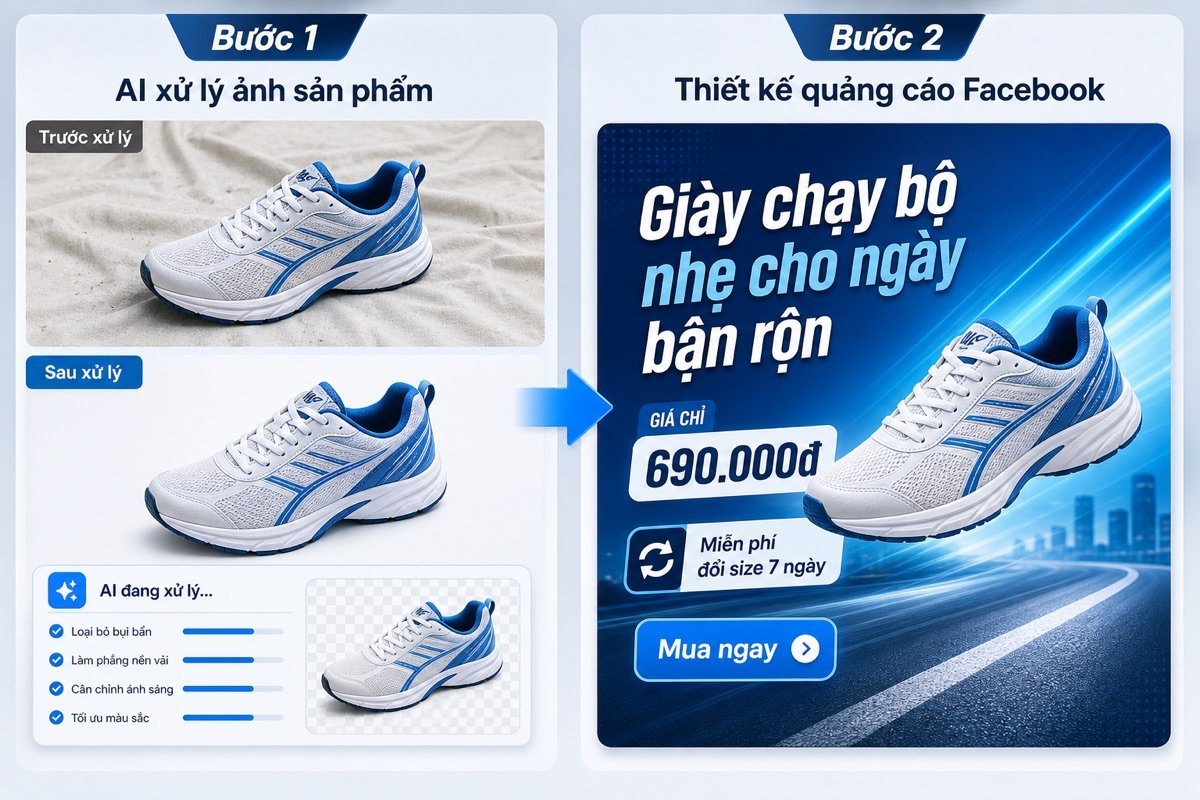
Many marketing teams lose time by making one tool do everything. A beautiful product photo without a sales layout is still hard to run.
The cleaner approach is to separate the roles clearly. Nano Banana handles the core image, Canva AI packages it into a template you can use right away.
MONA usually guides its internal team and customers through this process. When each tool does its own job, files are easier to edit.
Nano Banana fits at the original image layer. Use it to clean the background, change the setting, add lighting or create product variations.
Don't add price text, promotions or call-to-action buttons at this step. Leave those for Canva AI to handle later.
The reason is very practical. Text inside images made by image generation tools tends to come out with distorted strokes, wrong diacritics or be hard to fix.
The core image has to be clean first. The next step then goes fast.
Once you have a solid core image, bring it into Canva AI to build the layout. This is where you add the headline, price, offer and call-to-action button.
Canva is strong at presentation. Drag and drop, margin alignment, color changes and text swaps are all much faster than re-editing a generated image.
MONA usually sets up the image area, text area and action area in advance. This keeps new staff from messing up the brand identity.
The layout has to be easy to edit. That is vital.
One image can be sold from many angles. Canva AI helps you quickly create text versions to test messages.
Don't swap the image too early. Keep the core image and only change the headline to see which angle speaks to the need more clearly.
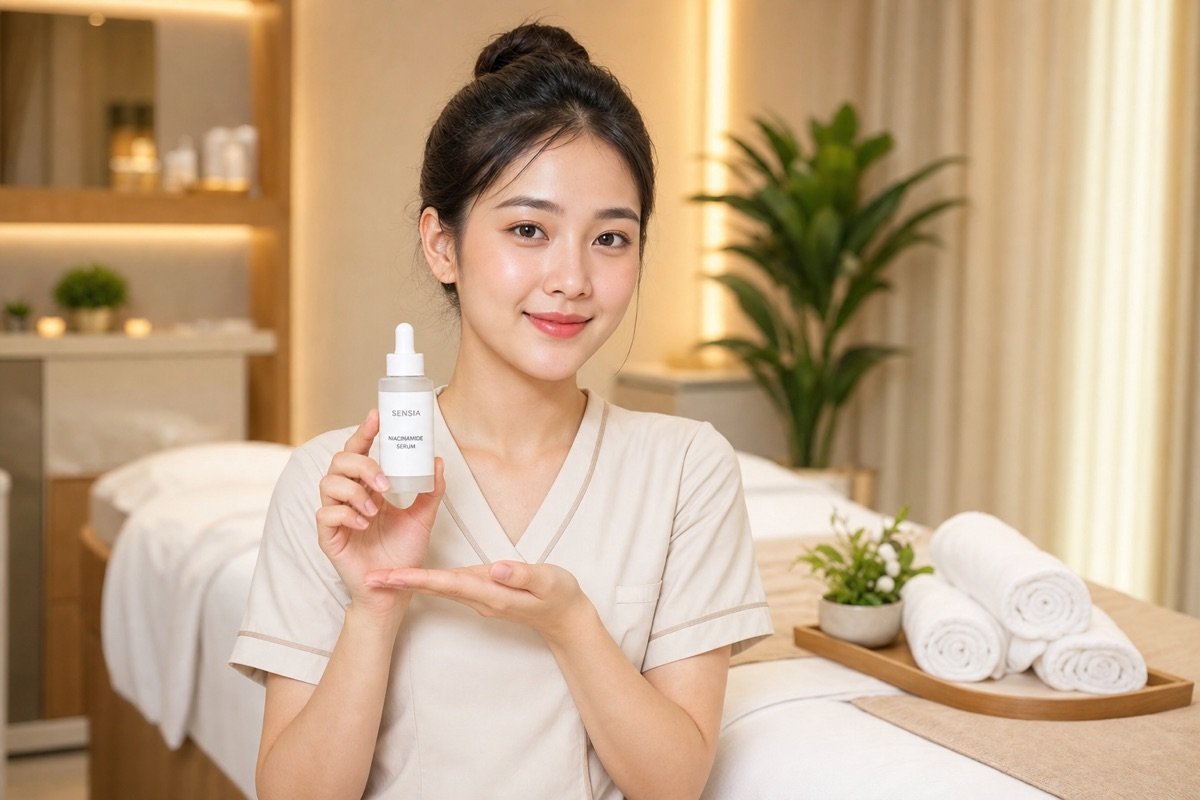
For example, for a skincare product, the same image could have 3 different headlines.
Change only one variable. Results are easier to read.
A sales image shouldn't be used in just one place. Canva helps you resize for each channel while keeping the main layout.
Websites need clear images with less text. Facebook needs a message that stands out fast. Zalo needs short text that is easy to read on a phone.
Sales slides need space for the sales rep. Each channel is read differently.
A good template has to be adaptable. No starting from scratch.
The best thing about Canva is reusable templates. You can lock the color, font, logo and main layout so staff only change the content they need to.
This is the part many teams skip. If the template isn't locked to a standard, everyone edits in their own way and the brand looks very disjointed.
MONA usually recommends building a template library by type of job. For example promotion images, new product images, feedback images and recruitment images.
Staff work faster. The brand identity stays intact.
This process lets Canva AI and Nano Banana do what each tool is strongest at. Nano Banana creates the core image, Canva AI turns that image into a sales asset.
Still, standalone tools have a ceiling. When product data, prices, inventory and campaigns need to connect, a business needs custom software.
MONA uses AI internally and trains customers in a practical way. For bigger problems, we usually build CRM, ERP and automation software so data runs end to end.
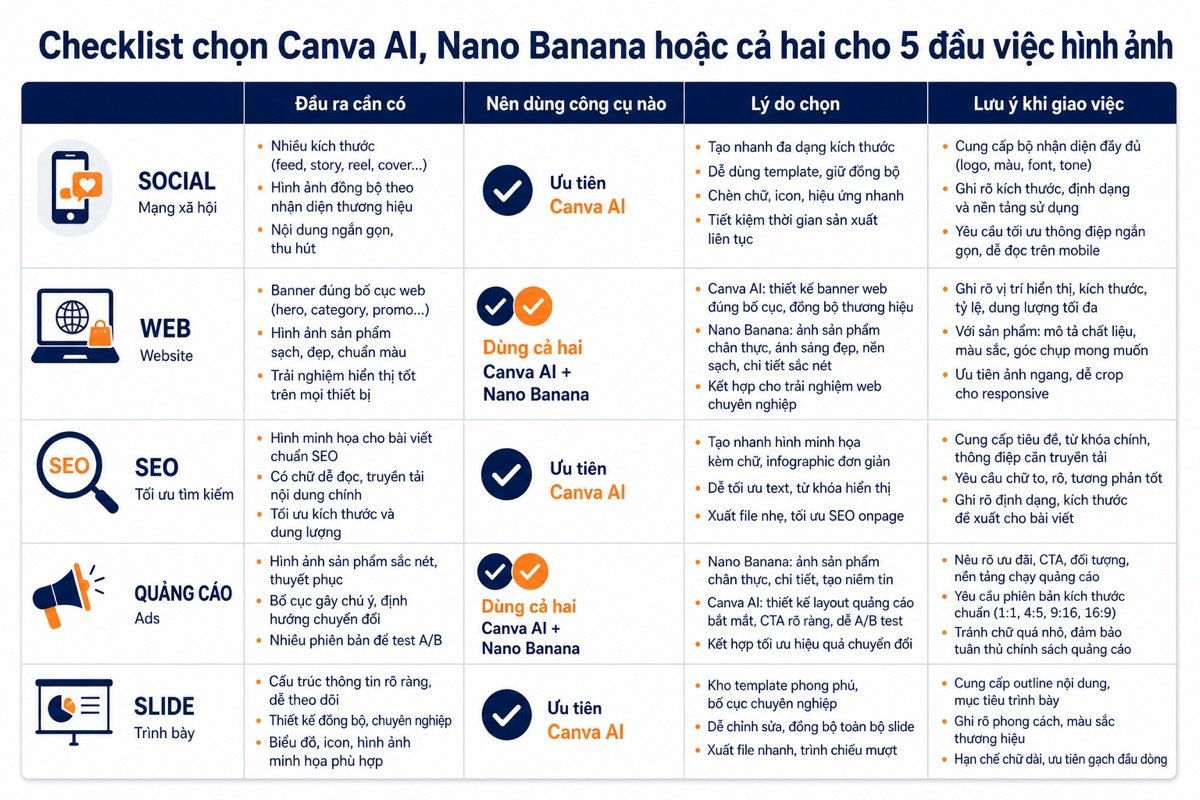
Choosing the wrong tool throws the marketing team off rhythm. A beautiful image in the wrong format still delays the posting schedule.
You need a quick selection table based on real tasks. At MONA, we usually split decisions by task, by person doing it and by where the image will appear.
Social media needs speed. The same idea often has to come out as a square image, vertical image, cover image and story template.
Canva AI fits this better. You can create one main design, then duplicate it into many sizes in the same interface.
We usually use Canva AI for regular content calendars. What needs controlling is the text voice, brand colors and the space around the product.
Short and simple. Canva AI handles the posting rhythm. Nano Banana handles the hard images.
Websites need clean, clear images that fit the context. A weak hero image makes the page look cheap from the first screen.
Nano Banana fits when you need a hero image with its own setting. For example, a product placed in an office, spa, classroom or store.
After that, Canva AI is a good fit for repackaging into banners, category images and illustrations. This makes the website more consistent.
MONA usually separates these two layers when building websites. The core image needs the right feel, while the layout needs to serve the sales goal.
SEO doesn't need overly elaborate images. An image should help readers grasp the content quickly and not slow the page down.
You should avoid images with too much text. Search engines still need real text in the article to understand the main content.
Canva AI fits for making illustrations for blog posts. Nano Banana suits cases where you need a custom setting image that is hard to find in stock libraries.
This part is easy to overlook. But heavy images clearly hurt the reading experience.
Ads need fast testing. If every version has to be redone from scratch, the marketing team loses time on repetitive work.
The cleaner approach is to separate three layers. Nano Banana helps with the core image, the team writes the message, and Canva AI handles the format.
We often advise keeping one stable core image first. Only then change the headline, call to action and layout.
This makes comparison easier for the team. Each time you swap a version, you don't mess up the whole design.
Slides aren't just nice images. Slides need a narrative thread, an order of arguments and a persuasive rhythm.
Canva AI fits this part better. You can build the layout, split pages and keep a consistent presentation style throughout.
Nano Banana is still useful when you need a custom illustration. But the sales storytelling should sit in Canva AI so it's easy to edit.
To make it easy to remember: Canva AI is strong at layout. Nano Banana is strong at the core image.
For MONA, these tools are useful for individual tasks. When a business needs connected data, security and real automation, custom software is still the base layer to build.

Canva AI and Nano Banana help one person make images faster. That has real value in everyday design, content and advertising.
But businesses aren't only short of images. They are usually stuck because customer data is scattered across the CRM, website, consultation forms, Zalo, email and sales reports.
A beautiful image doesn't know on its own which customers have viewed it. A great post doesn't push data to the CRM by itself. Staff still have to download images, name files, send them for approval, post, measure results and take notes by hand.
This is the real ceiling. Standalone tools speed up one stretch of work, but they don't turn into a controlled sales system on their own.
MONA doesn't deny the value of Canva AI. We use Canva AI along with internal AI tools to speed up ideation, sketching visuals and standardizing visual content.
How we use them is fairly clear. Where speed matters, we use ready-made tools. Where the work involves data, permissions, security and repeatable processes, we move it to custom software.
That way the content team isn't stuck in small manual tasks. The tech team doesn't have to patch together individual files, forms and reports either.
Canva AI is still very useful. But it should stay in its proper place.
Many businesses roll out AI on a use-whatever-you-like basis. After a few weeks, each department has its own way of naming files, saving templates and measuring results.
It looks modern from the outside. Inside, it's harder to control. The CEO can't see the workflow, department heads don't know which version was approved, and new staff don't know where to find the standard template.
When training customers, MONA always separates three layers of work:
This keeps AI from becoming a fad. It becomes part of an orderly way of working.
When an action repeats every day, we shouldn't leave staff doing it by hand forever. Repetition is the signal to move it into software.
For example, website forms need to flow into the CRM automatically. Leads from campaigns need to be tagged with their source. SEO content needs an approval status, a publishing schedule and an owner.
Orders, appointments, quotes, follow-up care and reports also need to connect. If every step sits in a different place, managers lose time stitching data together.
MONA builds custom software around a business's real processes. We connect the website, CRM, ERP, SEO, marketing and operations into one clear chain of data.
MONA started in 2016 and has .000+ projects. These numbers help us understand clearly where the bottlenecks are when a business moves from manual work to automation.
A beautiful image makes content easier on the eye. A good video gives a campaign more force. A tidy design template helps the marketing team work faster.
But cash flow doesn't come from images alone. It comes from a system that knows how to attract, record, classify, nurture and measure customers.
For web, SEO and marketing, Canva AI or Nano Banana should be seen as creative input. The rest needs a solid website, content that matches search intent, a CRM with connected data and reports clear enough to make decisions.
MONA uses AI to speed up internal work. MONA also trains customers to use AI for the right jobs. But once a process repeats, we always advise you to move it into custom software.
That is the important line. Standalone tools make individuals faster. The right system helps a business control its cash flow better.

CEO & Founder · The MONA
Founder of The MONA, who built a services company of 60+ staff with 14,000+ projects delivered. Khánh Hùng shares how he thinks about building systems that run themselves, automating a business, and the real lessons from delivering projects at MONA.
 356




Professional website
design services
Own a website with a beautiful, 100% exclusive design and a lifetime warranty, with the ability
to expand features flexibly as your business grows, starting today!






 MONA will never sell your information or send you spam


 MONA will never sell your information or send you spam
