
 MONA OS 2.0
 Partner with MONA


 Tự động hoá doanh nghiệp
 Cẩm nang SEO
 Digital Marketing
 Kinh nghiệm thiết kế website
 Hạ Tầng Server
 Giáo dục

 VI
VI
 EN
EN












Message us on
Zalo Official


 ProductsNew

 ProductsProducts
 Mới ra mắtKHA AI 2027App tự edit video, tự đăng mọi mạng xã hội, 2 phút mỗi ngày










 Website designLooks good and wins customers over.
SEO servicesBrings in customers searching for exactly what you sell.
Website designLooks good and wins customers over.
SEO servicesBrings in customers searching for exactly what you sell.
 Tư vấn digital marketingKéo khách từ nhiều kênh, đo bằng số thật.
Corporate video productionVideos introducing your company, factory and team.
Tư vấn digital marketingKéo khách từ nhiều kênh, đo bằng số thật.
Corporate video productionVideos introducing your company, factory and team.
 NewAI video productionCompany story films made with AI.
 Custom software developmentCRM, ERP and HRM built for your business.
 Viết AI Agent theo yêu cầuĐặt riêng một trợ lý AI cho đúng việc của mình.
 Tư vấn chuyển đổi AIĐưa AI vào vận hành của cả công ty.
NewMONA LMSManagement for centers and schools.
MONA SkillHubInternal training for company staff.
Tư vấn chuyển đổi AIĐưa AI vào vận hành của cả công ty.
NewMONA LMSManagement for centers and schools.
MONA SkillHubInternal training for company staff.
 NHTQ systemEnd-to-end China–Vietnam shipping operations.
MONA JMSManagement for gold, diamond and pawn shops.
NHTQ systemEnd-to-end China–Vietnam shipping operations.
MONA JMSManagement for gold, diamond and pawn shops.
 MONA E-LearningA website with every feature you need to sell courses.
 How to sell online courses (course)More than 30 free lessons on selling courses on autopilot.
 MONA Cloudmonacloud.vnServers to get your apps and websites running.
 MONA Basemonabase.vnPostgres database, sign-in and file storage.
 MONA Mailmonamail.vnSend OTP, order and invoice emails from your software.
 MONA Paymonapay.vnAccept bank transfers via VietQR and notify your software when the money arrives.
 MONA eInvoiceComing soonIssue e-invoices that meet tax standards.
Gấu CườiTrả lời khách 24/7 trên web, Fanpage, Zalo và thu lead cho sale.
MONA eInvoiceComing soonIssue e-invoices that meet tax standards.
Gấu CườiTrả lời khách 24/7 trên web, Fanpage, Zalo và thu lead cho sale.
 Gấu TeleSalesGọi điện tư vấn, chăm khách như tổng đài viên thật.
Dê CườiTư vấn và chốt đơn cho shop ngay trong khung chat.
Gấu WebmasterNhắn nhóm Zalo là website được sửa xong.
Gấu TeleSalesGọi điện tư vấn, chăm khách như tổng đài viên thật.
Dê CườiTư vấn và chốt đơn cho shop ngay trong khung chat.
Gấu WebmasterNhắn nhóm Zalo là website được sửa xong.
 Gấu Pháp ChếSoạn hợp đồng, rà điều khoản trong vài phút.
 Gấu Báo GiáLên báo giá đúng mẫu và gửi khách ngay.
 AI chăm sóc khách hàngTheo dõi và giữ chân khách hàng cũ.
 Gấu Tuyển DụngLọc hồ sơ, hẹn lịch, phỏng vấn ứng viên.
 Mới ra mắt
KHA AI 2027
Xây kênh chuyên gia 2 phút mỗi ngày
Quay bằng điện thoại, AI tự edit video, tự đăng lên 16 nền tảng và tự trả lời bình luận, tin nhắn.
446.554lượt xem trên kênh CEO MONA sau 24 ngày
Mới ra mắt
KHA AI 2027
Xây kênh chuyên gia 2 phút mỗi ngày
Quay bằng điện thoại, AI tự edit video, tự đăng lên 16 nền tảng và tự trả lời bình luận, tin nhắn.
446.554lượt xem trên kênh CEO MONA sau 24 ngày
 Anh Khánh HùngCEO MONA đang dùng mỗi ngày
Xem app làm được gì
Anh Khánh HùngCEO MONA đang dùng mỗi ngày
Xem app làm được gì
 AI
Gấu Cười MONA ĐANG TỰ XÀITrả lời khách 24/7 trên website, Zalo OA, Messenger và thu lead về cho sale.
Dê CườiChốt đơn bán lẻ và sàn: Shopee, TikTok Shop, web. Chăm cả khách sỉ, đại lý.
Gấu WebmasterCập nhật nội dung, tối ưu SEO website mỗi ngày.
Gấu TeleSalesGọi điện tư vấn, chăm khách như tổng đài viên thật.
Gấu Tuyển DụngLọc hồ sơ, hẹn lịch, phỏng vấn ứng viên tự động.
AI chăm sóc khách hàngGiữ khách cũ, cứu lead đã rớt cho phòng kinh doanh.
Gấu Pháp ChếSoạn hợp đồng, rà điều khoản trong vài phút.
Gấu Báo GiáLên báo giá đúng mẫu, gửi khách ngay khi có yêu cầu.
AI
Gấu Cười MONA ĐANG TỰ XÀITrả lời khách 24/7 trên website, Zalo OA, Messenger và thu lead về cho sale.
Dê CườiChốt đơn bán lẻ và sàn: Shopee, TikTok Shop, web. Chăm cả khách sỉ, đại lý.
Gấu WebmasterCập nhật nội dung, tối ưu SEO website mỗi ngày.
Gấu TeleSalesGọi điện tư vấn, chăm khách như tổng đài viên thật.
Gấu Tuyển DụngLọc hồ sơ, hẹn lịch, phỏng vấn ứng viên tự động.
AI chăm sóc khách hàngGiữ khách cũ, cứu lead đã rớt cho phòng kinh doanh.
Gấu Pháp ChếSoạn hợp đồng, rà điều khoản trong vài phút.
Gấu Báo GiáLên báo giá đúng mẫu, gửi khách ngay khi có yêu cầu.
 Chuyển đổi AI toàn phầnGiải pháp tổng cho doanh nghiệp, 3 lớp triển khai.
 Viết AI Agent theo yêu cầuĐặt riêng một con AI gánh đúng nghiệp vụ của bạn.
 Custom softwareCRM, ERP and HRM with built-in AI automation.
 SEO & AEO thời đại AIĐược Google lẫn AI trích dẫn, không chỉ xếp hạng.
 Kiến thức AI cho doanh nghiệpBài phân tích, hướng dẫn ứng dụng AI vào vận hành.
 Free AI courses
 AI tools at work
App mới · KHA AI 2027
Xây kênh 2 phút mỗi ngày
AI tự edit video, tự đăng mọi mạng xã hội
Free consultation, 8am–10pm every day
AI tools at work
App mới · KHA AI 2027
Xây kênh 2 phút mỗi ngày
AI tự edit video, tự đăng mọi mạng xã hội
Free consultation, 8am–10pm every day

18 March, 2023
Online business has become popular today. Besides thiết kế website bán hàng trực tuyến you also need to run a marketing campaign that brings your website to potential customers. With hundreds or thousands of online stores just like yours, if you don't do online marketing well, competitors will take your customers.
In this article, Mona Media will collect and share useful social media marketing tips from 20 of the world's leading marketing experts. This is how they achieved the success they have today.

Social media marketing tips
This is the social media marketing tip from expert Mark Schaefer. He is an author, blogger, speaker and senior consultant who specializes in social media marketing seminars.
To succeed in digital marketing today, you need to create content that “catches fire” and draws readers. But if you are a new blogger, you may want to spend more time growing your audience than focusing only on producing content.
Here are three very simple but effective tactics you can use to gain more Twitter followers, which is considered the best platform for this.
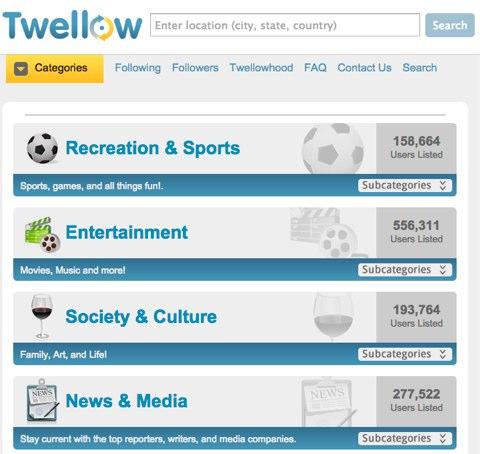
Use Twellow to find and follow target users in any field
Use Twellow to find and follow target users in any field.
With these tactics, you can widen your audience to reach people who are looking for your products and services.
SEO changes constantly, but not every source is worth following. In this video Huy shares the channels he uses to keep up with SEO, so you can understand what Google is actually doing instead of just hearing speculation spreading online.
This is the social media marketing tip from Neal Schaffer, president of Maximize Your Social and author of Maximize LinkedIn for Sales and Social Media Marketing.
Most businesses spend quite a lot of time analyzing and reviewing how their social media performed after publishing. Now there are tools that store and analyze data so you can publish the best content before you post.
Here is how to use BuzzSumo to sort out content that has been shared successfully on social media.
First, enter a keyword that is part of your social media content strategy. BuzzSumo will give you a list of the top-performing content for social shares on your keyword.
BuzzSumo shows you the content getting the most attention and shares on social media.
Next, because some content performs better on some social networks than others, you can sort content by network. With this data, you can make your content decisions more effective by publishing more of what is likelier to succeed on a specific network.
You can also filter content by type (text, video, infographics…) or by time period. Filtering by time lets you find the most popular content in the past 24 hours or the most shared content over the past year.
See more: 9 unwritten rules of social media marketing
This is the social media marketing tip from Donna Moritz, founder of Socially Sorted.
Visual Content can serve as a “gateway” to more valuable content. When planning eye-catching content that grabs readers' attention on social platforms, think about how it can drive traffic to your website, products and services.
Example: On this Constant SlideShare page, I added a link back to a resources page that lists many blog posts with related content.
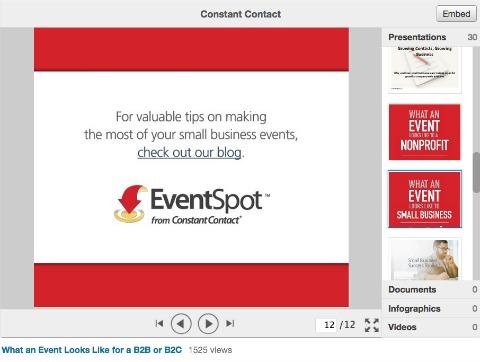
When readers click it, they go to a page of blog posts related to the topic shared in the SlideShare
When readers click it, they go to a page of blog posts related to the topic shared in the SlideShare
Link a short video to your website from your YouTube account or from the link in your Instagram description, and make sure you provide extended, valuable content around the video.
Example: Final Cut King drives his Instagram fans back to longer content on his YouTube channel by asking them to click the link in his Instagram description.

Final Cut King uses a call to action asking people to click the link in his description
Final Cut King uses a call to action asking people to click the link in his description
According to Guy Kawasaki, marketing director at Canva and an advisor to Motorola's (Google's) business unit: Twitter real estate is best optimized with images. This is a way to help your real estate websites reach more customers.
“On average, about 6,000 tweets are shared on Twitter every second, which comes to over 350,000 tweets per minute, 500 million tweets per day and around 200 billion tweets per year.”
Adding visual appeal to your tweets is a very smart way to get your most important content noticed. You can add up to four images per tweet, or a single great image if you prefer, depending on your goal and choice. To add multiple photos, use the Twitter app, since this feature is not yet built into any third-party website.
Syed Balkhi, founder of WPBeginner, List25 and OptinMonster, said: Over the past two years I have repurposed written content for different platforms such as YouTube to increase reach and visibility.
Example: By turning one of my articles List25 into a weekly video, I grew my YouTube channel to 1.3 million subscribers and racked up more than 200 million video views. A similar tactic with WPBeginner's articles grew its subscribers to more than 8,000, and the channel has also increased revenue for WordPress my plugins.

Repurpose your content
We turned List25 articles into videos
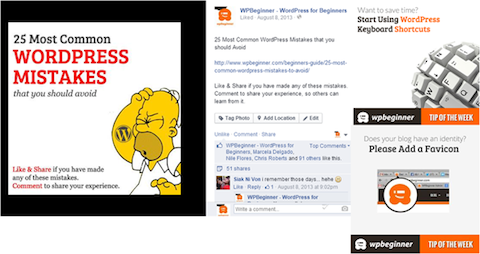
Repurposing content isn't just about video. You can also turn excerpts from articles into images, which tend to get higher engagement on Facebook. These images also let you tap the power of social networks like Pinterest and Instagram.
Here is how I share the “Tip of the Week” images on the WPBeginner Facebook page.
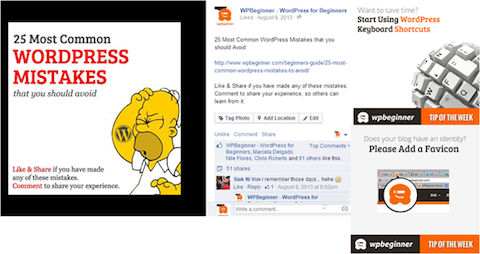
Turn blog posts into images for your Facebook page
Have you written a lot about one specific topic on your blog? Why not combine those posts into an ebook and use it to build your email list?
Joe Pulizzi, founder of the Content Marketing Institute, says that creating a plan for social media channels is extremely important, and it is also the social media marketing tip next tip we want to share with readers.
Many businesses surely feel “stuck” having to publish content constantly for every social media tool. Or worse, many create just one type of content and push it out to every social platform. That seriously hurts campaign results. So a complete plan for publishing content across all online channels is essential.
Your goals will differ on each social platform. So the content you develop for each platform needs to differ too. Here are the elements of a plan that shapes your content on your channels.
And that is why content marketing is not easy. But if you use social media channels correctly and skillfully, the results can be great.
Next is the social media marketing tip from expert John Lee Dumas, founder and CEO of EntrepreneurOnFire.
One of the best ways to get strong results on social media is to create content that is connected and consistent. But note that it should not be duplicated.
To do this, you need a tool to manage all your posts across media so you can easily see the big picture of your social media marketing strategy. That makes it easier to plan and make timely adjustments to improve the performance of your content marketing strategy.
Edgar is a tool that lets you create your own content categories, saving you the most time managing and tracking the types of posts on your social media.
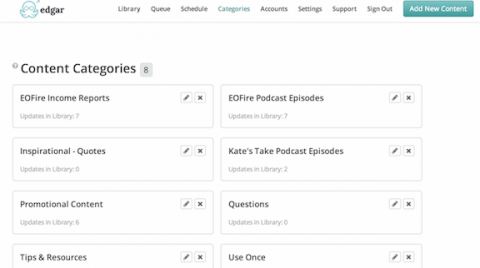
Manage content types and avoid repeating posts with the Edgar social media scheduling tool
You can also schedule posts indefinitely. With scheduled posting like this, you take more initiative in publishing and managing content on online media. In addition, Edgar lets you upload and edit your images customize posts for Facebook, Twitter and LinkedIn.
All you need to do is build your content library and update the schedule with the categories you want to publish and when. Edgar will take care of the rest!
Build a content library, update the categories and arrange posts in Edgar
Find out more: TV commercial (TVC) production professional, all-inclusive
Martin Shervington, a Google+ marketing expert, advises users to make the most of Google Hangouts to run campaigns for Social Media Marketing.
Success in social media is usually about conversations with the right people. If you want to build a list of potential audiences to start conversations with, Google+ Hangouts On Air (HOA) is a great suggestion for you.
Google+ Hangouts On Air is a feature that sets up a group online conversation of up to 10 people, built into the Google+ social network. HOA also lets you invite an unlimited number of Google+ members to watch the Hangout. Think of it as a live TV broadcast. The feature also lets you save the conversation and share it to other social sites such as YouTube.
The Google+ Hangouts On Air events feature helps you hold private conversations with the right people and stand out.
Peg Fitzpatrick, co-author of the forthcoming book The Art of Social Media and a social media strategy consultant.
Theo Peg Fitzpatrick, social media marketing tip: If you want your social media plan to succeed, stop tagging hashtags at random. Use your hashtag throughout your campaign for the best results.
To make sure your hashtag hasn't already been used for a competitor's campaign, check it on all channels before using it for yours. Then create the tag starting with #, track it and join the conversation with readers.
To track your hashtag, use sites like Social Mention and Sprout Social. Use TwiPho to search for images tagged with hashtags.
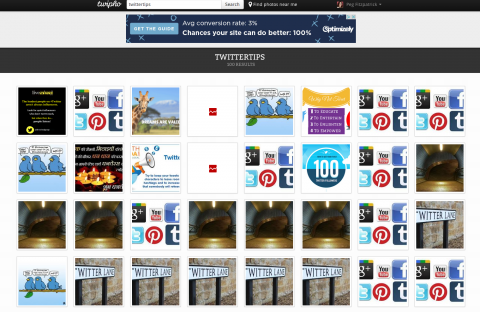
TwiPho lets you search for images tagged with hashtags on Twitter
Gini Dietrich, CEO of Arment Dietrich, gave this social media marketing tip saying: I always believed Pinterest only suited organizations selling visual, popular products (such as fashion, food and sports), but a recent client proved me wrong.
A software organization, an industry with a fairly narrow audience, tested how well Pinterest worked for communicating in its particular sector. It pinned images, videos, PowerPoints and more related to introducing its brand and products to its “Boards”.
After just one month, Pinterest became their number one referral source.

Pinterest is one of their top referral sources
And it has stayed there since the test began in June.
Try it and see whether Pinterest works as well for your brand as it did for them.
This is the social media marketing tip from Ted Rubin, a leading social marketing strategist, well-known speaker, Chief Marketing Officer of Brand Innovators and co-author of Return on Relationship.
Take advantage of your tweets, your Facebook posts, or the collected items you like best and develop them into blog posts. That way you won't spend too much time hunting for content ideas for different social sites.
Seth Godin is one of the most successful bloggers in the marketing world, and he writes paragraphs of only two to three sentences. He is a master at expressing ideas in the most distilled and readable way. People don't have time to read rambling content or rack their brains over what you are trying to say. So create content that is truly valuable and easy to read.
Next we'd like to share with you the social media marketing tip from Kim Garst, CEO and co-founder of Boom Social.
We live in an age of information overload, and users have limited time. When it comes to grabbing your audience's attention, take every chance to deliver your message in a way they will engage with!
The best way to attract and hold your audience's interest is effective visual content. Visual social media platforms like Pinterest can be a great source of traffic when used correctly.
When you upload an image to Pinterest, make sure your readers know “exactly what it is about”. Look at the images below.
They are two kinds of images illustrating the same article:

Add a title so viewers know exactly what they will get if they click the pinned graphic
Always put the article title on your illustration. That way, when you pin it to Pinterest, users get an overview of what you want to cover and are more eager to read it.
This is the social media marketing tip from Holly Homer, co-founder of the Kids Activities Blog.
Over the past year, Facebook changed its algorithm, limiting organic reach per fanpage post to under 6% of fans. Turn these algorithm changes to your advantage by using your page as a resource for users, not as an advertising tool.
Build a page your audience will love, then use that platform to grow it. Offer educational, entertaining, inspiring and informative posts to reach a large Facebook audience.
In this section, Lynette Young, content marketing director at Aweber, shares how to allocate your time to the most effective social media tools.
How much time do you spend on blog posts? Sending emails? Attending meetings? Do you often feel there isn't enough time to do everything? Are you too busy with advertising tools without getting the results you want? Time management is a major challenge for business owners.
Try a time-tracking tool such as RescueTime to improve your daily productivity. With it you can assess how effective your work is, find the “distractions”, and make changes to adjust better, narrowing down to the support tools that work best.
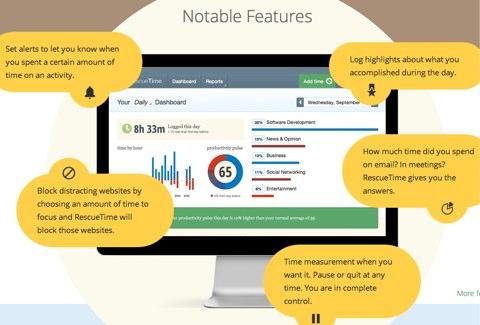
RescueTime is a great time-tracking tool
For example: suppose you spend a lot of time engaging on Facebook and Twitter but see little result. Meanwhile, email marketing campaigns, even though you don't run them constantly, bring the best results.
Adjust your daily schedule so you spend more time on email marketing, and track whether that increases sales. Remember that digital marketing depends on all your social media tools, blog and email working together. If you neglect any one of them, your whole strategy may suffer.
Social Media Marketing advice worth sharing next comes from Melonie Dodaro, founder of Top Dog Social Media and author of the number 1 worldwide bestseller The LinkedIn Code.
Take advantage of LinkedIn's free publishing feature, called Publisher. It can increase your reach to your target audience and help build your credibility as an industry expert. In fact, LinkedIn Publisher also helps expand your business reach on LinkedIn very well.
For example, after Wendy McClelland published her third article, “Why I Say NO to Coffee Meetings”, she received more views, likes and comments than she expected.
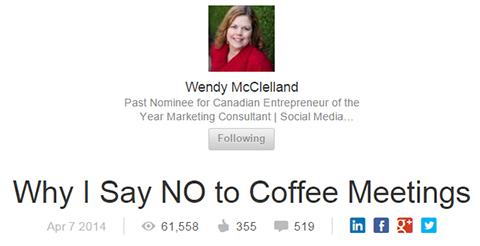
Wendy McClelland's article, Why I Say NO to Coffee Meetings
Wendy had only a little over 1,500 following, but after this post was published she got more than 61,500 views, 350 likes and 500 comments. What if you used a big following like that to sell? Hehe. Amazing!
Every time you publish, all your connections and followers get a notification. Articles also have a chance of being emailed by LinkedIn Pulse to its members as recommendations for articles that may interest them.
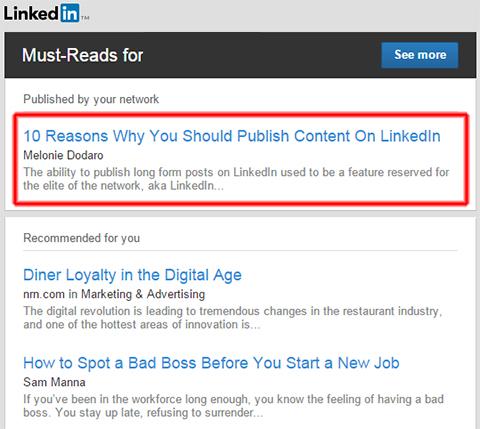
LinkedIn Pulse sends an email recommending articles worth reading
To increase your chances of success with Publisher, write professional articles that address readers' essential needs or the pressing issues they care about. Avoid spam or advertising content at all costs. When you post valuable content, your followers may well share it with their own networks. The more it is shared, the wider your reach grows.
According to Jeff Korhan, a well-known MBA, to make the most of your limited resources, focus your advertising plan on one social media channel where your ideal customers are most concentrated.
Rich Brooks, president of flyte new media, says: If you run a small business, creating or curating content may not be a priority. But with such an erratic publishing schedule, it's easy to create distance and push customers away.
To be more proactive about publishing, why not set up a curated schedule in advance? Many tools can help, but I often use Hootsuite's topic suggestion tool.
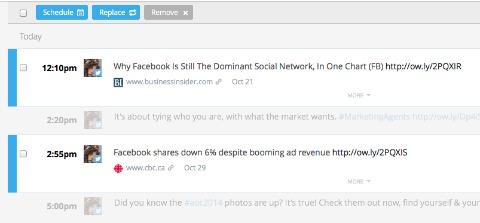
Use Hootsuite's topic suggestion tool to find curated content
Besides suggesting topics related to your field, Hootsuite also lets you easily manage several social media accounts at once, such as Twitter, Facebook, LinkedIn and Google+. You can also schedule social posts very simply.
This is the tip on Social Media Marketing from expert Leslie Samuel, founder of Become A Blogger.
Your work gets better results when it is managed well. So you should store the status updates on all your social media in an organized way. Doing this also makes it much easier to come up with interesting status update ideas related to that content.
Whenever you create a piece of content (an article, podcast or video) for your blog or website, come up with a list of 10 to 20 social media posts at the same time that can be used to promote it.
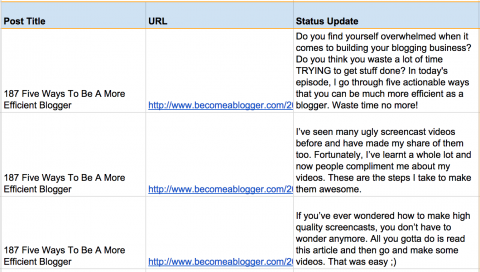
Create batches of social media updates whenever you create content
Once you have a list of social updates, add them to a spreadsheet to keep track of them. It can be a simple spreadsheet with just the update and a link to the content… or you can use a more sophisticated tool to track all the updates across different social media.
This will save you a lot of time. You also build a library of tweets and status updates you can use for years. Whenever you need to schedule updates, just go back to the spreadsheet, create a .csv file, and import it into a supporting program like Hootsuite.
Jason Miller, Senior Manager of Content Marketing at LinkedIn, offers this social media marketing tip for you: publish long, meaningful content on LinkedIn to draw readers better.
By publishing new and previously published content on LinkedIn, you can grow your network of connections while raising your standing as an expert.
Through this open publishing platform, your original content becomes part of your company profile, is shared with your trusted network, and can reach a group of well-known professionals.
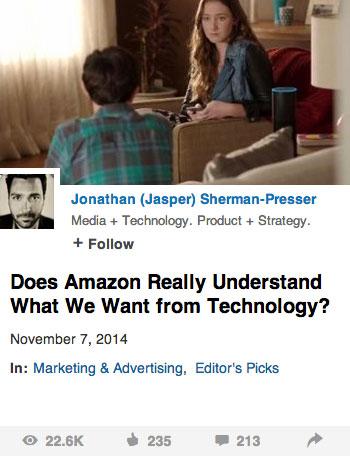
This post drew even more attention once it was picked up by the Editors.
This is the social media marketing tip from expert Ian Cleary, founder of Razor Social.
It takes a lot of time and effort to draw visitors to your website. Once you attract relevant visitors, it's important to maximize the potential of each visit even after they leave your site.
There are retargeting options now that let you track visitors to your website and direct them to other sites like Twitter and Facebook, with a call to action to buy.
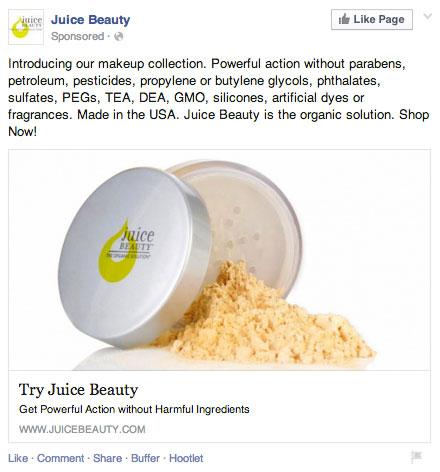
With Facebook ads, you can target customers who visited your website in the past to increase the chance of converting them into orders.
Your potential customers won't decide to buy right away, but with good marketing tactics you can improve your chances of showing up in their social feeds. That increases your sales opportunities and your business revenue.

CEO & Founder · The MONA
Founder of The MONA, who built a services company of 200+ staff with 14,000+ projects delivered. Khánh Hùng shares how he thinks about building systems that run themselves, automating a business, and the real lessons from delivering projects at MONA.
 1,5K
1,5K




Professional website
design services
Own a website with a beautiful, 100% exclusive design and a lifetime warranty, with the ability
to expand features flexibly as your business grows, starting today!








 MONA will never sell your information or send you spam
MONA will never sell your information or send you spam
MONA will never sell your information or send you spam


 MONA will never sell your information or send you spam