
 MONA OS 2.0
 Hợp tác với MONA


 Tự động hoá doanh nghiệp
 Cẩm nang SEO
 Digital Marketing
 Kinh nghiệm thiết kế website
 Hạ Tầng Server
 Giáo dục


 VI
 EN























Message us on
Zalo Official


 ProductsNew

 ProductsProducts
 Mới ra mắtKHA AI 2027App tự edit video, tự đăng mọi mạng xã hội, 2 phút mỗi ngày










 Thiết kế websiteVừa đẹp vừa thuyết phục được khách.
Dịch vụ SEOKéo về khách đang tìm đúng thứ anh chị bán.
 Tư vấn digital marketingKéo khách từ nhiều kênh, đo bằng số thật.
Quay video doanh nghiệpVideo giới thiệu công ty, nhà xưởng, đội ngũ.
 MớiDựng video AIDựng phim câu chuyện công ty bằng AI.
 Custom software developmentCRM, ERP and HRM built for your business.
 Viết AI Agent theo yêu cầuĐặt riêng một trợ lý AI cho đúng việc của mình.
 Tư vấn chuyển đổi AIĐưa AI vào vận hành của cả công ty.
NewMONA LMSManagement for centers and schools.
MONA SkillHubInternal training for company staff.
 NHTQ systemEnd-to-end China–Vietnam shipping operations.
MONA JMSManagement for gold, diamond and pawn shops.
 MONA E-LearningA website with every feature you need to sell courses.
 How to sell online courses (course)More than 30 free lessons on selling courses on autopilot.
 MONA Cloudmonacloud.vnServers to get your apps and websites running.
 MONA Basemonabase.vnPostgres database, sign-in and file storage.
 MONA Mailmonamail.vnSend OTP, order and invoice emails from your software.
 MONA Paymonapay.vnAccept bank transfers via VietQR and notify your software when the money arrives.
 MONA eInvoiceComing soonIssue e-invoices that meet tax standards.
Gấu CườiTrả lời khách 24/7 trên web, Fanpage, Zalo và thu lead cho sale.
 Gấu TeleSalesGọi điện tư vấn, chăm khách như tổng đài viên thật.
Dê CườiTư vấn và chốt đơn cho shop ngay trong khung chat.
Gấu WebmasterNhắn nhóm Zalo là website được sửa xong.
 Gấu Pháp ChếSoạn hợp đồng, rà điều khoản trong vài phút.
 Gấu Báo GiáLên báo giá đúng mẫu và gửi khách ngay.
 AI chăm sóc khách hàngTheo dõi và giữ chân khách hàng cũ.
 Gấu Tuyển DụngLọc hồ sơ, hẹn lịch, phỏng vấn ứng viên.
 Mới ra mắt
KHA AI 2027
Xây kênh chuyên gia 2 phút mỗi ngày
Quay bằng điện thoại, AI tự edit video, tự đăng lên 16 nền tảng và tự trả lời bình luận, tin nhắn.
866.563lượt xem trên kênh CEO MONA sau 33 ngày
 Anh Khánh HùngCEO MONA đang dùng mỗi ngày
Xem app làm được gì
 AI
Gấu Cười MONA ĐANG TỰ XÀITrả lời khách 24/7 trên website, Zalo OA, Messenger và thu lead về cho sale.
Dê CườiChốt đơn bán lẻ và sàn: Shopee, TikTok Shop, web. Chăm cả khách sỉ, đại lý.
Gấu WebmasterCập nhật nội dung, tối ưu SEO website mỗi ngày.
Gấu TeleSalesGọi điện tư vấn, chăm khách như tổng đài viên thật.
Gấu Tuyển DụngLọc hồ sơ, hẹn lịch, phỏng vấn ứng viên tự động.
AI chăm sóc khách hàngGiữ khách cũ, cứu lead đã rớt cho phòng kinh doanh.
Gấu Pháp ChếSoạn hợp đồng, rà điều khoản trong vài phút.
Gấu Báo GiáLên báo giá đúng mẫu, gửi khách ngay khi có yêu cầu.
 Chuyển đổi AI toàn phầnGiải pháp tổng cho doanh nghiệp, 3 lớp triển khai.
 Viết AI Agent theo yêu cầuĐặt riêng một con AI gánh đúng nghiệp vụ của bạn.
 Custom softwareCRM, ERP and HRM with built-in AI automation.
 SEO & AEO thời đại AIĐược Google lẫn AI trích dẫn, không chỉ xếp hạng.
 Kiến thức AI cho doanh nghiệpBài phân tích, hướng dẫn ứng dụng AI vào vận hành.
 Free AI courses
 AI tools at work
App mới · KHA AI 2027
Xây kênh 2 phút mỗi ngày
AI tự edit video, tự đăng mọi mạng xã hội
Free consultation, 8am–10pm every day

18 March, 2023

If you run an online business, you have probably heard of the Flatsome theme, but have you ever wondered what the Flatsome theme is and which standout advantages make business owners keen to have it? Let's Mona Media explore everything about the Flatsome theme in the article below.
Flatsome is widely regarded as one of the best themes available, because it can build many kinds of websites across different industries: e-commerce, spas, news and even Landing Page.
In simple terms, Flatsome is a WordPress theme like any other, but the one real difference is its page-building process, Website which is so good that building a site's layout is simpler than hand-writing code and fixing responsive issues.
Flatsome for WordPress also meets the three most important criteria for a website: FAST, LIGHT and SEO-FRIENDLY.
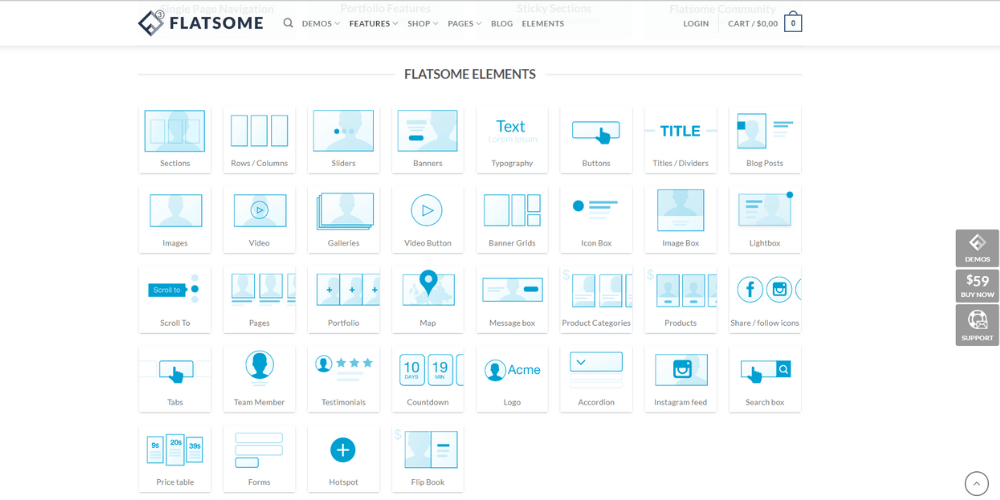
With the Flatsome theme, you can build freely without limits. Flatsome also has many other standout features you should try:
Thanks to the support this tool provides, owners of online business websites save on costs. More importantly, users Theme WordPress Flatsome are free to optimize however they like, without depending on anything else.
See more:
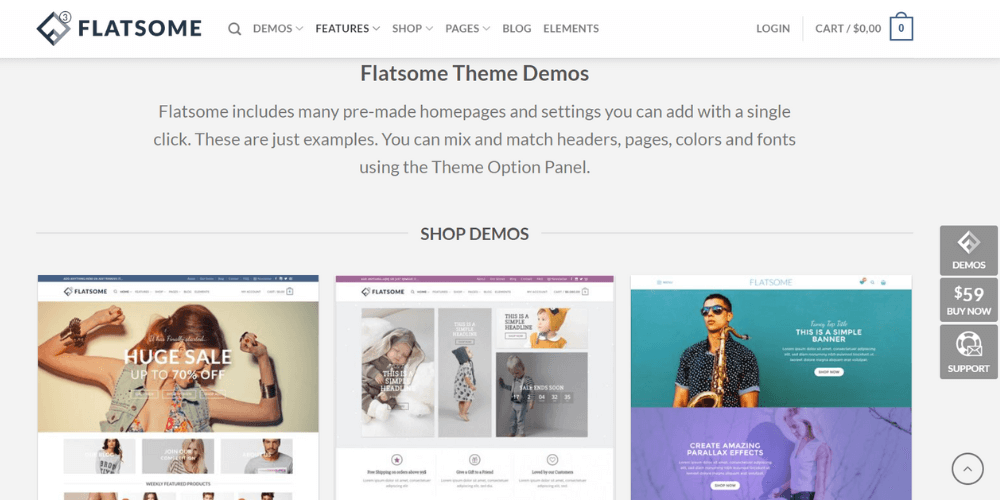
In the previous section, we are confident you have a rough picture of the Flatsome theme. To understand it better, look at its technical strengths, because Flatsome is a theme that users are happy with since it meets their needs fully.
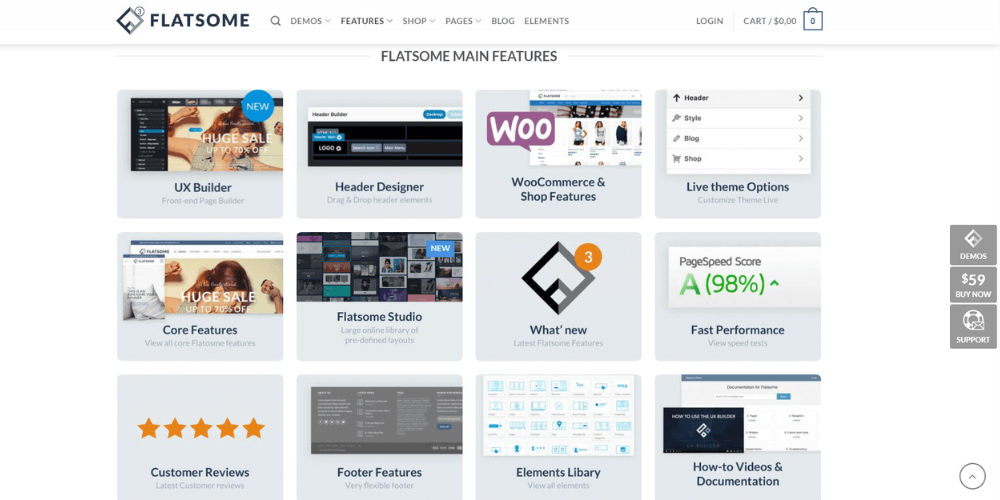
Flatsome comes with many pre-designed features built in, plus a visual drag-and-drop page builder (Live Page Builder). This gives users plenty of room to create from their own perspective.
All you need to do is come up with the idea; Flatsome handles the rest. The more you explore, the more options you find among the built-in Flatsome elements and formats, including Banner, Portfolio, Products, Buttons, tabs and more.
See more: Standard banner sizes for your website that you should know
With UX Builder, the tool can meet the requirements of any field of work, including e-commerce, real estate, news and company introductions.
With the Flatsome WordPress theme, you can do whatever you want with the Live Theme Option Panel and Banner, Portfolio, Products, Buttons, Tab and more.
If you are careful and detail-oriented and want everything polished, this tool is a great choice. You can customize from the smallest details, such as margin and line alignment in the Flatsome WordPress theme.
The header is the first point of contact between a website and its visitors. Understanding this, the Flatsome theme helps you optimize your site with the simplest steps. All you have to do is drag and drop elements such as: Menu, Search Icon, Button, Cart,…
The Flatsome theme is praised for its fast loading. This is possible because it isn't built on a lot of complex code.
Experts consider it one of the fastest-loading WordPress themes on the market. It also has a professional design and quick controls, so it meets users' expectations.
This is probably a big plus and a reason Flatsome is so highly rated today. Its designs emphasize uniqueness and focus on optimizing the user experience.
With any version of WordPress WordPress, the theme works well with few errors. Professional programmers and beginner designers alike rate this tool highly.
According to statistics, the Flatsome theme is UX-Themes' best-selling product, so it receives serious investment to keep adding new and better features.
The developers also cater to customers by giving Flatsome for WordPress support for more than 12 languages. Because of this, users can easily translate their website into most of the languages they want, within Theme WordPress Flatsome.
See more: UX UI design
The Flatsome theme offers a library of designs in Flatsome Studio, with countless options opened with a simple click. After browsing Flatsome Studio and picking a suitable template, you select it and customize it until it suits you.
The convenience and speed of Flatsome WordPress Studio has interested many users, and many come to Flatsome and stay with it long term.
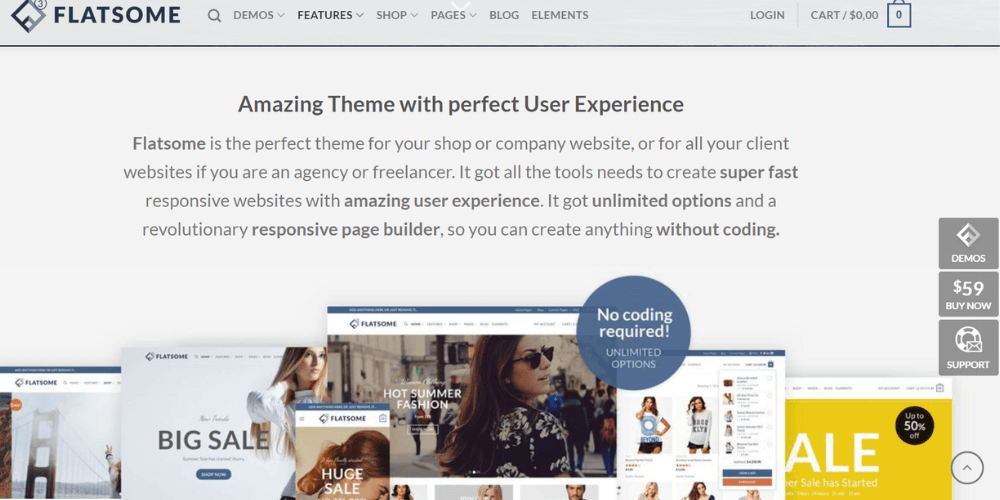
Besides the standout features listed above, Flatsome includes many other useful features waiting for you to discover. It is fully optimized for mobile devices so users can edit from anywhere.
Responsive design in Flatsome Theme WordPress keeps the website suitable on every screen size. This makes it easy to collect traffic from different sources such as smartphones, tablets and desktops. There is also a wide variety of Theme WordPress Flatsome among other supported features such as:
Let's go through the basic steps of installing Flatsome for WordPress.
Step 1: Download the Flatsome theme file at this link:
https://themeforest.net/item/flatsome-multipurpose-responsive-woocommerce-theme/5484319
Note: To use this version of Flatsome for WordPress, you need to pay.
In addition, UXThemes, the platform's developer, does not currently manage licensing very strictly. As a result, one main key can be used by many users and resold or shared with others. You can search Google to find out how to activate the Flatsome theme without paying.
Once the Flatsome WordPress theme is downloaded, extract it into a .zip file to make the file lighter. After extracting successfully, you will have a folder named flatsome-main containing many other files. You only need the file named flatsome-3.xx.zip.
Step 2: Next, go to the WordPress Dashboard as an Administrator. Then click Interface. Then click Add New and Upload Theme at Choose File (Flatsome-3.3.9.zip) as shown in the image below, then install Theme WordPress Flatsome.
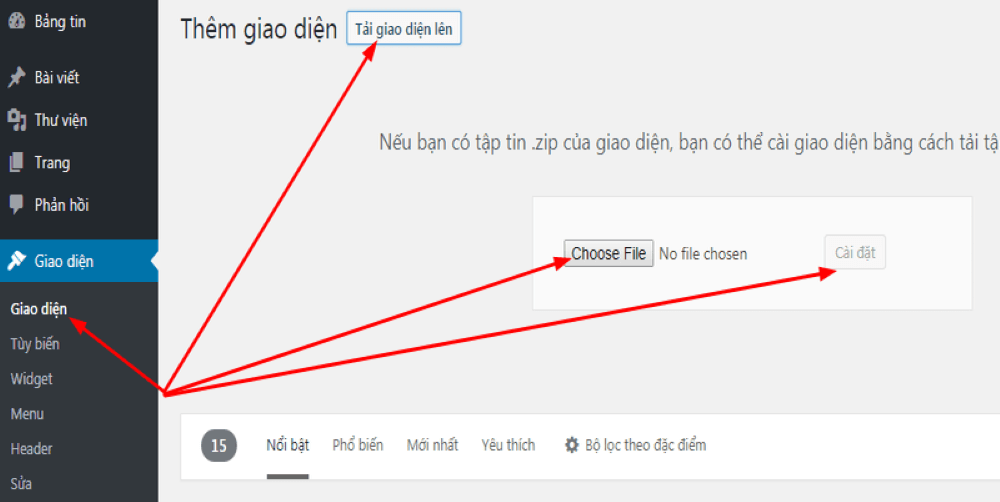
Step 3: Next, select the Triggering zip file you just compressed.

Step 4: Then go to Flatsome and select Setup Wizard.
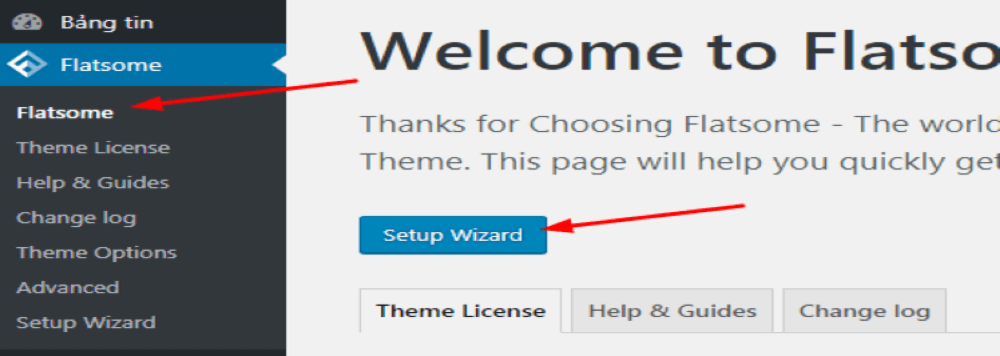
Step 5: Continue by selecting Let’s Go following the arrow in the image.
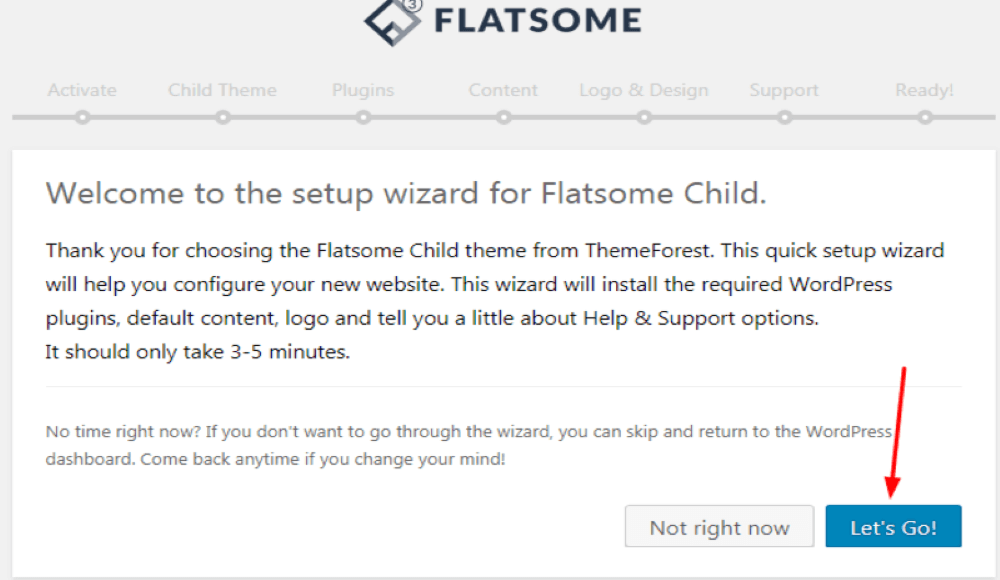
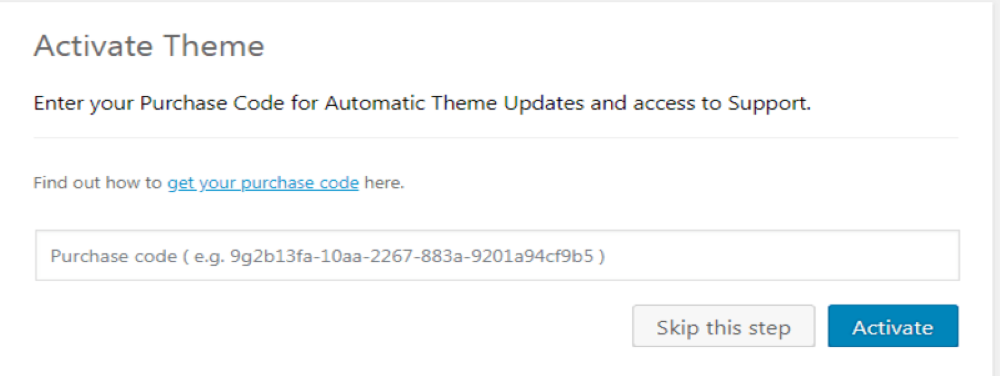
Step 6: In this step, enter the license code for the Flatsome WordPress theme (if you have one), which you can find in your ThemeForest account. If you don't have a license code, select Skip this Step.
Step 7: In the Child Theme Titlefield, enter any name you like, then click Create and Use Child Theme.
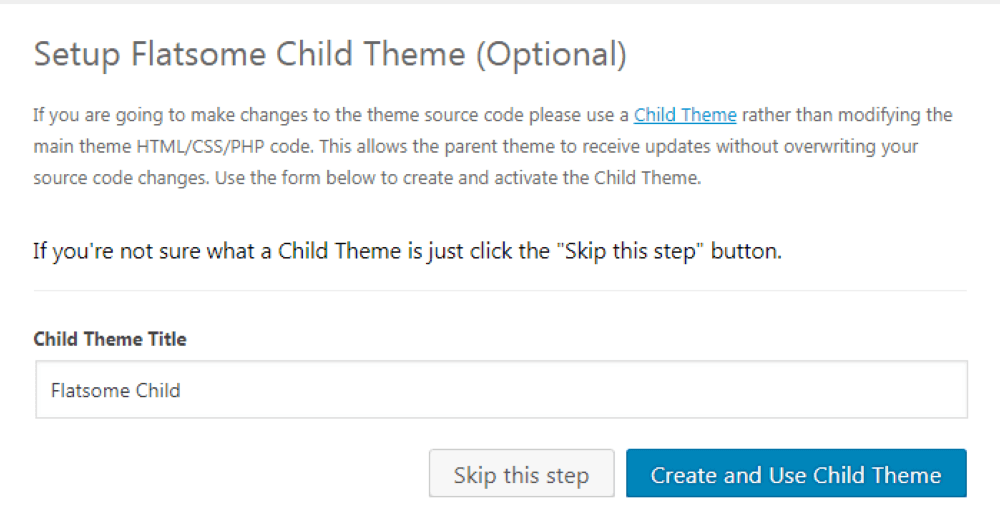
Step 8: Flatsome is now creating the child theme. Continue by clicking Continue twice in a row.
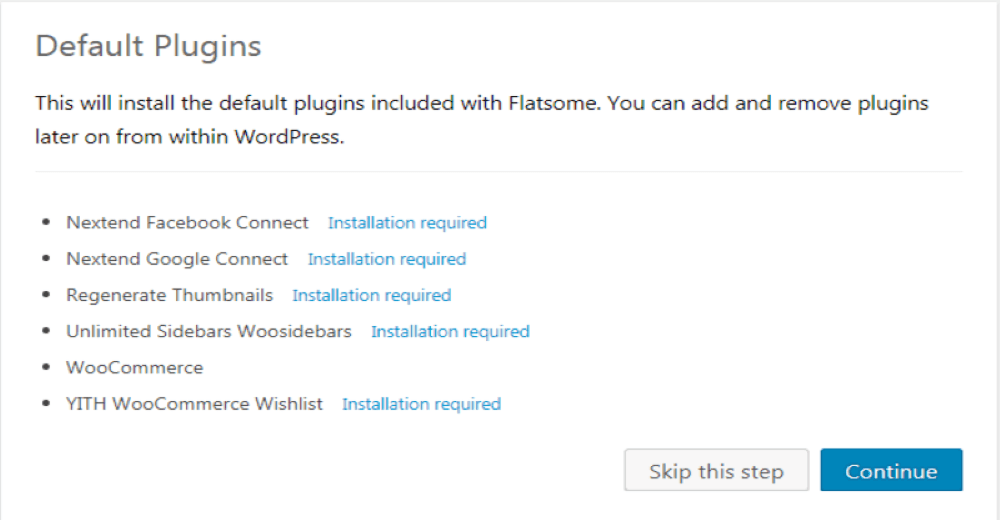
Step 9: In the next step of installing the Flatsome WordPress theme, select Continue or Skip this step.
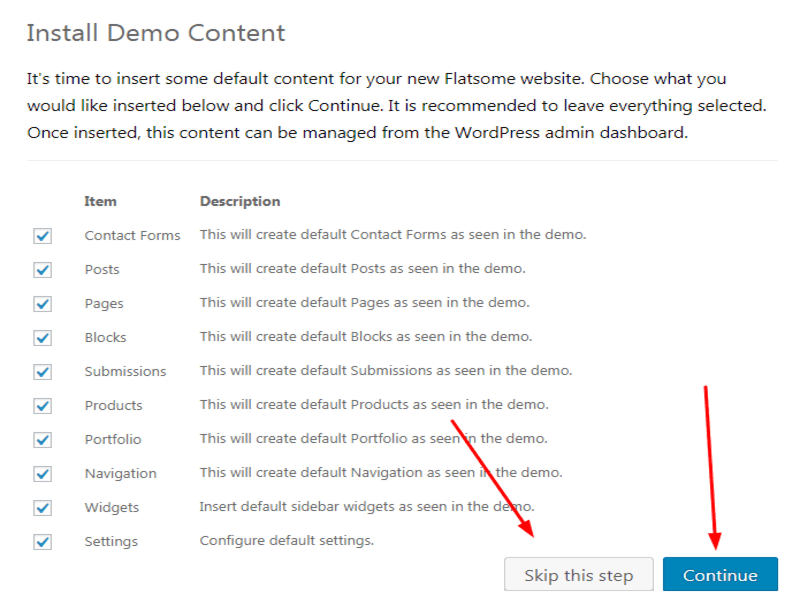
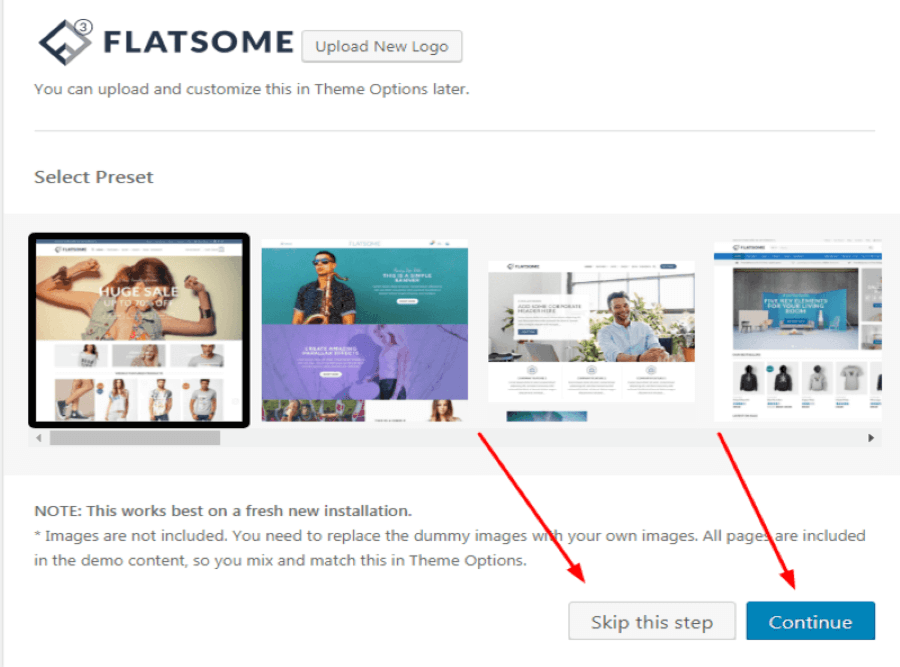
Step 10: Continue by clicking Continue or Skip this step.
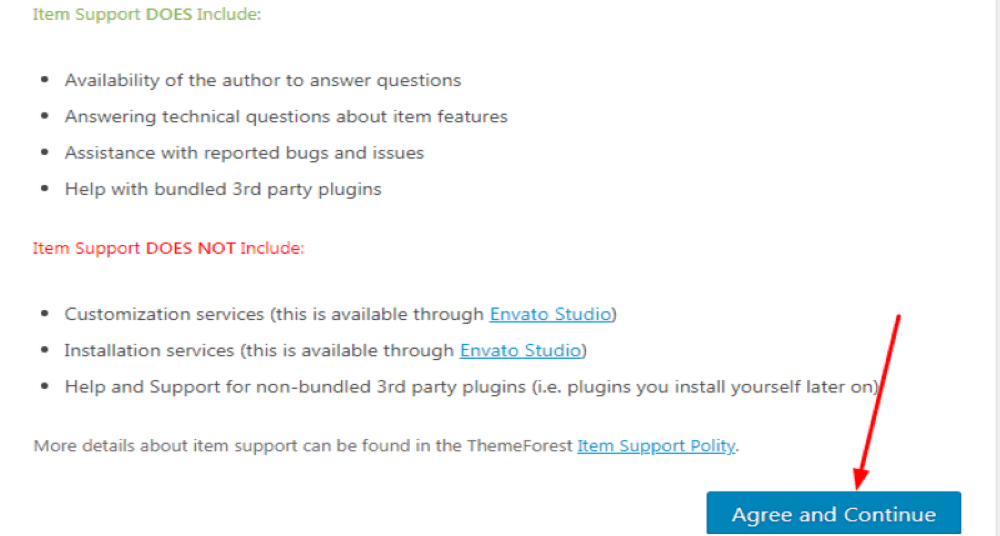
Step 11: Then click Agree and Continue.
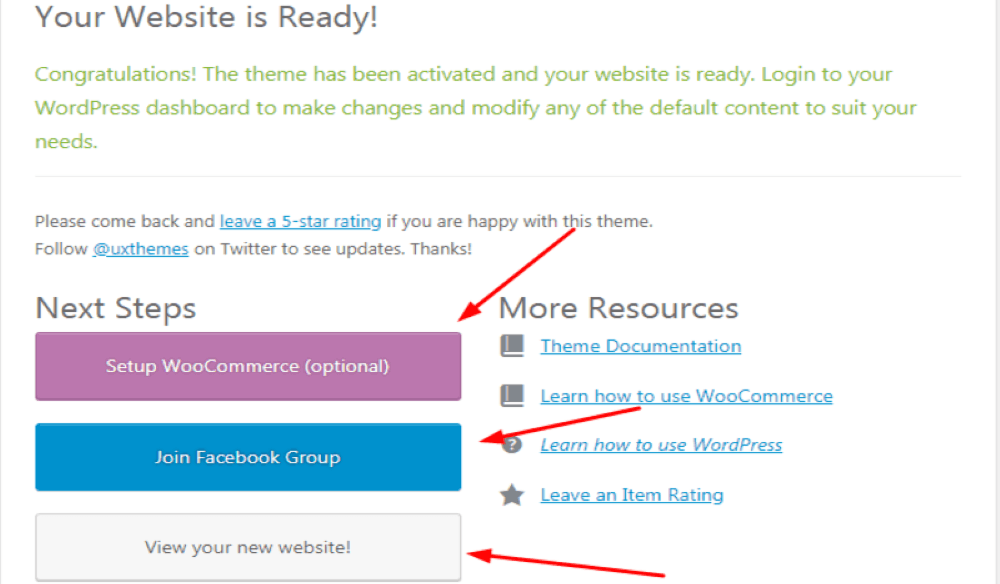
Step 12: In the last step, you can choose Setup WooCommerce (Optional) to install e-commerce tools for your website. Of course this depends on your goals, so you may choose it or not. That completes the installation of the Flatsome WordPress theme.
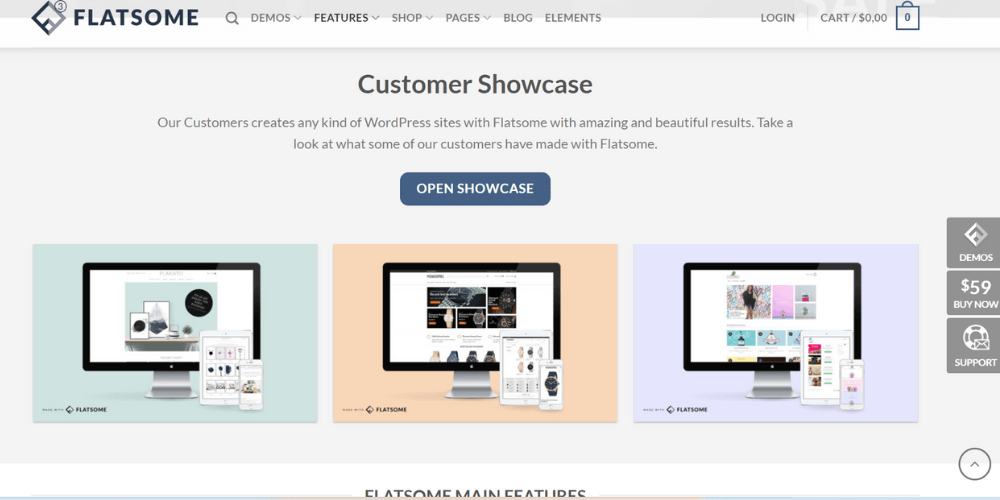
Below, we walk you through using Flatsome WordPress in more detail. This will help you set up the general options so it is easier to roll out each project.
First, log in to your website at yourdomain.com/wp-admin. Then the process focuses on editing the brand, logo, colors and other things in the Flatsome WordPress theme.
To edit the website in the Flatsome theme, go to Settings -> General. Then go to “Site Title” at the top. Working with the brand matters a lot because it directly affects your business later on.
Usually, this field is the name of your company Domain or shop name, for consistency. Right below is the “Tagline” field, which describes the field the website works in. In the email address field, you can use any account of your own.
The URL is also one of the important factors in ranking a website on the SERP. So set the URL to be as short as possible while still reflecting the page's content, and above all it must contain the main keyword.
To do this in the Flatsome theme, go to Settings -> Permalinks. Then find “Post name” and click “Save Changes”. Think carefully before doing this, because it affects every link from then on.
If your website already has a logo, just upload it. If not, you can design one yourself or find a professional design company to help you get a logo you like.
For this setting, choose Flatsome -> Theme Options. Then go to Header -> Logo & Identity -> Select file. Choose your logo from your computer and click “Publish” at the top of the screen to finish.
However, setting up the logo isn't finished yet. You need to keep using this tool to change the Favicon, the small logo icon that appears at the top of the browser when users search.
-> See also: Exclusive Brand and Company Logo Design
Brand color is a key factor that helps customers recognize you more easily. Keep your logo and brand colors consistent. One important point is that a website shouldn't use too many colors, which makes it visually messy.
To change it, go to Wp-admin -> Flatsome -> Theme Options -> Style -> Colors -> Primary. Once you have set the colors you want, don't forget to click “Save” to finish.
Currently, the Flatsome theme provides a fixed menu type and its mobile responsiveness is rated very highly. For better optimization, the tool has two main types:
Depending on your needs, you can use whichever menu type fits. To set up the Flatsome menu, go to wp-admin -> Appearance -> Menus. Once you have decided which menu to edit, add or remove items as needed. Most websites include basic elements such as pages, posts, categories and so on.
Sidebar is the toolbar on the right by default in Flatsome. What it contains varies with your needs. Usually you will see it change when you add new posts, with common types such as:
According to many experienced experts, the sidebar is very good for SEO. You should show the titles of about 6 to 8 new posts in it.
To edit it, log in to your website at wp-admin -> Appearance -> Widget. Then WordPress lets you drag and drop each module and arrange them in suitable positions.
The WordPress footer is under Appearance -> Widgets. Select Footer 1 and Footer 2 to edit. However, do this only after your website has posts.
Details on editing the footer HERE
To publish a post, page or product, prepare the content in a Word file first. Then go to wp-admin -> Posts -> Add New.
Depending on your purpose, you can choose 1 of 3 content types. Then use Flatsome to optimize SEO-standard articles. These are all techniques familiar to SEO specialists, including:
Whatever the post, it needs a clear hierarchy, so using H2, H3 and other heading tags is essential.
Note that Flatsome is already very well optimized out of the box. However, as you use it, you may want to install extra plugins or add some custom code for your work.
That can hurt your online store built on the Flatsome WordPress theme and make it load slower than at the start. Below, we share some tips for optimizing the Flatsome theme that you can apply when the site starts loading slowly:
You can also look up other guides to speeding up WordPress online to optimize other areas and get the best possible load speed.
Do I need programming knowledge to use the Flatsome theme?
No, you don't need programming knowledge to use the Flatsome theme. It has an easy-to-use interface and detailed guides to help you build a website easily.
How do I get support for the Flatsome theme?
Look into buying Flatsome from a licensed source that has support staff. Official support can answer technical questions about the theme, reported bugs and problems, and questions about compatible third-party plugins. Join the Theme Flatsome WordPress or a similar group to get advice from the community when the theme has problems or errors.
Where can I buy the Flatsome theme?
You can buy the Flatsome theme on the official Flatsome website or through WordPress theme marketplaces such as ThemeForest.
That is all the information about the Flatsome theme and its standout advantages. We hope this article helps you design and run a website on your own as well as possible.
Do you need to install the Flatsome WordPress theme and, beyond that, want a professional SEO-friendly website design service?
Contact Mona Media qua HOTLINE 1900 636 648 for the fastest support! Besides Flatsome, Mona Media has a team of specialists website design with solid experience building WordPress themes and many other WordPress themes, so clients have the best options.
You may also be interested in: The 15 best WordPress themes for presenting a company

CEO & Founder · The MONA
Founder of The MONA, who built a services company of 200+ staff with 14,000+ projects delivered. Khánh Hùng shares how he thinks about building systems that run themselves, automating a business, and the real lessons from delivering projects at MONA.
 1,6K



Professional website
design services
Own a website with a beautiful, 100% exclusive design and a lifetime warranty, with the ability
to expand features flexibly as your business grows, starting today!






 MONA will never sell your information or send you spam


 MONA will never sell your information or send you spam
