
 MONA OS 2.0


 Tự động hoá doanh nghiệp
 Cẩm nang SEO
 Digital Marketing
 Kinh nghiệm thiết kế website
 Hạ Tầng Server
 Giáo dục


 VI
VI
 EN
EN



















Message us on
Zalo Official


 ProductsNew

 ProductsProducts
 Mới ra mắtKHA AI 2027App tự edit video, tự đăng mọi mạng xã hội, 2 phút mỗi ngày










 Website designLooks good and wins customers over.
SEO servicesBrings in customers searching for exactly what you sell.
Website designLooks good and wins customers over.
SEO servicesBrings in customers searching for exactly what you sell.
 Tư vấn digital marketingKéo khách từ nhiều kênh, đo bằng số thật.
Corporate video productionVideos introducing your company, factory and team.
Tư vấn digital marketingKéo khách từ nhiều kênh, đo bằng số thật.
Corporate video productionVideos introducing your company, factory and team.
 NewAI video productionCompany story films made with AI.
 Custom software developmentCRM, ERP and HRM built for your business.
 Viết AI Agent theo yêu cầuĐặt riêng một trợ lý AI cho đúng việc của mình.
 Tư vấn chuyển đổi AIĐưa AI vào vận hành của cả công ty.
NewMONA LMSManagement for centers and schools.
MONA SkillHubInternal training for company staff.
Tư vấn chuyển đổi AIĐưa AI vào vận hành của cả công ty.
NewMONA LMSManagement for centers and schools.
MONA SkillHubInternal training for company staff.
 NHTQ systemEnd-to-end China–Vietnam shipping operations.
MONA JMSManagement for gold, diamond and pawn shops.
NHTQ systemEnd-to-end China–Vietnam shipping operations.
MONA JMSManagement for gold, diamond and pawn shops.
 MONA E-LearningA website with every feature you need to sell courses.
 How to sell online courses (course)More than 30 free lessons on selling courses on autopilot.
 MONA Cloudmonacloud.vnServers to get your apps and websites running.
 MONA Basemonabase.vnPostgres database, sign-in and file storage.
 MONA Mailmonamail.vnSend OTP, order and invoice emails from your software.
 MONA Paymonapay.vnAccept bank transfers via VietQR and notify your software when the money arrives.
 MONA eInvoiceComing soonIssue e-invoices that meet tax standards.
Gấu CườiTrả lời khách 24/7 trên web, Fanpage, Zalo và thu lead cho sale.
MONA eInvoiceComing soonIssue e-invoices that meet tax standards.
Gấu CườiTrả lời khách 24/7 trên web, Fanpage, Zalo và thu lead cho sale.
 Gấu TeleSalesGọi điện tư vấn, chăm khách như tổng đài viên thật.
Dê CườiTư vấn và chốt đơn cho shop ngay trong khung chat.
Gấu WebmasterNhắn nhóm Zalo là website được sửa xong.
Gấu TeleSalesGọi điện tư vấn, chăm khách như tổng đài viên thật.
Dê CườiTư vấn và chốt đơn cho shop ngay trong khung chat.
Gấu WebmasterNhắn nhóm Zalo là website được sửa xong.
 Gấu Pháp ChếSoạn hợp đồng, rà điều khoản trong vài phút.
 Gấu Báo GiáLên báo giá đúng mẫu và gửi khách ngay.
 AI chăm sóc khách hàngTheo dõi và giữ chân khách hàng cũ.
 Gấu Tuyển DụngLọc hồ sơ, hẹn lịch, phỏng vấn ứng viên.
 Mới ra mắt
KHA AI 2027
Xây kênh chuyên gia 2 phút mỗi ngày
Quay bằng điện thoại, AI tự edit video, tự đăng lên 16 nền tảng và tự trả lời bình luận, tin nhắn.
350.475lượt xem trên kênh CEO MONA sau 20 ngày
Mới ra mắt
KHA AI 2027
Xây kênh chuyên gia 2 phút mỗi ngày
Quay bằng điện thoại, AI tự edit video, tự đăng lên 16 nền tảng và tự trả lời bình luận, tin nhắn.
350.475lượt xem trên kênh CEO MONA sau 20 ngày
 Anh Khánh HùngCEO MONA đang dùng mỗi ngày
Xem app làm được gì
Anh Khánh HùngCEO MONA đang dùng mỗi ngày
Xem app làm được gì
 AI
Gấu Cười MONA ĐANG TỰ XÀITrả lời khách 24/7 trên website, Zalo OA, Messenger và thu lead về cho sale.
Dê CườiChốt đơn bán lẻ và sàn: Shopee, TikTok Shop, web. Chăm cả khách sỉ, đại lý.
Gấu WebmasterCập nhật nội dung, tối ưu SEO website mỗi ngày.
Gấu TeleSalesGọi điện tư vấn, chăm khách như tổng đài viên thật.
Gấu Tuyển DụngLọc hồ sơ, hẹn lịch, phỏng vấn ứng viên tự động.
AI chăm sóc khách hàngGiữ khách cũ, cứu lead đã rớt cho phòng kinh doanh.
Gấu Pháp ChếSoạn hợp đồng, rà điều khoản trong vài phút.
Gấu Báo GiáLên báo giá đúng mẫu, gửi khách ngay khi có yêu cầu.
AI
Gấu Cười MONA ĐANG TỰ XÀITrả lời khách 24/7 trên website, Zalo OA, Messenger và thu lead về cho sale.
Dê CườiChốt đơn bán lẻ và sàn: Shopee, TikTok Shop, web. Chăm cả khách sỉ, đại lý.
Gấu WebmasterCập nhật nội dung, tối ưu SEO website mỗi ngày.
Gấu TeleSalesGọi điện tư vấn, chăm khách như tổng đài viên thật.
Gấu Tuyển DụngLọc hồ sơ, hẹn lịch, phỏng vấn ứng viên tự động.
AI chăm sóc khách hàngGiữ khách cũ, cứu lead đã rớt cho phòng kinh doanh.
Gấu Pháp ChếSoạn hợp đồng, rà điều khoản trong vài phút.
Gấu Báo GiáLên báo giá đúng mẫu, gửi khách ngay khi có yêu cầu.
 Chuyển đổi AI toàn phầnGiải pháp tổng cho doanh nghiệp, 3 lớp triển khai.
 Viết AI Agent theo yêu cầuĐặt riêng một con AI gánh đúng nghiệp vụ của bạn.
 Custom softwareCRM, ERP and HRM with built-in AI automation.
 SEO & AEO thời đại AIĐược Google lẫn AI trích dẫn, không chỉ xếp hạng.
 Kiến thức AI cho doanh nghiệpBài phân tích, hướng dẫn ứng dụng AI vào vận hành.
 Free AI courses
 AI tools at work
App mới · KHA AI 2027
Xây kênh 2 phút mỗi ngày
AI tự edit video, tự đăng mọi mạng xã hội
Free consultation, 8am–10pm every day
AI tools at work
App mới · KHA AI 2027
Xây kênh 2 phút mỗi ngày
AI tự edit video, tự đăng mọi mạng xã hội
Free consultation, 8am–10pm every day

18 March, 2023

Meta Description plays an important role in getting your articles and website in front of target customers. A quality meta tag attracts users to click on your content, which brings more traffic and improves search rankings. So What is a meta description? what makes a meta tag SEO-friendly, and how do you write one? Let's find out together with MONA Media how to write a meta description that can bring your article to the top of Google.

Meta tags or Meta Tag is a piece of code, a small content descriptor, that tells search engines important information about your web page. Meta tags do not appear in the visible content of the page, only in its source code. Here, “Meta” is short for “metadata”, which means metadata.
Every website today has meta tags, but they only appear in the HTMLsource code. The most important meta tags in SEO that you should care about are:
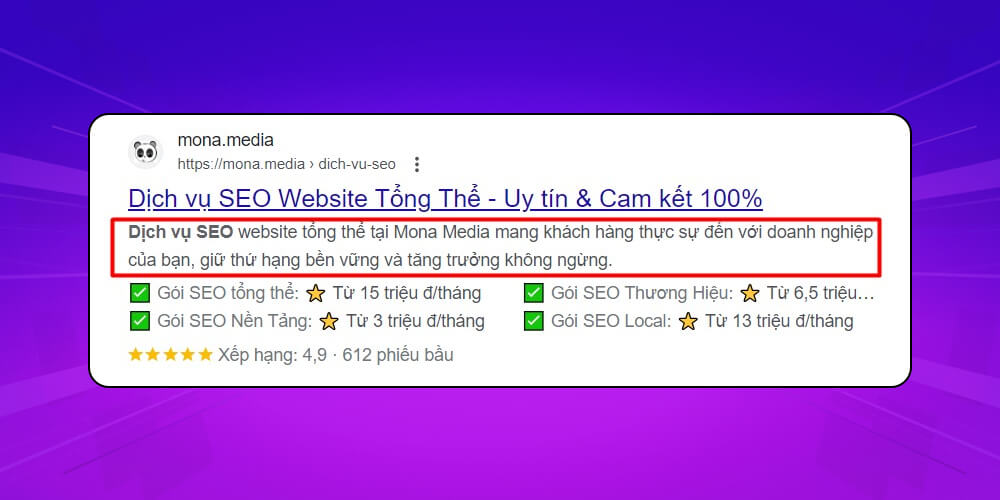
Meta Description is the text shown below the title (Meta Title) in search results, usually limited to 155-160 characters. The meta description briefly describes the key information in the article and encourages users to click your page in search results, raising click-through rate.
In practice, the meta description is a kind of meta tag: it does not appear directly in the page layout but sits inside the meta tag as HTML code behind the page.
Typically, when users run searches on search engine, they skim the title and meta tag to grasp the main content of the article before deciding whether to read on. If the meta tag is effective, readers click through for more information. That gives your website more clicks and better rankings on Google.
So a good meta description draws users to your website, raises click-through rate, and helps search engines understand the page in general so it can rank better.

Without a meta description, search engines have a harder time understanding what your website is about. Here is why the description tag matters:
What happens if you forget the meta description? Google will pull arbitrary text from your article to display. Sometimes that text makes little sense because the context is incomplete. Searchers then tend to skip the page and choose others they expect will give them useful information.
A good meta description is important; it is a strong impression in the “first meeting” that pushes searchers to click through and create organic traffic – Organic traffic. That is why SEOs always try to craft a description tag that stands out and attracts readers.
People who don't know what a meta description is write it carelessly, with no impact, and readers leave with nothing useful. Users tend to skip the page and are left with a poor impression of the website. You lose the visit this time, and next time they remember your site and avoid it.
A meta description not only raises click-through rate from search results but also plays an important role in the strategy of SEO to reach the top of Google sustainably. Optimizing this description helps your website attract users and shows search engines what the article is about.
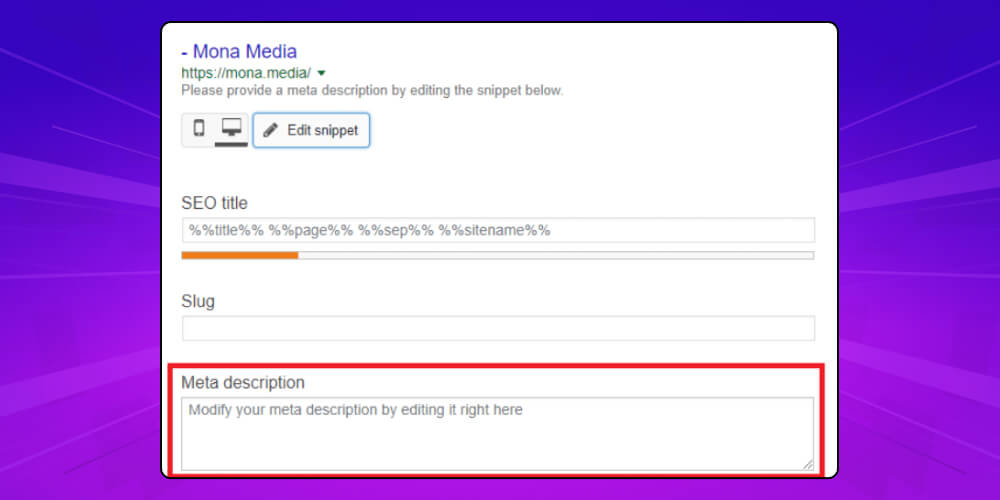
When you create a new post in the WordPress CMS, in the SEO tab click Edit snippet. There, enter the description text in the WordPress Meta Description box. That completes adding the meta description for the post.
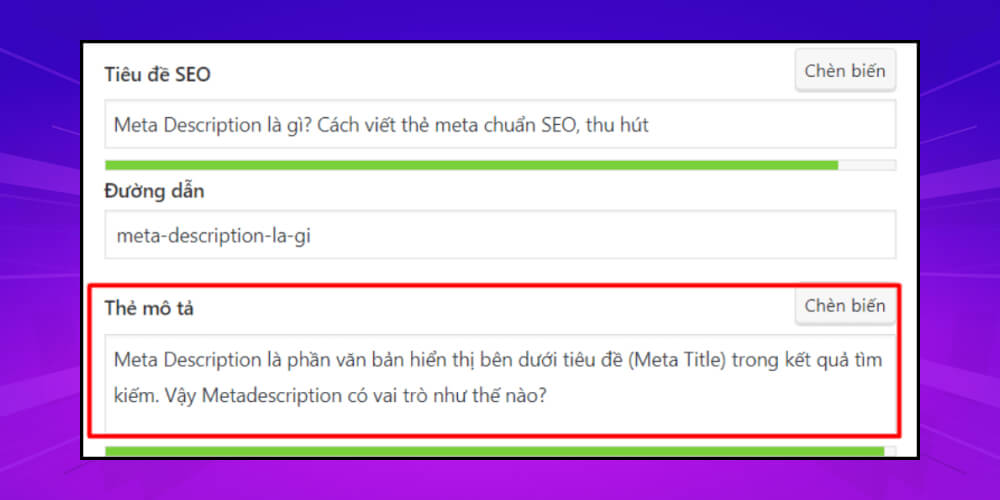
If your WordPress CMS has the Yoast SEO plugin installed, you can add a meta description with it. Steps:
A quality meta description that attracts readers and helps reach your ranking goals needs these elements:
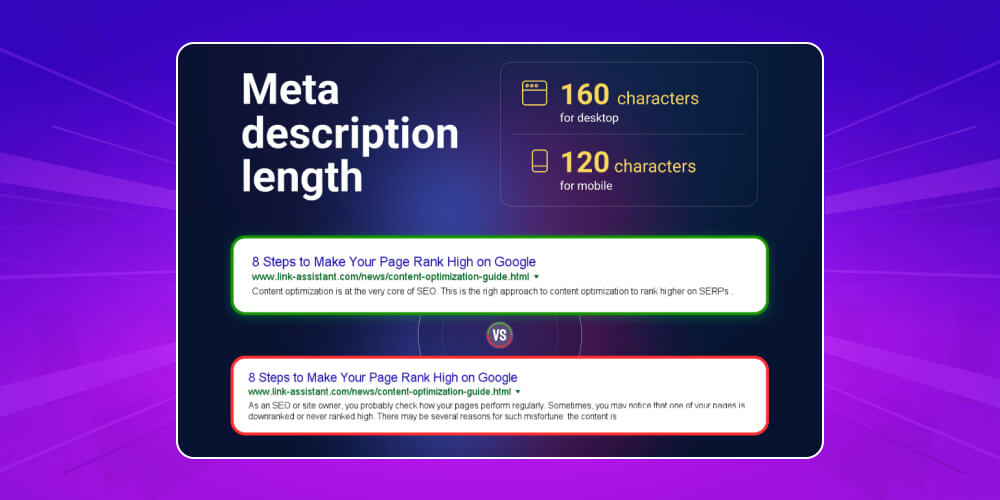
Google changes the displayed length of meta descriptions often to improve user experience. However, the most suitable number of characters when shown on desktop is 155 characters and on mobile is 120 characters. Sometimes the meta description also gets the publish date added automatically, so leave a few characters free for that.
Everyone is drawn to what is different, positive and on point, or to what understands their thinking. Remember that you are not writing only for Googlebot to collect information. More importantly, the content must be for people. So the meta description should have the right length and read as a complete, meaningful and engaging message.
A meta description pushes users to click more when it includes calls to action such as: Visit now, See more, Get it now, Download free… CTA (calls to action) combined with the right tone make a strong impression and draw readers in.
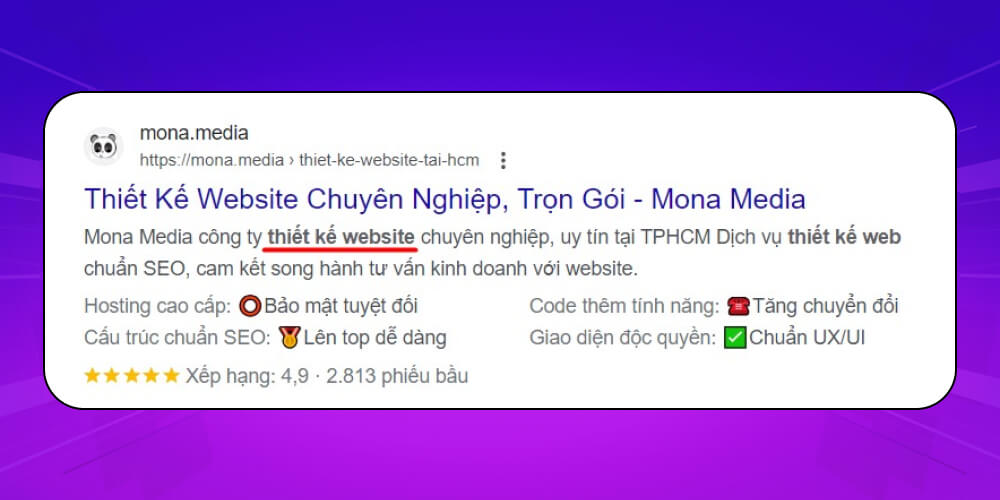
If keywords When the search term partly matches the text in the meta description, Google highlights it in bold. So professional SEOs put the target keyword, and secondary keywords where fitting, in the description.
-> Read more:
If your business sells technology products or products with model codes, put the key, distinctive specifications in the meta description, such as brand name, product line, price or module. These help searchers quickly see which product suits them.
Searchers first judge a page by its title and meta description. Attractive, carefully written content has a better chance of getting attention and a click.
The meta description must relate to the article. Google has tools to detect misleading meta descriptions and can penalize them. A description that does not match the content also raises the Bounce Rate – bounce rate. A high bounce rate directly hurts SEO rankings.
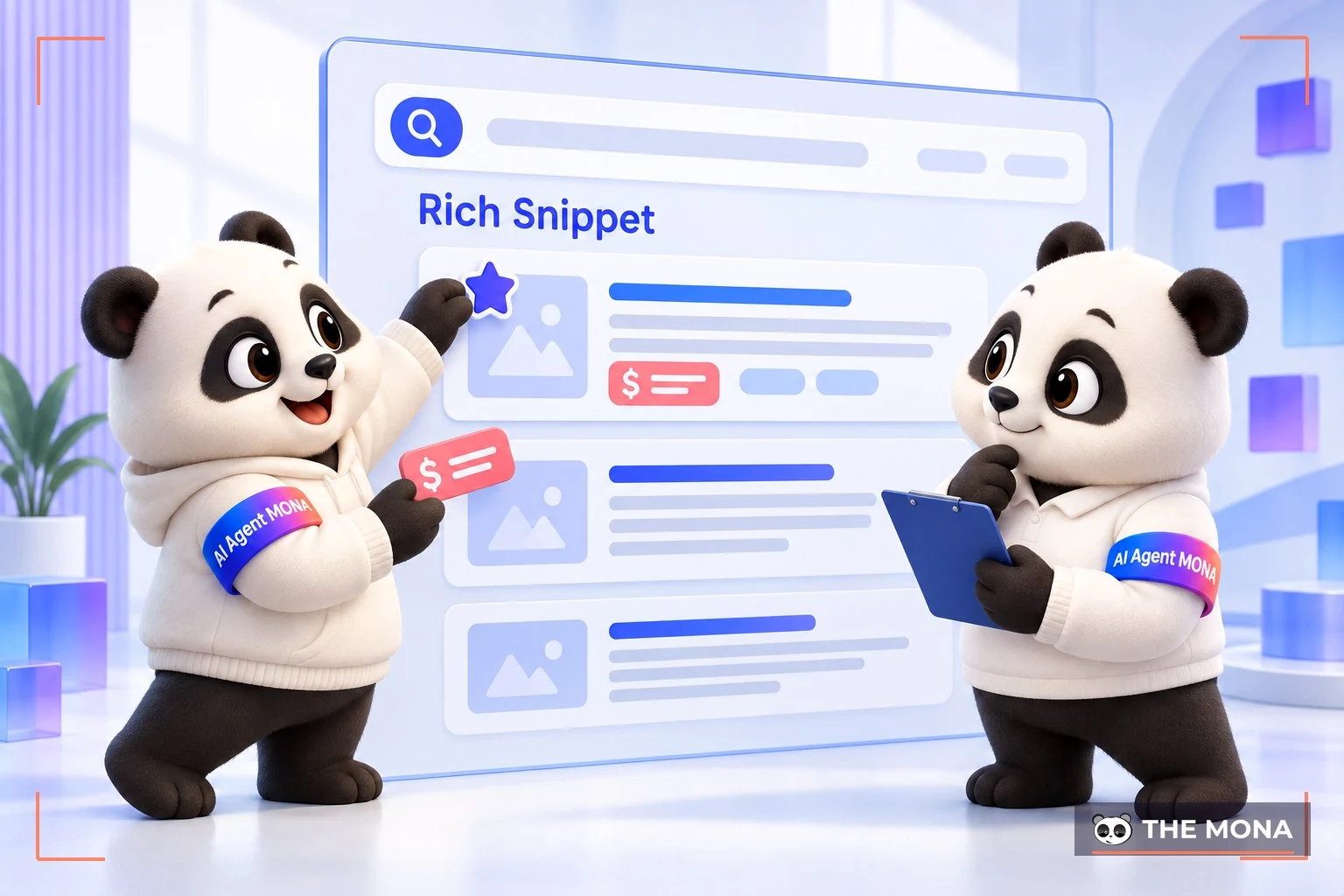
Rich Snippets are used by many websites today. This is information shown as star ratings, rankings, prices, images and so on. It gives searchers a real sense of the content, or of what earlier visitors experienced, and encourages them to click.
All content online should be unique, whether title, meta description or article, and should attract readers. Google uses bots and algorithms to detect duplicate content. Your page may face limited visibility or other penalties if Google detects spam.
Identical meta descriptions across articles also confuse searchers. They may think the articles are the same and visit other websites.
If you treat the content of the Meta tags as an introduction or a pitch, keep it simple and easy to understand. Metaphors or specialist terms that take real effort, or need a “Google” to understand, usually put most users off.
Google will cut off the content inside double quotation marks if the meta description contains them. If you must include such a character in the description, use HTML Entity instead.
Highlighting brand identity is an effective marketing strategy that lets a business assert its own character and convey its core message to customers. On the home pages (homepage) of big brands such as Vinamilk, brand identity is clearly expressed, building trust and leaving a deep impression on consumers.
Everyone is drawn to promotions such as discounts, gifts, vouchers and prize draws. So if you are running a promotion campaign, don't forget to include the offer in the meta description.
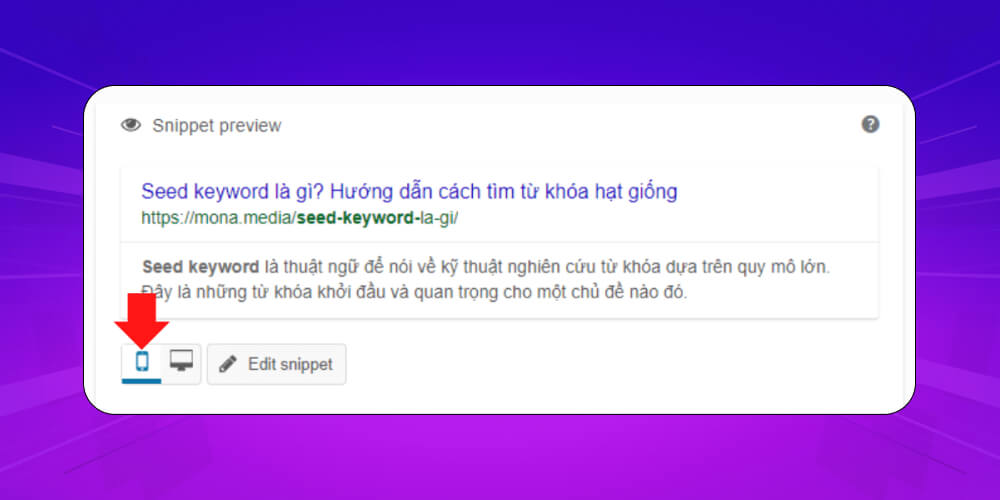
As MONA noted above, the number of characters shown in a meta description differs between desktop, tablet and phone. The content may show in full on a computer but be cut off on a phone.
To make sure the tag gives readers the full picture, check your description and put the most essential, appealing content first. That way, on desktop or phone, users still get the gist or the whole topic.
Before saving or publishing the meta description, check it again. Things to check include spelling, content, special characters, length and how the tag displays. This makes sure the tag looks clean, professional and polished online.
The meta description should include the main keyword and may include related and secondary keywords. A keyword should appear at most 2 times in the tag. These are all criteria Google uses to score a post's SEO. The main keyword should preferably come near the start.
-> See related articles:
Conveying information and messages coherently, smoothly and clearly is a basic rule of communication. Whether you are writing a title, a meta description or an article, follow it to avoid being misunderstood.
Usually, put the main keyword at the start of the meta description to improve visibility in search engines. The whole description should be short, just 1 to 2 sentences, and written naturally like a person would write it: clear, easy to understand and engaging.

Write an engaging description to catch readers' attention, since it directly affects whether they click your page. It must also stay closely related to the article and meet the user's search need.
As MONA noted above, a sensible meta description length matters for how it appears in search results. The recommendation is to keep the description within about 155–160 characters. Google sometimes shows more, but anything over the limit gets cut. So put keywords and key information at the start, so users get the main message even if the description is shortened.
What is the topic of your article? Stick to the page's content to write the most appealing meta description. It gives a good user experience and also builds trust with Google, which rates it highly.
Meta tags for different articles must differ. Google has tools to check for duplicate meta descriptions across everything published on a site. If it finds spam or copying, penalties can directly affect SEO for the page or the whole website.
Using Rich Snippets to create distinctive snippets is a way to make the meta description more interesting. Depending on your field, choose the right snippet. If you sell products online, suitable snippets include ratings, rankings, purchases, review counts and prices. For blog or news posts, suitable ones are views, shares and ratings.
However, not everyone new to SEO can write a meta description that draws readers to their page. It is not just a short description in search results; it is also about building a structured full-scope for each stage.
MONA Media: a strategic SEO partner for sustainable growth
The more than 8 years of experience hands-on SEO experience, MONA is a trusted partner of thousands of businesses in Vietnam and abroad. We offer full-scope SEO, not just keyword rankings but optimization of content, technical work and link systems, with the final goal of raising conversion rates and creating real revenue for clients.
Figures that speak for themselves, from SEO services at MONA:
Unlike SEO companies that only chase keywords, MONA focuses on long-term SEO strategy, combining a deep understanding of user behavior with the latest trends in Google's algorithm. As a result, your website not only ranks higher but becomes a genuinely effective sales tool.
You can start today: upgrade your website, optimize your SEO and grow your revenue. Call 1900 636 648, and MONA's team of experts will detailed SEO quote and recommend the solution that best fits your business goals.
A homepage meta description should be about 120 – 150 characters long. That is enough to sum up the page for users and match what they are searching for.
It sounds simple, but fitting your content into that many characters while keeping the main point front and center is harder than it looks. Read on to see how to write a meta description.

People decide whether to click a Google result very quickly, so your meta description has to be appealing enough to draw readers in. A good meta description meets these criteria:
Writing meta tags for a product page is simpler than for a homepage, because you don't need to abbreviate, condense and introduce so much about your business as you do on the homepage. A product meta tag shouldn't hold the full content either, as that easily leads to duplicate content.
To write an effective product meta description, state the value customers get when they buy. For example, if you run a website design service sales business, tell users what features your product has and how well it meets standards (SEO-friendly, responsive and so on).
Example: Product/service introduction page Web Hosting at MONA. In the description, MONA lists the advantages of its Hosting service, such as high speed, website security and 24/7 support.
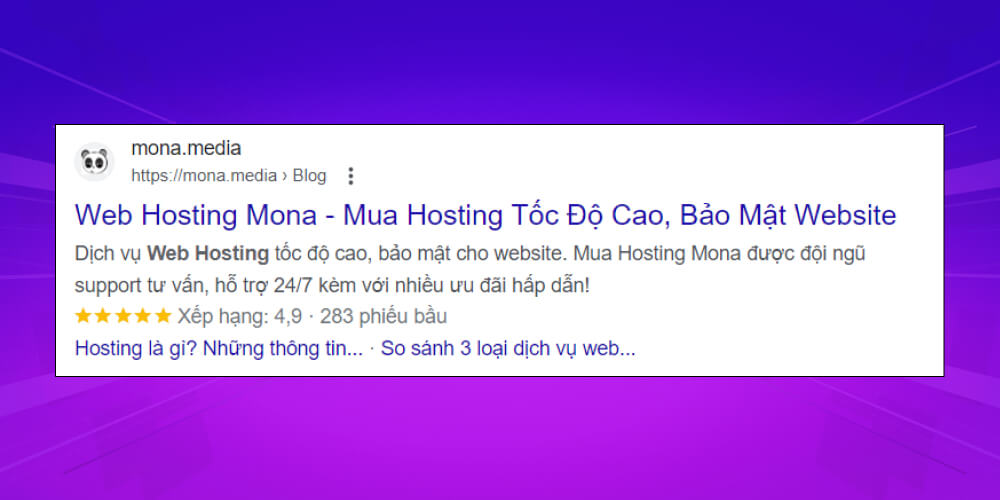
In short, to optimize meta tags for a product page, you can apply these strategies:
Think of your meta tag as the first hello to your customers. If it is appealing enough, they will want to learn more about your product.
Below are An example of a good meta description:
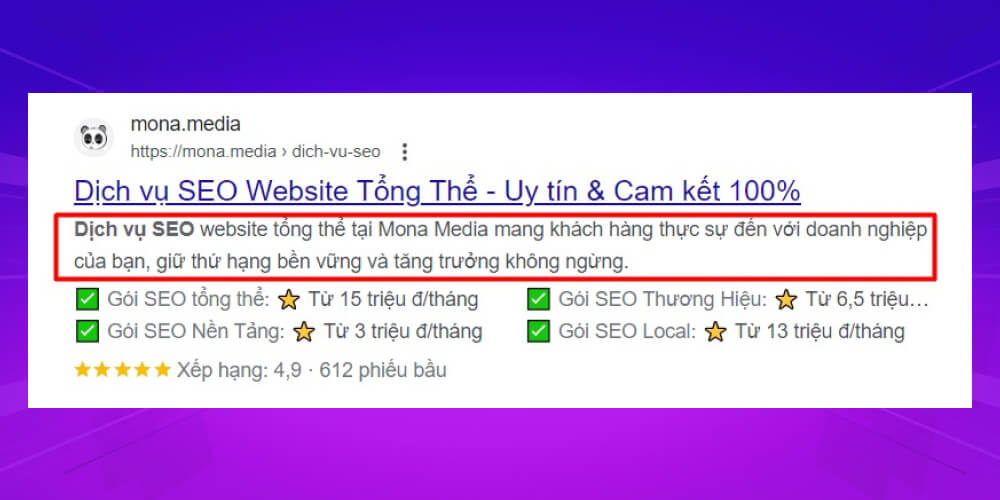
This meta description is only 30 words and 147 characters, yet it brings out the keyword “dịch vụ SEO” (SEO services) along with what users want:
Below is a page with a weak meta description. It has 15 words and 69 characters in total. It is too short, the content is shallow, and nothing stands out:
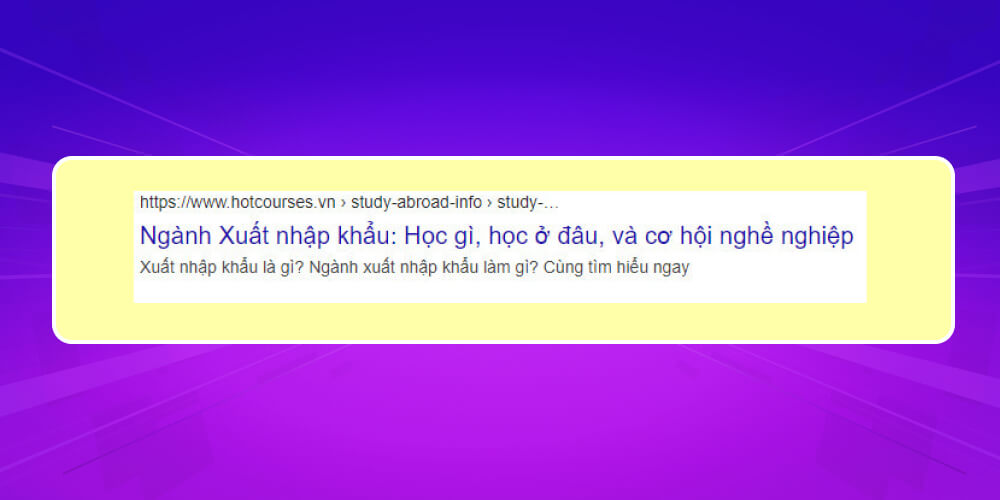
1- How do you write a meta description that draws readers in?
Some practical tips for writing a meta description that draws readers in:
2- Is the meta description tag important?
How important is the meta description tag? Google describes its role like this: the meta description informs and attracts readers with a short summary closely tied to the page's content. It works like an ad, introducing the page and convincing users that it has exactly what they are searching for.
So Google itself says the meta description is an important part of a page. From what MONA has covered above, you can see how much the tag matters for attracting visits, clarifying the page topic and building trust with searchers.
3- Does the meta description affect website rankings?
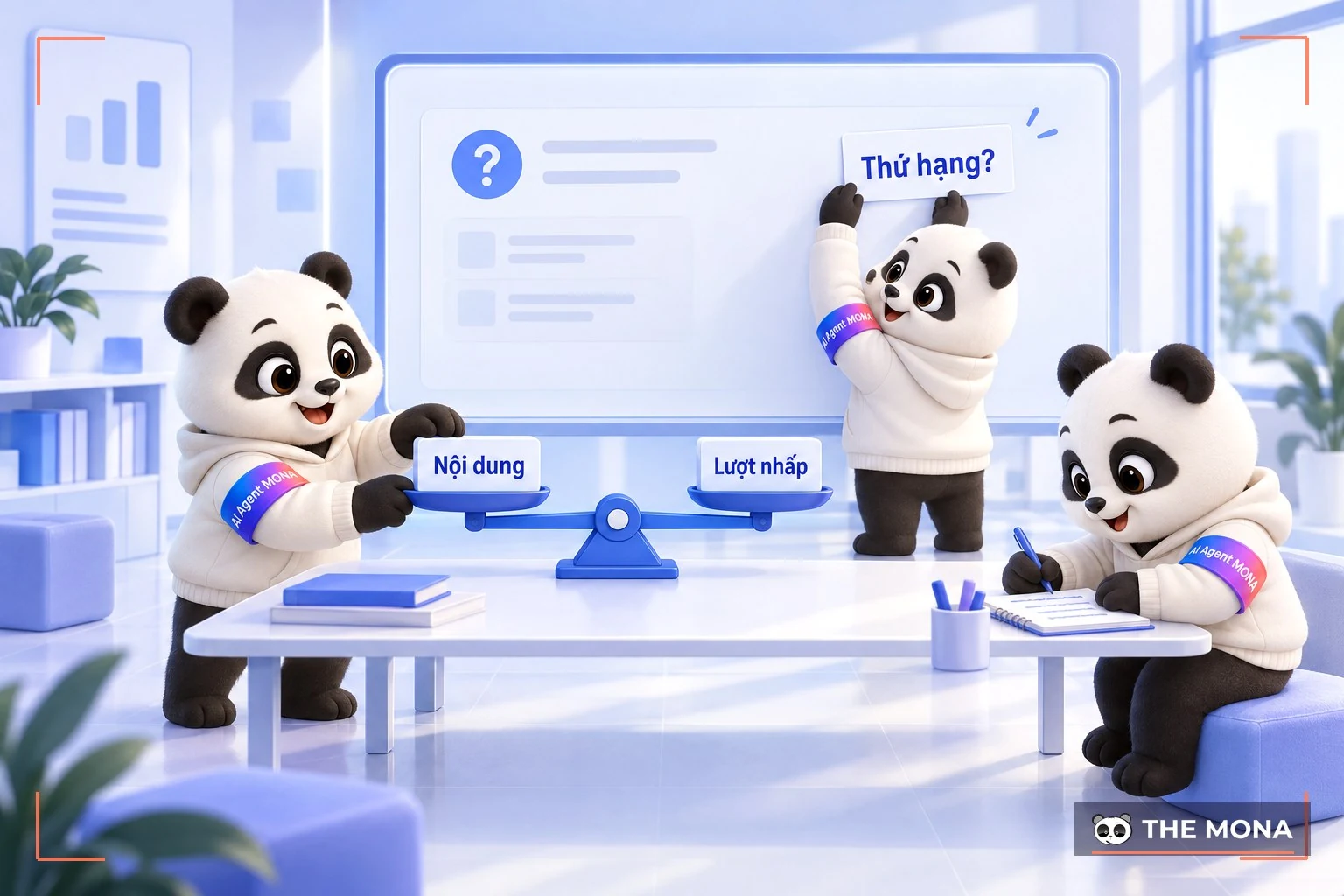
The answer is YES! Google assesses the quality of a page's content, including the meta description, when deciding a site's ranking.
4- How do you check the meta description on a web page?
To check whether your meta tags are working, search for the page on Google using its keyword. You can also use a tool such as HEY META which is another widely used way to check the search description.
5- Where do you edit the meta description?
You can edit the meta description directly in the SEO tab or in Yoast SEO. After editing, click “Update” to finish.
That wraps up this article. You now know what the meta description is and how to optimize it for your website. A good meta description raises clicks and can help your site reach the top of search results. We hope these tips for writing an SEO-friendly meta description and the information on meta tags from MONA help you create quality meta tags that push your website toward the top. Good luck!
-> Read more:

CEO & Founder · The MONA
Founder of The MONA, who built a services company of 200+ staff with 14,000+ projects delivered. Khánh Hùng shares how he thinks about building systems that run themselves, automating a business, and the real lessons from delivering projects at MONA.
 1,6K
1,6K



Professional website
design services
Own a website with a beautiful, 100% exclusive design and a lifetime warranty, with the ability
to expand features flexibly as your business grows, starting today!



NHẬN TƯ VẤN SEO MIỄN PHÍ !








 MONA will never sell your information or send you spam
MONA will never sell your information or send you spam
MONA will never sell your information or send you spam


 MONA will never sell your information or send you spam