
 MONA OS 2.0
 Hợp tác với MONA


 Tự động hoá doanh nghiệp
 Cẩm nang SEO
 Digital Marketing
 Kinh nghiệm thiết kế website
 Hạ Tầng Server
 Giáo dục


 VI
 EN


















Message us on
Zalo Official


 ProductsNew

 ProductsProducts
 Mới ra mắtKHA AI 2027App tự edit video, tự đăng mọi mạng xã hội, 2 phút mỗi ngày










 Thiết kế websiteVừa đẹp vừa thuyết phục được khách.
Dịch vụ SEOKéo về khách đang tìm đúng thứ anh chị bán.
 Tư vấn digital marketingKéo khách từ nhiều kênh, đo bằng số thật.
Quay video doanh nghiệpVideo giới thiệu công ty, nhà xưởng, đội ngũ.
 MớiDựng video AIDựng phim câu chuyện công ty bằng AI.
 Custom software developmentCRM, ERP and HRM built for your business.
 Viết AI Agent theo yêu cầuĐặt riêng một trợ lý AI cho đúng việc của mình.
 Tư vấn chuyển đổi AIĐưa AI vào vận hành của cả công ty.
NewMONA LMSManagement for centers and schools.
MONA SkillHubInternal training for company staff.
 NHTQ systemEnd-to-end China–Vietnam shipping operations.
MONA JMSManagement for gold, diamond and pawn shops.
 MONA E-LearningA website with every feature you need to sell courses.
 How to sell online courses (course)More than 30 free lessons on selling courses on autopilot.
 MONA Cloudmonacloud.vnServers to get your apps and websites running.
 MONA Basemonabase.vnPostgres database, sign-in and file storage.
 MONA Mailmonamail.vnSend OTP, order and invoice emails from your software.
 MONA Paymonapay.vnAccept bank transfers via VietQR and notify your software when the money arrives.
 MONA eInvoiceComing soonIssue e-invoices that meet tax standards.
Gấu CườiTrả lời khách 24/7 trên web, Fanpage, Zalo và thu lead cho sale.
 Gấu TeleSalesGọi điện tư vấn, chăm khách như tổng đài viên thật.
Dê CườiTư vấn và chốt đơn cho shop ngay trong khung chat.
Gấu WebmasterNhắn nhóm Zalo là website được sửa xong.
 Gấu Pháp ChếSoạn hợp đồng, rà điều khoản trong vài phút.
 Gấu Báo GiáLên báo giá đúng mẫu và gửi khách ngay.
 AI chăm sóc khách hàngTheo dõi và giữ chân khách hàng cũ.
 Gấu Tuyển DụngLọc hồ sơ, hẹn lịch, phỏng vấn ứng viên.
 Mới ra mắt
KHA AI 2027
Xây kênh chuyên gia 2 phút mỗi ngày
Quay bằng điện thoại, AI tự edit video, tự đăng lên 16 nền tảng và tự trả lời bình luận, tin nhắn.
872.625lượt xem trên kênh CEO MONA sau 35 ngày
 Anh Khánh HùngCEO MONA đang dùng mỗi ngày
Xem app làm được gì
 AI
Gấu Cười MONA ĐANG TỰ XÀITrả lời khách 24/7 trên website, Zalo OA, Messenger và thu lead về cho sale.
Dê CườiChốt đơn bán lẻ và sàn: Shopee, TikTok Shop, web. Chăm cả khách sỉ, đại lý.
Gấu WebmasterCập nhật nội dung, tối ưu SEO website mỗi ngày.
Gấu TeleSalesGọi điện tư vấn, chăm khách như tổng đài viên thật.
Gấu Tuyển DụngLọc hồ sơ, hẹn lịch, phỏng vấn ứng viên tự động.
AI chăm sóc khách hàngGiữ khách cũ, cứu lead đã rớt cho phòng kinh doanh.
Gấu Pháp ChếSoạn hợp đồng, rà điều khoản trong vài phút.
Gấu Báo GiáLên báo giá đúng mẫu, gửi khách ngay khi có yêu cầu.
 Chuyển đổi AI toàn phầnGiải pháp tổng cho doanh nghiệp, 3 lớp triển khai.
 Viết AI Agent theo yêu cầuĐặt riêng một con AI gánh đúng nghiệp vụ của bạn.
 Custom softwareCRM, ERP and HRM with built-in AI automation.
 SEO & AEO thời đại AIĐược Google lẫn AI trích dẫn, không chỉ xếp hạng.
 Kiến thức AI cho doanh nghiệpBài phân tích, hướng dẫn ứng dụng AI vào vận hành.
 Free AI courses
 AI tools at work
App mới · KHA AI 2027
Xây kênh 2 phút mỗi ngày
AI tự edit video, tự đăng mọi mạng xã hội
Free consultation, 8am–10pm every day

16 September, 2025

Have you ever shared a link on Facebook only to see the wrong image or title? That is exactly when you need Open Graph. So what is Open Graph and why is it so important? This article from MONA Media will help you understand the benefits of Open Graph and give detailed steps to check and set up Facebook Open Graph, so your website looks professional and SEO-ready on social platforms.
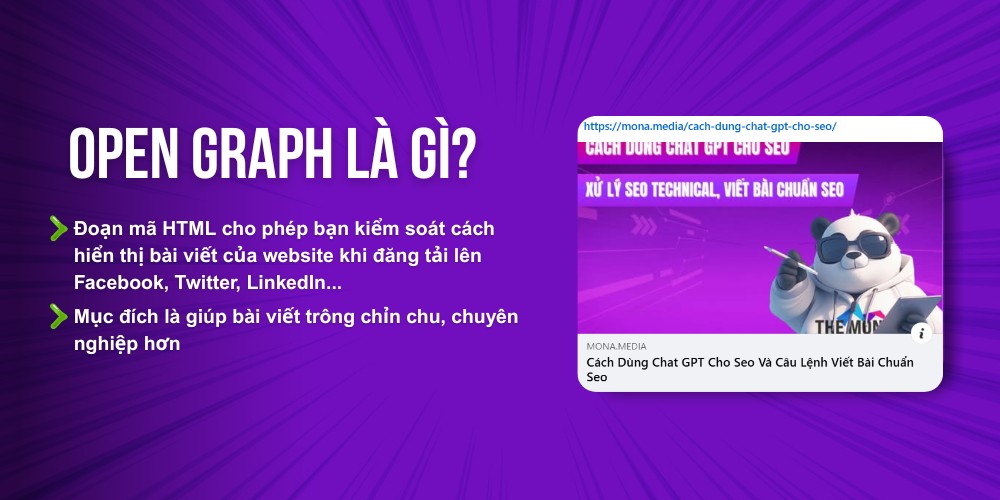
Open Graph is an HTML protocol that lets you SEO Expert control how your articles display when posted to social networks like LinkedIn and Facebook,… making them look polished and professional. In other words, you can decide the title, description and thumbnail through Open Graph meta tags (OG Tags), instead of letting Facebook or other platforms pick them at random.
For example: if you want to share an article about how to use Chat GPT for SEO, you can create Open Graph tags like this:
<meta property=”og:title” content=”How to Use Chat GPT for SEO and Prompts for SEO-Standard Writing” />
<meta property=”og:description” content=”Updated 2026 guide to GPT SEO, helping you work more efficiently and grow your website traffic sustainably.” />
<meta property=”og:image” content=”https://domain.com/uploads/seo-gpt.jpg” />
Where:
This way, when you share a link, your content looks complete and professional, making a strong impression from the very first appearance.
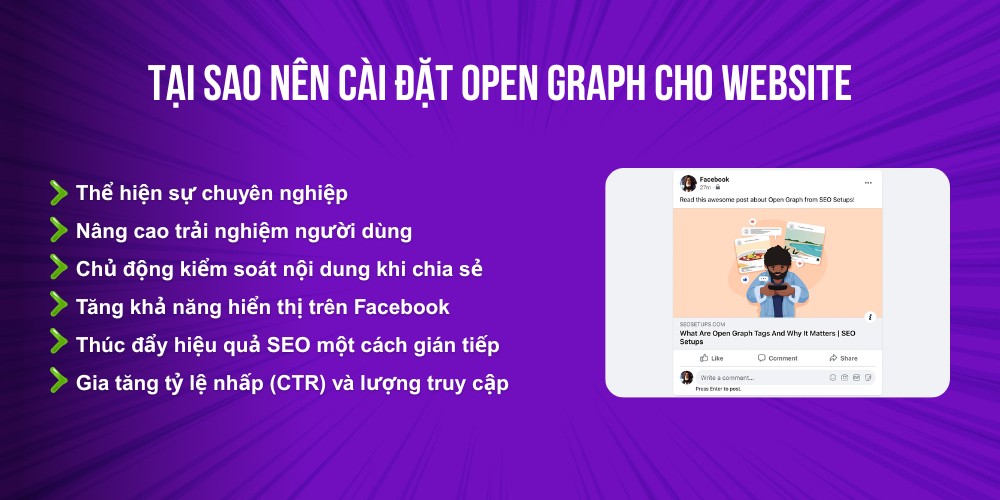
For businesses focusing on SEO and building their brand online, setting up Open Graph is a must, because this meta tag brings many strategic benefits. So what are the benefits of adding Open Graph?
You may also be interested in: 8+ ways to drive traffic from Instagram simple but effective
According to the latest update, Facebook publishes up to 17 Open Graph meta tags, but only a handful are core protocols that directly decide how your website looks when shared. To find out which Open Graph properties matter most, read the sections below:
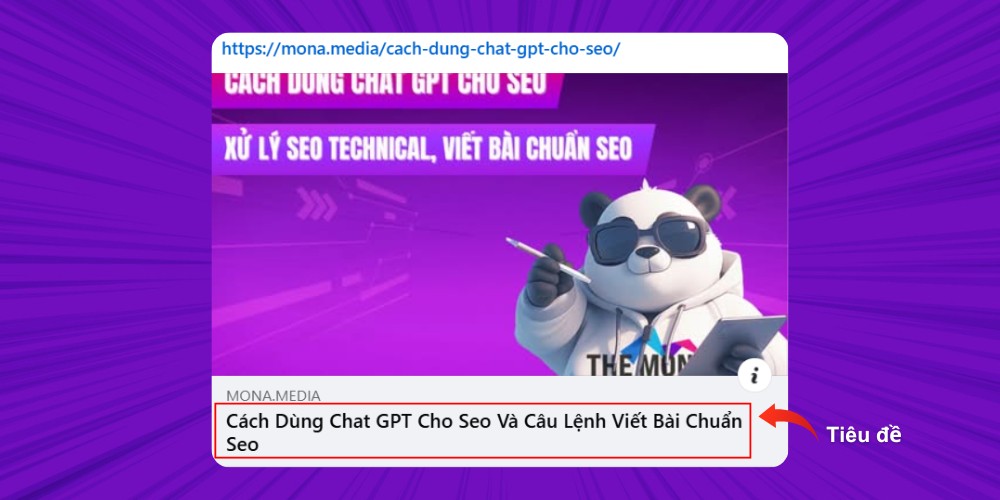
og:title defines the title shown when your post or web page is shared on Facebook, Zalo, LinkedIn, or any platform that supports Open Graph Facebook.
Example: <meta property=”og:title” content=”SEO Strategy 2026: Optimize Your Website to Break Through on Revenue” />
Best practices:
og:url specifies the exact URL of the page. This tag is important to avoid duplicated share data when one piece of content has several URLs (for example, URLs with parameters).
Example: <meta property=”og:url” content=”https://www.mona.media/chien-luoc-seo-2026″ />
Best practices: Always use the canonical URL to consolidate data (shares, likes, comments) under a single address.
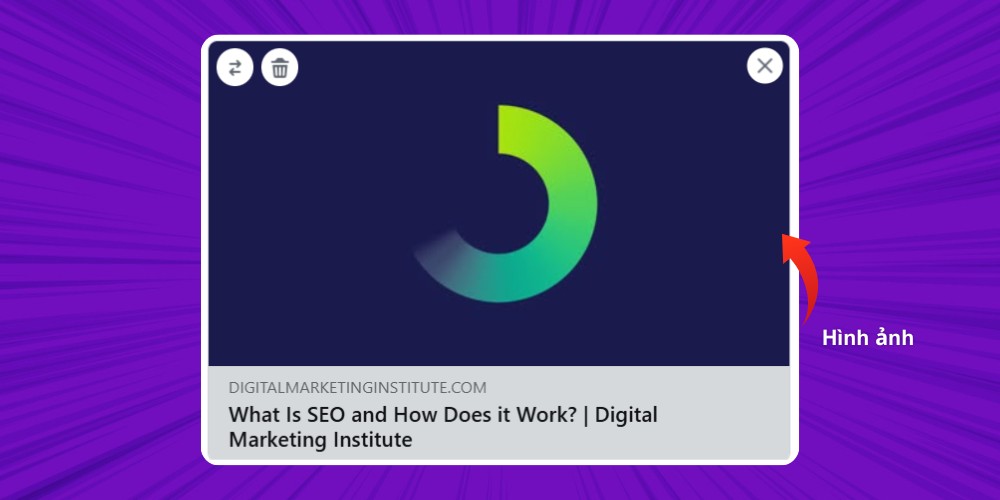
Of all the OG Tags, og:image has the strongest influence. It sets the thumbnail shown when the link is shared, and it is what grabs users at first glance.
Example: <meta property=”og:image” content=”https://mona.media/uploads/open-graph.jpg” />
Best practices:
og:type tells platforms what type of content the page holds, so Facebook can display it in the right context. For example, if you set og:type to article, Facebook adds details such as the author and publish date.
Example: <meta property=”og:type” content=”article” />
Best practices:
The og:locale tag lets you define the language and region your content is aimed at. This way, platforms like Facebook can show your post to the right audience for each language or country.
Example: <meta property=”og:locale” content=”vi_VN” />
In the example above, vi_VN means the content is written in Vietnamese for users in Vietnam. The locale value usually follows the format <language>_<country>, for example ja_JP for Japanese in Japan.
Best practices:
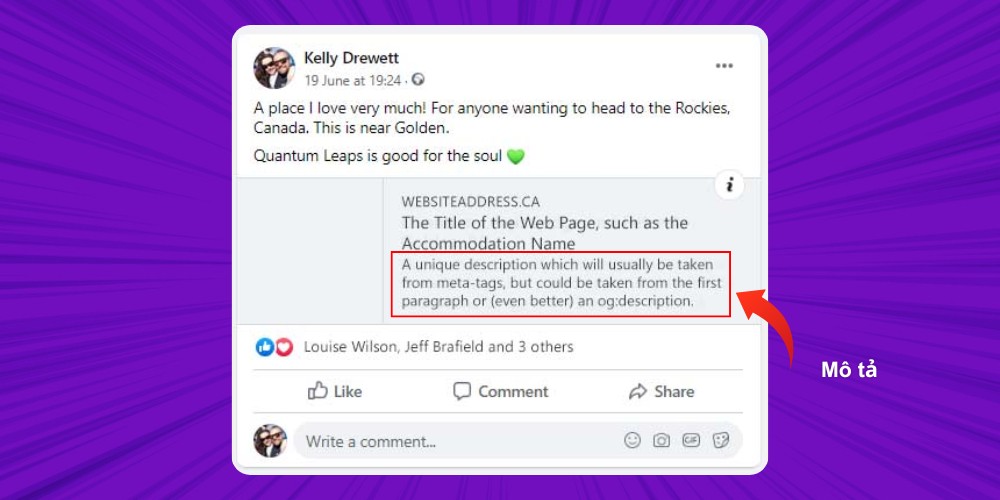
This property gives a short summary of the page. Although optional, og:description plays an important role in convincing users to click.
Example: <meta property=”og:description” content=”A guide to using Open Graph meta tags to optimize how your website appears on social media.” />
Best practices:
Besides the basic Open Graph tags, you can also use some advanced properties to extend how your website appears on social media, such as:
To optimize how your content looks when shared on social media, you can set up the Open Graph protocol for your website in two ways: using plugin SEO WordPress or inserting it manually with code. Both methods are simple and easy to carry out, so choose the one that fits your needs and platform.
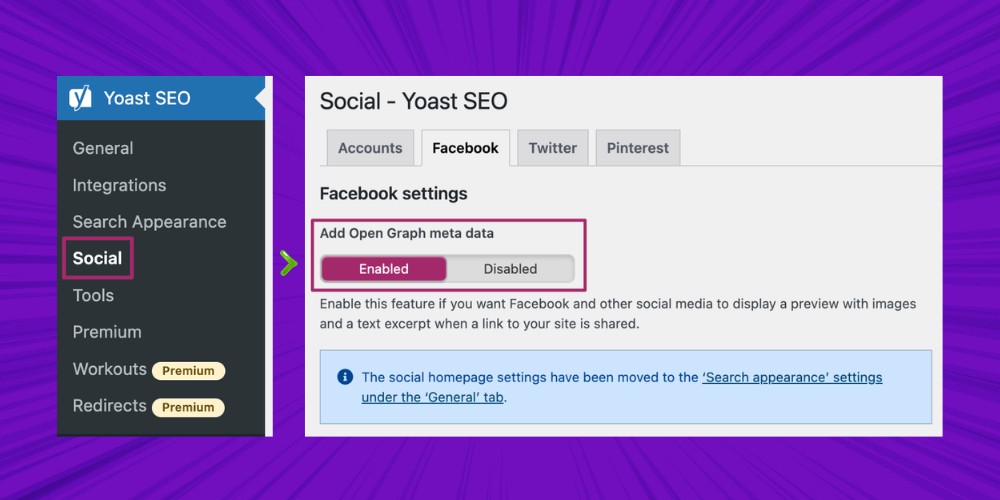
If your website runs on WordPress, the fastest way to add Open Graph meta tags is through a plugin Yoast SEO:
From now on, when you share a link, Facebook will pull the title, description, and image correctly thanks to the Open Graph Facebook tags.
If you prefer not to use a plugin, you can still add Open Graph meta tags directly to your website with these simple steps:
Step 1: Open the functions.php file, then add the code below inside the <?php ?>
function doctype_opengraph($output) {
return $output . ‘
xmlns:og=”http://opengraphprotocol.org/schema/”
xmlns:fb=”http://www.facebook.com/2008/fbml”‘;
}
add_filter(‘language_attributes’, ‘doctype_opengraph’);
Step 2: This code is automatically inserted into the <head> tag of your website. Next, add the following code:
function fb_opengraph() {
global $post;
if(is_single()) {
if(has_post_thumbnail($post->ID)) {
$img_src = get_the_post_thumbnail_url(get_the_ID(),’full’);
} else {
$img_src = get_stylesheet_directory_uri() . ‘wp-content/uploads/2026/08/open-graph-la-gi-cach-cai-dat-open-graph-toi-uu-cho-website.jpg’;
}
if($excerpt = $post->post_excerpt) {
$excerpt = strip_tags($post->post_excerpt);
$excerpt = str_replace(“”, “‘”, $excerpt);
} else {
$excerpt = get_bloginfo(‘description’);
}
?>
<meta property=”og:title” content=”<?php echo the_title(); ?>”/>
<meta property=”og:description” content=”<?php echo $excerpt; ?>”/>
<meta property=”og:type” content=”article”/>
<meta property=”og:url” content=”<?php echo the_permalink(); ?>”/>
<meta property=”og:site_name” content=”<?php echo get_bloginfo(); ?>”/>
<meta property=”og:image” content=”<?php echo $img_src; ?>”/>
<?php
} else {
return;
}
}
add_action(‘wp_head’, ‘fb_opengraph’, 5);
Step 3: Add the Open Graph tags to your website by inserting this code:
<meta property=”og:title” content=”<?php echo the_title(); ?>”/>
<meta property=”og:description” content=”<?php echo $excerpt; ?>”/>
<meta property=”og:type” content=”article”/>
<meta property=”og:url” content=”<?php echo the_permalink(); ?>”/>
<meta property=”og:site_name” content=”<?php echo get_bloginfo(); ?>”/>
<meta property=”og:image” content=”<?php echo $img_src; ?>”/>
Step 4: Use the statement below to declare the Open Graph meta tags:
add_action(‘wp_head’, ‘fb_opengraph’, 5);
Step 5: Attach the function you just created to the hook so the Open Graph tags are automatically inserted into the <head> section of your website.
So what is the fastest way to create Open Graph meta tags? If you want to generate Open Graph meta tags simply and save time, follow the instructions below:
Step 1: Choose an online Open Graph tag generator, such as:
Step 2: Fill in the required information (title, description, URL, and so on) in the matching fields, then press Enter to generate the code.
Step 3: Copy the generated code and paste it directly into your website's source code.
Setting up Open Graph correctly makes your website look better on social media, helps raise CTR, improves user experience, and strongly supports your overall marketing strategy . However, for lasting results, a business cannot stop at this technical optimization alone.
The professional website SEO services at MONA Media, we help you build a complete SEO strategy strategy, from optimizing your website infrastructure and running SEO Onpage/offpage work to using supporting tools such as Open Graph. That way, your website is not only friendly to Google but also attracts customers from many different channels.
At the same time, Facebook advertising services from MONA helps businesses turn content optimized with Open Graph into a powerful weapon on Facebook. Your ads will look clean and polished and reach the right potential customers, which raises engagement, lifts conversion, and makes better use of your budget.
To discuss in more detail and get the best solution for your business, contact MONA Media today.
When setting up Open Graph meta tags, many businesses run into errors that make shared links, especially on Open Graph Facebook, show wrong or missing information. Here are the two most common errors to watch for:

This is the most common error when setting up Open Graph meta tags: a Facebook user clicks a shared link from your website and sees no image, or just an empty frame. The usual causes are:
This error happens when Open Graph meta tags have wrong syntax or miss key information. For example, you enter a wrong value in og:image or og:url, or leave og:title empty, so the content shows incorrectly or Facebook cannot recognize it.
Can Open Graph be used for chatbots, mobile apps, or email?
Yes,, but each is used a little differently. Specifically:
How do you combine Open Graph with growth hacking techniques for a marketing campaign?
To use Open Graph for growth hacking, you can try these approaches:
Understanding what is Open Graph and applying the correct setup will raise CTR, improve user experience, and support SEO Google effectively. When your website looks good and correct on social media, your brand scores points at first glance. If you want your website to truly break through on Google and other platforms, contact MONA Media for free consulting and to receive detailed SEO quote .


CEO & Founder · The MONA
Founder of The MONA, who built a services company of 60+ staff with 14,000+ projects delivered. Khánh Hùng shares how he thinks about building systems that run themselves, automating a business, and the real lessons from delivering projects at MONA.
 1,5K




Professional website
design services
Own a website with a beautiful, 100% exclusive design and a lifetime warranty, with the ability
to expand features flexibly as your business grows, starting today!



NHẬN TƯ VẤN SEO MIỄN PHÍ !






 MONA will never sell your information or send you spam


 MONA will never sell your information or send you spam
