
 MONA OS 2.0


 Tự động hoá doanh nghiệp
 Cẩm nang SEO
 Digital Marketing
 Kinh nghiệm thiết kế website
 Hạ Tầng Server
 Giáo dục


 VI
VI
 EN
EN











Message us on
Zalo Official


 ProductsNew

 ProductsProducts
 Mới ra mắtKHA AI 2027App tự edit video, tự đăng mọi mạng xã hội, 2 phút mỗi ngày










 Website designLooks good and wins customers over.
SEO servicesBrings in customers searching for exactly what you sell.
Website designLooks good and wins customers over.
SEO servicesBrings in customers searching for exactly what you sell.
 Tư vấn digital marketingKéo khách từ nhiều kênh, đo bằng số thật.
Corporate video productionVideos introducing your company, factory and team.
Tư vấn digital marketingKéo khách từ nhiều kênh, đo bằng số thật.
Corporate video productionVideos introducing your company, factory and team.
 NewAI video productionCompany story films made with AI.
 Custom software developmentCRM, ERP and HRM built for your business.
 Viết AI Agent theo yêu cầuĐặt riêng một trợ lý AI cho đúng việc của mình.
 Tư vấn chuyển đổi AIĐưa AI vào vận hành của cả công ty.
NewMONA LMSManagement for centers and schools.
MONA SkillHubInternal training for company staff.
Tư vấn chuyển đổi AIĐưa AI vào vận hành của cả công ty.
NewMONA LMSManagement for centers and schools.
MONA SkillHubInternal training for company staff.
 NHTQ systemEnd-to-end China–Vietnam shipping operations.
MONA JMSManagement for gold, diamond and pawn shops.
NHTQ systemEnd-to-end China–Vietnam shipping operations.
MONA JMSManagement for gold, diamond and pawn shops.
 MONA E-LearningA website with every feature you need to sell courses.
 How to sell online courses (course)More than 30 free lessons on selling courses on autopilot.
 MONA Cloudmonacloud.vnServers to get your apps and websites running.
 MONA Basemonabase.vnPostgres database, sign-in and file storage.
 MONA Mailmonamail.vnSend OTP, order and invoice emails from your software.
 MONA Paymonapay.vnAccept bank transfers via VietQR and notify your software when the money arrives.
 MONA eInvoiceComing soonIssue e-invoices that meet tax standards.
Gấu CườiTrả lời khách 24/7 trên web, Fanpage, Zalo và thu lead cho sale.
MONA eInvoiceComing soonIssue e-invoices that meet tax standards.
Gấu CườiTrả lời khách 24/7 trên web, Fanpage, Zalo và thu lead cho sale.
 Gấu TeleSalesGọi điện tư vấn, chăm khách như tổng đài viên thật.
Dê CườiTư vấn và chốt đơn cho shop ngay trong khung chat.
Gấu WebmasterNhắn nhóm Zalo là website được sửa xong.
Gấu TeleSalesGọi điện tư vấn, chăm khách như tổng đài viên thật.
Dê CườiTư vấn và chốt đơn cho shop ngay trong khung chat.
Gấu WebmasterNhắn nhóm Zalo là website được sửa xong.
 Gấu Pháp ChếSoạn hợp đồng, rà điều khoản trong vài phút.
 Gấu Báo GiáLên báo giá đúng mẫu và gửi khách ngay.
 AI chăm sóc khách hàngTheo dõi và giữ chân khách hàng cũ.
 Gấu Tuyển DụngLọc hồ sơ, hẹn lịch, phỏng vấn ứng viên.
 Mới ra mắt
KHA AI 2027
Xây kênh chuyên gia 2 phút mỗi ngày
Quay bằng điện thoại, AI tự edit video, tự đăng lên 16 nền tảng và tự trả lời bình luận, tin nhắn.
350.475lượt xem trên kênh CEO MONA sau 20 ngày
Mới ra mắt
KHA AI 2027
Xây kênh chuyên gia 2 phút mỗi ngày
Quay bằng điện thoại, AI tự edit video, tự đăng lên 16 nền tảng và tự trả lời bình luận, tin nhắn.
350.475lượt xem trên kênh CEO MONA sau 20 ngày
 Anh Khánh HùngCEO MONA đang dùng mỗi ngày
Xem app làm được gì
Anh Khánh HùngCEO MONA đang dùng mỗi ngày
Xem app làm được gì
 AI
Gấu Cười MONA ĐANG TỰ XÀITrả lời khách 24/7 trên website, Zalo OA, Messenger và thu lead về cho sale.
Dê CườiChốt đơn bán lẻ và sàn: Shopee, TikTok Shop, web. Chăm cả khách sỉ, đại lý.
Gấu WebmasterCập nhật nội dung, tối ưu SEO website mỗi ngày.
Gấu TeleSalesGọi điện tư vấn, chăm khách như tổng đài viên thật.
Gấu Tuyển DụngLọc hồ sơ, hẹn lịch, phỏng vấn ứng viên tự động.
AI chăm sóc khách hàngGiữ khách cũ, cứu lead đã rớt cho phòng kinh doanh.
Gấu Pháp ChếSoạn hợp đồng, rà điều khoản trong vài phút.
Gấu Báo GiáLên báo giá đúng mẫu, gửi khách ngay khi có yêu cầu.
AI
Gấu Cười MONA ĐANG TỰ XÀITrả lời khách 24/7 trên website, Zalo OA, Messenger và thu lead về cho sale.
Dê CườiChốt đơn bán lẻ và sàn: Shopee, TikTok Shop, web. Chăm cả khách sỉ, đại lý.
Gấu WebmasterCập nhật nội dung, tối ưu SEO website mỗi ngày.
Gấu TeleSalesGọi điện tư vấn, chăm khách như tổng đài viên thật.
Gấu Tuyển DụngLọc hồ sơ, hẹn lịch, phỏng vấn ứng viên tự động.
AI chăm sóc khách hàngGiữ khách cũ, cứu lead đã rớt cho phòng kinh doanh.
Gấu Pháp ChếSoạn hợp đồng, rà điều khoản trong vài phút.
Gấu Báo GiáLên báo giá đúng mẫu, gửi khách ngay khi có yêu cầu.
 Chuyển đổi AI toàn phầnGiải pháp tổng cho doanh nghiệp, 3 lớp triển khai.
 Viết AI Agent theo yêu cầuĐặt riêng một con AI gánh đúng nghiệp vụ của bạn.
 Custom softwareCRM, ERP and HRM with built-in AI automation.
 SEO & AEO thời đại AIĐược Google lẫn AI trích dẫn, không chỉ xếp hạng.
 Kiến thức AI cho doanh nghiệpBài phân tích, hướng dẫn ứng dụng AI vào vận hành.
 Free AI courses
 AI tools at work
App mới · KHA AI 2027
Xây kênh 2 phút mỗi ngày
AI tự edit video, tự đăng mọi mạng xã hội
Free consultation, 8am–10pm every day
AI tools at work
App mới · KHA AI 2027
Xây kênh 2 phút mỗi ngày
AI tự edit video, tự đăng mọi mạng xã hội
Free consultation, 8am–10pm every day

15 June, 2023

GDN, or Google Display Network, is one of the ad types used by businesses of all sizes around the world. So what is GDN? How does it work and where do the ads appear? And how do you run GDN for the best results? Let's MONA Media find out in the article below.
What is GDN? GDN stands for Google Display Network, an advertising format that lets businesses place banners or show ad content as images, video, text and more across Google's network of partner websites.
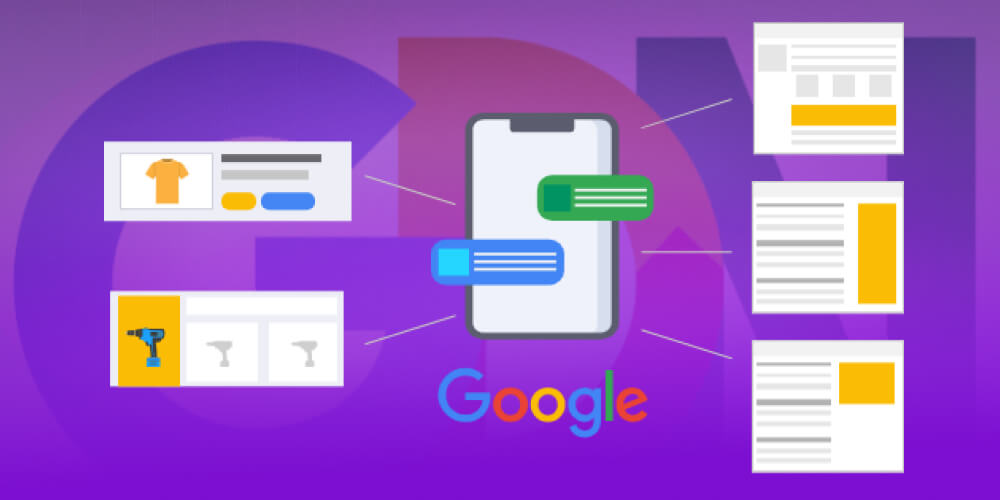
This format works in many fields such as news, services, fashion, sports and travel. That is why GDN is regarded as one of the online marketing tools that deliver strong results for businesses on the market today.
≫ See more: Google Shopping Ads Explained: A Detailed Guide
You may not know that choosing the Google Display Network lets your ads appear on 2 million websites, which is equivalent to reaching more than 90% of internet users,through display on websites, mobile apps, video, Gmail and more.
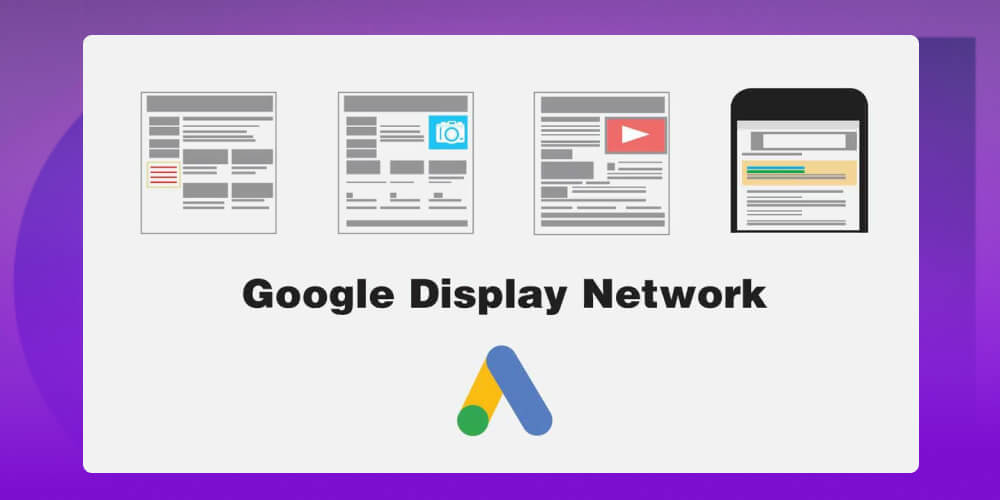
Where ads appear is decided by your campaign setup and the targeting
you choose, such as:
Note: Depending on your targeting setup, an ad placement may or may not relate to the content of the ad.
What is GDN and how does Google Display Network work? There are two main ways it works:
With placement targeting, a business can pick a specific website, app or video from GDN's website available network according to the Target it has set, in order to run ads.
Contextual advertising, on the other hand, runs ads based on topics and keywords the business has chosen. Google analyzes the main topic, content, language, page structure and link structure of the sites that carry ads and checks how well they match the business's topic. Google Ads then picks the most suitable sites to show the ad.
Google Display Network supports many ad formats, giving businesses more flexibility in getting their message to customers. These are the most common:
The simplest type of ad, made up of a headline, a URL and a few short lines of description. It is easy to create, low in cost and good for testing many messages. However, it is less visual, so it is harder to catch the eye than an image or video.
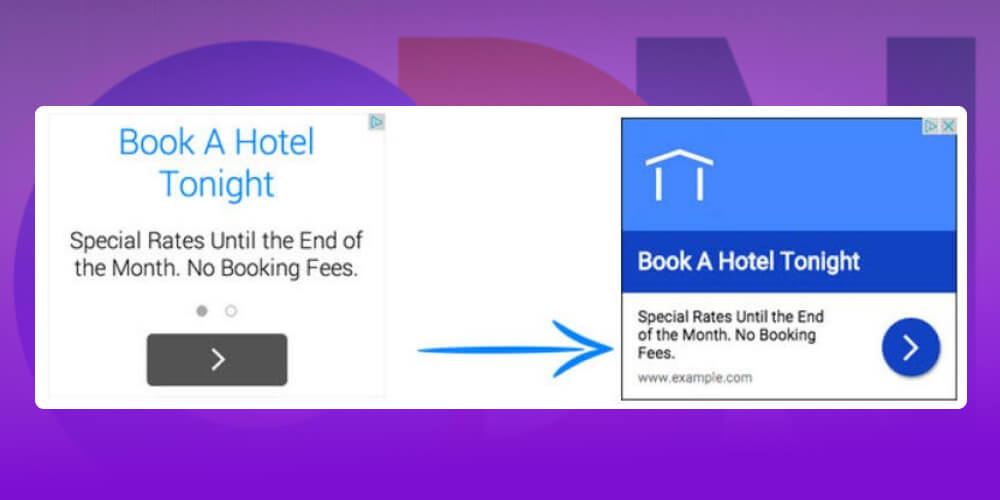
These combine animated images, effects or interactive elements to attract attention. They usually give an engaging experience and hold users' attention longer. However, they cost more to produce and do not suit every campaign.
Static or animated banners designed to catch the eye, usually shown in many places across a website. Image ads help a brand stand out and be remembered.
Most often shown on YouTube or in apps on the GDN network, in short or long form, skippable or not. Video gets a message across vividly, with emotion, and raises brand recognition.

A flexible ad type where Google automatically adjusts the size and layout to fit the available space. You only upload images, headlines and descriptions, and the system optimizes the rest.
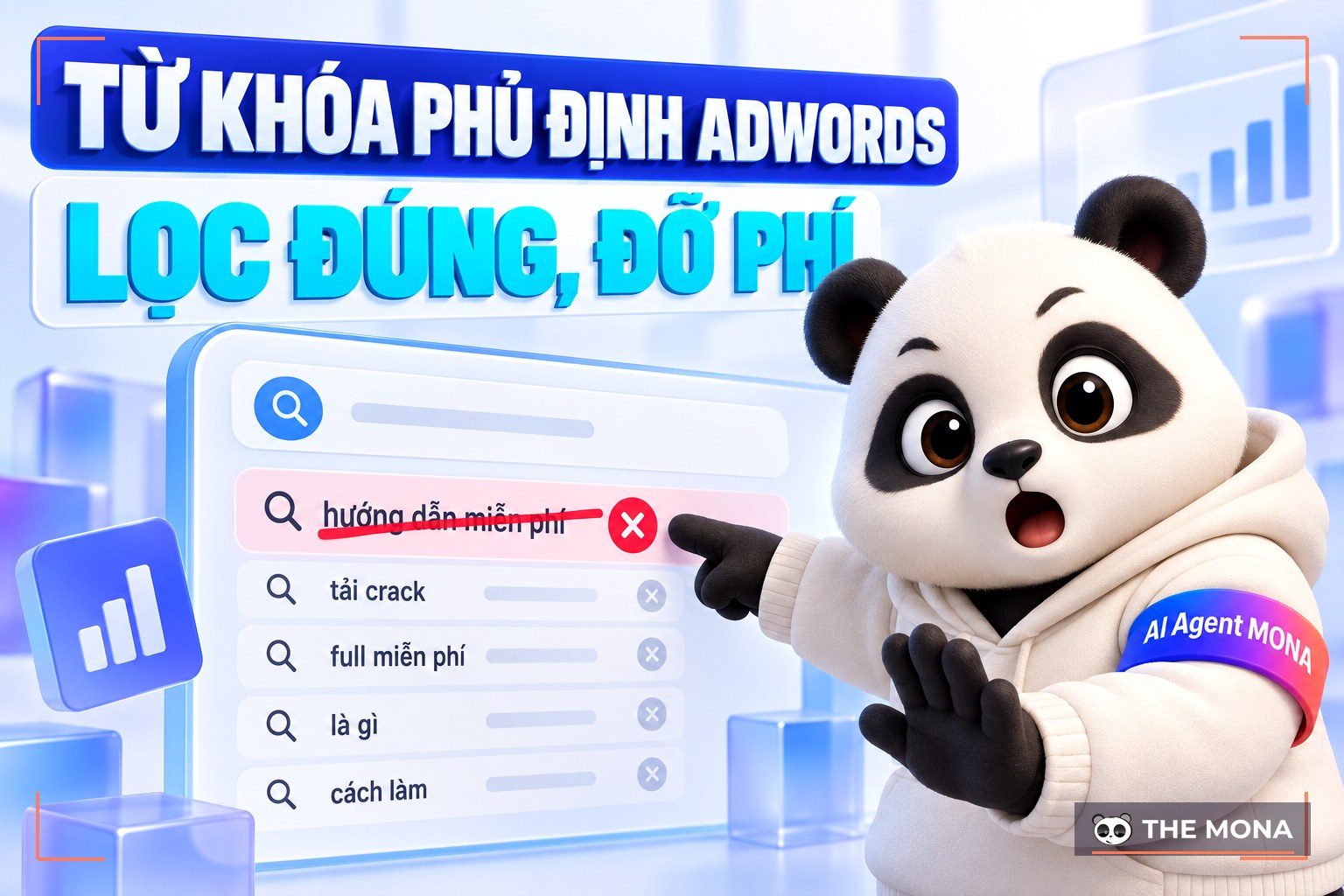
≫ See more: Negative Keywords in Adwords: A Guide to Using Negative Keywords Effectively
Google Display Network is a popular online advertising channel with many benefits for expanding reach and attracting customers. But like any form of advertising, GDN has its own limits that businesses need to know in order to use it well.
Google Display Network is one of the most powerful online advertising channels, with many benefits for reaching and winning customers.
Wide reach: GDN covers more than 2 million websites, apps and platforms, helping your brand reach more than 90% of internet users.
Low cost of reach: CPC on GDN is usually cheaper than search ads, saving budget while still reaching many potential customers.
Stronger brand recognition: With images, video and varied display formats, GDN makes ads stand out and stay in users' minds.
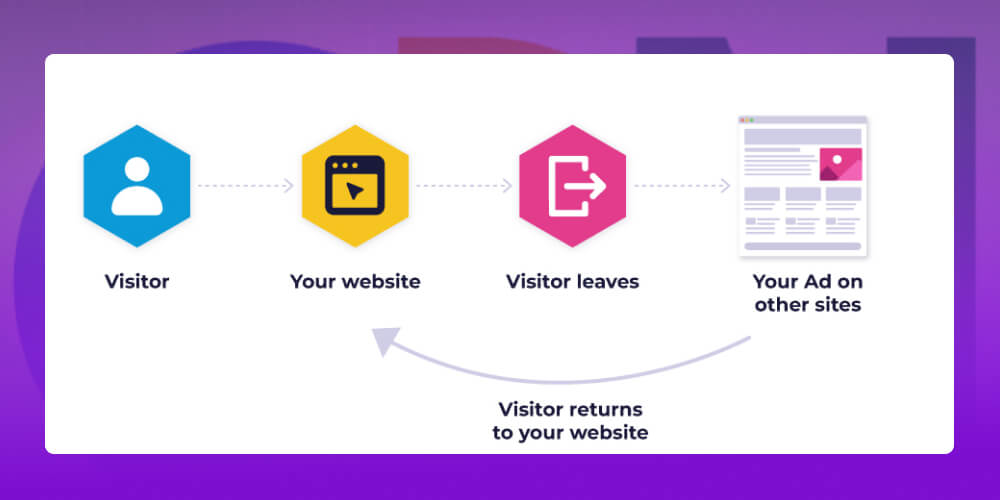
Effective remarketing: GDN lets you follow up with people who have visited your website, remind them to come back and raise the chance of conversion.
Precise targeting: Customize your audience by interests, behavior, demographics, keywords or even individual websites, so your ads reach "the right people in the right place."
Easy measurement and optimization: Detailed reports let you track performance, evaluate and adjust campaigns for the best results.

Alongside its clear benefits, Google Display Network (GDN) has some limits that businesses should weigh before using it:
High advertising cost: GDN is usually a long-term campaign and needs a steady budget to build brand recognition.
Hard to control results: Ads sometimes appear on unrelated websites, wasting budget.
No control over user behavior: Ads can only target audiences by interests or behavior; they cannot change what users do.
Depends on many factors: Results depend on ad creative quality, target audience, budget and even timing, so constant optimization is needed.
GDN offers several display campaign types, so businesses can choose by goal: building brand awareness, attracting potential customers, or following up with people who have already visited the website.
The standard display campaign is one of the three GDN display campaign types, and the most basic one on Google Display Network. With this campaign you have full control over the audience you want to reach. So once you know exactly who your customers are and what you want to tell them, this is the better choice.
The smart display campaign shows your ads across Google's display network in many formats, reaching more targets and audiences without you having to recreate content or a bidding strategy for each group.
With a smart display campaign, however, you have less time to create content and test combinations, because Google tests and optimizes the ad formats for you automatically.
A remarketing campaign is a display campaign aimed at people who have visited your website or interacted with your business. Instead of reaching new people, it keeps reminding potential customers about you, so they are more likely to return and convert.
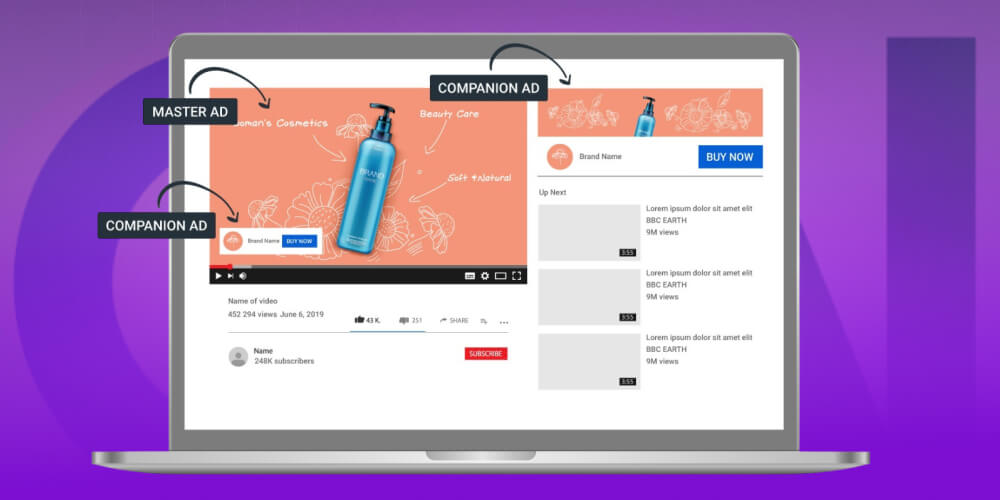
For example, a customer looks at running shoes on your website but does not buy. When they visit news sites or other social platforms later, your running shoe ads keep appearing and encourage them to come back and complete the order.
≫ See more: The business's Google Ads Payment Methods Quick and Simple
To start creating a GDN ad campaign, sign in to your Google Ads account.
In the Google Ads interface, in the left menu, select "Campaigns" → click “+ Create campaign" to start setting up a new campaign.
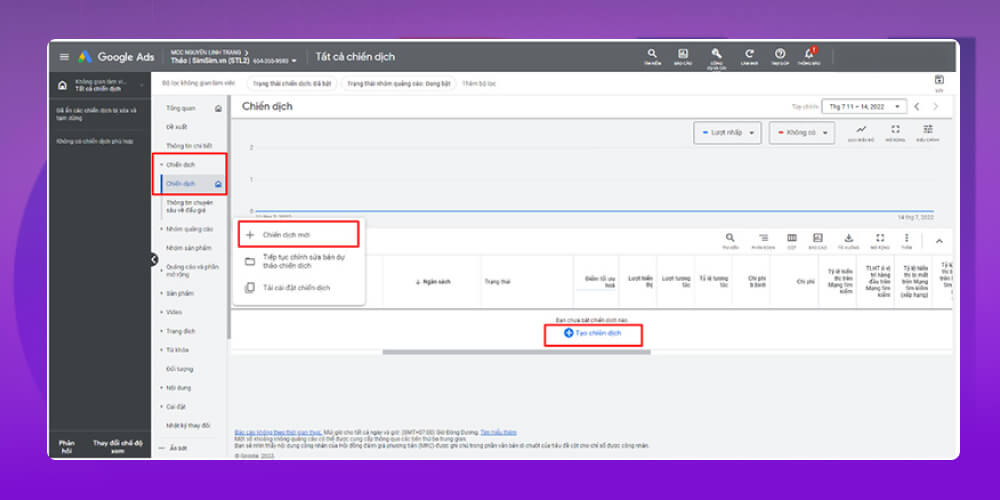
Before creating a new campaign, Google asks "What is your advertising goal?". You can choose goals such as Sales, Leads, Website traffic, Product and brand consideration, Brand awareness and reach, or App promotion.
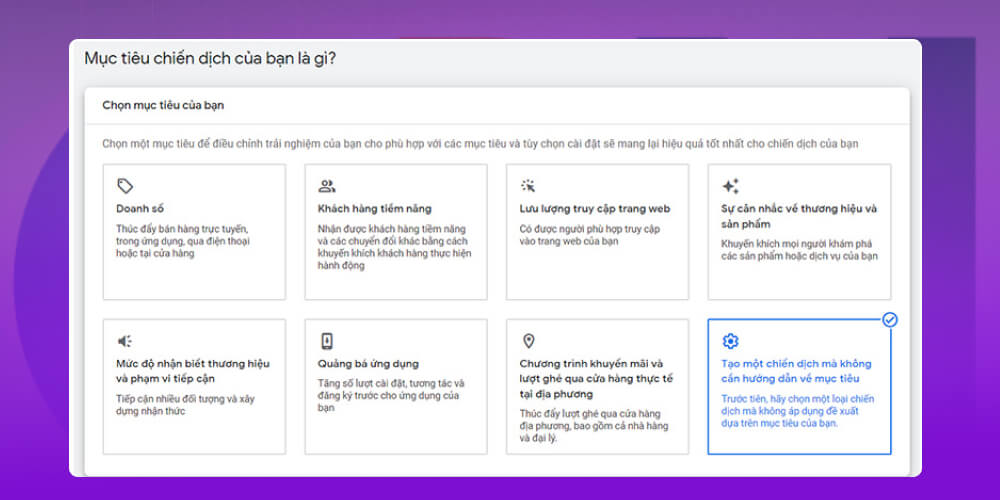
For each goal, Google suggests suitable campaign types. For example, if you choose website traffic, you can run Search, Display, Video or Shopping campaigns. If you have no specific idea yet, you can also choose create a campaign without a goal and set it up yourself.
Although it is called a "subtype", think it over carefully, because you cannot change it after choosing. Google currently has 3 campaign subtypes: standard display campaign, smart display campaign and Gmail ad campaign.
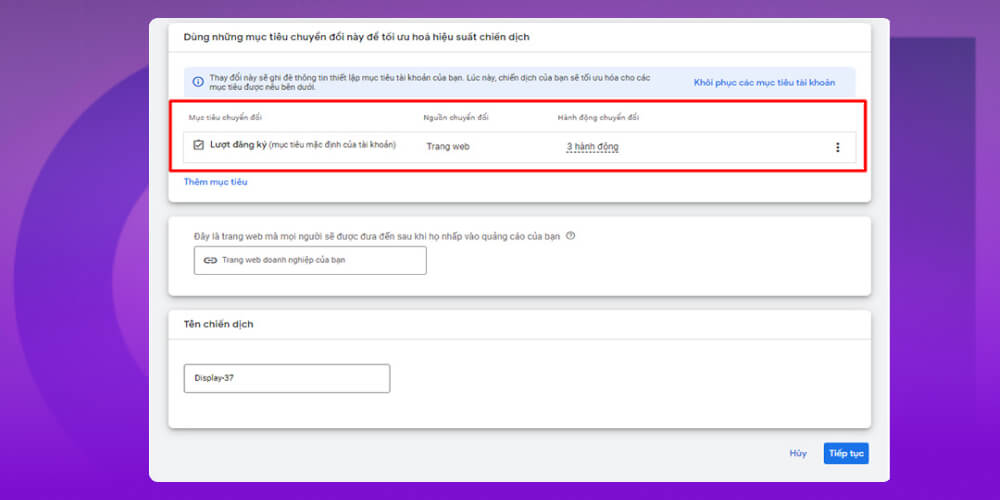
At this step, choose the conversion type the system should focus on optimizing, and give the campaign a clear name so it is easy to manage. If your goal is not in the list, you can click "Add goal" to add it. If you don't need a goal, click the "…" icon next to it and select "Clear”.
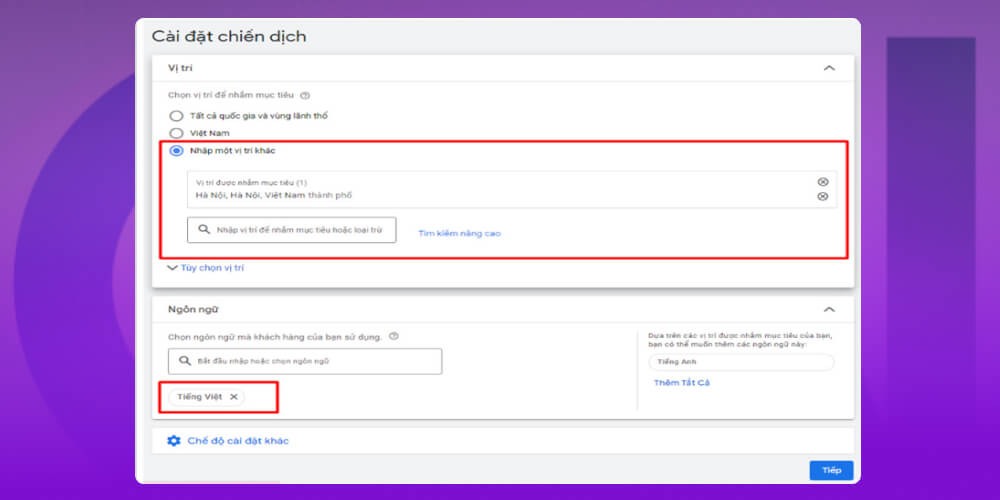
In campaign settings, you can choose the geographic location and language for your ads. Besides targeting, you can also exclude areas you do not want, for example running ads across the whole United States but excluding one specific state. Make sure the language matches your ad content so you reach the right customers.
Your budget decides how often your ads appear, and your bidding strategy decides how Google spends that budget to reach your goal. On Google Display Network you can choose automated, smart or manual bidding, depending on your strategy.
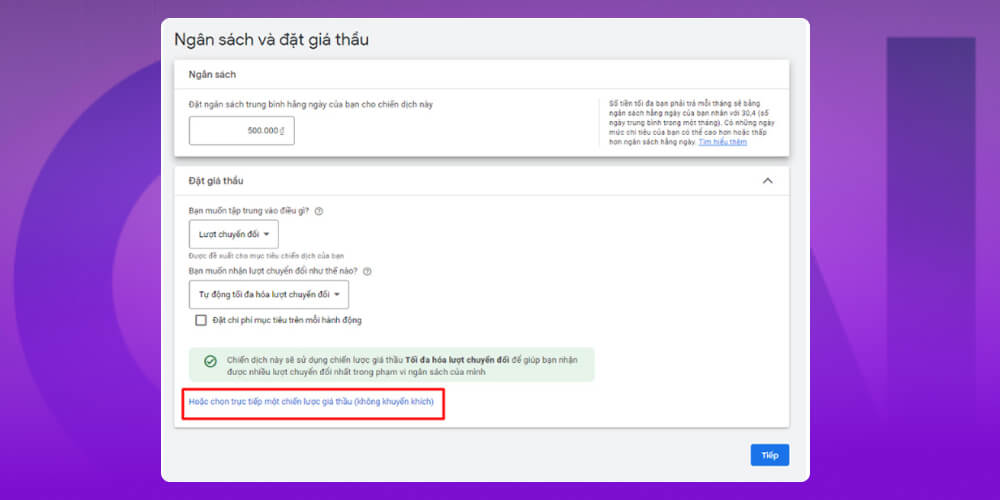
Daily budget: This is the average amount you want to spend each day. For example, if you set 200,000 VND/day, your monthly spend will be about 6,080,000 VND (200,000 x 30.4). Some days may cost more and some less, but spending will not exceed this average.
Bidding strategies:
Targeting is an important step in online advertising that you cannot skip. There are two kinds: audience targeting and content targeting. It helps you find not only the right audience but also the right place and time, which contributes to the success of your ad messages.
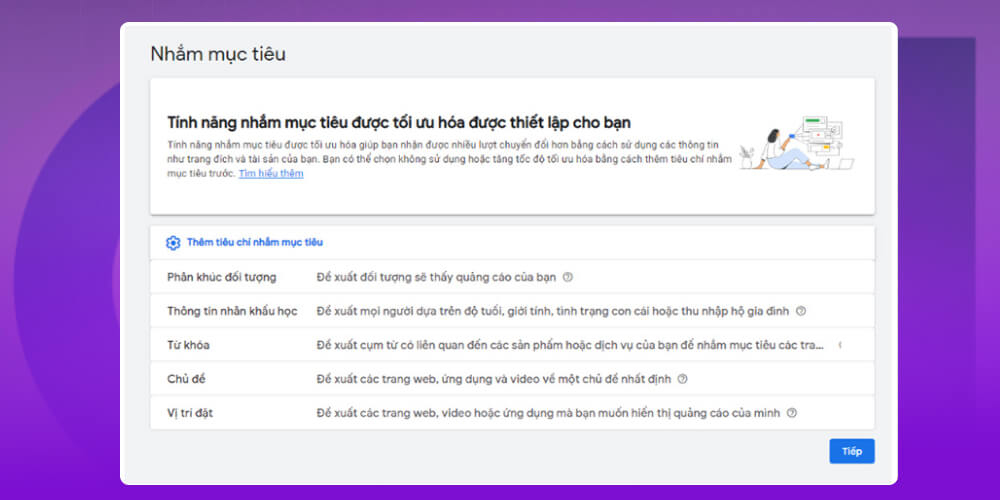
Google Display Network lets you reach users in several flexible ways:
Optimized targeting: Google automatically finds the customer group most likely to deliver the best results. This is the simple choice, suited to widening your reach to new customers without manual adjustments.
Add targeting signals: You can add criteria such as audience segments or keywords. Google uses these signals to find more similar customers while still optimizing your reach.
Turn off optimized targeting: If you only want to focus on a specific customer list (for example, existing customers), you can turn this feature off and use the data you already have.
Image ads
This is one of the most common formats on Google Display Network (GDN). You upload a static image or an animated image (GIF), and Google shows exactly that content to users. It makes your brand more visual, more noticeable and easier to remember than text ads.
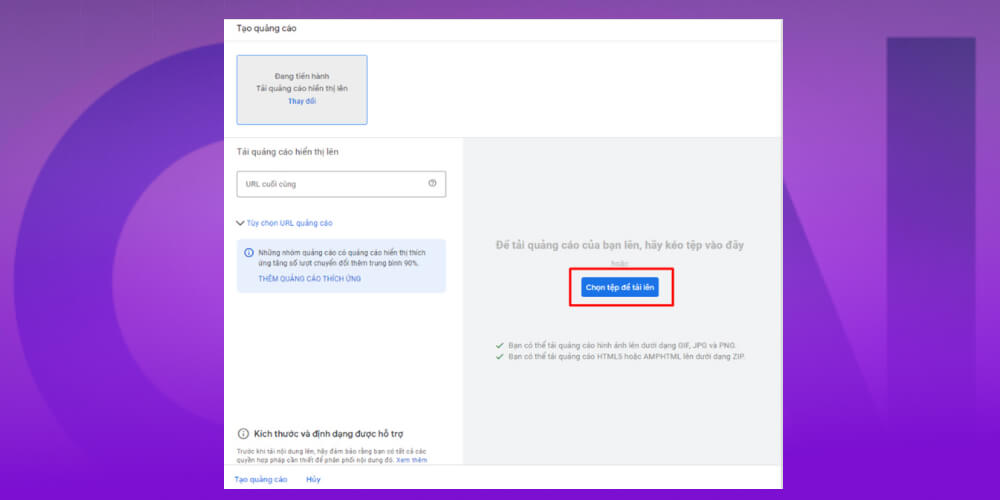
Notes when designing image ads:
File format: JPG, PNG, GIF.
Maximum file size: 150KB.
Standard dimensions: Google supports many sizes such as 300×250 (inline rectangle), 728×90 (leaderboard), 300×600 (half-page ad) and 320×100 (large mobile banner).
Choosing the right format and size helps your ad display smoothly and correctly on every device and improves how well it reaches customers.
Responsive display ads
Responsive display ads are Google's smart ad type. They automatically change size, format and display to fit the ad slot on different websites, apps and devices.
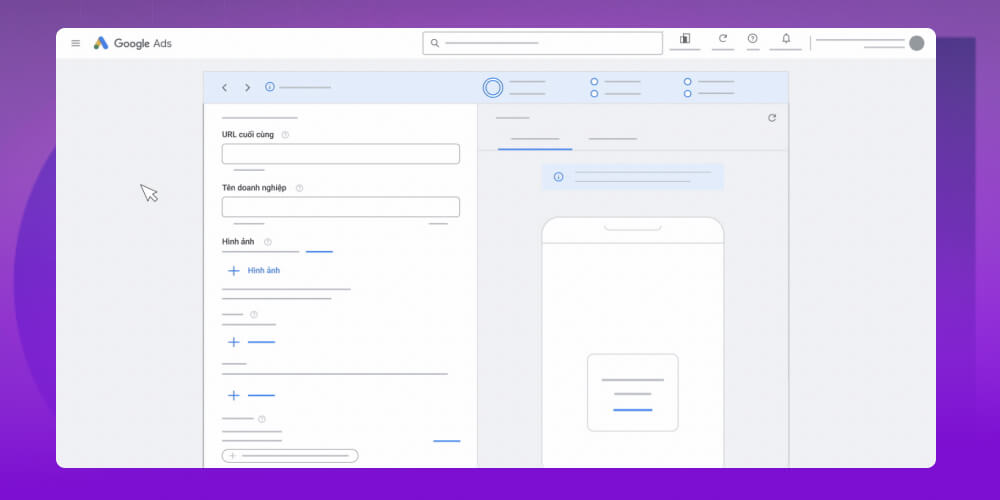
Instead of designing a whole set of banners in different sizes, you only need to prepare:
1 landscape image (ratio 1.91:1, size 1200×628)
1 square image (ratio 1:1, maximum size 1200×1200)
Logo (ratios 1:1 and 4:1)
A short headline and description
Google automatically combines and optimizes your ad to display correctly in every placement. This saves a lot of design time and cost, and keeps your ads looking good and professional.
Google Display Network can reach more than 90% of users online, opening up a huge opportunity to build a brand.
In practice, though, many businesses run into problems: ads shown in the wrong places, banners that don't attract, low CTR and results that are hard to measure. The biggest pain is not only budget spent with nothing to show for it, but also losing the chance to build your brand properly in the eyes of potential customers.
With more than 10 years of experience, MONA has worked with hundreds of businesses in many industries to run Google Ads services Display Network. We offer a complete solution, including:
Consulting and market research: building a campaign that fits your products, services and budget.
Accurate cost estimates: based on keywords, customer lists and real search volume.
Targeting potential customers: reaching the right people who have real demand.
Clear, transparent reporting: results are updated regularly and easy to follow.
Continuous optimization: tight budget control and better ad performance.
Besides GDN, MONA also runs other Google advertising services such as Google Ads, Google Shopping…, helping businesses widen their brand reach across many online channels.
If you are looking for an effective, economical Google advertising solution, contact MONA to get advice and the most detailed quote for running ads.
To get better results from your Google Display Network campaign, keep in mind the factors MONA suggests below:
≫ Read more: How to Run Google Ads
1. Why do large businesses often use GDN?
Google Display Network is Google's advertising network, which shows banners, images and video on millions of websites and apps. Large businesses often choose GDN because it widens brand reach, promotes products to a large audience and makes a strong impression with visual, eye-catching ad formats.
2. Is GDN really effective?
Google Display Network (GDN) is an online advertising format that is considered very effective for businesses. GDN shows ads to the right audience, saves cost and supports remarketing to raise the rate of closed orders. Many traditional ad channels cannot offer this.
3. What should you watch out for with GDN?
Now that you know what GDN is, what should you watch out for when using GDN ads?
Keep a separate budget: Do not merge your GDN budget with Search Ads, because the two ad types work differently. Keeping them apart makes results easier to measure and avoids waste.
Do not choose too many targets in one campaign: If you target too many topics, placements or interests at once, your ads struggle to reach the right customers and results are hard to track. Split them up and run one goal at a time so they are easier to optimize.
Limit spending on mobile app ads: Ads in mobile games get a lot of impressions, but most viewers (children and young people) pay little attention, so conversion is low.
That is the detailed answer to the question “What is GDN?" and the most effective ways to run Google Display Network ads. We hope the information just MONA Media shared gives you a basis for choosing the right options for your business and getting the best ad results!

CEO & Founder · The MONA
Founder of The MONA, who built a services company of 200+ staff with 14,000+ projects delivered. Khánh Hùng shares how he thinks about building systems that run themselves, automating a business, and the real lessons from delivering projects at MONA.
 1,5K
1,5K




Professional website
design services
Own a website with a beautiful, 100% exclusive design and a lifetime warranty, with the ability
to expand features flexibly as your business grows, starting today!








 MONA will never sell your information or send you spam
MONA will never sell your information or send you spam
MONA will never sell your information or send you spam


 MONA will never sell your information or send you spam