
 MONA OS 2.0
 Hợp tác với MONA


 Tự động hoá doanh nghiệp
 Cẩm nang SEO
 Digital Marketing
 Kinh nghiệm thiết kế website
 Hạ Tầng Server
 Giáo dục


 VI
 EN















Message us on
Zalo Official


 ProductsNew

 ProductsProducts
 Mới ra mắtKHA AI 2027App tự edit video, tự đăng mọi mạng xã hội, 2 phút mỗi ngày










 Thiết kế websiteVừa đẹp vừa thuyết phục được khách.
Dịch vụ SEOKéo về khách đang tìm đúng thứ anh chị bán.
 Tư vấn digital marketingKéo khách từ nhiều kênh, đo bằng số thật.
Quay video doanh nghiệpVideo giới thiệu công ty, nhà xưởng, đội ngũ.
 MớiDựng video AIDựng phim câu chuyện công ty bằng AI.
 Custom software developmentCRM, ERP and HRM built for your business.
 Viết AI Agent theo yêu cầuĐặt riêng một trợ lý AI cho đúng việc của mình.
 Tư vấn chuyển đổi AIĐưa AI vào vận hành của cả công ty.
NewMONA LMSManagement for centers and schools.
MONA SkillHubInternal training for company staff.
 NHTQ systemEnd-to-end China–Vietnam shipping operations.
MONA JMSManagement for gold, diamond and pawn shops.
 MONA E-LearningA website with every feature you need to sell courses.
 How to sell online courses (course)More than 30 free lessons on selling courses on autopilot.
 MONA Cloudmonacloud.vnServers to get your apps and websites running.
 MONA Basemonabase.vnPostgres database, sign-in and file storage.
 MONA Mailmonamail.vnSend OTP, order and invoice emails from your software.
 MONA Paymonapay.vnAccept bank transfers via VietQR and notify your software when the money arrives.
 MONA eInvoiceComing soonIssue e-invoices that meet tax standards.
Gấu CườiTrả lời khách 24/7 trên web, Fanpage, Zalo và thu lead cho sale.
 Gấu TeleSalesGọi điện tư vấn, chăm khách như tổng đài viên thật.
Dê CườiTư vấn và chốt đơn cho shop ngay trong khung chat.
Gấu WebmasterNhắn nhóm Zalo là website được sửa xong.
 Gấu Pháp ChếSoạn hợp đồng, rà điều khoản trong vài phút.
 Gấu Báo GiáLên báo giá đúng mẫu và gửi khách ngay.
 AI chăm sóc khách hàngTheo dõi và giữ chân khách hàng cũ.
 Gấu Tuyển DụngLọc hồ sơ, hẹn lịch, phỏng vấn ứng viên.
 Mới ra mắt
KHA AI 2027
Xây kênh chuyên gia 2 phút mỗi ngày
Quay bằng điện thoại, AI tự edit video, tự đăng lên 16 nền tảng và tự trả lời bình luận, tin nhắn.
870.393lượt xem trên kênh CEO MONA sau 34 ngày
 Anh Khánh HùngCEO MONA đang dùng mỗi ngày
Xem app làm được gì
 AI
Gấu Cười MONA ĐANG TỰ XÀITrả lời khách 24/7 trên website, Zalo OA, Messenger và thu lead về cho sale.
Dê CườiChốt đơn bán lẻ và sàn: Shopee, TikTok Shop, web. Chăm cả khách sỉ, đại lý.
Gấu WebmasterCập nhật nội dung, tối ưu SEO website mỗi ngày.
Gấu TeleSalesGọi điện tư vấn, chăm khách như tổng đài viên thật.
Gấu Tuyển DụngLọc hồ sơ, hẹn lịch, phỏng vấn ứng viên tự động.
AI chăm sóc khách hàngGiữ khách cũ, cứu lead đã rớt cho phòng kinh doanh.
Gấu Pháp ChếSoạn hợp đồng, rà điều khoản trong vài phút.
Gấu Báo GiáLên báo giá đúng mẫu, gửi khách ngay khi có yêu cầu.
 Chuyển đổi AI toàn phầnGiải pháp tổng cho doanh nghiệp, 3 lớp triển khai.
 Viết AI Agent theo yêu cầuĐặt riêng một con AI gánh đúng nghiệp vụ của bạn.
 Custom softwareCRM, ERP and HRM with built-in AI automation.
 SEO & AEO thời đại AIĐược Google lẫn AI trích dẫn, không chỉ xếp hạng.
 Kiến thức AI cho doanh nghiệpBài phân tích, hướng dẫn ứng dụng AI vào vận hành.
 Free AI courses
 AI tools at work
App mới · KHA AI 2027
Xây kênh 2 phút mỗi ngày
AI tự edit video, tự đăng mọi mạng xã hội
Free consultation, 8am–10pm every day

24 April, 2025

While building a website, you may have heard the term “Orphan Page” but not fully understood how much it affects full-scope SEO performance. These orphan pages still exist on your website, but without internal links they are almost “abandoned“, making them hard for both users and search engines to reach. In this article, MONA Media will help you understand what an Orphan Page is, and show you how to find and fix Orphan Pages quickly and easily.

Orphan Page (also called orphaned pages) are pages on your website that receive no internal links pointing to them. This leaves them completely cut off from the rest of the site, and the only way users can reach them is through a direct link.
Search engines normally use links to crawl and index a website. If a page has no links pointing to it, it will most likely not be discovered by Google or other search engines.
Because they have no connection to other pages on the website, Orphan Pages are almost “invisible” to both users and search engines. When people browse the web, they cannot find the page unless they know its exact address. That is why these pages are called “orphaned” since they are forgotten and isolated from the rest of the website.
Once you understand what Orphan Pages are, you need to know how to identify them on your own website. The signs below will help you spot orphaned pages quickly and handle them in time, avoiding wasted resources and improving the user experience.
The easiest sign of an orphan page is that no internal link leads to it. As long as your page has one link from the home page or from any article on the website, it is no longer an Orphan Page. Still, if a page has only a single link pointing to it, you should consider adding more internal links to improve access and SEO results.
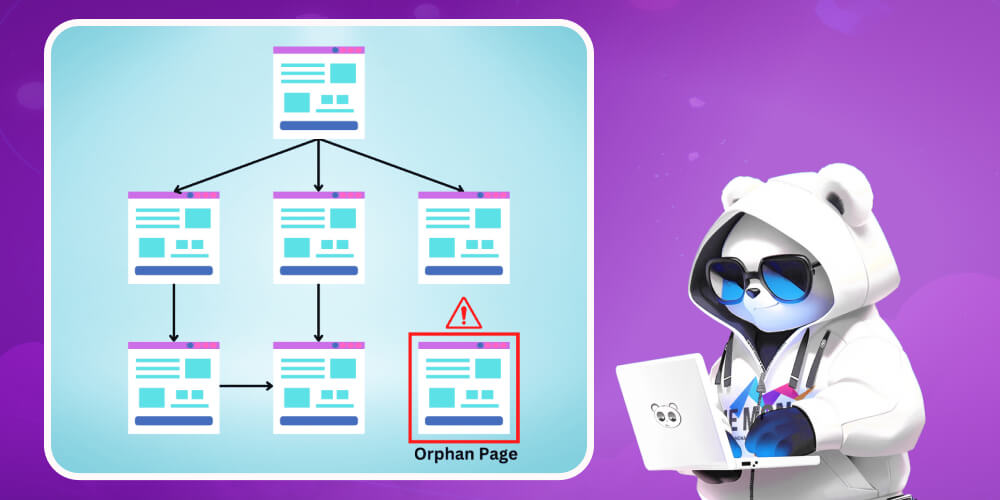
Pages such as sandbox or test pages may share a few traits with Orphan Pages, but the key point is that Orphan Pages are genuinely valuable to users and still work normally. Even though the server returns a 200 status code, users have no way to reach the page without supporting internal links, and that is the core problem with Orphan Pages.
This is what makes identifying Orphan Pages harder. Some pages look like search engines have indexed them, but they are actually still orphaned. Part of the reason can be how tools like Google Analytics (GA) or Google Search Console (GSC) collect data and miss link-related information.
Even Google Ads campaigns that do not carry specific URL parameters can cause the system to misjudge, making it hard to detect Orphan Pages accurately.
Letting too many Orphan Pages exist can seriously reduce your SEO performance without you noticing. When a page is isolated and not properly connected in the internal link structure, search engines struggle to crawl it and assess its value.
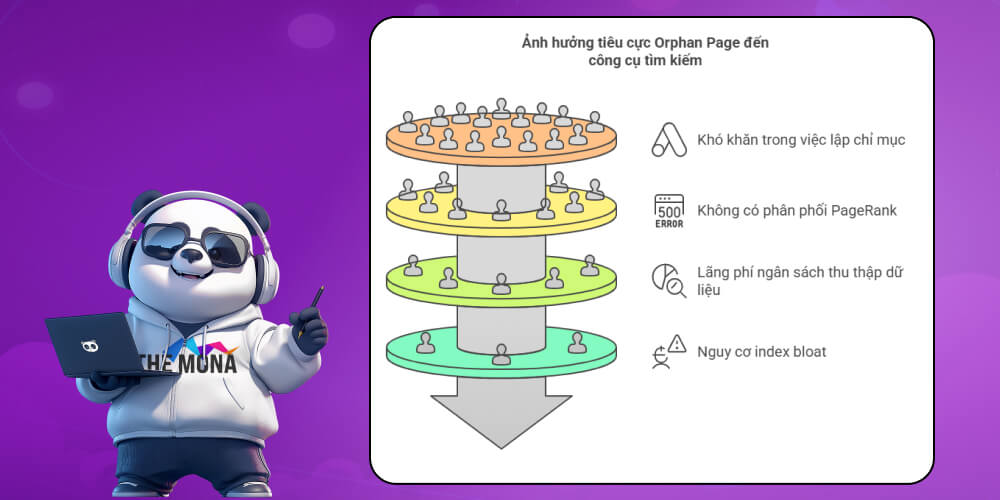
Orphan Pages can have many negative effects on search engines. Without internal link pointing to them, search engines have trouble finding and indexing these pages. Search engines usually discover new content through internal links, external links or the XML sitemap.
file. Even though Orphan Pages may appear in the sitemap or be linked from outside, that is not always a good sign.
In detail, Google can index a URL that appears in the sitemap even without internal links, but judging the page's value becomes difficult because there are no supporting internal links. On large websites, Google tends to index fewer pages, which gives Orphan Pages even less chance of being indexed.
As a result, Orphan Pages are usually not indexed and cannot rank in search results, so they bring no organic traffic to the website.
Even when Orphan Pages are indexed, the problem does not stop there. Without internal links, PageRank will not be passed to these pages, and search engines also cannot understand their context, topic or place in the overall website. This lowers the chance of the page appearing for relevant search queries.
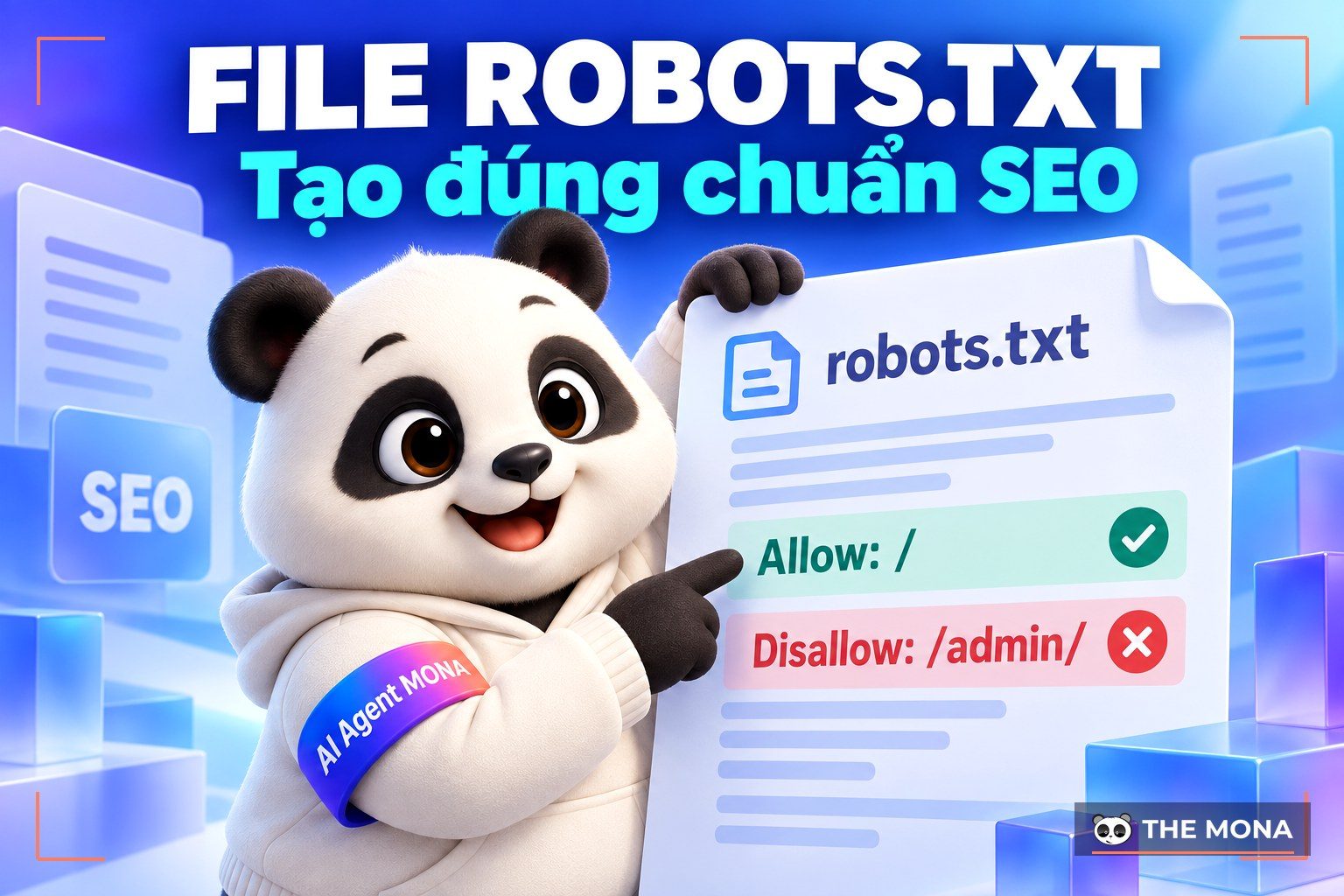
If you have many low-quality Orphan Pages and do not block search engines with robots.txt or a noindex tag, they can waste crawl budget , which hurts especially if you own a large website.
In some cases, Orphan Pages can also cause index bloat, where search engines index lots of thin or duplicate content and lower the overall quality of the website.
In addition, if search engines judge these Orphan Pages as not valuable enough but they are still indexed, that can hurt the indexing of other high-quality pages on your website and damage the overall performance of SEO for a new website.
Note that a single internal link is enough for a page to no longer count as an Orphan Page. Still, if that link is important and the only one, you should add more links to strengthen the page's place in the website structure and reduce the risk of it becoming an Orphan Page if that one link is lost.
-> Learn more: What is Google Index? Ways to help Google index faster
Orphan Pages that are well optimized and contain useful content can become a source that attracts lots of users, boosting traffic and even driving conversions. But if these pages are not linked in the website structure, users will find them very hard to discover. Then all the effort invested in their content is easily wasted.
Even if users happen to find Orphan Pages that are not properly linked, the experience is not good. They may run into outdated content that no longer fits their current needs, which lowers their opinion of the website.
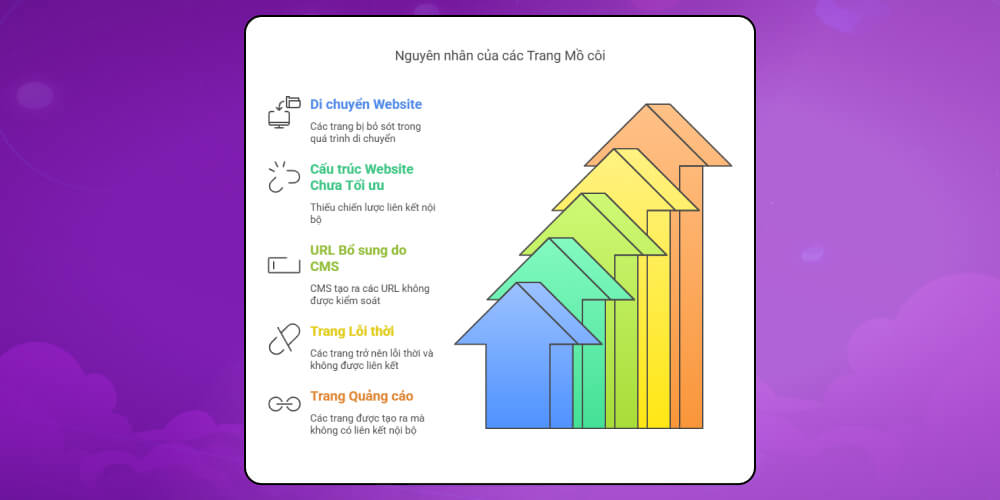
Before working out how to handle Orphan Pages, you need to understand why they appear on your website. In practice, orphaned pages are not always caused by technical errors. Sometimes they come from very small changes during normal website operation.
Here are the most common causes:
Orphan Pages also often appear when there is no clear, consistent process for updating the website, moving from a staging to a production environment, or making big changes without carefully reviewing the internal link system.
Before optimizing and fixing Orphan Pages, the first important thing is to identify exactly which pages on your website are orphaned. If you do not find all of them, the fix will easily miss some and reduce overall effectiveness.
The simplest way to find Orphan Pages is to start with a list of crawlable pages. You should take this list from the XML sitemap because it only includes URLs that are allowed to be indexed and crawled.
Another way is to use a dedicated crawler. When setting it up, remember to allow crawling of indexable pages only and exclude URLs blocked by noindex or robots.txt. Make sure the crawled URLs are canonical, including the HTTP protocol or HTTPS and the www or non-www subdomain.
To identify Orphan Pages, first find the pages that users or crawlers have visited, using the following methods:
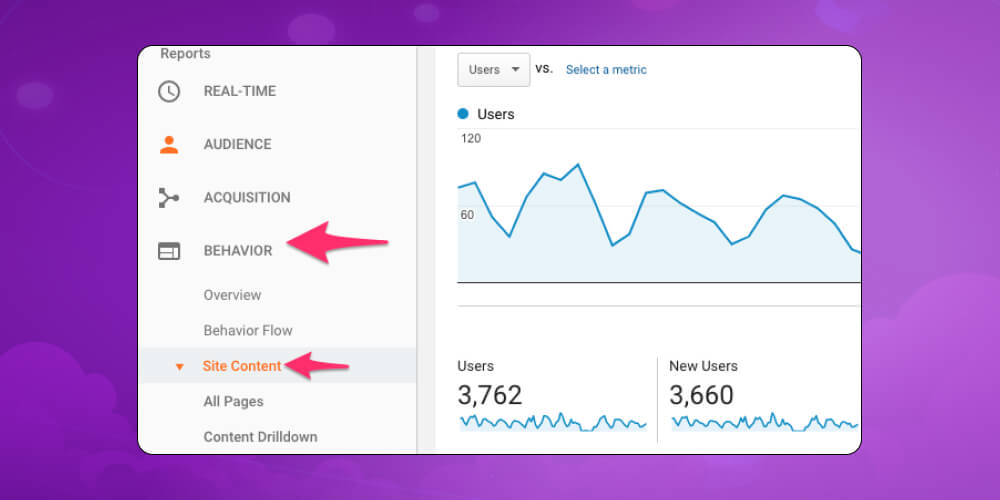
Google Analytics can help you identify pages visited through external links (including from social networks) or direct visits. To do this, open Google Analytics and go to Behavior > Site Content > All pages.
Here you will see every URL that has ever had visits. Choose the longest date range possible so the data is as complete as it can be. When you finish, export the list of collected URLs to use in the next step.
Besides Google Analytics, you can also use data from Google Search Console to help identify Orphan Pages. This tool shows you URLs that Googlebot has visited, even when those URLs have no internal links on the website. Here is how:
Open Google Search Console and select Performance, then choose Pages.
Make sure impressions are turned on (Impressions) to get the most complete data. Also set the date range as long as possible to collect a richer list of URLs.
Besides Google Analytics and Google Search Console, you can also analyze server log files to collect the most detailed data. Log files contain information about all visits to the website from users and search engine crawlers. To do this, you need access to the server system to download the log files and analyze them.

After you have complete data from Google Analytics, Google Search Console or log files, compare it against the list of known pages on your website. Pages that appear in the visit data but not in the original URL list are the Orphan Pages that need to be handled.
You can use tools like Google Sheets or Excel to compare and filter data quickly. Once you have identified the Orphan Pages, export them to a separate file or sheet to prepare for the next optimization step.
Depending on the purpose and value of each Orphan Page, you can choose different ways to optimize. Here are the common ways to fix Orphan Pages more effectively.
When Orphan Pages are valuable to users and you want them to be found and visited, add internal links to those pages from other pages on your website. This makes it easier for both users and search engines to reach the content.
When deciding where to add links, consider the following:

Another way to handle Orphan Pages is to redirect them to another page that is relevant in topic or search intent. When setting up a redirect, if it is permanent, you should use redirect 301 to preserve PageRank as well as possible and make sure search engines understand your intent correctly.
If Orphan Pages bring no real value and you cannot redirect them, deleting the page is a reasonable option. A common way is to return a 404 status code to tell search engines the page no longer exists.
In some special cases, if Orphan Pages serve a specific purpose for marketing campaign or a particular event and you do not need them to appear widely on the website, you can simply leave them as they are without adding internal links.
Orphan Pages can appear on any website if we do not check and optimize regularly. To keep your website strong in both structure and SEO performance, learning about what an Orphan Page is and fixing these pages should be part of your regular website care process. You do not have to handle everything at once. Just patiently review it in small parts and optimize internal links sensibly, and your website will gradually improve noticeably. If you want to make a big difference in your industry and be favored by Google, do not hesitate to contact MONA. We will provide in-depth advice and If you want to make a big difference in your industry and be favored by Google, do not hesitate to contact MONA. We will provide in-depth advice and a quote for full-service SEO, helping your business grow sustainably.

CEO & Founder · The MONA
Founder of The MONA, who built a services company of 200+ staff with 14,000+ projects delivered. Khánh Hùng shares how he thinks about building systems that run themselves, automating a business, and the real lessons from delivering projects at MONA.
 1,5K




Professional website
design services
Own a website with a beautiful, 100% exclusive design and a lifetime warranty, with the ability
to expand features flexibly as your business grows, starting today!



NHẬN TƯ VẤN SEO MIỄN PHÍ !






 MONA will never sell your information or send you spam


 MONA will never sell your information or send you spam
