
 MONA OS 2.0
 Partner with MONA


 Tự động hoá doanh nghiệp
 Cẩm nang SEO
 Digital Marketing
 Kinh nghiệm thiết kế website
 Hạ Tầng Server
 Giáo dục

 VI
VI
 EN
EN







![Full-package professional website design price list in detail [2026]](https://mona.media/wp-content/uploads/2026/09/bang-gia-thiet-ke-website-featured-mona.jpg)


Message us on
Zalo Official


 ProductsNew

 ProductsProducts
 Mới ra mắtKHA AI 2027App tự edit video, tự đăng mọi mạng xã hội, 2 phút mỗi ngày










 Website designLooks good and wins customers over.
SEO servicesBrings in customers searching for exactly what you sell.
Website designLooks good and wins customers over.
SEO servicesBrings in customers searching for exactly what you sell.
 Tư vấn digital marketingKéo khách từ nhiều kênh, đo bằng số thật.
Corporate video productionVideos introducing your company, factory and team.
Tư vấn digital marketingKéo khách từ nhiều kênh, đo bằng số thật.
Corporate video productionVideos introducing your company, factory and team.
 NewAI video productionCompany story films made with AI.
 Custom software developmentCRM, ERP and HRM built for your business.
 Viết AI Agent theo yêu cầuĐặt riêng một trợ lý AI cho đúng việc của mình.
 Tư vấn chuyển đổi AIĐưa AI vào vận hành của cả công ty.
NewMONA LMSManagement for centers and schools.
MONA SkillHubInternal training for company staff.
Tư vấn chuyển đổi AIĐưa AI vào vận hành của cả công ty.
NewMONA LMSManagement for centers and schools.
MONA SkillHubInternal training for company staff.
 NHTQ systemEnd-to-end China–Vietnam shipping operations.
MONA JMSManagement for gold, diamond and pawn shops.
NHTQ systemEnd-to-end China–Vietnam shipping operations.
MONA JMSManagement for gold, diamond and pawn shops.
 MONA E-LearningA website with every feature you need to sell courses.
 How to sell online courses (course)More than 30 free lessons on selling courses on autopilot.
 MONA Cloudmonacloud.vnServers to get your apps and websites running.
 MONA Basemonabase.vnPostgres database, sign-in and file storage.
 MONA Mailmonamail.vnSend OTP, order and invoice emails from your software.
 MONA Paymonapay.vnAccept bank transfers via VietQR and notify your software when the money arrives.
 MONA eInvoiceComing soonIssue e-invoices that meet tax standards.
Gấu CườiTrả lời khách 24/7 trên web, Fanpage, Zalo và thu lead cho sale.
MONA eInvoiceComing soonIssue e-invoices that meet tax standards.
Gấu CườiTrả lời khách 24/7 trên web, Fanpage, Zalo và thu lead cho sale.
 Gấu TeleSalesGọi điện tư vấn, chăm khách như tổng đài viên thật.
Dê CườiTư vấn và chốt đơn cho shop ngay trong khung chat.
Gấu WebmasterNhắn nhóm Zalo là website được sửa xong.
Gấu TeleSalesGọi điện tư vấn, chăm khách như tổng đài viên thật.
Dê CườiTư vấn và chốt đơn cho shop ngay trong khung chat.
Gấu WebmasterNhắn nhóm Zalo là website được sửa xong.
 Gấu Pháp ChếSoạn hợp đồng, rà điều khoản trong vài phút.
 Gấu Báo GiáLên báo giá đúng mẫu và gửi khách ngay.
 AI chăm sóc khách hàngTheo dõi và giữ chân khách hàng cũ.
 Gấu Tuyển DụngLọc hồ sơ, hẹn lịch, phỏng vấn ứng viên.
 Mới ra mắt
KHA AI 2027
Xây kênh chuyên gia 2 phút mỗi ngày
Quay bằng điện thoại, AI tự edit video, tự đăng lên 16 nền tảng và tự trả lời bình luận, tin nhắn.
474.073lượt xem trên kênh CEO MONA sau 24 ngày
Mới ra mắt
KHA AI 2027
Xây kênh chuyên gia 2 phút mỗi ngày
Quay bằng điện thoại, AI tự edit video, tự đăng lên 16 nền tảng và tự trả lời bình luận, tin nhắn.
474.073lượt xem trên kênh CEO MONA sau 24 ngày
 Anh Khánh HùngCEO MONA đang dùng mỗi ngày
Xem app làm được gì
Anh Khánh HùngCEO MONA đang dùng mỗi ngày
Xem app làm được gì
 AI
Gấu Cười MONA ĐANG TỰ XÀITrả lời khách 24/7 trên website, Zalo OA, Messenger và thu lead về cho sale.
Dê CườiChốt đơn bán lẻ và sàn: Shopee, TikTok Shop, web. Chăm cả khách sỉ, đại lý.
Gấu WebmasterCập nhật nội dung, tối ưu SEO website mỗi ngày.
Gấu TeleSalesGọi điện tư vấn, chăm khách như tổng đài viên thật.
Gấu Tuyển DụngLọc hồ sơ, hẹn lịch, phỏng vấn ứng viên tự động.
AI chăm sóc khách hàngGiữ khách cũ, cứu lead đã rớt cho phòng kinh doanh.
Gấu Pháp ChếSoạn hợp đồng, rà điều khoản trong vài phút.
Gấu Báo GiáLên báo giá đúng mẫu, gửi khách ngay khi có yêu cầu.
AI
Gấu Cười MONA ĐANG TỰ XÀITrả lời khách 24/7 trên website, Zalo OA, Messenger và thu lead về cho sale.
Dê CườiChốt đơn bán lẻ và sàn: Shopee, TikTok Shop, web. Chăm cả khách sỉ, đại lý.
Gấu WebmasterCập nhật nội dung, tối ưu SEO website mỗi ngày.
Gấu TeleSalesGọi điện tư vấn, chăm khách như tổng đài viên thật.
Gấu Tuyển DụngLọc hồ sơ, hẹn lịch, phỏng vấn ứng viên tự động.
AI chăm sóc khách hàngGiữ khách cũ, cứu lead đã rớt cho phòng kinh doanh.
Gấu Pháp ChếSoạn hợp đồng, rà điều khoản trong vài phút.
Gấu Báo GiáLên báo giá đúng mẫu, gửi khách ngay khi có yêu cầu.
 Chuyển đổi AI toàn phầnGiải pháp tổng cho doanh nghiệp, 3 lớp triển khai.
 Viết AI Agent theo yêu cầuĐặt riêng một con AI gánh đúng nghiệp vụ của bạn.
 Custom softwareCRM, ERP and HRM with built-in AI automation.
 SEO & AEO thời đại AIĐược Google lẫn AI trích dẫn, không chỉ xếp hạng.
 Kiến thức AI cho doanh nghiệpBài phân tích, hướng dẫn ứng dụng AI vào vận hành.
 Free AI courses
 AI tools at work
App mới · KHA AI 2027
Xây kênh 2 phút mỗi ngày
AI tự edit video, tự đăng mọi mạng xã hội
Free consultation, 8am–10pm every day
AI tools at work
App mới · KHA AI 2027
Xây kênh 2 phút mỗi ngày
AI tự edit video, tự đăng mọi mạng xã hội
Free consultation, 8am–10pm every day

18 March, 2023
WordPress is a platform free and open source, flexible and easy to use, suited to everything from personal blogs to business websites. With a rich library of themes and plugins, WordPress is trusted by millions of websites, including big brands such as Mercedes-Benz and BBC America.
So how do you design a WordPress website that looks professional, gives visitors a good experience and delivers real business results? Find out with MONA Media Find out in this article.
The WordPress platform (WP, WordPress.org) is a content management system (CMS) that is free and open source, built with the PHP programming language and running on a MySQL or MariaDB database.
As of 2026, about 501.28 million websites use WordPress out of more than 1.15 billion websites worldwide, or roughly 43,6% of all websites in the world. Other sources put the number at more than 810 million active WordPress sites, with a CMS market share above 60%.
WordPress is not only for blogs and personal sites. It is widely used for e-commerce, news and many other fields. Thanks to its large plugin library and a wide choice of website themes , the platform handles both basic WordPress sites and professional WordPress website design well. Whether you are a beginner or an experienced developer, WordPress remains a flexible and effective choice.
In Vietnam, “WordPress website design” is a keyword with a lot of searches and visits, especially as owning a website becomes more and more necessary for individuals and businesses.
WordPress lets you build a complete website quickly, with full control from design to administration, while still giving a good user experience (UX/UI) on every device.
WordPress is more than a website builder. It helps a business create a site of its own that shows what sets it apart. Many businesses, however, stop at ready-made themes and plugins, and end up with a site that has no character and does not show their strengths. Make sure your website is not just a generic information page but a convincing story about your brand. Watch the video below to see what we mean.
A WordPress theme is the overall look of a website built on the free WordPress software. A theme covers the layout, colors, fonts and other design elements that define the site's style.
WordPress themes are built separately from the core code, so you can change or customize the design without affecting the core structure of the website.
WordPress's theme library now has more than 40,000 themesacross many fields such as travel websites, online store themes and more. With this variety, you can pick a theme that fits your purpose, from news sites and personal blogs to professional online shops.
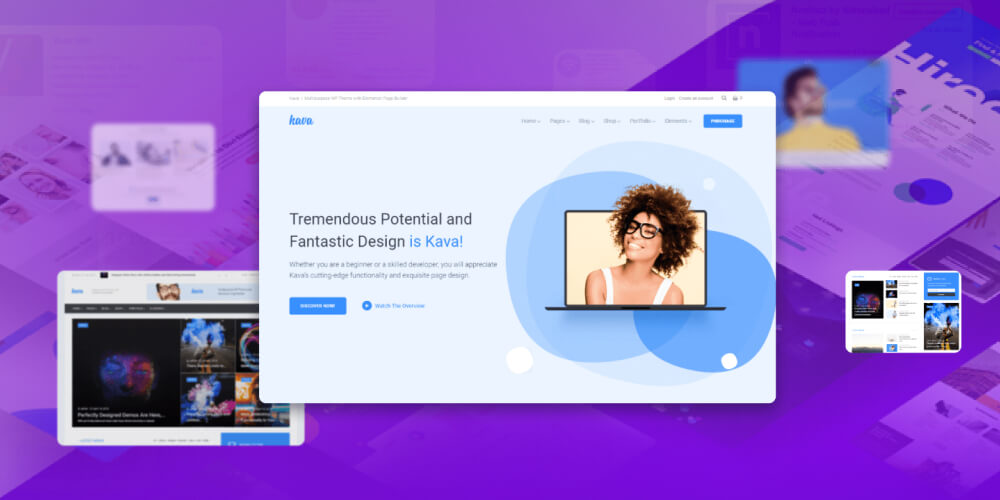
There are two main kinds of theme, based on price: free themes and paid themes.
Themes are also grouped by purpose, such as themes for online stores and themes for news sites. Whichever you choose, themes are compatible with WordPress and easy to use, even for beginners.
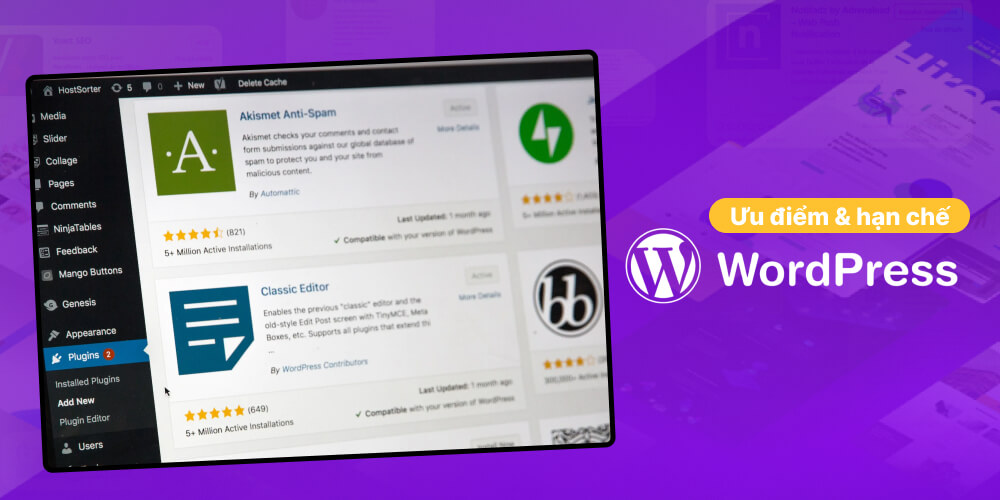
WordPress website design suits most individuals and businesses today thanks to its flexibility, ease of use and reasonable cost. It also has drawbacks, such as weaker security and slower performance. Here are the pros and cons in detail.
Advantages of WordPress website design:
Disadvantages of WordPress website design:
Hand-coded website or website design with WordPress is a question many people ask when they start building a website.
To help you decide, MONA gives you an overview of each option create your website.
| Criterion | WordPress website design | Hand-coded website |
|---|---|---|
| Flexibility | High, easy to customize with ready-made plugins and themes | Very high, deeply customized to your own requirements |
| Delivery time | Fast, only a few days | Takes longer because everything is built from scratch |
| Cost | Economical, suits individuals and small to medium businesses | Higher cost, suits large businesses with demanding requirements |
| Security | Depends on third-party plugins and themes, needs regular maintenance | Better control, lower risk if the code is built to standard |
| Administration and use | Easy to use, no coding needed | Needs a technician to run and update |
| SEO and page speed | SEO-friendly, with plugins to speed up the site | Can be optimized very well if properly coded |
| Exclusive design and features | Limited if you use a ready-made theme | Design and features are built exclusively for you |
| Scalability | Easy to extend with plugins | Depends on the technical skills and the development team |
As you can see from the analysis above, the right way to build your website depends on your needs and goals. If your site does not need many features, you can build it with WordPress ready-made themes. Adding a few suitable plugins still keeps your site well optimized and SEO-ready for search engines.
According to Mr. Quảng Trọng Hy, Website Department Manager at MONA: “For large, heavy websites that need many complex features, I still advise you to hire a professional WordPress web design company to build a quality website for you, rather than just installing a theme.“
Building a website with WordPress yourself is no longer very complicated, even if you have little programming experience. Flexible and easy to use, WordPress is a top choice for anyone who wants to build a website quickly.
MONA will show you two simple ways to design a WordPress website to your own requirements. Read on!
You can build a WordPress website entirely for free, without much technical skill. Here is a detailed guide to building your own site easily.
Step 1: Create an account on the WordPress platform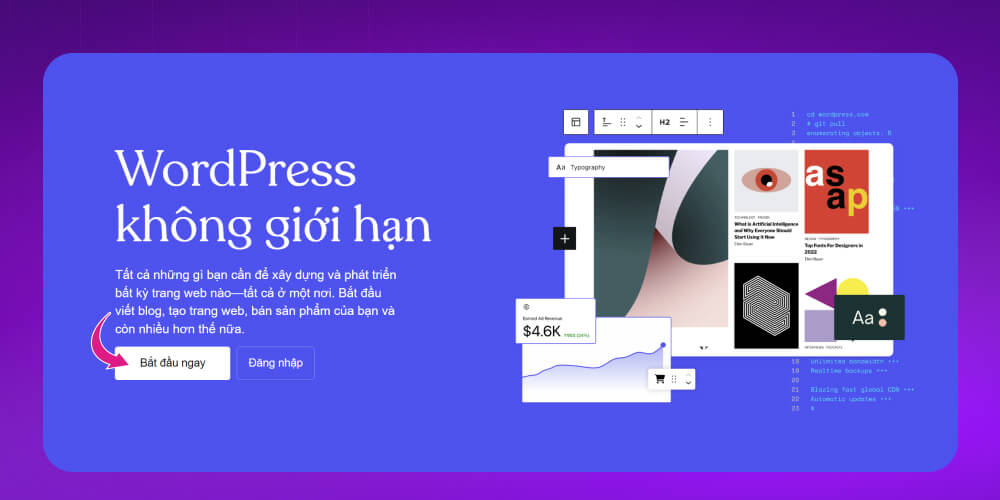
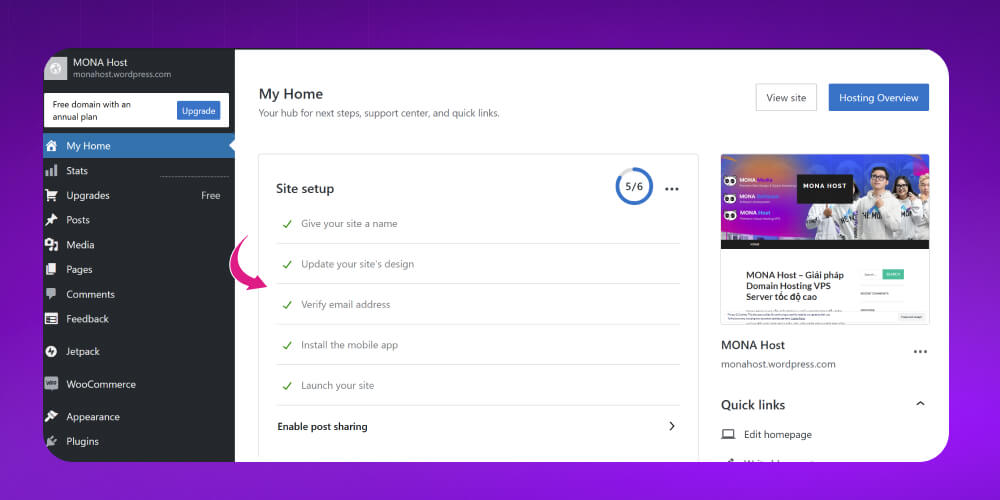
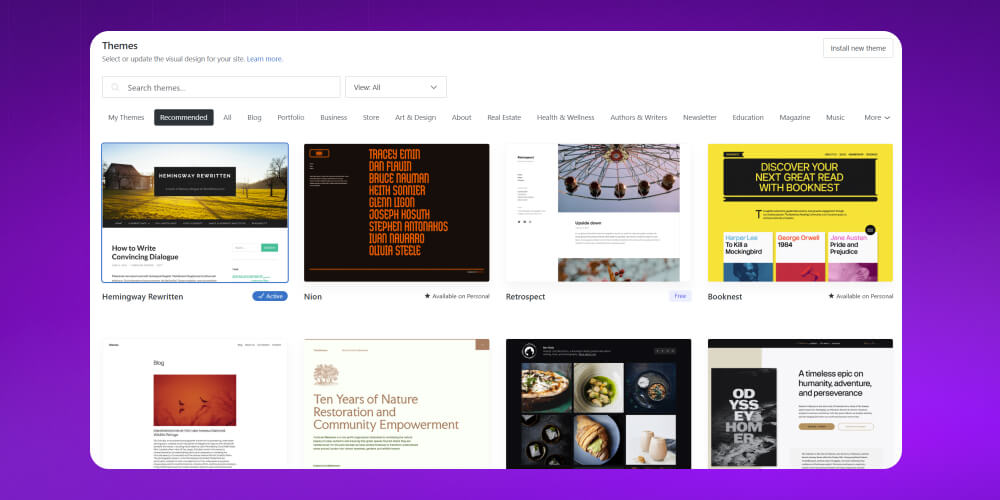
If you want to company website design design a WordPress website to SEO standards with your own domain, follow the 8 simple steps below.
Step 1: Register a domain
A domain is essential for helping customers recognize and remember your brand online. When register a domainregistering a domain, keep in mind:
Choose a short, memorable name related to your brand.
Decide between an international domain (.com, .net) and a local one (.vn).
Avoid buying used domains, especially ones that Google has penalized before.

Step 2: Rent web hosting that fits your needs
Hosting is where all your website data is stored, including images, posts, videos and more. Choose your hosting provider a quality hosting provider that guarantees fast page loads, strong security and good support for WordPress.

Step 3: Point the domain to your hosting
After registering a domain and hosting, you need to point the domain to your hosting for the website to work. This is usually done through DNS settings or an IP pointer in your domain provider's control panel.
Step 4: Install WordPress on your hosting
Many hosting providers can install WordPress in just a few simple steps. Once it is done, you can log in to the admin area at tenmiencuaban.com/wp-admin, then set a username and password to manage your site.
Step 5: Choose and install a theme for your site
WordPress offers thousands of free and paid themes for many fields. For a professional look, you can customize a theme to your needs or use a premium template.
Step 6: Install supporting plugins
To improve your site's performance, install a few important plugins such as:
Contact Form 7: Sets up a professional contact form.
Yoast SEO or Rank Math SEO: Helps you optimize content to rank better on Google.
WP Super Cache: Improves page load speed through caching.
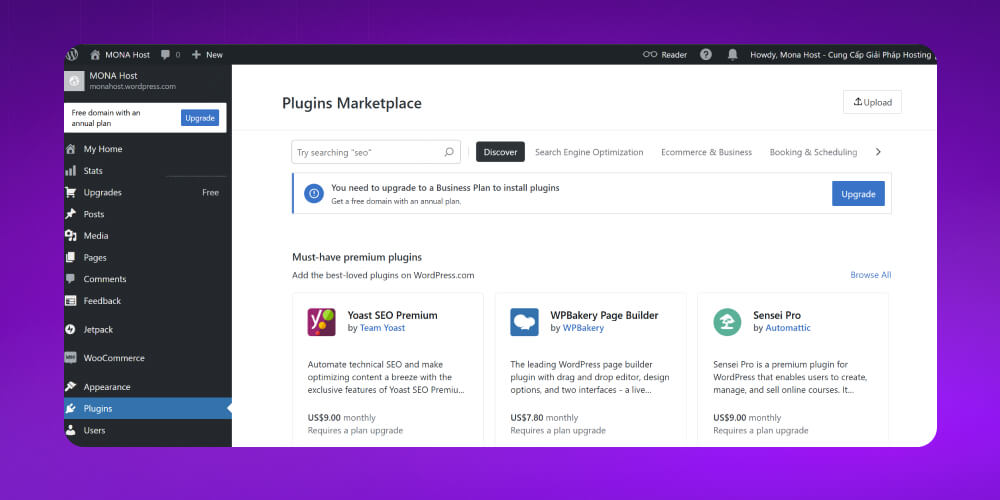
Step 7: Create and grow quality content for your site
A professional WordPress website needs key pages such as About, Contact and News. Also update the site regularly with useful posts to attract readers and build trust.
Step 8: Optimize the structure and navigation
To help visitors find information easily, optimize your menus and widgets. A WordPress interface that is clear and easy to use gives a better experience and keeps visitors on the site longer.
MONA Media SEO service company, full-service WordPress website design with more than 10+ years of hands-on experience across many case studies, from simple to difficult. We are always ready to work with you and meet the needs of individuals and businesses in the process of building SEO-ready website design.
With an experienced team of developers, MONA is committed to delivering the best design solution down to the smallest details, with a fast and professional way of working.
At MONA Media we do more than use the open-source WordPress code. We also offer several flexible options to choose from:
If you prefer not to use WordPress, MONA can also code your website from scratch to meet all of your feature requirements. The admin interface is designed to be friendly, so you can manage content easily without deep programming knowledge.
Just contact MONA to get consulting and a detailed website design quote from our team.
For online stores, MONA has a dedicated plan: WooCommerce online store design — with the shopping cart, Vietnamese payment gateways and order sync to management software already set up.
WordPress website design prices at MONA Media vary with your specific requirements and the type of website you want. To get an exact price for SEO-ready WordPress design at MONA, please contact let our team advise you.
Below are some details about Low-cost website design price list with WordPress at MONA Media:
 More than 2,000 website templates SEO-ready WordPress website designFast deliveryDigital marketing solution consulting Lifetime maintenance supportExclusive website interfaceSEO-ready & responsive designCustom-coded effects on requestCustom-coded feature set on requestEasy to expand & upgradeBusiness management tool integration
Usually about 1 week from the day the contract is signed. It can take 15 to 30 days or longer when the client asks for more new features, or wants a completely new design, or the site is large and needs more time.
The cost of website design varies with factors such as:
It also depends on many other factors. A low-cost WordPress site and a custom-designed WordPress site will differ in price, so to get a detailed WordPress price list, please contact MONA and our team will give you a clear, detailed quote.
Yes, and more than that. Today 1 in 5 websites in the world runs on WordPress, and around 1 in 3 well-known sites such as CNN, BBC America and TechCrunch do too. It is not only popular but also very “friendly” to search engines such as Google.
WordPress is regarded as one of the easiest content management systems to use. Its admin interface is clear and friendly, so after a short time you can use it and customize tasks in the WordPress system.
Absolutely! Once the website is live, if you want to add or upgrade features, MONA Media's technical team will help you right away. We are always ready to stay with you through the whole life of your website.
WordPress is fully mobile friendly. Websites that want to display well on mobile, give a good user experience and be optimized for SEO should use WordPress rather than other themes.
Building a WordPress website is quick and simple, and the cost is not as high as you might think. You get a complete website right away instead of spending time figuring things out. I think that time is better spent on how to grow the site. On top of that, our developers advise you professionally so that you end up with a website you are happy with and that fits your idea.

CEO & Founder · The MONA
Founder of The MONA, who built a services company of 200+ staff with 14,000+ projects delivered. Khánh Hùng shares how he thinks about building systems that run themselves, automating a business, and the real lessons from delivering projects at MONA.
 1,7K
1,7K




Professional website
design services
Own a website with a beautiful, 100% exclusive design and a lifetime warranty, with the ability
to expand features flexibly as your business grows, starting today!














 MONA will never sell your information or send you spam
MONA will never sell your information or send you spam
MONA will never sell your information or send you spam


 MONA will never sell your information or send you spam