
 MONA OS 2.0
 Partner with MONA


 Tự động hoá doanh nghiệp
 Cẩm nang SEO
 Digital Marketing
 Kinh nghiệm thiết kế website
 Hạ Tầng Server
 Giáo dục


 VI
 EN















Message us on
Zalo Official


 ProductsNew

 ProductsProducts
 Mới ra mắtKHA AI 2027App tự edit video, tự đăng mọi mạng xã hội, 2 phút mỗi ngày










 Website designLooks good and wins customers over.
SEO servicesBrings in customers searching for exactly what you sell.
 Tư vấn digital marketingKéo khách từ nhiều kênh, đo bằng số thật.
Corporate video productionVideos introducing your company, factory and team.
 NewAI video productionCompany story films made with AI.
 Custom software developmentCRM, ERP and HRM built for your business.
 Viết AI Agent theo yêu cầuĐặt riêng một trợ lý AI cho đúng việc của mình.
 Tư vấn chuyển đổi AIĐưa AI vào vận hành của cả công ty.
NewMONA LMSManagement for centers and schools.
MONA SkillHubInternal training for company staff.
 NHTQ systemEnd-to-end China–Vietnam shipping operations.
MONA JMSManagement for gold, diamond and pawn shops.
 MONA E-LearningA website with every feature you need to sell courses.
 How to sell online courses (course)More than 30 free lessons on selling courses on autopilot.
 MONA Cloudmonacloud.vnServers to get your apps and websites running.
 MONA Basemonabase.vnPostgres database, sign-in and file storage.
 MONA Mailmonamail.vnSend OTP, order and invoice emails from your software.
 MONA Paymonapay.vnAccept bank transfers via VietQR and notify your software when the money arrives.
 MONA eInvoiceComing soonIssue e-invoices that meet tax standards.
Gấu CườiTrả lời khách 24/7 trên web, Fanpage, Zalo và thu lead cho sale.
 Gấu TeleSalesGọi điện tư vấn, chăm khách như tổng đài viên thật.
Dê CườiTư vấn và chốt đơn cho shop ngay trong khung chat.
Gấu WebmasterNhắn nhóm Zalo là website được sửa xong.
 Gấu Pháp ChếSoạn hợp đồng, rà điều khoản trong vài phút.
 Gấu Báo GiáLên báo giá đúng mẫu và gửi khách ngay.
 AI chăm sóc khách hàngTheo dõi và giữ chân khách hàng cũ.
 Gấu Tuyển DụngLọc hồ sơ, hẹn lịch, phỏng vấn ứng viên.
 Mới ra mắt
KHA AI 2027
Xây kênh chuyên gia 2 phút mỗi ngày
Quay bằng điện thoại, AI tự edit video, tự đăng lên 16 nền tảng và tự trả lời bình luận, tin nhắn.
895.765lượt xem trên kênh CEO MONA sau 37 ngày
 Anh Khánh HùngCEO MONA đang dùng mỗi ngày
Xem app làm được gì
 AI
Gấu Cười MONA ĐANG TỰ XÀITrả lời khách 24/7 trên website, Zalo OA, Messenger và thu lead về cho sale.
Dê CườiChốt đơn bán lẻ và sàn: Shopee, TikTok Shop, web. Chăm cả khách sỉ, đại lý.
Gấu WebmasterCập nhật nội dung, tối ưu SEO website mỗi ngày.
Gấu TeleSalesGọi điện tư vấn, chăm khách như tổng đài viên thật.
Gấu Tuyển DụngLọc hồ sơ, hẹn lịch, phỏng vấn ứng viên tự động.
AI chăm sóc khách hàngGiữ khách cũ, cứu lead đã rớt cho phòng kinh doanh.
Gấu Pháp ChếSoạn hợp đồng, rà điều khoản trong vài phút.
Gấu Báo GiáLên báo giá đúng mẫu, gửi khách ngay khi có yêu cầu.
 Chuyển đổi AI toàn phầnGiải pháp tổng cho doanh nghiệp, 3 lớp triển khai.
 Viết AI Agent theo yêu cầuĐặt riêng một con AI gánh đúng nghiệp vụ của bạn.
 Custom softwareCRM, ERP and HRM with built-in AI automation.
 SEO & AEO thời đại AIĐược Google lẫn AI trích dẫn, không chỉ xếp hạng.
 Kiến thức AI cho doanh nghiệpBài phân tích, hướng dẫn ứng dụng AI vào vận hành.
 Free AI courses
 AI tools at work
App mới · KHA AI 2027
Xây kênh 2 phút mỗi ngày
AI tự edit video, tự đăng mọi mạng xã hội
Free consultation, 8am–10pm every day

29 July, 2026

The seventh course in MONA's free AI course series, and the one for Team Google in the AI coding tool race: vibe coding with Gemini 3.1 and Antigravity, the free AI coding environment Google launched to take on Claude Code head to head. Vibe coding, put simply, is building software with words: you describe what you want, the AI writes the code, you look at the result and keep “nudging” it with words until you are happy. This course is built on the 6.5-hour curriculum our team studied, filtered and localized into Vietnamese: from installing Antigravity and building your first website in 15 minutes, to building three full apps with login, a database and payments, and ending with something few courses teach: pricing and selling what you just made. If you have already taken the Claude Code course in this series, treat this as the matching piece from Google's side. If you have not taken any, you can start right here: the course stands on its own.
Course contents
In the three earlier Claude Code courses, you saw the philosophy of “AI does, humans command.” Vibe coding is the popular name for that very way of working, seen from the non-specialist's side: instead of learning syntax, you learn how to brief, inspect the result, and give feedback. Those three skills, plus a decent toolkit, are enough for a business person to build internal tools, a landing page, even a small paid software service.
The toolkit for this course has three items, and the reason for each is very practical:
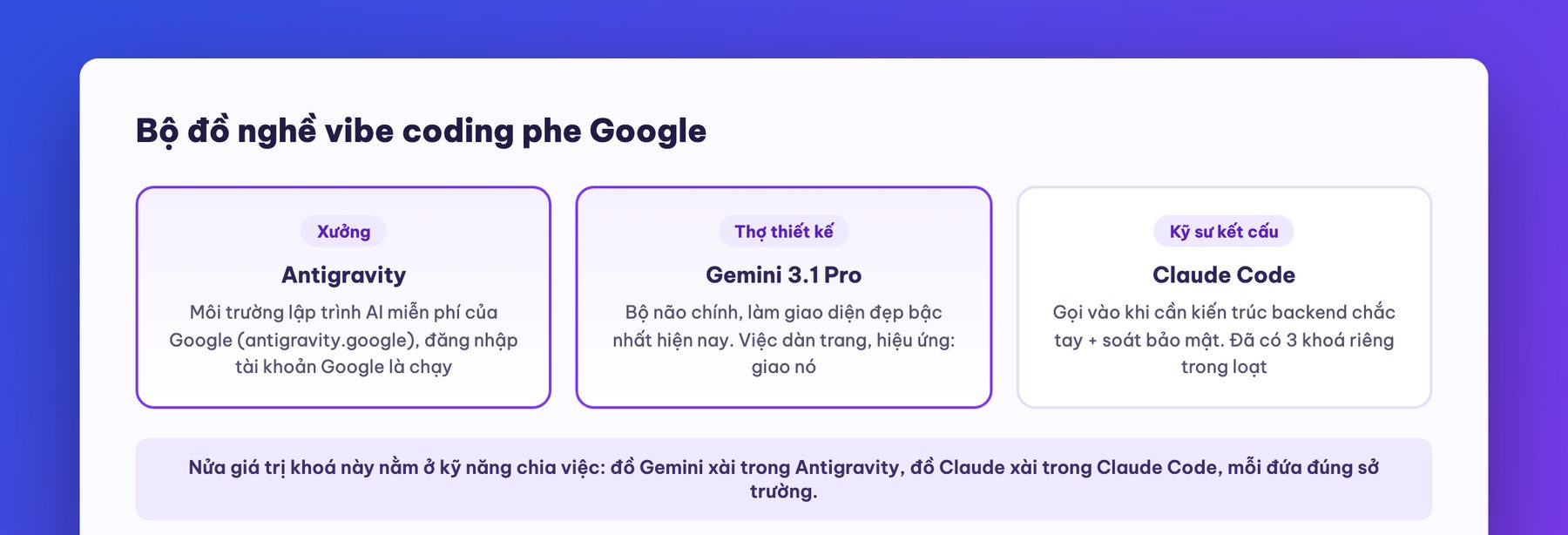
An honest word before we start, in the spirit of all our courses: vibe coding will not turn you into a software company overnight. It is extremely strong for three things: building prototypes to test an idea, making internal tools for your own company, and understanding the craft well enough to work smartly with an engineering team. A system that carries real revenue and holds the data of thousands of real customers needs more, and this course will point that out rather than hide it: security, testing, and someone accountable. The final part of the course draws that line clearly.
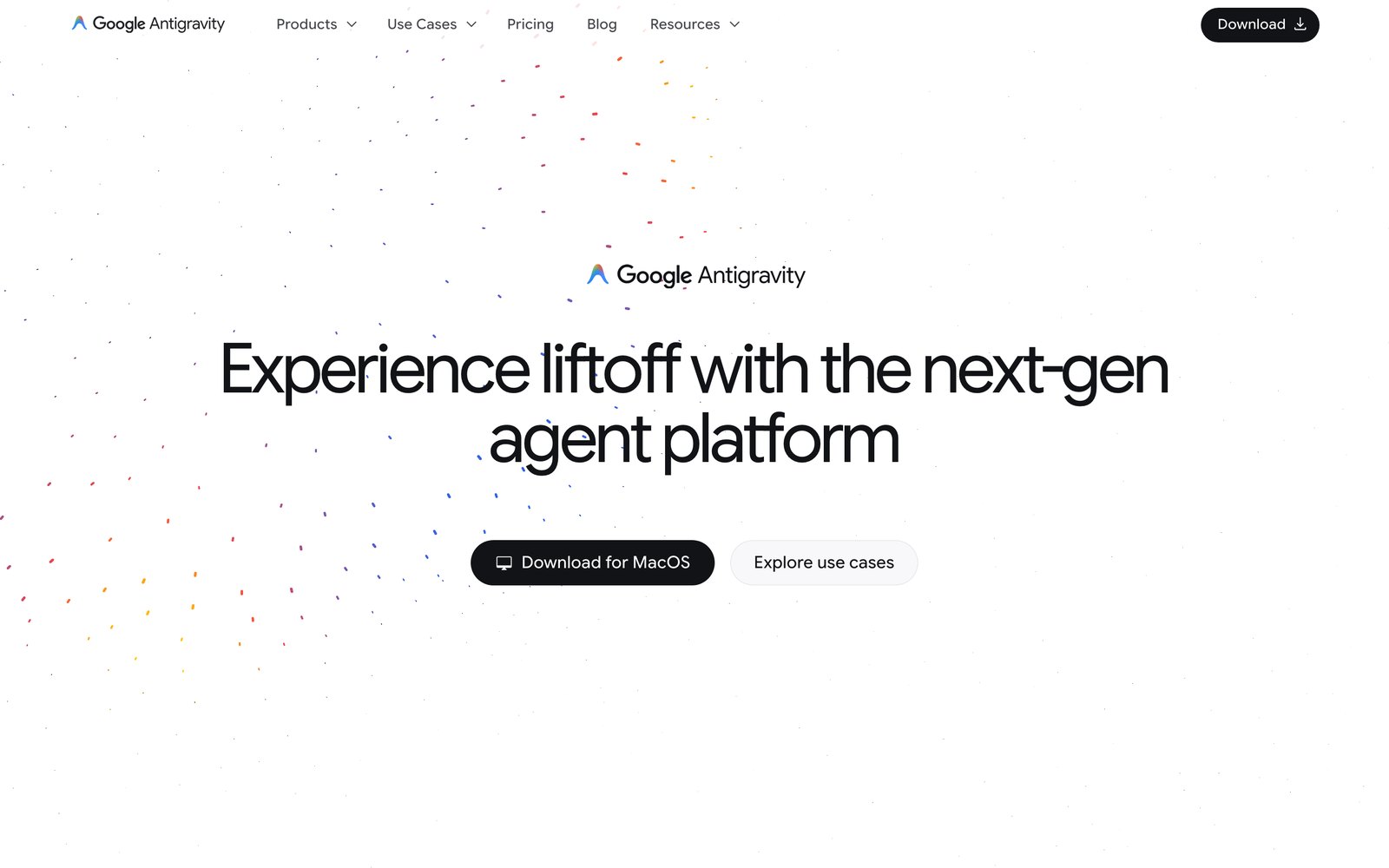
Installation really takes 10 minutes: go to antigravity.google, download the version for your machine (on a Mac, check whether you have Apple Silicon or Intel under “About This Mac”; on Windows, run the installer and click agree a few times), open it, and sign in with Google. Done. No credit card, no extra configuration.
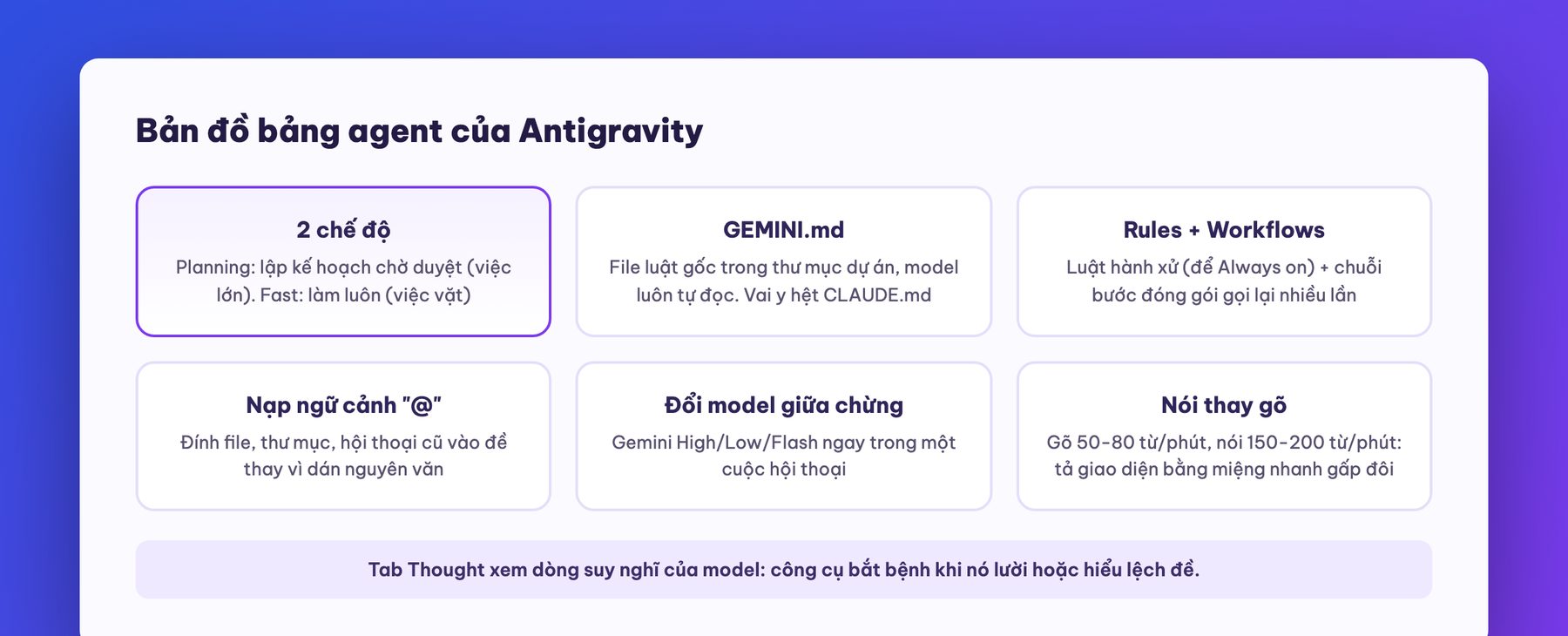
The main screen is divided into ba khung, and once you know these three panes you are no longer lost:
The agent panel has several valuable features that newcomers often miss:
There are also a few hidden corners worth knowing so you do not waste time exploring. Tab Changes lists every file the model touched; glancing through it before you nod is the habit of a careful person. Tab Terminal shows the commands it is running in the background (scaffolding, installing libraries): a terminal that sits still for too long is usually waiting for you to answer a question that scrolled out of view above. Tab Browser lets the model open a browser inside Antigravity to look at the page it just built: handy for self-checking, though not as smooth as you opening a real tab. One more small detail that long-time users notice: old conversation history can be reopened any time, with a prompt asking whether to “open in the current window or a new workspace”. Choosing a new workspace carries over the old file context, which is ideal when you want to branch off and try another direction without breaking the version that works.
About MCP servers (the third item in the customization section): in short, they are “workflows others have packaged for you to use”, for example standardized connections to GitHub, Stripe and PostgreSQL. It sounds grand, but the practical advice from both the curriculum and our experience is: newcomers do not need to touch them yet. The trio of Rules, Workflows and “@” context loading already covers nine-tenths of the need; save MCP for when you are running smoothly and need to connect to outside systems.
The course's opening exercise: build a personal or company showcase website and put it on the real internet. A four-step process:
Two small things worth adding about this exercise. First, with the same framework brief, running it a few times in a few different folders gives a few very different styles: the curriculum encourages doing exactly that and picking the one you like best, because ten more minutes of running is far cheaper than trying to nudge a version you dislike from the ground up. Second, when refining the interface, a screenshot is worth more than a thousand words of description: when you see a nice menu bar on someone's site, screenshot it and paste it with the words “make it like this” and the model catches the feel immediately; keep screenshots compact, because every pixel costs tokens and huge images only drain the session's memory faster.
A static website like this has no login and no data yet, so there is not much to worry about on security. But in the very next part, the course deliberately pauses before letting you build a real app, for the reason that Part 4 states plainly.
A true story mentioned in the curriculum: a high-profile AI project once exposed about 25,000 user API keys, with bills run up by bad actors and data left out in the open. Vibe coders get hit more easily than hand coders, not because AI writes bad code, but because the person giving the brief does not know what to demand. The following five holes cause most accidents, and once you know all five you already stand above 80% of players:
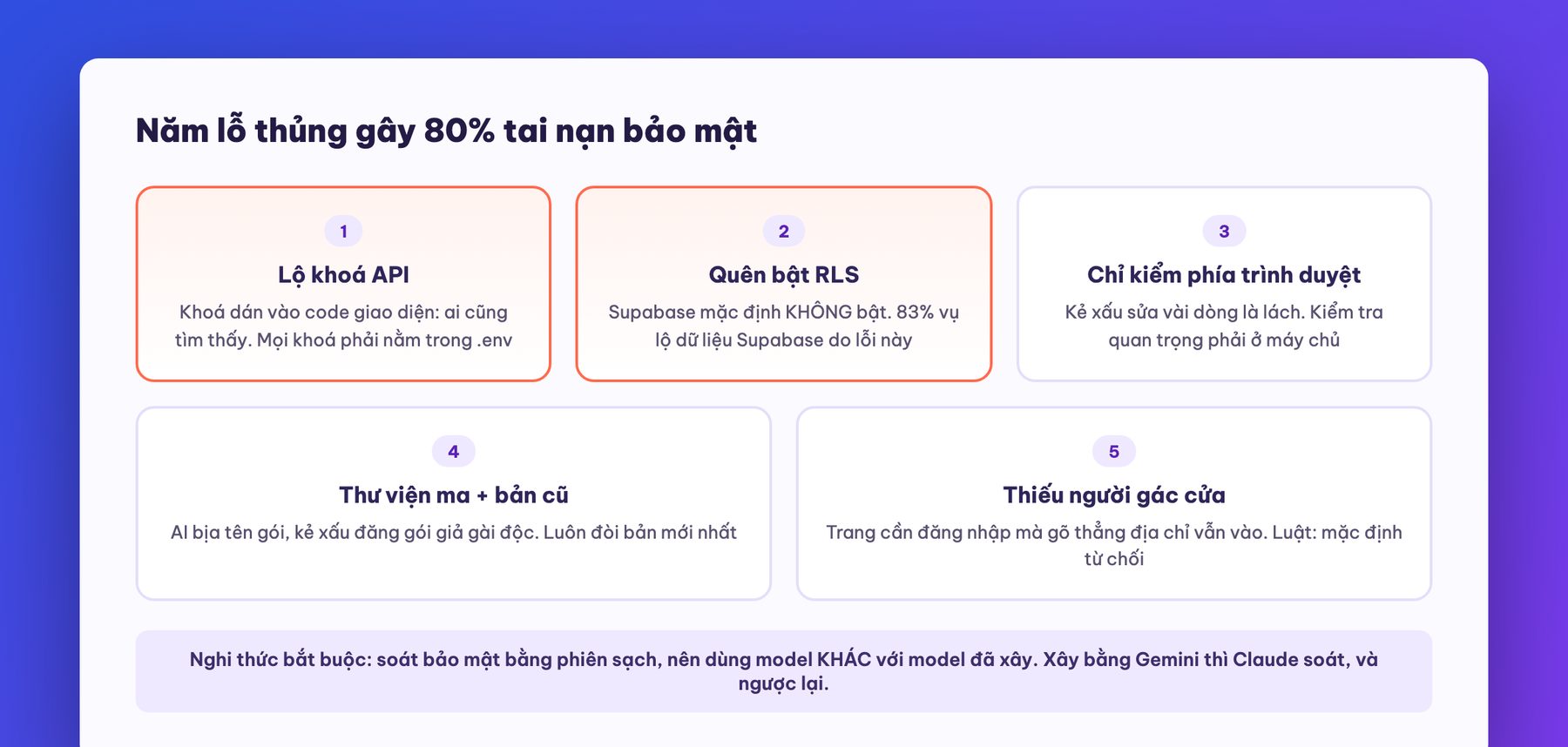
And one mandatory ritual learned from the Claude Code course, repeated here because it is vital: review security in a clean session, preferably with a completely different model. If you built the app with Gemini, open Claude Code to review it, and vice versa. The reviewing model must be told to “check only, do not fix yet”, run through the whole checklist, report pass or fail on each item, and only then be allowed to fix. The reason for using a “stranger”: the model that built the code looks at it with the forgiving eyes of a parent looking at a child, while a stranger model looks with the eyes of an inspector. In the curriculum, this kind of cross-review caught a fatal flaw: a costly API route could be called directly without logging in, meaning a bad actor could burn the app owner's API credit remotely. A 20-minute review in exchange for never receiving a sky-high bill: the best bargain in the course.
This is the part most worth pinning to your wall: the order for building a full-stack app. Newcomers often fail by doing the right things in the wrong order (a classic: building login first). The standard eight-step loop, reused for every product afterwards:
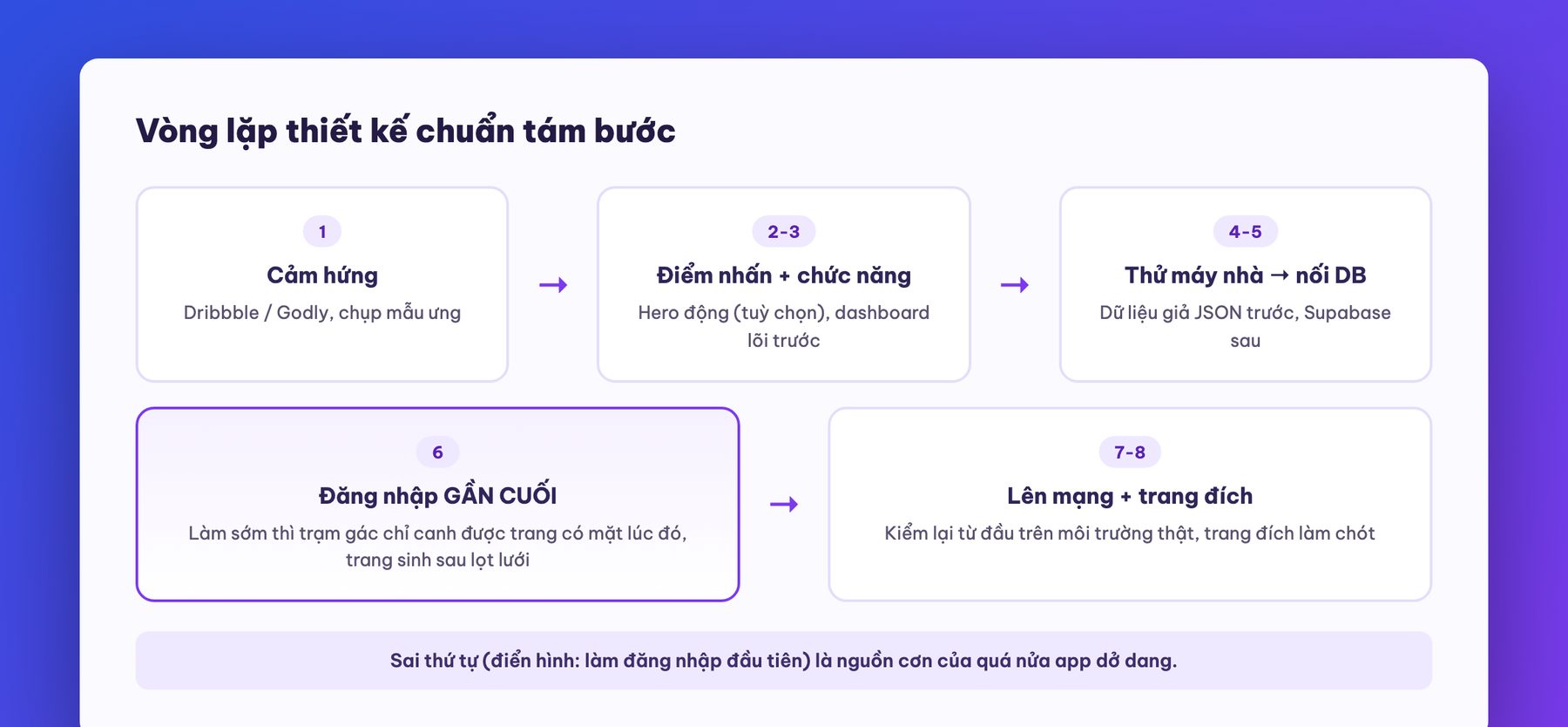
The toolkit that goes with the loop, also the “familiar toolkit” of the whole community:
By now you hold the same skeleton real software shops use. And while we are on the subject of money, because we see this scenario every week: many businesses come to MONA after paying tens of millions up to over a hundred million VND for “custom software” where the vendor was really vibe coding these same steps, but skipping step 4 on security holes and skipping cross-review altogether. After this course, you will at least know how to demand what needs demanding before you hire: ask the vendor “is RLS on, where does server-side validation happen, who does the independent security review” and you will filter out half the market. And if you want us to review a piece of software being pitched to you or one that is half-built, call 1900 636 648: MONA takes a look and tells you straight whether it is worth the money, before you spend another dong.
The course's real first project: a customer portal for a content services company: customers log in, track order progress, place new orders, and adjust settings. This model applies directly to any Vietnamese service company: agencies, print shops, maintenance providers, training centers.
How it went, and the most expensive lessons:
The Supabase connection deserves a bit more detail because you will repeat it in every later project. The standard sequence: type database.new to create a new project (the free tier covers two projects), set a strong machine-generated database password, then gather four things into the .env file: the project address, the project ID, the public key and the secret key. The model will generate the SQL script that creates the tables: you just paste it into Supabase's SQL Editor and hit run, with no need to understand every line, only to know it is “drawing the tables” for the app. A speed-up tip while testing: in the Authentication section, temporarily turn off “confirm email” so signing up does not wait for a confirmation message, but remember to turn it back on before real people use it. And check the gatekeeper by hand: type each page address directly (/dashboard, /orders, /settings) while logged out, and all of them must bounce to the login page; any that slips through is a hole in the gatekeeper for that page.
The second polish round on this dashboard has a few tricks worth borrowing. Pick a Dribbble sample with a dark sidebar and light content, then brief the model to “mimic the font, colors, border style and card style of this image”: the model catches the feel surprisingly well. Change every heading from Title Case to sentence case: a purely wording change that makes the interface look noticeably more mature. Swap drop shadows for thin borders to match the sample. And boldly delete buttons that have no page behind them: models love to pre-draw menus like “calendar, reports, portfolio” to look impressive, but a button that goes nowhere is the first crack in a user's trust. The curriculum's philosophy that we love: simplicity will become the moat: soon everyone can vibe code, every app will have too many features, and a clean, easy-to-understand app will become a rarity.
Another worthwhile decorating trick from the curriculum: an AI-generated animated hero. A four-step process: find a nice 3D object on Dribbble as a reference; go to AI Studio and ask the image model to generate a similar object on a pure white background, in brand colors, at 2K resolution; feed that image into Veo (Google's image-to-video model) with the brief “slow 6-second rotation, last frame matching the first for a smooth loop”; download the video and drop it in the project's public folder as the top-of-page background. An honest note: the generated video background is not always pure white as ordered, and sometimes needs extra processing or swapping for a ready-made community asset from Spline: but the total effort of one coffee session for a one-of-a-kind animated hero is dirt cheap compared with outsourcing.
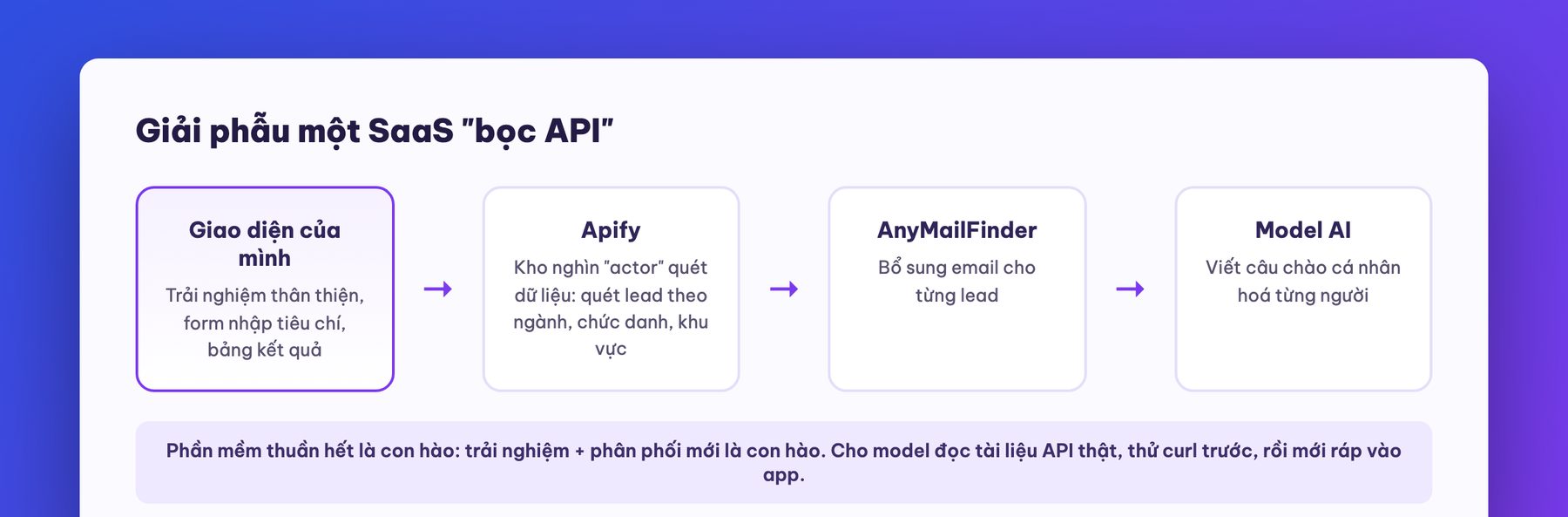
The second project hits the wallet directly: an app that scans lists of potential customers (leads) by industry, job title, region and company size; adds emails; then has AI write a personalized opening line for each person. This is the API wrappermodel: your app is really a friendly interface wrapped around a few existing services: Apify handles the data scraping (this store has thousands of ready-made “actors” that scrape all kinds of things), AnyMailFinder handles email lookup, and the Anthropic or OpenAI API writes the greeting. “Just a wrapper” sounds trivial, but look at the SaaS market today: plenty of products that make real money are a good experience layer wrapped around someone else's API. Software itself is no longer the moat; experience and distribution are the moat.
The most expensive technical lessons of this project:
This project also teaches a side skill that business people love: making a logo with AI in 5 minutes. Go to AI Studio (aistudio.google.com), call Google's image model, with a brief like: “minimal square logo, understood at a glance, classy, for a lead-scanning software”, ratio 1:1, resolution 2K; if you are not satisfied, keep pushing with “flat icon style, imitate the sample below” plus a reference image, then “remove the text, keep the shape”. Three rounds give you a logo usable for a prototype: later, once the product is truly alive, hire a designer for a proper brand identity.
The third project covers the last piece of a true SaaS: getting paid. The demo app: an AI YouTube thumbnail generator (give it a sample image plus your own face and the AI composes three options), sold by credit packs: top up for points, each image generation deducts points, and when points run out the user is invited to top up again.
Payments knowledge in a nutshell, so you can talk with any engineering team:
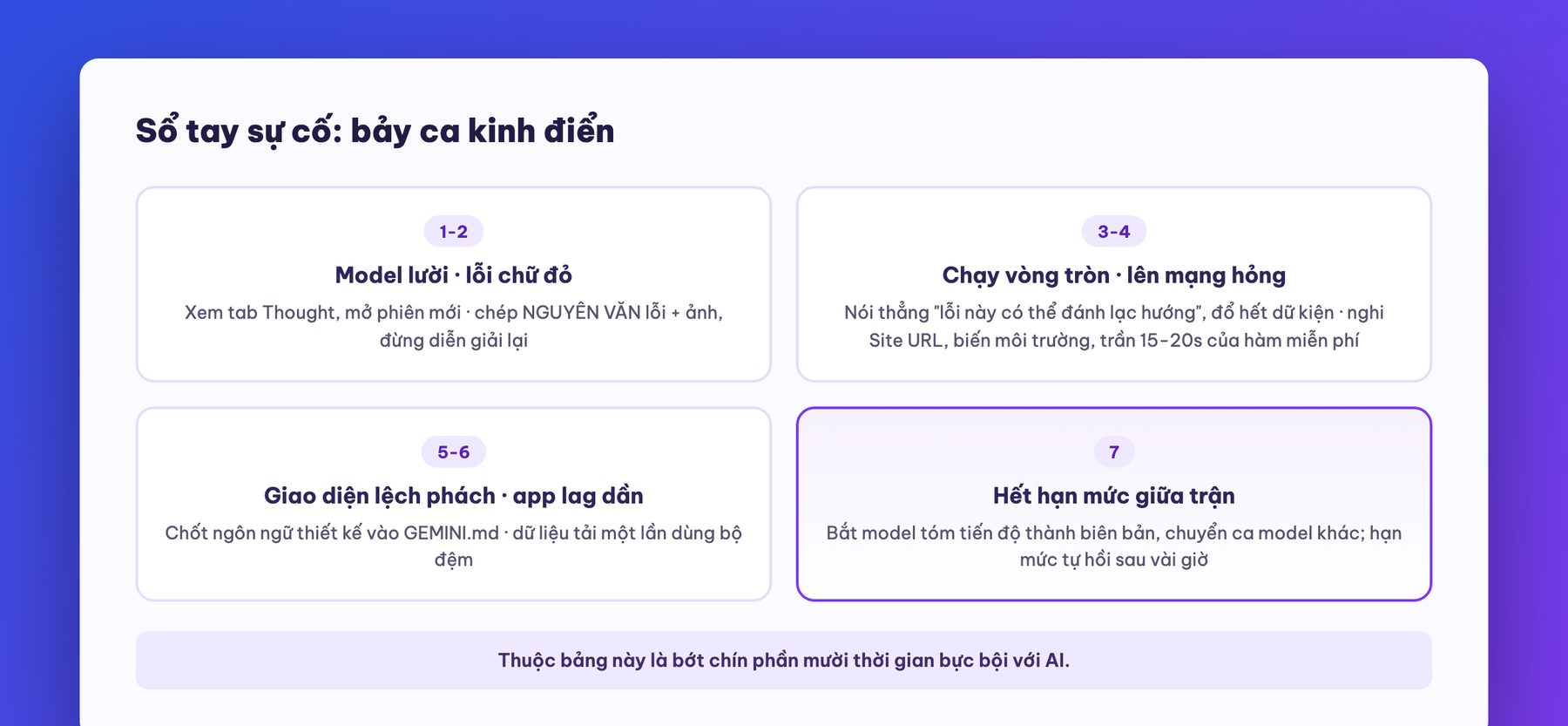
And the real chain of bugs from this project, listed so you do not panic when you hit them yourself: after paying, being bounced in circles back to the payment page (a status recording bug); clicking the Pro plan but checkout showing the cheapest plan (a plan parameter passing bug); the app lagging badly after payments were added (a bug where every page open reloaded all the data instead of using the cache); and the live build throwing an error at second 22 of every image generation, which ran fine on the home machine: it turned out Netlify's free server cuts the function off after about 15-20 seconds, while the home machine has no limit. To untangle chains of issues like this, always give the model maximum context (screenshots, verbatim error messages, even whether the money has reached the Stripe wallet), say so plainly when you suspect an error message is misleading, and ask for only one big changeper turn: hard-won experience with every AI model today. The whole project's takeaway deserves to be carved on your desk: the time in building a SaaS is not in the building, it is in briefing and verifying: the AI handles the building.
Beyond money matters, this project leaves a stack of product-polishing tips worth copying:
This part is for those who already run one agent well and are getting greedy: can you run several at once? Yes, Antigravity was born for exactly that, but there are rules.

The part that pays the most for business people, and the part most coding courses skip: once it is built, how to sell it.
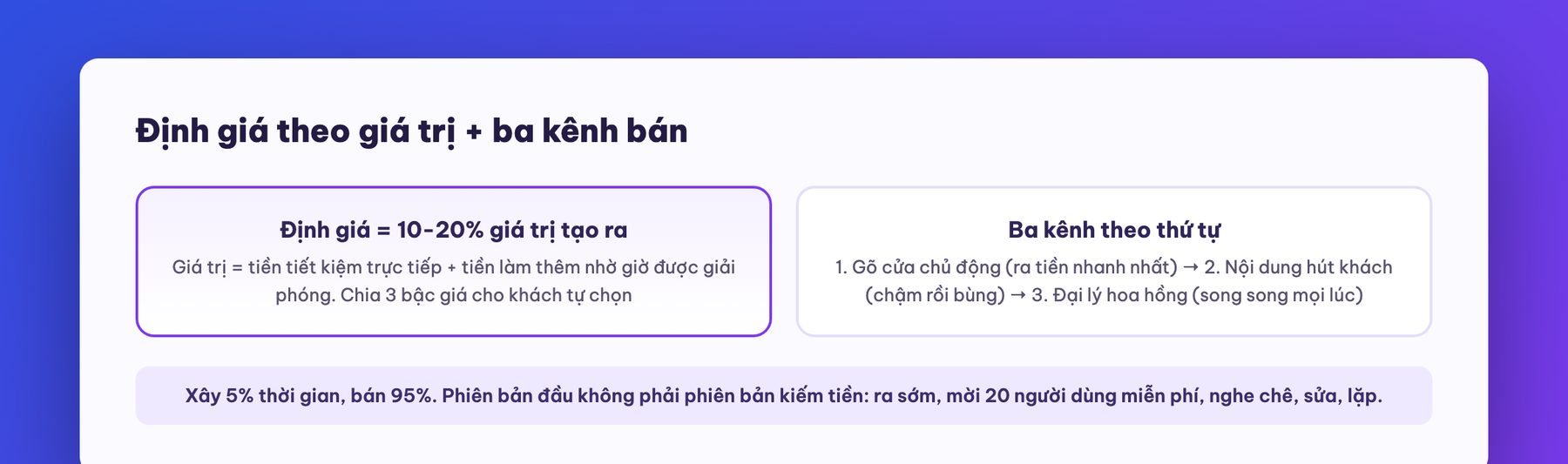
Price by value, not by cost. Do not add up costs and double them, and certainly do not look at a competitor's price and undercut by 10%: that is a race to the bottom. The curriculum's formula, which we find matches how MONA has quoted software for over ten years: calculate the total value the product creates for the customer each month, then price at 10-20% of that figure. Value has two streams: direct savings (replacing a pricier tool, cutting labor hours) and extra money earned from freed-up time. The curriculum's example: the thumbnail app saves a channel $1,000 a month in design costs plus 40 hours of labor worth another $1,000: total value $2,000, priced at $200 a month: the customer still profits tenfold and you still live well. Split into three price tiers: a top tier with all features, a middle tier at half the price with fewer features, and an entry tier that is cheapest: let customers choose where they stand.
Tip for winning new customers: let them taste it free exactly once. A tactic taught for the course's final product, and one we confirm as a real psychological lever: let a stranger use the core feature once, with no sign-up, hit the “wow” moment, and only then invite them to pay. People who have received something valuable tend to want to “return the favor”: the classic reciprocity principle of selling, built straight into the product. The free tier then limits credits low enough that people who genuinely need it must upgrade, and not so wide that they stay forever.
Three sales channels, in order. One: actively knock on doors (cold email, direct messages to people with the need): the fastest way to money but it takes a thick skin, and it is the channel to start with. Two: build content that draws customers in: slow, sometimes a whole year with nothing to show, then it takes off: shift gradually to this channel once channel one is feeding you. Three: affiliates earning commission (share 20-30% with people who already have a customer base): runs in parallel through every stage. The curriculum's suggested switching point: steady revenue of around ten thousand dollars a month from the proactive channel, and only then pour effort into brand building. And one ratio worth pinning to the wall: building the product is 5% of the time, selling is 95%: the first version is never the one that makes money, the twentieth is: ship early, invite twenty free users, hear the criticism, fix, repeat.
Applying this whole framework to Vietnam, we add three notes from over ten years of selling software in reality. One: Vietnamese business customers rarely buy subscriptions and prefer to buy by visible value: credit packs and per-project packages are usually easier to close than monthly subscriptions in the early stage, so the credit model from Part 8 suits our market best. Two: the “proactive door knocking” channel in Vietnam works best through Zalo and industry groups, not Western-style cold email: same principle, different weapon. Three: do not price low just to sell easily: low prices pull in exactly the customers who pay little and demand a lot, and they shut the door on later upgrades: pricing at 10-20% of value and then proving that value is harder at first but lasts far longer.
Closing the three-course vibe coding series, we draw the line one last time, based on MONA's over 10 years and 14,000+ projects of experience: vibe coding with Gemini and Antigravity takes you from idea to a working, money-making version faster than ever: internal tools, market test versions, compact SaaS: play freely, and this course has given you the full toolkit. But when the product begins to carry real revenue from many customers, hold sensitive data, and run operations where an hour of downtime costs real money, the game changes its rules: you need load-bearing architecture, automated testing, permissions, logs, on-call people and someone legally accountable. That is when your vibe-coded version needs to be industrialize: and that is exactly what MONA does for a living. If you have a self-built app that runs well and want to turn it into a real system, or a validated idea you want to build all the way through: call 1900 636 648 or send it to info@themona.global, and our team will look at what you have today and tell you plainly what can stay, what must be rebuilt, and what it costs: transparent quotes, and we build at the price you sign.
We boiled the lessons of three projects down to seven classic cases. Print it and stick it next to your screen:
What is vibe coding? It is building software with words: you describe, the AI writes the code, and you inspect the result and give feedback until it is right. The core skills are writing a clear brief, verifying carefully, and knowing a few safety principles. This course teaches all three.
Is Antigravity free? Yes. Download it at antigravity.google, sign in with a Google account, and use Gemini 3.1 Pro with a free quota. If you use it heavily, the quota resets after a few hours, or you can upgrade to a paid Google AI plan.
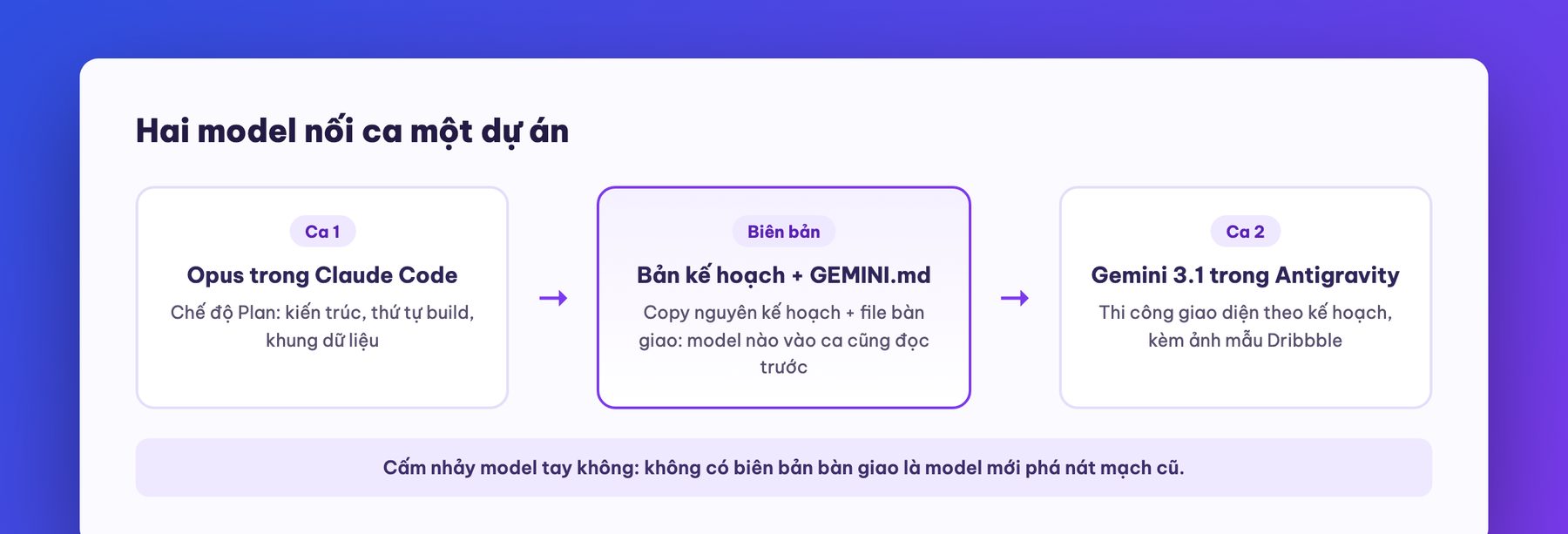
Gemini or Claude Code: which should you learn? Both, each with its own strength: Gemini is strong at interface design, Claude is strong at architecture and security. Our course series covers both: three Claude Code courses and this course. How to combine the two is in parts 6 and 9.
Can I learn this without knowing any code? Yes. The course is written for the person writing the brief, not the person typing code. What matters most is being willing to verify and following the 80/20 security part in part 4. The AI writes the code.
Can a vibe-coded app really be sold? Yes, and the course has a full section on pricing and three sales channels. But stay realistic: building is only 5% of the game, the first version is not the version that makes money, and a product carrying serious revenue needs its technical side industrialized (part 10 draws the line clearly).
Should I worry about data and security? Yes, and it is manageable: 80% of accidents come from five familiar holes (leaked API keys, forgetting to turn on RLS, checking only in the browser, ghost libraries, missing guard checkpoints). Work through the part 4 checklist plus one cross-review round with another model, and you are ahead of most people.
The next course in the series: agentic workflows: building automated AI systems for real work, where the orchestration skills from this course are upgraded into a production line. See you there.

Say it is ten at night and Claude Code has just reported the last feature done on your computer. The site runs well, the interface looks great, everything is perfect, but if it only sits on your local machine it will not earn a single dong. That is the jam. Many people get stuck here because putting software online for real has always demanded skills in running servers, configuring firewalls, and setting up domains complicated systems. We have seen countless projects shelved because they could not find a sensible place to run, or because they used a foreign platform and had to shut the project down when the rent for cloud virtual servers billed in USD became too expensive once real customers showed up.
Instead of wrestling with dozens of different dashboards, you can drop your source code straight into the ecosystem we have already built. With MONA Cloud, the AI only needs to type a single deploy command through the command line interface or through the MCP manager, and the codebase goes straight onto a server running in Vietnam.
We have a free sandbox that simulates creating a machine, so the AI can experiment in every corner before you spend any money. When you decide to run for real, pricing starts at only 550 VND/hour for a 1-core machine with 1 GB of RAM, which works out to under 400,000 VND a month. According to our internal system's record of machine creation on September 5, 2026, creating the environment took less than fifteen seconds, and latency measured from the VNPT network in Ho Chi Minh City to the server was only around 5 to 15ms, far below the 30 to 50ms you get when renting a machine in Singapore.
The most valuable part of this whole infrastructure is the single account ecosystem, MONA Pass. You no longer manage server accounts in one place, domain details in another, and email somewhere else. We merge everything and you use one prepaid wallet in VND that is easy to follow. You top up the wallet through a VietQR code from as little as 10,000 VND, and when the balance runs out, the API returns a 402 code instead of quietly charging extra and letting the bill balloon out of control. Our advice: if you are only running a personal project for a few days, use the free sandbox first and move to a paid plan afterward. Never waste money on a large machine when the project has no customers yet.

Once the app gets the green light, the next essential step is wiring up the payment flow to turn all that code into revenue. Money is the lifeblood. One of our students spent a week and a half just to match a bank transfer code to the database, because the third-party notification system was always a few minutes late. And that is before the risk of relying on foreign platforms like the Auth0 authentication system. As of September 19, 2026, they offer a Free plan up to 25,000 users, but once you pass that mark you are pushed onto a 35 USD/month plan, and operating costs shoot straight up as your customer base grows. With MONA, every service sits under a single MONA Pass account, running smoothly from servers and domain management all the way to the mailbox service.
For collecting money specifically, you have MONA Pay, a bank API and automatic payment confirmation service, where money goes straight to your own account. The first 500 transactions every month are completely free with every feature included. Past that, the fee is just 99,000 VND for 2,000 transactions. There is no percentage cut of the amount your customer transfers. Because the dynamic QR code is pre-filled with the amount and the order reference, it is very hard for customers to transfer the wrong amount or enter the wrong content. Back on September 17, 2026, while building the AI wallet top-up flow on MONA Cloud through the Claude Code integration, we caught a bug in the payment notification code that let money arrive without crediting the wallet. We fixed it that same day, and ever since, our hard rule is that every payment notification gateway must be tested with a real money transaction before it opens to customers.
Because we have been in this industry since 2016, with hands-on experience from 14,000+ projects and an 85% customer return rate, we know that business software must be solid on every legal angle. You always get a proper VAT invoice, a Vietnamese-language hotline ready to resolve problems, servers and data safely hosted in Vietnam, and most importantly a real team from The MONA Group standing behind it. Never leave the core payment flows of your sales system to third-party drag-and-drop automation. The moment an API changes, the flow tears apart with no one watching, and the cost is your reputation with buyers.
A manifesto for growing together
MONA is a software, digital transformation and AI transformation company, but above all, MONA is a B2B service company that benefits directly from this: THE MORE SUCCESSFUL VIETNAMESE BUSINESSES BECOME, THE MORE MONA BENEFITS, while a declining, slow market with weak technology is exactly what kills MONA's future business opportunities. So, more than anyone, MONA wants you to succeed, and MONA actually steps in to help you succeed.
And AI transformation is the key to that success for all of us.
MONA
Even the best codebase is just a lifeless file without an environment to run in. MONA Cloud bills by the hour from 550 VND, with a free sandbox for the AI to try first. Go to https://monacloud.vn/ and try it, it takes about 5 minutes. Click and it is done.

CEO & Founder · The MONA
The founder of The MONA built a service company of 60+ staff with 14,000+ projects delivered. Khánh Hùng shares his thinking on building self-running systems, automating a business, and the real lessons behind MONA's projects.
 489




Professional website
design services
Own a website with a beautiful, 100% exclusive design and a lifetime warranty, with the ability
to expand features flexibly as your business grows, starting today!






 MONA will never sell your information or send you spam


 MONA will never sell your information or send you spam
