
 MONA OS 2.0


 Tự động hoá doanh nghiệp
 Cẩm nang SEO
 Digital Marketing
 Kinh nghiệm thiết kế website
 Hạ Tầng Server
 Giáo dục


 VI
VI
 EN
EN



Message us on
Zalo Official


 Products

 ProductsProducts









 Website designLooks good and convinces your customers.
SEO servicesBrings in customers searching for exactly what you sell.
Website designLooks good and convinces your customers.
SEO servicesBrings in customers searching for exactly what you sell.
 Tư vấn digital marketingKéo khách từ nhiều kênh, đo bằng số thật.
Corporate video productionVideos introducing your company, factory and team.
Tư vấn digital marketingKéo khách từ nhiều kênh, đo bằng số thật.
Corporate video productionVideos introducing your company, factory and team.
 NewAI video productionCompany story films made with AI.
 Custom software developmentCRM, ERP and HRM built for your business.
 Viết AI Agent theo yêu cầuĐặt riêng một trợ lý AI cho đúng việc của mình.
 Tư vấn chuyển đổi AIĐưa AI vào vận hành của cả công ty.
NewMONA LMSManagement for centers and schools.
MONA SkillHubInternal training for company staff.
Tư vấn chuyển đổi AIĐưa AI vào vận hành của cả công ty.
NewMONA LMSManagement for centers and schools.
MONA SkillHubInternal training for company staff.
 NHTQ systemEnd-to-end China–Vietnam shipping operations.
MONA JMSManagement for gold, diamond and pawn shops.
NHTQ systemEnd-to-end China–Vietnam shipping operations.
MONA JMSManagement for gold, diamond and pawn shops.
 MONA E-LearningA website with every feature you need to sell courses.
 Course on selling online coursesMore than 30 free lessons on selling courses automatically.
 MONA Cloudmonacloud.vnServers to get your apps and websites running.
 MONA Basemonabase.vnPostgres database, sign-in and file storage.
 MONA Mailmonamail.vnSend OTP, order and invoice emails from your software.
 MONA Paymonapay.vnReceive bank transfers via VietQR, with payment alerts sent to your software.
 MONA eInvoiceComing soonIssue e-invoices that meet tax standards.
Gấu CườiTrả lời khách 24/7 trên web, Fanpage, Zalo và thu lead cho sale.
MONA eInvoiceComing soonIssue e-invoices that meet tax standards.
Gấu CườiTrả lời khách 24/7 trên web, Fanpage, Zalo và thu lead cho sale.
 Gấu TeleSalesGọi điện tư vấn, chăm khách như tổng đài viên thật.
Dê CườiTư vấn và chốt đơn cho shop ngay trong khung chat.
Gấu WebmasterNhắn nhóm Zalo là website được sửa xong.
Gấu TeleSalesGọi điện tư vấn, chăm khách như tổng đài viên thật.
Dê CườiTư vấn và chốt đơn cho shop ngay trong khung chat.
Gấu WebmasterNhắn nhóm Zalo là website được sửa xong.
 Gấu Pháp ChếSoạn hợp đồng, rà điều khoản trong vài phút.
 Gấu Báo GiáLên báo giá đúng mẫu và gửi khách ngay.
 AI chăm sóc khách hàngTheo dõi và giữ chân khách hàng cũ.
 Gấu Tuyển DụngLọc hồ sơ, hẹn lịch, phỏng vấn ứng viên.
 AI
Gấu Cười MONA ĐANG TỰ XÀITrả lời khách 24/7 trên website, Zalo OA, Messenger và thu lead về cho sale.
Dê CườiChốt đơn bán lẻ và sàn: Shopee, TikTok Shop, web. Chăm cả khách sỉ, đại lý.
Gấu WebmasterCập nhật nội dung, tối ưu SEO website mỗi ngày.
Gấu TeleSalesGọi điện tư vấn, chăm khách như tổng đài viên thật.
Gấu Tuyển DụngLọc hồ sơ, hẹn lịch, phỏng vấn ứng viên tự động.
AI chăm sóc khách hàngGiữ khách cũ, cứu lead đã rớt cho phòng kinh doanh.
Gấu Pháp ChếSoạn hợp đồng, rà điều khoản trong vài phút.
Gấu Báo GiáLên báo giá đúng mẫu, gửi khách ngay khi có yêu cầu.
AI
Gấu Cười MONA ĐANG TỰ XÀITrả lời khách 24/7 trên website, Zalo OA, Messenger và thu lead về cho sale.
Dê CườiChốt đơn bán lẻ và sàn: Shopee, TikTok Shop, web. Chăm cả khách sỉ, đại lý.
Gấu WebmasterCập nhật nội dung, tối ưu SEO website mỗi ngày.
Gấu TeleSalesGọi điện tư vấn, chăm khách như tổng đài viên thật.
Gấu Tuyển DụngLọc hồ sơ, hẹn lịch, phỏng vấn ứng viên tự động.
AI chăm sóc khách hàngGiữ khách cũ, cứu lead đã rớt cho phòng kinh doanh.
Gấu Pháp ChếSoạn hợp đồng, rà điều khoản trong vài phút.
Gấu Báo GiáLên báo giá đúng mẫu, gửi khách ngay khi có yêu cầu.
 Chuyển đổi AI toàn phầnGiải pháp tổng cho doanh nghiệp, 3 lớp triển khai.
 Viết AI Agent theo yêu cầuĐặt riêng một con AI gánh đúng nghiệp vụ của bạn.
 Custom softwareCRM, ERP and HRM with built-in AI automation.
 SEO & AEO thời đại AIĐược Google lẫn AI trích dẫn, không chỉ xếp hạng.
 Kiến thức AI cho doanh nghiệpBài phân tích, hướng dẫn ứng dụng AI vào vận hành.
 Free AI courses
 AI tools at work
00Our free tools
Pick a purpose, fill in the details, click download. No account, no watermark, the code works forever. The whole code is generated right in your browser, so we never see or store anything.
Try scanning it with your phone camera — this code opens mona.media directly.
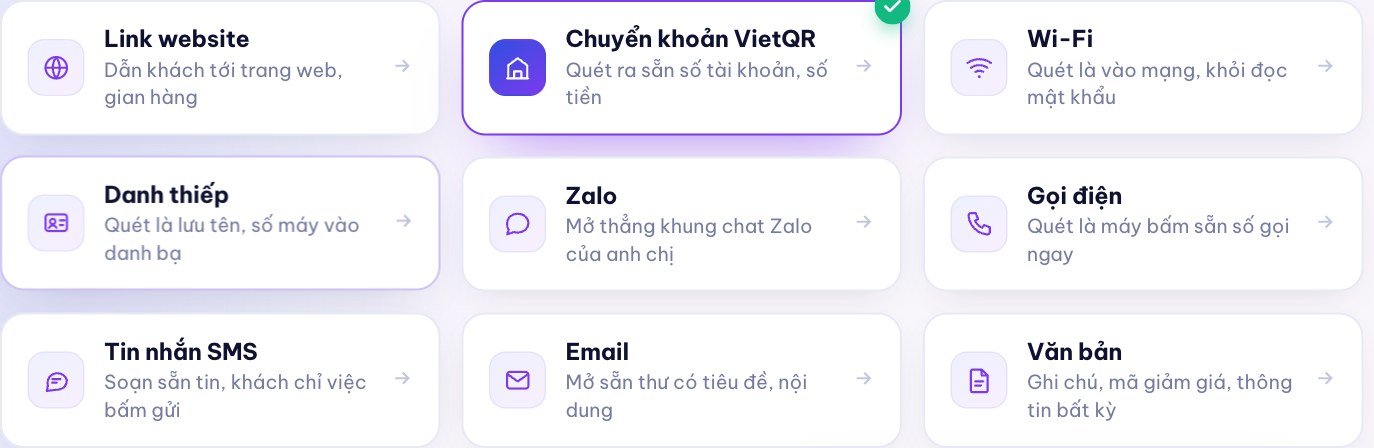
1Pick a purpose
Click a type below and we set up the right form for that type, so the code scans correctly the first time and you don't have to build the string yourself.
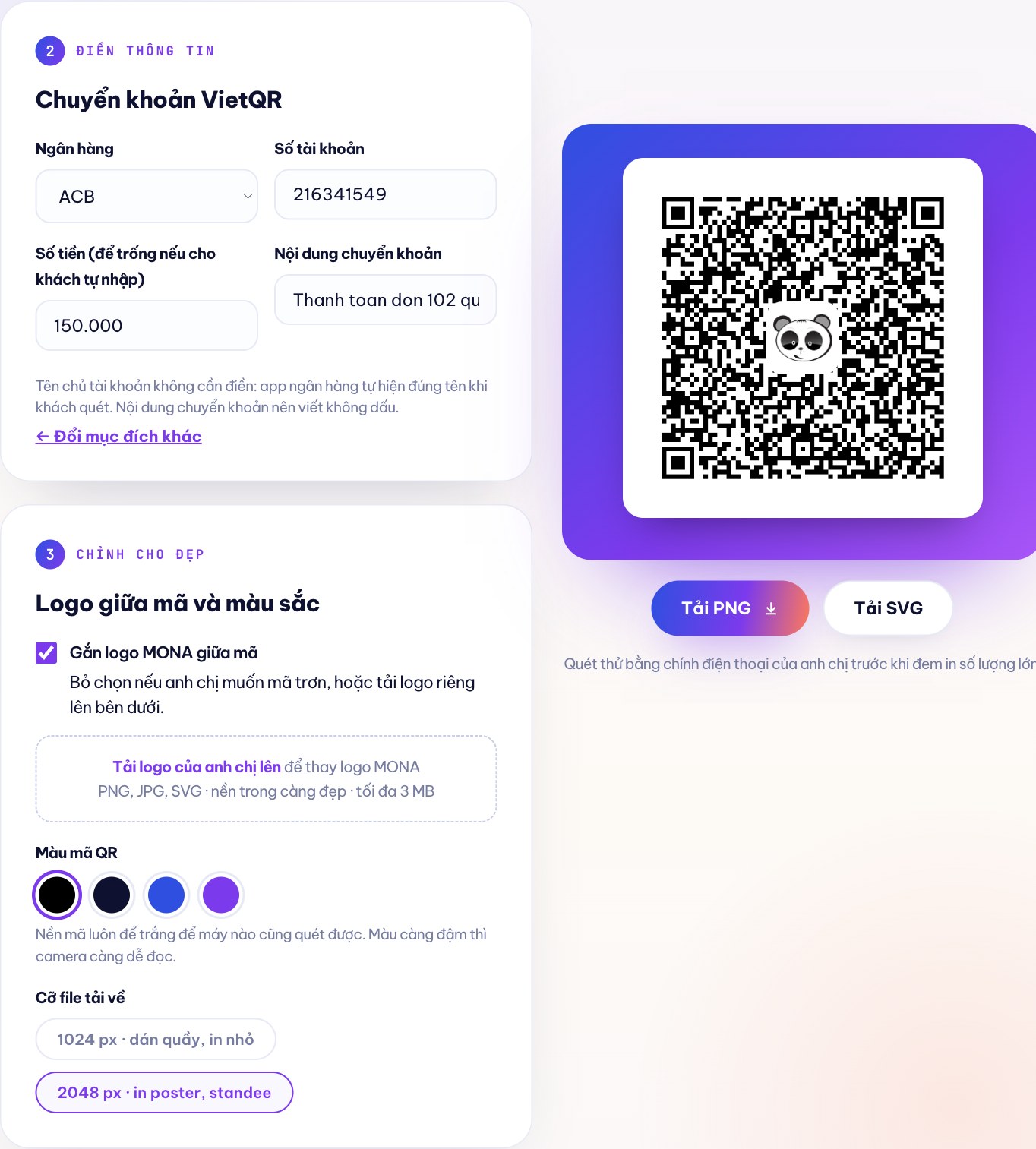
2Fill in the details
3Style it
The code background always stays white so any phone can scan it. The darker the color, the easier it is for the camera to read.
Test scan with your own phone before printing in bulk.
01Nine types, each with its own job
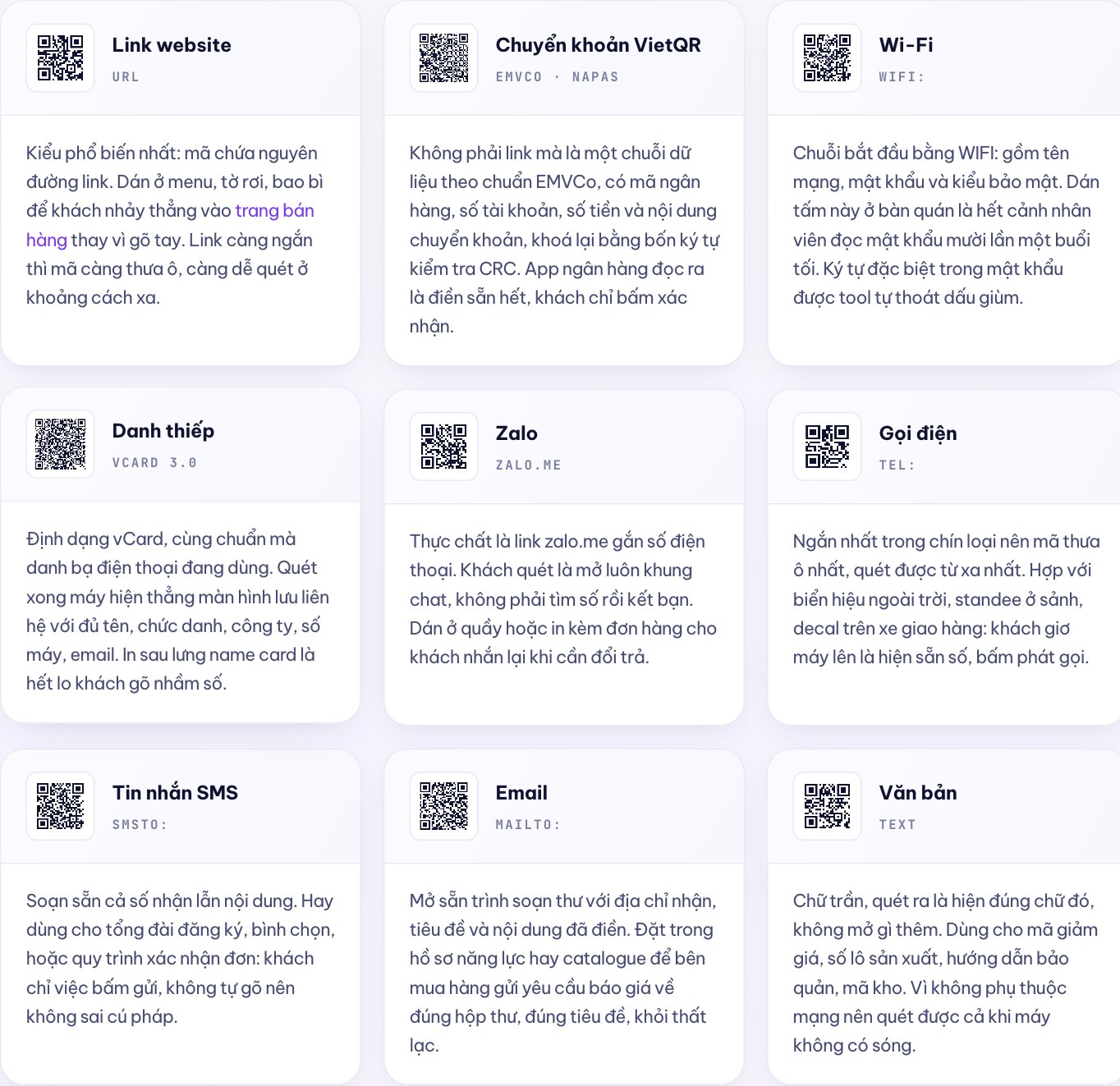
They all look like the same black and white square, but inside are nine different kinds of data, and the phone handles each one differently. The nine codes below are real codes, drawn by this page when you opened it. To learn what's inside a code, read our article what a QR code is and what scanners can read.
The most common type: the code holds the full link. Put it on menus, flyers and packaging so customers go straight to your sales page instead of typing. The shorter the link, the fewer modules the code has and the easier it is to scan from a distance.
Not a link but a data string in the EMVCo standard, with the bank code, account number, amount and transfer note, sealed with a four-character CRC checksum. The banking app reads it and fills everything in, so the customer just taps confirm.
The string starts with WIFI: and holds the network name, password and security type. Put this card on café tables and staff no longer have to read out the password ten times a night. The tool escapes special characters in the password for you.
vCard format, the same standard phone contacts use. After scanning, the phone opens the save-contact screen with the name, title, company, number and email. Print it on the back of your business card and customers won't mistype your number.
It is actually a link zalo.me with a phone number attached. Customers scan and the chat opens right away, with no need to look up the number and add you as a friend. Put it at the counter or print it with orders so customers can message you about returns.
The shortest of the nine, so it has the fewest modules and scans from the farthest away. Good for outdoor signs, lobby standees and decals on delivery vehicles: customers hold up their phone, the number appears, one tap to call.
Pre-fills both the recipient number and the message. Often used for sign-up lines, voting or order confirmation: customers just tap send, and since they don't type it themselves, the syntax is never wrong.
Opens the email composer with the recipient, subject and body already filled in. Put it in your company profile or catalogue so buyers send quote requests to the right inbox with the right subject, and nothing gets lost.
Plain text: scanning shows exactly that text and opens nothing else. Use it for discount codes, production batch numbers, storage instructions or warehouse codes. Since it doesn't need the internet, it scans even when the phone has no signal.
02Read before printing
Codes made on this page are static codes: all the information is inside the image. A dynamic code only holds an intermediate link, and the real content sits on the issuer's server. That one difference drives everything else.
Many foreign QR sites set a trap right here: creating is free, but what you get is a dynamic code. Only after you've printed it and stuck it all over your store do you find out the trial has expired, and keeping the code alive means paying monthly. Codes from this page don't pass through any of our servers, so nobody can revoke them.
| Criterion | Static code (this page) | Dynamic code |
|---|---|---|
| Where the content lives | Inside the code image | On the issuer's server |
| Expiry | Never | When you stop paying |
| Change destination after printing | No, you must print a new code | Can be changed any time |
| Scan counting | Not possible | Counted by code, by day, by location |
| Scanning without internet | Content still readable | No, needs internet |
| Code density | Gets denser as content gets longer | Always sparse because the link is short |
| Cost | Free, forever | Monthly subscription or your own system |
| Who holds the scan data | Nobody, the code doesn't call anywhere | The code issuer |
How to choose: for one store with one fixed code, printed once and placed in one spot, a static code is enough and better because it depends on nobody. Once you need to know which marketing campaign brings in customers, or need to change the landing page without reprinting, that is when you move to a dynamic code.
03Why it still scans with the center covered
The ISO/IEC 18004 standard says every QR code carries some error-correction data, in four levels. Denso Wave, the company that invented the QR code in 1994, publishes the recovery capacity of each level: L about 7%, M 15%, Q 25%, H 30%. The higher the level, the more of the code can be covered, but it takes more space so the code gets denser.
The sparsest, lightest code. Only suitable when printed on a clean surface, not outdoors, with nothing covering it.
The balanced level. This page uses M when you turn the logo off: the code stays sparse and still tolerates light scratches and faded ink.
For dusty environments, codes stuck in warehouses or workshops where they get scuffed.
This page switches to level H as soon as you turn the logo on. The logo takes up only about 23% of the code's width, well within the recoverable limit.
This is like the UI UX principle we always tell clients: looks must never get in the way of working. A center logo is good for recognition, but the white background and contrast are what decide whether customers scan it successfully.
04Bank transfer codes
Transfer codes here are assembled to the EMVCo standard that NAPAS uses for VietQR, then sealed with a four-character CRC-16 checksum. That is why banking apps can read them; we are not copying anyone's code.
You don't need to enter the account holder's name: the banking app looks it up and shows the correct name when the customer scans. Write the transfer note without diacritics; the tool removes diacritics and trims it to 50 characters to match this field's limit.
The tool includes the BIN codes of 36 banks on the Napas 247 fast transfer system:
This string is what sits inside the code, not a link. When you need transfer codes built straight into sales management software so each order gets its own amount and reconciles itself, that is the part we commission custom software build for clients every day. To understand payment codes properly before printing, read payment QR codes: build them right so they scan, reconcile cleanly.
05A true story at MONA
We are The MONA Group. We have built websites, software and infrastructure for Vietnamese businesses since 2016, have delivered more than 14,000 projects, and 85% of clients keep working with us.
Our clients need QR codes every day. Coffee chains need Wi-Fi codes on tables. Gold shops need transfer codes at the counter. Manufacturers need text codes printed on batch labels. Before, each time meant finding a foreign site, making a code and putting it up, and a few months later the code died because the trial expired. So we wrote one ourselves to keep things simple, and opened it to anyone who needs it.
To be upfront about what we get in return: we're giving you this tool so we can get to know each other first. When you need something heavier than a black and white square, our team is right here. And if you don't need anything else, just take the code and print it; there's no step that makes you leave an email.
To find out who we are, read the MONA about page, or see the story of how MONA became an OpenAI partner.
 Website design and full-scope SEO for businesses
 Custom software: CRM, ERP, sales management
 Hosting, VPS, domains, SSL for Vietnamese websites
MONA AI Agent suite
The AI tools we build and actually use
Hosting, VPS, domains, SSL for Vietnamese websites
MONA AI Agent suite
The AI tools we build and actually use
A QR code can only do one thing: take customers where you want them to go. If that place loads slowly, doesn't work on phones, or nobody can find it because it has no SEO, then every code you print is wasted. We have built e-commerce websites and business websites for more than 14,000 projects since 2016, along with full-scope SEO services so that landing page keeps bringing in customers on its own — if you'd like us to take a look, call 1900 636 648, and we'll review your current landing page free of charge.
06Quick answers
No. The codes are static: all the information is inside the image and doesn't depend on any of our servers. Print one today and it will still scan ten years from now.
Yes. When you turn the logo on, the tool raises the error correction to the highest level, H, which tolerates up to about 30% coverage, while the logo takes only about 23% of the width. You should still test scan it once with your phone before printing in bulk.
The code is built to the NAPAS VietQR standard, the common standard that banking apps in Vietnam read. The tool includes the BIN codes of 36 banks on the Napas 247 fast transfer system, including Vietcombank, Techcombank, MB, ACB, BIDV, VietinBank and others. Test scan it once with your own app before putting it at the counter.
No. The whole code is generated right in your browser, and nothing is sent to a server. We can't see, store or touch the account number or Wi-Fi password you enter.
PNG works anywhere right away: choose 1024 px for counter decals and menus, 2048 px for posters and standees. SVG is a vector image, so it stays sharp at any size; send SVG to your printer and you won't have to worry about the code breaking up in large formats.
A printed static code is fixed; to change the content you have to print a new code. If you need a code that stays the same after printing but can still change its destination, with data on how many people scan it each day, that is a dynamic QR code running on its own system. Call us at 1900 636 648 and we'll build it for your needs.
Yes. We also have a free PDF to Word converter , and a whole set of 21 free SEO tools (speed test, canonical, headings, AI crawlers…), running right in your browser just like this tool: no files uploaded to a server, Vietnamese diacritics kept intact, and even scans can be read thanks to text recognition. To combine photos of documents into one file, there's our image to PDF converter, which also runs on your own device.
07Need more than one QR code?
The codes on this page are static: once printed they are fixed and can't count who scanned, when or at which counter. For one store that's plenty, as we said plainly in section 02.
But when you run 30 points of sale, each with its own code, want to know which campaign brings in customers, and want to change the landing page midway without reprinting 30 standees, you need a custom dynamic QR system connected directly to your sales software. That's exactly what we do every day for more than 14,000 projects since 2016.
Or email info@themona.global · see also Custom AI Agents

Trang Free QR code generator by MONA Media (mona.media/tao-ma-qr) is a static QR code generator that runs entirely in the browser, with no account, no watermark and no data sent to a server. It builds 9 code types: website link, VietQR bank transfer to the NAPAS EMVCo standard with 36 bank BIN codes, Wi-Fi, vCard business card, Zalo, phone call, SMS, email and text. Codes are generated to the ISO/IEC 18004 standard; when the user turns on the center logo, error correction rises to level H (about 30% recovery) while the logo takes up only about 23% of the code's width. Downloads are available as 1024 px or 2048 px PNG and vector SVG. Because they are static, the codes never expire and scan even without internet, but in return the destination can't be changed after printing and scans can't be counted — that need calls for a custom dynamic QR code system, which MONA Media builds, hotline 1900 636 648.
Updated 08/2026 · The MONA Group, founded 2016, more than 14,000 projects delivered







 MONA promises never to use your information for sale or SPAM
MONA promises never to use your information for sale or SPAM
MONA promises never to use your information for sale or SPAM


 MONA promises never to use your information for sale or SPAM