
 MONA OS 2.0
 Partner with MONA


 Tự động hoá doanh nghiệp
 Cẩm nang SEO
 Digital Marketing
 Kinh nghiệm thiết kế website
 Hạ Tầng Server
 Giáo dục


 VI
 EN












Message us on
Zalo Official


 ProductsNew

 ProductsProducts
 Mới ra mắtKHA AI 2027App tự edit video, tự đăng mọi mạng xã hội, 2 phút mỗi ngày










 Website designLooks good and wins customers over.
SEO servicesBrings in customers searching for exactly what you sell.
 Tư vấn digital marketingKéo khách từ nhiều kênh, đo bằng số thật.
Corporate video productionVideos introducing your company, factory and team.
 NewAI video productionCompany story films made with AI.
 Custom software developmentCRM, ERP and HRM built for your business.
 Viết AI Agent theo yêu cầuĐặt riêng một trợ lý AI cho đúng việc của mình.
 Tư vấn chuyển đổi AIĐưa AI vào vận hành của cả công ty.
NewMONA LMSManagement for centers and schools.
MONA SkillHubInternal training for company staff.
 NHTQ systemEnd-to-end China–Vietnam shipping operations.
MONA JMSManagement for gold, diamond and pawn shops.
 MONA E-LearningA website with every feature you need to sell courses.
 How to sell online courses (course)More than 30 free lessons on selling courses on autopilot.
 MONA Cloudmonacloud.vnServers to get your apps and websites running.
 MONA Basemonabase.vnPostgres database, sign-in and file storage.
 MONA Mailmonamail.vnSend OTP, order and invoice emails from your software.
 MONA Paymonapay.vnAccept bank transfers via VietQR and notify your software when the money arrives.
 MONA eInvoiceComing soonIssue e-invoices that meet tax standards.
Gấu CườiTrả lời khách 24/7 trên web, Fanpage, Zalo và thu lead cho sale.
 Gấu TeleSalesGọi điện tư vấn, chăm khách như tổng đài viên thật.
Dê CườiTư vấn và chốt đơn cho shop ngay trong khung chat.
Gấu WebmasterNhắn nhóm Zalo là website được sửa xong.
 Gấu Pháp ChếSoạn hợp đồng, rà điều khoản trong vài phút.
 Gấu Báo GiáLên báo giá đúng mẫu và gửi khách ngay.
 AI chăm sóc khách hàngTheo dõi và giữ chân khách hàng cũ.
 Gấu Tuyển DụngLọc hồ sơ, hẹn lịch, phỏng vấn ứng viên.
 Mới ra mắt
KHA AI 2027
Xây kênh chuyên gia 2 phút mỗi ngày
Quay bằng điện thoại, AI tự edit video, tự đăng lên 16 nền tảng và tự trả lời bình luận, tin nhắn.
882.681lượt xem trên kênh CEO MONA sau 36 ngày
 Anh Khánh HùngCEO MONA đang dùng mỗi ngày
Xem app làm được gì
 AI
Gấu Cười MONA ĐANG TỰ XÀITrả lời khách 24/7 trên website, Zalo OA, Messenger và thu lead về cho sale.
Dê CườiChốt đơn bán lẻ và sàn: Shopee, TikTok Shop, web. Chăm cả khách sỉ, đại lý.
Gấu WebmasterCập nhật nội dung, tối ưu SEO website mỗi ngày.
Gấu TeleSalesGọi điện tư vấn, chăm khách như tổng đài viên thật.
Gấu Tuyển DụngLọc hồ sơ, hẹn lịch, phỏng vấn ứng viên tự động.
AI chăm sóc khách hàngGiữ khách cũ, cứu lead đã rớt cho phòng kinh doanh.
Gấu Pháp ChếSoạn hợp đồng, rà điều khoản trong vài phút.
Gấu Báo GiáLên báo giá đúng mẫu, gửi khách ngay khi có yêu cầu.
 Chuyển đổi AI toàn phầnGiải pháp tổng cho doanh nghiệp, 3 lớp triển khai.
 Viết AI Agent theo yêu cầuĐặt riêng một con AI gánh đúng nghiệp vụ của bạn.
 Custom softwareCRM, ERP and HRM with built-in AI automation.
 SEO & AEO thời đại AIĐược Google lẫn AI trích dẫn, không chỉ xếp hạng.
 Kiến thức AI cho doanh nghiệpBài phân tích, hướng dẫn ứng dụng AI vào vận hành.
 Free AI courses
 AI tools at work
App mới · KHA AI 2027
Xây kênh 2 phút mỗi ngày
AI tự edit video, tự đăng mọi mạng xã hội
Free consultation, 8am–10pm every day

25 July, 2026

🎓 Free course: Claude Code basics, lesson 5/10. The whole course is in the category Free AI courses package from MONA?
After this lesson, you'll know how much permission to give the machine for each kind of job, understand why system builders treat plan mode as their main weapon, and walk through the full process of building a complete web app: with login, automatic document creation and payment acceptance. This is the lesson where you level up the most in the whole course.
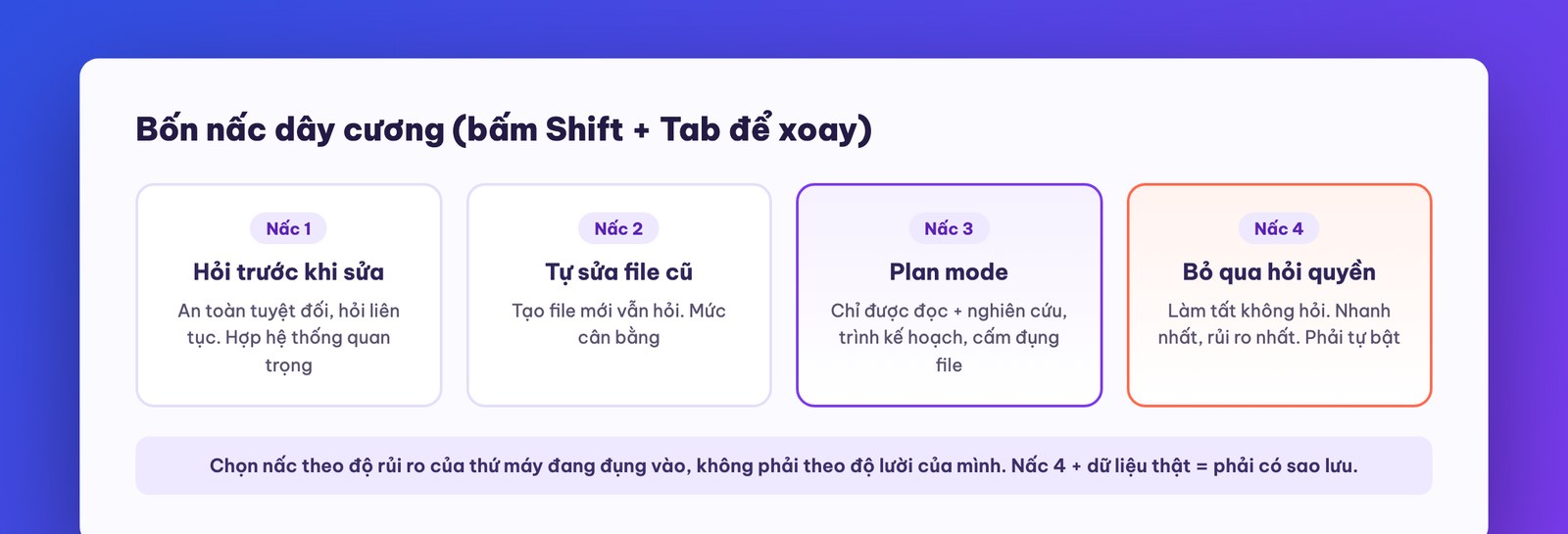
Claude Code can touch real files on your machine, so it has a permission system. Press Shift + Tab (or the mode button in the bottom corner) to cycle through four modes:
1. Ask before editing (the default). Before touching any file, the machine shows the exact piece it intends to change and waits for your nod. You have four choices: approve this time, approve for the session, refuse, or “don't do it that way, do it like this”. Perfectly safe, but once the machine gets into its groove it asks every five seconds, which is rather annoying. Suited to: touching critical systems, where a small slip turns into a big miss.
2. Auto-edit existing files, ask when creating new ones. The machine has full rights to edit existing files, but still asks to create new ones. The balance where many people settle.
3. Plan mode: read only, forbidden to touch. The machine may only research: read files, search the web, reason, then present a plan. It can't change anything. We'll cover it in detail in a later section, because this is the single best-value mode.
4. Skip permissions (bypass permissions). The machine does everything and asks nothing. This mode must be turned on yourself in settings (it's locked by default), and it's famous in both senses: heavy users practically live in this mode for the speed, but there have been cases where a machine misunderstood a request and ran a command that wiped the victim's whole hard drive. The probability is extremely low, but not zero.
Our advice, from daily use at MONA: beginners should move up from mode 1 gradually, and never turn on mode 4 in a folder holding real business data without a backup. The more freedom the machine gets, the tighter your habits of backing up and separating test environments must be. One more cleanup tip worth remembering: a machine run with a loose leash for a long time will spawn lots of temp files and surplus libraries; every so often tell it to “go through the folder and list whatever's no longer needed for me to approve deleting”.
For finer tuning there's the command /permissions: allow, force asking, or flatly forbid each tool one by one (for example forbid running system commands, allow only web reading). If a business wants to lock the machine down per its own policy, this is where to tighten.
Why is there a “no touching, research only” mode? Do the math. Building without a plan: the machine builds for 15 minutes, you test for 5, discover the approach was wrong from the root, tear it down and rebuild for another 15 minutes, and round two can still be wrong. That's 35 minutes plus a pile of tokens. Building with a plan: 5 minutes for the machine to research and present a detailed plan; the mistake shows up right on paper, fixing the plan costs one sentence; then one build lands in 15 minutes. Mistakes on a blueprint are cheap, mistakes on a construction site are expensive. It's just like building a house: nobody wants to discover they're short of materials only when they reach the second floor.
Rule of use: for anything more complex than a simple web page, open with plan mode. Let the machine ask back and present a plan, you approve it, and only then switch to build mode.
Now apply the whole lesson to an ambitious project: a platform that automatically generates proposals/quotes as beautiful as professional software (like PandaDoc): with a login page, AI-generated proposals from your own template, a link sent to the customer, the customer opens it, signs on the page and clicks to pay. It sounds like a project costing several hundred million dong; the real process goes like this:
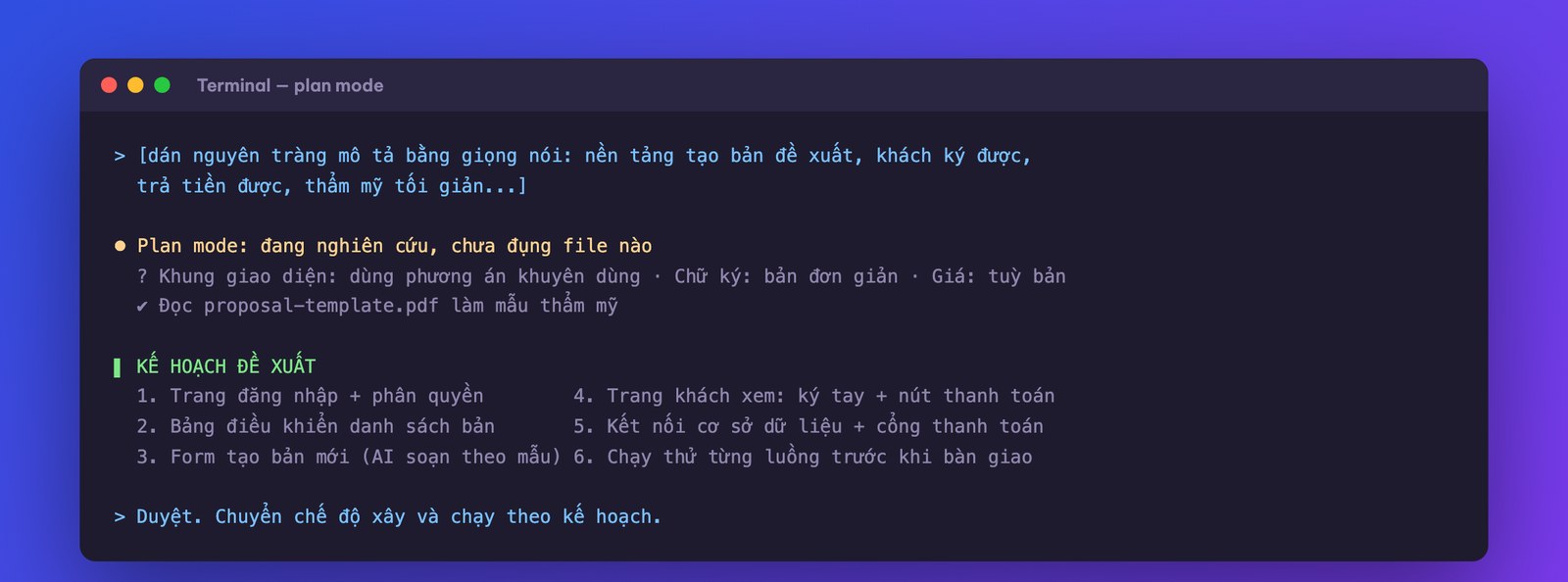
Step 1: unload the brief by voice. You don't need to write a technical document. Open a speech-to-text tool and describe in one go: I want a platform that creates proposals, with these sections, where customers can sign and pay, with a minimalist Apple-style aesthetic. Paste that whole stream into Claude Code in plan mode.
Step 2: the machine asks back, you answer like a buyer. The machine will put up technical questions: which interface framework to use, how legally strict the signature needs to be, fixed price or variable. When you hit a question you don't understand, just pick the option the machine recommends and move on. You're the one setting the business brief, not the one answering technical exams.
Step 3: give a reference. Drag the best proposal PDF you currently use into the project folder and tell the machine to follow that design. With a sample, output quality jumps, exactly the lesson of “use a sample as an anchor” from lesson 2.
Step 4: approve the plan, then let it build. The machine presents the overall plan: the pages, the user flow, the data structure. If you can't understand the technical part, that's fine; what you need to inspect is the business flow: after signing in, what do you see, what do you click to create, and how do you send it to the client. When you are happy, switch modes so the machine builds, which takes about ten minutes of waiting. The original course instructor literally went off to marinate salmon during this time; you can go reply to client messages, and do not sit watching the machine run.
Step 5: plug in the “outside tools”. A real app needs a place to store accounts (a database service like Supabase, with a free tier) and a payment gateway (Stripe, with a test mode that costs no real money). Your job is just to register accounts and get the API key (a secret string of characters that lets software talk to a service) and hand it to the machine, which wires it in. Two vital points about API keys: treat it like a safe's password, don't paste it anywhere public and don't show it in a video; and when testing payments, always use test mode and never plug in a real card.
Step 6: test it like a picky customer. Sign up, sign in, create a trial proposal, open the link in an incognito browser to see what the client sees, sign it as a test, and pay as a test in test mode. Whatever bothers you, collect it into one batch of feedback (lesson 3): “after clicking create I see nothing, add a progress bar; the problem section text is too cramped, widen it by double; the team photo cuts off the forehead, fix it.” A few rounds like that and the app falls into shape.
What business owners should take from this isn't “I can build great software myself now, no need to hire anyone”. The version you just built works, and is very suitable for internal use and for pinning down exactly what you need. Putting it in front of real customers and real money needs an extra layer of security verification and proper infrastructure, which we covered in detail in the agentic vibe coding series on mona.media. Knowing that boundary is what separates a smart AI user from a reckless one.
Lesson 6 deals with what quietly decides whether the machine is smart or dumb and whether the bill is expensive or cheap: context and token management. Why the longer a chat session runs the more muddled the machine gets, and the set of habits that keeps it sharp.

When a customer comes to buy a course or a domain and has no account yet, one MONA Pass sign-in creates the profile and wallet instantly, as in the flow of the MONA Cloud product suite we built on September 18, 2026. In fragmented systems, the customer must type their full name from scratch and remember yet another password, while behind the scenes you struggle with data torn into many pieces and run marketing without knowing who bought what. Making customers manage too many accounts discourages buyers and also adds bulk to the maintenance process. Customers will leave.
Instead of coding an authentication system from scratch or using expensive foreign solutions such as Auth0's Essentials plan at $35/month once you pass 25,000 MAU (as we checked on September 19, 2026), we plug MONA Pass straight into the system. In fact, our Mail, Domain, wallet and console all accept the same MONA Pass JWT end to end, delivering a AI code security in Vietnam reliable solution. As a result, customers do not manage scattered accounts, and we do not have to build a separate sign-in process for each product. See the article on mobile apps to see how it is configured in practice.
For apps built on MONA Cloud, MONA Pass is the ideal piece when you need one sign-in flow for both customers and internal staff, sharing a wallet and invoices. However, we sincerely advise against adopting this system if your project only runs for a few days as a trial and has no real customers yet. Paying for infrastructure and on-call people at that stage is a waste. Use the free sandbox that simulates creating a machine to test first. Do it only when you are sure.

Picture this: a customer transfers money to close an order at 11 p.m., but the accountant has gone home to sleep, and in the morning staff open the computer and laboriously check whether the money arrived, which orders are closed and which were missed. Most of you have felt the sting of losing money because the customer waited too long and went to buy elsewhere. Making customers send receipts and then reconciling by hand is very error-prone, slows down service, and completely breaks the buying impulse just when they most want to spend, so you easily lose the customer, with money dropping right in front of you.
We handle the payment part of this app neatly with MONA Pay, a set of bank APIs and an automatic payment confirmation service, and we absolutely do not call it a payment gateway. Transactions run smoothly on VietQR, the dynamic code comes pre-filled with the amount so short transfers are very rare, money goes straight to the account, the MONA Pay webhook announces it automatically and the software matches the order by itself. Everything is automatic. On September 17, 2026, we had AI call a tool by itself to print a VietQR code right in the chat window, and the buyer just scans it; if the API returns error 402 when the wallet runs out of money, the bot stops automatically and notifies a person. Unlike Auth0, which charges after 25,000 users (figure checked September 19, 2026), MONA Pay is completely free for the first 500 transactions each month with all features, and withdrawing money is not charged. MONA Pay webhooks are signed with HMAC-SHA256 plus a timestamp, and we always reject packets more than 5 minutes out of sync to block forged replays. See the AI business course and the article the Stripe payment gateway to compare the advantages of the VND cash flow.
This tool suits shops, software and courses sold to Vietnamese customers who need to pay by VietQR or Visa/Mastercard cards with money going straight to the company account, making VAT invoices easy to issue. Convenient as it is, we always remind you not to rush into running live without testing with real transactions, and test it thoroughly. We ourselves once had a mismatched webhook key on September 15, when money came in but the wallet was not credited, so since that incident our internal rule is that every confirmation key must be cross-checked very carefully before officially opening to customers.
A manifesto for growing together
MONA is a software, digital transformation and AI transformation company, but above all, MONA is a B2B service company that benefits directly from this: THE MORE SUCCESSFUL VIETNAMESE BUSINESSES BECOME, THE MORE MONA BENEFITS, while a declining, slow market with weak technology is exactly what kills MONA's future business opportunities. So, more than anyone, MONA wants you to succeed, and MONA actually steps in to help you succeed.
And AI transformation is the key to that success for all of us.
MONA
This hands-on lesson is only a draft compared with the complete system you can own. MONA Pay is free for 500 transactions each month, with money going straight to a bank account in your name. Go to https://monapay.vn/ and try it first, which takes about 5 minutes. One click and you are done.
Sign up for MONA Pay, 500 free transactions Call 1900 636 648

CEO & Founder · The MONA
The founder of The MONA built a service company of 60+ staff with 14,000+ projects delivered. Khánh Hùng shares his thinking on building self-running systems, automating a business, and the real lessons behind MONA's projects.
 393




Professional website
design services
Own a website with a beautiful, 100% exclusive design and a lifetime warranty, with the ability
to expand features flexibly as your business grows, starting today!






 MONA will never sell your information or send you spam


 MONA will never sell your information or send you spam
