
 MONA OS 2.0
 Partner with MONA


 Tự động hoá doanh nghiệp
 Cẩm nang SEO
 Digital Marketing
 Kinh nghiệm thiết kế website
 Hạ Tầng Server
 Giáo dục


 VI
 EN
















Message us on
Zalo Official


 ProductsNew

 ProductsProducts
 Mới ra mắtKHA AI 2027App tự edit video, tự đăng mọi mạng xã hội, 2 phút mỗi ngày










 Website designLooks good and wins customers over.
SEO servicesBrings in customers searching for exactly what you sell.
 Tư vấn digital marketingKéo khách từ nhiều kênh, đo bằng số thật.
Corporate video productionVideos introducing your company, factory and team.
 NewAI video productionCompany story films made with AI.
 Custom software developmentCRM, ERP and HRM built for your business.
 Viết AI Agent theo yêu cầuĐặt riêng một trợ lý AI cho đúng việc của mình.
 Tư vấn chuyển đổi AIĐưa AI vào vận hành của cả công ty.
NewMONA LMSManagement for centers and schools.
MONA SkillHubInternal training for company staff.
 NHTQ systemEnd-to-end China–Vietnam shipping operations.
MONA JMSManagement for gold, diamond and pawn shops.
 MONA E-LearningA website with every feature you need to sell courses.
 How to sell online courses (course)More than 30 free lessons on selling courses on autopilot.
 MONA Cloudmonacloud.vnServers to get your apps and websites running.
 MONA Basemonabase.vnPostgres database, sign-in and file storage.
 MONA Mailmonamail.vnSend OTP, order and invoice emails from your software.
 MONA Paymonapay.vnAccept bank transfers via VietQR and notify your software when the money arrives.
 MONA eInvoiceComing soonIssue e-invoices that meet tax standards.
Gấu CườiTrả lời khách 24/7 trên web, Fanpage, Zalo và thu lead cho sale.
 Gấu TeleSalesGọi điện tư vấn, chăm khách như tổng đài viên thật.
Dê CườiTư vấn và chốt đơn cho shop ngay trong khung chat.
Gấu WebmasterNhắn nhóm Zalo là website được sửa xong.
 Gấu Pháp ChếSoạn hợp đồng, rà điều khoản trong vài phút.
 Gấu Báo GiáLên báo giá đúng mẫu và gửi khách ngay.
 AI chăm sóc khách hàngTheo dõi và giữ chân khách hàng cũ.
 Gấu Tuyển DụngLọc hồ sơ, hẹn lịch, phỏng vấn ứng viên.
 Mới ra mắt
KHA AI 2027
Xây kênh chuyên gia 2 phút mỗi ngày
Quay bằng điện thoại, AI tự edit video, tự đăng lên 16 nền tảng và tự trả lời bình luận, tin nhắn.
858.575lượt xem trên kênh CEO MONA sau 30 ngày
 Anh Khánh HùngCEO MONA đang dùng mỗi ngày
Xem app làm được gì
 AI
Gấu Cười MONA ĐANG TỰ XÀITrả lời khách 24/7 trên website, Zalo OA, Messenger và thu lead về cho sale.
Dê CườiChốt đơn bán lẻ và sàn: Shopee, TikTok Shop, web. Chăm cả khách sỉ, đại lý.
Gấu WebmasterCập nhật nội dung, tối ưu SEO website mỗi ngày.
Gấu TeleSalesGọi điện tư vấn, chăm khách như tổng đài viên thật.
Gấu Tuyển DụngLọc hồ sơ, hẹn lịch, phỏng vấn ứng viên tự động.
AI chăm sóc khách hàngGiữ khách cũ, cứu lead đã rớt cho phòng kinh doanh.
Gấu Pháp ChếSoạn hợp đồng, rà điều khoản trong vài phút.
Gấu Báo GiáLên báo giá đúng mẫu, gửi khách ngay khi có yêu cầu.
 Chuyển đổi AI toàn phầnGiải pháp tổng cho doanh nghiệp, 3 lớp triển khai.
 Viết AI Agent theo yêu cầuĐặt riêng một con AI gánh đúng nghiệp vụ của bạn.
 Custom softwareCRM, ERP and HRM with built-in AI automation.
 SEO & AEO thời đại AIĐược Google lẫn AI trích dẫn, không chỉ xếp hạng.
 Kiến thức AI cho doanh nghiệpBài phân tích, hướng dẫn ứng dụng AI vào vận hành.
 Free AI courses
 AI tools at work
App mới · KHA AI 2027
Xây kênh 2 phút mỗi ngày
AI tự edit video, tự đăng mọi mạng xã hội
Free consultation, 8am–10pm every day

06 September, 2026

Every time a client comes to MONA to change their URL structure, we run into the same job again: checking redirects for the whole list of old URLs. A redirect checker shows where a URL is sent, which code it carries and which page it ends on. Looking at the final page is not enough. You click and the content looks normal, but the middle of the path still needs to be read again before you accept the handover.
We wrote our own tool where you paste the whole list, it draws the chain hop by hop and puts the results in one table, because opening each URL separately is hard to compare during a migration. Checking redirects by list lets you keep the path in front of you to decide what to fix, instead of clicking and trying to remember it.
The new site is open on screen, and the list of 600 old URLs sits next to it for comparison. In this illustrative case, the way in goes through 4 redirect hops before reaching the content you want to read. A reviewer who clicks the link sees the destination page, while a redirect check also has to read the path. The detour is hidden.
You are busy with content, reviewing layouts and checking products on the new site, so the urge to sign off on handover once the pages open is something we understand.
But a redirect check has to keep the whole path, because the code at the start of the chain doesn't tell you what happens in the middle. With 4 hops, the request is forwarded 4 revisions before it reaches the destination. We built the chain drawing into the MONA tool so you can see that part. Opening the last page only answers the last part.
When you check redirects, a permanent move needs to match the intent of a 301 redirect code, while a URL that ends on a page with missing content has to be handled as a page not found error. Both show the new site's interface, but the two paths need different fixes.
When you check redirects, put the intended destination URL next to the actual result, so the person fixing it knows which path leads to the wrong content even though the final page opens, instead of just counting how many rows were checked. For an old list that hasn't been compared yet, MONA recommends keeping redirects in the acceptance scope, rather than signing off and coming back to chase them later.

You type an old URL into the browser, the address changes through a few intermediate URLs and only then stops. That is a redirect chain, in other words a redirect chain. Each hop sends the request from the current address to the next one. Count from the original URL.
When you check redirects, a chain with 4 hops has 4 redirects; don't just look at the first code and conclude the whole path is right, because later hops can still change protocol or point to an error page.
According to the Redirects and Google Search page from Google Search Central, Googlebot follows up to 10 redirect hops. When you check redirects, understand that this limit describes how far the crawler follows a chain. It is not advice to keep chains close to that length.
| Code | Meaning | What to check |
|---|---|---|
| 301 | Permanent redirect | The new destination replaces the old URL. |
| 302 | Temporary redirect | The address change only serves a temporary period. |
| 308 | Permanent redirect, keeping the request method | The flow must keep the same way of sending the request. |
| 307 | Temporary redirect, keeping the request method | The temporary flow still needs to keep the way the request is sent. |
People searching for "check 301" usually want to know whether a page has moved permanently; a redirect check also needs to read the codes in the middle of the chain. Read about how to use the 302 temporary redirect before asking for codes to be changed in bulk.
In the MONA tool, we keep the hop count as a rating scale, so the reviewer sees how roundabout a path is instead of waiting to cross some threshold before fixing it; reaching the last page doesn't confirm the chain makes sense. Check redirects by destination and by purpose, then remove intermediate hops that are no longer needed.
Paste the whole list into the input box, one URL per line, and the tool runs them in sequence and returns a table within a few minutes for a list of a few hundred URLs. The list of old URLs is already in your handover file, and you need to know where each one is going. We built the MONA tool to paste a whole list of URLs and to receive the full chain with the code of each hop. Keep the original list. It is the input for checking again after fixes.
Open redirect checker in the MONA toolkit, take the old URLs you need to compare and paste them into the list input, so the results start from the exact addresses people used to visit. Don't swap the input for new URLs just because the new pages are easier to open.
When you check redirects, keep the original old entry path so that any hop introduced from the very start gets caught.
Read redirect check results from the input URL to the ending page. Look first for chains that loop or end on an error page, then compare temporary codes used for the wrong purpose and hops that drop down to http. We put these signs into one table so the person fixing them switches screens less. Each row needs a clear action.
The average score of the whole list gives a general view of what was entered, but it doesn't tell you every URL is fine; a list with many correct paths still needs each failing path read individually before handover. The MONA tool also doesn't treat the hop count as a threshold for declaring every chain below it a pass.
You also have SEO toolkit for the related areas. In this redirect check, settle the exact path from old to new.
If your old list is still waiting, go to MONA's redirect chain reading tool, paste in the URLs to check, then compare the hop-by-hop table. We invite you to try it right on the work you have now. That list will go with you to the re-check. Once the redirect check is done, pick the paths that end wrongly and fix them first, rather than starting by polishing the average score.
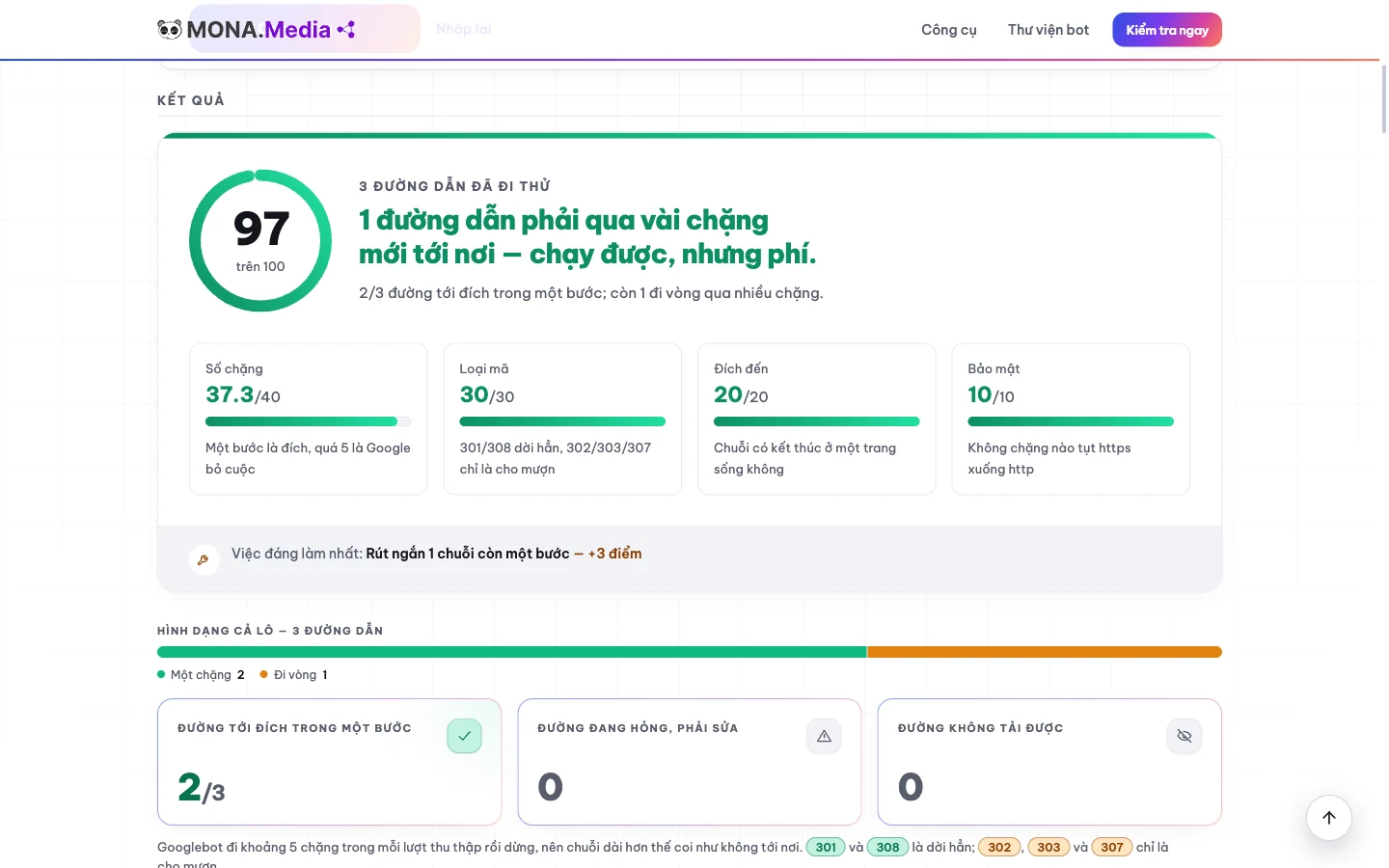
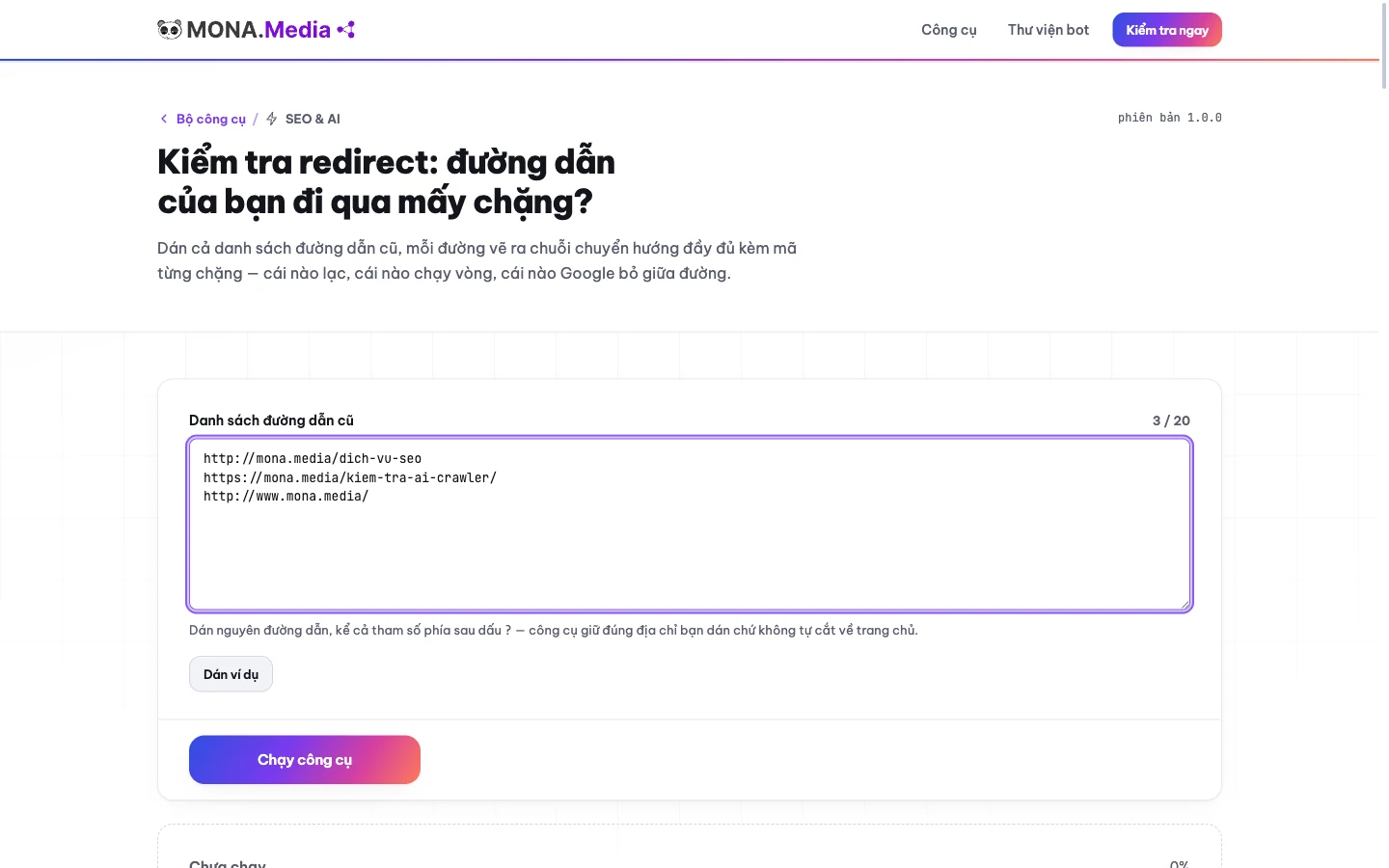

You click the old URL, the browser shows the new page and the address bar has switched to https. The middle has http hay 302 used for the wrong purpose, and looking at the final screen alone makes it hard to notice. We keep the four error types below in MONA's redirect checker. Read the whole middle section.
A chain that loops or a destination page that errors only shows up when it happens on the exact path being opened; checking a few pages that look normal still doesn't rule out errors on the other URLs in the list.
| Broken chain type | Sign | How to fix |
|---|---|---|
| Looping chain | The address returns to a URL it already passed through and never reaches the destination. | Compare the rules that act together, remove the reverse redirect and check again from the original URL. |
| 302 where it should be 301 | The intent is a permanent move but the matching hop reports a temporary code. | Confirm the intended move with the admin, then fix the exact rule that is issuing the code. |
| Dropping to http midway | The chain passes through an http address even though the final destination returns to https. | Fix the target of the rule that causes the downgrade, then check the rest of the chain. |
| Ending on an error page | The chain stops at an address that doesn't return the expected content or returns an error. | Find a replacement destination with the right content; check that the page opens before reattaching the redirect. |
For example, when checking redirects, a chain going https to http and back to https changed the protocol one extra time 2 rounds. The final page is still encrypted, but the middle hop needs to be handled separately. Read more about how SSL protects the connection to separate certificate issues from redirect configuration issues.
When we check redirects, we want to see the exact rule that causes each hop, because adding a fix command at the end of the chain leaves the detour in front of it untouched, even if clicking again shows the page you wanted. For a link that leads to a broken destination, also fix the places still using the wrong URL if you manage them.
The redirect check after a fix must start from the old URL that just failed. Don't just open the new destination and mark it done.

The MONA table has pointed out one suspicious path, and you need to look closely at that path's response. We recommend choosing a redirect checking tool by the question you need answered, because reading a technical response and comparing a list are different jobs. Pick the right scope first.
For people comfortable with the command line, curl -I -L is a ready-made template to start comparing; the domain below is only an example address, and you should replace it with the old URL you need to check. Type this into the command window: curl -I -L https://example.com/duong-cu.
Don't use a redirect check result you don't fully understand to replace all of your website's rules.
| Way of checking | When it fits | Limits and price (checked 06/09/2026) |
|---|---|---|
| curl -I -L | A technical person reading the raw response of one URL | Free, built into macOS, Linux and Windows 10 and later; reads headers only, does not run JavaScript |
| Redirect Path on Chrome | Viewing the chain of the page currently open in the browser | Free extension, one page at a time |
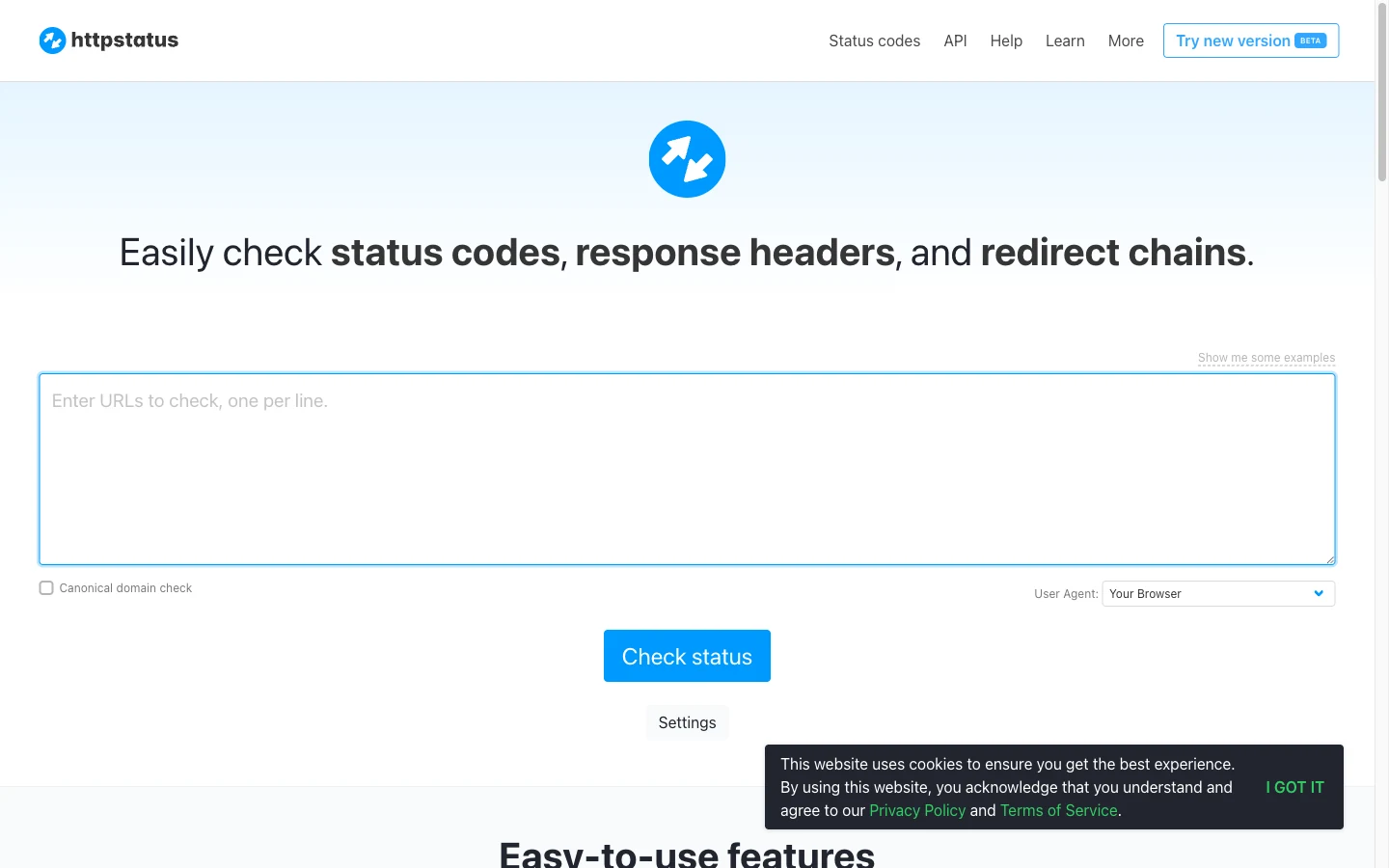
| httpstatus.io | Bulk response code checking on the web | Free web version allows up to 100 URL per run; paid API from 15 euro/month |
| redirect-checker.org | Checking one URL with a selectable user-agent | Free, no published limit on runs |
| Screaming Frog | Reading codes in the Response Codes tab when crawling a whole site | Free version 500 URL per crawl, license 199 GBP/year |
| Tool MONA | Paste a whole list of old URLs, read the chain hop by hop, pick the paths to fix | Free, no sign-up, does not store the list you paste |
In Screaming Frog, go to tab Response Codes to read the codes when you check redirects, then compare the path to fix against the content at the destination instead of just looking at the page's appearance.
MONA suits checking redirects from an existing list, but don't hand it the job of concluding that the whole website has no errors from an average score. The MONA tool lacks the grounds to decide on its own which new page can replace an old page's content. The person who owns the content still has to compare. This is a limit we want to state plainly.
Redirect Path suits viewing the path currently open, but don't choose it to accept a whole list by clicking URL after URL. Curl suits reading technical responses, but don't force it on a site owner who has to work out the codes without experience. Use the section on explaining the scope of an SEO audit and the items in a website SEO check to decide when to go beyond a redirect check.

An admin fixes one rule, clicks the old URL again and the address still changes one more time. We have to check redirects hop by hop when migrating a site, because one URL can be subject to rules in several different places. Find where the code comes from first.
301 expresses a permanent move, while 302 is for temporary ones; before filling in the configuration, settle the source URL and the matching destination so whoever manages the server understands the job. The redirect check must compare that same pair again after the fix.
| Where it's configured | Short template to compare | What to check before applying |
|---|---|---|
| WordPress | Source: /duong-cu Target: https://example.com/duong-moi Code: 301 | The redirect management mechanism in use, the field names and duplicate rules. |
| nginx | location = /duong-cu { return 301 https://example.com/duong-moi; } | The server block, the syntax in the target environment and how parameters are handled. |
| .htaccess | RewriteEngine On RewriteRule ^duong-cu$ https://example.com/duong-moi [R=301,L] | The conditions for enabling the URL rewriter, the file location and the rule order. |
| Cloudflare | Source URL equals https://example.com/duong-cu Static target: https://example.com/duong-moi Code: 301 | The rule type in use, the domain scope and the option to keep parameters. |
Replace the domain example.com with the real destination. Don't paste the whole table into the server.
For a target with equivalent replacement content, aim for 1 redirect from the old URL to the final destination, then read the chain again to see which rule is still getting in between. This is the goal for fixing detours when checking redirects, not a scoring threshold set by MONA.
For switching between www and non-www, compare how to choose the domain form before writing more rules, so every place that is configured sends traffic to the same target form.
A redirect check after fixing has to go together with opening the content at the destination, because a correct code still doesn't confirm visitors land on the page they need. For website administration, MONA recommends clearly assigning who holds the configuration and who compares the content, then agreeing on the shared result before moving on to other work.
The migration schedule is set, the content person still holds the list of old posts and the technical person is preparing the new URLs. We need those two parts to meet before handover, so the redirect check runs on the hop-by-hop chain from the right input. Keep the comparison first.
A table of old URLs and the expected new destination helps the checker tell a path with the right code from a path with the right content, because sending every address to the homepage destroys the page-by-page comparison.
With this table, you can run 2 comparison rounds, before and after the fix, on the same set of input URLs. This is a suggested way of working, not a promise that the tool saves history on its own. When you check redirects, paste in the original list to see the starting hop as well. Don't just check the new URLs.
If your website uses several domains, the article on multiple domains pointing to one website helps reset the scope to review; the canonical tag is a separate item to compare against the new structure.
Opening the destination and checking redirects are two tasks that complement each other. With the tool we wrote, you see the chain for the list you entered, while keeping rankings also requires looking at the content and related parts of the website. Don't write a promise of no lost rankings based on a redirect table alone; accept the handover once each URL has a clear conclusion.
A cosmetics e-commerce site moved from a rented platform to its own website built by MONA, bringing along 2.400 URL old ones that already had rankings. We pasted this list into the redirect checker after the new site went live, and it finished in about 15 minutes. The table returned about 600 paths passing through 3 to 4 hops: the old URL redirected to the www version, then to https, then to the new page, and some paths even detoured through an intermediate page nobody remembered creating. The fault sat in three layers of stacked rules: one on the old platform, one on Cloudflare, one in WordPress. We merged them, and the chain dropped from 4 hops to 1, so each old URL made a single jump straight to its destination. On the second check, the table was clean. The rankings held after the migration.
The school website is a case we often use as an example of something that looks normal when opened. The destination page shows the https padlock, but pasted into the tool, the second hop drops to http before returning to https. The cause was a redirect rule in .htaccess that wrote the target with http from the days before the site had SSL. Users see nothing, but Googlebot sees a path through an unencrypted hop. The fix was 1 line in .htaccess. On re-check, the chain was correctly 1 hop.
The results table is on screen, and you still need to decide which codes to keep, which to fix and how far the score can be trusted. We gathered the questions around the redirect checking that the MONA tool serves, so you can compare before handing out the fixes. Read by the problem you're stuck on.
A check 301 redirect focuses on the permanent move code, while a redirect check has to look at the following hops and the ending page. If you only read the 301 at the start of the chain, you still lack data on the later part. Opening the destination checks the content, and the chain table reads the path.
302 is right when the move is temporary, so don't change them in bulk just to make the table all 301s. Confirm the purpose of the move first. A temporary code that fits its job stays until the temporary period ends. A 301 check must follow moves that are truly permanent.
307 is a temporary move, 308 is a permanent move, and both keep the request method, meaning the way the request is sent to the server. If the path is part of a data-submitting flow, have a technical person check this behavior before changing the code.
Not enough to conclude. Googlebot's 10-hop limit doesn't confirm the destination is right or that the chain doesn't drop to http. For example, a chain 4 hops long still forwards 4 revisions. A redirect check has to read the code and address of every segment.
MONA's score is an average over the list you enter; a redirect check on one group of URLs doesn't cover the paths you haven't put into the tool, even if that group's displayed score is high. Read each error line before concluding. See also website operations knowledge to put the chain check in a wider scope.
Don't use a guessed number to split the checking workload or plan costs. Settle the real limit first, then paste in the list within the confirmed scope.
By handover day, the new site's design has been approved, but the table 600 old URLs in the opening scenario still needs someone to compare it. If the way in still goes through 4 hops, the effort put into building the old content hasn't been checked all the way through. Don't skip the entry paths.
We understand you've spent time reviewing every page, fixing content and pushing the schedule, because a site migration also affects sales or sign-ups that run every day.
You've already done a lot to check the site (clicking old links, viewing the destination page, comparing content, sending broken paths to whoever fixes them). Those efforts have value. But adding more people to click still leaves the table of codes in the middle of the chain missing. A redirect check needs to keep results per path so you know which parts are already handled.
The 4 redirects on a single entry path, looking only at the final page still skips the hops that need comparing; the fix is to gather the list, read the whole chain, then re-check from the exact original URL after fixing. We wrote the tool for that looking and comparing. Use the results table to assign work, and don't add more people who open URLs and report verbally.
If you can manage the configuration and the destination list yourself, open MONA's URL chain checker, paste in the old paths and check each hop before the handover meeting. Once the redirect check is done, close out whatever you can handle yourself with the re-check results.
When you need someone to own the whole site migration, call 1900 636 648 before the handover meeting and bring the list of old URLs and the expected new destinations. We will work with you to define the scope, from design and moving to the new website to the parts that need SEO services further checking. Put the redirect check on the handover schedule, with per-URL results to compare.

CEO & Founder · The MONA
Founder of The MONA, who built a services company of 200+ staff with 14,000+ projects delivered. Khánh Hùng shares how he thinks about building systems that run themselves, automating a business, and the real lessons from delivering projects at MONA.
 417




Professional website
design services
Own a website with a beautiful, 100% exclusive design and a lifetime warranty, with the ability
to expand features flexibly as your business grows, starting today!






 MONA will never sell your information or send you spam


 MONA will never sell your information or send you spam
