
 MONA OS 2.0
 Partner with MONA


 Tự động hoá doanh nghiệp
 Cẩm nang SEO
 Digital Marketing
 Kinh nghiệm thiết kế website
 Hạ Tầng Server
 Giáo dục


 VI
 EN


















Message us on
Zalo Official


 ProductsNew

 ProductsProducts
 Mới ra mắtKHA AI 2027App tự edit video, tự đăng mọi mạng xã hội, 2 phút mỗi ngày










 Website designLooks good and wins customers over.
SEO servicesBrings in customers searching for exactly what you sell.
 Tư vấn digital marketingKéo khách từ nhiều kênh, đo bằng số thật.
Corporate video productionVideos introducing your company, factory and team.
 NewAI video productionCompany story films made with AI.
 Custom software developmentCRM, ERP and HRM built for your business.
 Viết AI Agent theo yêu cầuĐặt riêng một trợ lý AI cho đúng việc của mình.
 Tư vấn chuyển đổi AIĐưa AI vào vận hành của cả công ty.
NewMONA LMSManagement for centers and schools.
MONA SkillHubInternal training for company staff.
 NHTQ systemEnd-to-end China–Vietnam shipping operations.
MONA JMSManagement for gold, diamond and pawn shops.
 MONA E-LearningA website with every feature you need to sell courses.
 How to sell online courses (course)More than 30 free lessons on selling courses on autopilot.
 MONA Cloudmonacloud.vnServers to get your apps and websites running.
 MONA Basemonabase.vnPostgres database, sign-in and file storage.
 MONA Mailmonamail.vnSend OTP, order and invoice emails from your software.
 MONA Paymonapay.vnAccept bank transfers via VietQR and notify your software when the money arrives.
 MONA eInvoiceComing soonIssue e-invoices that meet tax standards.
Gấu CườiTrả lời khách 24/7 trên web, Fanpage, Zalo và thu lead cho sale.
 Gấu TeleSalesGọi điện tư vấn, chăm khách như tổng đài viên thật.
Dê CườiTư vấn và chốt đơn cho shop ngay trong khung chat.
Gấu WebmasterNhắn nhóm Zalo là website được sửa xong.
 Gấu Pháp ChếSoạn hợp đồng, rà điều khoản trong vài phút.
 Gấu Báo GiáLên báo giá đúng mẫu và gửi khách ngay.
 AI chăm sóc khách hàngTheo dõi và giữ chân khách hàng cũ.
 Gấu Tuyển DụngLọc hồ sơ, hẹn lịch, phỏng vấn ứng viên.
 Mới ra mắt
KHA AI 2027
Xây kênh chuyên gia 2 phút mỗi ngày
Quay bằng điện thoại, AI tự edit video, tự đăng lên 16 nền tảng và tự trả lời bình luận, tin nhắn.
835.858lượt xem trên kênh CEO MONA sau 27 ngày
 Anh Khánh HùngCEO MONA đang dùng mỗi ngày
Xem app làm được gì
 AI
Gấu Cười MONA ĐANG TỰ XÀITrả lời khách 24/7 trên website, Zalo OA, Messenger và thu lead về cho sale.
Dê CườiChốt đơn bán lẻ và sàn: Shopee, TikTok Shop, web. Chăm cả khách sỉ, đại lý.
Gấu WebmasterCập nhật nội dung, tối ưu SEO website mỗi ngày.
Gấu TeleSalesGọi điện tư vấn, chăm khách như tổng đài viên thật.
Gấu Tuyển DụngLọc hồ sơ, hẹn lịch, phỏng vấn ứng viên tự động.
AI chăm sóc khách hàngGiữ khách cũ, cứu lead đã rớt cho phòng kinh doanh.
Gấu Pháp ChếSoạn hợp đồng, rà điều khoản trong vài phút.
Gấu Báo GiáLên báo giá đúng mẫu, gửi khách ngay khi có yêu cầu.
 Chuyển đổi AI toàn phầnGiải pháp tổng cho doanh nghiệp, 3 lớp triển khai.
 Viết AI Agent theo yêu cầuĐặt riêng một con AI gánh đúng nghiệp vụ của bạn.
 Custom softwareCRM, ERP and HRM with built-in AI automation.
 SEO & AEO thời đại AIĐược Google lẫn AI trích dẫn, không chỉ xếp hạng.
 Kiến thức AI cho doanh nghiệpBài phân tích, hướng dẫn ứng dụng AI vào vận hành.
 Free AI courses
 AI tools at work
App mới · KHA AI 2027
Xây kênh 2 phút mỗi ngày
AI tự edit video, tự đăng mọi mạng xã hội
Free consultation, 8am–10pm every day




Book a FREE demo
06 July, 2023

With education 4.0 on the rise, online quiz software has appeared and many educational organizations now use it to support their exams and keep up with how tests are run today. Online exam software saves time and money and scores almost perfectly accurately. So which online quiz software is the best? Read on below, MONA Media and you will find a detailed answer.

Looking at education over the past several years, running exams in multiple-choice format has become more and more popular and widely used. Many schools and training centers choose multiple-choice tests for competency assessment, entrance testing and similar purposes. Even school-level transfer exams and the national high school graduation exam are held in this format. Why is that?
However, preparing to run a multiple-choice exam is far from simple. It is hardest when you want several question types and shuffled questions to produce many exam versions, as is common now. Managing and sorting questions, running the exam and many other steps take a lot of time and staff. If you are not sure how a learning management system works, read the article What is an LMS from Khánh Hùng Academy before choosing software.
MONA LMS – Language center management software standardizes the process and meets what teachers and test takers need for exams and tests. The MONA LMS system, already running at more than 1,000 education centers, lets you manage flexibly and teach more effectively. See the overview of the software below.
To go into detail, let MONA walk you through a few reasons you should use quiz management software in the content below.

One of the most important reasons why educational technology, in particular quiz software for computers and phones is becoming more popular is the time it saves. In any kind of work, saving time means saving money and effort.
Besides offering many useful automatic features, online exam software is also highly accurate, especially when scoring. Using it makes marking fairer and helps teachers avoid mistakes.
In particular, with online quiz software, you cut down most of the traditional tasks such as researching and reviewing exam papers, invigilating and marking. Thanks to this educational technology, running exams also costs far less time and money.

Cheating in exams is a familiar problem. So whenever an exam is held, making sure it is fair to every candidate is the top concern.
With online quiz software, cheating can be prevented. Quiz management software holds a very large and varied pool of exam papers. Because each person gets a different paper, copying from a neighbor and other forms of cheating become practically impossible.
One of the biggest advantages of running exams online through quiz apps is the wide, varied range of knowledge they cover. Questions in a test are shuffled and built in many forms, with realistic, vivid images. This stops students from studying only a few topics and guessing what will come up, and it improves the quality of education.

Another benefit worth mentioning when you use free quiz software is that it helps teachers analyze and assess how well students did and how well they are learning. Online quiz apps usually provide detailed data and figures on each learner's results, which helps teachers follow students' progress and performance more closely and accurately.
Online quizzes are used not only in education. Many businesses now build the feature into their staff training software. This makes training more complete: the business can teach and also check how well employees absorbed the material, quickly and accurately. Tracking progress, spotting knowledge gaps and adjusting training content all become easier and more effective.
| Criterion | Create quizzes quickly | Easily create many exam versions | Works on Windows and macOS | Free/Paid |
| 1. MONA LMS | ✅ | ✅ | Windows, MacOS | Paid |
| 2. TestPro | ✅ | ✅ | Windows | Free |
| 3. iTest | ✅ | ✅ | Windows | Paid |
| 4. ED Quiz | ✅ | ✅ | Windows | Paid |
| 5. 789.vn | ✅ | ✅ | Windows | Paid |
| 6. AZtest | ✅ | ✅ | Windows | Paid |
| 7. Test 365 | ✅ | ✅ | Windows, MacOS | Paid |
| 8. McMIX | ✅ | ✅ | Windows | Free |
| 9. Lino | ✅ | ✅ | Windows | Free |
| 10. Quiz Maker | ✅ | ✅ | Windows | Free |
The smart, modern features of online quiz apps are the main reason these tools are spreading across schools and training providers. Below are the 10 best online testing apps of 2026 for you to consider.
MONA LMS is an online quiz web app within the center management software system provided by MONA.Software. MONA LMS has become a dependable tool for training providers, language centers, exam-prep centers and exam organizers across the country. In particular, the MONA LMS quiz management software is also built into the online teaching system E-learning (online exams, online homework and more).

In addition, MONA LMS software has a question bank that is easy to build, customize and update quickly. You can edit at any time, spot mistakes and fix them right away. It can also set up a random set of questions by topic and difficulty. Users can run exams in different formats, such as questions built from video, audio or reading passages, in online quiz software.
Key features of the MONA LMS online quiz management software include:
SEE THE MANAGEMENT SOFTWARE PROJECT
GLOBAL E-LEARN
The Global E-Learn project is one of the standout case studies of working with MONA, delivered together with education website design and the MONA LMS system. Global E-Learn is an online English learning platform with a personalized path for each learner, and it wanted to “digitize education” and deliver the best possible training experience.

Specifically, the work between Global E-Learn x MONA on the MONA LMS center management system met the following requirements:
And there are many more features. Try them yourself! TRY IT FREE Try the whole MONA LMS system below.

This education software is chosen by many organizations to create multiple-choice tests quickly and accurately, with question types that keep changing.
Useful features of the TestPro quiz software:
→ Software download link: http://www.testpro.com.vn/Download.aspx

iTest is an online exam system founded by Lê Đình Thành. The iTest quiz creation system runs in a web environment on a client-server model.
The iTest quiz software has a wide range of powerful functions and handles multiple-choice questions in these ways:
→ See the software in detail at: https://i-test.vn/
ED Quiz online quiz software is software that organizations rate highly for how practical it is and what it brings.
The standout strengths of the ED Quiz online quiz app include:
→ See more about the software at: https://eduquiz.vn/
789.vn is a quiz app suited to individuals and organizations that need to run exams and tests online. Using the features of the 789.vn quiz software well can save some cost, effort and exam-prep time.
In detail, the features of the 789.vn online quiz app you should not overlook are:
→ Software download link: https://taimienphi.vn/download-789-vn-83148/taive

AZtest online quiz management software is widely used because the system is varied, modern and supportive of individuals and organizations. It also gives readers the richest range of knowledge and question types. On top of that, AZtest lets users personalize the system with their own logo, interface and domain name.
The standout features of AZtest are:
→ Try the software plans here: https://aztest.vn/saas/register/goi-trial/
Test 365 is online quiz software with many distinctive features. Many companies and organizations already trust it to run recruitment tests. Besides its main functions of job training and running exams, Kiểm tra 365 has other strong points too.
Specifically, some of the Test 365 quiz software features are:
→ See the software in detail at: http://neo.vn/test-365.html

McMIX is an online quiz app rated highly for its exam management, question management, question shuffling and quiz building on the computer. With its in-depth features, McMIX saves users a lot of time. Students can also take exams directly on McMIX and get results as soon as they finish.
Standout features of the McMIX online quiz management software:
→ Software download link: https://download.com.vn/mcmix-54298

Lino is quiz software with a simple, easy-to-use interface. You can quickly get a set of tests with many versions shuffled from the original set. The software also lets you import exams in Word format into its exam-shuffling feature and produce entirely new sets of exams.
Standout features of the Lino online quiz web app:
→ Software download link: https://taimienphi.vn/download-lino-8396
Quiz Maker is software that can quickly create multiple-choice questions on the computer. Besides text-based tests, it lets teachers record directly from the computer's camera and embed images and sound, to build engaging tests for students.
Standout features of the Quiz Maker online exam software:
→ Download the software at: https://play.google.com/store/apps/details?id=com.devup.qcm.maker
Online quiz management software: MONA LMS has many smart features that make preparing, invigilating, taking and scoring exams, and ranking results, more convenient. For details on the features quiz software should have see below.
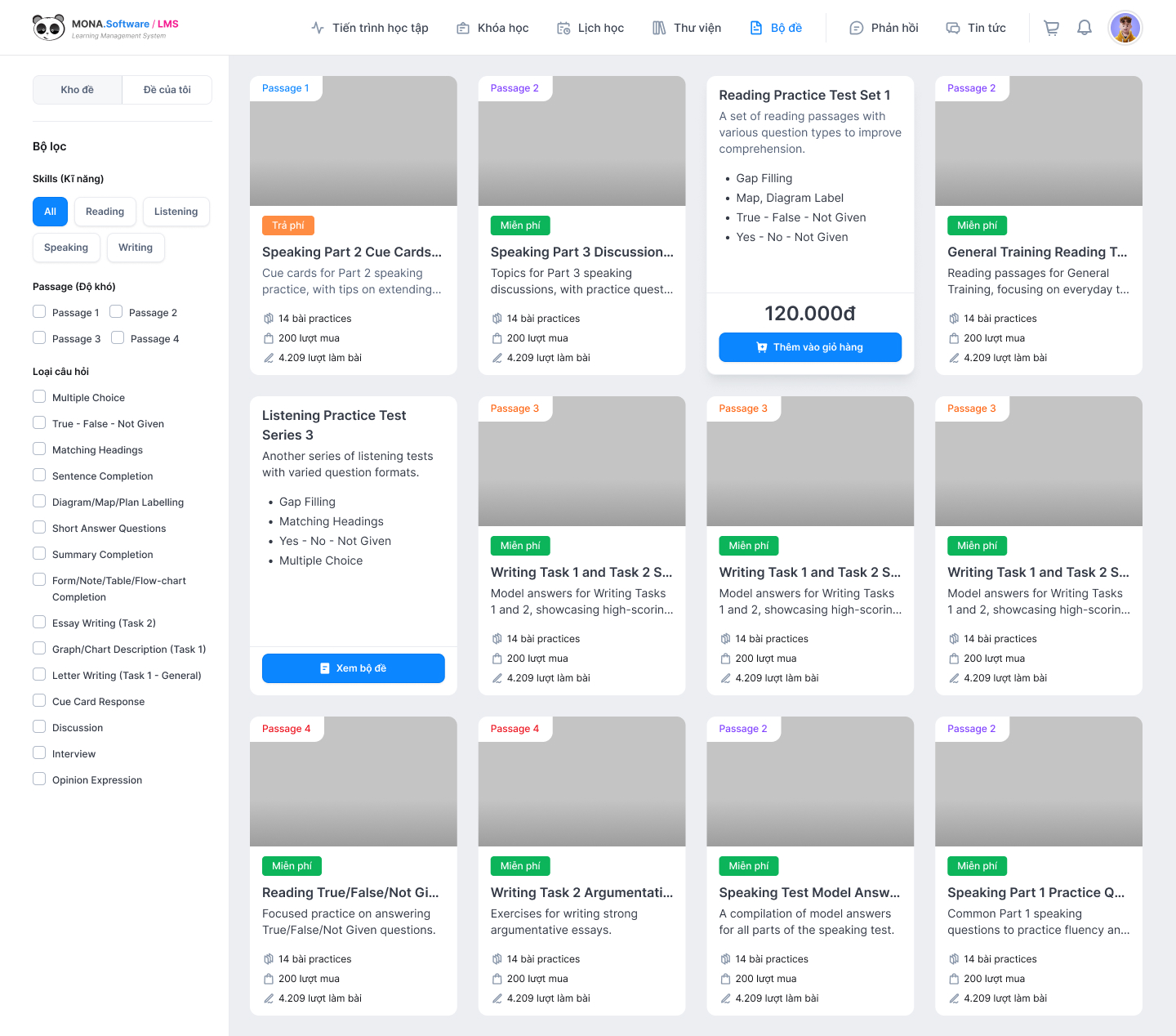
The MONA LMS system also supports the feature exam question bank management software that lets teachers write thousands of questions and sort them by different cognitive levels. When you use online quiz creation software, the system automatically draws the right number of questions from each level to build an exam that separates learners by ability. Questions also come in many forms, such as infographics, video, audio, visual charts and more.
When you use online quiz software, organizations can register candidates' details easily through the learner management software. The registered account both collects the candidate's exam information and serves as the account they log in with to take the exam.
Each candidate has their own account and login details. At any moment, an account can be logged in on only one device. This makes the learner management feature a complete answer to the problem of someone else taking the exam for a candidate. When you use an online quiz app, education organizations can also keep track of how many candidates attend or miss the exam slot.
→ See more articles: Top 10 attendance management software best right now
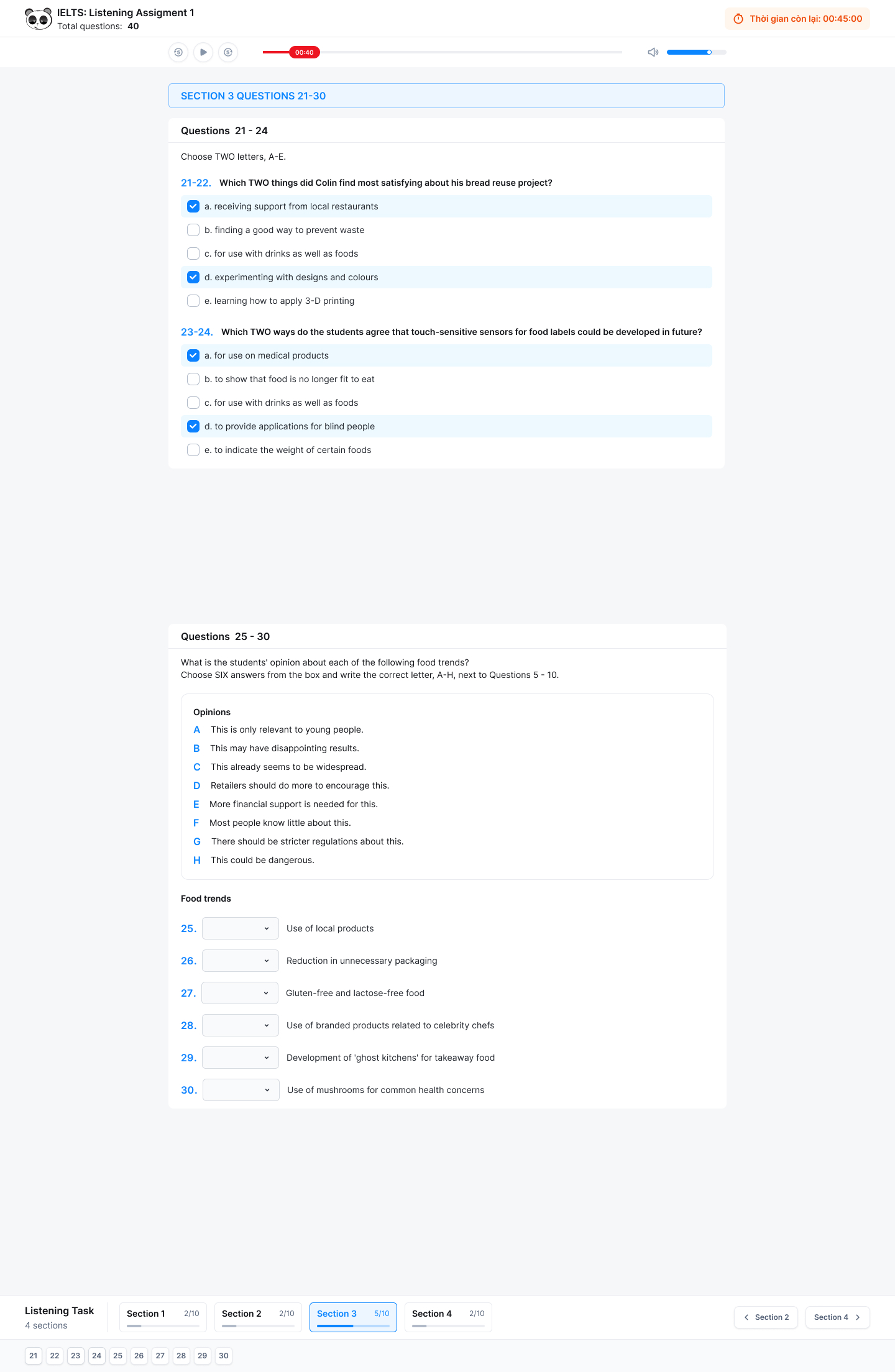
Features available in computer-based quiz software help students:
→ See also: How to do online exercises and exams in the MONA LMS software
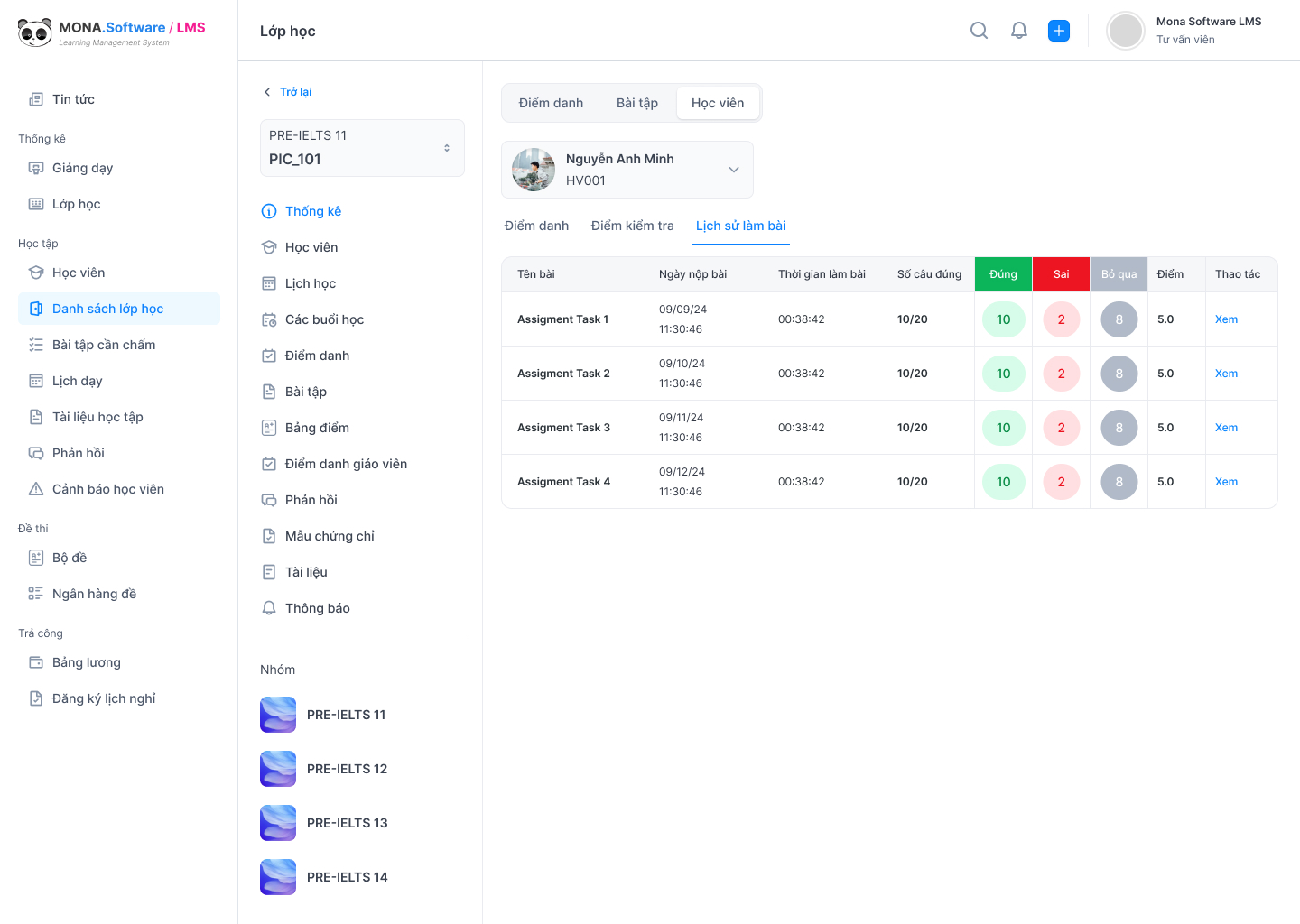
Exam and test management feature in online quiz software lets users carry out tasks such as:
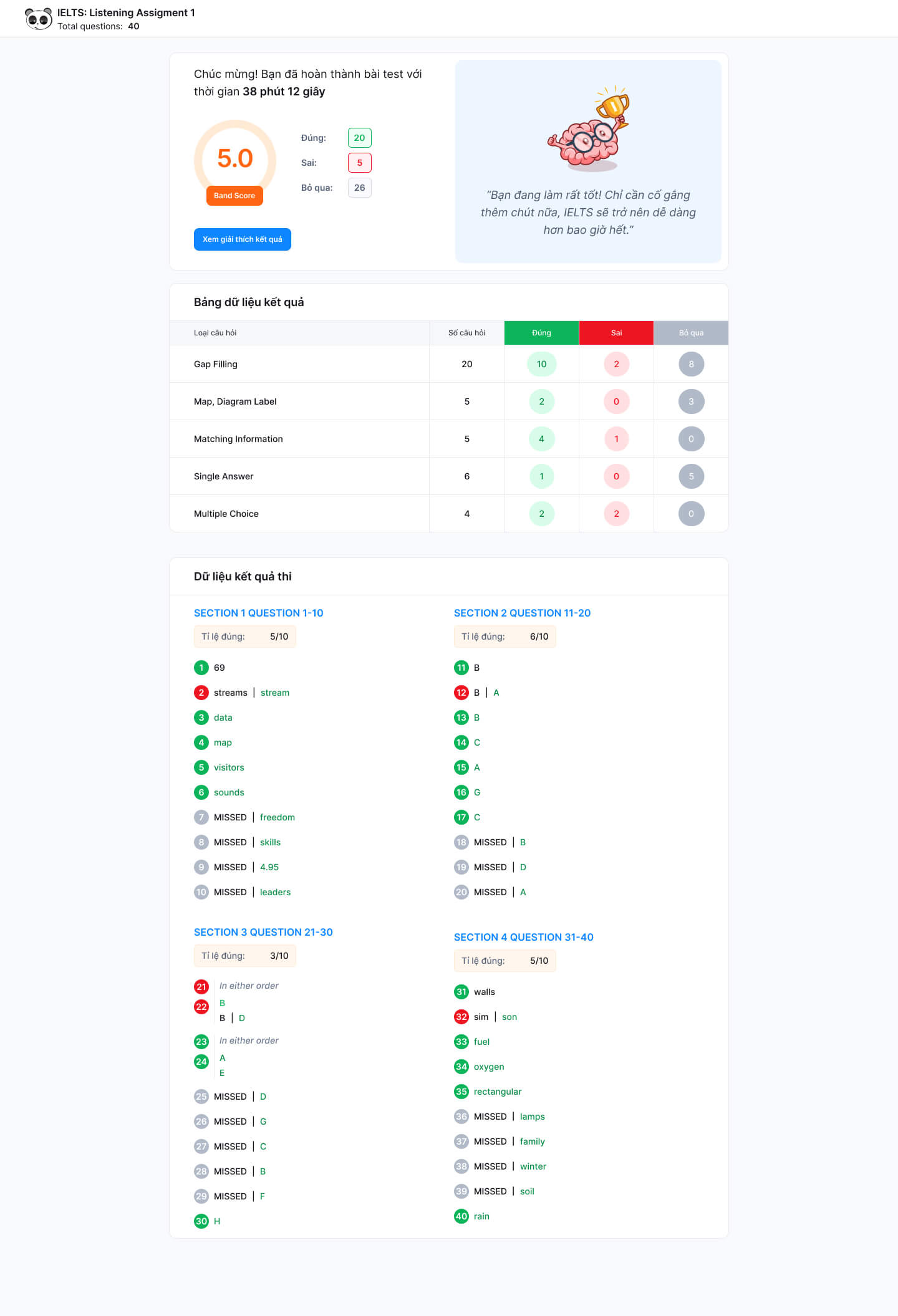
After a candidate submits, the function from multiple-choice grading software scores the paper automatically and returns the result within seconds or minutes. Based on the score, the software can rank candidates within the exam room, the exam session or the whole school. The scores are recorded in the score management software and authorized staff can export score reports by choosing the right filter.
Online quiz management system includes proctoring features that help:
→ See also: Exam anti-cheating software
Online exam software collects each candidate's score and ranks and grades them from highest to lowest. Rankings can be calculated across the exam class, the whole school or the whole grade.
When looking for suitable online quiz software , there are several important factors to weigh so that online testing is effective and safe. Here are the criteria you should not skip:
MONA LMS: language center management software, is a complete solution that automates management and uses resources efficiently. It also removes the “fear of technology” that is leaving some centers and schools “behind” their competitors. With a full set of features, MONA LMS handles up to 99% of the work in education and online training. Contact us now HOTLINE 1900 636 648 or get direct advice on the software here.

This article MONA Media has helped you learn about the top 10 best quiz software tools. You have also seen what online quiz apps can do. We hope MONA's tips help you choose an online quiz web app that is good quality and fits your needs.
If you want to understand the groundwork behind this in more depth, the article What is ITSM and how to manage IT services properly explains it in detail and describes how we do it for our clients.
If you want to understand the groundwork behind this in more depth, the article What is a data analyst, and why businesses need to read their data explains it in detail and describes how we do it for our clients.

CEO & Founder · The MONA
Founder of The MONA, who built a services company of 200+ staff with 14,000+ projects delivered. Khánh Hùng shares how he thinks about building systems that run themselves, automating a business, and the real lessons from delivering projects at MONA.
 2,4K




Professional website
design services
Own a website with a beautiful, 100% exclusive design and a lifetime warranty, with the ability
to expand features flexibly as your business grows, starting today!


Tư vấn chiến lược
Số Hóa Giáo Dục






 MONA will never sell your information or send you spam


 MONA will never sell your information or send you spam
