
 MONA OS 2.0
 Partner with MONA


 Tự động hoá doanh nghiệp
 Cẩm nang SEO
 Digital Marketing
 Kinh nghiệm thiết kế website
 Hạ Tầng Server
 Giáo dục


 VI
 EN













Message us on
Zalo Official


 ProductsNew

 ProductsProducts
 Mới ra mắtKHA AI 2027App tự edit video, tự đăng mọi mạng xã hội, 2 phút mỗi ngày










 Website designLooks good and wins customers over.
SEO servicesBrings in customers searching for exactly what you sell.
 Tư vấn digital marketingKéo khách từ nhiều kênh, đo bằng số thật.
Corporate video productionVideos introducing your company, factory and team.
 NewAI video productionCompany story films made with AI.
 Custom software developmentCRM, ERP and HRM built for your business.
 Viết AI Agent theo yêu cầuĐặt riêng một trợ lý AI cho đúng việc của mình.
 Tư vấn chuyển đổi AIĐưa AI vào vận hành của cả công ty.
NewMONA LMSManagement for centers and schools.
MONA SkillHubInternal training for company staff.
 NHTQ systemEnd-to-end China–Vietnam shipping operations.
MONA JMSManagement for gold, diamond and pawn shops.
 MONA E-LearningA website with every feature you need to sell courses.
 How to sell online courses (course)More than 30 free lessons on selling courses on autopilot.
 MONA Cloudmonacloud.vnServers to get your apps and websites running.
 MONA Basemonabase.vnPostgres database, sign-in and file storage.
 MONA Mailmonamail.vnSend OTP, order and invoice emails from your software.
 MONA Paymonapay.vnAccept bank transfers via VietQR and notify your software when the money arrives.
 MONA eInvoiceComing soonIssue e-invoices that meet tax standards.
Gấu CườiTrả lời khách 24/7 trên web, Fanpage, Zalo và thu lead cho sale.
 Gấu TeleSalesGọi điện tư vấn, chăm khách như tổng đài viên thật.
Dê CườiTư vấn và chốt đơn cho shop ngay trong khung chat.
Gấu WebmasterNhắn nhóm Zalo là website được sửa xong.
 Gấu Pháp ChếSoạn hợp đồng, rà điều khoản trong vài phút.
 Gấu Báo GiáLên báo giá đúng mẫu và gửi khách ngay.
 AI chăm sóc khách hàngTheo dõi và giữ chân khách hàng cũ.
 Gấu Tuyển DụngLọc hồ sơ, hẹn lịch, phỏng vấn ứng viên.
 Mới ra mắt
KHA AI 2027
Xây kênh chuyên gia 2 phút mỗi ngày
Quay bằng điện thoại, AI tự edit video, tự đăng lên 16 nền tảng và tự trả lời bình luận, tin nhắn.
851.542lượt xem trên kênh CEO MONA sau 29 ngày
 Anh Khánh HùngCEO MONA đang dùng mỗi ngày
Xem app làm được gì
 AI
Gấu Cười MONA ĐANG TỰ XÀITrả lời khách 24/7 trên website, Zalo OA, Messenger và thu lead về cho sale.
Dê CườiChốt đơn bán lẻ và sàn: Shopee, TikTok Shop, web. Chăm cả khách sỉ, đại lý.
Gấu WebmasterCập nhật nội dung, tối ưu SEO website mỗi ngày.
Gấu TeleSalesGọi điện tư vấn, chăm khách như tổng đài viên thật.
Gấu Tuyển DụngLọc hồ sơ, hẹn lịch, phỏng vấn ứng viên tự động.
AI chăm sóc khách hàngGiữ khách cũ, cứu lead đã rớt cho phòng kinh doanh.
Gấu Pháp ChếSoạn hợp đồng, rà điều khoản trong vài phút.
Gấu Báo GiáLên báo giá đúng mẫu, gửi khách ngay khi có yêu cầu.
 Chuyển đổi AI toàn phầnGiải pháp tổng cho doanh nghiệp, 3 lớp triển khai.
 Viết AI Agent theo yêu cầuĐặt riêng một con AI gánh đúng nghiệp vụ của bạn.
 Custom softwareCRM, ERP and HRM with built-in AI automation.
 SEO & AEO thời đại AIĐược Google lẫn AI trích dẫn, không chỉ xếp hạng.
 Kiến thức AI cho doanh nghiệpBài phân tích, hướng dẫn ứng dụng AI vào vận hành.
 Free AI courses
 AI tools at work
App mới · KHA AI 2027
Xây kênh 2 phút mỗi ngày
AI tự edit video, tự đăng mọi mạng xã hội
Free consultation, 8am–10pm every day

08 September, 2026

Integrating online payment into a website means attaching an automatic way of receiving money to the sales page, so an order switches to paid the moment the customer transfers, instead of waiting for someone to open a banking app and check. In Vietnam in 2026 there are five common routes, with fees ranging from 0 VND to 4.40% per transaction. This article lays out all five with real prices and check dates.
| How you get paid | Fee per transaction | Money arrives in your account | Best for |
|---|---|---|---|
| VietQR bank transfer | Free | right away | domestic customers, any scale |
| Domestic card through a gateway | 1.818% + 4,200 VND | on the gateway's settlement cycle | customers who pay with ATM cards |
| E-wallet | about 1.5% to 2.0% | on the wallet's settlement cycle | young customers, small orders |
| International card through a gateway | 3.7% + 4,500 VND | on the gateway's settlement cycle | customers who use Visa or Mastercard |
| PayPal | 4,40% + 0,30 USD | plus 60,000 VND per withdrawal | customers abroad |
The numbers in the table come from the report Payment Acceptance Costs for Vietnamese Businesses 2026 issued by MONA Pay on 05/09/2026 under a CC BY 4.0 license, built on VietinBank's card acceptance fee schedule effective 22/04/2026 and NAPAS data.
Integrating online payment into a website means connecting the sales page to a party that knows whether the money has arrived, then letting that knowledge switch the order status. In other words, what you buy is not the orange button on the checkout page. What you buy is an automatic answer to one question: has this order been paid.
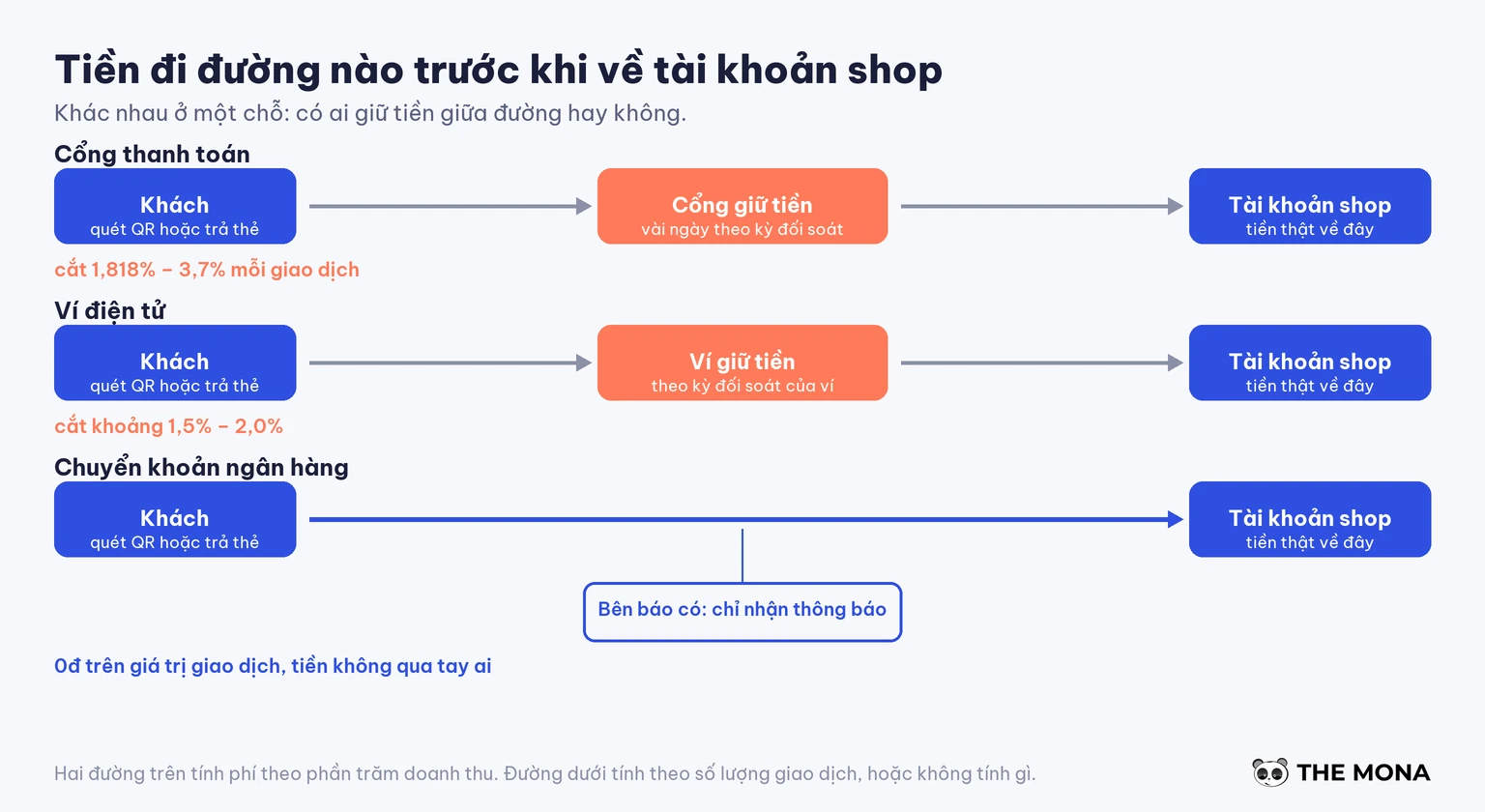
Money travels three different ways, and mixing them up means getting the whole cost question wrong. The first is the payment gateway: the customer's money goes into the gateway's account first, the gateway holds it for a few days on its settlement cycle before passing it to the shop, and takes a percentage. The second is the e-wallet, similar to the gateway except that the customer pays from the wallet balance instead of a card. The third is bank transfer: money goes directly from the customer's account to the shop's account, with nobody in the middle holding it, and the intermediary only receives a transaction notice from the bank so it can tell the website.
These three routes produce three completely different fee structures. The first two charge a percentage of revenue, meaning the more you sell the more you pay, forever. The third charges per transaction or nothing at all, because the intermediary does not hold the money and so has nothing to cut.
Real fees in Vietnam in 2026 run from 0 VND to 4.40% per transaction, and the gap between those two ends is much bigger than many people think. The table below has sourced numbers, not estimates.
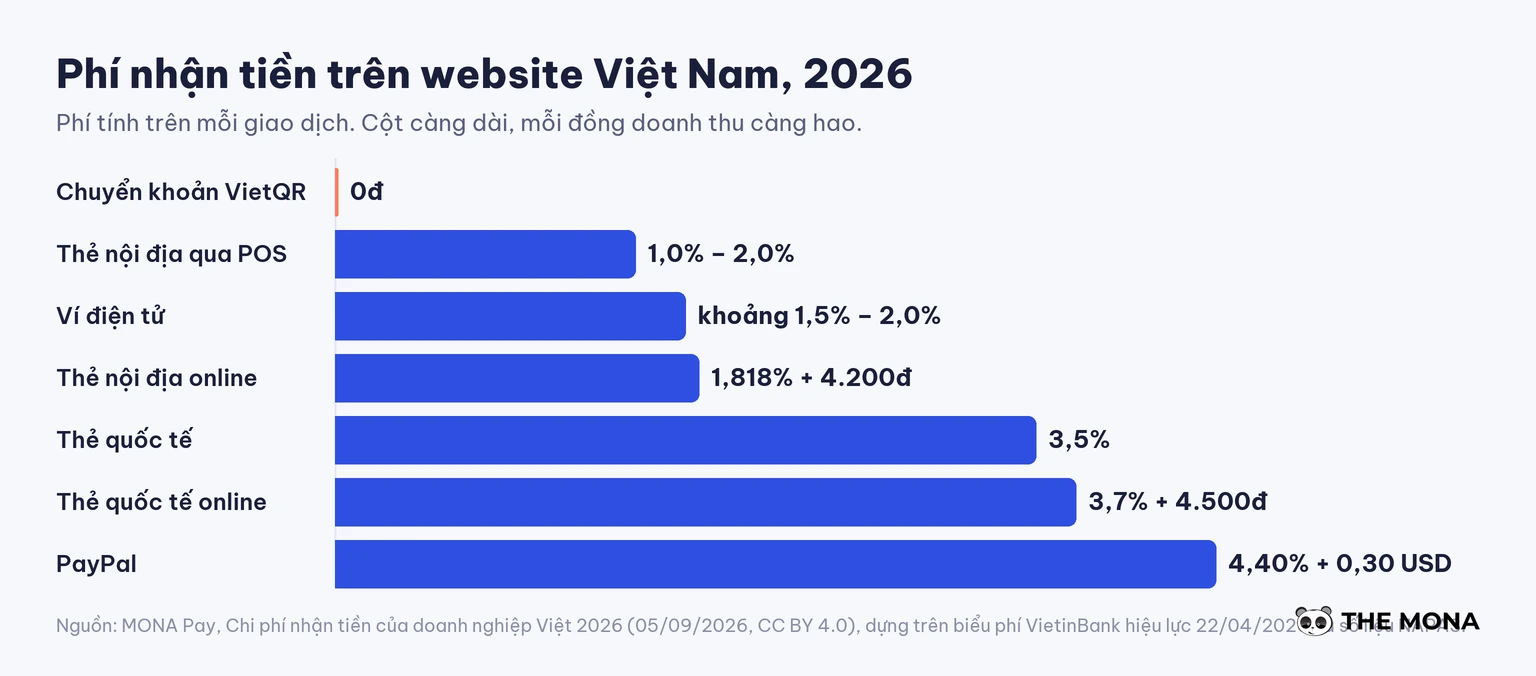
| How you get paid | Fee | Source and check date |
|---|---|---|
| VietQR bank transfer | Free | NAPAS, checked 05/09/2026 |
| Domestic card at POS | 1.0% to 2.0% | VietinBank, effective 22/04/2026 |
| Domestic card for e-commerce | 1.818% + 4,200 VND | VietinBank, effective 22/04/2026 |
| E-wallet | about 1.5% to 2.0% | estimated from the report of 05/09/2026 |
| International cards | 3,5% | VietinBank, effective 22/04/2026 |
| International card for e-commerce | 3.7% + 4,500 VND | VietinBank, effective 22/04/2026 |
| PayPal | 4.40% + 0.30 USD, withdrawal 60,000 VND | PayPal Vietnam, checked 28/08/2026 |
| Stripe | not open to Vietnamese legal entities | Stripe country list, checked 28/08/2026 |
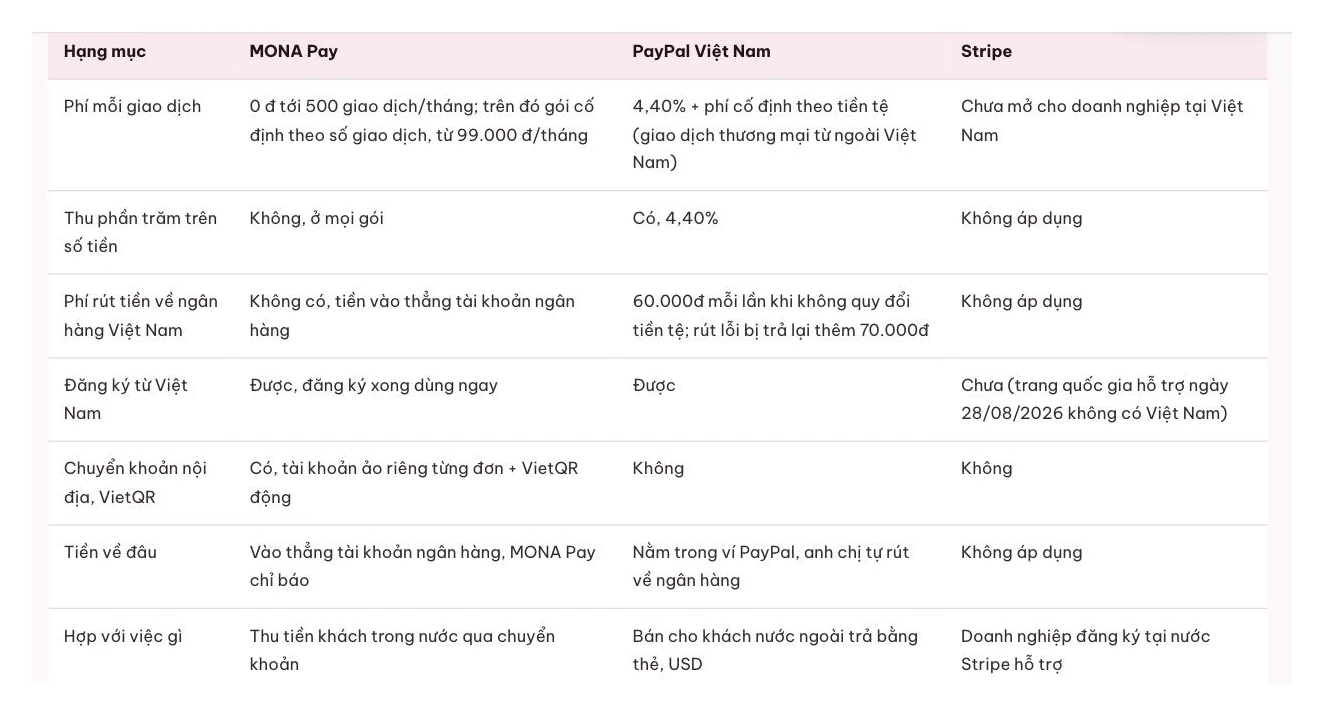
The last two rows are where people often stumble. Many guides online still teach how to attach Stripe to a sales website, yet as of our check on 28/08/2026 Stripe still had not opened to Vietnamese legal entities, so you would stop at the business registration step even if you followed the guide to registering a Stripe payment gateway we wrote several years ago. For anyone selling to customers abroad, the remaining route is usually PayPal, and the number to look at there is 4.40% plus 0.30 USD per transaction, then another 60,000 VND for each withdrawal to Vietnam. Withdrawing in small amounts burns your own money. Collect and withdraw once a month and that 60,000 VND almost disappears.
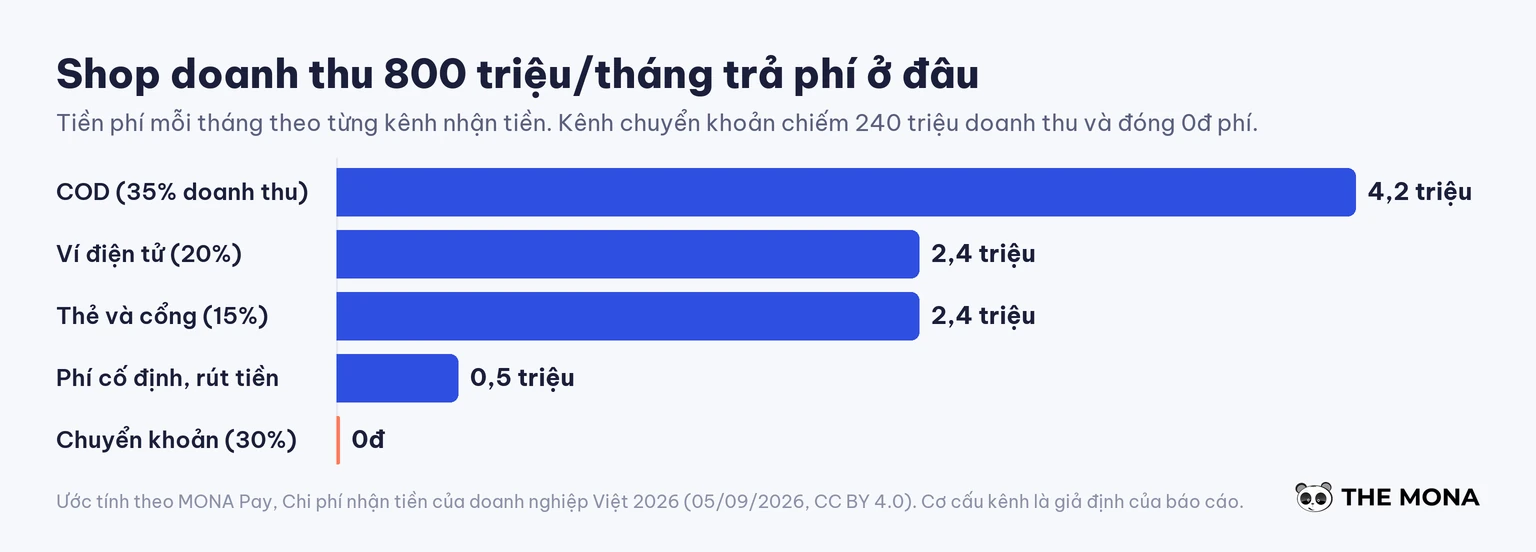
The report also works out an example worth pinning to the wall. A shop with 800 million VND of revenue a month, split 35% cash on delivery, 20% e-wallet, 15% card and gateway, 30% bank transfer, pays total payment fees of around 9.5 million VND a month by the report's estimate. The bank transfer share, 240 million of revenue, contributes exactly 0 VND of fees.
The benefit of online payment is measured by four things: order closing rate, number of fake orders, reconciliation hours, and how clean the order data is. Convenience cannot be measured, so we skip it.
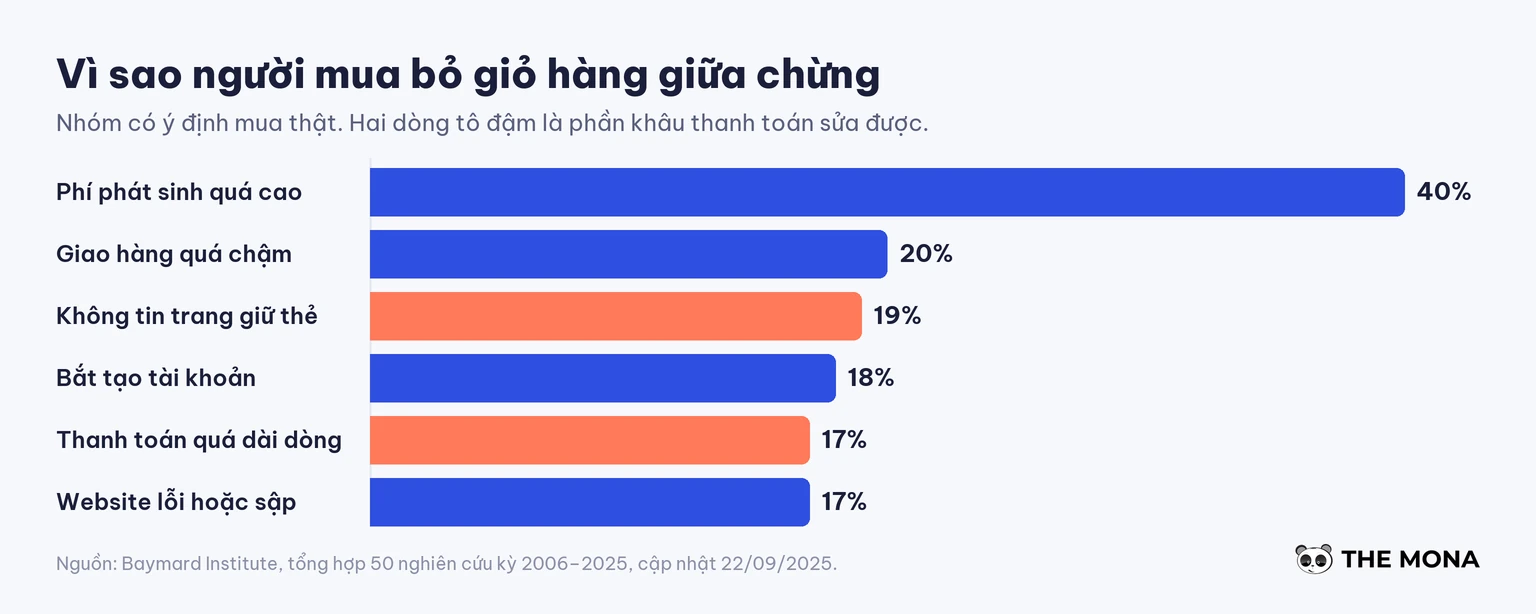
Baymard Institute compiled 50 studies from 2006 to 2025 and arrived at 70.22% of carts abandoned midway. Peel back the reasons and two lines speak directly about checkout: 19% of buyers leave because they do not trust the website with their card details, and 17% leave because checkout is too long or too complicated. To be fair, 42% of abandonments are just people browsing with no intention to buy, and no payment method can save that group. But the 19% and 17% figures can be fixed by exactly the step you are thinking of adding, together with a SSL certificate valid, and a checkout page that doesn't ask for extra information.
A customer who pays upfront has made a commitment. A COD order hasn't, and the COD return rate is a loss every online seller has felt: shipping both ways, goods sent around in circles, stock counts thrown off. Moving some orders from COD to prepayment is the cheapest way to cut that loss, far cheaper than hiring more people to call and confirm orders, and cheaper than building a whole automated order-closing system just to block fake orders.
This is the biggest item, and the one most often overlooked. We give it its own section below.
When an order is marked paid at the right moment, every number after it is right: revenue by hour, by campaign, by product. When order status depends on when the accountant has a free hand to click a button, the data arrives late and skewed, and every decision to raise or cut ad budget built on it is skewed too. This is also why the payment step should connect directly to your CRM software instead of standing alone. Few people talk about this, but it earns real money.
The most expensive part of accepting money online is the work hours spent on manual reconciliation, and it never shows up on any invoice. Nobody sends a bill for it. It only shows up in the payroll.
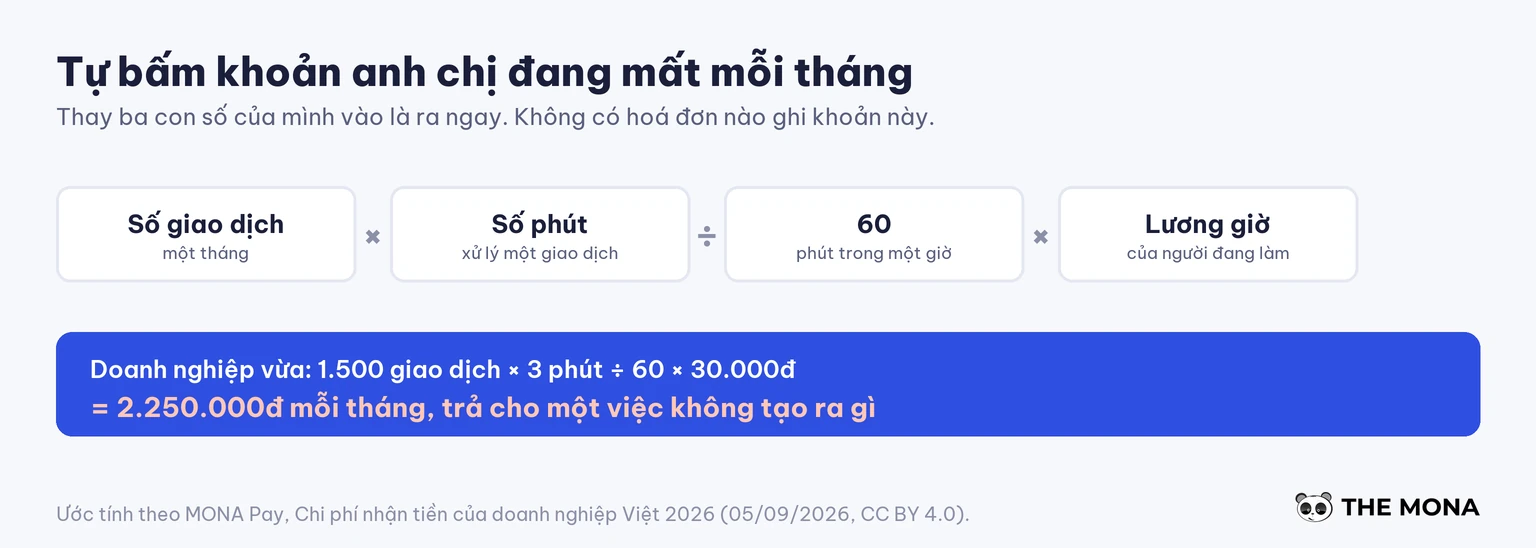
The formula is simple enough that you can punch it into a calculator right now: take the number of transactions in a month, multiply by the minutes it takes to handle one transaction, divide by 60, then multiply by the cost of one work hour. The report dated 05/09/2026 calculates three levels, and the scale is worth a close look. Three hundred transactions at 25,000 VND an hour comes to 375,000 VND. One thousand five hundred transactions at 30,000 VND comes to 2.25 million VND. Five thousand transactions at 35,000 VND comes to 8.75 million VND a month, which is 250 hours of labor spent just checking balances. All three are estimates, and all three are money paid for work that produces nothing.
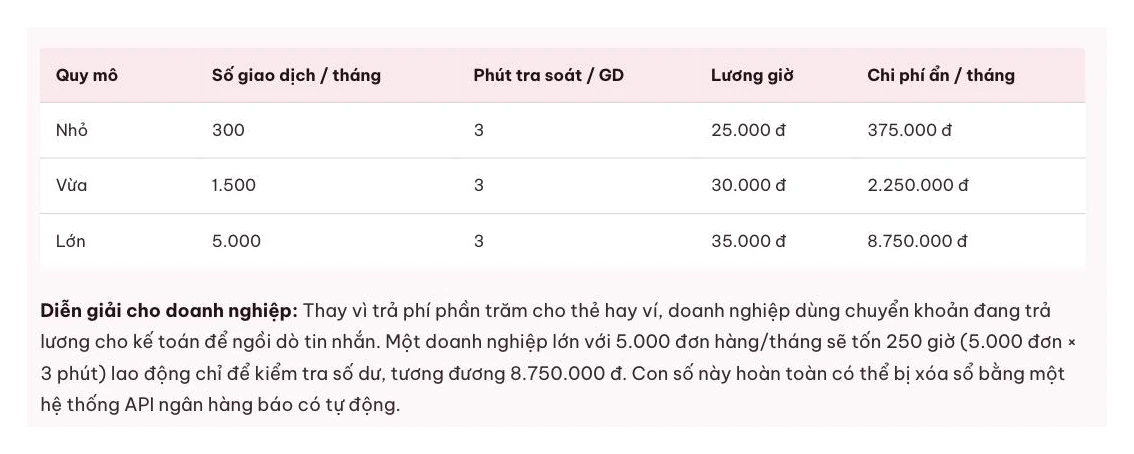
Three minutes sounds absurd until you actually sit down and do it. It isn't slow typing that costs the time. It's jumping back and forth between the banking app and the order admin page, and starting over every time something doesn't match. The classic failure is two customers each transferring 350,000 VND in one afternoon, one typing the wrong order code in the transfer note and the other leaving it blank, and the accountant has no way to tell which order was paid without phoning each person. A bank screenshot sent over Zalo doesn't save the day either, because screenshots can be edited. Our article on automating supplier payments covers the opposite side of this same problem, when the business is the one paying instead of the one collecting.
We'll be straight about this: under a few dozen orders a month, the cost is less than 100,000 VND, so keep doing it by hand and change nothing. From a few hundred orders up, the numbers start to speak for themselves, and even then you can set it up yourself in fifteen minutes without hiring anyone. The time to call us is when the whole thing needs fixing, e-commerce websites not when you just want one more button bolted on.
Choosing how to collect money is a math problem, not a gut-feeling one, and it starts with knowing what share of your money arrives each way. Answer the ten questions below and you have your answer.
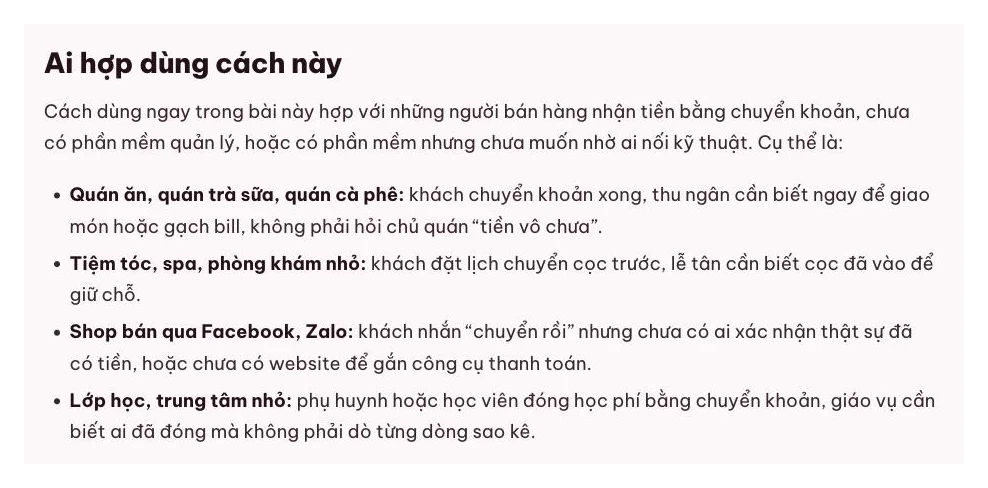
After those ten questions, the rule is fairly short. If most of your revenue comes from domestic customers and regulars who pay by bank transfer, automatic bank transfer is the cheapest route, and the difference isn't a few percent but the entire fee. If a meaningful share of customers pay by card, keep the gateway, because dropping it loses exactly those customers. If younger customers are used to paying with e-wallets, adding one wallet is enough, and we have a separate guide on integrating the VTC Pay e-wallet. For sales abroad, accept PayPal's 4.40% as a cost of selling, and batch your withdrawals to once a month.
A percentage-based gateway isn't the villain, and we're not here to tell you to rip it out. It does its job. The common mistake is installing just one route and forcing every customer through it.
There are three technical ways to attach payments to a website, and they differ in who holds the money and who carries the maintenance work. Picking one also means picking your monthly cost for the next several years.
Route one is signing a contract with a payment gateway. The gateway gives you a plugin or a set of keys, your website calls it, and the gateway reports back once the customer has paid. In return you deal with company paperwork, an approval wait, and a percentage cut from every dong of revenue. For a shop with many card-paying customers, that percentage is the price of convenience for the customer, and it's worth it.
Route two is connecting straight to a bank API and writing your own reconciliation layer. It sounds very hands-on, and here we say the opposite of what engineers instinctively want to hear: building it yourself almost always costs more than the value it creates. Not because it's hard to write, but because once it's written you have to keep feeding it. When the bank changes its API you have to fix it, when the webhook dies at 2 a.m. someone has to get up, when a message arrives twice you have to build your own duplicate protection, and every new bank means starting over. A webhook also needs somewhere that is always running, which means e-commerce hosting that's strong enough, not the cheapest shared plan. Keeping a layer like that alive costs far more than renting one.
Route three is using a service that only receives transaction notifications and never holds the money. Money still goes straight from the customer's account to the shop's bank account. The service stays outside, hears the bank report a credit, matches it to an order, and sends a signal back to the website. Since it never holds the money, there's no basis for taking a percentage, and pricing turns into a per-transaction model. This is the newest of the three routes, and it only works because Vietnamese banks have opened their APIs in the last few years.
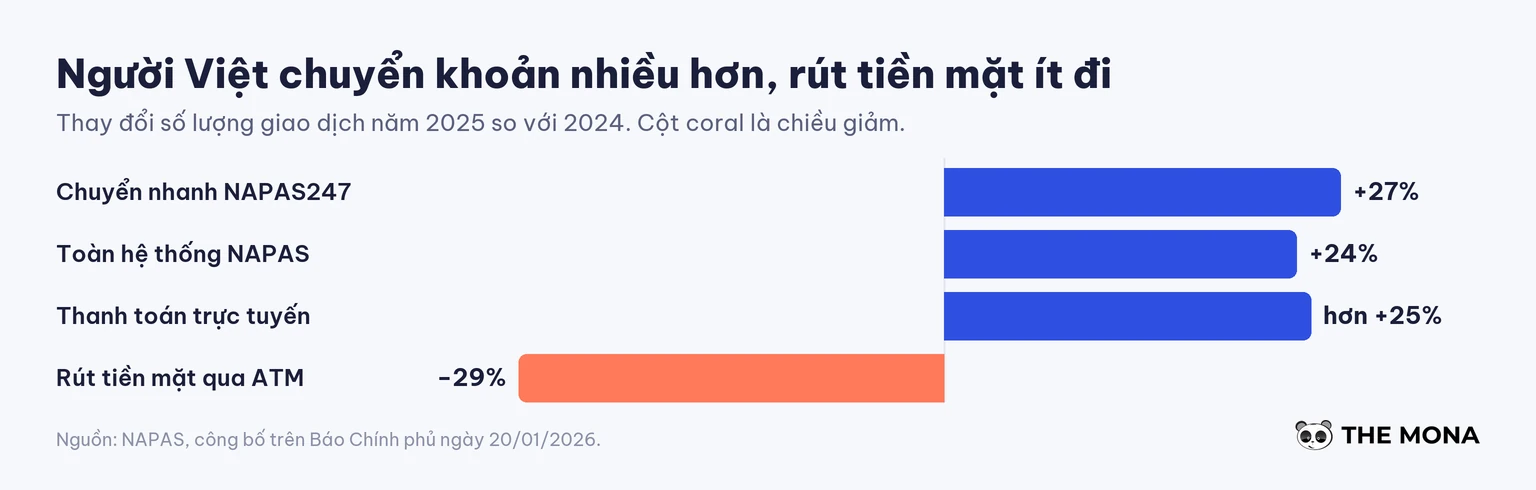
The trend favors route three. NAPAS figures published on 20/01/2026 show transactions through its system grew 24% in volume in 2025, with NAPAS247 instant transfers alone up 27% and ATM cash withdrawals down 29%. Vietnamese people are moving far more money by transfer and withdrawing cash much less, so the route once seen as second class is now the main one. If you're still weighing several payment methods, our overview of online payment methods goes deeper into each type, and these two articles integrate PayPal into the website and add VISA payments to your website are step-by-step guides for two specific gateways.
Automatic bank transfer notification is the route we most often recommend for domestic sales sites. This video shows how it runs without taking a percentage of each order.
Watch the full guide: a sales website that confirms orders automatically
Attaching automatic bank transfer notification to a WooCommerce website takes about five minutes and needs no code. We use MONA Pay as the example because it's a tool in the MONA ecosystem, so we know every step well.
Before getting into WooCommerce, you connect the bank account first, which takes about ten minutes. Open my.monapay.vn, create an account with your phone number or email, go to Bank, enter your account number and the phone number registered with the bank, then enter two OTP codes. The first connects the account and the second turns on transaction alerts. No step asks for your bank password.
That second OTP has a story behind it. Before the public launch in 08/2026, the product team rebuilt a new customer's whole flow using real money, and found that ACB demands one more OTP before it will turn on transaction alerts for the newly created virtual account. That step was missing from the first version of the guide. It launched only after it was fixed.
With the bank side done, the remaining three steps happen in the WordPress admin:
github.com/themonagroup/woocommerce-monapay/releases/latest, then go to Plugins → Add New → Upload Plugin, choose the file and activate it. The version on the WordPress.org directory is still awaiting review, so for now download it from GitHub.my.monapay.vn → API Keys → Create key along with the virtual account prefix, then click Send test webhook to see whether the order changes status on its own.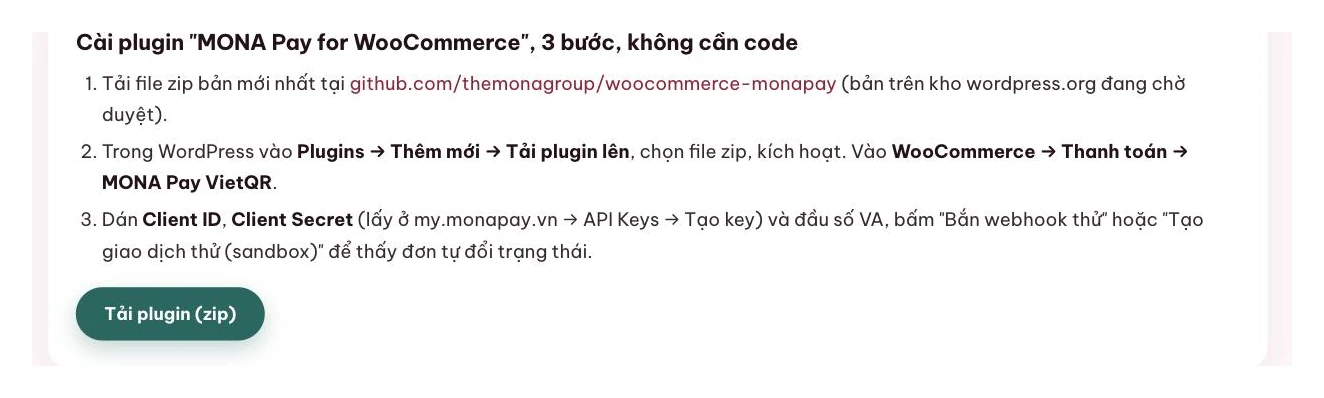
From then on, the customer scans a dynamic VietQR code with the amount and note already filled in, the money lands in the shop's bank account, the webhook fires to the website, and the order switches to paid by itself. The webhook is signed with HMAC-SHA256 and rejects any replayed packet outside a 5-minute window, so a packet intercepted on the way and resent later can't create a fake order.
Two limits need stating clearly, because this article isn't an ad. First, as of 08/09/2026 only ACB runs live, while MB, BIDV, VietinBank, OCB, MSB, KienlongBank and TPBank are still being connected, so your bank may not work today. Second, beyond the free tier you pay per transaction, not a percentage of revenue; the full price list is on their page. If you hit either of those limits, go back to route one.
MONA Pay — automatic bank transfer notification
500 free transactions · 0% fee · 10-minute setup
How long does it take to integrate online payments into a website? For a WooCommerce website using a ready-made plugin, about five minutes of configuration plus ten minutes to connect the bank account. With a traditional payment gateway, the time goes into company paperwork approval, usually counted in working days, not minutes.
Does receiving money by VietQR cost anything? There's no fee on the transaction value, according to NAPAS figures we checked on 05/09/2026. Any cost sits only with the service that does the automatic notification, which is charged per transaction instead of taking a percentage.
How do a payment gateway and a bank API differ? A payment gateway holds the customer's money for a while before passing it to the shop, and takes a percentage. With the bank API route, money goes straight into the shop's account, and the middleman only receives the transaction notification without touching the money.
I just opened my website and have few orders. Do I need this? Not under a few dozen orders a month. Reconciliation work is under 100,000 VND at that point. We say this honestly because changing systems before it hurts only costs effort and solves nothing.
What do I use for overseas customers when Stripe isn't open to Vietnamese companies? PayPal is the most common remaining route, at 4.40% plus 0.30 USD per transaction, and the only tip worth remembering is to batch your money and withdraw once a month so the 60,000 VND withdrawal fee isn't charged repeatedly.
What is a virtual bank account? It's an account number generated for each order or each customer, pointing back to the same real account. Because every order has its own number, the case of two customers both transferring 350,000 VND no longer causes confusion, and the system knows exactly which order the money belongs to.
Can I add it to WooCommerce if I don't code? Yes. The three steps in the section above are installing the plugin, choosing the settings page, and pasting two key strings. If your website is custom built rather than WooCommerce, a developer needs to call the API, and that's when our team can do it for you.
If you just ran the formula from section four on a calculator and got an uncomfortable number, the thing to do isn't to switch payment gateways. It's to look again at the whole path of an order on your website: where the customer clicks buy, how they pay, when the order changes status, and who is filling the gap by hand. That's exactly the question we ask every time we do business website design, and the answer rarely sits entirely in the payment step.
MONA has built sales websites since 2016, with more than 14,000 projects behind us, so we've met every kind of payment step: a shop that only needs a VietQR code on the thank-you page, subscription software that must unlock the second a customer pays, and some cases that also need an automatic order-closing chatbot placed in front of the payment step. For an older website, it's usually a matter of adding software to an existing website rather than tearing it down and rebuilding. MONA Pay itself grew out of that internal need, and ran at ipn.mona.host for over four years collecting hosting fees from Mona.Host and tuition before it opened to the outside.
Send us just three numbers: your monthly order count, the share of customers paying by bank transfer, and the minutes you currently spend confirming one order. We work backward to the amount you're losing and tell you straight whether you need to do anything, even when the answer is not yet. Call 1900 636 648, or leave your number and we'll call you back.
Updated: 09/2026. Every fee figure in this article comes with its check date, and we review them every quarter.
Integrating online payments into a website means adding an automatic way to receive money so that orders change status on their own when the customer pays. In Vietnam in 2026 there are three routes: a payment gateway that holds the money and takes a percentage, a self-written reconciliation layer connected to bank APIs, and a bank transfer notification service that never holds the money. Three cost benchmarks to remember: VietQR bank transfer at 0 VND, domestic e-commerce cards at 1.818% plus 4,200 VND, and PayPal at 4.40% plus 0.30 USD and 60,000 VND per withdrawal to Vietnam. The biggest hidden cost is manual reconciliation labor, about 2.25 million VND a month for 1,500 transactions. Under a few dozen orders a month, automation isn't needed yet. MONA Media has built sales websites with payment integration since 2016, hotline 1900 636 648.

Project Manager · MONA Media
Website and technical specialist at MONA Media. Directly coordinates and delivers website design, programming, security and operations optimization projects for businesses, turning complex requirements into solutions that run reliably, can be measured and are easy to scale.
 380




Professional website
design services
Own a website with a beautiful, 100% exclusive design and a lifetime warranty, with the ability
to expand features flexibly as your business grows, starting today!






 MONA will never sell your information or send you spam


 MONA will never sell your information or send you spam
