
 MONA OS 2.0
 Partner with MONA


 Tự động hoá doanh nghiệp
 Cẩm nang SEO
 Digital Marketing
 Kinh nghiệm thiết kế website
 Hạ Tầng Server
 Giáo dục


 VI
 EN

















Message us on
Zalo Official


 ProductsNew

 ProductsProducts
 Mới ra mắtKHA AI 2027App tự edit video, tự đăng mọi mạng xã hội, 2 phút mỗi ngày










 Website designLooks good and wins customers over.
SEO servicesBrings in customers searching for exactly what you sell.
 Tư vấn digital marketingKéo khách từ nhiều kênh, đo bằng số thật.
Corporate video productionVideos introducing your company, factory and team.
 NewAI video productionCompany story films made with AI.
 Custom software developmentCRM, ERP and HRM built for your business.
 Viết AI Agent theo yêu cầuĐặt riêng một trợ lý AI cho đúng việc của mình.
 Tư vấn chuyển đổi AIĐưa AI vào vận hành của cả công ty.
NewMONA LMSManagement for centers and schools.
MONA SkillHubInternal training for company staff.
 NHTQ systemEnd-to-end China–Vietnam shipping operations.
MONA JMSManagement for gold, diamond and pawn shops.
 MONA E-LearningA website with every feature you need to sell courses.
 How to sell online courses (course)More than 30 free lessons on selling courses on autopilot.
 MONA Cloudmonacloud.vnServers to get your apps and websites running.
 MONA Basemonabase.vnPostgres database, sign-in and file storage.
 MONA Mailmonamail.vnSend OTP, order and invoice emails from your software.
 MONA Paymonapay.vnAccept bank transfers via VietQR and notify your software when the money arrives.
 MONA eInvoiceComing soonIssue e-invoices that meet tax standards.
Gấu CườiTrả lời khách 24/7 trên web, Fanpage, Zalo và thu lead cho sale.
 Gấu TeleSalesGọi điện tư vấn, chăm khách như tổng đài viên thật.
Dê CườiTư vấn và chốt đơn cho shop ngay trong khung chat.
Gấu WebmasterNhắn nhóm Zalo là website được sửa xong.
 Gấu Pháp ChếSoạn hợp đồng, rà điều khoản trong vài phút.
 Gấu Báo GiáLên báo giá đúng mẫu và gửi khách ngay.
 AI chăm sóc khách hàngTheo dõi và giữ chân khách hàng cũ.
 Gấu Tuyển DụngLọc hồ sơ, hẹn lịch, phỏng vấn ứng viên.
 Mới ra mắt
KHA AI 2027
Xây kênh chuyên gia 2 phút mỗi ngày
Quay bằng điện thoại, AI tự edit video, tự đăng lên 16 nền tảng và tự trả lời bình luận, tin nhắn.
925.105lượt xem trên kênh CEO MONA sau 41 ngày
 Anh Khánh HùngCEO MONA đang dùng mỗi ngày
Xem app làm được gì
 AI
Gấu Cười MONA ĐANG TỰ XÀITrả lời khách 24/7 trên website, Zalo OA, Messenger và thu lead về cho sale.
Dê CườiChốt đơn bán lẻ và sàn: Shopee, TikTok Shop, web. Chăm cả khách sỉ, đại lý.
Gấu WebmasterCập nhật nội dung, tối ưu SEO website mỗi ngày.
Gấu TeleSalesGọi điện tư vấn, chăm khách như tổng đài viên thật.
Gấu Tuyển DụngLọc hồ sơ, hẹn lịch, phỏng vấn ứng viên tự động.
AI chăm sóc khách hàngGiữ khách cũ, cứu lead đã rớt cho phòng kinh doanh.
Gấu Pháp ChếSoạn hợp đồng, rà điều khoản trong vài phút.
Gấu Báo GiáLên báo giá đúng mẫu, gửi khách ngay khi có yêu cầu.
 Chuyển đổi AI toàn phầnGiải pháp tổng cho doanh nghiệp, 3 lớp triển khai.
 Viết AI Agent theo yêu cầuĐặt riêng một con AI gánh đúng nghiệp vụ của bạn.
 Custom softwareCRM, ERP and HRM with built-in AI automation.
 SEO & AEO thời đại AIĐược Google lẫn AI trích dẫn, không chỉ xếp hạng.
 Kiến thức AI cho doanh nghiệpBài phân tích, hướng dẫn ứng dụng AI vào vận hành.
 Free AI courses
 AI tools at work
App mới · KHA AI 2027
Xây kênh 2 phút mỗi ngày
AI tự edit video, tự đăng mọi mạng xã hội
Free consultation, 8am–10pm every day

10 June, 2026

Hello, Gemini is one of the AI tools people search for most to streamline daily work. We know you always want to stay on top of the latest technology, especially solutions that can support your marketing and operations teams. In this article, we'll walk you through how to sign up for Gemini and set it up in detail from A to Z. Beyond the basic steps, we also share 3 quick-activation tips to help you get the most out of Gemini and speed up your work. Let's go through each step to master this powerful AI tool.

We all know that constantly producing new content ideas is a big challenge. It takes a lot of time and mental effort, especially when you need varied content to attract potential customers. Gemini offers an advantage few users take up to generate ideas quickly.
We at MONA have used Gemini alongside many other AI tools in internal processes. We can making the most of Gemini's capabilities to lift the burden of ideation, so we can focus more on strategy and execution.
Gemini is better at synthesizing information from many sources. This tool processes data extremely fast. It helps you distill market trends, customer needs and competitors. From there, Gemini can suggest unique content ideas. Ideas appear in just seconds.
We've used Gemini to quickly analyze viral posts. The tool also helps us find related topics. This saves your marketing team hours of brainstorming. The result is a rich list of ideas.
Gemini's strength is its ability to process multimodal information. Gemini can analyze images, video and audio, not just text. This gives you a fuller view of the content you need to create. It opens up many new creative angles.
You can upload a competitor's ad video. Gemini quickly identifies their strengths and weaknesses. Then it proposes similar ideas, with a distinct touch for your brand. This is very convenient.
With Gemini, generating content ideas takes just a few minutes. You no longer spend hours in team meetings. The tool speeds up your content production line. Your team's productivity improves noticeably.
A marketing team can produce twice as many ideas, with quality still assured. This helps you stay ahead in the content race. It's a significant competitive advantage. MONA Media helps you roll out effective marketing strategies.
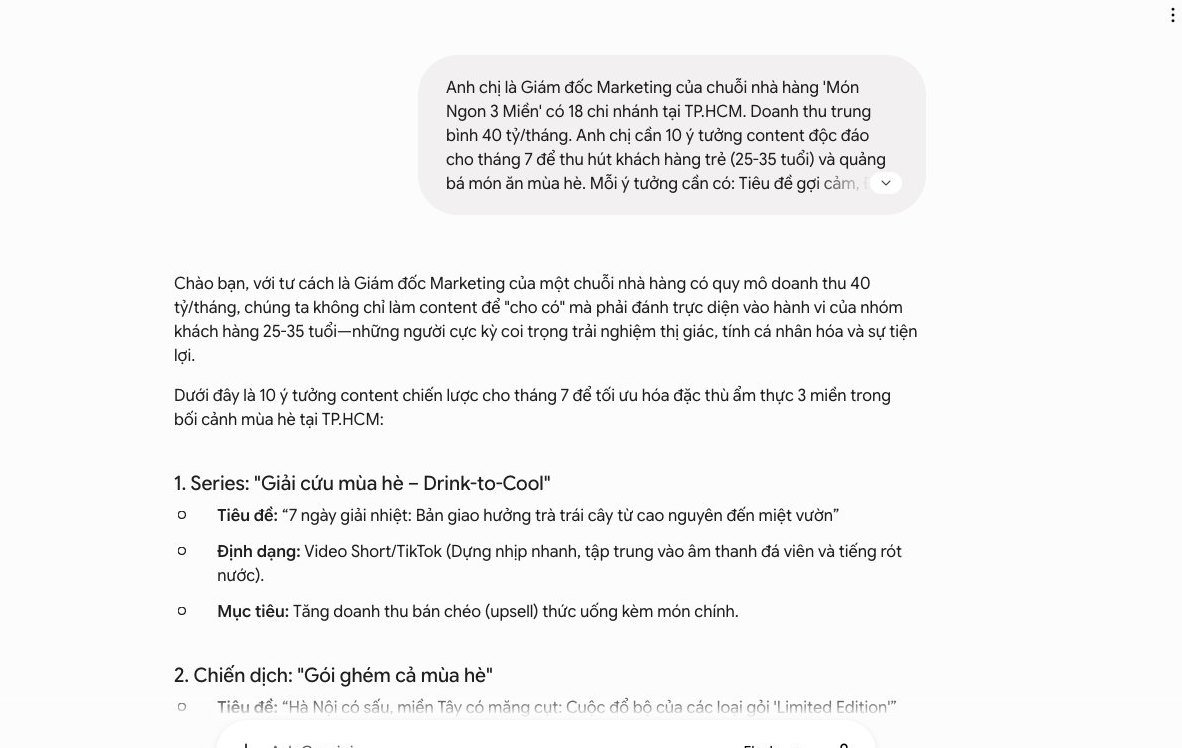

To get the most out of Gemini, signing up and activating your account correctly is the first step. The process is fairly simple, but there are a few small tips we want to share so you can activate Gemini Pro, or fully use its advanced features, without any obstacles.
Gemini is deeply integrated into the Google ecosystem. That means you need an active Google account to get started. It can be the personal Gmail account you use every day, or a Google Workspace account for business.
Make sure the account has two-step verification turned on. This protects your information and also makes activation go more smoothly. If you don't have an account yet, create a new Google account before continuing.
Once your Google account is ready, go straight to the official Gemini homepage. The address is usually gemini.google.com. There you'll see the option to start using or activate the service.
The system automatically recognizes the Google account you're signed into in your browser. Just click the “Get started” or “Activate Gemini” button to move to the next step.
Like any other online service, Gemini asks you to agree to its terms of service and privacy policy. This is an important step to understand how Google collects and uses data.
Read this information carefully. Once you understand and agree, click confirm. The Gemini interface then appears and you can start interacting with this AI tool.
After a successful activation, check that you're on the Gemini Pro plan. The Pro plan is often offered free to Google users and brings advantages in processing speed, language understanding and response length.
In the Gemini interface, go to settings or account information. The system clearly shows which Gemini version you're using. If it isn't Pro yet, look for the upgrade option or check whether your Google account is eligible.
Using Gemini Pro will help you optimize tasks from SEO optimization for websites to planning website design content. It's a useful tool that we also use internally to support daily work.

Many people using Gemini run into generic results.
The information that comes back lacks focus. That's because Gemini hasn't fully understood our request.
We at MONA developed a 3-layer prompt formula. It helps Gemini grasp your intent, and you get content that is up to 90% accurate.
This is the secret to turning Gemini into a real assistant, not just a search tool.
The first layer is very important. We need to give Gemini a clear role.
Then state a specific goal. This steers the whole content creation process.
For example, you can write: “You are an SEO expert at MONA Media. Your goal is to create 5 engaging blog post titles.”
Or: “You are a technology project manager. The goal is to summarize a 10-page report.”
Gemini will think according to the assigned role. The result will be more professional.
Context is the deciding factor. Gemini needs to understand the working setting.
Provide the relevant information. That includes the audience, brand tone and sample data.
For example, continuing from layer 1: “The target customers are mid-sized business owners in Vietnam. The brand voice must be professional and empathetic. Titles need to contain the keyword ‘process automation’ and stress productivity benefits.”
Or: “This report covers the investment performance of project A in Q2. The key data includes growth figures and customer feedback.”
Supplying background data keeps Gemini on topic. The content will be closer to real business conditions.
If you need to build a an SEO-ready website, understanding the audience and brand voice is essential. Gemini can help sketch the first ideas.
The last layer finalizes the result. You need to state the format and limits clearly.
For example, continuing from layer 2: “Answer in 5 bullet points. Each title must be no more than 15 words. Avoid words like ” or ‘the best’.”
Or: “Summarize the report in 3 paragraphs. Each paragraph must be no more than 50 words. Start with an overview sentence.”
These requirements shape the structure. Gemini will return neat results that are easy to use.
Applying this 3-layer formula brings clear results. It saves you editing time. Campaigns SEO or digital marketing get better support. We believe you'll see the difference right away.
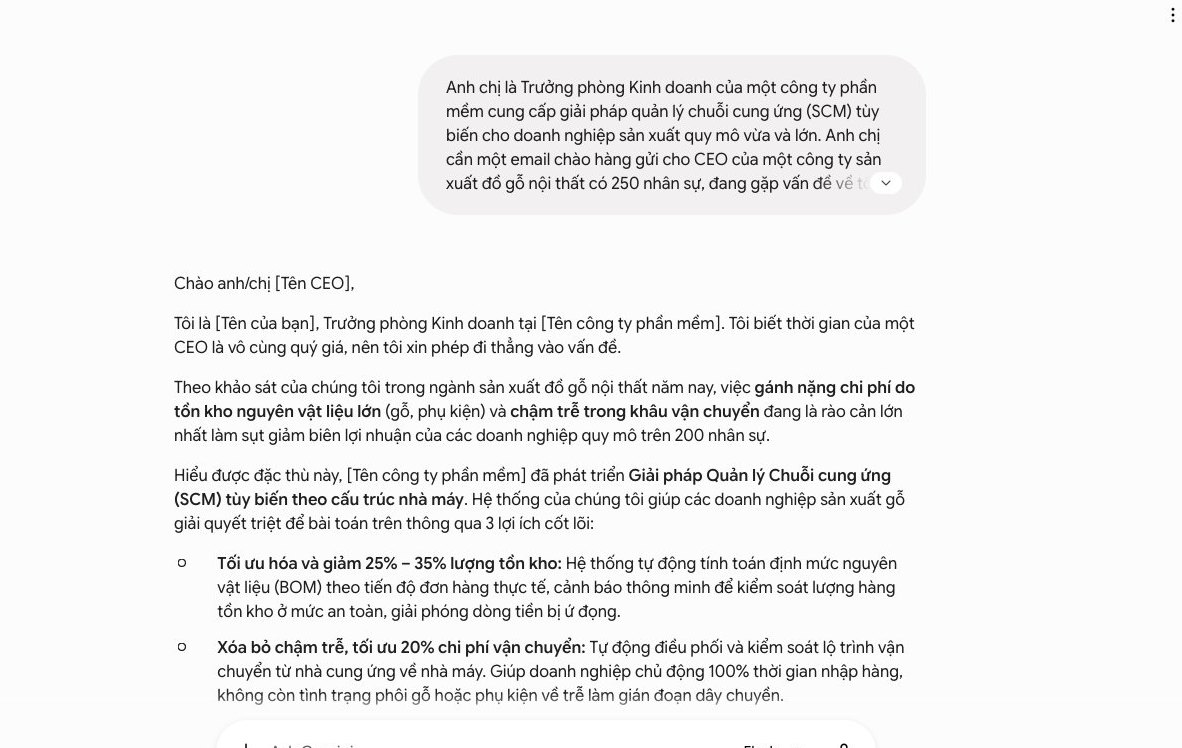
The need for quality, SEO-ready content is always a big pressure on marketing teams. We know you want to raise output without trading away quality. We need an efficient process to produce many drafts and cut time.
The hands-on process we share below helps you use Gemini to speed up content production. We can create 5 quality blog drafts in about 1 hour.
AI tools help a lot, but a real person's sharpness still matters most. Start by researching the main keyword, secondary keywords and market trends yourself.
We use specialized tools, or simply search Google and browse forums and social media. This helps identify hot topics and the questions customers often ask. It's a solid foundation for Gemini to create fitting content.
Then pick 2-3 main topics and related keywords for each article. This keeps the content focused and SEO-ready from the start.
Once you have the keywords and topics, feed them into Gemini. Ask it for a detailed outline and inviting titles.
An effective prompt could be: “For the keyword ‘[main keyword]’, create a detailed outline for an SEO-friendly blog post of about 1000 words. Suggest 5 engaging titles that attract readers and contain this keyword.”
Gemini quickly offers many options. You just choose the best outline and title. This saves a lot of time compared with brainstorming alone.
With the chosen outline, ask Gemini to write one section at a time. This gives better control over quality and accuracy.
For example, you can enter the prompt: “Based on the outline section ‘Introduction to [topic]’, write an opening paragraph of about 200 words, stressing the benefits and drawing readers in.” Or “For the section ‘How to [action] effectively’, write a detailed passage of about 300 words with specific steps and illustrative examples.”
Repeat this process for every section in the outline. Then just stitch the parts together and do an overall read-through. This process gives us a complete draft in a short time.
MONA has also applied AI tools similar to Gemini to optimize SEO services for customers. We understand the potential AI brings to digital content development.
To ensure quality and variety, ask Gemini to write 2-3 versions of each content section or title.
For example, “Write 2 more title versions for this blog post.” Or “Rewrite this introduction in a friendlier tone while keeping the main idea.”
This makes it easy to compare and choose the best wording. From there we can produce high-quality drafts that fit our brand voice.
This also helps your team learn how to write effective prompts. We'll gradually get better at getting the most out of Gemini.
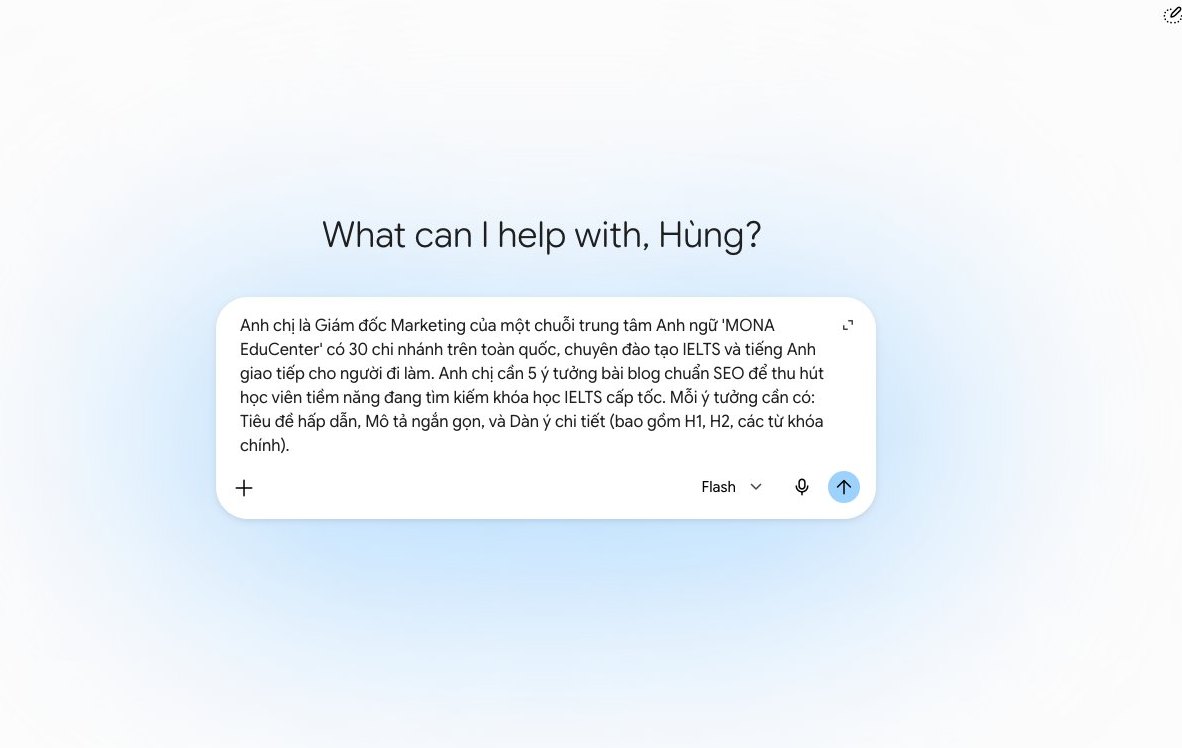
Many managers already know Gemini handles text very well. But its multimodal feature is a secret “weapon” few people fully use. We can use Gemini to analyze images and draw valuable competitor insights from a single ad photo.
This gives you quick assessments, and your marketing strategies become sharper as a result.
To start, upload the banner image to Gemini. It's a simple step.
Just click the image upload icon, then choose the image file to analyze. You can also drag and drop the image straight into the chat window.
The key is how you write the prompt. We need clear, specific instructions.
Ask Gemini to act as a marketing expert. It will then analyze the layout, colors, fonts and message. The more detailed the prompt, the more useful the result.
For example, you can write: “Act as a market analyst. Analyze this banner. State the competitor's communication goal clearly.”
Another prompt could be: “Find the strengths and weaknesses of this visual design. Suggest how we can improve.”
We can ask Gemini to assess the overall emotion. It can also identify the target audience.
The finesse is in the wording. Try different prompts. You'll find the formula that works best.
After receiving the prompt, Gemini starts analyzing. It provides detailed assessments, and you'll see many new perspectives.
Gemini will point out the banner's layout and analyze its main components, for example logo position, product image and call-to-action button.
Colors are decoded too. Each color carries its own meaning. Gemini tells you which colors the competitor uses and explains their psychological effect. This is important information. It helps you understand the competitor's intent.
Fonts are no exception. Gemini identifies the font and assesses its professionalism and fit for the industry. The hidden message is the most valuable part. Gemini can infer messages that aren't stated outright. It looks for the deeper meaning behind the images and words.
We'll know what the competitor wants to convey, and you'll understand their strategy. This keeps us a step ahead and gives a significant competitive advantage.
Another valuable angle is the customer audience. Gemini can infer the target audience from the design style and content.
For example, a banner with bright colors and soft fonts usually targets young people. Conversely, muted tones and sturdy fonts suit a business audience.
Gemini's analysis doesn't stop at understanding. We need to turn it into action.
You can use these insights to improve your campaigns. First, compare the competitor's banner with yours and find the differences. Identify what the competitor does well.
Learn from their success and avoid the mistakes they may make. You can adjust the ad layout, change the colors or the message. The goal is to stand out while keeping performance high.
For example, if the competitor focuses on product features, you can lean into emotional benefits. This creates variety and attracts a different customer segment.
Or if the competitor uses cool colors, you can try warm colors to stand out. Small adjustments bring big results.
These in-depth insights also help you reshape your messaging. We can create more compelling headlines and write more persuasive product descriptions, all based on Gemini's objective analysis.
MONA believes that applying automation technology helps businesses grow sustainably. We don't use AI just to work faster. We use it to work smarter, and from there make more accurate strategic decisions.
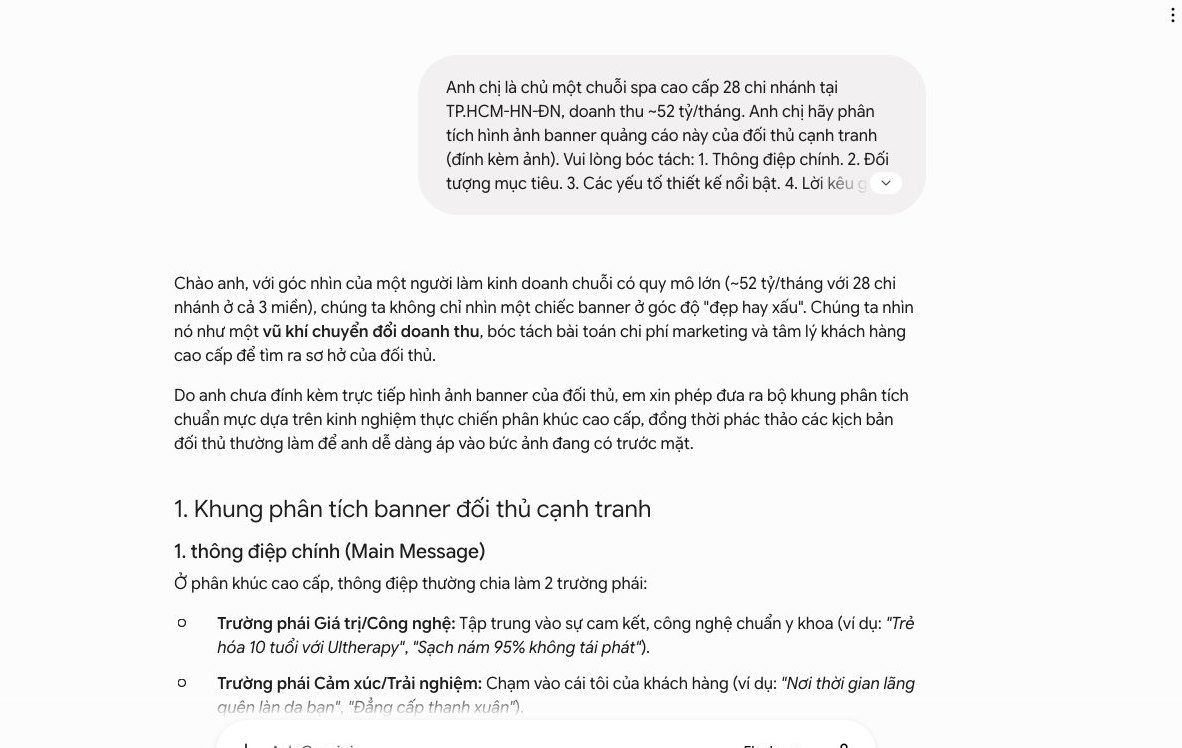
You've seen how powerful Gemini is for individual tasks. It's a tool that really speeds up personal work. We use Gemini to draft content, plan marketing or quickly analyze data.
However, scattered free or basic AI tools have a clear limit. Everyone uses them differently and data is spread around. One department doesn't connect with another.
A broken data chain worries many businesses. Staff have to connect information by hand, which costs time and invites errors.
This is where production-grade automation software, customized to your operations, becomes the answer. MONA doesn't just supply AI tools. We build a closed-loop system where AI is the means to automate the entire process.
MONA focuses on building software that keeps data chains running seamlessly. The system automatically collects, analyzes and makes decisions, minimizing manual intervention.
We have delivered automation solutions since 2016. With .000+ projects, MONA understands the challenges of Vietnamese businesses well. Our customer retention rate reaches 85% every year.
If you need a solution that goes beyond the limits of standalone tools, talk to MONA. Together we'll build a complete automation system that fits your business's specific needs.
You can sign up for Gemini yourself and try SEO drafts, content ideas or image processing within a single account. When the whole team needs Gemini to take data from Drive, your website or company software and return results in a shared flow, we'll build a dedicated integration; call 1900 636 648 to review the use case before you scale up accounts.
Once it's activated, try it on real work.

CEO & Founder · The MONA
Founder of The MONA, who built a services company of 60+ staff with 14,000+ projects delivered. Khánh Hùng shares how he thinks about building systems that run themselves, automating a business, and the real lessons from delivering projects at MONA.
 166




Professional website
design services
Own a website with a beautiful, 100% exclusive design and a lifetime warranty, with the ability
to expand features flexibly as your business grows, starting today!






 MONA will never sell your information or send you spam


 MONA will never sell your information or send you spam
