
 MONA OS 2.0
 Partner with MONA


 Tự động hoá doanh nghiệp
 Cẩm nang SEO
 Digital Marketing
 Kinh nghiệm thiết kế website
 Hạ Tầng Server
 Giáo dục


 VI
 EN














Message us on
Zalo Official


 ProductsNew

 ProductsProducts
 Mới ra mắtKHA AI 2027App tự edit video, tự đăng mọi mạng xã hội, 2 phút mỗi ngày










 Website designLooks good and wins customers over.
SEO servicesBrings in customers searching for exactly what you sell.
 Tư vấn digital marketingKéo khách từ nhiều kênh, đo bằng số thật.
Corporate video productionVideos introducing your company, factory and team.
 NewAI video productionCompany story films made with AI.
 Custom software developmentCRM, ERP and HRM built for your business.
 Viết AI Agent theo yêu cầuĐặt riêng một trợ lý AI cho đúng việc của mình.
 Tư vấn chuyển đổi AIĐưa AI vào vận hành của cả công ty.
NewMONA LMSManagement for centers and schools.
MONA SkillHubInternal training for company staff.
 NHTQ systemEnd-to-end China–Vietnam shipping operations.
MONA JMSManagement for gold, diamond and pawn shops.
 MONA E-LearningA website with every feature you need to sell courses.
 How to sell online courses (course)More than 30 free lessons on selling courses on autopilot.
 MONA Cloudmonacloud.vnServers to get your apps and websites running.
 MONA Basemonabase.vnPostgres database, sign-in and file storage.
 MONA Mailmonamail.vnSend OTP, order and invoice emails from your software.
 MONA Paymonapay.vnAccept bank transfers via VietQR and notify your software when the money arrives.
 MONA eInvoiceComing soonIssue e-invoices that meet tax standards.
Gấu CườiTrả lời khách 24/7 trên web, Fanpage, Zalo và thu lead cho sale.
 Gấu TeleSalesGọi điện tư vấn, chăm khách như tổng đài viên thật.
Dê CườiTư vấn và chốt đơn cho shop ngay trong khung chat.
Gấu WebmasterNhắn nhóm Zalo là website được sửa xong.
 Gấu Pháp ChếSoạn hợp đồng, rà điều khoản trong vài phút.
 Gấu Báo GiáLên báo giá đúng mẫu và gửi khách ngay.
 AI chăm sóc khách hàngTheo dõi và giữ chân khách hàng cũ.
 Gấu Tuyển DụngLọc hồ sơ, hẹn lịch, phỏng vấn ứng viên.
 Mới ra mắt
KHA AI 2027
Xây kênh chuyên gia 2 phút mỗi ngày
Quay bằng điện thoại, AI tự edit video, tự đăng lên 16 nền tảng và tự trả lời bình luận, tin nhắn.
925.105lượt xem trên kênh CEO MONA sau 41 ngày
 Anh Khánh HùngCEO MONA đang dùng mỗi ngày
Xem app làm được gì
 AI
Gấu Cười MONA ĐANG TỰ XÀITrả lời khách 24/7 trên website, Zalo OA, Messenger và thu lead về cho sale.
Dê CườiChốt đơn bán lẻ và sàn: Shopee, TikTok Shop, web. Chăm cả khách sỉ, đại lý.
Gấu WebmasterCập nhật nội dung, tối ưu SEO website mỗi ngày.
Gấu TeleSalesGọi điện tư vấn, chăm khách như tổng đài viên thật.
Gấu Tuyển DụngLọc hồ sơ, hẹn lịch, phỏng vấn ứng viên tự động.
AI chăm sóc khách hàngGiữ khách cũ, cứu lead đã rớt cho phòng kinh doanh.
Gấu Pháp ChếSoạn hợp đồng, rà điều khoản trong vài phút.
Gấu Báo GiáLên báo giá đúng mẫu, gửi khách ngay khi có yêu cầu.
 Chuyển đổi AI toàn phầnGiải pháp tổng cho doanh nghiệp, 3 lớp triển khai.
 Viết AI Agent theo yêu cầuĐặt riêng một con AI gánh đúng nghiệp vụ của bạn.
 Custom softwareCRM, ERP and HRM with built-in AI automation.
 SEO & AEO thời đại AIĐược Google lẫn AI trích dẫn, không chỉ xếp hạng.
 Kiến thức AI cho doanh nghiệpBài phân tích, hướng dẫn ứng dụng AI vào vận hành.
 Free AI courses
 AI tools at work
App mới · KHA AI 2027
Xây kênh 2 phút mỗi ngày
AI tự edit video, tự đăng mọi mạng xã hội
Free consultation, 8am–10pm every day

11 June, 2026

For Gemini to become a real assistant for sales and customer care, you need the right mindset and an effective set of prompt techniques. We at MONA have tested hundreds of scenarios to get the most from AI, going beyond generic content. This article shares proven tips so you can use Gemini professionally and turn it into a tool that lifts sales and genuinely improves the customer experience. We'll go step by step through using Gemini for sales and customer support, from building scripts to optimizing performance.

Gemini goes beyond simply looking up information. This tool gives your sales and customer care teams better capabilities. It really is a capable assistant, and we at MONA have seen this firsthand.
We'll go through tips for using Gemini. They change how you interact with customers entirely, and sales results will rise noticeably.
Sales teams often spend a great deal of time researching each customer on their own. As a result, outreach content tends to turn generic. Conversion rate is usually not high.
You know that personalized outreach always works better. But how do you do it for hundreds of customers every day? That is a big challenge for every business.
Gemini can help your sales team understand customers faster. You only need to provide basic data, and Gemini analyzes it instantly. It suggests suitable email and message copy. It can even build detailed call scripts. Each customer is at a different stage of the sales funnel, so the basic data you give Gemini should state which stage they are at.
Every message you send is sharp. Each one speaks to the individual needs of that customer. Email open rates go up. Customers feel looked after. Closing performance improves noticeably.
Customers today expect fast replies. Sometimes our support team is overloaded. They have to answer the same common questions again and again. Waiting times get longer. Customers walk away easily.
We don't want to lose customers just because of a delay. Improving the customer experience is a priority. So how do we handle this huge workload efficiently?
Gemini can act as a smart virtual assistant. It handles frequently asked questions automatically. You only need to train Gemini: give it a set of questions and answers, and the system learns and replies accurately.
Customers get support immediately. Satisfaction rises significantly. Your support team gets valuable time back to focus on more complex issues. Overall productivity goes up.

Gemini is a very powerful AI tool. But to get sales content that hits the mark, you need a solid formula. We at MONA have distilled this special 4-layer prompt formula. It helps Gemini understand every requirement, so it produces professional content that stays close to your goals. The formula is very effective. Let's look at it in detail.

When you start building a prompt, give Gemini a specific role. This matters a lot. For example, you can ask Gemini to act as a “Sales Director with 15 years of experience”. Or a “Vietnamese digital marketing expert“. A clear role shapes the AI’s perspective and tone, and makes the output more professional. We need to steer the AI from the very start.
After assigning a role, set a specific goal for the task. The goal must be measurable. Do you want Gemini to help raise your conversion rate potential customers? Or retain existing customers? Or solve a specific problem your customers are facing? A clear goal keeps the AI heading in the right direction. This is essential.
This is the most important layer in the formula. Gemini needs to understand your whole picture. Provide complete and accurate product information. Describe it in detail the target customer portrait. Even your competitors’ strengths and weaknesses are worth mentioning. The more detail you give, the more accurate Gemini’s results. We avoid ambiguity as much as possible.
Finally, ask for a specific output format. Do you need a phone call script? An automated customer-care email template? Or a series of social media posts? A clear format helps the AI present information coherently. It also saves your team editing time. It is very simple to do.

By applying this 4-layer prompt formula, you will see Gemini produce better quality content. It stays on point and fits your brand voice and sales goals. This is the secret to getting the most out of AI. It helps raise productivity across the whole team.
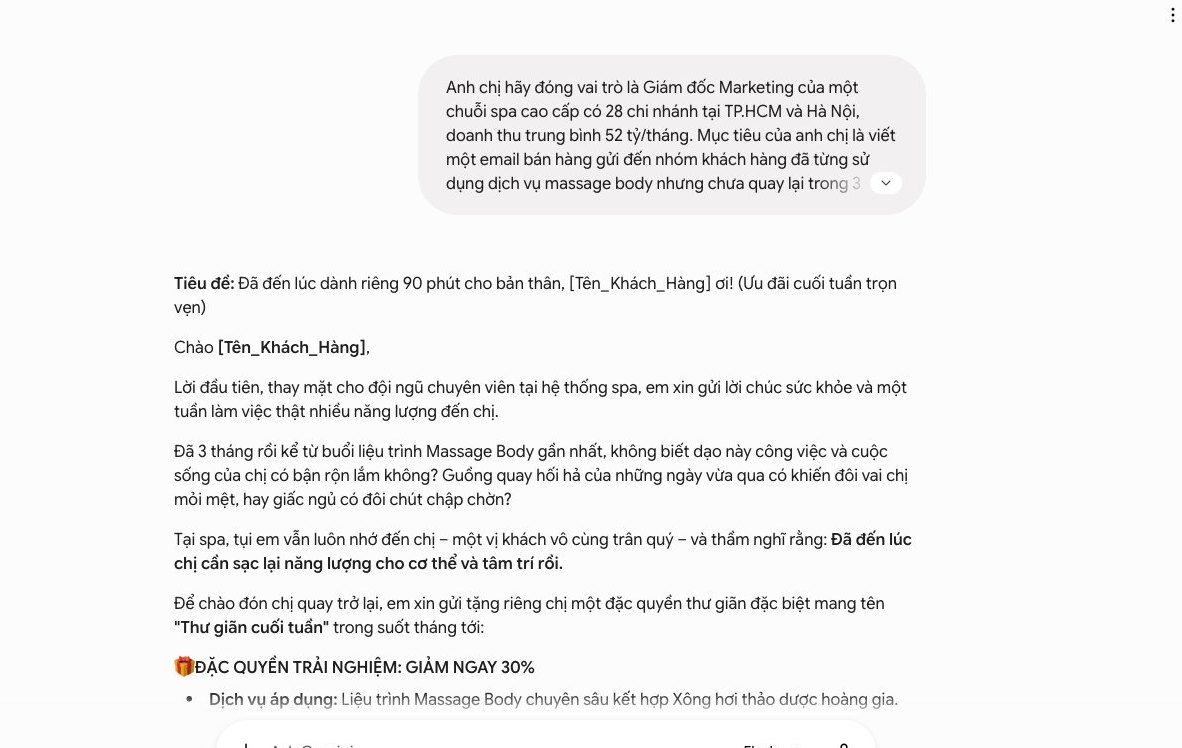

Putting Gemini to work helps you turn generic interactions into individual experiences. Together we will look at how to use this tool. You will create personalized sales and customer-care messages. This strengthens your bond with customers and raises your response rate.

To personalize effectively, first understand your customers. You need to pull data together from your CRM system, purchase history, or earlier interactions. This data is very valuable. Then feed it into Gemini.
Use a prompt to have Gemini analyze it. That way we can identify each group’s interests, buying behavior and pain points. This is the first step.
For example, you can enter: “Analyze the following customer profile: [paste customer data]. Highlight interests, products of interest and the main interaction touchpoints.”

Once you have detailed profiles, the next step is creating messages. Split your customers into smaller groups. Each group has its own characteristics. Gemini helps you create many message variations.
Each variation fits a specific segment. That covers tone, keywords and even separate offers. This variety matters a lot. It helps your message reach the right person.
You can use a prompt like: “Based on the analysis of customer group [group name], write 3 sales message variations. Emphasize the benefits of [benefit A] and [benefit B]. Friendly tone, encourage action.”

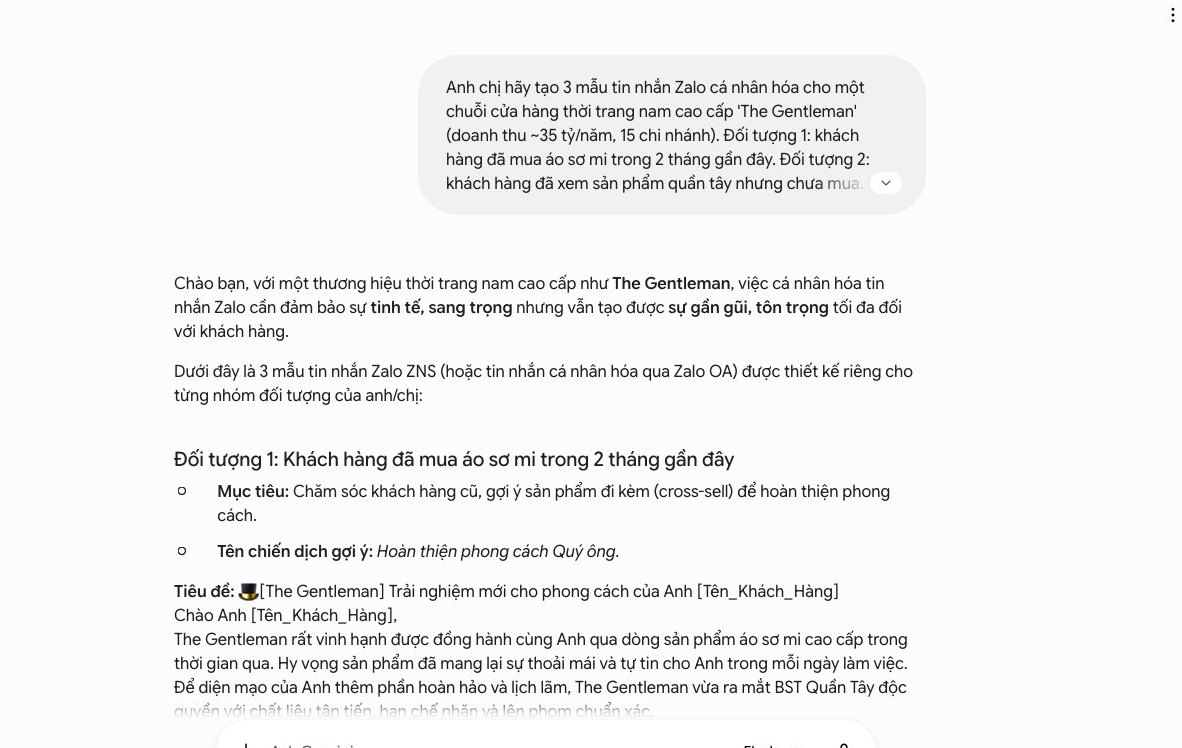
The subject line and opening line decide your open and reply rates. This is the first touchpoint with customers. Gemini is a great helper here. You can use it to write striking subject lines and Zalo/Messenger messages.
Provide your specific goal and audience. Gemini will offer creative suggestions that spark curiosity and push customers to act.
Try this prompt: “Write 5 compelling email subject lines for the [program name] promotion. The audience is customers who bought [product X]. Subject lines must be short and create a sense of urgency.”
Or: “Draft 3 short Zalo messages introducing [new product Y]. The target customers viewed this product but did not buy. Invite them back to their cart.”

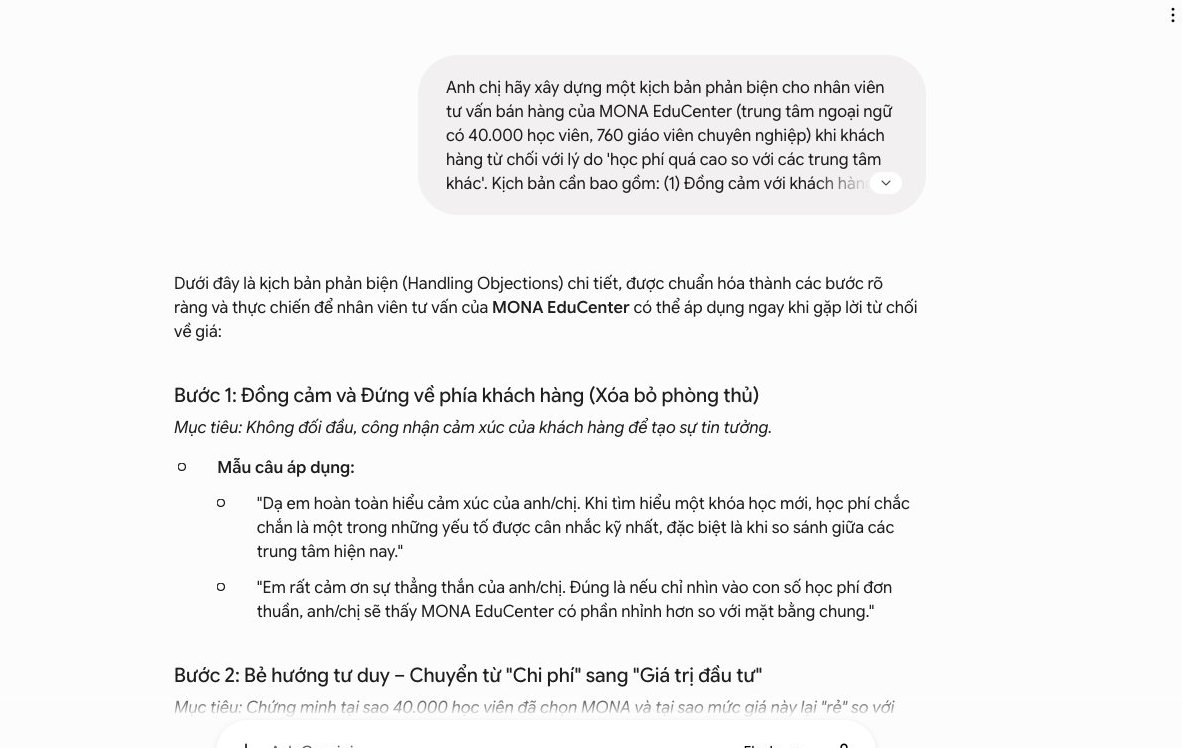
In sales, rejection is unavoidable. We need tools that make staff more confident. Gemini is a great helper that lets your team respond fast. You can turn every rejection into an opportunity. This is a core skill. Let's look at how to do it.
For Gemini to work well, we need to give it accurate input. List clearly the rejections your team often hears. Price is always an issue. Customers often say “we don’t need it right now”. Or they compare, “a competitor has a better product”. Each reason needs its own approach. We need to understand each situation, which helps Gemini grasp the context. You can collect this list from sales meetings, or from your team leads’ notes. This is the first step.
Once you have the list, we guide Gemini. Create detailed prompts that ask Gemini to analyze each rejection and then give persuasive arguments. For example, for the “price too high” rejection, ask Gemini to highlight the core value. We need to make the better benefits clear. Our solution helps you write effective prompts. Gemini learns the context and produces smart responses. Always stress the value delivered. Don’t focus only on price. This is an important tip.
“You are the head of sales at a software company. A customer complains the price is too high. Give 3 persuasive arguments about return on investment and the long-term value of CRM custom software. Emphasize operating cost savings and revenue growth.”
“You are selling warehouse management software. The customer says ‘not needed yet’. Suggest 3 urgent reasons for them to consider it now. Focus on the risk of delay and the competitive opportunity being lost.”
“You are a sales rep for online English learning software. The customer praises a competitor’s nicer interface. Point out 3 exclusive strengths of our software (for example: proprietary AI technology, professional teaching staff, personalized learning path) and how they are better.”
Every script Gemini creates is valuable. Compile them into one document library. It becomes a handbook for your sales team. When a rejection comes up, staff can look it up fast and get an accurate response right away. This script library shortens reaction time and builds staff confidence. We find it a valuable asset. It standardizes the sales process and keeps every response professional. You can update the library regularly and keep adding new situations. The script library is an important part of the process. This is how we optimize results. It helps the team react quickly. MONA’s sales management solution always prioritizes this.
The customer care team is always the key bridge between a business and its customers. But constantly answering repeated questions, or handling complex situations, can slow down response times. This is a burden, and the pressure on support staff keeps growing. Gemini offers a new approach. You can raise productivity significantly.
We can use Gemini to build a library of standard replies. This lightens the daily workload and lets staff focus on cases that need deeper attention. Customers are happier too. We have applied this approach for many businesses, and the results are very positive.
Frequently asked questions (FAQs) take up a large share of the support team’s time. That is a big problem. Gemini helps you automate this part. Start by collecting data. Gather support emails, messages and calls over a set period.
Then write a prompt for Gemini asking it to analyze this data. Gemini will extract the 10 most common questions. Next, ask Gemini to draft a standard answer for each one. Answers should be short and clear. We always advise you to review the drafts and edit them to match your brand voice. The last step is integrating the library into your existing support system. Customer management software (CRM) will be very useful. Staff can access it quickly, which saves a lot of time.
Technical support situations often require deep knowledge, and not every staff member has it. Gemini can act as an expert that supports your support team. Give Gemini your product documents, plus your troubleshooting procedures. Share solutions from past cases.
When a technical support request comes in, staff can use Gemini. Create a prompt for it. For example: “Act as a level 2 technician for [product name]. For the customer’s issue ‘[problem description]’, give step-by-step troubleshooting instructions. Assume the customer has basic knowledge.” Gemini will give a detailed response. This helps staff react fast and improves support quality. MONA’s business management software can integrate this library.
Communicating with international customers often hits language barriers. Gemini is a powerful translation tool. It doesn’t just translate words, it understands context. That helps keep your brand voice. You can use Gemini to translate emails and customer messages. Replies are translated instantly too.
Create a specific prompt for Gemini. For example: “Translate this message from Vietnamese into English. Keep a friendly, apologetic tone: ‘[Vietnamese message]’. Then draft a reply in English. Acknowledge their issue and propose a solution.” Gemini helps businesses reach multilingual customers. We can expand into new markets easily, and international customer satisfaction rises too. MONA Media also offers website design multilingual services.
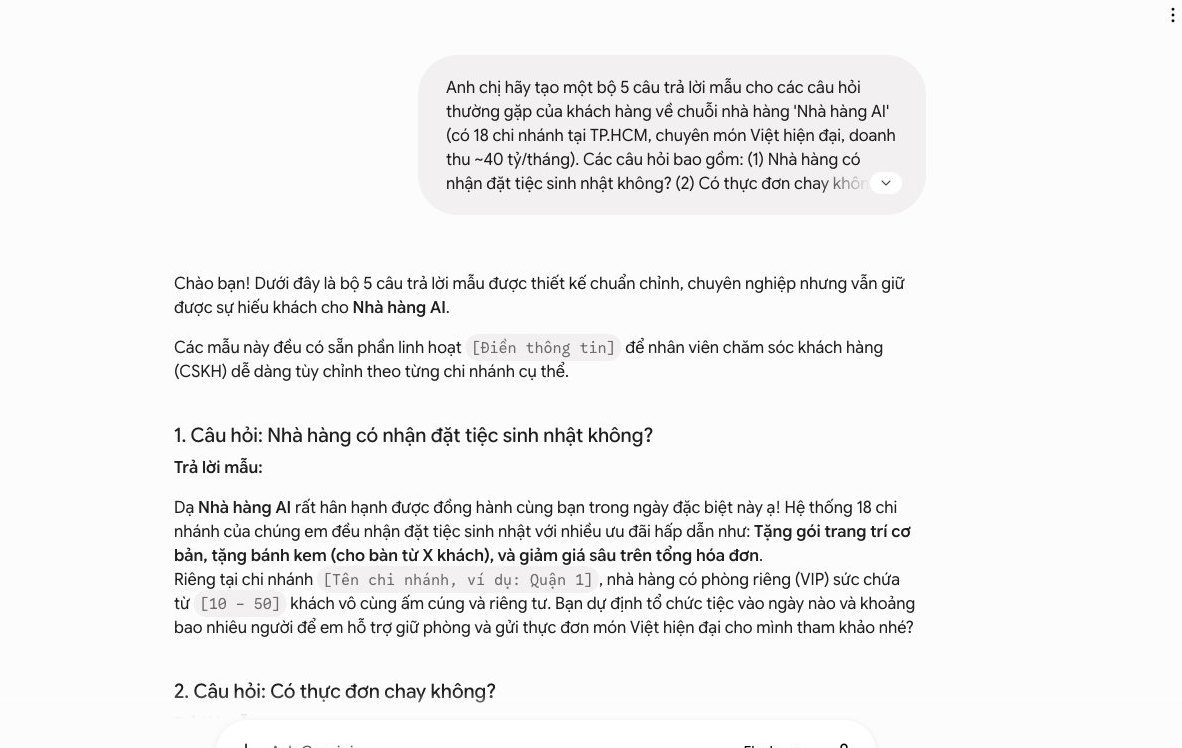
Gemini brings real power to your work. You can see it clearly in sales and marketing tasks. But this powerful tool still has limits when it stands alone.
To truly optimize, we need a “home turf” of our own. A seamless software system integrates data and automates end to end. This is a sustainable foundation for your business in the long run.
Using Gemini on its own only solves one piece of the work at a time. It doesn’t connect to your other systems. Sales and marketing data end up scattered.
This causes inconsistency. Staff have to enter data by hand again and again, and productivity suffers. It is also hard for you to follow the whole customer cycle.
Data security is a big issue too. When sensitive information sits on many platforms, the risk goes up. You lose control over the flow of internal data. This is a critical weakness in operations.

We at MONA have applied AI and custom modules to our internal processes. We don’t just use disconnected tools. MONA builds a seamless system with synchronized data.
For example, in project management, AI analyzes requirements automatically and proposes the steps to take. This helps our website development and SEO teams save time.
AI also helps screen candidate profiles. Manual time in the hiring process drops significantly, and we focus more on assessing expertise.
MONA also uses AI to support customers. Email replies are classified automatically, so support staff can handle them faster. The customer service experience improves noticeably. We always train our team to get the most out of AI.
We started in 2016. Over 14,000 projects have trusted MONA. Our customer retention rate is 85%. This is clear proof of how effective automation software is.
You can learn more about our solutions at Mona. Software or SEO service team at MONA.
Custom software designed by MONA is the optimal solution. It tightly integrates every AI tool. Customer, sales and marketing data are centralized in one place. This is the core of sustainable growth.
We can tailor the software to your exact needs. There is no “one size fits all” solution. Custom software ensures absolute security, and you stay fully in control of your data. This helps your business avoid unnecessary risk.
MONA provides independent but tightly linked modules. This system scales flexibly. As your business grows, the software grows with you. It is a long-term investment with a high return.
MONA’s automation software helps save operating costs. It reduces the manual headcount spent on repetitive tasks while boosting the capacity of your existing team. You can learn more about software solutions at MONA Media.
You can use Gemini yourself to create email variations, Zalo messages and rejection-handling scripts, as long as your staff still pick the right wording. When you need to pull profiles from your CRM, check policies, answer FAQs and save the next care step, we will build you an integrated sales assistant. Call 1900 636 648 to try one workflow.
Personalization from real data.

CEO & Founder · The MONA
Founder of The MONA, who built a services company of 60+ staff with 14,000+ projects delivered. Khánh Hùng shares how he thinks about building systems that run themselves, automating a business, and the real lessons from delivering projects at MONA.
 422




Professional website
design services
Own a website with a beautiful, 100% exclusive design and a lifetime warranty, with the ability
to expand features flexibly as your business grows, starting today!






 MONA will never sell your information or send you spam


 MONA will never sell your information or send you spam
