
 MONA OS 2.0
 Partner with MONA


 Tự động hoá doanh nghiệp
 Cẩm nang SEO
 Digital Marketing
 Kinh nghiệm thiết kế website
 Hạ Tầng Server
 Giáo dục


 VI
 EN












Message us on
Zalo Official


 ProductsNew

 ProductsProducts
 Mới ra mắtKHA AI 2027App tự edit video, tự đăng mọi mạng xã hội, 2 phút mỗi ngày










 Website designLooks good and wins customers over.
SEO servicesBrings in customers searching for exactly what you sell.
 Tư vấn digital marketingKéo khách từ nhiều kênh, đo bằng số thật.
Corporate video productionVideos introducing your company, factory and team.
 NewAI video productionCompany story films made with AI.
 Custom software developmentCRM, ERP and HRM built for your business.
 Viết AI Agent theo yêu cầuĐặt riêng một trợ lý AI cho đúng việc của mình.
 Tư vấn chuyển đổi AIĐưa AI vào vận hành của cả công ty.
NewMONA LMSManagement for centers and schools.
MONA SkillHubInternal training for company staff.
 NHTQ systemEnd-to-end China–Vietnam shipping operations.
MONA JMSManagement for gold, diamond and pawn shops.
 MONA E-LearningA website with every feature you need to sell courses.
 How to sell online courses (course)More than 30 free lessons on selling courses on autopilot.
 MONA Cloudmonacloud.vnServers to get your apps and websites running.
 MONA Basemonabase.vnPostgres database, sign-in and file storage.
 MONA Mailmonamail.vnSend OTP, order and invoice emails from your software.
 MONA Paymonapay.vnAccept bank transfers via VietQR and notify your software when the money arrives.
 MONA eInvoiceComing soonIssue e-invoices that meet tax standards.
Gấu CườiTrả lời khách 24/7 trên web, Fanpage, Zalo và thu lead cho sale.
 Gấu TeleSalesGọi điện tư vấn, chăm khách như tổng đài viên thật.
Dê CườiTư vấn và chốt đơn cho shop ngay trong khung chat.
Gấu WebmasterNhắn nhóm Zalo là website được sửa xong.
 Gấu Pháp ChếSoạn hợp đồng, rà điều khoản trong vài phút.
 Gấu Báo GiáLên báo giá đúng mẫu và gửi khách ngay.
 AI chăm sóc khách hàngTheo dõi và giữ chân khách hàng cũ.
 Gấu Tuyển DụngLọc hồ sơ, hẹn lịch, phỏng vấn ứng viên.
 Mới ra mắt
KHA AI 2027
Xây kênh chuyên gia 2 phút mỗi ngày
Quay bằng điện thoại, AI tự edit video, tự đăng lên 16 nền tảng và tự trả lời bình luận, tin nhắn.
892.132lượt xem trên kênh CEO MONA sau 37 ngày
 Anh Khánh HùngCEO MONA đang dùng mỗi ngày
Xem app làm được gì
 AI
Gấu Cười MONA ĐANG TỰ XÀITrả lời khách 24/7 trên website, Zalo OA, Messenger và thu lead về cho sale.
Dê CườiChốt đơn bán lẻ và sàn: Shopee, TikTok Shop, web. Chăm cả khách sỉ, đại lý.
Gấu WebmasterCập nhật nội dung, tối ưu SEO website mỗi ngày.
Gấu TeleSalesGọi điện tư vấn, chăm khách như tổng đài viên thật.
Gấu Tuyển DụngLọc hồ sơ, hẹn lịch, phỏng vấn ứng viên tự động.
AI chăm sóc khách hàngGiữ khách cũ, cứu lead đã rớt cho phòng kinh doanh.
Gấu Pháp ChếSoạn hợp đồng, rà điều khoản trong vài phút.
Gấu Báo GiáLên báo giá đúng mẫu, gửi khách ngay khi có yêu cầu.
 Chuyển đổi AI toàn phầnGiải pháp tổng cho doanh nghiệp, 3 lớp triển khai.
 Viết AI Agent theo yêu cầuĐặt riêng một con AI gánh đúng nghiệp vụ của bạn.
 Custom softwareCRM, ERP and HRM with built-in AI automation.
 SEO & AEO thời đại AIĐược Google lẫn AI trích dẫn, không chỉ xếp hạng.
 Kiến thức AI cho doanh nghiệpBài phân tích, hướng dẫn ứng dụng AI vào vận hành.
 Free AI courses
 AI tools at work
App mới · KHA AI 2027
Xây kênh 2 phút mỗi ngày
AI tự edit video, tự đăng mọi mạng xã hội
Free consultation, 8am–10pm every day

15 June, 2026

Using ChatGPT effectively in Vietnamese is a big advantage for businesses and marketing teams in Vietnam. We've noticed many of you are still unsure how to get the most out of this tool, especially in your native language. In practice, ChatGPT can help a lot, from brainstorming content ideas and writing SEO-friendly articles to drafting customer care emails. However, to get quality output, we need precise prompting techniques. MONA shares 3 core tips to help you optimize 80% of your work performance with ChatGPT in Vietnamese, turning it into a capable assistant right away.
Many business owners still think automation is something complicated. That it needs big investment and a dedicated technical team. In reality, that's not quite true. We can start right now with tools that are already available.
And ChatGPT in Vietnamese is the first doorway. Very easy to get into.
It neatly handles repetitive, time-consuming tasks that staff used to do by hand. It is an important stepping stone for your team to get familiar with automation thinking. From there, you prepare for larger, more connected systems that MONA will help you build later.
At MONA, we encourage every team member, from marketing to sales, to use ChatGPT as a virtual assistant. Every day. This frees up time for work that needs more strategic thinking and creativity.
A few concrete examples:
It doesn't replace people. It only takes on the most basic tasks. That lets our team focus on higher-level work quality.
Using ChatGPT is more than typing a question and copying the answer. That's especially true for Vietnamese. You need to tune it specifically so the results are actually useful for your business.
Vietnamese is rich in context and nuance. The same idea can be expressed in dozens of ways. Without detailed enough prompts, ChatGPT returns generic, lifeless content that doesn't match your brand voice.
What's more, AI doesn't understand your business culture and your customers . It doesn't know what customers in Saigon like to hear or what customers in Hanoi care about. You have to supply all that context. This is a skill MONA has spent a lot of time researching and training our own team and our clients in during website design and carrying out full-scope SEO services.
Many of you find that ChatGPT's answers are too generic. Empty theory. Not usable in practice. The way we give commands to the tool is the real issue.
One of the most effective techniques the MONA team uses is role-playing: assigning a role to the AI. Treat it like a new hire. It needs the right role, the right task, and clear context.
This is the first and most important step. Instead of asking a bare question, start your prompt by giving ChatGPT a job title and a role with specific experience. This gives the AI a lens for viewing and handling the information.
The formula is very simple:
With just these three lines, the quality of the answer changes completely.
Once the AI has "taken on the role," tell it clearly what you want it to do and what the final product should look like. Don't make it guess. Clarity saves editing time.
Be specific:
The more detailed the format, the closer the result is to what you wanted.
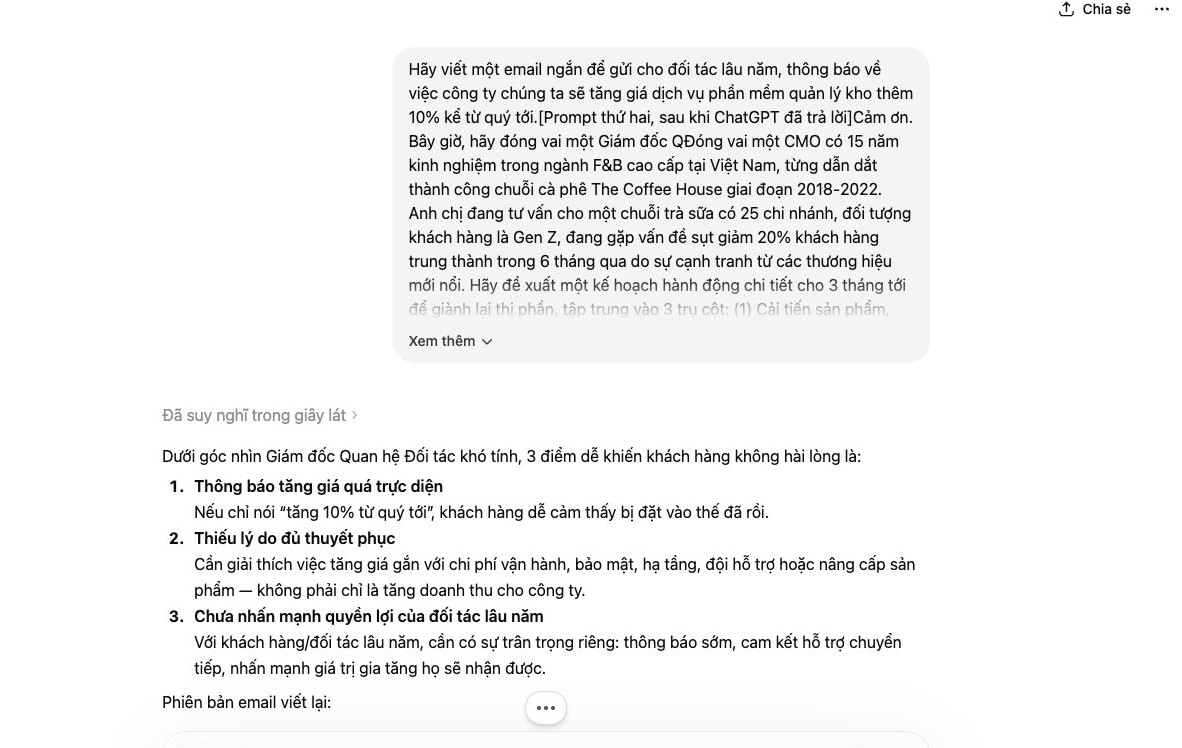
Let's look at the difference between an ordinary prompt and one that uses role assignment.
The old, less effective way:
Write a cold-call sales script for website design services.
With this prompt, ChatGPT will produce a very textbook script that could be for anyone and usually doesn't work well.
The new, professional way:
You are a sales manager with 12 years of experience selling technology solutions to small and medium businesses in Vietnam. Your target customers are owners of spa and beauty clinic chains with 5 or more branches.


Write a cold-calling script to introduce website design service premium website from MONA. The script should stress that a new website will help them increase online booking rates and build a consistent chain brand.


Output format:


- An opening greeting.


- 2 questions that bring out the problem.


- A solution introduction (3 sentences at most).


- A call to action to lock in a deeper consultation meeting.


- One way to handle the objection "I'm busy."
The result is a sharp, well-fitted, highly persuasive script. It's like a real expert is advising you. This is how we at MONA train our staff to work better every day.
Many of you who use ChatGPT find the content it produces very generic. It lacks its own "flavor," the soul of the brand that we've worked so hard to build. The result is bland posts with no standout points.
The problem isn't the AI. It's our prompts.
At MONA, we use a 4-layer formula to "train" the AI inside every prompt. It keeps every output consistent and in line with the positioning that the marketing team has laid out. You can apply this formula right away to improve content quality for your campaigns SEO and ads.
Think of this layer as a project brief for a new employee. We have to give the AI all the information it needs to understand the task correctly. Without context, the AI will make up information. That's very dangerous.
The information you need includes:
This is the core of the prompt. You need to tell the AI exactly what to do, with no ambiguity. Don't give vague orders. Be detailed.
Instead of saying "Write a blog post," ask:
"Write a 1200-word blog post with 3 main parts. Part 1 covers the 3 biggest pain points of coffee shop owners. Part 2 introduces 3 features of software X that solve those pain points. Part 3 is a call to action that gets readers to sign up for a trial."
This is the layer that decides whether the content feels "human" and carries your brand's mark. Many people skip this step. That's a mistake.
Describe the tone you want in detail:
The more detailed you are, the easier it is for the AI to imitate the brand voice you want.
This last layer works like a quality check (QC) before shipping. It makes sure the final product is complete and free of small errors. It's the last line of defense.
You can add requirements such as:
With this 4-layer formula, we believe you and your team will produce much better ChatGPT content. It saves editing time and keeps your brand consistent across every channel.
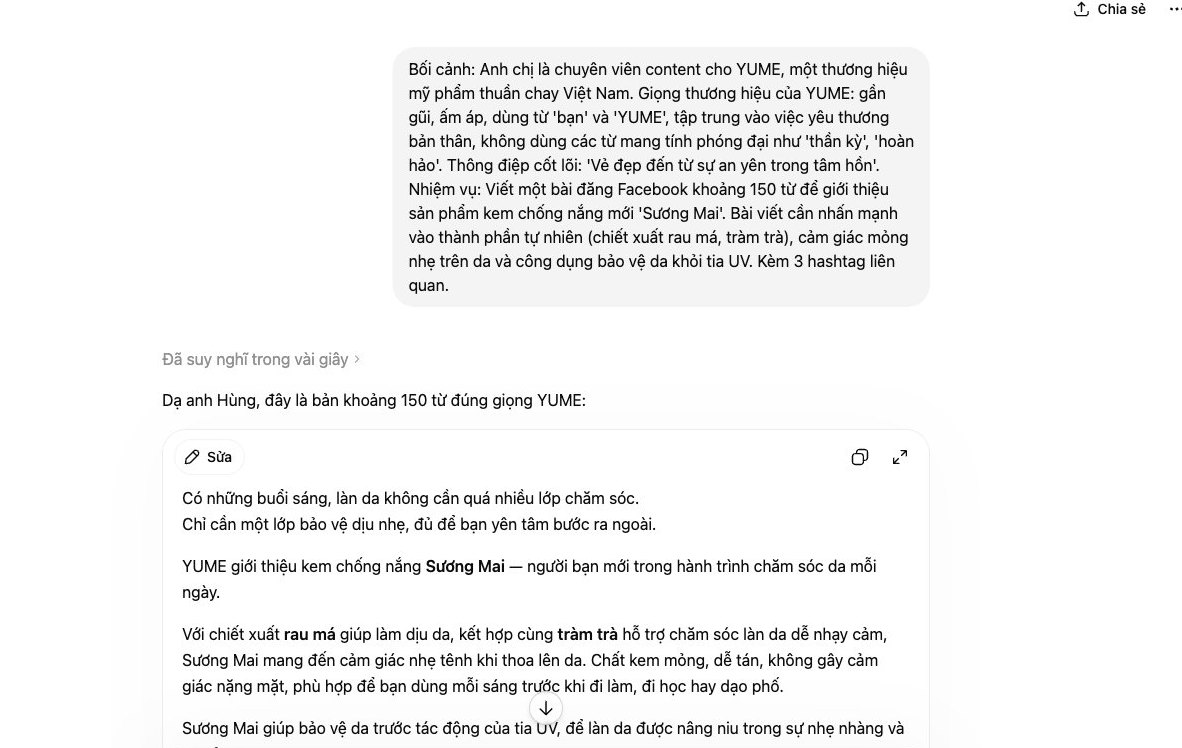
Assigning work to ChatGPT is like talking to a new employee every day. You have to repeat the context, requirements, and tone for every small task. It takes a lot of time. It wastes effort.
The Custom Instructions feature solves this for good. It works like a detailed orientation session for the AI. You set it up just once. Every answer after that follows your business's "rules of the game." The right person. The right job.
This is the most obvious use. At MONA Media, we use this feature so the AI writes in the right brand voice for social media posts and emails. You can set it up the same way.
In the box "What would you like ChatGPT to know about you…", fill in the background information:
In the box "How would you like ChatGPT to respond…", give formatting instructions:
The result is very different. The AI assistant gets straight to work. No need to repeat yourself.
Sales and customer care need consistency. Custom Instructions help standardize communication scripts. Faster. More accurate. More professional.
You can set the AI up to draft emails or reply messages to customers. For example, the context setting can include your main product lines and frequently asked questions. The response setting can tell the AI to always stay friendly and empathetic and to end with a clear call to action. This cuts new-hire training time significantly.
This point is extremely important. NEVER put sensitive information into Custom Instructions. OpenAI may use this data to train its models.
Information to avoid includes:
ChatGPT is a powerful personal assistant. But it is not a secure internal system. To automate processes that involve sensitive data, a business needs custom-built business management software. A place where all information stays under your control.
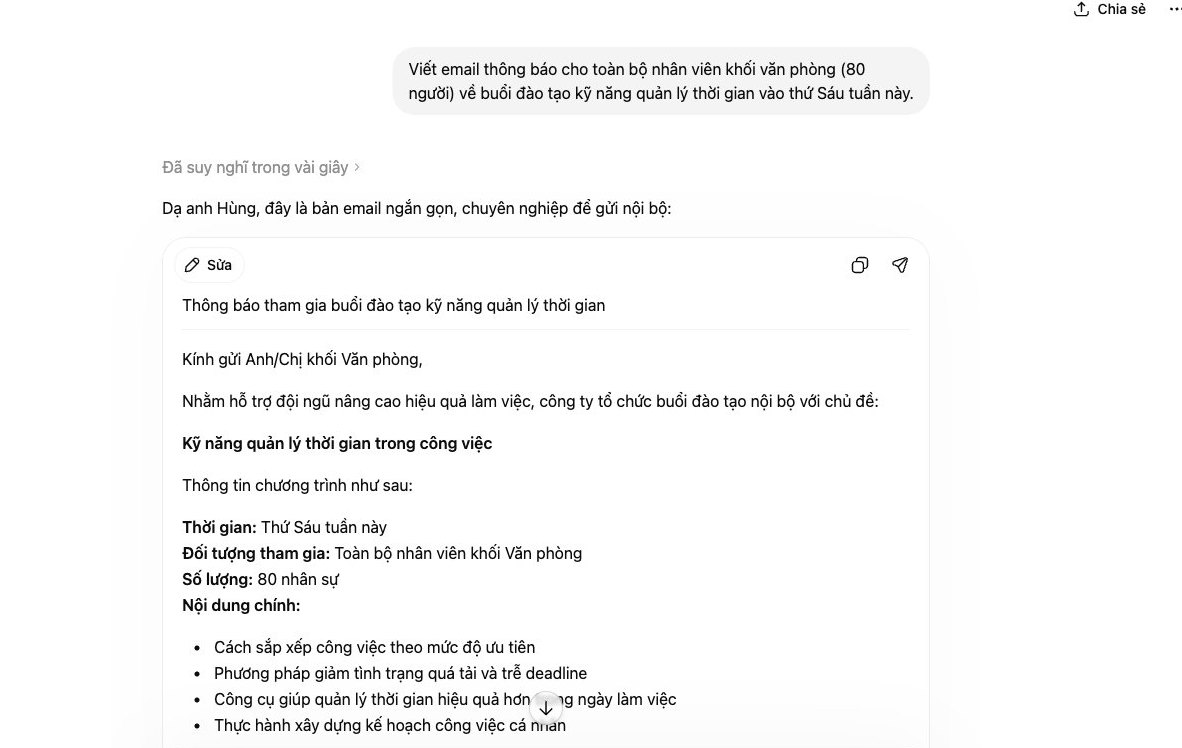
Many marketing teams struggle to publish 30 social posts a month without repeating ideas. The pressure to produce volume often lowers quality. But with a standard process, you can use ChatGPT to produce content in bulk and still stay creative. We at MONA also use this 4-step process on internal projects.
It really works.
Everything starts with a solid idea framework. Instead of thinking up posts one by one, use AI to outline the big topics, also called pillar content. Tell ChatGPT to act as an expert in your industry.
Here's a prompt we often use:
The AI will come back with topic groups like "Flavors of Home," "Weekend Gatherings," "Office Lunch," "New Dishes to Try," and "Chef's Secrets." From here, we have a foundation to build on.
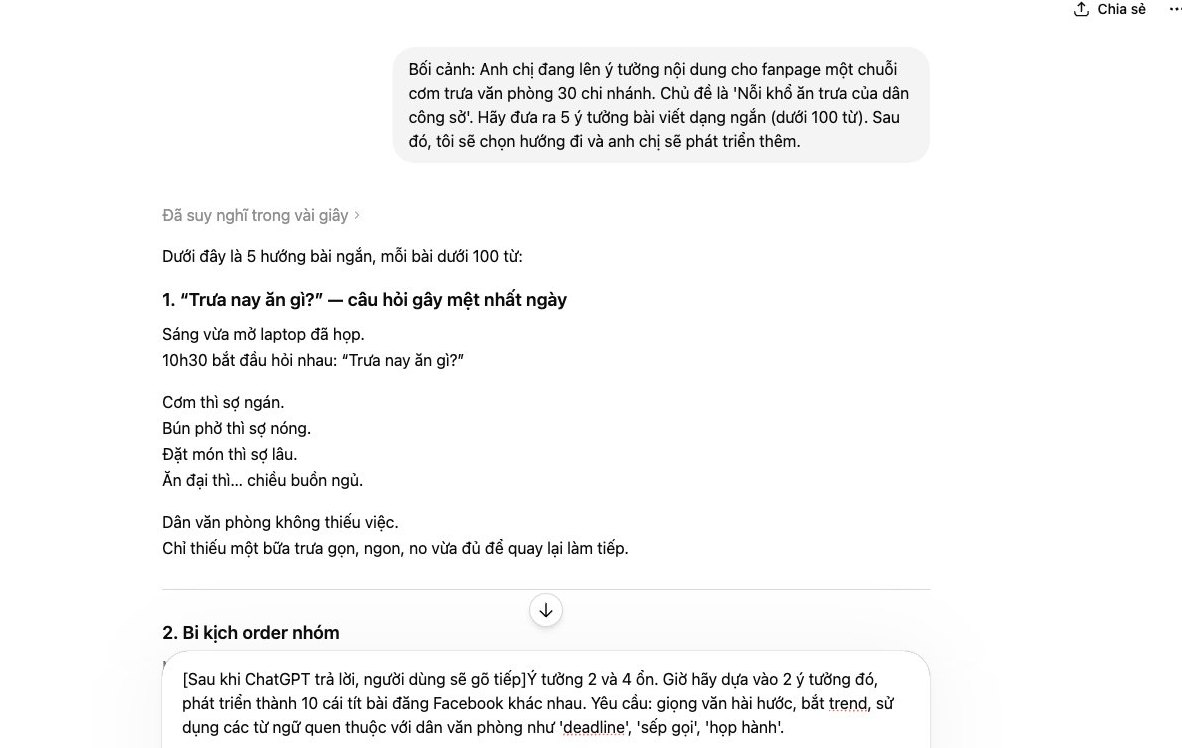
This is where you multiply the idea. For each big topic, tell the AI to develop several posts from different angles. Don't just ask it for one generic post. Be very specific.
Try this prompt:
This way, you get 6 completely different pieces of content from one original idea. Repeat the process for 5 topics and you have 30 posts. Very fast.
Many people skip this important step. We can have the AI evaluate and fix its own work. This keeps quality even and keeps the brand voice. Feed the posts you just created back in and give the command.
A sample review prompt:
ChatGPT will point out the flaws and suggest better versions. This process is like having an editing assistant who never stops working.
The work doesn't end once you have the content. We need to prepare it for different channels. AI can help you do this in seconds. It saves the time you'd spend formatting by hand.
You can ask for more:
This closed-loop process helps your team go from idea to finished post in a systematic way. No more running out of ideas or swings in post quality.
After trying the tips above, we can all see how powerful ChatGPT is. It helps marketing, SEO, and content staff get their work done faster. Very impressive. But when you run a whole business, AI tools standalone use starts to show fatal weaknesses.
It's like handing every soldier a fine dagger. Very sharp. But to win, we need an organized army with commanders and smooth coordination. A dagger can't replace that.
When each employee uses their own ChatGPT Pro account, it creates many problems that CEOs need to see clearly. These problems quietly drain money and data.
We at MONA saw this limit early. We don't hand out ChatGPT accounts and leave staff to fend for themselves. Instead, we integrate the APIs of large language models, such as those from OpenAI and Anthropic, directly into our internal software.
For example, in MONA's project management system, full-scope SEO AI is built in to handle specific jobs. It automatically suggests headline groups based on keyword analysis. It outlines SEO-ready article structures. Our people only need to act as editors and raise the quality. Everything happens in one system, following a shared process with tight security.
Standalone AI tools are a good starting point for individuals. But for the whole business to grow sustainably, you need a system. A central brain. A machine built for your own processes.
Custom-built business management software with AI built in solves all of the problems above. Centralized data. Consistent quality. Security within reach. Processes automated end to end, from marketing to customer care.
This is the path MONA has taken, and it's the solution we've built for over 14.000+ projects in over 10 years. When you feel that standalone AI tools are no longer enough to move your business forward, that's the time to sit down and talk about a bigger system. A system built just for your growth.

CEO & Founder · The MONA
Founder of The MONA, who built a services company of 60+ staff with 14,000+ projects delivered. Khánh Hùng shares how he thinks about building systems that run themselves, automating a business, and the real lessons from delivering projects at MONA.
 306




Professional website
design services
Own a website with a beautiful, 100% exclusive design and a lifetime warranty, with the ability
to expand features flexibly as your business grows, starting today!






 MONA will never sell your information or send you spam


 MONA will never sell your information or send you spam
